CodeSandbox is an online code editor, and this guide uses the web-platform meaning: an HTML page you built in it.
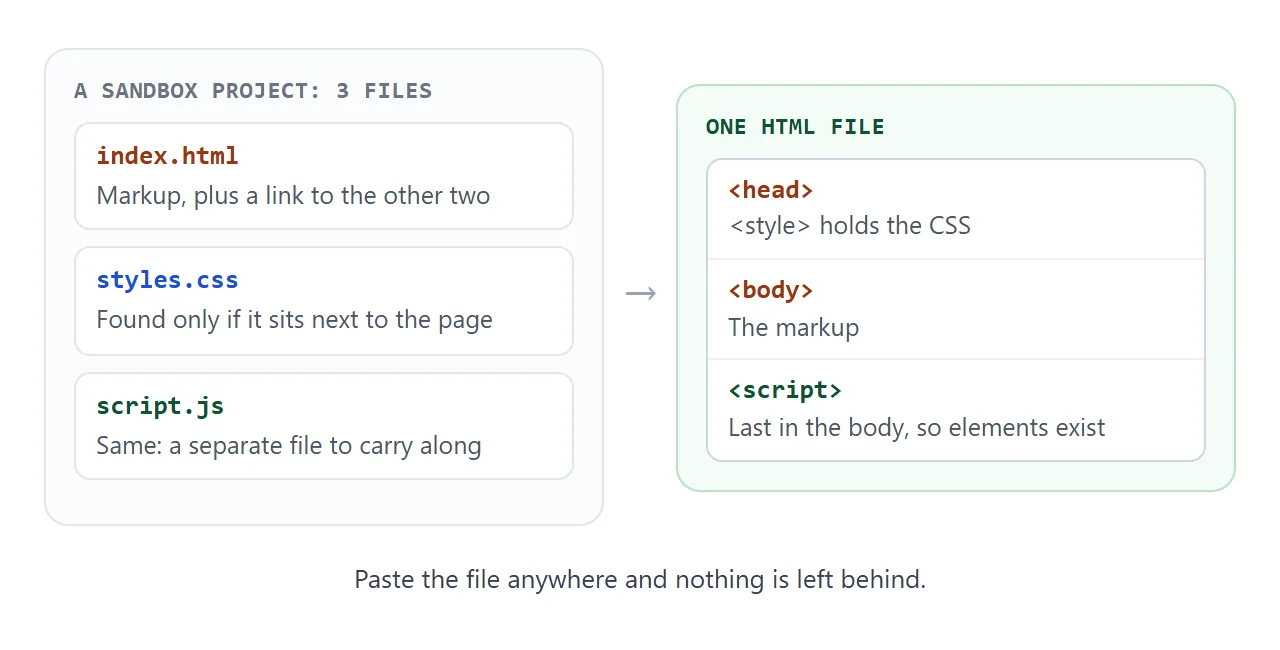
A sandbox keeps that page in separate files. To get one working file, put the CSS in a <style> tag, put the JavaScript in a <script> at the end of the body, and load libraries from a CDN by URL.
Try the smallest version first. Type a name and press the button.
<!doctype html>
<html lang="en">
<head>
<meta charset="utf-8">
<meta name="viewport" content="width=device-width, initial-scale=1">
<title>One file, three jobs</title>
<style>
  /* 1. CSS lives in the head, not in styles.css */
  body {
    margin: 0; padding: 24px; min-height: 100vh; box-sizing: border-box;
    font-family: system-ui, sans-serif; background: #f4f5f7; color: #1d2330;
  }
  .card {
    max-width: 340px; padding: 18px 20px; border-radius: 12px;
    background: #fff; box-shadow: 0 6px 20px rgba(0, 0, 0, .1);
  }
  input { width: 100%; box-sizing: border-box; padding: 10px; font-size: 16px; border: 1px solid #c9ced8; border-radius: 8px; }
  button { margin-top: 10px; padding: 10px 14px; font-size: 16px; border: 0; border-radius: 8px; background: #2563eb; color: #fff; }
  #out { margin: 14px 0 0; font-size: 18px; min-height: 1.4em; }
</style>
</head>
<body>
<!-- 2. The markup is the page itself -->
<div class="card">
  <label for="name"><b>Your name</b></label>
  <input id="name" placeholder="Type here">
  <button id="go" type="button">Say hello</button>
  <p id="out" aria-live="polite"></p>
</div>

<!-- 3. The JavaScript sits at the end, so the elements above already exist -->
<script>
  const nameInput = document.getElementById('name');
  const out = document.getElementById('out');
  let clicks = 0;

  document.getElementById('go').addEventListener('click', () => {
    clicks++;
    out.textContent = 'Hello, ' + (nameInput.value.trim() || 'stranger') + '! (click ' + clicks + ')';
  });
</script>
</body>
</html>
Everything the page needs is inside it, so you can copy it into any editor, any chat or any document and it behaves the same.
What a CodeSandbox HTML project looks like
CodeSandbox offers a static template for plain HTML, CSS and JavaScript. The template's repository holds an index.html, a styles.css and a package.json, and its index.html pulls the stylesheet in with a link tag.
Sandpack, the CodeSandbox component for code editors on other websites, lists static among its templates too.
So a project is several files that find each other by name. That works inside the editor, because the files sit side by side. It stops working when you copy only one of them somewhere else.
The smallest single file
The example above is the whole recipe, in three parts:
- CSS in the head. A
<style>element holds the rules that used to live instyles.css. - Markup in the body. The visible page, written once.
- JavaScript last. A classic script runs as soon as the browser parses it, so a script at the end of the body can find every element above it.
Add <meta name="viewport" content="width=device-width, initial-scale=1"> to the head so the page is sized correctly on a phone. The viewport meta tag guide explains why.
Linked CSS is the first thing to break
A link tag with href="styles.css" is a relative address: the browser looks for a file of that name next to the page.
When you paste the page into a chat or a document, nothing is next to it, so the request fails and the page loses its styling.
<!doctype html>
<html lang="en">
<head>
<meta charset="utf-8">
<meta name="viewport" content="width=device-width, initial-scale=1">
<title>Linked file or inline style</title>
<style>
body { margin: 0; padding: 20px; font-family: system-ui, sans-serif; background: #f4f5f7; color: #1d2330; }
.row { display: flex; flex-wrap: wrap; gap: 8px; margin-bottom: 14px; }
button { padding: 10px 14px; font-size: 15px; border: 1px solid #c9ced8; border-radius: 8px; background: #fff; }
#target { padding: 18px; border-radius: 12px; background: #fff; border: 2px dashed #c9ced8; }
#log { margin-top: 14px; padding: 10px 12px; border-radius: 8px; background: #fff; font: 14px/1.5 ui-monospace, Consolas, monospace; min-height: 3em; }
.ok { color: #0f5132; } .bad { color: #9a3412; }
</style>
</head>
<body>
<div class="row">
<button id="linked" type="button">Add <link href="styles.css"></button>
<button id="inline" type="button">Add an inline <style></button>
</div>
<div id="target"><b>Styled box</b><br>It turns green with a solid border when its CSS arrives.</div>
<div id="log">Press a button.</div>
<script>
const log = document.getElementById('log');
const say = (text, cls) => { log.innerHTML = '<span class="' + cls + '">' + text + '</span>'; };
// A linked file only works if a file with that name sits next to the page
document.getElementById('linked').addEventListener('click', () => {
const link = document.createElement('link');
link.rel = 'stylesheet';
link.href = 'styles.css';
link.onload = () => say('styles.css loaded', 'ok');
link.onerror = () => say('styles.css was not found. Nothing was styled.', 'bad');
document.head.appendChild(link);
});
// Inline CSS travels inside the page, so it cannot go missing
document.getElementById('inline').addEventListener('click', () => {
const style = document.createElement('style');
style.textContent = '#target { background: #e8f6ee; border: 2px solid #1f9d55; }';
document.head.appendChild(style);
say('Inline style applied', 'ok');
});
</script>
</body>
</html>
A link tag reports the failure through its error event, as the demo does. Inline CSS cannot go missing because it is part of the page. Inline CSS covers the rest of that choice.
Imports and libraries
Project code often starts with import confetti from 'confetti'. In a browser, a bare name like confetti means nothing until you define it. An import map does that: a small JSON block that maps the name to a URL.
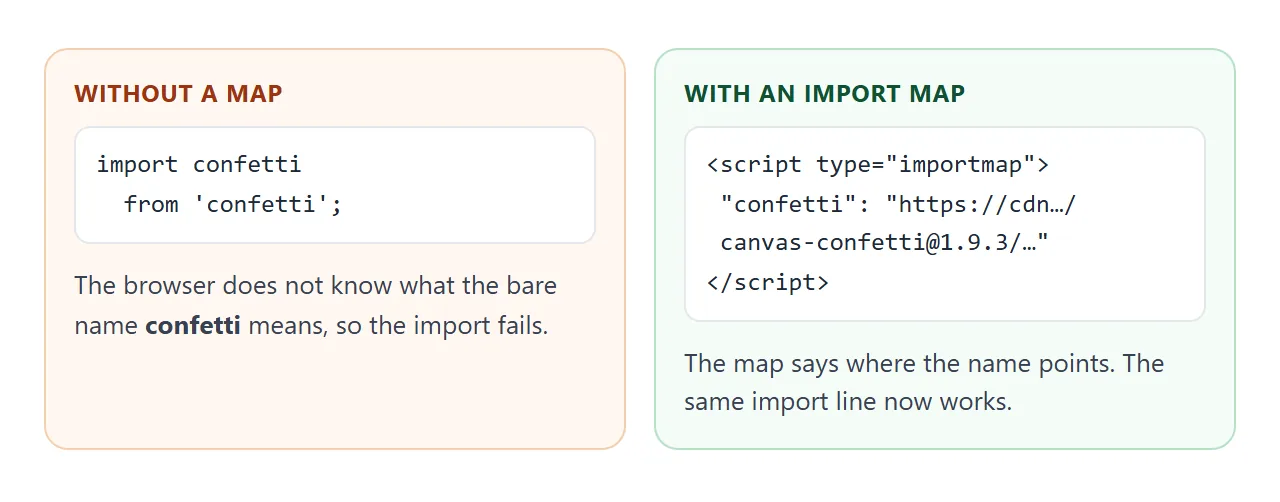
Three rules from MDN keep it working:
- The import map goes before any module script that uses it.
- The code that imports runs in a
<script type="module">. A regular script that usesimportthrows an error. - Module scripts are deferred automatically, so they run after the page is parsed.
<!doctype html>
<html lang="en">
<head>
<meta charset="utf-8">
<meta name="viewport" content="width=device-width, initial-scale=1">
<title>A package from a CDN, no install</title>
<style>
  body { margin: 0; padding: 24px; font-family: system-ui, sans-serif; background: #f4f5f7; color: #1d2330; }
  button { padding: 12px 18px; font-size: 17px; border: 0; border-radius: 10px; background: #2563eb; color: #fff; }
  button:disabled { background: #9aa3b2; }
  #status { margin-top: 14px; font-size: 15px; }
</style>

<!-- The import map must come before the module script that uses it -->
<script type="importmap">
{ "imports": { "confetti": "https://cdn.jsdelivr.net/npm/canvas-confetti@1.9.3/dist/confetti.module.mjs" } }
</script>
</head>
<body>
<button id="boom" type="button" disabled>Loading...</button>
<p id="status">Fetching the package from cdn.jsdelivr.net</p>

<script type="module">
  const button = document.getElementById('boom');
  const status = document.getElementById('status');
  try {
    // Same line you would write in a CodeSandbox project: import confetti from 'confetti'
    const { default: confetti } = await import('confetti');
    button.disabled = false;
    button.textContent = 'Fire confetti';
    status.textContent = 'Loaded. The version is pinned in the URL (1.9.3).';
    button.addEventListener('click', () => confetti({ particleCount: 90, spread: 70, origin: { y: 0.6 } }));
  } catch (err) {
    button.textContent = 'Could not load';
    status.textContent = 'The CDN did not answer: ' + err.message;
  }
</script>
</body>
</html>
Put the exact version in the URL, as the demo does with @1.9.3. jsDelivr, the CDN used here, warns that asking for the latest version is dangerous because major versions usually come with breaking changes.
One more caution from MDN: if a module script loads another local file from a file:// page, the browser raises CORS errors. An inline module script that imports from a CDN, like the demo, avoids that.
When the project needs a build step
Some sandboxes are not plain HTML at all. A React project, for example, is written in JSX, which React's documentation calls a syntax extension for JavaScript that is transformed into plain JavaScript objects.
Its documentation also recommends a build tool to package and run the source.
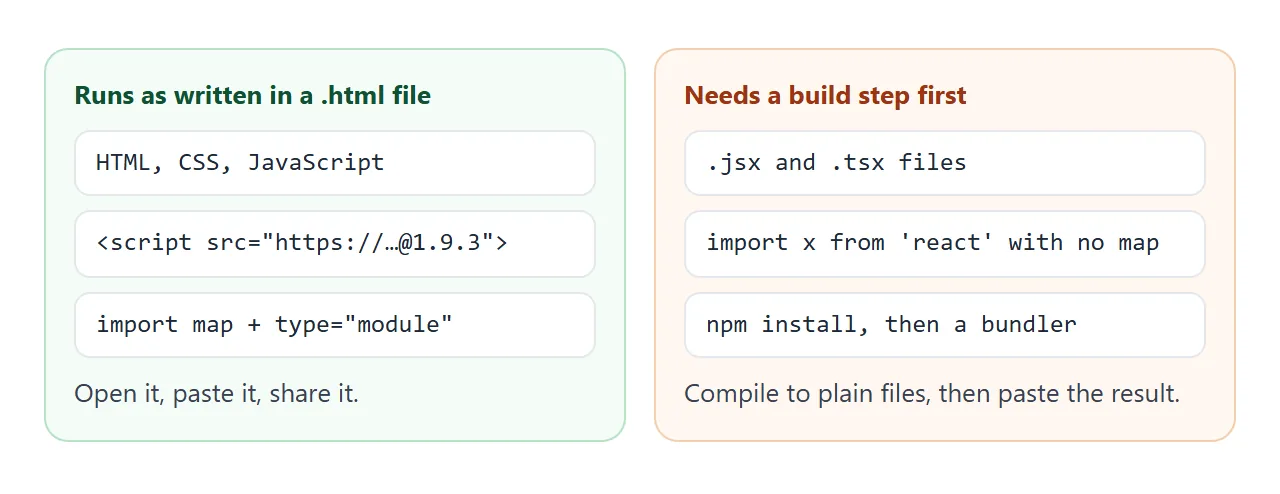
A plain .html file has no build tool, so this does not run in one:
// src/index.jsx in a build-based project
import { createRoot } from 'react-dom/client';
createRoot(document.getElementById('root')).render(<h1>Hello</h1>);
Either build the project and paste the output, as Host a React app as a page describes, or write the same page in plain JavaScript:
document.getElementById('root').textContent = 'Hello';
Embeds are iframes
CodeSandbox documents an embed as HTML with an iframe, which you copy from the Share menu in the editor. Embedding suits a blog that wants a live editor inside an article.
A NOS page blocks iframes, outside images and fetch calls to other sites. So do not embed a sandbox inside a page you plan to share there. Paste the page's own HTML instead, as described in Single HTML file apps.
When it does not work
| What you see | Cause | Fix |
|---|---|---|
| The page has no styling | Link to styles.css, file not with the page |
Move the CSS into a <style> tag |
| Script error: element is null | Script ran before the element existed | Put the script at the end of the body |
Error on an import line |
A regular script, or a bare name with no map | Use type="module" and an import map |
| Import map ignored | The map comes after the module script | Place the map first |
Module fails on a file:// page |
A local module file needs a server | Inline the code, or import from a CDN |
.jsx or .tsx code shows as text or errors |
It needs a build step | Build first, or rewrite in plain JavaScript |
| Library changed behaviour overnight | The URL has no version | Pin an exact version |
Share it as a link
A single file is easiest to judge when it runs. A screenshot cannot be clicked, and one file is easier to send than a folder of files.
To send the working version, paste the page into a NOS document and choose Create share link. HTML to link walks through it.
The page renders as written and its scripts run, so the people you send it to can press the buttons themselves, with no account.
Scripts and styles from cdnjs.cloudflare.com, cdn.jsdelivr.net, cdn.tailwindcss.com, code.jquery.com and unpkg.com load. If you change the code later, the same link shows the new version.