A digital business card is one short web page: your name, what you study or do, and a few links that open with a tap. You reach it from a link, so the card travels as a link or as a QR code on paper.
This page makes one for a career fair.
One question people ask is which free or cheap site builder makes a simple one-page personal site. A card does not need a builder. It needs one page and one address, and that is what the steps below produce.
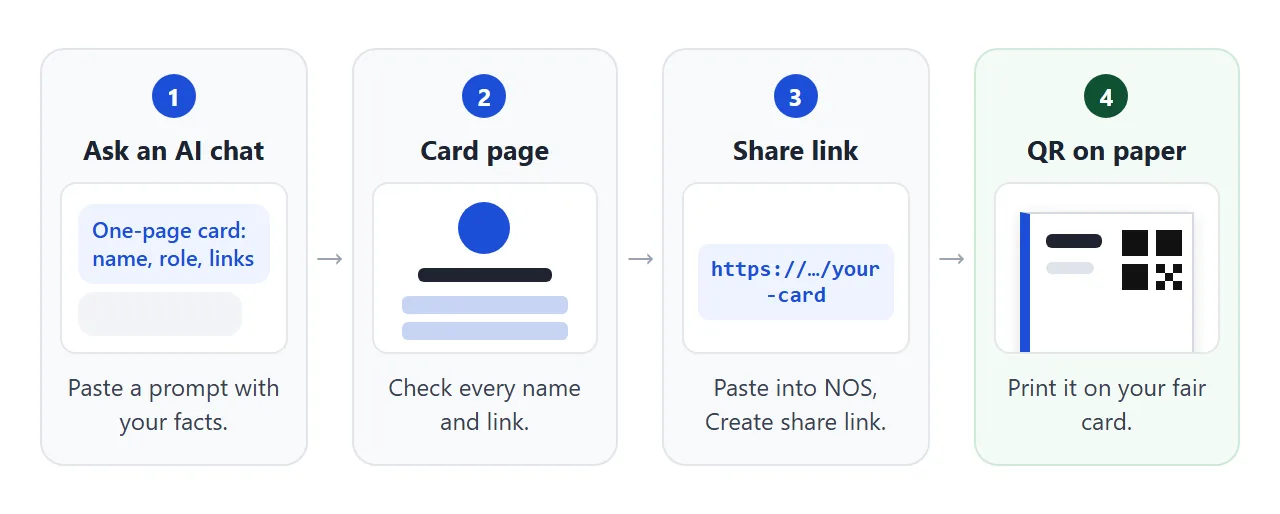
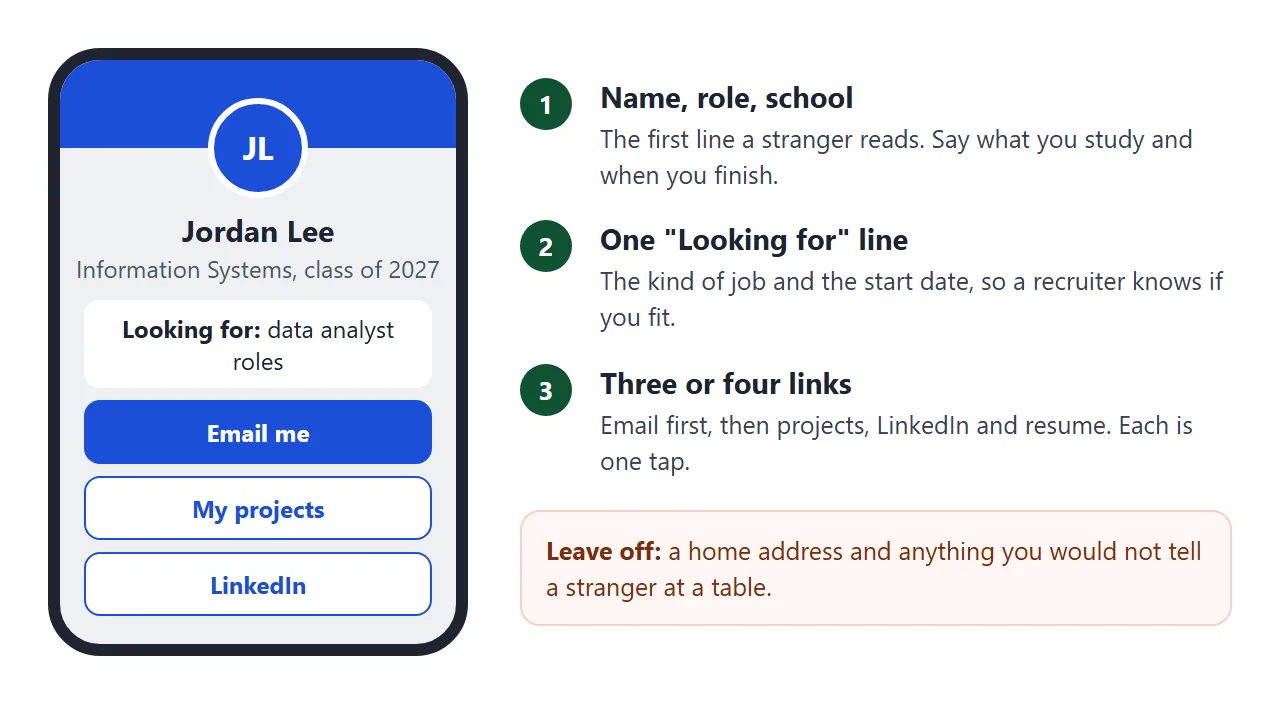
Start with the page itself. It is built for a phone, since that is where a recruiter will open it.
<!doctype html>
<html lang="en">
<head>
<meta charset="utf-8">
<meta name="viewport" content="width=device-width, initial-scale=1">
<title>Jordan Lee - Digital business card</title>
<style>
* { box-sizing: border-box; }
:root { --accent: #1d4ed8; }
body { margin: 0; font-family: system-ui, sans-serif; background: #eef0f4; color: #1f2430; line-height: 1.5; }
.wrap { max-width: 420px; margin: 0 auto; padding: 18px 16px 26px; }
.card { background: #fff; border-radius: 18px; overflow: hidden; box-shadow: 0 3px 14px rgba(0,0,0,.1); }
.band { height: 72px; background: var(--accent); }
.body { padding: 0 20px 20px; text-align: center; }
.avatar { width: 84px; height: 84px; margin: -42px auto 0; border-radius: 50%; border: 4px solid #fff; background: var(--accent); color: #fff; display: grid; place-items: center; font-size: 28px; font-weight: 700; }
h1 { margin: 10px 0 0; font-size: 24px; line-height: 1.2; }
.role { margin: 2px 0 0; font-size: 14px; color: #4b5563; }
.want { margin: 14px 0 0; padding: 9px 12px; border-radius: 10px; background: #f3f5f9; font-size: 14px; }
.links { display: grid; gap: 8px; margin-top: 14px; }
.links a { display: block; padding: 11px 14px; border-radius: 10px; border: 1px solid var(--accent); color: var(--accent); font-size: 15px; font-weight: 600; text-decoration: none; }
.links a.main { background: var(--accent); color: #fff; }
.chips { display: flex; flex-wrap: wrap; gap: 6px; justify-content: center; margin-top: 14px; }
.chips span { padding: 4px 10px; border-radius: 99px; background: #eef1f6; font-size: 13px; }
.pick { display: flex; gap: 8px; justify-content: center; align-items: center; margin-top: 14px; font-size: 12.5px; color: #6b7280; }
.pick button { width: 26px; height: 26px; border-radius: 50%; border: 2px solid #fff; box-shadow: 0 0 0 1px #c7cfdd; cursor: pointer; }
.pick button[aria-pressed="true"] { box-shadow: 0 0 0 2px #1f2430; }
</style>
</head>
<body>
<div class="wrap">
<div class="card">
<div class="band"></div>
<div class="body">
<div class="avatar">JL</div>
<h1>Jordan Lee</h1>
<p class="role">Information Systems student · Riverside University, class of 2027</p>
<p class="want"><b>Looking for:</b> entry-level data analyst roles starting June 2027</p>
<div class="links">
<a class="main" href="mailto:jordan.lee@example.com">Email me</a>
<a href="https://example.com/jordan-lee/portfolio" target="_blank" rel="noopener">My projects</a>
<a href="https://example.com/in/jordan-lee" target="_blank" rel="noopener">LinkedIn</a>
<a href="https://example.com/jordan-lee/resume" target="_blank" rel="noopener">One-page resume</a>
</div>
<div class="chips"><span>SQL</span><span>Excel</span><span>Python basics</span><span>Dashboards</span></div>
<div class="pick">Accent colour
<button type="button" data-c="#1d4ed8" style="background:#1d4ed8" aria-label="Blue" aria-pressed="true"></button>
<button type="button" data-c="#0f766e" style="background:#0f766e" aria-label="Teal" aria-pressed="false"></button>
<button type="button" data-c="#9333ea" style="background:#9333ea" aria-label="Purple" aria-pressed="false"></button>
<button type="button" data-c="#c2410c" style="background:#c2410c" aria-label="Orange" aria-pressed="false"></button>
</div>
</div>
</div>
</div>
<script>
// Swap one CSS variable to recolour the whole card
document.querySelectorAll('.pick button').forEach(function (b) {
b.addEventListener('click', function () {
document.documentElement.style.setProperty('--accent', b.dataset.c);
document.querySelectorAll('.pick button').forEach(function (o) { o.setAttribute('aria-pressed', o === b ? 'true' : 'false'); });
});
});
</script>
</body>
</html>
Every detail is made up. Replace it with your own. Keep the "Looking for" line, because it tells a stranger in one sentence whether you are worth a second look.
Make the card with AI
Any of ChatGPT, Claude or Gemini can write this page. Paste the prompt below, fill in the brackets with your own facts, and ask for a single file.
Write one self-contained HTML file: a digital business card for
a student, laid out for a phone first. Use only inline CSS and a
little JavaScript, with no outside images, fonts or scripts. Use my
initials in a coloured circle instead of a photo.

Show: my name, my degree and school with graduation year, and one
line starting "Looking for:". Under that, big tappable buttons:
Email me (a mailto link), My projects, LinkedIn, One-page resume.
Then four skill tags.

My facts: [name, degree, school, year, what job you want, email,
three web addresses, four skills]. Do not invent anything I did not
give you.
Read the result before you use it. Check every name, date and address, and click each button to see where it goes. Make sure nothing was added that you did not give it.
A mailto link opens the visitor's email app. MDN also lists tel: links, which on a cellular device autodial the number. Leave the phone number off the page unless you want strangers to use it.
Send it as a link
Paste the finished HTML into a NOS document and choose Create share link. HTML to link walks through it. The page renders as written, and the scripts in it run.
Anyone with the link opens it in a browser, phones included, with no account. They can read the page but not edit it. If you change your role or fix a typo later, editing the same document keeps the same link.
Make only one document for the card. A second share link is a new address, so a code printed from the first would still open the first page.
Pictures need care. As of October 2026, NOS blocks images loaded from other sites, so use initials, inline SVG or CSS shapes, as the example does. Whether a tool in this chain is free depends on the plan you are on, so check yours.
Print the link as a QR code
A QR code holds a link, not the card. Scanning it opens whatever is at that link. The sheet below turns your link into a code and lays it out on a card shape, eight to a page, ready to cut.
<!doctype html>
<html lang="en">
<head>
<meta charset="utf-8">
<meta name="viewport" content="width=device-width, initial-scale=1">
<title>Career fair card sheet with QR code</title>
<style>
  * { box-sizing: border-box; }
  body { margin: 0; padding: 14px; font-family: system-ui, sans-serif; background: #eef0f4; color: #1f2430; }
  .form { max-width: 460px; margin: 0 auto 12px; display: grid; gap: 8px; }
  .form label { font-size: 13px; font-weight: 600; }
  .form input { width: 100%; padding: 9px 10px; font-size: 14px; border: 1px solid #b9bfcb; border-radius: 8px; }
  .btns { display: flex; gap: 8px; flex-wrap: wrap; }
  .btns button { padding: 9px 14px; font-size: 14px; border: 0; border-radius: 8px; background: #1d4ed8; color: #fff; cursor: pointer; }
  .btns button.alt { background: #fff; color: #1d4ed8; border: 1px solid #1d4ed8; }
  .msg { font-size: 12.5px; color: #9a3412; min-height: 16px; }
  .note { max-width: 460px; margin: 0 auto 8px; font-size: 12.5px; color: #4b5563; }
  .biz { position: relative; width: 100%; max-width: 460px; aspect-ratio: 7 / 4; margin: 0 auto; background: #fff; border-radius: 6px; box-shadow: 0 3px 14px rgba(0,0,0,.14); display: flex; align-items: center; gap: 4%; padding: 5%; border-left: 8px solid #1d4ed8; }
  .biz .txt { flex: 1; min-width: 0; }
  .biz .nm { font-size: clamp(17px, 5vw, 24px); font-weight: 700; line-height: 1.15; overflow-wrap: anywhere; }
  .biz .rl { margin-top: 4px; font-size: clamp(11px, 3vw, 13px); color: #4b5563; line-height: 1.35; overflow-wrap: anywhere; }
  .biz .sh { margin-top: 10px; font-size: clamp(10px, 2.8vw, 12px); color: #1d4ed8; font-weight: 600; overflow-wrap: anywhere; }
  .biz .qr { flex: none; width: 38%; text-align: center; }
  .biz .qr .code { line-height: 0; }
  .biz .qr svg { width: 100%; height: auto; display: block; }
  .biz .qr .ph { aspect-ratio: 1; display: grid; place-items: center; font-size: 11px; color: #6b7280; }
  .biz .cap { margin-top: 2px; font-size: clamp(9px, 2.5vw, 11px); font-weight: 600; line-height: 1.25; }
  #printArea { display: none; }
  @media print {
    @page { margin: 0.5in; }
    body { background: #fff; padding: 0; }
    .form, .note, #preview { display: none; }
    #printArea { display: grid; grid-template-columns: repeat(2, 3.5in); gap: 0; justify-content: center; }
    #printArea .biz { width: 3.5in; height: 2in; max-width: none; aspect-ratio: auto; margin: 0; border-radius: 0; box-shadow: none; border: 1px dashed #bbb; border-left: 8px solid #1d4ed8; padding: 0.15in; }
    #printArea .biz .nm { font-size: 17pt; }
    #printArea .biz .rl { font-size: 9pt; }
    #printArea .biz .sh { font-size: 8pt; }
    #printArea .biz .cap { font-size: 7pt; }
    #printArea .biz .qr { width: 1.3in; }
  }
</style>
</head>
<body>
<div class="form">
  <label for="nm">Name</label>
  <input id="nm" value="Jordan Lee" autocomplete="off">
  <label for="rl">Role and school</label>
  <input id="rl" value="Information Systems, Riverside University, class of 2027" autocomplete="off">
  <label for="url">Your card page link</label>
  <input id="url" type="url" inputmode="url" value="https://example.com/jordan" autocomplete="off">
  <div class="btns">
    <button id="make" type="button">Make QR code</button>
    <button id="print" type="button" class="alt">Print 8 cards</button>
  </div>
  <div class="msg" id="msg"></div>
</div>
<p class="note">Preview of one card. Print gives 8 cards per sheet, ready to cut.</p>

<div id="preview"></div>
<div id="printArea"></div>

<template id="tpl">
  <div class="biz">
    <div class="txt"><div class="nm"></div><div class="rl"></div><div class="sh"></div></div>
    <div class="qr"><div class="code"></div><div class="cap">Scan for my card</div></div>
  </div>
</template>

<script>
  // Minimal QR encoder: byte mode, error correction level M, versions 1-10.
  const EC = { // [ec codewords per block, blocks in group 1, data cw group 1, blocks group 2, data cw group 2] for level M
    1:[10,1,16,0,0], 2:[16,1,28,0,0], 3:[26,1,44,0,0], 4:[18,2,32,0,0], 5:[24,2,43,0,0],
    6:[16,4,27,0,0], 7:[18,4,31,0,0], 8:[22,2,38,2,39], 9:[22,3,36,2,37], 10:[26,4,43,1,44]
  };
  const ALIGN = { 1:[], 2:[6,18], 3:[6,22], 4:[6,26], 5:[6,30], 6:[6,34], 7:[6,22,38], 8:[6,24,42], 9:[6,26,46], 10:[6,28,50] };

  const EXP = [], LOG = [];
  (function () { let x = 1; for (let i = 0; i < 255; i++) { EXP[i] = x; LOG[x] = i; x <<= 1; if (x & 256) x ^= 0x11d; } for (let i = 255; i < 512; i++) EXP[i] = EXP[i - 255]; })();
  const gmul = (a, b) => (a && b) ? EXP[LOG[a] + LOG[b]] : 0;

  function rsRemainder(data, n) {
    let gen = [1];
    for (let i = 0; i < n; i++) {
      const next = new Array(gen.length + 1).fill(0);
      for (let j = 0; j < gen.length; j++) { next[j] ^= gen[j]; next[j + 1] ^= gmul(gen[j], EXP[i]); }
      gen = next;
    }
    const rem = new Array(n).fill(0);
    for (const b of data) {
      const f = b ^ rem.shift(); rem.push(0);
      for (let i = 0; i < n; i++) rem[i] ^= gmul(gen[i + 1], f);
    }
    return rem;
  }

  function bchFormat(data) { let r = data; for (let i = 0; i < 10; i++) r = (r << 1) ^ ((r >>> 9) * 0x537); return ((data << 10) | r) ^ 0x5412; }
  function bchVersion(v) { let r = v; for (let i = 0; i < 12; i++) r = (r << 1) ^ ((r >>> 11) * 0x1f25); return (v << 12) | r; }

  function encodeQR(text) {
    const bytes = Array.from(new TextEncoder().encode(text));
    let ver = 0;
    for (let v = 1; v <= 10; v++) {
      const e = EC[v], cap = e[1] * e[2] + e[3] * e[4];
      const ccBits = v < 10 ? 8 : 16;
      if (4 + ccBits + bytes.length * 8 <= cap * 8) { ver = v; break; }
    }
    if (!ver) return null;
    const e = EC[ver], cap = e[1] * e[2] + e[3] * e[4];
    const bits = [];
    const put = (val, n) => { for (let i = n - 1; i >= 0; i--) bits.push((val >>> i) & 1); };
    put(4, 4); put(bytes.length, ver < 10 ? 8 : 16);
    bytes.forEach(b => put(b, 8));
    put(0, Math.min(4, cap * 8 - bits.length));
    while (bits.length % 8) bits.push(0);
    for (let pad = 0xec; bits.length < cap * 8; pad ^= 0xec ^ 0x11) put(pad, 8);
    const data = [];
    for (let i = 0; i < bits.length; i += 8) data.push(parseInt(bits.slice(i, i + 8).join(''), 2));

    const blocks = []; let pos = 0;
    for (let g = 0; g < 2; g++) for (let k = 0; k < e[1 + g * 2]; k++) { const len = e[2 + g * 2]; blocks.push(data.slice(pos, pos + len)); pos += len; }
    const ecs = blocks.map(b => rsRemainder(b, e[0]));
    const out = [];
    const maxLen = Math.max(...blocks.map(b => b.length));
    for (let i = 0; i < maxLen; i++) blocks.forEach(b => { if (i < b.length) out.push(b[i]); });
    for (let i = 0; i < e[0]; i++) ecs.forEach(c => out.push(c[i]));
    const stream = []; out.forEach(b => put2(stream, b));
    function put2(arr, val) { for (let i = 7; i >= 0; i--) arr.push((val >>> i) & 1); }

    const size = ver * 4 + 17;
    const m = Array.from({ length: size }, () => new Array(size).fill(false));
    const fn = Array.from({ length: size }, () => new Array(size).fill(false));
    const set = (x, y, v) => { m[y][x] = v; fn[y][x] = true; };
    const finder = (cx, cy) => {
      for (let dy = -4; dy <= 4; dy++) for (let dx = -4; dx <= 4; dx++) {
        const x = cx + dx, y = cy + dy; if (x < 0 || y < 0 || x >= size || y >= size) continue;
        const d = Math.max(Math.abs(dx), Math.abs(dy)); set(x, y, d !== 2 && d !== 4);
      }
    };
    finder(3, 3); finder(size - 4, 3); finder(3, size - 4);
    for (let i = 8; i < size - 8; i++) { set(i, 6, i % 2 === 0); set(6, i, i % 2 === 0); }
    const al = ALIGN[ver];
    al.forEach((ay, i) => al.forEach((ax, j) => {
      if ((i === 0 && j === 0) || (i === 0 && j === al.length - 1) || (i === al.length - 1 && j === 0)) return;
      for (let dy = -2; dy <= 2; dy++) for (let dx = -2; dx <= 2; dx++) set(ax + dx, ay + dy, Math.max(Math.abs(dx), Math.abs(dy)) !== 1);
    }));
    set(8, size - 8, true);
    for (let i = 0; i < 9; i++) { fn[8][i] = true; fn[i][8] = true; }
    for (let i = 0; i < 8; i++) { fn[8][size - 1 - i] = true; fn[size - 1 - i][8] = true; }
    if (ver >= 7) {
      const vb = bchVersion(ver);
      for (let i = 0; i < 18; i++) {
        const bit = ((vb >>> i) & 1) === 1, a = size - 11 + (i % 3), b = Math.floor(i / 3);
        set(a, b, bit); set(b, a, bit);
      }
    }

    let k = 0;
    const place = (mask) => {
      const g = m.map(r => r.slice()); k = 0;
      for (let right = size - 1; right >= 1; right -= 2) {
        if (right === 6) right = 5;
        for (let v = 0; v < size; v++) for (let j = 0; j < 2; j++) {
          const x = right - j, up = ((right + 1) & 2) === 0, y = up ? size - 1 - v : v;
          if (fn[y][x]) continue;
          let bit = k < stream.length ? stream[k] === 1 : false; k++;
          const inv = [(x + y) % 2 === 0, y % 2 === 0, x % 3 === 0, (x + y) % 3 === 0, (Math.floor(x / 3) + Math.floor(y / 2)) % 2 === 0, (x * y) % 2 + (x * y) % 3 === 0, ((x * y) % 2 + (x * y) % 3) % 2 === 0, ((x + y) % 2 + (x * y) % 3) % 2 === 0][mask];
          g[y][x] = bit !== inv;
        }
      }
      const f = bchFormat((0 << 3) | mask); // level M = 00
      const fb = i => ((f >>> i) & 1) === 1;
      for (let i = 0; i <= 5; i++) g[i][8] = fb(i);
      g[7][8] = fb(6); g[8][8] = fb(7); g[8][7] = fb(8);
      for (let i = 9; i < 15; i++) g[8][14 - i] = fb(i);
      for (let i = 0; i < 8; i++) g[8][size - 1 - i] = fb(i);
      for (let i = 8; i < 15; i++) g[size - 15 + i][8] = fb(i);
      g[size - 8][8] = true;
      return g;
    };
    const penalty = (g) => {
      let p = 0;
      for (let t = 0; t < 2; t++) {
        for (let a = 0; a < size; a++) {
          let run = 1;
          for (let b = 1; b < size; b++) {
            const cur = t ? g[b][a] : g[a][b], prev = t ? g[b - 1][a] : g[a][b - 1];
            if (cur === prev) { run++; if (run === 5) p += 3; else if (run > 5) p++; } else run = 1;
          }
        }
      }
      for (let y = 0; y < size - 1; y++) for (let x = 0; x < size - 1; x++) if (g[y][x] === g[y][x + 1] && g[y][x] === g[y + 1][x] && g[y][x] === g[y + 1][x + 1]) p += 3;
      let dark = 0; g.forEach(r => r.forEach(v => { if (v) dark++; }));
      p += Math.floor(Math.abs(dark * 20 - size * size * 10) / (size * size)) * 10;
      return p;
    };
    let best = null, bestP = Infinity;
    for (let mask = 0; mask < 8; mask++) { const g = place(mask); const p = penalty(g); if (p < bestP) { bestP = p; best = g; } }
    return best;
  }

  function toSvg(grid) {
    const n = grid.length, q = 4; // quiet zone: 4 modules
    let d = '';
    grid.forEach((row, y) => row.forEach((v, x) => { if (v) d += 'M' + (x + q) + ' ' + (y + q) + 'h1v1h-1z'; }));
    const t = n + q * 2;
    return '<svg xmlns="http://www.w3.org/2000/svg" viewBox="0 0 ' + t + ' ' + t + '" shape-rendering="crispEdges"><rect width="' + t + '" height="' + t + '" fill="#fff"/><path d="' + d + '" fill="#000"/></svg>';
  }

  const nm = document.getElementById('nm'), rl = document.getElementById('rl');
  const url = document.getElementById('url'), msg = document.getElementById('msg');
  const tpl = document.getElementById('tpl');

  function fill(card, svg, text) {
    card.querySelector('.nm').textContent = nm.value;
    card.querySelector('.rl').textContent = rl.value;
    card.querySelector('.sh').textContent = text.replace(/^https?:\/\//i, '');
    card.querySelector('.code').innerHTML = svg || '<div class="ph">Press Make QR code</div>';
  }
  function render() {
    const text = url.value.trim();
    msg.textContent = '';
    let svg = '';
    if (!/^https?:\/\//i.test(text)) { msg.textContent = 'Start the link with https://'; }
    else {
      const grid = encodeQR(text);
      if (!grid) msg.textContent = 'That link is too long for this small generator. Use a shorter one.';
      else svg = toSvg(grid);
    }
    const one = tpl.content.firstElementChild.cloneNode(true);
    fill(one, svg, text);
    document.getElementById('preview').replaceChildren(one);
    const area = document.getElementById('printArea');
    area.replaceChildren();
    for (let i = 0; i < 8; i++) { const c = tpl.content.firstElementChild.cloneNode(true); fill(c, svg, text); area.appendChild(c); }
  }
  document.getElementById('make').addEventListener('click', render);
  document.getElementById('print').addEventListener('click', function () { render(); window.print(); });
  [nm, rl].forEach(function (el) { el.addEventListener('input', render); });
  url.addEventListener('keydown', function (e) { if (e.key === 'Enter') render(); });
  render();
</script>
</body>
</html>
The generator runs inside the page and needs no account. Its output was decoded with OpenCV's QR reader on sample links during testing. Scan your own printout anyway before you print a stack.
You can also make the code in Chrome. Chrome Help describes a Create QR code option for the open page, with a Download button for the image. The menu location can differ by version, so check the Help page for yours.
For sizing and placement, see QR code link.
Three habits help the code scan:
- Leave a margin. The Denso Wave QR Code site says a margin is required around the code. The demo gives it a white box.
- Add a few words. "Scan for my card" tells a stranger why to raise a phone.
- Keep the link short. More data means more modules and a larger code. A shorter link gives a simpler square.
What the recruiter sees
At a career-fair table, the recruiter holds your paper card. They open the phone camera, point it at the square and tap what appears.
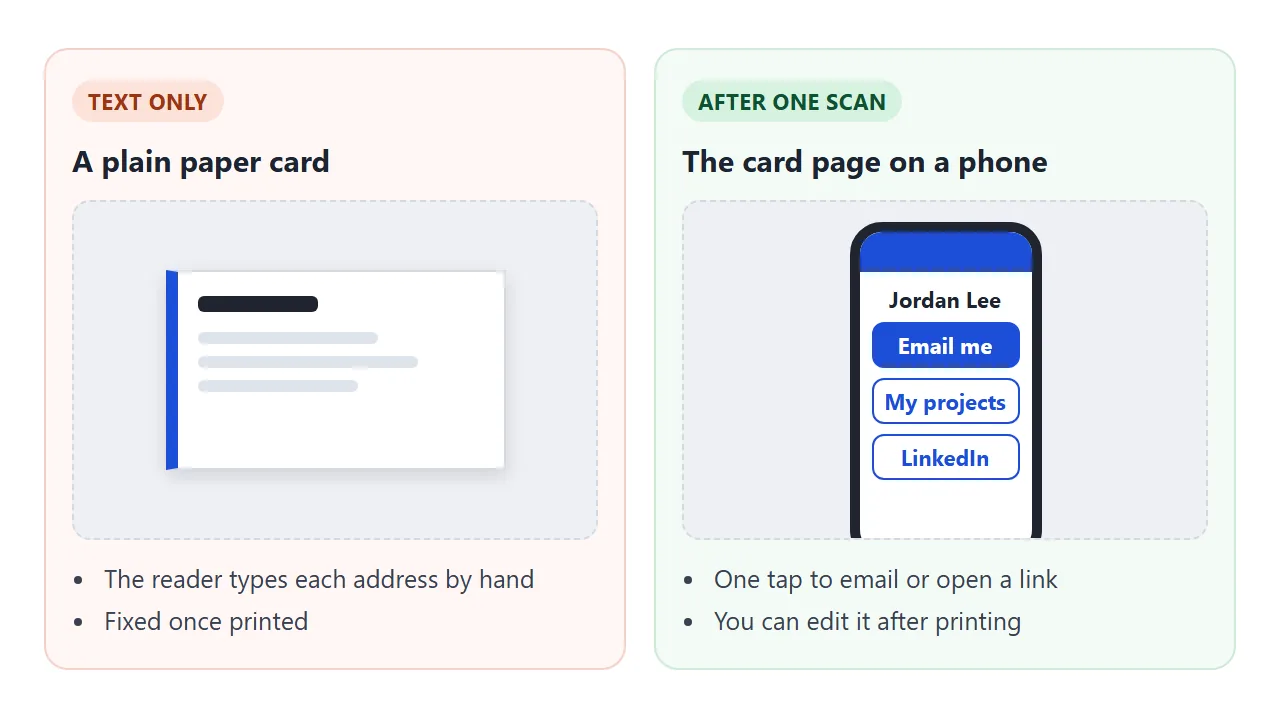
Apple's support page says the iPhone Camera recognises the code, shows a notification, and opens the link when tapped.
Android's site describes the same flow: open the camera, point it at the code, and a notification with the details appears. Both are as of October 2026, and settings differ between phones.
Ways to hand over your details
You do not have to pick only one. Each way suits a different moment at the table.
| Way | Good for | The catch |
|---|---|---|
| Paper card, text only | Someone with no phone out | The reader types every address |
| Card page link, sent after | Following up by email or message | Needs the link in your reply |
| QR code on the card | A recruiter standing at your table | Needs a clean print and a margin |
| Both, plus your email | Every reader | Uses a little more room on the card |
If you already have a portfolio, link to it from the card instead of copying it over. Visiting card link covers sharing contact details as a link, and Student portfolio covers the longer page.
When it does not work
| What you see | Likely cause | Fix |
|---|---|---|
| The camera shows nothing | Code too small, blurred or cut off | Print it larger, add a blank margin, scan again |
| The code opens an old version | A new share link was made instead of an edit | Edit the original document, reprint only if the link changed |
| The card looks tiny on a phone | The page has no viewport tag | Add the viewport meta tag |
| A picture is missing | The image came from another site | Use initials, inline SVG or a CSS shape |
| The code is a dense grid | The link is long | Use a shorter link and print the code bigger |
| Only some phones scan it | Camera settings differ | Print the link as text beside the code |
Last, test the printed card. Scan it with your own phone and a friend's, in room light, from the distance of a table.