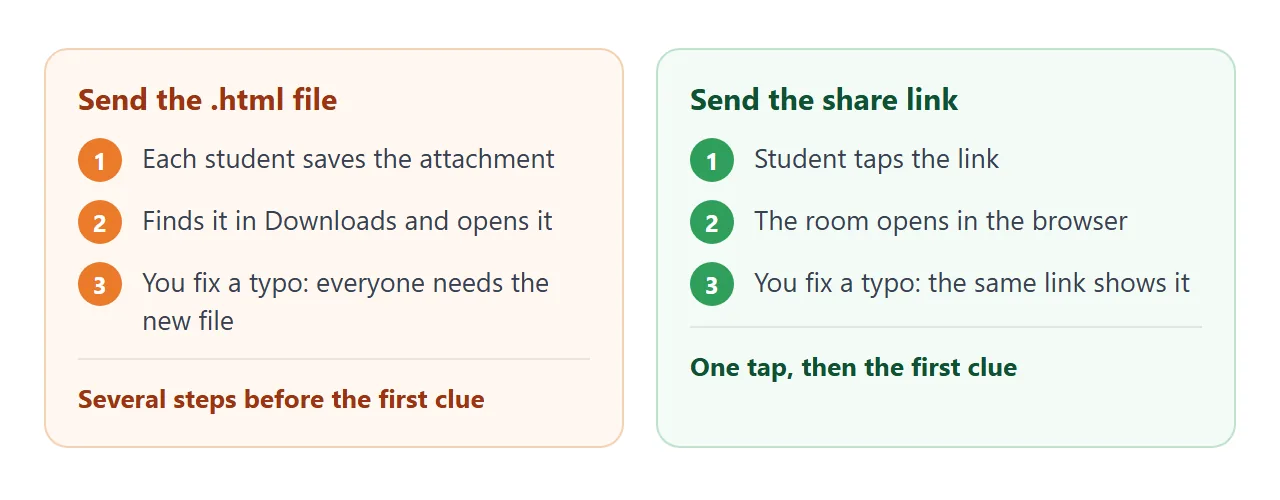
When you compare digital escape room makers, ask what a student must do before the first clue appears. One HTML page made with an AI chat and sent as a link asks for a single tap. Try a working room first.
<!doctype html>
<html lang="en">
<head>
<meta charset="utf-8">
<meta name="viewport" content="width=device-width, initial-scale=1">
<title>The Locked Lab</title>
<style>
  * { box-sizing: border-box; }
  body { margin: 0; font-family: system-ui, sans-serif; background: #0f172a; color: #e2e8f0; padding: 16px; }
  .wrap { max-width: 640px; margin: 0 auto; }
  header { display: flex; justify-content: space-between; align-items: center; gap: 12px; flex-wrap: wrap; }
  h1 { font-size: 22px; margin: 0; }
  .keys { background: #1e293b; border-radius: 999px; padding: 6px 14px; font-weight: 700; font-size: 16px; }
  .story { color: #94a3b8; font-size: 16px; line-height: 1.5; margin: 8px 0 14px; }
  .lock { background: #1e293b; border: 2px solid #334155; border-radius: 14px; padding: 14px 16px; margin-bottom: 12px; }
  .lock.open { border-color: #22c55e; }
  .lock h2 { font-size: 17px; margin: 0 0 6px; display: flex; justify-content: space-between; gap: 8px; }
  .lock p { font-size: 16px; line-height: 1.5; margin: 6px 0 10px; }
  .row { display: flex; gap: 8px; flex-wrap: wrap; align-items: center; }
  input[type=text] { font-size: 18px; padding: 10px 12px; border-radius: 8px; border: 2px solid #475569; background: #0f172a; color: #fff; width: 150px; letter-spacing: 2px; }
  button { font-size: 16px; padding: 10px 16px; border-radius: 8px; border: 0; background: #3b82f6; color: #fff; font-weight: 600; cursor: pointer; min-height: 44px; }
  button.ghost { background: transparent; border: 2px solid #475569; color: #cbd5e1; }
  button.choice { background: #334155; }
  .msg { min-height: 22px; font-size: 15px; margin-top: 8px; color: #fbbf24; }
  .hint { font-size: 15px; color: #a5b4fc; margin-top: 6px; }
  .shake { animation: shake .3s; }
  @keyframes shake { 25% { transform: translateX(-6px); } 75% { transform: translateX(6px); } }
  #door { text-align: center; border-style: dashed; }
  #door.open { background: #14532d; border-style: solid; }
  svg { max-width: 100%; height: auto; display: block; }
  [hidden] { display: none !important; }
</style>
</head>
<body>
<div class="wrap">
  <header>
    <h1>The Locked Lab</h1>
    <div class="keys" aria-live="polite">Keys: <span id="keys">0</span> / 3</div>
  </header>
  <p class="story">The lab door has jammed behind you. Open three locks to find three keys, then leave through the door.</p>

  <section class="lock" id="lock1">
    <h2>Lock 1: The shelf <span class="state"></span></h2>
    <svg viewBox="0 0 320 90" role="img" aria-label="A shelf with 3 red beakers, 2 blue beakers and 4 green beakers">
      <rect x="0" y="74" width="320" height="8" rx="3" fill="#475569"/>
      <g id="beakers"></g>
    </svg>
    <p>Count the beakers by colour. The code is red, blue, green, as three digits.</p>
    <div class="row">
      <label for="a1" class="sr" style="position:absolute;left:-9999px">Lock 1 code</label>
      <input type="text" id="a1" inputmode="numeric" maxlength="3" autocomplete="off" placeholder="???">
      <button data-check="1">Try</button>
      <button class="ghost" data-hint="1">Hint</button>
    </div>
    <div class="msg" id="m1"></div><div class="hint" id="h1" hidden>Hint: red is the first digit.</div>
  </section>

  <section class="lock" id="lock2">
    <h2>Lock 2: The door plate <span class="state"></span></h2>
    <p>The plate shows <b style="letter-spacing:3px">DWRP</b>. Every letter was moved 3 places forward in the alphabet (A became D). What is the real word?</p>
    <div class="row">
      <label for="a2" style="position:absolute;left:-9999px">Lock 2 word</label>
      <input type="text" id="a2" autocomplete="off" autocapitalize="off" placeholder="word">
      <button data-check="2">Try</button>
      <button class="ghost" data-hint="2">Hint</button>
    </div>
    <div class="msg" id="m2"></div><div class="hint" id="h2" hidden>Hint: go back 3 letters. D goes back to A.</div>
  </section>

  <section class="lock" id="lock3">
    <h2>Lock 3: The lab notebook <span class="state"></span></h2>
    <p>A page says: "Liquid water turns into a gas." Which word is missing from the page?</p>
    <div class="row" id="choices">
      <button class="choice" data-pick="Melting">Melting</button>
      <button class="choice" data-pick="Evaporation">Evaporation</button>
      <button class="choice" data-pick="Freezing">Freezing</button>
    </div>
    <div class="msg" id="m3"></div>
  </section>

  <section class="lock" id="door">
    <h2 style="justify-content:center">The door</h2>
    <p id="doorText">Locked. You need 3 keys.</p>
  </section>
</div>

<script>
  // Answers are stored encoded (btoa of the lowercase answer), not as plain text.
  // To change one, run btoa('newanswer') in the browser console and paste the result.
  const ANSWERS = { 1: 'MzI0', 2: 'YXRvbQ==', 3: 'ZXZhcG9yYXRpb24=' };
  const solved = new Set();

  // Draw the beakers: 3 red, 2 blue, 4 green
  const colours = ['#ef4444','#ef4444','#ef4444','#3b82f6','#3b82f6','#22c55e','#22c55e','#22c55e','#22c55e'];
  document.getElementById('beakers').innerHTML = colours.map((c, i) =>
    '<g transform="translate(' + (12 + i * 34) + ',30)"><path d="M4 0h18v14l8 30H-4l8-30z" fill="none" stroke="#cbd5e1" stroke-width="2"/>' +
    '<path d="M0 26h26l4 18H-4z" fill="' + c + '"/></g>').join('');

  function check(n, value) {
    const box = document.getElementById('lock' + n);
    if (btoa(value.trim().toLowerCase()) === ANSWERS[n]) {
      solved.add(n);
      box.classList.add('open');
      box.querySelector('.state').textContent = 'Key found';
      document.getElementById('m' + n).textContent = '';
      document.getElementById('keys').textContent = solved.size;
      if (solved.size === 3) {
        document.getElementById('door').classList.add('open');
        document.getElementById('doorText').textContent = 'The door swings open. You escaped!';
      }
    } else {
      document.getElementById('m' + n).textContent = 'Not quite. Try again.';
      box.classList.remove('shake'); void box.offsetWidth; box.classList.add('shake');
    }
  }

  document.querySelectorAll('[data-check]').forEach((b) => b.addEventListener('click', () => {
    const n = b.dataset.check;
    check(n, document.getElementById('a' + n).value);
  }));
  document.querySelectorAll('input[type=text]').forEach((inp) => inp.addEventListener('keydown', (e) => {
    if (e.key === 'Enter') check(inp.id.slice(1), inp.value);
  }));
  document.querySelectorAll('[data-hint]').forEach((b) => b.addEventListener('click', () => {
    document.getElementById('h' + b.dataset.hint).hidden = false;
  }));
  document.querySelectorAll('[data-pick]').forEach((b) => b.addEventListener('click', () => check(3, b.dataset.pick)));
</script>
</body>
</html>
The whole room is one file. The pictures, the locks and the answers are all inside it, so nothing has to be installed and nothing is fetched from another site. Open it at phone width too, because students may play there.
Make it with AI
Paste this prompt into ChatGPT, Claude or Gemini. Change the topic and age in the first line and keep the rules, because the rules are what make the file easy to share.
Make a digital escape room as ONE HTML file for students aged 12-14 on the topic "the water cycle".
- Three locks: a number code from a picture, a decoded word, and a multiple-choice question. A final door opens after all three.
- Use only plain HTML, CSS and JavaScript in the one file. No libraries, no outside images, fonts or links. Draw pictures with inline SVG or CSS.
- Do not use localStorage, cookies or a server.
- Store each answer as btoa of the lowercase answer, never as plain text. Compare after trim and lowercase.
- A wrong answer shows a short message. Each lock has a Hint button with a gentler clue.
- Big tap targets, text at least 16px, readable on a phone, with the viewport meta tag.
- Show "Keys 0 / 3" and a message when the door opens.
- In the chat, after the code, list every answer in a table so I can check them.
Then check the result before it goes anywhere:
- Solve every lock yourself. Type a correct answer with capitals and a trailing space; it should still open.
- Try wrong answers. You want a gentle message, not a blank screen.
- Compare with the table. The AI's list of answers should match what the page accepts.
- Look for outside pictures. Anything that loads from another site will not show in a shared page.
Send it as a link
Copy the whole HTML from the chat, paste it into a NOS document and choose Create share link. HTML to link walks through it. The page renders as written and its scripts run, so every lock works for the people you send it to.
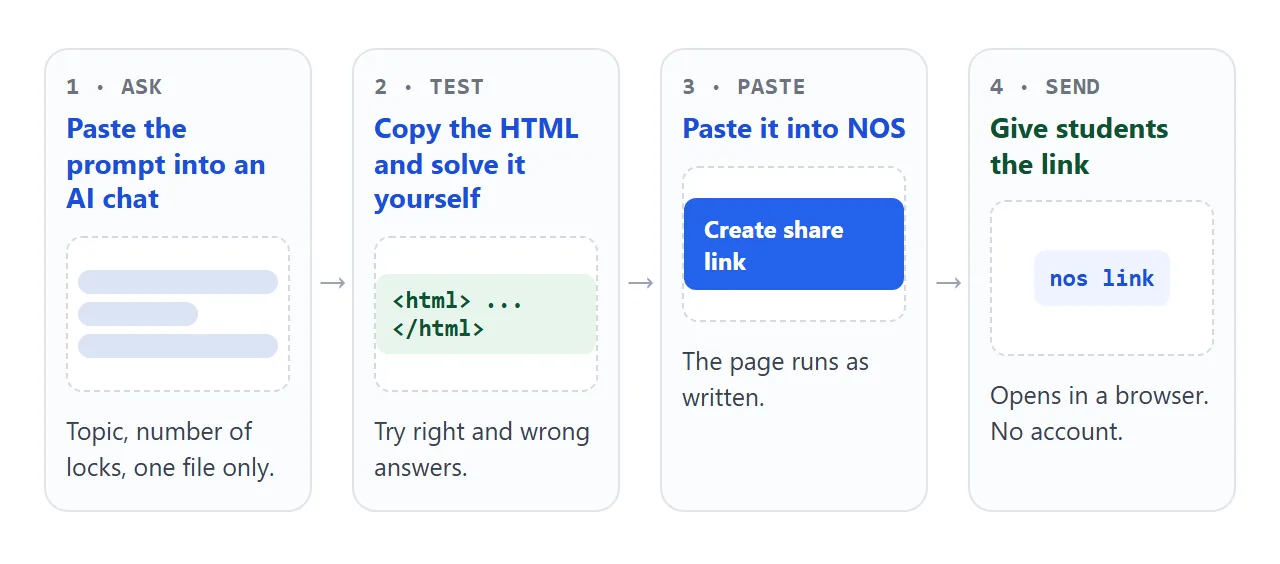
Students open the link in a browser, a phone included, with no account. They see your page and cannot edit it. If you fix a clue later, change the code in your document and the same link shows the new version.
Where the link goes depends on how you reach your class. Each of these is as described in the platform's own help, as of October 2026:
- Google Classroom: Google says a teacher can attach documents, links, images and videos to assignments.
- Canvas: an instructor can add an External URL as a module item, and a checkbox makes it load in a new tab.
- Google Sites: Insert, then Embed lets you enter a URL, but Google notes that some websites will not let you add their content. If the frame stays empty, put the link on the page as ordinary text.
- Email, chat or paper: the link is plain text, so it also fits an email, a message or a QR code. See QR code link.
Maker app, Google Form or one HTML page
There is no single best choice. These are three ways teachers build a room, and what to check before you commit to each.
| Approach | What you do | Check first |
|---|---|---|
| Dedicated escape room maker | Pick a template and fill in clues in its editor | Whether students need an account and what your plan includes. Rules differ by product. |
| Google Form | Write questions and send students to different sections by answer | Google says "Go to section based on answer" works only for multiple choice and dropdown questions |
| One HTML page from an AI chat | Describe the room, receive the file, share a link | You test it yourself, and the answers sit in the page code |
The third row suits a teacher who wants full control of the look and the puzzles, and a link that works the same on every device. For plain quiz questions with a score, see HTML quiz.
A second room: look around, then open one drawer
Not every room needs numbered locks. This one lets students tap objects to collect clues, then combine them into one drawer code. A timer counts up from the moment the page opens.
<!doctype html>
<html lang="en">
<head>
<meta charset="utf-8">
<meta name="viewport" content="width=device-width, initial-scale=1">
<title>The Reading Room</title>
<style>
  * { box-sizing: border-box; }
  body { margin: 0; font-family: system-ui, sans-serif; background: #fdf6e3; color: #3b2f1e; padding: 14px; }
  .wrap { max-width: 640px; margin: 0 auto; }
  header { display: flex; justify-content: space-between; align-items: center; gap: 10px; flex-wrap: wrap; }
  h1 { font-size: 22px; margin: 0; }
  .timer { font: 700 18px ui-monospace, Consolas, monospace; background: #3b2f1e; color: #fdf6e3; padding: 4px 12px; border-radius: 8px; }
  .intro { font-size: 16px; line-height: 1.5; margin: 8px 0 10px; }
  .room { background: #f5e6c4; border: 2px solid #c9a96a; border-radius: 14px; padding: 8px; }
  .room svg { width: 100%; height: auto; display: block; }
  .spot { cursor: pointer; }
  .spot:focus { outline: none; }
  .spot:hover rect.hit, .spot:focus rect.hit { fill: rgba(37, 99, 235, .18); stroke: #2563eb; stroke-width: 2; }
  .spot.seen rect.hit { stroke: #16a34a; stroke-width: 2; fill: rgba(22, 163, 74, .12); }
  .panel { background: #fff; border: 2px solid #c9a96a; border-radius: 12px; padding: 12px 14px; margin-top: 12px; }
  .panel h2 { font-size: 16px; margin: 0 0 6px; }
  #notes { margin: 0; padding-left: 20px; font-size: 16px; line-height: 1.6; min-height: 50px; }
  #notes:empty::before { content: "Tap things in the room to collect clues."; color: #8a7a5c; margin-left: -20px; }
  .row { display: flex; gap: 8px; flex-wrap: wrap; align-items: center; }
  input[type=text] { font-size: 22px; letter-spacing: 6px; width: 140px; padding: 8px 10px; border: 2px solid #c9a96a; border-radius: 8px; text-align: center; }
  button { font-size: 16px; min-height: 44px; padding: 10px 18px; border: 0; border-radius: 8px; background: #2563eb; color: #fff; font-weight: 600; cursor: pointer; }
  #msg { margin-top: 8px; font-size: 16px; min-height: 22px; }
  #win { background: #dcfce7; border-color: #16a34a; }
  [hidden] { display: none !important; }
</style>
</head>
<body>
<div class="wrap">
  <header>
    <h1>The Reading Room</h1>
    <div class="timer" id="timer" aria-label="Time so far">00:00</div>
  </header>
  <p class="intro">The drawer holds the exit pass. Look around the room, collect four clues, and work out the drawer code.</p>

  <div class="room">
    <svg viewBox="0 0 600 300" role="group" aria-label="A reading room with a clock, a bookshelf, a globe, a calendar and a drawer">
      <rect width="600" height="300" fill="#f5e6c4"/>
      <rect y="230" width="600" height="70" fill="#d9b97a"/>

      <g class="spot" tabindex="0" role="button" aria-label="Clock" data-clue="The clock shows 4 o'clock. First digit: 4.">
        <circle cx="90" cy="70" r="42" fill="#fff" stroke="#3b2f1e" stroke-width="4"/>
        <line x1="90" y1="70" x2="90" y2="38" stroke="#3b2f1e" stroke-width="4" stroke-linecap="round"/>
        <line x1="90" y1="70" x2="109" y2="81" stroke="#3b2f1e" stroke-width="6" stroke-linecap="round"/>
        <text x="90" y="46" text-anchor="middle" font-size="12" font-weight="700">12</text>
        <rect class="hit" x="42" y="22" width="96" height="96" rx="10" fill="transparent"/>
      </g>

      <g class="spot" tabindex="0" role="button" aria-label="Bookshelf" data-clue="The shelf holds 6 books. Second digit: 6.">
        <rect x="190" y="30" width="170" height="190" fill="#8b5e34"/>
        <rect x="198" y="38" width="154" height="84" fill="#6f4a28"/>
        <rect x="198" y="130" width="154" height="84" fill="#6f4a28"/>
        <g fill="#ef4444"><rect x="206" y="66" width="14" height="56"/><rect x="224" y="60" width="14" height="62"/></g>
        <g fill="#3b82f6"><rect x="242" y="64" width="14" height="58"/><rect x="260" y="70" width="14" height="52"/></g>
        <g fill="#22c55e"><rect x="278" y="62" width="14" height="60"/><rect x="296" y="68" width="14" height="54"/></g>
        <rect class="hit" x="186" y="26" width="178" height="198" rx="6" fill="transparent"/>
      </g>

      <g class="spot" tabindex="0" role="button" aria-label="Globe" data-clue="The globe has a tag: 7 continents. Third digit: 7.">
        <circle cx="440" cy="150" r="42" fill="#60a5fa" stroke="#1e3a8a" stroke-width="3"/>
        <path d="M416 135c10-16 28-14 36-4s-6 22-18 20-24-4-18-16z" fill="#4ade80"/>
        <rect x="436" y="192" width="8" height="30" fill="#6f4a28"/>
        <rect x="466" y="176" width="22" height="20" rx="3" fill="#fff" stroke="#3b2f1e" stroke-width="2"/>
        <text x="477" y="191" text-anchor="middle" font-size="14" font-weight="700">7</text>
        <rect x="414" y="220" width="52" height="8" rx="3" fill="#6f4a28"/>
        <rect class="hit" x="394" y="104" width="92" height="126" rx="10" fill="transparent"/>
      </g>

      <g class="spot" tabindex="0" role="button" aria-label="Calendar" data-clue="The calendar page is circled on the 2nd. Fourth digit: 2.">
        <rect x="520" y="30" width="64" height="76" rx="6" fill="#fff" stroke="#3b2f1e" stroke-width="3"/>
        <rect x="520" y="30" width="64" height="18" rx="6" fill="#ef4444"/>
        <circle cx="552" cy="76" r="14" fill="none" stroke="#ef4444" stroke-width="3"/>
        <text x="552" y="82" text-anchor="middle" font-size="18" font-weight="700">2</text>
        <rect class="hit" x="514" y="24" width="76" height="88" rx="8" fill="transparent"/>
      </g>

      <g class="spot" tabindex="0" role="button" aria-label="Drawer" data-clue="A note on the drawer: the code goes clock, shelf, globe, calendar.">
        <rect x="500" y="170" width="90" height="60" fill="#8b5e34" stroke="#5c3d1e" stroke-width="3"/>
        <circle cx="545" cy="200" r="6" fill="#fbbf24"/>
        <rect class="hit" x="494" y="164" width="102" height="72" rx="6" fill="transparent"/>
      </g>
    </svg>
  </div>

  <div class="panel">
    <h2>Your clues</h2>
    <ol id="notes"></ol>
  </div>

  <form class="panel" id="form">
    <h2>Drawer code</h2>
    <div class="row">
      <label for="code" style="position:absolute;left:-9999px">4-digit code</label>
      <input type="text" id="code" inputmode="numeric" maxlength="4" autocomplete="off" placeholder="????">
      <button type="submit">Open</button>
    </div>
    <div id="msg" aria-live="polite"></div>
  </form>

  <div class="panel" id="win" hidden>
    <h2>The drawer opens. You escaped!</h2>
    <p id="winText" style="margin:0;font-size:16px"></p>
  </div>
</div>

<script>
  const CODE = 'NDY3Mg==';  // btoa of the code; run btoa('1234') in the console to make your own
  const notes = document.getElementById('notes');
  const start = Date.now();
  let finished = false;

  function clock() {
    const s = Math.floor((Date.now() - start) / 1000);
    return String(Math.floor(s / 60)).padStart(2, '0') + ':' + String(s % 60).padStart(2, '0');
  }
  const tick = setInterval(() => { document.getElementById('timer').textContent = clock(); }, 1000);

  function reveal(spot) {
    spot.classList.add('seen');
    if (spot.dataset.done) return;
    spot.dataset.done = '1';
    const li = document.createElement('li');
    li.textContent = spot.dataset.clue;
    notes.appendChild(li);
  }
  document.querySelectorAll('.spot').forEach((s) => {
    s.addEventListener('click', () => reveal(s));
    s.addEventListener('keydown', (e) => { if (e.key === 'Enter' || e.key === ' ') { e.preventDefault(); reveal(s); } });
  });

  document.getElementById('form').addEventListener('submit', (e) => {
    e.preventDefault();
    if (finished) return;
    const v = document.getElementById('code').value.trim();
    if (btoa(v) === CODE) {
      finished = true;
      clearInterval(tick);
      document.getElementById('msg').textContent = '';
      document.getElementById('win').hidden = false;
      document.getElementById('winText').textContent = 'Time: ' + clock() + '. Show your teacher this screen.';
    } else {
      document.getElementById('msg').textContent = 'The drawer stays shut. Check your clues and the order.';
    }
  });
</script>
</body>
</html>
To make it, change one line in the prompt: ask for "a room scene drawn in inline SVG with four tappable objects that each reveal one digit of a drawer code".
The timer shows on the student's own screen when they finish, so you can ask them to show it. For a stand-alone timer, see HTML countdown timer.
What students can and cannot see
A page like this runs in the student's browser, so everything in the file, answers included, reaches the student's device. Anyone who opens the page code can read it. Encoding the answers hides them from a glance and no more.
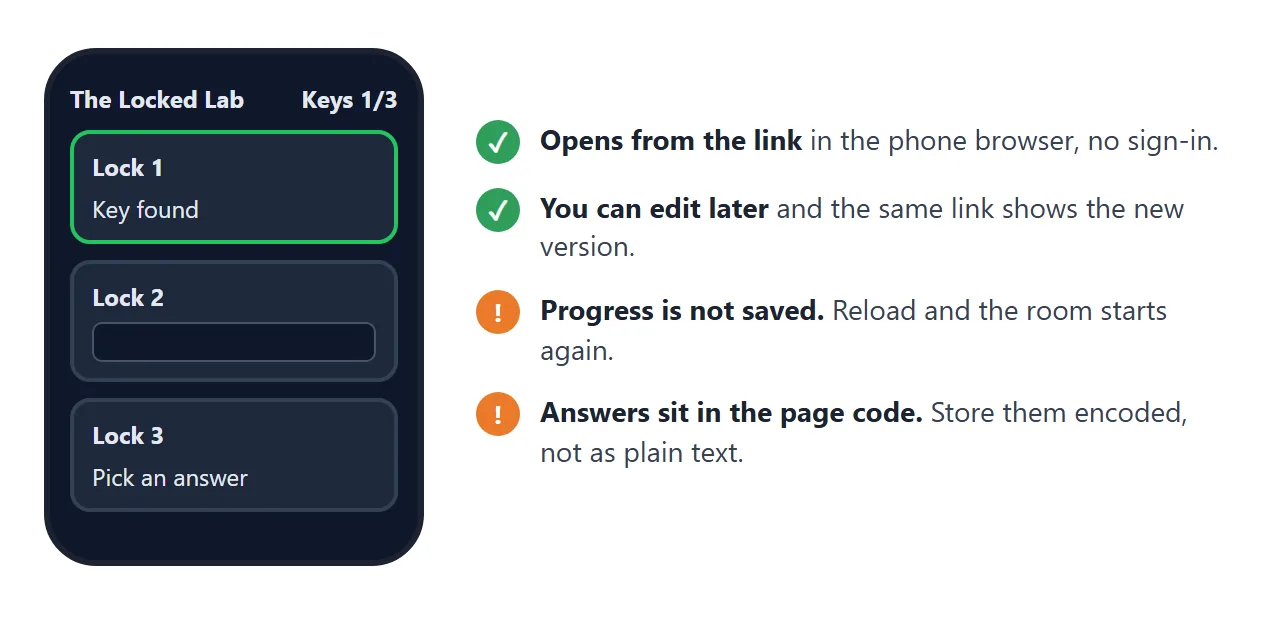
Treat the room as a class activity, not a test. Also remember that these rooms keep no progress. A student who reloads starts again, and in NOS a visitor's changes are not saved.
When it does not work
| What you see | Cause | Fix |
|---|---|---|
| The chat shows explanations, not a page | The AI wrote prose around the code | Ask: "Reply with only the full HTML in one code block" |
| A correct answer is refused | The page compares exact spelling or case | Ask the AI to trim spaces and lowercase before comparing |
| A picture is missing | The AI linked an outside image, which a shared page blocks | Ask for inline SVG or CSS shapes instead |
| Buttons do nothing | The paste is incomplete or the script has an error | Paste again from the first line to the last, or send the AI the error |
| Google Sites shows an empty frame | Google says some websites will not let you add their content | Put the link on the page as text |
| Text is tiny on a phone | The viewport meta tag is missing | Ask the AI to add it; see viewport meta tag |
| A student reloads and starts over | The page keeps no progress | Tell students not to reload, or keep rooms short |