Running a cafe, a food truck or a small shop, you may ask whether there is free digital menu software. A menu that people only read does not need any.
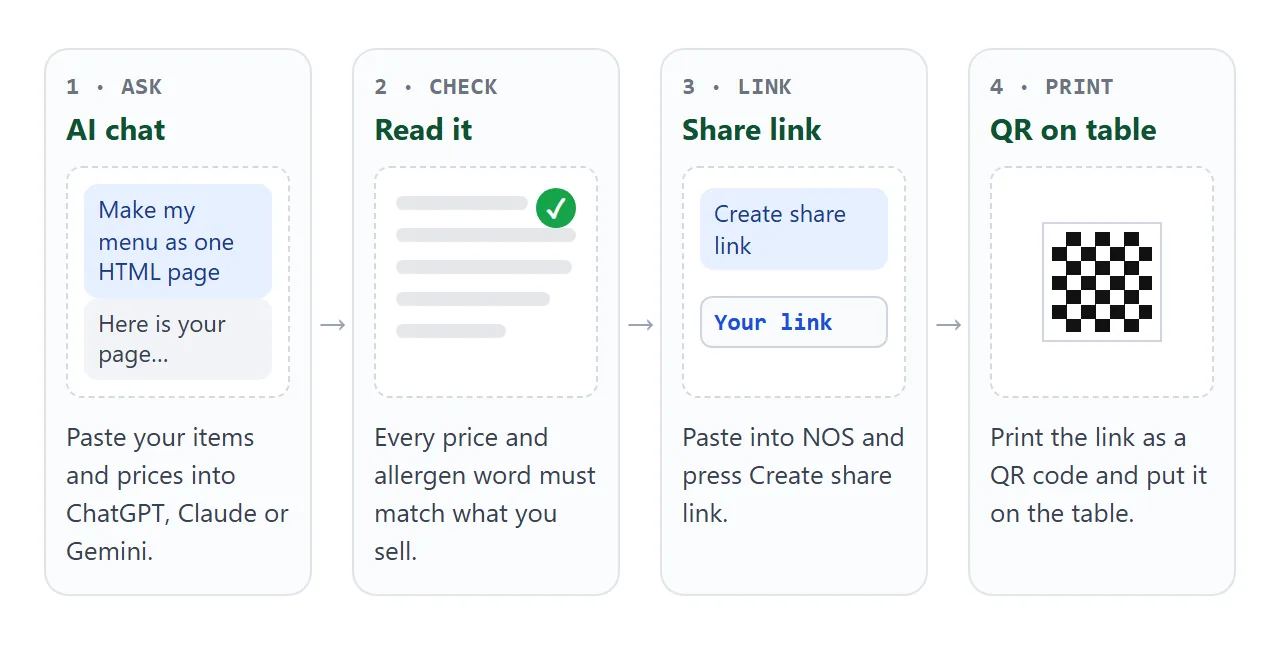
It needs one web page with your dishes and prices, and one address that opens it on a phone. An AI chat can write that page. You change a price by editing one number, and the link stays the same.
Here is a page you can copy. It is a made-up cafe, so replace every name and number with your own.
<!doctype html>
<html lang="en">
<head>
<meta charset="utf-8">
<meta name="viewport" content="width=device-width, initial-scale=1">
<title>Juniper Corner Cafe menu</title>
<style>
  * { box-sizing: border-box; }
  body { margin: 0; font-family: system-ui, sans-serif; background: #faf6ef; color: #2a2118; font-size: 17px; line-height: 1.5; }
  .wrap { max-width: 520px; margin: 0 auto; padding: 18px 16px 28px; }
  header { text-align: center; padding-bottom: 8px; }
  h1 { margin: 0; font-size: 26px; letter-spacing: .3px; }
  .sub { margin: 2px 0 0; font-size: 14px; color: #6b5d4d; }
  .special { margin: 16px 0; padding: 12px 14px; background: #fff3d6; border: 1px solid #e8c978; border-radius: 12px; }
  .special h2 { margin: 0 0 6px; font-size: 15px; text-transform: uppercase; letter-spacing: .6px; color: #8a5a00; }
  .filters { display: flex; flex-wrap: wrap; gap: 8px; margin: 14px 0 6px; }
  .filters button { font: inherit; font-size: 15px; padding: 7px 14px; border-radius: 999px; border: 1px solid #c9b89f; background: #fff; color: #2a2118; cursor: pointer; }
  .filters button[aria-pressed="true"] { background: #2f5d3a; border-color: #2f5d3a; color: #fff; }
  section h2 { margin: 20px 0 4px; font-size: 19px; border-bottom: 2px solid #2f5d3a; padding-bottom: 3px; }
  .item { display: flex; justify-content: space-between; gap: 14px; padding: 9px 0; border-bottom: 1px solid #eadfcc; }
  .item .name { font-weight: 600; }
  .item .desc { display: block; font-size: 14px; font-weight: 400; color: #6b5d4d; }
  .price { font-variant-numeric: tabular-nums; white-space: nowrap; font-weight: 600; }
  .tag { display: inline-block; margin-left: 4px; padding: 0 6px; font-size: 12px; font-weight: 700; border-radius: 6px; background: #dcebdc; color: #1f4a2b; vertical-align: 1px; }
  .out .name, .out .price { color: #9b8f80; text-decoration: line-through; }
  .out .flag { font-size: 13px; font-weight: 700; color: #9a3412; }
  [hidden] { display: none !important; }
  footer { margin-top: 22px; font-size: 14px; color: #6b5d4d; text-align: center; }
</style>
</head>
<body>
<div class="wrap">
  <header>
    <h1>Juniper Corner Cafe</h1>
    <p class="sub">Menu updated Friday, 2 October</p>
  </header>

  <!-- Edit the words and numbers below. Keep each item inside its <div class="item"> line. -->
  <div class="special">
    <h2>Today</h2>
    <div class="item" style="border:0;padding:0"><span class="name">Pumpkin soup and bread<span class="desc">Until 3 pm, while it lasts</span></span><span class="price">6.50</span></div>
  </div>

  <div class="filters" id="filters">
    <button type="button" data-cat="all" aria-pressed="true">All</button>
    <button type="button" data-cat="coffee" aria-pressed="false">Coffee</button>
    <button type="button" data-cat="cold" aria-pressed="false">Cold drinks</button>
    <button type="button" data-cat="food" aria-pressed="false">Food</button>
  </div>

  <section data-cat="coffee">
    <h2>Coffee</h2>
    <div class="item"><span class="name">Espresso</span><span class="price">2.80</span></div>
    <div class="item"><span class="name">Flat white</span><span class="price">3.90</span></div>
    <div class="item"><span class="name">Latte<span class="desc">Oat milk instead of dairy, no charge</span></span><span class="price">4.20</span></div>
  </section>

  <section data-cat="cold">
    <h2>Cold drinks</h2>
    <div class="item"><span class="name">Iced tea <span class="tag">V</span></span><span class="price">3.40</span></div>
    <div class="item out"><span class="name">Lemon soda</span><span><span class="flag">Sold out</span> <span class="price">3.20</span></span></div>
  </section>

  <section data-cat="food">
    <h2>Food</h2>
    <div class="item"><span class="name">Cheese toastie<span class="desc">Contains gluten, milk</span></span><span class="price">6.90</span></div>
    <div class="item"><span class="name">Lentil salad <span class="tag">V</span> <span class="tag">GF</span></span><span class="price">7.80</span></div>
    <div class="item"><span class="name">Almond cake<span class="desc">Contains nuts, egg</span></span><span class="price">4.60</span></div>
  </section>

  <footer>V = vegan, GF = no gluten ingredients. Ask us about anything not listed.<br>Order and pay at the counter.</footer>
</div>

<script>
  // Show one group at a time; the prices themselves are plain text in the HTML above.
  const buttons = document.querySelectorAll('#filters button');
  const sections = document.querySelectorAll('section[data-cat]');
  buttons.forEach(function (btn) {
    btn.addEventListener('click', function () {
      const cat = btn.dataset.cat;
      buttons.forEach(function (b) { b.setAttribute('aria-pressed', String(b === btn)); });
      sections.forEach(function (s) { s.hidden = cat !== 'all' && s.dataset.cat !== cat; });
    });
  });
</script>
</body>
</html>
The prices are plain text in the page. There is no database and no account, which is why one number is all you change.
Make it with AI
Any of ChatGPT, Claude or Gemini can write this. Paste the prompt, put your own dishes in the brackets, and ask for a single file.
Write one self-contained HTML file: a menu page for a small cafe,
laid out for a phone first, with large readable type. Use only
inline CSS and a little JavaScript. No outside images, fonts or
scripts, and no ordering or payment buttons.

Group the dishes under buttons that show one group at a time.
Put prices in plain text next to each dish, so I can edit them
by hand. Add a "Today" box at the top and a line saying when the
menu was last updated. Show allergen words as plain text under
the dish name.

My menu: [dish, price, allergen words, group, one per line].
Use only what I give you. Do not invent dishes or allergens.
Read the result before you use it. A chat assistant can slip, and a wrong price or a missing allergen word on a menu matters.
- Prices: compare each one with your till or your price list.
- Allergen words: check them against your recipes. Ask your local food authority what you are expected to show.
- Buttons: tap every filter button on a phone and make sure no dish goes missing.
- Extras: delete any dish, claim or opening hours you did not give it.
Change a price without changing the link
This is the part that saves you money over a printed menu. The price is a number inside a short piece of the page.
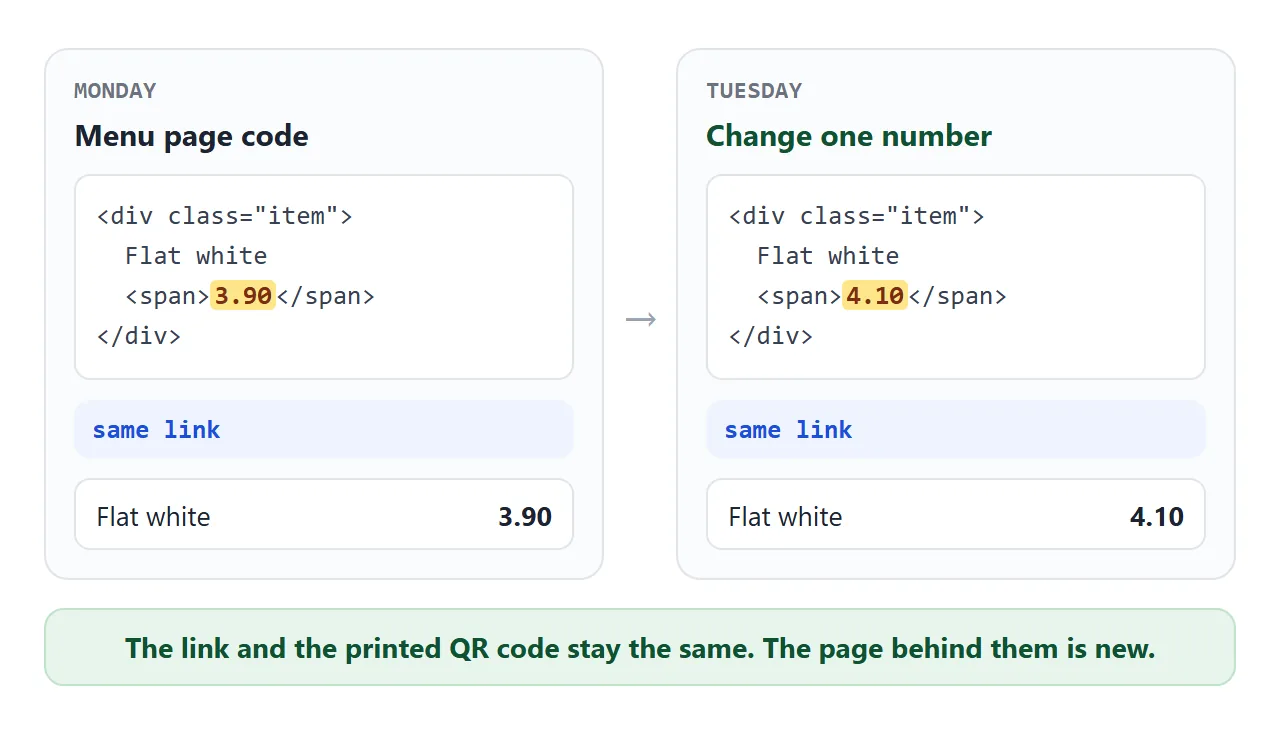
Open the NOS document, find the number, type the new one. The same applies to a sold-out dish: add the word "Sold out" next to it, as the example does, and remove it when the stock is back.
Keep the "updated" line honest. Change the date when you change the page, so a guest can see the menu is current.
Send it as a link
Paste the finished HTML into a NOS document and choose Create share link. HTML to link walks through it. The page renders as written, and the scripts in it run, so the filter buttons work.
Anyone with the link opens it in a browser, phones included, with no account. They can read the menu but not edit it. Editing the code keeps the same link.
Make only one document for the menu. A second share link is a different address, so a code printed from the first would still open the first page.
Pictures need care. As of October 2026, NOS blocks images loaded from other sites. Use text, inline SVG or CSS shapes, as the example does. Whether a tool in this chain is free depends on the plan you are on, so check yours.
If you have a Google Business Profile, its Help lists a menu link among the single links a business can add. Use your share link there. Where the setting sits can change, so follow the current Help page.
Put the code on the table
A QR code holds a link, not the menu. Scanning it opens whatever is at that link, so a printed code keeps working while the page behind it changes.
The sheet below turns your link into a code and lays it out as four table signs per page. Type your name and link, press Make QR code, then print.
<!doctype html>
<html lang="en">
<head>
<meta charset="utf-8">
<meta name="viewport" content="width=device-width, initial-scale=1">
<title>Table sign with a QR code for the menu</title>
<style>
  * { box-sizing: border-box; }
  body { margin: 0; padding: 14px; font-family: system-ui, sans-serif; background: #eef0f4; color: #1f2430; }
  .form { max-width: 360px; margin: 0 auto 12px; display: grid; gap: 8px; }
  .form label { font-size: 13px; font-weight: 600; }
  .form input { width: 100%; padding: 9px 10px; font-size: 14px; border: 1px solid #b9bfcb; border-radius: 8px; }
  .btns { display: flex; gap: 8px; flex-wrap: wrap; }
  .btns button { padding: 9px 14px; font-size: 14px; border: 0; border-radius: 8px; background: #2f5d3a; color: #fff; cursor: pointer; }
  .btns button.alt { background: #fff; color: #2f5d3a; border: 1px solid #2f5d3a; }
  .msg { font-size: 12.5px; color: #9a3412; min-height: 16px; }
  .note { max-width: 360px; margin: 0 auto 8px; font-size: 12.5px; color: #4b5563; }
  .sign { width: 100%; max-width: 300px; aspect-ratio: 3 / 4; margin: 0 auto; background: #fff; border-radius: 8px; box-shadow: 0 3px 14px rgba(0,0,0,.14); border-top: 10px solid #2f5d3a; padding: 6% 8%; display: flex; flex-direction: column; align-items: center; text-align: center; }
  .sign .nm { font-size: clamp(18px, 6vw, 24px); font-weight: 700; line-height: 1.2; overflow-wrap: anywhere; }
  .sign .code { width: 78%; margin-top: 6%; line-height: 0; }
  .sign .code svg { width: 100%; height: auto; display: block; }
  .sign .code .ph { aspect-ratio: 1; display: grid; place-items: center; font-size: 12px; color: #6b7280; line-height: 1.3; }
  .sign .cta { margin-top: 4%; font-size: clamp(16px, 5vw, 20px); font-weight: 700; }
  .sign .ln { margin-top: 3%; font-size: clamp(12px, 3.6vw, 14px); color: #4b5563; overflow-wrap: anywhere; }
  .sign .sh { margin-top: auto; font-size: clamp(10px, 3vw, 12px); color: #2f5d3a; font-weight: 600; overflow-wrap: anywhere; }
  #printArea { display: none; }
  @media print {
    @page { margin: 0.5in; }
    body { background: #fff; padding: 0; }
    .form, .note, #preview { display: none; }
    #printArea { display: grid; grid-template-columns: repeat(2, 3.75in); justify-content: center; }
    #printArea .sign { width: 3.75in; height: 5in; max-width: none; aspect-ratio: auto; margin: 0; border-radius: 0; box-shadow: none; border: 1px dashed #bbb; border-top: 10px solid #2f5d3a; padding: 0.25in; }
    #printArea .sign .nm { font-size: 22pt; }
    #printArea .sign .code { width: 2.6in; }
    #printArea .sign .cta { font-size: 18pt; }
    #printArea .sign .ln { font-size: 12pt; }
    #printArea .sign .sh { font-size: 9pt; }
  }
</style>
</head>
<body>
<div class="form">
  <label for="nm">Name of your place</label>
  <input id="nm" value="Juniper Corner Cafe" autocomplete="off">
  <label for="ln">One line under the code</label>
  <input id="ln" value="Order and pay at the counter" autocomplete="off">
  <label for="url">Your menu link</label>
  <input id="url" type="url" inputmode="url" value="https://example.com/juniper-menu" autocomplete="off">
  <div class="btns">
    <button id="make" type="button">Make QR code</button>
    <button id="print" type="button" class="alt">Print 4 signs</button>
  </div>
  <div class="msg" id="msg"></div>
</div>
<p class="note">Preview of one sign. Print gives 4 signs per sheet, ready to cut.</p>

<div id="preview"></div>
<div id="printArea"></div>

<template id="tpl">
  <div class="sign">
    <div class="nm"></div>
    <div class="code"></div>
    <div class="cta">Scan for the menu</div>
    <div class="ln"></div>
    <div class="sh"></div>
  </div>
</template>

<script>
  // Minimal QR encoder: byte mode, error correction level M, versions 1-10.
  const EC = { // [ec codewords per block, blocks in group 1, data cw group 1, blocks group 2, data cw group 2] for level M
    1:[10,1,16,0,0], 2:[16,1,28,0,0], 3:[26,1,44,0,0], 4:[18,2,32,0,0], 5:[24,2,43,0,0],
    6:[16,4,27,0,0], 7:[18,4,31,0,0], 8:[22,2,38,2,39], 9:[22,3,36,2,37], 10:[26,4,43,1,44]
  };
  const ALIGN = { 1:[], 2:[6,18], 3:[6,22], 4:[6,26], 5:[6,30], 6:[6,34], 7:[6,22,38], 8:[6,24,42], 9:[6,26,46], 10:[6,28,50] };

  const EXP = [], LOG = [];
  (function () { let x = 1; for (let i = 0; i < 255; i++) { EXP[i] = x; LOG[x] = i; x <<= 1; if (x & 256) x ^= 0x11d; } for (let i = 255; i < 512; i++) EXP[i] = EXP[i - 255]; })();
  const gmul = (a, b) => (a && b) ? EXP[LOG[a] + LOG[b]] : 0;

  function rsRemainder(data, n) {
    let gen = [1];
    for (let i = 0; i < n; i++) {
      const next = new Array(gen.length + 1).fill(0);
      for (let j = 0; j < gen.length; j++) { next[j] ^= gen[j]; next[j + 1] ^= gmul(gen[j], EXP[i]); }
      gen = next;
    }
    const rem = new Array(n).fill(0);
    for (const b of data) {
      const f = b ^ rem.shift(); rem.push(0);
      for (let i = 0; i < n; i++) rem[i] ^= gmul(gen[i + 1], f);
    }
    return rem;
  }

  function bchFormat(data) { let r = data; for (let i = 0; i < 10; i++) r = (r << 1) ^ ((r >>> 9) * 0x537); return ((data << 10) | r) ^ 0x5412; }
  function bchVersion(v) { let r = v; for (let i = 0; i < 12; i++) r = (r << 1) ^ ((r >>> 11) * 0x1f25); return (v << 12) | r; }

  function encodeQR(text) {
    const bytes = Array.from(new TextEncoder().encode(text));
    let ver = 0;
    for (let v = 1; v <= 10; v++) {
      const e = EC[v], cap = e[1] * e[2] + e[3] * e[4];
      const ccBits = v < 10 ? 8 : 16;
      if (4 + ccBits + bytes.length * 8 <= cap * 8) { ver = v; break; }
    }
    if (!ver) return null;
    const e = EC[ver], cap = e[1] * e[2] + e[3] * e[4];
    const bits = [];
    const put = (val, n) => { for (let i = n - 1; i >= 0; i--) bits.push((val >>> i) & 1); };
    put(4, 4); put(bytes.length, ver < 10 ? 8 : 16);
    bytes.forEach(b => put(b, 8));
    put(0, Math.min(4, cap * 8 - bits.length));
    while (bits.length % 8) bits.push(0);
    for (let pad = 0xec; bits.length < cap * 8; pad ^= 0xec ^ 0x11) put(pad, 8);
    const data = [];
    for (let i = 0; i < bits.length; i += 8) data.push(parseInt(bits.slice(i, i + 8).join(''), 2));

    const blocks = []; let pos = 0;
    for (let g = 0; g < 2; g++) for (let k = 0; k < e[1 + g * 2]; k++) { const len = e[2 + g * 2]; blocks.push(data.slice(pos, pos + len)); pos += len; }
    const ecs = blocks.map(b => rsRemainder(b, e[0]));
    const out = [];
    const maxLen = Math.max(...blocks.map(b => b.length));
    for (let i = 0; i < maxLen; i++) blocks.forEach(b => { if (i < b.length) out.push(b[i]); });
    for (let i = 0; i < e[0]; i++) ecs.forEach(c => out.push(c[i]));
    const stream = []; out.forEach(b => put2(stream, b));
    function put2(arr, val) { for (let i = 7; i >= 0; i--) arr.push((val >>> i) & 1); }

    const size = ver * 4 + 17;
    const m = Array.from({ length: size }, () => new Array(size).fill(false));
    const fn = Array.from({ length: size }, () => new Array(size).fill(false));
    const set = (x, y, v) => { m[y][x] = v; fn[y][x] = true; };
    const finder = (cx, cy) => {
      for (let dy = -4; dy <= 4; dy++) for (let dx = -4; dx <= 4; dx++) {
        const x = cx + dx, y = cy + dy; if (x < 0 || y < 0 || x >= size || y >= size) continue;
        const d = Math.max(Math.abs(dx), Math.abs(dy)); set(x, y, d !== 2 && d !== 4);
      }
    };
    finder(3, 3); finder(size - 4, 3); finder(3, size - 4);
    for (let i = 8; i < size - 8; i++) { set(i, 6, i % 2 === 0); set(6, i, i % 2 === 0); }
    const al = ALIGN[ver];
    al.forEach((ay, i) => al.forEach((ax, j) => {
      if ((i === 0 && j === 0) || (i === 0 && j === al.length - 1) || (i === al.length - 1 && j === 0)) return;
      for (let dy = -2; dy <= 2; dy++) for (let dx = -2; dx <= 2; dx++) set(ax + dx, ay + dy, Math.max(Math.abs(dx), Math.abs(dy)) !== 1);
    }));
    set(8, size - 8, true);
    for (let i = 0; i < 9; i++) { fn[8][i] = true; fn[i][8] = true; }
    for (let i = 0; i < 8; i++) { fn[8][size - 1 - i] = true; fn[size - 1 - i][8] = true; }
    if (ver >= 7) {
      const vb = bchVersion(ver);
      for (let i = 0; i < 18; i++) {
        const bit = ((vb >>> i) & 1) === 1, a = size - 11 + (i % 3), b = Math.floor(i / 3);
        set(a, b, bit); set(b, a, bit);
      }
    }

    let k = 0;
    const place = (mask) => {
      const g = m.map(r => r.slice()); k = 0;
      for (let right = size - 1; right >= 1; right -= 2) {
        if (right === 6) right = 5;
        for (let v = 0; v < size; v++) for (let j = 0; j < 2; j++) {
          const x = right - j, up = ((right + 1) & 2) === 0, y = up ? size - 1 - v : v;
          if (fn[y][x]) continue;
          let bit = k < stream.length ? stream[k] === 1 : false; k++;
          const inv = [(x + y) % 2 === 0, y % 2 === 0, x % 3 === 0, (x + y) % 3 === 0, (Math.floor(x / 3) + Math.floor(y / 2)) % 2 === 0, (x * y) % 2 + (x * y) % 3 === 0, ((x * y) % 2 + (x * y) % 3) % 2 === 0, ((x + y) % 2 + (x * y) % 3) % 2 === 0][mask];
          g[y][x] = bit !== inv;
        }
      }
      const f = bchFormat((0 << 3) | mask); // level M = 00
      const fb = i => ((f >>> i) & 1) === 1;
      for (let i = 0; i <= 5; i++) g[i][8] = fb(i);
      g[7][8] = fb(6); g[8][8] = fb(7); g[8][7] = fb(8);
      for (let i = 9; i < 15; i++) g[8][14 - i] = fb(i);
      for (let i = 0; i < 8; i++) g[8][size - 1 - i] = fb(i);
      for (let i = 8; i < 15; i++) g[size - 15 + i][8] = fb(i);
      g[size - 8][8] = true;
      return g;
    };
    const penalty = (g) => {
      let p = 0;
      for (let t = 0; t < 2; t++) {
        for (let a = 0; a < size; a++) {
          let run = 1;
          for (let b = 1; b < size; b++) {
            const cur = t ? g[b][a] : g[a][b], prev = t ? g[b - 1][a] : g[a][b - 1];
            if (cur === prev) { run++; if (run === 5) p += 3; else if (run > 5) p++; } else run = 1;
          }
        }
      }
      for (let y = 0; y < size - 1; y++) for (let x = 0; x < size - 1; x++) if (g[y][x] === g[y][x + 1] && g[y][x] === g[y + 1][x] && g[y][x] === g[y + 1][x + 1]) p += 3;
      let dark = 0; g.forEach(r => r.forEach(v => { if (v) dark++; }));
      p += Math.floor(Math.abs(dark * 20 - size * size * 10) / (size * size)) * 10;
      return p;
    };
    let best = null, bestP = Infinity;
    for (let mask = 0; mask < 8; mask++) { const g = place(mask); const p = penalty(g); if (p < bestP) { bestP = p; best = g; } }
    return best;
  }

  function toSvg(grid) {
    const n = grid.length, q = 4; // quiet zone: 4 modules
    let d = '';
    grid.forEach((row, y) => row.forEach((v, x) => { if (v) d += 'M' + (x + q) + ' ' + (y + q) + 'h1v1h-1z'; }));
    const t = n + q * 2;
    return '<svg xmlns="http://www.w3.org/2000/svg" viewBox="0 0 ' + t + ' ' + t + '" shape-rendering="crispEdges"><rect width="' + t + '" height="' + t + '" fill="#fff"/><path d="' + d + '" fill="#000"/></svg>';
  }

  const nm = document.getElementById('nm'), ln = document.getElementById('ln');
  const url = document.getElementById('url'), msg = document.getElementById('msg');
  const tpl = document.getElementById('tpl');

  function fill(sign, svg, text) {
    sign.querySelector('.nm').textContent = nm.value;
    sign.querySelector('.ln').textContent = ln.value;
    sign.querySelector('.sh').textContent = text.replace(/^https?:\/\//i, '');
    sign.querySelector('.code').innerHTML = svg || '<div class="ph">Press Make QR code</div>';
  }
  function render() {
    const text = url.value.trim();
    msg.textContent = '';
    let svg = '';
    if (!/^https?:\/\//i.test(text)) { msg.textContent = 'Start the link with https://'; }
    else {
      const grid = encodeQR(text);
      if (!grid) msg.textContent = 'That link is too long for this small generator. Use a shorter one.';
      else svg = toSvg(grid);
    }
    const one = tpl.content.firstElementChild.cloneNode(true);
    fill(one, svg, text);
    document.getElementById('preview').replaceChildren(one);
    const area = document.getElementById('printArea');
    area.replaceChildren();
    for (let i = 0; i < 4; i++) { const c = tpl.content.firstElementChild.cloneNode(true); fill(c, svg, text); area.appendChild(c); }
  }
  document.getElementById('make').addEventListener('click', render);
  document.getElementById('print').addEventListener('click', function () { render(); window.print(); });
  [nm, ln].forEach(function (el) { el.addEventListener('input', render); });
  url.addEventListener('keydown', function (e) { if (e.key === 'Enter') render(); });
  render();
</script>
</body>
</html>
The generator runs inside the page and needs no account. Its output was decoded with OpenCV's QR reader on sample links during testing. Scan your own printout with two phones before you print a stack.
You can also make a code in Chrome. Chrome Help describes Create QR code for the open page, with a Download button for the image. The menu location can differ by version.
Guests scan it with the phone camera. Apple's support page says to open the Camera app, hold the device so the code appears, and tap the link.
Android's site says to open the camera, point it at the code, and wait for the notification. Both are as of October 2026.
Leave a blank margin around the code, because the Denso Wave QR Code site says one is required. Put a few words beside it, such as "Scan for the menu". For sizes and placement, see QR code link.
What a one-page menu does not do
This page shows the menu. It does not take orders, take payments, keep a customer list or tell you who opened it.
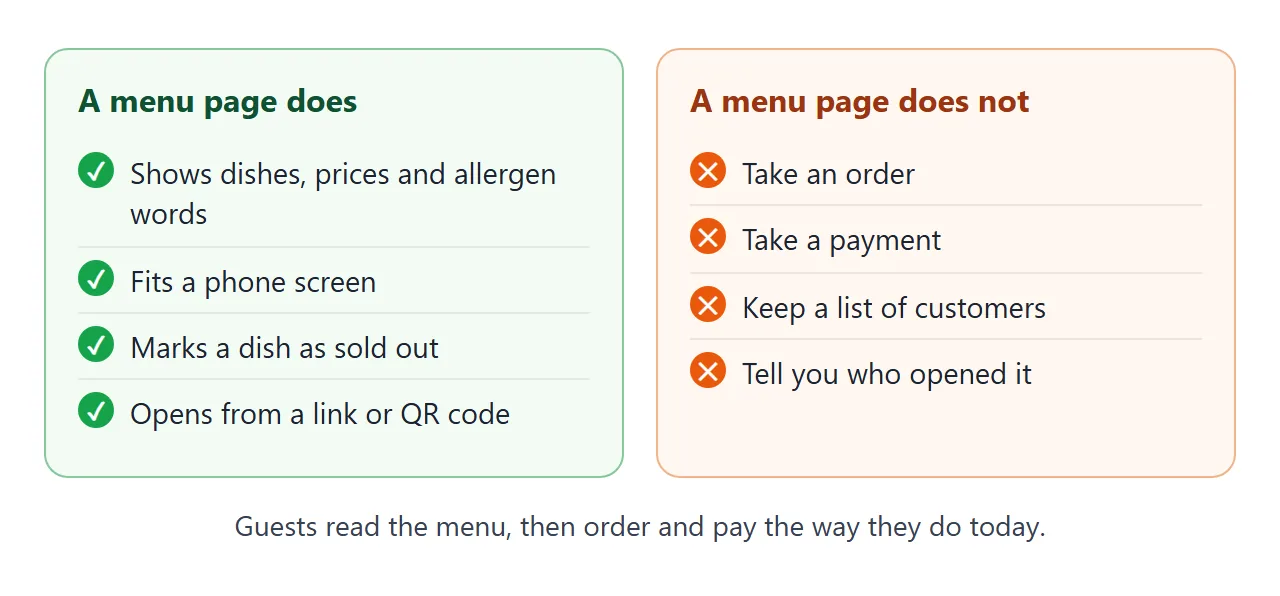
That is a choice. A menu that only reads is simple to build, and simple to fix at 8 a.m. If you later need orders or payments, that is a separate tool with its own plans and fees to check on its own site.
| Way to show a menu | What guests get | What you do to change a price |
|---|---|---|
| Paper only | Reading at the venue | Reprint |
| PDF at a link | A file sized for paper | Make a new file |
| One HTML page (this guide) | A page that fits the phone | Edit one number |
| Ordering service | Menu plus ordering | Use the service's own editor |
For more on why a page suits a phone better than a file, read Menu link. For wording and layout of the dishes, see How to make an online menu.
When it does not work
| What you see | Likely cause | Fix |
|---|---|---|
| The QR code shows nothing | Code printed too small or without a margin | Print it bigger with a blank margin |
| The code opens an old menu | A new share link was made instead of an edit | Edit the original document |
| Text is tiny on a phone | The page has no viewport tag | Add the viewport meta tag |
| A dish photo is missing | The image came from another site | Use inline SVG or a CSS shape |
| A filter button hides a dish | The AI gave that dish the wrong group | Fix the group word in the code |
| Guests ask how to order | The page has no ordering | Add a line such as "Order at the counter" |
Last, test the whole chain on a phone that is not yours: scan the printed code, read the menu, and check three prices.