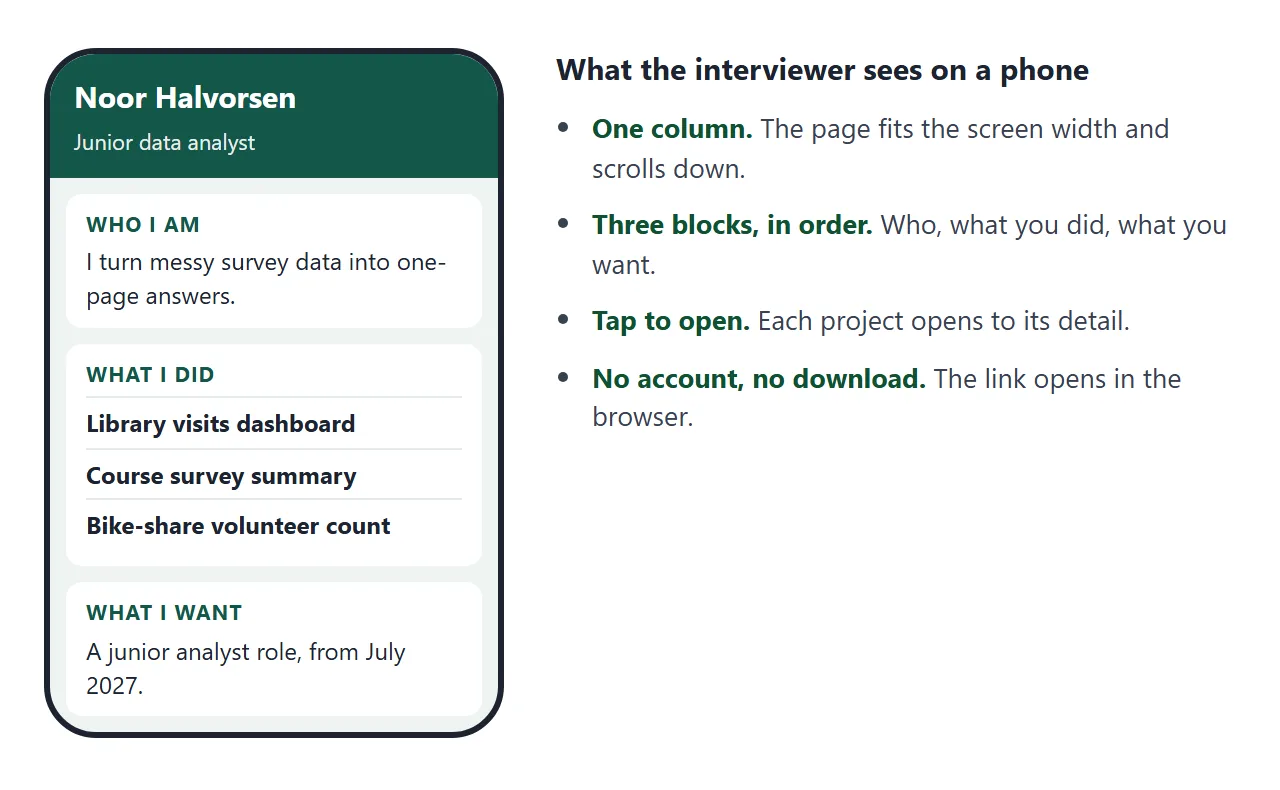
An elevator pitch one pager is a single page with three blocks: who you are, what you did, and what you want. For a job seeker, make it a web page and send the link in the thank-you email after an interview.
A Quora question asks for the best free or cheap site builder for a simple one-page personal website. For a pitch, a builder is more than the job needs. One page of HTML from an AI chat, pasted into NOS, becomes a link.
Here is a pitch page for a made-up student. Tap a project to open its detail, or use Open all. The page is drawn from one object near the bottom of the code, so changing the page means changing a few lines.
<!doctype html>
<html lang="en">
<head>
<meta charset="utf-8">
<meta name="viewport" content="width=device-width, initial-scale=1">
<title>Noor Halvorsen: one-page pitch</title>
<style>
  * { box-sizing: border-box; }
  body { margin: 0; padding: 14px; font-family: system-ui, sans-serif; background: #eef4f2; color: #1c2724; line-height: 1.5; }
  .wrap { max-width: 600px; margin: 0 auto; }
  header { background: #14574a; color: #fff; border-radius: 14px; padding: 18px 18px 16px; }
  header h1 { margin: 0 0 2px; font-size: 26px; line-height: 1.2; }
  header .role { margin: 0; font-size: 16px; opacity: .95; }
  header .thanks { margin: 10px 0 0; font-size: 14px; opacity: .9; }
  section { background: #fff; border-radius: 14px; padding: 14px 18px; margin-top: 12px; box-shadow: 0 1px 6px rgba(0,0,0,.07); }
  .label { margin: 0 0 6px; font-size: 12px; font-weight: 700; letter-spacing: .06em; text-transform: uppercase; color: #14574a; }
  section p { margin: 0; font-size: 17px; }
  .tools { display: flex; justify-content: space-between; align-items: center; gap: 10px; margin-bottom: 4px; }
  button { font: inherit; font-size: 13px; font-weight: 700; padding: 7px 12px; border: 0; border-radius: 8px; background: #e1ece9; color: #14574a; cursor: pointer; }
  details { border-top: 1px solid #e3ebe8; padding: 10px 0; }
  details:first-of-type { border-top: 0; }
  summary { cursor: pointer; font-weight: 700; font-size: 16px; }
  details p { margin-top: 6px; font-size: 15px; color: #3a4844; }
  .contact { font-size: 15px; }
  .contact b { color: #14574a; }
  footer { margin: 12px 4px 0; font-size: 12px; color: #5b6865; text-align: center; }
</style>
</head>
<body>
<div class="wrap">
  <header>
    <h1 id="name"></h1>
    <p class="role" id="headline"></p>
    <p class="thanks">Thank you for the conversation. This is the short version of what I did not have time to say.</p>
  </header>

  <section>
    <p class="label">Who I am</p>
    <p id="who"></p>
  </section>

  <section>
    <div class="tools">
      <p class="label" style="margin:0">What I did</p>
      <button type="button" id="toggle">Open all</button>
    </div>
    <div id="projects"></div>
  </section>

  <section>
    <p class="label">What I want</p>
    <p id="want"></p>
  </section>

  <section class="contact">
    <p class="label">Reach me</p>
    <p id="contact"></p>
  </section>

  <footer id="updated"></footer>
</div>

<script>
  // Edit this one object to change the page. Everything below it only draws it.
  const PROFILE = {
    name: 'Noor Halvorsen',
    headline: 'Junior data analyst · Statistics student, graduating June 2027',
    who: 'I turn messy survey and usage data into one-page answers for people who are not analysts.',
    projects: [
      { title: 'Library visits dashboard',
        detail: 'Cleaned 14 months of door-count logs from a campus library and built a one-page dashboard. Staff used it when they reviewed opening hours.' },
      { title: 'Course survey summary',
        detail: 'Summarised 212 survey answers into five findings for a department meeting, with the method written on the last line.' },
      { title: 'Bike-share volunteer count',
        detail: 'Planned a two-weekend count with six volunteers and compared the totals with the city\'s published figures.' }
    ],
    want: 'A junior analyst role where I work with survey and usage data. I can start in July 2027, and I am glad to do a short work sample.',
    contact: '<b>Email:</b> noor@example.com (fictional) · <b>Page:</b> this link',
    updated: 'Updated 1 October 2026'
  };

  document.getElementById('name').textContent = PROFILE.name;
  document.getElementById('headline').textContent = PROFILE.headline;
  document.getElementById('who').textContent = PROFILE.who;
  document.getElementById('want').textContent = PROFILE.want;
  document.getElementById('contact').innerHTML = PROFILE.contact;
  document.getElementById('updated').textContent = PROFILE.updated;

  const box = document.getElementById('projects');
  PROFILE.projects.forEach((p) => {
    const d = document.createElement('details');
    const s = document.createElement('summary');
    s.textContent = p.title;
    const t = document.createElement('p');
    t.textContent = p.detail;
    d.appendChild(s);
    d.appendChild(t);
    box.appendChild(d);
  });

  const btn = document.getElementById('toggle');
  btn.addEventListener('click', () => {
    const all = box.querySelectorAll('details');
    const open = btn.textContent === 'Open all';
    all.forEach((d) => (d.open = open));
    btn.textContent = open ? 'Close all' : 'Open all';
  });
</script>
</body>
</html>
What goes in the three blocks
The page is read after the conversation is over, so each block answers one question and then stops.
| Block | It answers | Keep it to |
|---|---|---|
| Who I am | What field are you in, and what do you do well? | One or two sentences |
| What I did | What have you made or changed? | Two or three items, each with a fact |
| What I want | Which role, from when, and how do I reach you? | One sentence plus contact details |
Every item in the second block should be something you could talk about for another five minutes. If you cannot explain a number out loud, leave it out.
Draft the blocks as plain sentences before you ask an AI to lay out a page. The worksheet below counts words as you type and shows the text the way you will paste it.
<!doctype html>
<html lang="en">
<head>
<meta charset="utf-8">
<meta name="viewport" content="width=device-width, initial-scale=1">
<title>Draft your three blocks</title>
<style>
  * { box-sizing: border-box; }
  body { margin: 0; padding: 14px; font-family: system-ui, sans-serif; background: #f3f1ec; color: #26221c; line-height: 1.45; }
  .wrap { max-width: 600px; margin: 0 auto; }
  h1 { font-size: 22px; margin: 0 0 4px; }
  .sub { margin: 0 0 12px; font-size: 14px; color: #6a6358; }
  .block { background: #fff; border-radius: 12px; padding: 12px 14px; margin-bottom: 10px; box-shadow: 0 1px 6px rgba(0,0,0,.07); }
  label { display: block; font-weight: 700; font-size: 15px; margin-bottom: 2px; }
  .hint { font-size: 13px; color: #6a6358; margin: 0 0 6px; }
  textarea { width: 100%; min-height: 76px; font: inherit; font-size: 15px; padding: 8px 10px; border: 1px solid #cfc8ba; border-radius: 8px; resize: vertical; }
  .count { margin-top: 4px; font-size: 13px; font-weight: 600; color: #2f6b3a; }
  .count.long { color: #b4470c; }
  .row { display: flex; gap: 8px; margin: 4px 0 12px; }
  button { font: inherit; font-size: 14px; font-weight: 700; padding: 9px 14px; border: 0; border-radius: 8px; background: #8a4b12; color: #fff; cursor: pointer; }
  button.ghost { background: #e6e0d3; color: #26221c; }
  .preview { background: #fff; border: 2px solid #8a4b12; border-radius: 12px; padding: 12px 14px; margin-bottom: 12px; }
  .preview h2 { margin: 0 0 6px; font-size: 16px; }
  .preview p { margin: 0 0 8px; font-size: 15px; }
  .preview p:last-child { margin-bottom: 0; }
  .preview .k { font-weight: 700; color: #8a4b12; }
  .check { background: #fff; border-radius: 12px; padding: 10px 14px; box-shadow: 0 1px 6px rgba(0,0,0,.07); }
  .check h2 { margin: 0 0 6px; font-size: 16px; }
  .check label { display: flex; gap: 8px; align-items: flex-start; font-weight: 400; font-size: 14px; margin: 0 0 6px; }
  .check input { margin-top: 3px; }
  .done { margin: 8px 0 0; font-size: 14px; font-weight: 700; color: #2f6b3a; min-height: 20px; }
</style>
</head>
<body>
<div class="wrap">
  <h1>Draft your three blocks</h1>
  <p class="sub">Write plain sentences first. The AI lays out the page later. Nothing you type here is sent or saved.</p>

  <div class="block">
    <label for="who">1. Who I am</label>
    <p class="hint">Your field and the kind of work you want to do. Aim for 35 words or fewer.</p>
    <textarea id="who" data-max="35"></textarea>
    <div class="count" id="c-who"></div>
  </div>

  <div class="block">
    <label for="did">2. What I did</label>
    <p class="hint">Two or three things you made or changed, each with a fact you can explain. Aim for 80 words or fewer.</p>
    <textarea id="did" data-max="80"></textarea>
    <div class="count" id="c-did"></div>
  </div>

  <div class="block">
    <label for="want">3. What I want</label>
    <p class="hint">The role, when you can start, and how to reach you. Aim for 40 words or fewer.</p>
    <textarea id="want" data-max="40"></textarea>
    <div class="count" id="c-want"></div>
  </div>

  <div class="row">
    <button type="button" id="select">Select the draft</button>
    <button type="button" id="clear" class="ghost">Clear</button>
  </div>

  <div class="preview" id="preview">
    <h2>Your draft, as the AI will receive it</h2>
    <p><span class="k">Who I am:</span> <span id="p-who"></span></p>
    <p><span class="k">What I did:</span> <span id="p-did"></span></p>
    <p><span class="k">What I want:</span> <span id="p-want"></span></p>
  </div>

  <div class="check">
    <h2>Before you paste it into the AI</h2>
    <label><input type="checkbox" class="tick"> Every number is one I can explain out loud.</label>
    <label><input type="checkbox" class="tick"> The role I want is named.</label>
    <label><input type="checkbox" class="tick"> My contact details are in the third block.</label>
    <label><input type="checkbox" class="tick"> Nothing here is a claim I could not back up in an interview.</label>
    <div class="done" id="done"></div>
  </div>
</div>

<script>
  const SAMPLE = {
    who: 'Final-year statistics student who turns messy survey data into one-page answers for people who are not analysts.',
    did: 'Cleaned 14 months of library door counts and built a dashboard that staff used to review opening hours. Summarised 212 survey answers into five findings for a department meeting.',
    want: 'A junior analyst role working with survey and usage data, starting July 2027. noor@example.com (fictional).'
  };
  const ids = ['who', 'did', 'want'];

  const words = (s) => (s.trim() ? s.trim().split(/\s+/).length : 0);

  function update() {
    ids.forEach((id) => {
      const ta = document.getElementById(id);
      const n = words(ta.value);
      const max = Number(ta.dataset.max);
      const c = document.getElementById('c-' + id);
      c.textContent = n + ' words' + (n > max ? ' - long, trim it' : '');
      c.classList.toggle('long', n > max);
      document.getElementById('p-' + id).textContent = ta.value.trim() || '(empty)';
    });
  }

  ids.forEach((id) => {
    const ta = document.getElementById(id);
    ta.value = SAMPLE[id];
    ta.addEventListener('input', update);
  });
  update();

  document.getElementById('clear').addEventListener('click', () => {
    ids.forEach((id) => (document.getElementById(id).value = ''));
    update();
  });

  document.getElementById('select').addEventListener('click', () => {
    const r = document.createRange();
    r.selectNodeContents(document.getElementById('preview'));
    const sel = window.getSelection();
    sel.removeAllRanges();
    sel.addRange(r);
  });

  const ticks = document.querySelectorAll('.tick');
  ticks.forEach((t) =>
    t.addEventListener('change', () => {
      const all = Array.from(ticks).every((x) => x.checked);
      document.getElementById('done').textContent = all ? 'Ready to paste into the AI.' : '';
    })
  );
</script>
</body>
</html>
Make it with AI
Paste your three blocks into ChatGPT, Claude or Gemini with this prompt.
Make one HTML page that works as my one-page pitch after a job
interview. Three blocks in this order: "Who I am", "What I did",
"What I want". Put my details in one JavaScript object near the bottom
of the file (name, headline, who, projects with title and detail, want,
contact) and build the page from it. Show each project as a line that
opens to show its detail. Large text, one column, works on a phone.
No outside libraries, images or fonts. No forms. Do not save data
anywhere. Use only the facts below. Do not add numbers, employers or
tools that I did not write.

[paste your three blocks here]
Then check the result before you send it:
- Every fact. Compare each name, number and date with your own notes. An AI can fill a gap with something that sounds right.
- The role. The third block should name the job you want, not a general wish.
- Contact details. Make sure the email address is yours and has no typo.
- Left-over text. Look for words such as Lorem, your name or placeholder.
- Phone width. Make the browser window narrow. The page should stay in one column.
If something is wrong, fix that line in the code, or paste the code back to the AI and say what to change. Editing AI-generated HTML without code covers the second route.
Send it as a link
- Copy all of the code the AI returned.
- Paste it into a NOS document. The page renders and its scripts run, so click through it yourself.
- Choose Create share link and copy the address. HTML to link walks through it.
- Put the address in the thank-you email, with one sentence about what is on the page.
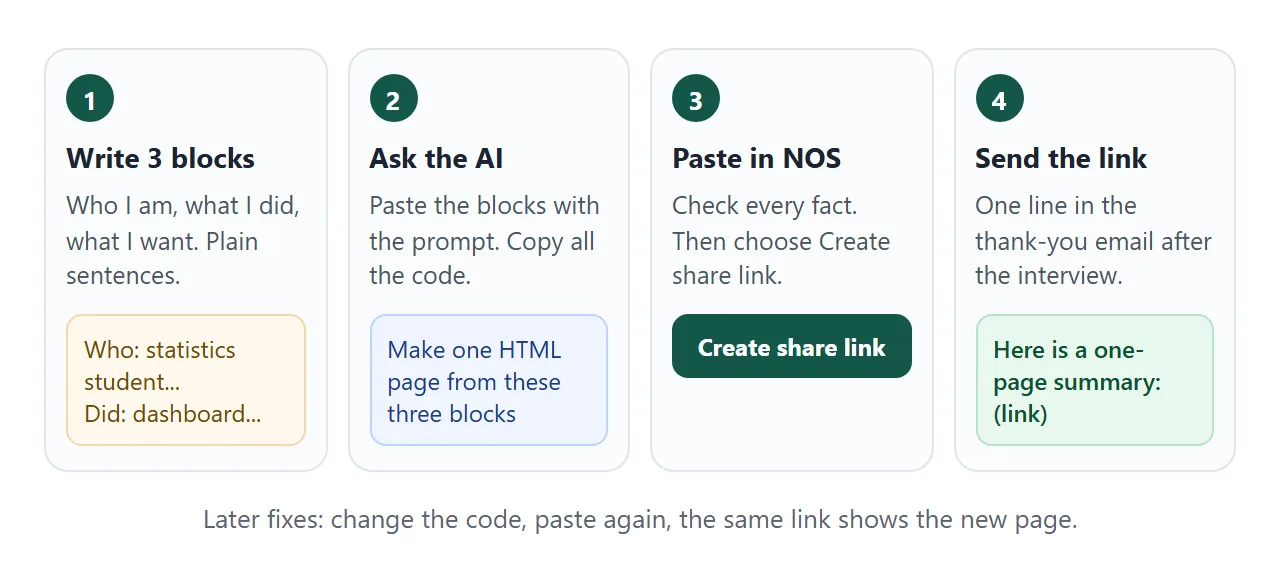
Anyone with the link can open the page in a browser, on a phone or a laptop, without an account. They cannot edit it.
In Gmail on a computer, the help page says to click Compose, highlight the text, click Insert link (or press Ctrl + K), paste the address and click Apply. You can also paste the bare address on its own line.
LinkedIn's help says the Featured section on a profile can hold links to external websites, for example a personal blog or portfolio. As of October 2026 the menus may differ by device and account, so check the current help page.
Ways to send a pitch compared
| Attach a file | Paste text into the email | Send a link | |
|---|---|---|---|
| What the reader gets | A copy | Text, no layout | An address that opens a page |
| After you fix a typo | Send a new file | Send a new email | Edit once, same link |
| On a phone | Depends on the phone and the mail app | Reads in the mail app | Opens in the browser |
| Which version they see | The one you sent | The one you sent | The current page |
A file still has a place when an application form asks for one. Use the page for the follow-up, where the aim is to be easy to open. Email vs link for documents compares the two in more detail.
Fixing the page after you sent it
A typo, a new project or a changed start date does not need a second email. Change the line in the code, paste it into the same NOS document, and the address you sent now shows the new page.
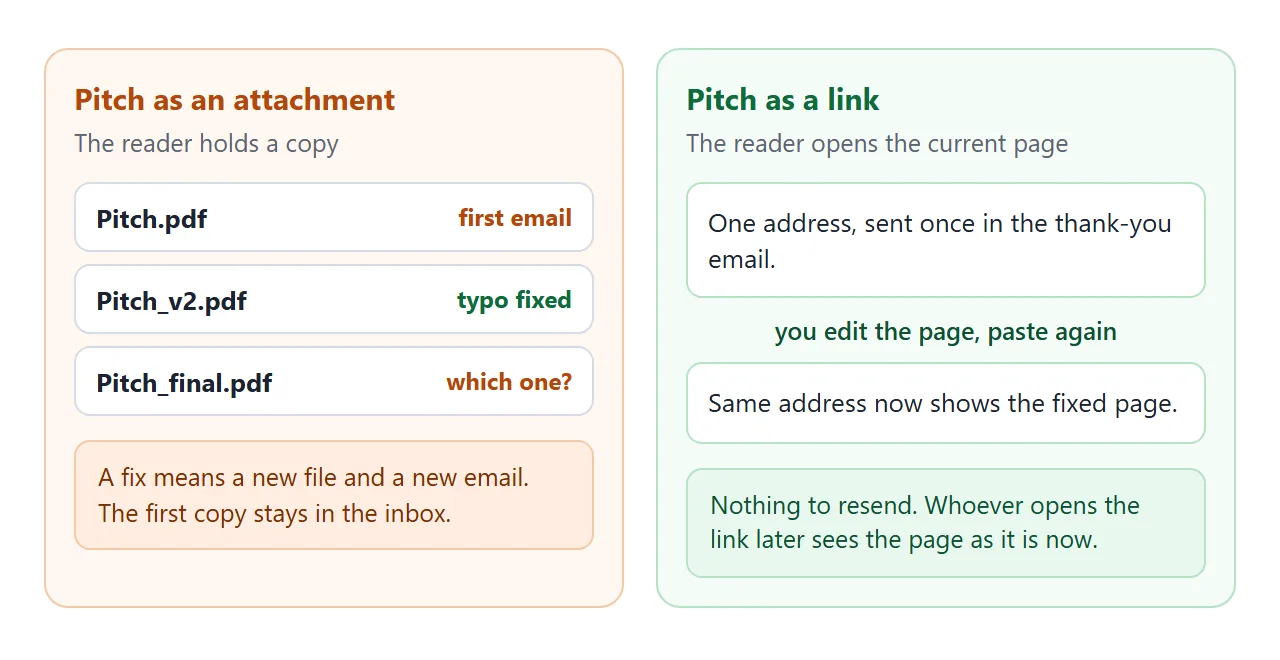
Because the link is the same, everyone who has it sees the current version. If you rewrite the page for a different job, the first interviewer sees the rewrite too. Keep the page general, and put anything specific to one employer in the email.
If you also need a full resume, the page can sit beside it. HTML resume shows that side, and linking a portfolio in a resume covers where the address goes on the paper copy.
When it does not work
| Symptom | Cause | Fix |
|---|---|---|
| The reader sees code, not a page | The HTML file was sent as an attachment and opened as text | Send the link, not the file |
| A number or tool on the page is not yours | The AI filled a gap | Fix the line in the code and paste again |
| A project does not open when tapped | Part of the code was lost when copying | Copy all of the AI's reply again |
| Images or fonts are missing | They come from another website, which the page blocks | Ask for a version with no outside images or fonts |
| A contact form does not send | NOS blocks sending a form to a server | Write your email address as text instead |
| You cannot tell whether it was opened | NOS does not record who opened a link | Ask a question in the email and follow up as usual |
| The interviewer sees an unfinished edit | The link always shows the current page | Edit only when the new version is ready |
If a phone shows a sent file as plain text, opening an HTML file on a phone explains why. Before you send any page an AI wrote, share AI-generated HTML lists what to check.