The simplest free Evite alternative for a small gathering is your own invitation page, sent as one link. Guests open it in a browser with no account and no app. What you give up is the RSVP list: replies reach you as messages.
Here is a page you can copy. Fill in the form as a guest would and press the button.
<!doctype html>
<html lang="en">
<head>
<meta charset="utf-8">
<meta name="viewport" content="width=device-width, initial-scale=1">
<title>Pizza and Games Night</title>
<style>
  * { box-sizing: border-box; }
  body {
    margin: 0; font-family: system-ui, -apple-system, "Segoe UI", sans-serif;
    background: #fff7ed; color: #1f2937; line-height: 1.5;
  }
  .wrap { max-width: 520px; margin: 0 auto; padding: 0 16px 32px; }
  .hero {
    margin: 0 -16px; padding: 28px 20px 24px; text-align: center; color: #fff;
    background: linear-gradient(135deg, #ea580c, #db2777);
  }
  .hero small { letter-spacing: 2px; text-transform: uppercase; opacity: .9; font-size: 12px; }
  .hero h1 { margin: 6px 0 4px; font-size: 30px; line-height: 1.15; }
  .hero p { margin: 0; opacity: .95; }
  .facts { display: grid; grid-template-columns: 1fr 1fr; gap: 10px; margin: 18px 0; }
  .fact { background: #fff; border-radius: 12px; padding: 12px 14px; box-shadow: 0 2px 8px rgba(0,0,0,.06); }
  .fact b { display: block; font-size: 12px; text-transform: uppercase; letter-spacing: 1px; color: #9a3412; }
  .fact.wide { grid-column: 1 / -1; }
  h2 { font-size: 18px; margin: 22px 0 8px; }
  ul { margin: 0; padding-left: 20px; }
  .map { background: #fff; border-radius: 12px; padding: 8px; box-shadow: 0 2px 8px rgba(0,0,0,.06); }
  .map svg { display: block; width: 100%; height: auto; }
  form { background: #fff; border-radius: 12px; padding: 16px; box-shadow: 0 2px 8px rgba(0,0,0,.06); }
  label { display: block; font-weight: 600; font-size: 14px; margin: 12px 0 4px; }
  label:first-of-type { margin-top: 0; }
  input[type=text], input[type=number], textarea {
    width: 100%; padding: 10px; font: inherit; border: 1px solid #d1d5db; border-radius: 8px;
  }
  .choice { display: flex; gap: 8px; }
  .choice label {
    flex: 1; margin: 0; padding: 10px; text-align: center; font-weight: 600;
    border: 1px solid #d1d5db; border-radius: 8px; cursor: pointer;
  }
  .choice input { position: absolute; opacity: 0; pointer-events: none; }
  .choice label:has(input:checked) { background: #ea580c; border-color: #ea580c; color: #fff; }
  .choice label:has(input:focus-visible) { outline: 3px solid #fdba74; outline-offset: 2px; }
  button {
    margin-top: 14px; width: 100%; padding: 12px; font: inherit; font-weight: 700;
    color: #fff; background: #1f2937; border: 0; border-radius: 8px; cursor: pointer;
  }
  button.alt { background: #fff; color: #1f2937; border: 1px solid #1f2937; margin-top: 8px; }
  #reply { display: none; margin-top: 16px; }
  #reply textarea { background: #f9fafb; }
  .note { font-size: 13px; color: #6b7280; margin: 10px 0 0; }
</style>
</head>
<body>
<div class="wrap">
  <div class="hero">
    <small>You are invited</small>
    <h1>Pizza and Games Night</h1>
    <p>Hosted by Robin</p>
  </div>

  <div class="facts">
    <div class="fact"><b>Date</b>Saturday, 18 October</div>
    <div class="fact"><b>Time</b>6:30 pm to 10 pm</div>
    <div class="fact wide"><b>Place</b>14 Alder Court, second floor. Ring the bell marked Robin.</div>
  </div>

  <h2>Good to know</h2>
  <ul>
    <li>Pizza is on us. Bring a drink or a board game if you like.</li>
    <li>Street parking is free after 6 pm.</li>
    <li>Tell us about allergies in your reply.</li>
  </ul>

  <h2>Finding us</h2>
  <div class="map">
    <svg viewBox="0 0 400 150" role="img" aria-label="Simple map: Alder Court runs between Main Street and the park, number 14 is marked">
      <rect width="400" height="150" fill="#ecfdf5"/>
      <rect x="0" y="62" width="400" height="26" fill="#e5e7eb"/>
      <rect x="250" y="0" width="26" height="150" fill="#e5e7eb"/>
      <rect x="290" y="14" width="96" height="40" rx="8" fill="#bbf7d0"/>
      <text x="338" y="39" text-anchor="middle" font-size="13" fill="#166534">Park</text>
      <text x="40" y="79" font-size="12" fill="#4b5563">Main Street</text>
      <text x="282" y="124" font-size="12" fill="#4b5563">Alder Court</text>
      <circle cx="263" cy="104" r="9" fill="#ea580c"/>
      <text x="263" y="108" text-anchor="middle" font-size="11" font-weight="700" fill="#fff">14</text>
    </svg>
  </div>

  <h2>Will you come?</h2>
  <form id="rsvp">
    <label for="name">Your name</label>
    <input type="text" id="name" required autocomplete="off">
    <label>Can you make it?</label>
    <div class="choice">
      <label><input type="radio" name="go" value="yes" checked>Yes</label>
      <label><input type="radio" name="go" value="no">No</label>
    </div>
    <label for="n">How many people, including you?</label>
    <input type="number" id="n" min="1" max="6" value="1">
    <label for="msg">Allergies or a note (optional)</label>
    <textarea id="msg" rows="2"></textarea>
    <button type="submit">Make my reply</button>
    <p class="note">This page does not collect replies. It writes yours out so you can send it to Robin in the same chat where you got the link.</p>

    <div id="reply">
      <label for="out">Your reply</label>
      <textarea id="out" rows="4" readonly></textarea>
      <button type="button" class="alt" id="copy">Copy reply</button>
    </div>
  </form>
</div>

<script>
  const form = document.getElementById('rsvp');
  const out = document.getElementById('out');

  form.addEventListener('submit', (e) => {
    e.preventDefault();  // nothing is sent anywhere; we only build text
    const name = document.getElementById('name').value.trim();
    const going = form.elements.go.value === 'yes';
    const n = document.getElementById('n').value;
    const msg = document.getElementById('msg').value.trim();
    let text = going
      ? 'Hi Robin, this is ' + name + '. Yes, we are coming to Pizza and Games Night on 18 October (' + n + (n === '1' ? ' person' : ' people') + ').'
      : 'Hi Robin, this is ' + name + '. Sorry, I cannot make Pizza and Games Night on 18 October.';
    if (msg) text += ' Note: ' + msg;
    out.value = text;
    document.getElementById('reply').style.display = 'block';
  });

  document.getElementById('copy').addEventListener('click', (e) => {
    out.select();
    if (navigator.clipboard) navigator.clipboard.writeText(out.value).catch(() => {});
    e.target.textContent = 'Copied (or press Ctrl+C)';
  });
</script>
</body>
</html>
Free invitation sites versus one link
An invitation service sends the invitation for you and keeps the replies. Evite's home page describes tracking RSVPs in real time. Evite's help page also says free invitations carry ads and Premium ones do not, as of October 2026.
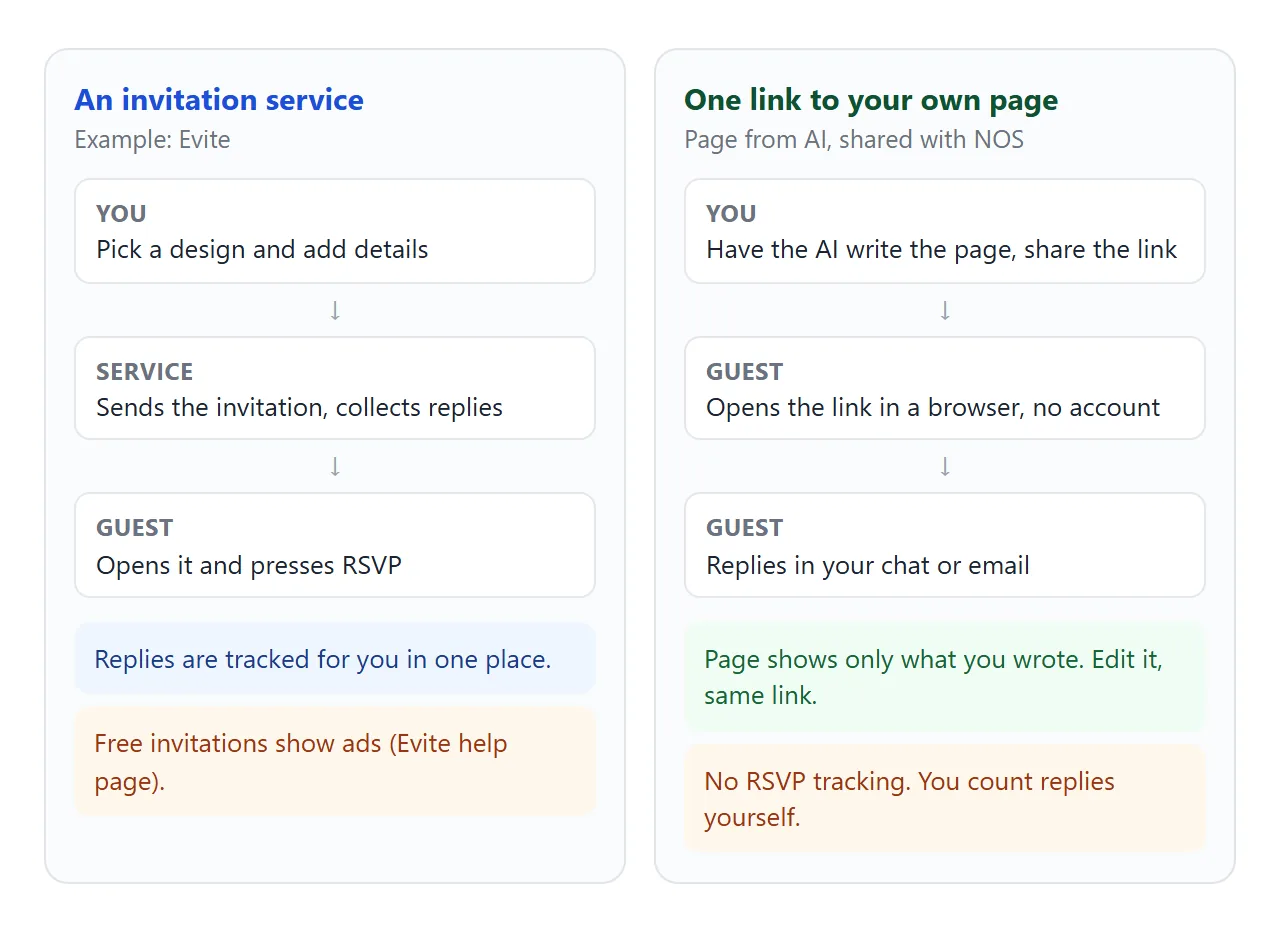
A one-link page works the other way round. You decide the whole look, and guests need nothing but the address. It cannot count anyone.
For a dinner with twelve friends, replies in a group chat are enough. For an event where a caterer needs a number, a list that fills itself helps. A middle path is a page for the invitation and a tally page for counting.
Make it with AI
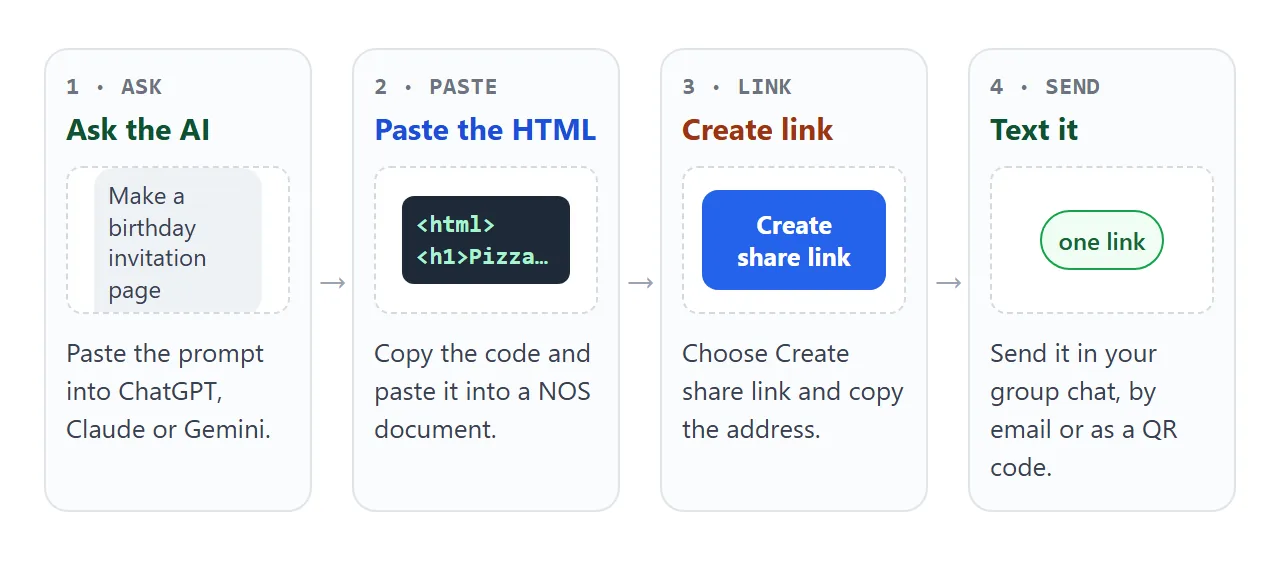
You do not need to write HTML. Paste this into ChatGPT, Claude or Gemini and replace the details in brackets.
Write one self-contained HTML file for a party invitation.
Details: [event name], [date], [start and end time],
[address], hosted by [your name]. Add a short "good to know" list: [parking, food, what to bring].
Rules: inline CSS only, no external images, fonts or scripts. Looks good on a phone.
Include a viewport meta tag. Draw any map as inline SVG, not an iframe.
Add a "Will you come?" form (name, yes or no, number of people, note).
On submit, do not send anything: write the reply as text in a box
with a Copy button, so the guest can paste it into our chat.
Then check the result before you send it:
- The date, time and address are exactly right, including the weekday.
- It reads well when you narrow the browser window to phone width.
- It does not load images or maps from other sites. NOS blocks outside images and iframes, so they would show up empty.
- The form does not try to post to a server. A form that sends data to another site is blocked in NOS.
Send it as a link
Copy the HTML, paste it into a NOS document and choose Create share link. HTML to link walks through it. The page opens as written, with its scripts running, in any browser, a phone included. Guests need no account, and cannot edit your page.
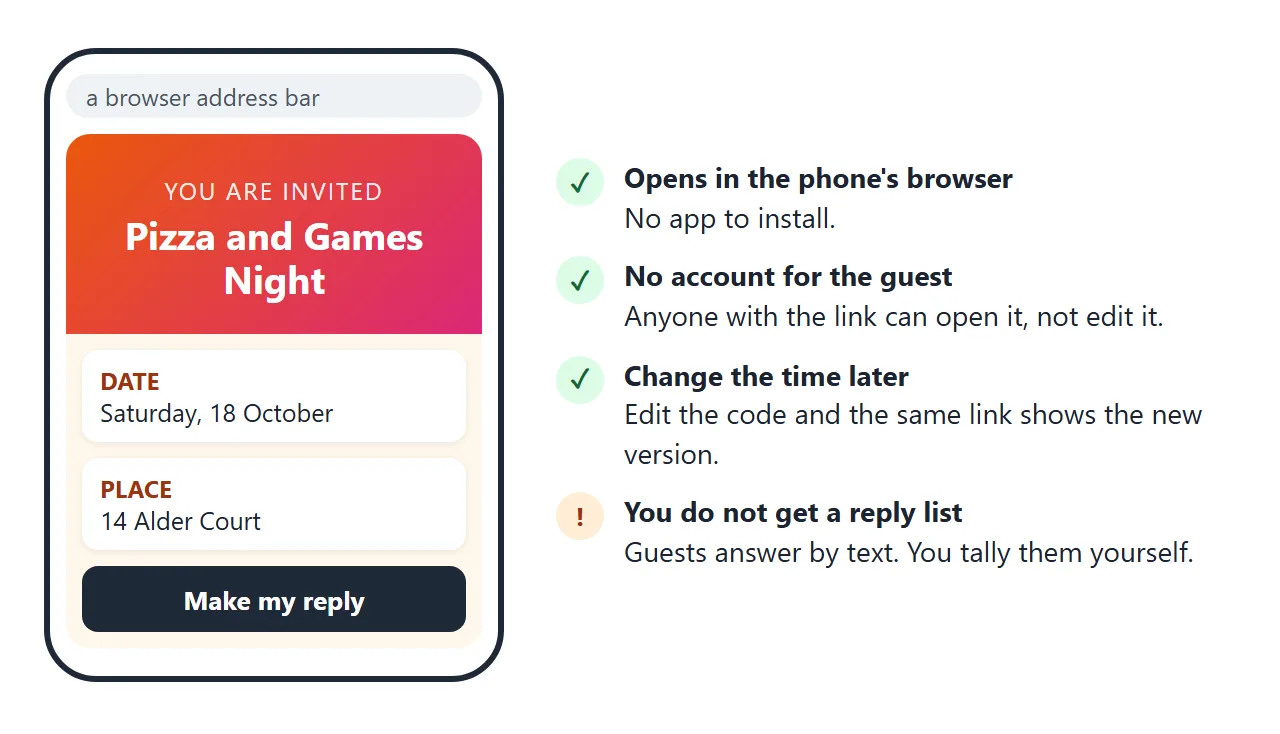
If you fix a typo or move the start time, edit the code and the same link shows the new version. You never have to resend the address.
A link pastes into a text message, an email or a chat like any web address. For a printed invitation, turn it into a QR code: HTML file to QR code shows how. For more invitation layouts, see HTML invitation template.
Ways to send an invitation compared
| Way | What the guest does | Who counts the replies |
|---|---|---|
| Evite free invitation | Opens the invitation link and RSVPs | The service lists them (free invitations carry ads) |
| Evite Premium invitation | The same, without ads | The service lists them (paid, see Evite's pricing page) |
| One-link page from AI | Opens the link, replies in your chat | You |
| A plain text message | Reads it, replies in your chat | You |
Evite's rows are what its help pages say as of October 2026. Features and plans can change, so read the current page before you pick.
Keeping count of replies
When a reply arrives in your chat, tick it off. A second page, for you only, does the sums.
<!doctype html>
<html lang="en">
<head>
<meta charset="utf-8">
<meta name="viewport" content="width=device-width, initial-scale=1">
<title>Reply tally (host copy)</title>
<style>
  * { box-sizing: border-box; }
  body { margin: 0; padding: 16px; font-family: system-ui, -apple-system, "Segoe UI", sans-serif; background: #f8fafc; color: #1f2937; }
  .card { max-width: 520px; margin: 0 auto; background: #fff; border-radius: 12px; padding: 16px; box-shadow: 0 2px 10px rgba(0,0,0,.08); }
  h1 { font-size: 20px; margin: 0 0 4px; }
  .warn { font-size: 13px; color: #9a3412; background: #ffedd5; border-radius: 8px; padding: 8px 10px; margin: 8px 0 14px; }
  .totals { display: flex; gap: 8px; margin-bottom: 12px; }
  .totals div { flex: 1; text-align: center; border-radius: 10px; padding: 8px 4px; font-size: 13px; }
  .totals b { display: block; font-size: 24px; }
  .t-yes { background: #dcfce7; color: #166534; }
  .t-no { background: #fee2e2; color: #991b1b; }
  .t-wait { background: #e5e7eb; color: #374151; }
  table { width: 100%; border-collapse: collapse; font-size: 15px; }
  th { text-align: left; font-size: 12px; text-transform: uppercase; letter-spacing: .5px; color: #6b7280; padding: 6px 4px; }
  th.c, td.c { text-align: center; width: 64px; }
  td { padding: 8px 4px; border-top: 1px solid #e5e7eb; }
  input[type=checkbox] { width: 22px; height: 22px; accent-color: #16a34a; }
  td.nocell input { accent-color: #dc2626; }
  .add { display: flex; gap: 8px; margin-top: 14px; }
  .add input { flex: 1; min-width: 0; padding: 10px; font: inherit; border: 1px solid #d1d5db; border-radius: 8px; }
  .add button { padding: 10px 14px; font: inherit; font-weight: 700; color: #fff; background: #1f2937; border: 0; border-radius: 8px; cursor: pointer; }
</style>
</head>
<body>
<div class="card">
  <h1>Pizza and Games Night: replies</h1>
  <div class="warn">Host copy. Keep this link to yourself and send guests the invitation link instead.</div>

  <div class="totals">
    <div class="t-yes"><b id="cy">0</b>coming</div>
    <div class="t-no"><b id="cn">0</b>not coming</div>
    <div class="t-wait"><b id="cw">0</b>no reply yet</div>
  </div>

  <table>
    <thead><tr><th>Guest</th><th class="c">Yes</th><th class="c">No</th></tr></thead>
    <tbody id="rows">
      <tr><td>Ana and Leo</td><td class="c"><input type="checkbox" class="yes" aria-label="Ana and Leo coming"></td><td class="c nocell"><input type="checkbox" class="no" aria-label="Ana and Leo not coming"></td></tr>
      <tr><td>Marcus</td><td class="c"><input type="checkbox" class="yes" aria-label="Marcus coming"></td><td class="c nocell"><input type="checkbox" class="no" aria-label="Marcus not coming"></td></tr>
      <tr><td>Priya</td><td class="c"><input type="checkbox" class="yes" aria-label="Priya coming"></td><td class="c nocell"><input type="checkbox" class="no" aria-label="Priya not coming"></td></tr>
      <tr><td>The Novak family</td><td class="c"><input type="checkbox" class="yes" aria-label="The Novak family coming"></td><td class="c nocell"><input type="checkbox" class="no" aria-label="The Novak family not coming"></td></tr>
    </tbody>
  </table>

  <form class="add" id="add">
    <input type="text" id="who" placeholder="Add a guest" aria-label="Guest name" autocomplete="off">
    <button type="submit">Add</button>
  </form>
</div>

<script>
  const rows = document.getElementById('rows');

  function count() {
    let y = 0, n = 0, w = 0;
    rows.querySelectorAll('tr').forEach((tr) => {
      const yes = tr.querySelector('input.yes').checked;
      const no = tr.querySelector('input.no').checked;
      if (yes) y++; else if (no) n++; else w++;
    });
    document.getElementById('cy').textContent = y;
    document.getElementById('cn').textContent = n;
    document.getElementById('cw').textContent = w;
  }

  // Yes and No exclude each other; then recount
  rows.addEventListener('change', (e) => {
    if (!e.target.matches('input[type=checkbox]') || !e.target.checked) return count();
    const other = e.target.closest('tr').querySelector(e.target.classList.contains('yes') ? 'input.no' : 'input.yes');
    other.checked = false;
    count();
  });

  document.getElementById('add').addEventListener('submit', (e) => {
    e.preventDefault();
    const input = document.getElementById('who');
    const name = input.value.trim();
    if (!name) return;
    const tr = document.createElement('tr');
    const td = document.createElement('td');
    td.textContent = name;
    tr.appendChild(td);
    [['yes', 'coming', ''], ["no", "not coming", " nocell"]].forEach(([cls, label, extra]) => {
      const c = document.createElement('td');
      c.className = 'c' + extra;
      const box = document.createElement('input');
      box.type = 'checkbox';
      box.className = cls;
      box.setAttribute('aria-label', name + ' ' + label);
      c.appendChild(box);
      tr.appendChild(c);
    });
    rows.appendChild(tr);
    input.value = '';
    count();
  });

  count();
</script>
</body>
</html>
In NOS, ticks and added rows that you make as the owner in View mode are saved. Changes a visitor makes are not saved. That suits a tally you keep for yourself.
Keep the tally link private. Anyone who has it can open the page and read the names on it. Send guests the invitation link, not this one. For a calendar entry guests can add, see calendar invite link.
When it does not work
| Symptom | Cause | Fix |
|---|---|---|
| The map or a photo is blank | It is loaded from another site, or it is an iframe | Use inline SVG or plain text for the address |
| A guest presses submit and nothing arrives | The page cannot send data to a server | Make the reply text copyable, as in the example, and ask for it in your chat |
| The page looks cramped on a phone | No viewport meta tag | Ask the AI to add one and keep the layout single-column |
| Guests keep asking where it is | The address is hidden in a long paragraph | Put date, time and place in big blocks at the top |
| A guest sees the old time | They are looking at a message, not the page | Send a short note that the page changed and share the same link |
| You cannot tell who has not answered | The page does not track anyone | Keep a tally page and ask the quiet ones directly |