Framer Motion here means the JavaScript animation library, not the Framer website builder. It is now published as Motion, and it runs in a plain HTML file: add one script tag, read animate from the global Motion object, and call it on an element.
Try the smallest version first. Press the buttons.
<!doctype html>
<html lang="en">
<head>
<meta charset="utf-8">
<meta name="viewport" content="width=device-width, initial-scale=1">
<title>Motion animate()</title>
<style>
  body { margin: 0; padding: 18px; font-family: system-ui, sans-serif; background: #f4f5f7; color: #1d2330; }
  .track { height: 72px; border-radius: 12px; background: #fff; box-shadow: inset 0 0 0 1px #e1e4ea; display: flex; align-items: center; padding: 0 8px; }
  #box { width: 56px; height: 56px; border-radius: 12px; background: #2563eb; }
  .row { display: flex; gap: 8px; margin-top: 14px; flex-wrap: wrap; }
  button { font: inherit; padding: 9px 14px; border: 0; border-radius: 8px; background: #1d2330; color: #fff; cursor: pointer; }
  #out { margin-top: 12px; font-size: 14px; color: #4b5563; min-height: 20px; }
</style>
</head>
<body>
<div class="track" id="track"><div id="box"></div></div>
<div class="row">
  <button id="slide">Slide</button>
  <button id="pop">Pop</button>
</div>
<div id="out">Press a button.</div>

<!-- Motion, pinned to one version. The script puts everything on window.Motion -->
<script src="https://cdn.jsdelivr.net/npm/motion@13.4.6/dist/motion.js"></script>
<script>
  const { animate } = Motion;
  const box = document.getElementById('box');
  const track = document.getElementById('track');
  const out = document.getElementById('out');
  let right = false;

  document.getElementById('slide').addEventListener('click', () => {
    right = !right;
    const distance = track.clientWidth - box.offsetWidth - 16;
    // animate(element, values, options): x is a transform shorthand
    animate(box, { x: right ? distance : 0 }, { type: 'spring', bounce: 0.3 })
      .finished.then(() => { out.textContent = 'Slide finished'; });
  });

  document.getElementById('pop').addEventListener('click', () => {
    // an array is a list of keyframes: 1 -> 1.4 -> 1
    animate(box, { scale: [1, 1.4, 1] }, { duration: 0.4 })
      .finished.then(() => { out.textContent = 'Pop finished'; });
  });
</script>
</body>
</html>
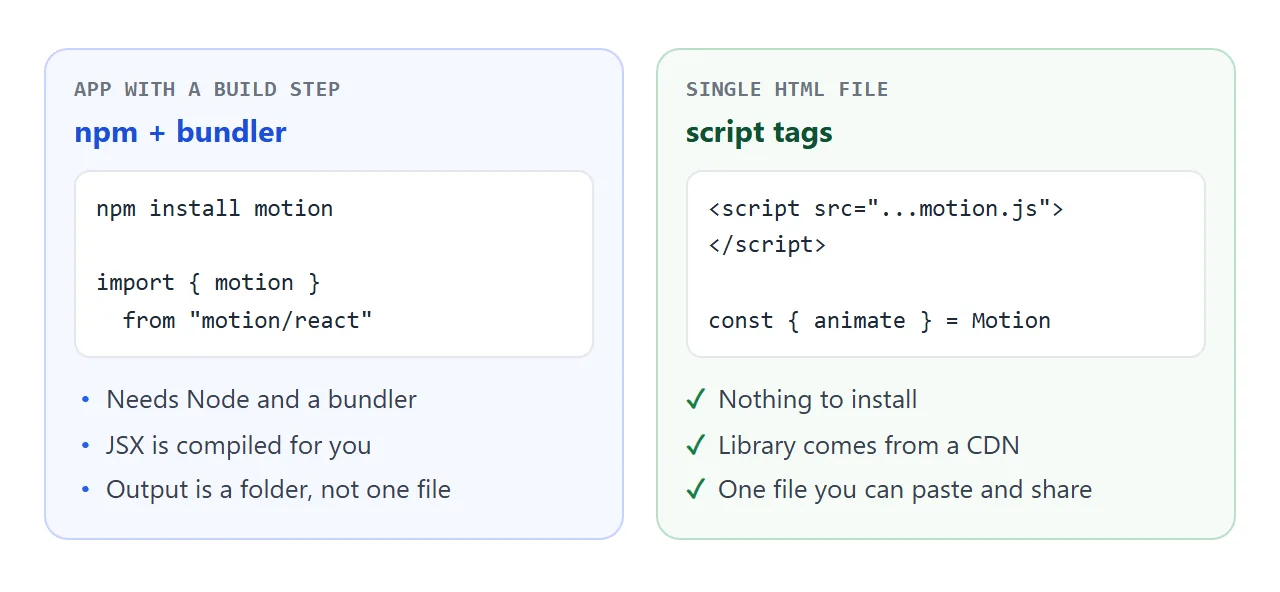
The same file works with no build step, no install and no React. That is the route this guide starts with. The React component API comes after it.
What the name means today
The library began as Framer Motion for React. Its authors then moved it into its own project, called Motion, and added APIs that work without React. Framer's dictionary says Motion was previously called Framer Motion and is an animation library for React and JavaScript.
For you, that gives two names for the same family of code. Searching for "framer motion react" still finds the React side. The vanilla functions such as animate are the newer part.
The smallest example, line by line
The example above has three moving parts.
<script src="https://cdn.jsdelivr.net/npm/motion@13.4.6/dist/motion.js"></script>
<script>
  const { animate } = Motion;
  animate(box, { x: 200 }, { duration: 0.5 });
</script>
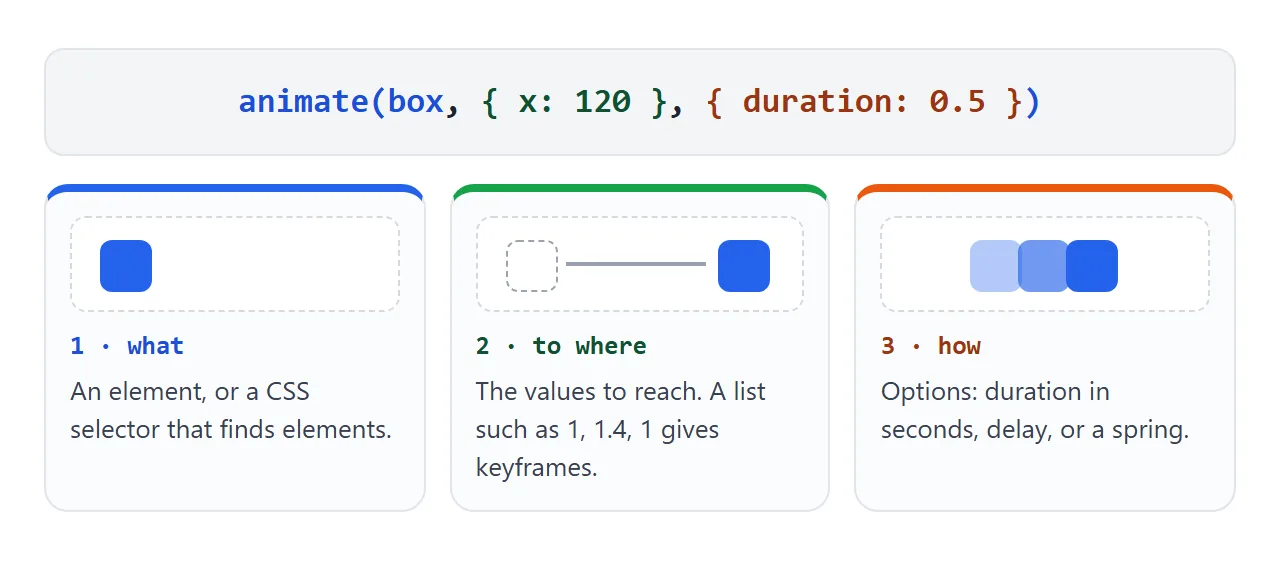
- The element. A DOM element, or a CSS selector.
- The values. An object of targets.
xandscaleare transform shortcuts, and a list such as[1, 1.4, 1]plays as keyframes. - The options. Durations are in seconds.
type: 'spring'swaps the timed curve for a spring.
animate returns controls. The finished property is a promise, so .finished.then(...) runs code when the animation ends. The controls also have pause(), play(), stop() and cancel().
Pin the version
Every script address in these examples contains a version number. Keep it. A link that says latest can change under a page that worked yesterday, and Motion's own quick start recommends replacing latest with a specific version.
The examples use version 13.4.6, the newest on npm when this guide was written on 1 October 2026. Change the number only after you have tried the page with the new one.
The React motion component in one file
In a React project you write motion.div and give it animation props. In a bundled app that looks like this.
import { motion } from "motion/react"

<motion.button whileHover={{ scale: 1.1 }} whileTap={{ scale: 0.95 }} />
A plain script has no bundler, and import works only in a module script. A bare name such as motion/react also needs an import map. The browser build avoids both by putting everything on window.Motion.
It needs React in place first. JSX is a syntax extension that must be transformed into plain JavaScript, so the example below calls React.createElement directly.
<!doctype html>
<html lang="en">
<head>
<meta charset="utf-8">
<meta name="viewport" content="width=device-width, initial-scale=1">
<title>framer-motion in one HTML file</title>
<style>
  body { margin: 0; padding: 18px; font-family: system-ui, sans-serif; background: #f4f5f7; color: #1d2330; }
  button { font: inherit; padding: 10px 16px; border: 0; border-radius: 10px; background: #1d2330; color: #fff; cursor: pointer; }
  .row { display: flex; gap: 10px; flex-wrap: wrap; align-items: center; margin-bottom: 14px; }
  ul { list-style: none; margin: 0; padding: 0; }
  li { background: #fff; border-radius: 10px; padding: 11px 14px; margin-bottom: 8px; box-shadow: 0 1px 0 #e1e4ea, 0 4px 12px rgba(0,0,0,.06); display: flex; justify-content: space-between; align-items: center; }
  li button { padding: 4px 10px; background: #e5e7eb; color: #1d2330; font-size: 13px; }
</style>
</head>
<body>
<div id="root"></div>

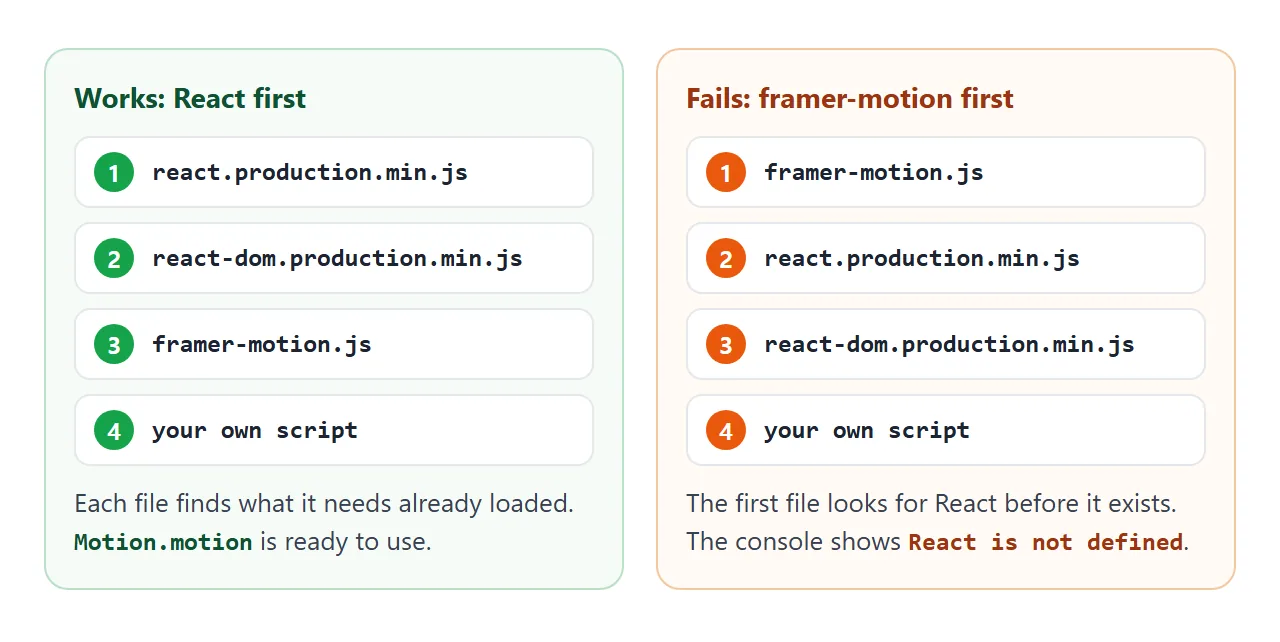
<!-- Order matters: React, ReactDOM, then framer-motion, then your code -->
<script src="https://unpkg.com/react@18.3.1/umd/react.production.min.js"></script>
<script src="https://unpkg.com/react-dom@18.3.1/umd/react-dom.production.min.js"></script>
<script src="https://cdn.jsdelivr.net/npm/framer-motion@13.4.6/dist/framer-motion.js"></script>
<script>
  const { motion, AnimatePresence } = Motion;   // the browser build exposes window.Motion
  const h = React.createElement;                // no JSX without a compiler
  let nextId = 3;

  function App() {
    const [items, setItems] = React.useState([{ id: 1, text: 'First note' }, { id: 2, text: 'Second note' }]);
    const add = () => setItems((l) => [...l, { id: nextId, text: 'Note ' + nextId++ }]);
    const remove = (id) => setItems((l) => l.filter((x) => x.id !== id));

    return h('div', null,
      h('div', { className: 'row' },
        h(motion.button, { onClick: add, whileHover: { scale: 1.06 }, whileTap: { scale: 0.94 } }, 'Add note'),
        h('span', null, items.length + ' notes')),
      h('ul', null,
        // AnimatePresence plays "exit" before a child leaves; each child needs a stable key
        h(AnimatePresence, null,
          items.map((it) =>
            h(motion.li, {
              key: it.id,
              initial: { opacity: 0, y: -12 },
              animate: { opacity: 1, y: 0 },
              exit: { opacity: 0, x: 60 },
              transition: { duration: 0.25 },
            }, it.text, h('button', { onClick: () => remove(it.id) }, 'Remove'))))));
  }

  ReactDOM.createRoot(document.getElementById('root')).render(h(App));
</script>
</body>
</html>
Three details make this work:
- Load order. React, ReactDOM, framer-motion, then your own script.
- One alias.
const h = React.createElementkeeps the calls short. - Exit animations.
AnimatePresencedetects a direct child leaving and plays itsexitfirst. Each child needs a stablekey, so avoid array positions.
React 18 is used because React 19 no longer ships the script-tag build that this approach loads. React's upgrade guide points to ES module CDNs for that case, which is a different setup from this one.
A finished page: cards that reveal as you scroll
The last example combines three functions: inView runs code when an element enters the viewport, stagger spaces the starts apart, and animate does the movement.
<!doctype html>
<html lang="en">
<head>
<meta charset="utf-8">
<meta name="viewport" content="width=device-width, initial-scale=1">
<title>Staggered reveal with Motion</title>
<style>
  body { margin: 0; padding: 16px; font-family: system-ui, sans-serif; background: #f4f5f7; color: #1d2330; }
  header { display: flex; justify-content: space-between; align-items: center; gap: 10px; margin-bottom: 14px; }
  h1 { font-size: 18px; margin: 0; }
  button { font: inherit; padding: 8px 14px; border: 0; border-radius: 8px; background: #1d2330; color: #fff; cursor: pointer; }
  .grid { display: grid; grid-template-columns: repeat(auto-fill, minmax(200px, 1fr)); gap: 12px; }
  .card { background: #fff; border-radius: 12px; padding: 14px; height: 110px; box-shadow: 0 1px 0 #e1e4ea, 0 6px 16px rgba(0,0,0,.07); }
  .card b { display: block; margin-bottom: 4px; }
  .card span { font-size: 13px; color: #6b7280; }
  /* hide cards only if Motion really loaded, so a blocked CDN never leaves a blank page */
  .motion .card { opacity: 0; }
</style>
</head>
<body>
<header><h1>Reveal on scroll</h1><button id="replay">Replay</button></header>
<div class="grid" id="grid"></div>

<script src="https://cdn.jsdelivr.net/npm/motion@13.4.6/dist/motion.js"></script>
<script>
  const grid = document.getElementById('grid');
  const names = ['Alpha', 'Bravo', 'Charlie', 'Delta', 'Echo', 'Foxtrot', 'Golf', 'Hotel', 'India', 'Juliet', 'Kilo', 'Lima'];
  grid.innerHTML = names.map((n, i) => '<div class="card"><b>' + n + '</b><span>Card ' + (i + 1) + '</span></div>').join('');
  const cards = [...document.querySelectorAll('.card')];

  if (window.Motion) {
    const { animate, stagger, inView } = Motion;
    document.documentElement.classList.add('motion');
    // honour the visitor's "reduce motion" setting: skip the movement, keep the fade
    const reduce = matchMedia('(prefers-reduced-motion: reduce)').matches;

    const show = () => reduce ? { opacity: 1 } : { opacity: 1, y: [24, 0] };

    // inView runs the callback when a card enters the viewport
    inView('.card', (card) => {
      animate(card, show(), { duration: 0.4, delay: (cards.indexOf(card) % 3) * 0.08 });
    }, { margin: '0px 0px -40px 0px' });

    document.getElementById('replay').addEventListener('click', () => {
      window.scrollTo(0, 0);
      animate(cards, { opacity: 0 }, { duration: 0 });
      // stagger(0.08) gives each card in the list a delay 0.08 s longer than the one before
      animate(cards.slice(0, 6), show(), { duration: 0.4, delay: stagger(0.08) });
    });
  }
</script>
</body>
</html>
- Hide only when Motion loaded. The script adds a class after the library is present, and the CSS hides cards only under that class. A blocked CDN then leaves a readable page instead of a blank one.
- Reduced motion. The code asks
matchMediawhether the visitor chose reduced motion. When it does, cards fade in without the upward move. - Stagger.
stagger(0.08)gives each element in a list a start 0.08 seconds later than the one before.
In React, the same wish is a MotionConfig setting named reducedMotion, with the values user, always and never. With user, Motion turns off transform animations and keeps changes such as opacity.
For the CSS-only version of this idea, see scroll reveal and CSS transitions. If you only need hover and fade effects, they are enough, and no library is needed.
When it does not work
| What you see | Cause | Fix |
|---|---|---|
Motion is not defined |
The script did not load: blocked CDN, wrong address, or your code runs first | Check the address, and put your script after the library tag |
React is not defined |
framer-motion loaded before React | Order the tags: React, ReactDOM, framer-motion |
| An error about an import statement | import is only allowed in a module script, and a bare name needs an import map |
Use the global Motion object, or add type="module" and a full address |
| JSX tags break the script | JSX has to be transformed into plain JavaScript first | Use React.createElement, or run the file through a compiler |
| The exit animation never plays | The child has no key, or is not a direct child of AnimatePresence |
Give each child a stable key |
| Nothing is visible on a slow network | Content starts hidden and waits for the library | Hide it only after the library is present |
| Movement is missing for some visitors | Their device asks for reduced motion | Keep a fade, as the last example does |
Share it as a link
An animation is hard to judge from a screenshot, and a GIF loses the spring. Sending the page lets people press, hover and scroll it themselves.
The page also needs its viewport meta tag to look right on a phone.
To send the working version, paste the page into a NOS document and choose Create share link. HTML to link walks through it.
The page renders as written and its scripts run, so the people you send it to can try the animation themselves. Scripts from jsDelivr and unpkg load. If you change the code later, the same link shows the new version.