A group trip itinerary works best as one page with one link. Everyone in the group opens the same plan, and when a time or a meeting point moves, you fix it on that page instead of sending a corrected copy.
For a team outing or a client trip, nobody needs an account or an app. They tap the link and read the day.
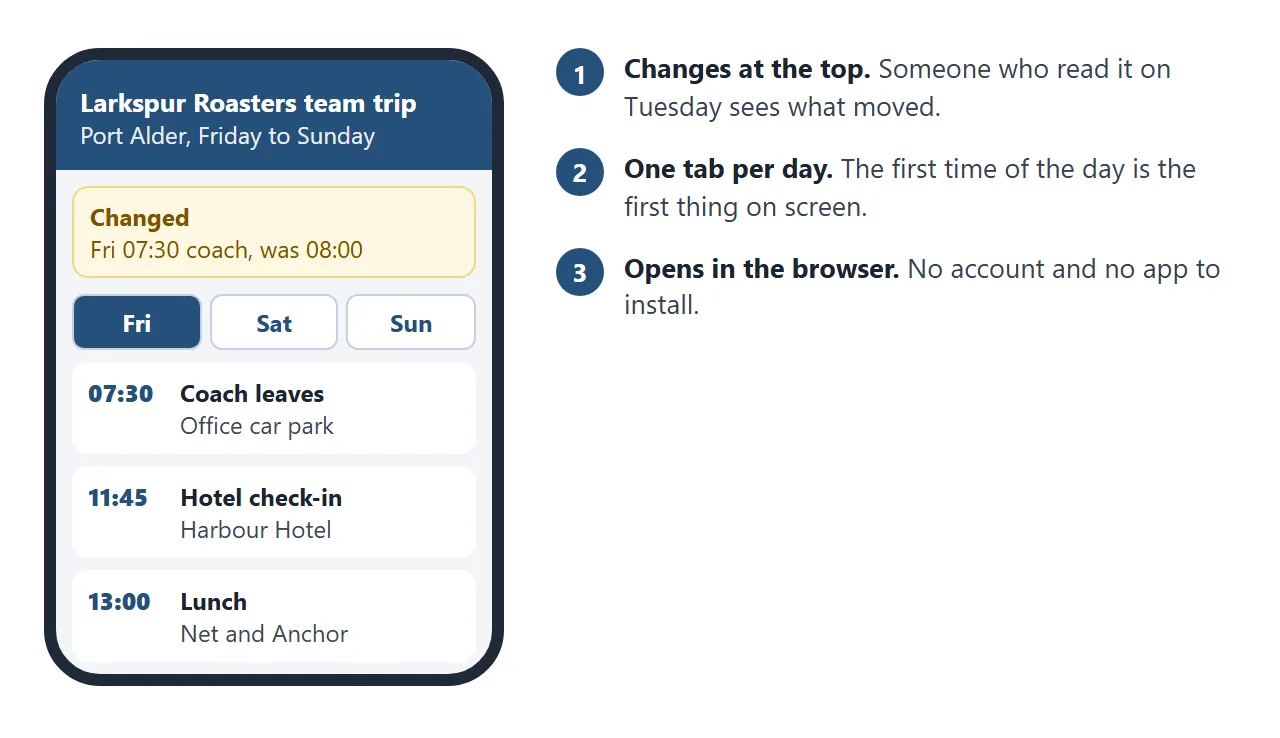
Here is an itinerary page for a made-up team trip. Tap Friday, Saturday and Sunday. Two entries were changed after the first version, so they are flagged and listed in a box at the top.
<!doctype html>
<html lang="en">
<head>
<meta charset="utf-8">
<meta name="viewport" content="width=device-width, initial-scale=1">
<title>Larkspur Roasters team trip</title>
<style>
* { box-sizing: border-box; }
body { margin: 0; font-family: system-ui, sans-serif; background: #f3f5f8; color: #1d2330; line-height: 1.45; }
header { background: #25507a; color: #fff; padding: 20px 16px 16px; }
.in { max-width: 680px; margin: 0 auto; }
header h1 { margin: 0 0 4px; font-size: 22px; }
header p { margin: 0; font-size: 14px; opacity: .92; }
main { max-width: 680px; margin: 0 auto; padding: 14px 16px 24px; }
.changes { background: #fff7e0; border: 1px solid #f2d680; border-radius: 12px; padding: 12px 14px; margin-bottom: 14px; }
.changes[hidden] { display: none; }
.changes h2 { margin: 0 0 6px; font-size: 15px; color: #7a5200; }
.changes ul { margin: 0; padding-left: 18px; font-size: 14px; }
.tabs { display: grid; grid-template-columns: repeat(3, 1fr); gap: 6px; margin-bottom: 12px; }
.tabs button { font: inherit; font-weight: 700; font-size: 15px; padding: 11px 6px; border: 1px solid #c8d1dd; background: #fff; color: #25507a; border-radius: 10px; cursor: pointer; }
.tabs button[aria-selected="true"] { background: #25507a; color: #fff; border-color: #25507a; }
.start { background: #fff; border-left: 6px solid #25507a; border-radius: 10px; padding: 12px 14px; margin-bottom: 12px; box-shadow: 0 1px 5px rgba(0,0,0,.06); }
.start small { display: block; font-size: 12px; font-weight: 700; color: #5b6472; text-transform: uppercase; letter-spacing: .03em; }
.start b { font-size: 26px; display: block; line-height: 1.15; }
.start span { font-size: 15px; }
.zone { font-size: 13px; color: #5b6472; margin: 0 0 10px; }
ol { list-style: none; margin: 0; padding: 0; }
li.item { display: grid; grid-template-columns: 62px 1fr; gap: 10px; background: #fff; border-radius: 10px; padding: 11px 12px; margin-bottom: 8px; box-shadow: 0 1px 5px rgba(0,0,0,.05); }
li.item.changed { border: 1px solid #f2d680; background: #fffdf5; }
.t { font-weight: 800; font-size: 17px; color: #25507a; }
.what { font-weight: 700; font-size: 16px; }
.where { font-size: 14px; color: #3d4654; }
.tag { display: inline-block; margin-left: 6px; padding: 1px 7px; border-radius: 999px; background: #ffe9a8; color: #6b4a00; font-size: 12px; font-weight: 700; vertical-align: 1px; }
.note { display: block; font-size: 13px; color: #7a5200; margin-top: 2px; }
footer { text-align: center; font-size: 13px; color: #5b6472; padding: 0 16px 22px; }
</style>
</head>
<body>
<header><div class="in">
<h1>Larkspur Roasters team trip</h1>
<p>Port Alder · Friday to Sunday · Organiser mobile: 555 0142 (fictional)</p>
</div></header>
<main>
<section class="changes" id="changes" hidden aria-live="polite"><h2>Changed since the first version</h2><ul id="changeList"></ul></section>
<div class="tabs" role="tablist" id="tabs"></div>
<div class="start" id="start"></div>
<p class="zone">All times are Port Alder local time.</p>
<ol id="list"></ol>
</main>
<footer>This page is the current plan. If something moves, the organiser fixes it here and the link stays the same.</footer>
<script>
// To fix the plan, edit one entry below. Add a "note" and it is flagged and listed at the top.
const DAYS = [
{ name: 'Friday', meet: 'Larkspur office car park', items: [
{ time: '07:30', what: 'Coach leaves', where: 'Office car park. Be there by 07:15.', note: 'Moved from 08:00 because of roadworks.' },
{ time: '11:45', what: 'Hotel check-in', where: 'Harbour Hotel, Quay Street 4' },
{ time: '13:00', what: 'Lunch', where: 'Net and Anchor, Fish Market Square' },
{ time: '15:00', what: 'Workshop: next year\'s menu', where: 'Harbour Hotel, Room Tern' },
{ time: '19:30', what: 'Dinner', where: 'Salt Shed, 8 minutes on foot from the hotel' }
]},
{ name: 'Saturday', meet: 'Harbour Hotel lobby', items: [
{ time: '08:30', what: 'Breakfast', where: 'Hotel restaurant' },
{ time: '09:45', what: 'Boat tour', where: 'Pier 2, below the fish market', note: 'Pier 2, not Pier 3 as first written.' },
{ time: '13:00', what: 'Lunch on your own', where: 'Free time in the old town' },
{ time: '16:00', what: 'Tasting with a guest roaster', where: 'Harbour Hotel, Room Tern' },
{ time: '19:00', what: 'Long-table dinner', where: 'Hotel terrace' }
]},
{ name: 'Sunday', meet: 'Harbour Hotel lobby', items: [
{ time: '09:00', what: 'Check-out', where: 'Reception. Leave bags with the porter if you like.' },
{ time: '10:00', what: 'Headland walk (optional)', where: 'Meet at the lobby door' },
{ time: '12:30', what: 'Coach home', where: 'Hotel front door' }
]}
];
const tabs = document.getElementById('tabs');
const list = document.getElementById('list');
const start = document.getElementById('start');
const changeList = document.getElementById('changeList');
function show(i) {
const day = DAYS[i];
tabs.querySelectorAll('button').forEach((b, n) => b.setAttribute('aria-selected', n === i ? 'true' : 'false'));
start.innerHTML = '';
const small = document.createElement('small'); small.textContent = day.name + ' starts';
const big = document.createElement('b'); big.textContent = day.items[0].time;
const where = document.createElement('span'); where.textContent = day.meet;
start.append(small, big, where);
list.innerHTML = '';
day.items.forEach((it) => {
const li = document.createElement('li');
li.className = 'item' + (it.note ? ' changed' : '');
const t = document.createElement('div'); t.className = 't'; t.textContent = it.time;
const box = document.createElement('div');
const w = document.createElement('div'); w.className = 'what'; w.textContent = it.what;
if (it.note) { const tag = document.createElement('span'); tag.className = 'tag'; tag.textContent = 'Changed'; w.appendChild(tag); }
const p = document.createElement('div'); p.className = 'where'; p.textContent = it.where;
box.append(w, p);
if (it.note) { const n = document.createElement('span'); n.className = 'note'; n.textContent = it.note; box.appendChild(n); }
li.append(t, box);
list.appendChild(li);
});
}
DAYS.forEach((d, i) => {
const b = document.createElement('button');
b.type = 'button'; b.setAttribute('role', 'tab'); b.textContent = d.name;
b.addEventListener('click', () => show(i));
tabs.appendChild(b);
d.items.forEach((it) => {
if (!it.note) return;
const li = document.createElement('li');
li.textContent = d.name + ' ' + it.time + ', ' + it.what + ': ' + it.note;
changeList.appendChild(li);
});
});
if (changeList.children.length) document.getElementById('changes').hidden = false;
show(0);
</script>
</body>
</html>
Each entry is one line in the code. Add a note to a line and the page flags it and lists it at the top. A person who read the plan on Tuesday sees on Thursday what moved.
For what belongs at the top of each day, see itinerary link. This page covers sending it to a group and correcting it afterwards.
Make it with AI
You do not have to write the page yourself. Paste your plan into ChatGPT, Claude or Gemini with this prompt.
Make one HTML page for a group trip from the plan below. One tab per
day. At the top of each day show the first time and the meeting place
in large text. List the day's entries in order: time, what, where.
Put the plan in one JavaScript list near the bottom. If an entry has
a "note" field, flag it as Changed and list it in a "Changed" box at
the top of the page. Say that all times are local time in [city].
Large text, works on a phone. No outside libraries, images or fonts.
Do not save data anywhere.

[paste your plan here]
Then check the result before anyone sees it:
- Every time and place. Compare each entry with your own notes. An AI can shift a time or add a venue you never booked.
- The time zone line. It should name the city your times are in.
- Phone width. Make the browser window narrow. Text should stay large and nothing should run off the side.
Send it as a link
- Copy all of the code the AI returned.
- Paste it into a NOS document. The page renders and its scripts run, so try the tabs yourself.
- Choose Create share link and copy the address. HTML to link walks through it.
- Send that address once, where the group already talks.
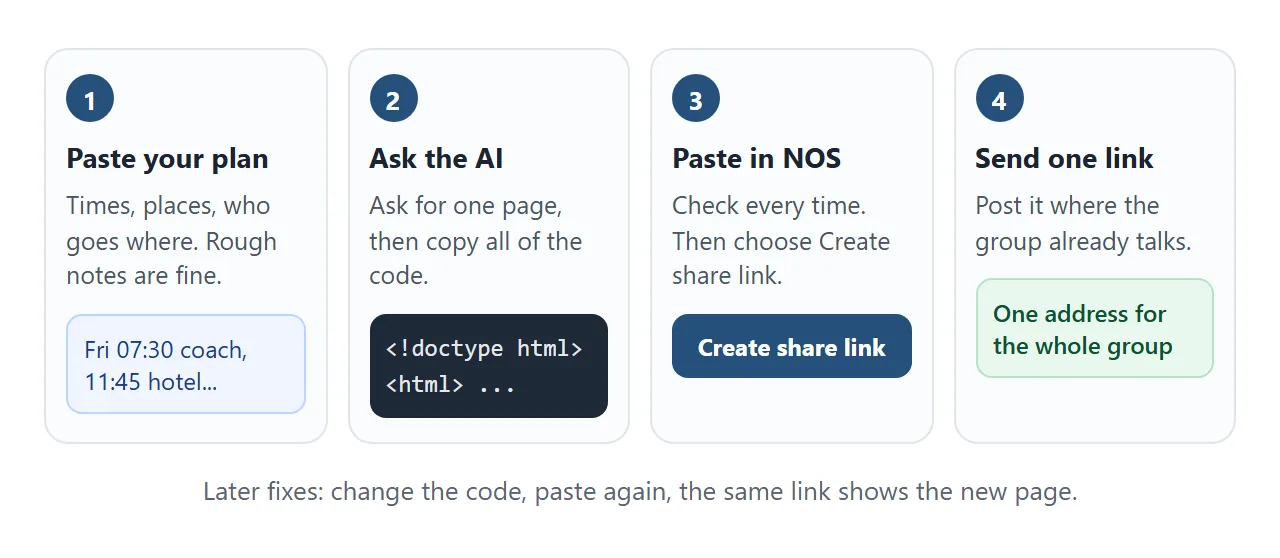
Anyone with the link can open the page in a browser, on a phone or a laptop, without an account. They cannot edit it. Editing your code later keeps the same link.
For a group chat, sharing an HTML page on WhatsApp covers the link preview. If a phone shows a sent file as plain text, see opening an HTML file on a phone.
For a printed handout on the coach or at the hotel desk, put the link in a QR code. QR code link explains why a printed code stays useful when the page behind it changes.
Fix a change without sending a new version
Change the entry in the code, or paste the code back to the AI and say what moved. Paste the result into the same NOS document. The link already in the group chat now shows the corrected plan.
Add a note to the entry you changed. It is then flagged on the day and repeated in the box at the top.
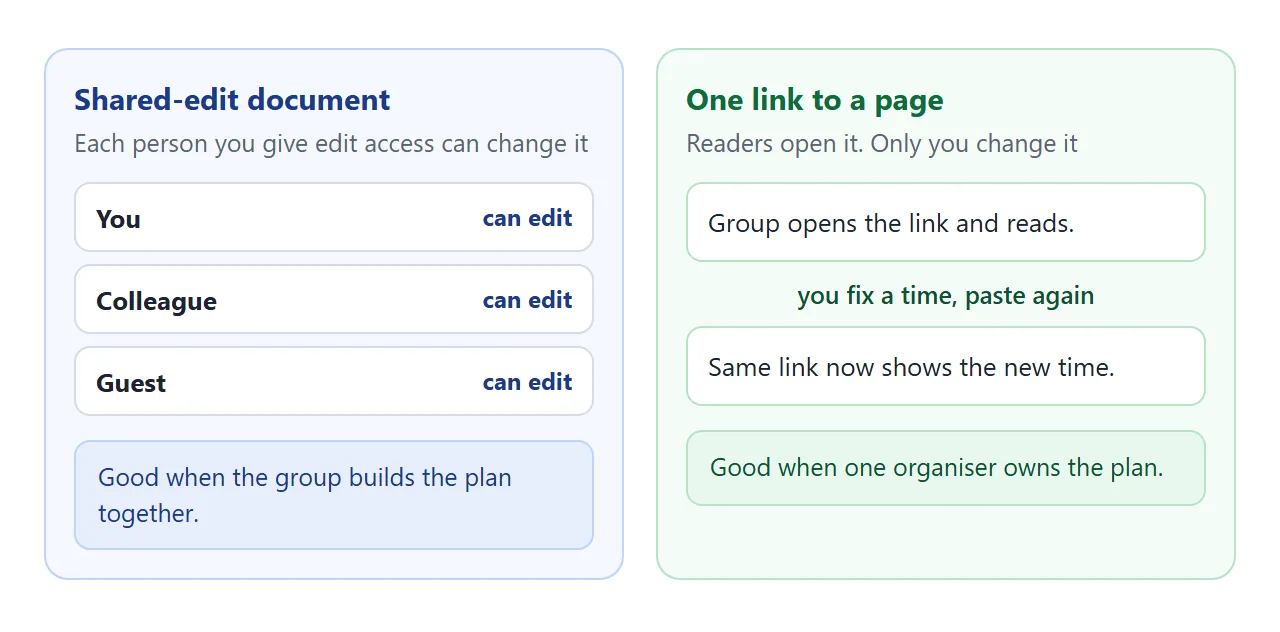
There is no shared-edit mode on a NOS page. The group reads and you change. That suits a plan one organiser owns, and a stray tap cannot move a time.
Google's help says each person you share a file with gets a role: Viewer, Commenter or Editor. An Editor can edit and share. That is the right tool when the group builds the plan together. Check the current help page, as of October 2026.
If people need to add their own choices, collect them by message and put the result on the page.
Ways to share a group itinerary compared
| File attachment | Shared-edit document | Link to a page | |
|---|---|---|---|
| What the group holds | A copy each | A live document | An address |
| After a change | Send a new file | Edit once, everyone sees it | Edit once, same link |
| Who can change it | Anyone, in their own copy | Whoever has the Editor role | Only you |
| Best when | You need a signed record | The group plans together | One organiser owns the plan |
A file still has a place. If you need an archived copy of the final plan, keep your own document as the record and use the page for what the group reads on the trip.
Pickups and rooms on the same page
A group asks the same two questions: where do I get on, and who am I sharing with? This page answers them. Type a first name and it shows that person's coach stop, time and room.
<!doctype html>
<html lang="en">
<head>
<meta charset="utf-8">
<meta name="viewport" content="width=device-width, initial-scale=1">
<title>Pickups and rooms</title>
<style>
* { box-sizing: border-box; }
body { margin: 0; font-family: system-ui, sans-serif; background: #f3f5f8; color: #1d2330; line-height: 1.45; }
header { background: #25507a; color: #fff; padding: 18px 16px; }
.in, main { max-width: 680px; margin: 0 auto; }
header h1 { margin: 0 0 4px; font-size: 21px; }
header p { margin: 0; font-size: 14px; opacity: .92; }
main { padding: 14px 16px 24px; }
label { display: block; font-weight: 700; font-size: 14px; margin-bottom: 5px; }
input { width: 100%; font: inherit; font-size: 17px; padding: 11px 12px; border: 2px solid #c8d1dd; border-radius: 10px; }
input:focus { outline: none; border-color: #25507a; }
.me { display: none; background: #e8f7ee; border: 1px solid #b7e2c6; border-radius: 12px; padding: 12px 14px; margin: 12px 0 0; }
.me.on { display: block; }
.me h2 { margin: 0 0 6px; font-size: 17px; color: #0f5132; }
.me p { margin: 2px 0; font-size: 15px; }
h3 { font-size: 15px; margin: 18px 0 8px; }
.stop { background: #fff; border-radius: 10px; padding: 11px 12px; margin-bottom: 8px; box-shadow: 0 1px 5px rgba(0,0,0,.05); }
.stop .top { display: flex; justify-content: space-between; gap: 10px; align-items: baseline; }
.stop b { font-size: 15px; }
.time { font-weight: 800; color: #25507a; font-size: 17px; white-space: nowrap; }
.old { color: #7a5200; font-size: 12px; font-weight: 700; background: #ffe9a8; border-radius: 999px; padding: 1px 7px; margin-left: 6px; }
.names { margin: 6px 0 0; font-size: 14px; color: #3d4654; }
.names span { display: inline-block; padding: 1px 7px; margin: 2px 4px 2px 0; border-radius: 999px; background: #eef1f6; }
.names span.hit { background: #25507a; color: #fff; font-weight: 700; }
.dim .names span:not(.hit) { opacity: .45; }
table { width: 100%; border-collapse: collapse; font-size: 14px; background: #fff; border-radius: 10px; overflow: hidden; }
th, td { text-align: left; padding: 8px 10px; border-bottom: 1px solid #e6ebf0; }
th { font-size: 12px; color: #5b6472; text-transform: uppercase; letter-spacing: .03em; }
tr.hit td { background: #dfeaf6; font-weight: 700; }
.none { display: none; color: #7a2d05; font-size: 14px; margin-top: 8px; }
.none.on { display: block; }
</style>
</head>
<body>
<header><div class="in">
<h1>Where do I get on, and who am I sharing with?</h1>
<p>Larkspur Roasters team trip · Friday coach and hotel rooms (fictional)</p>
</div></header>
<main>
<label for="q">Type your first name</label>
<input id="q" type="text" autocomplete="off" placeholder="For example: Priya">
<div class="none" id="none">No match. Check the spelling, or ask the organiser.</div>
<div class="me" id="me" aria-live="polite"></div>
<h3>Coach stops</h3>
<div id="stops"></div>
<h3>Hotel rooms (two to a room)</h3>
<table><thead><tr><th>Room</th><th>Who</th></tr></thead><tbody id="rooms"></tbody></table>
</main>
<script>
// To fix a time or a person, edit one line here. "was" shows the old time.
const STOPS = {
office: { name: 'Larkspur office car park', time: '07:30' },
westgate: { name: 'Westgate station, bay 4', time: '07:50', was: '08:10' },
hill: { name: 'Hill Road park and ride', time: '08:05' }
};
const PEOPLE = [
{ name: 'Priya', stop: 'office', room: 11 }, { name: 'Callum', stop: 'office', room: 11 },
{ name: 'Ines', stop: 'office', room: 12 }, { name: 'Tomas', stop: 'westgate', room: 12 },
{ name: 'Yuki', stop: 'westgate', room: 14 }, { name: 'Dara', stop: 'westgate', room: 14 },
{ name: 'Leo', stop: 'hill', room: 15 }, { name: 'Marta', stop: 'hill', room: 15 },
{ name: 'Sven', stop: 'hill', room: 16 }, { name: 'Aisha', stop: 'office', room: 16 }
];
const q = document.getElementById('q');
const stopsBox = document.getElementById('stops');
const roomsBody = document.getElementById('rooms');
const me = document.getElementById('me');
const none = document.getElementById('none');
function el(tag, cls, text) {
const e = document.createElement(tag);
if (cls) e.className = cls;
if (text) e.textContent = text;
return e;
}
function draw() {
const term = q.value.trim().toLowerCase();
const hits = term ? PEOPLE.filter((p) => p.name.toLowerCase().startsWith(term)) : [];
const hitNames = hits.map((p) => p.name);
const hitRooms = hits.map((p) => p.room);
stopsBox.innerHTML = '';
Object.keys(STOPS).forEach((key) => {
const s = STOPS[key];
const card = el('div', 'stop' + (term && hits.length ? ' dim' : ''));
const top = el('div', 'top');
const left = el('b', '', s.name);
if (s.was) left.appendChild(el('span', 'old', 'was ' + s.was));
top.append(left, el('span', 'time', s.time));
const names = el('div', 'names');
PEOPLE.filter((p) => p.stop === key).forEach((p) => {
names.appendChild(el('span', hitNames.includes(p.name) ? 'hit' : '', p.name));
});
card.append(top, names);
stopsBox.appendChild(card);
});
roomsBody.innerHTML = '';
[...new Set(PEOPLE.map((p) => p.room))].forEach((r) => {
const tr = el('tr', hitRooms.includes(r) ? 'hit' : '');
tr.append(el('td', '', String(r)), el('td', '', PEOPLE.filter((p) => p.room === r).map((p) => p.name).join(' and ')));
roomsBody.appendChild(tr);
});
me.className = 'me';
none.className = 'none' + (term && !hits.length ? ' on' : '');
if (hits.length === 1) {
const p = hits[0];
const mate = PEOPLE.find((o) => o.room === p.room && o.name !== p.name);
me.innerHTML = '';
me.appendChild(el('h2', '', p.name + ', your trip'));
me.appendChild(el('p', '', 'Get on at ' + STOPS[p.stop].name + ' at ' + STOPS[p.stop].time + '.'));
me.appendChild(el('p', '', 'Room ' + p.room + (mate ? ', with ' + mate.name : '') + '.'));
me.className = 'me on';
}
}
q.addEventListener('input', draw);
draw();
</script>
</body>
</html>
The people and stops are two short lists in the code. To fix a stop time, change one line. Add a was field and the old time stays visible beside the new one.
Everyone with the link sees every name on the page. Put in only what the whole group may see, and leave out phone numbers you would not read out loud.
When it does not work
| Symptom | Cause | Fix |
|---|---|---|
| People see code, not a page | The file was sent as an attachment and opened as text | Send the link, not the file |
| A time is wrong on the page | The AI changed or dropped it | Fix the entry in the code, paste again |
| Someone reads old times | They are looking at an old file or message | Ask them to open the link |
| A guest wants to add a stop | Visitors cannot edit the page | Ask them to message you, then you edit |
| Ticks on a packing list vanish | A visitor's changes are not saved | Ask people to keep their own list |
| Map pictures or fonts are missing | They load from another website, which the page blocks | Ask for a version with no outside images |
| You cannot see who opened it | NOS does not record opens | Ask the group to reply in the chat |
Before you send any page an AI wrote, share AI-generated HTML lists what to check. For a calendar entry per event, see calendar invite link.