A hackathon submission website is one page a judge opens from your form and understands in a minute: what the project is, what it looks like, and how to try it. One HTML file does that. A share link gives you the address the form asks for.
The situation is common. A Quora question asks how to put a site made for an academic project online, for free, so friends can see it. A hackathon is the same need with a deadline. Here is a page to copy.
<!doctype html>
<html lang="en">
<head>
<meta charset="utf-8">
<meta name="viewport" content="width=device-width, initial-scale=1">
<title>QuietSeat - project page</title>
<style>
  * { box-sizing: border-box; }
  body { margin: 0; font-family: system-ui, sans-serif; color: #1f2933; background: #f4f6fb; line-height: 1.5; }
  .wrap { max-width: 720px; margin: 0 auto; padding: 16px; }
  header { background: #1e2a5a; color: #fff; border-radius: 14px; padding: 20px 20px 18px; }
  header small { display: inline-block; font-size: 12px; letter-spacing: .4px; text-transform: uppercase; background: rgba(255,255,255,.16); padding: 3px 9px; border-radius: 99px; }
  h1 { margin: 10px 0 4px; font-size: 26px; }
  header p { margin: 0; font-size: 15px; color: #d6dcf5; }
  section { background: #fff; border-radius: 12px; padding: 16px 18px; margin-top: 12px; box-shadow: 0 1px 3px rgba(0,0,0,.07); }
  h2 { margin: 0 0 6px; font-size: 16px; color: #1e2a5a; }
  section p { margin: 0 0 6px; font-size: 14.5px; }
  .tabs { display: flex; gap: 6px; margin: 8px 0 10px; flex-wrap: wrap; }
  .tabs button { font: inherit; font-size: 14px; border: 1px solid #c9d0ea; background: #fff; border-radius: 99px; padding: 6px 14px; cursor: pointer; min-height: 36px; }
  .tabs button[aria-pressed="true"] { background: #1e2a5a; color: #fff; border-color: #1e2a5a; }
  .stage { display: flex; gap: 16px; align-items: flex-start; }
  .phone { flex: none; width: 124px; height: 220px; border-radius: 20px; background: #111827; padding: 7px; }
  .scr { width: 100%; height: 100%; border-radius: 14px; background: #eef1fb; overflow: hidden; position: relative; padding: 8px; }
  .bar { height: 8px; border-radius: 4px; background: #c9d0ea; margin-bottom: 7px; }
  .dot { display: inline-block; width: 20px; height: 20px; border-radius: 6px; margin: 0 4px 4px 0; }
  .free { background: #34d399; } .busy { background: #f97316; } .some { background: #fbbf24; }
  .btnm { position: absolute; left: 10px; right: 10px; bottom: 10px; height: 26px; border-radius: 8px; background: #1e2a5a; color: #fff; font-size: 11px; text-align: center; line-height: 26px; }
  .cap h3 { margin: 0 0 4px; font-size: 15px; }
  .cap p { font-size: 14px; }
  .alt { font-size: 12.5px; color: #52606d; border-left: 3px solid #c9d0ea; padding-left: 8px; margin-top: 6px; }
  .chips span { display: inline-block; font-size: 13px; background: #eef1fb; color: #1e2a5a; border-radius: 6px; padding: 3px 9px; margin: 0 6px 6px 0; }
  ol { margin: 4px 0 0; padding-left: 20px; font-size: 14.5px; }
  .urlbox { background: #f4f6fb; border: 1px dashed #aab3d6; border-radius: 8px; padding: 8px 10px; font: 13px/1.4 ui-monospace, Consolas, monospace; overflow-wrap: break-word; margin-top: 6px; }
  footer { font-size: 12.5px; color: #66728a; text-align: center; margin: 14px 0 4px; }
  @media (max-width: 480px) { .stage { flex-direction: column; align-items: center; } .cap { width: 100%; } h1 { font-size: 23px; } }
</style>
</head>
<body>
<div class="wrap">
  <header>
    <small>Campus Hack 2026 (sample)</small>
    <h1>QuietSeat</h1>
    <p>See which study-room seats are free before you walk across campus.</p>
  </header>

  <section>
    <h2>The problem</h2>
    <p>Students walk to the library and find every table taken. QuietSeat shows free seats on a phone first.</p>
  </section>

  <section>
    <h2>The app in three screens</h2>
    <p>Images from other sites do not load on a shared page, so each screen is drawn here and described in words.</p>
    <div class="tabs" id="tabs">
      <button type="button" data-i="0" aria-pressed="true">1 Map</button>
      <button type="button" data-i="1" aria-pressed="false">2 Seat</button>
      <button type="button" data-i="2" aria-pressed="false">3 Hold</button>
    </div>
    <div class="stage">
      <div class="phone"><div class="scr" id="scr"></div></div>
      <div class="cap">
        <h3 id="ct"></h3>
        <p id="cd"></p>
        <p class="alt" id="ca"></p>
      </div>
    </div>
  </section>

  <section>
    <h2>Built with, and the team</h2>
    <div class="chips"><span>HTML</span><span>JavaScript</span><span>Seat sensor simulator</span><span>Sample data only</span></div>
    <p>Team Paperclip: Mina (design), Joel (code), Aarav (sensor simulator), Sofia (pitch).</p>
  </section>

  <section>
    <h2>How judges can try it</h2>
    <ol>
      <li>Open the live demo link below on a phone.</li>
      <li>Tap any green seat on the map.</li>
      <li>Press Hold. A 10-minute timer starts.</li>
    </ol>
    <div class="urlbox">Live demo: paste your share link here</div>
    <div class="urlbox">Video: paste your YouTube or Vimeo address here</div>
  </section>

  <footer>Sample page. Names, hackathon and app are made up.</footer>
</div>

<script>
  const screens = [
    { t: 'Screen 1: Map', d: 'A floor plan of the library with one square per seat. Green is free, orange is taken.',
      a: 'Screenshot text: a grid of 12 squares, 8 green and 4 orange, under the title Level 2.',
      html: '<div class="bar" style="width:60%"></div><div><span class="dot free"></span><span class="dot busy"></span><span class="dot free"></span><span class="dot free"></span><span class="dot busy"></span><span class="dot free"></span><span class="dot free"></span><span class="dot busy"></span><span class="dot free"></span><span class="dot free"></span><span class="dot busy"></span><span class="dot free"></span></div>' },
    { t: 'Screen 2: Seat', d: 'Tap a seat to see its table, power outlet and noise level.',
      a: 'Screenshot text: a card titled Table 4, with the lines Outlet: yes and Noise: quiet.',
      html: '<div class="bar" style="width:45%"></div><div class="bar"></div><div class="bar" style="width:80%"></div><div class="bar" style="width:70%"></div><span class="dot free"></span><span class="dot some"></span>' },
    { t: 'Screen 3: Hold', d: 'Press Hold and the seat stays yours for ten minutes while you walk over.',
      a: 'Screenshot text: a large 10:00 timer and a button labelled Hold this seat.',
      html: '<div class="bar" style="width:50%"></div><div style="font-size:30px;font-weight:700;color:#1e2a5a;text-align:center;margin:30px 0 0">10:00</div><div class="btnm">Hold this seat</div>' }
  ];
  const tabs = document.getElementById('tabs');

  function show(i) {
    const s = screens[i];
    document.getElementById('scr').innerHTML = s.html;
    document.getElementById('ct').textContent = s.t;
    document.getElementById('cd').textContent = s.d;
    document.getElementById('ca').textContent = s.a;
    tabs.querySelectorAll('button').forEach((b) =>
      b.setAttribute('aria-pressed', String(Number(b.dataset.i) === i)));
  }

  tabs.addEventListener('click', (e) => {
    const b = e.target.closest('button');
    if (b) show(Number(b.dataset.i));
  });
  show(0);
</script>
</body>
</html>
Look at how the screens are handled. Pictures from other websites do not load on a shared page, so each screen is a small drawing plus a sentence that says what is on it. Judges who cannot see an image still get the point.
Make it with AI
Open ChatGPT, Claude or Gemini and paste the prompt below. Fill in the lines after "My project" with your own words. The key rule is in the prompt: the AI may only describe what your project really does.
Write one self-contained HTML file for my hackathon project page.
Sections in this order: name and tagline, The problem, The app in three screens, Built with, How judges can try it, Team.
Use only the facts I paste below. Do not invent features, numbers, names or links.
Put the CSS and JavaScript inside the same file. No outside images, fonts or libraries.
Instead of screenshots, draw each screen with simple CSS shapes and write one sentence under it.
Make it readable on a phone, and add three buttons to switch between the screens.
Reply with the HTML only.

My project:
Name and tagline:
Problem:
Screen 1, 2 and 3 (what is on each):
Built with:
Steps for a judge to try it:
Team:
When the page comes back, check it before you use it:
- Features. Every feature on the page is one you actually built. AI likes to add a feature that sounds good.
- Links. Delete any link you did not give it. AI can write web addresses that do not exist.
- Steps. Follow the "How judges can try it" steps yourself, in order.
- Phone. Open it on a phone. If the text is tiny, see the viewport meta tag.
What each part of the page is for
Give every block one job. The form has its own fields for most of them, so the page works as the one place where the story, the screens and the steps sit together.
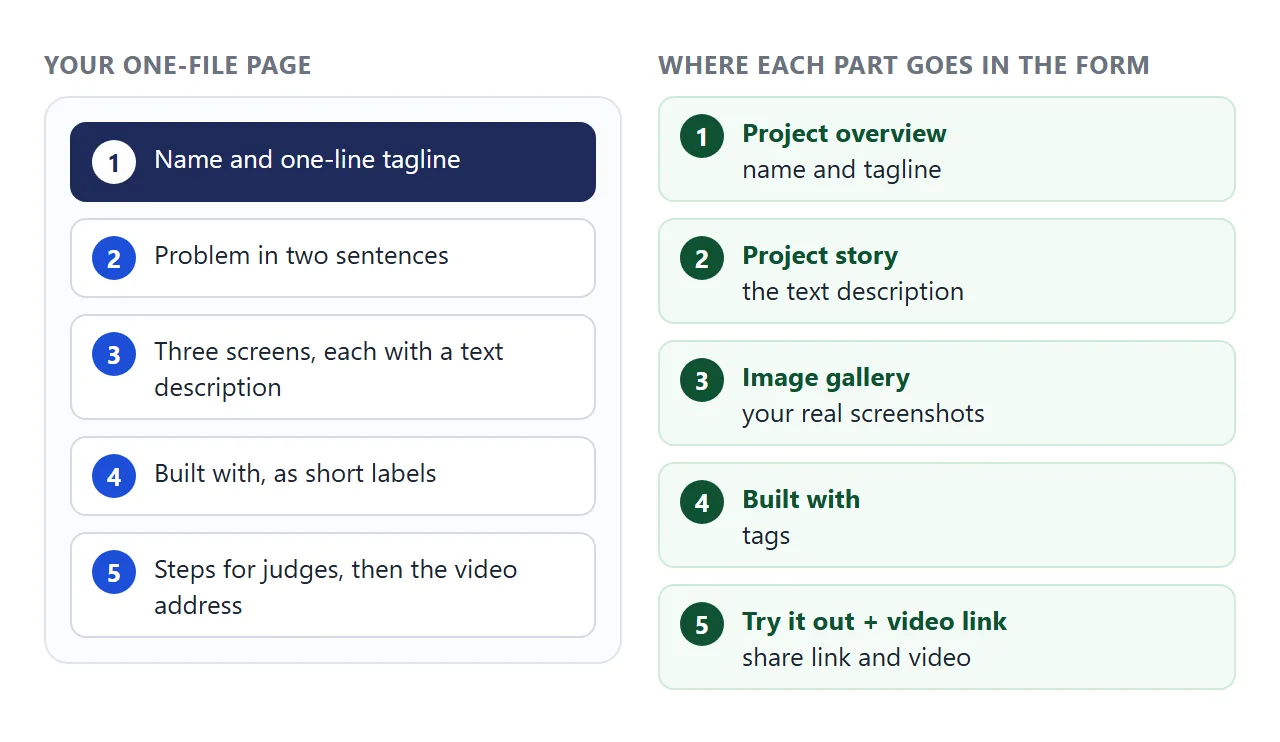
Put the steps for judges near the top of the page, not at the end. A judge with a few minutes will follow numbered steps before reading a long story. Keep the steps short and tell them which device to use.
Send it as a link
Copy the HTML, paste it into a NOS document and choose Create share link. HTML to link walks through it. The page renders as written and its scripts run, so the buttons that switch screens work for the judges too.
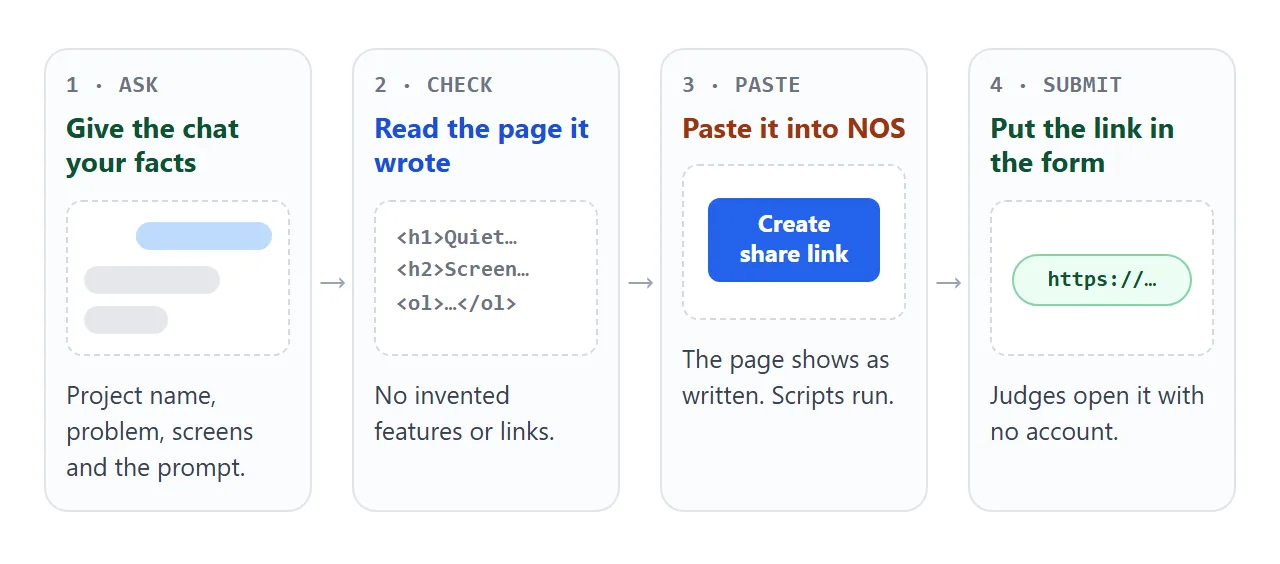
Whoever opens the link sees the page in their browser, on a phone too, with no account. They cannot edit it. If you fix a typo later, change the code and the same link shows the new version.
On Devpost (as of October 2026), the project details step has a "Try it Out" links field, an image gallery for screenshots and a video demo link.
Devpost's help says the Try it Out links "MAY be required" and the video "is usually required". Read your hackathon's rules. Other platforms use their own field names.
Where each thing goes, compared
The page does not replace the form. It covers the parts a form handles poorly, such as clickable screens and step-by-step instructions.
| Part of your entry | Best place | Why |
|---|---|---|
| Name and tagline | The form | It is shown on the project listing |
| Real screenshots | The form's image gallery | The page cannot load outside images |
| Demo video | YouTube or Vimeo, address in the video field | An embedded player is blocked on the page |
| Story and screens | The page | Text, drawings and buttons in one place |
| Steps for judges | The page, near the top | Judges can follow along |
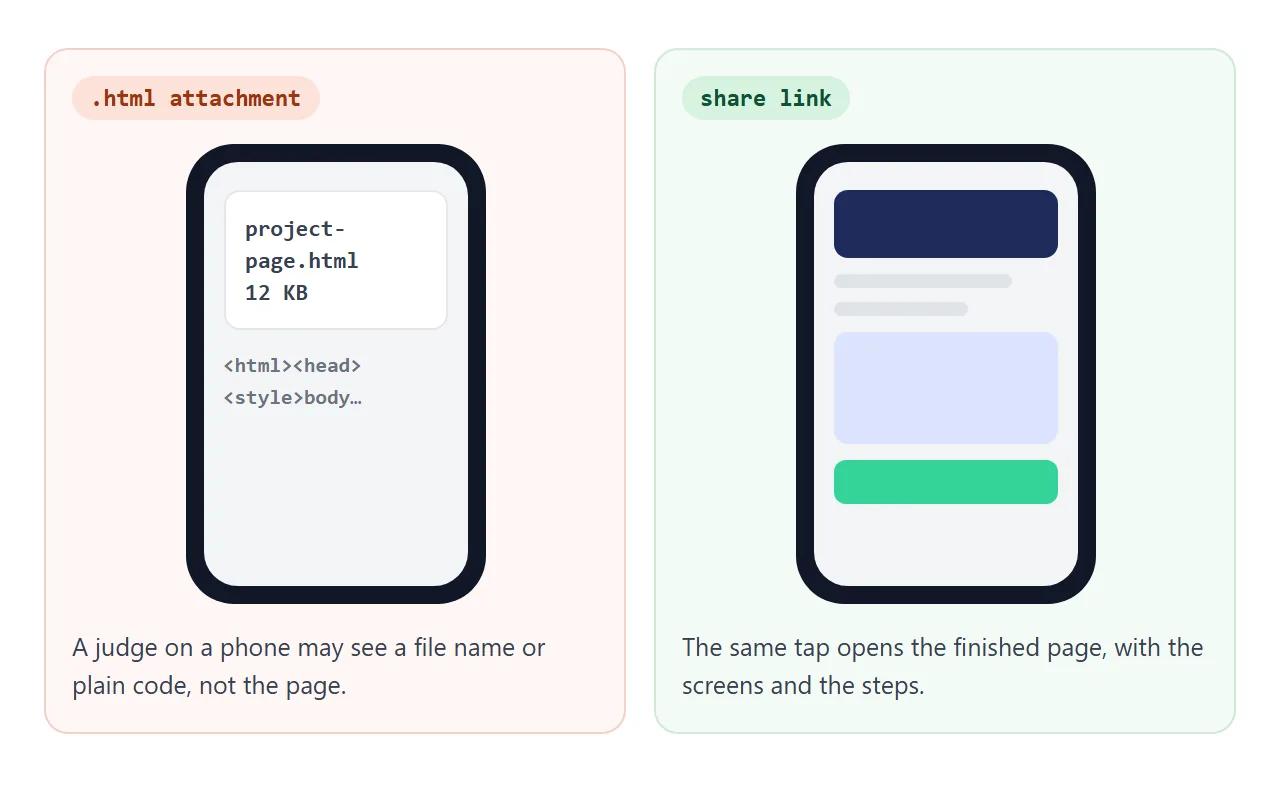
Do not send the page as an attachment. Phones treat HTML files unpredictably, as opening an HTML file on a phone explains. If you also want it on a poster or a slide at demo time, a QR code does that.
Draft the form text first
Most last-minute stress is typing into the real form with ten minutes left. Fill in the text here first, then copy it across. The check button shows what is still empty.
<!doctype html>
<html lang="en">
<head>
<meta charset="utf-8">
<meta name="viewport" content="width=device-width, initial-scale=1">
<title>Submission draft</title>
<style>
  * { box-sizing: border-box; }
  body { margin: 0; padding: 14px; font-family: system-ui, sans-serif; color: #1f2933; background: #f4f6fb; line-height: 1.45; }
  .card { max-width: 640px; margin: 0 auto; background: #fff; border-radius: 12px; padding: 16px 18px; box-shadow: 0 1px 4px rgba(0,0,0,.08); }
  h1 { margin: 0 0 4px; font-size: 19px; color: #1e2a5a; }
  .sub { margin: 0 0 12px; font-size: 14px; color: #52606d; }
  label { display: block; font-size: 14px; font-weight: 600; margin: 10px 0 3px; }
  input, textarea { width: 100%; font: inherit; font-size: 15px; padding: 8px 10px; border: 1px solid #c9d0ea; border-radius: 8px; }
  textarea { min-height: 70px; resize: vertical; }
  .hint { font-size: 12.5px; color: #66728a; display: flex; justify-content: space-between; }
  button { margin-top: 14px; font: inherit; font-weight: 600; background: #1e2a5a; color: #fff; border: 0; border-radius: 8px; padding: 10px 16px; cursor: pointer; min-height: 40px; }
  #out { display: none; margin-top: 14px; border-radius: 10px; padding: 12px 14px; font-size: 14px; }
  #out.ok { display: block; background: #e3f6ec; color: #0b5d46; }
  #out.warn { display: block; background: #fff1e6; color: #8a3d0a; }
  #out pre { margin: 8px 0 0; white-space: pre-wrap; word-break: break-word; font: 13px/1.5 ui-monospace, Consolas, monospace; color: #1f2933; background: #fff; border-radius: 8px; padding: 8px 10px; }
</style>
</head>
<body>
<div class="card">
  <h1>Draft your submission text</h1>
  <p class="sub">Fill these in before you open the real form. Nothing is sent anywhere.</p>
  <form id="f" novalidate>
    <label for="name">Project name</label>
    <input id="name" name="name" placeholder="QuietSeat">

    <label for="tag">One-line tagline</label>
    <input id="tag" name="tagline" placeholder="See free study seats before you walk over">
    <div class="hint"><span>Say what it does, not how.</span><span id="tc">0 characters</span></div>

    <label for="demo">Live demo link</label>
    <input id="demo" name="demo" placeholder="Your share link">

    <label for="video">Video address (YouTube or Vimeo)</label>
    <input id="video" name="video" placeholder="Public video address">

    <label for="steps">Testing steps for judges</label>
    <textarea id="steps" name="steps" placeholder="1. Open the demo link on a phone. 2. Tap a green seat. 3. Press Hold."></textarea>

    <button type="submit">Check my draft</button>
  </form>
  <div id="out" role="status"></div>
</div>

<script>
  const f = document.getElementById('f');
  const out = document.getElementById('out');
  const tag = document.getElementById('tag');
  const tc = document.getElementById('tc');

  tag.addEventListener('input', () => {
    tc.textContent = tag.value.length + ' characters';
  });

  f.addEventListener('submit', (e) => {
    e.preventDefault();                    // nothing leaves the page
    const data = new FormData(f);
    const labels = { name: 'Project name', tagline: 'Tagline', demo: 'Live demo link', video: 'Video address', steps: 'Testing steps' };
    const missing = Object.keys(labels).filter((k) => !String(data.get(k)).trim());
    const text = Array.from(data.entries()).map(([k, v]) => labels[k] + ': ' + (String(v).trim() || '(empty)')).join('\n');
    out.className = missing.length ? 'warn' : 'ok';
    out.textContent = '';
    const head = document.createElement('div');
    head.textContent = missing.length
      ? 'Still empty: ' + missing.map((k) => labels[k]).join(', ')
      : 'Everything is filled in. Copy this text into the form.';
    const pre = document.createElement('pre');
    pre.textContent = text;
    out.append(head, pre);
  });
</script>
</body>
</html>
The same pattern works inside your own page: a form that shows a result on screen. A form that sends data to a server is blocked on a shared page, so skip the contact form. Show your team's email as plain text.
When it does not work
| What you see | Cause | Fix |
|---|---|---|
| Empty boxes where pictures should be | Images from other websites are blocked | Use CSS or inline SVG drawings, and upload screenshots in the form |
| The video area is blank | Embedded players (iframes) are blocked | Show the video address as text and use the form's video field |
| A contact form does nothing | Sending a form to a server is blocked | Show your email as text |
| The page opens as plain code on a phone | It was sent as a file, not a link | Send the share link |
| Buttons do nothing | The script was left out or cut off | Ask the AI to resend the whole file with the script inside |
| Text is tiny on a phone | The viewport meta tag is missing | Ask the AI to add it, then reopen on the phone |
| The page needs your server | Fetching data from other sites is blocked | Use sample data in the page, and link the real app separately |
Before you press submit, open the project preview or the "View" step if your platform has one. Devpost's submission steps end with a proofread step that uses a View button, so you see the entry the way judges do.