An HTML CV is your CV written as a web page instead of a Word or PDF file. For a student, the useful part is the link. You send one address, and the reader opens a finished page in a browser. Nothing is left behind.
People search for this because they want that address. One Quora question asks it plainly: "How can I create a link for my resume?" The steps below get you there.
Here is a student CV as a web page. Try the three looks. Each one changes only a few colour lines.
<!doctype html>
<html lang="en">
<head>
<meta charset="utf-8">
<meta name="viewport" content="width=device-width, initial-scale=1">
<title>Mina Alder - CV</title>
<style>
  /* All colours live in variables, so a new look means changing these few lines */
  :root { --bg:#f4f5f7; --paper:#fff; --ink:#1d2330; --muted:#5b6472; --accent:#2563eb; --rule:#e1e4ea; }
  body[data-theme="warm"]  { --bg:#f7f1e8; --paper:#fffdf9; --ink:#2b2118; --muted:#6f5f50; --accent:#b4531a; --rule:#e8dccb; }
  body[data-theme="night"] { --bg:#10131a; --paper:#181d27; --ink:#e8ebf1; --muted:#98a1b3; --accent:#7aa7ff; --rule:#2a3140; }
  * { box-sizing: border-box; }
  body { margin:0; background:var(--bg); color:var(--ink); font:16px/1.55 system-ui, sans-serif; padding:14px; }
  .bar { max-width:46em; margin:0 auto 10px; display:flex; gap:8px; flex-wrap:wrap; align-items:center; font-size:14px; color:var(--muted); }
  .bar button { font:inherit; padding:6px 12px; border-radius:99px; border:1px solid var(--rule); background:var(--paper); color:var(--ink); cursor:pointer; }
  .bar button[aria-pressed="true"] { background:var(--accent); border-color:var(--accent); color:#fff; }
  main { max-width:46em; margin:0 auto; background:var(--paper); border:1px solid var(--rule); border-radius:12px; padding:26px 28px; }
  h1 { margin:0; font-size:1.7rem; }
  .meta { margin:.2rem 0 0; color:var(--muted); }
  .meta a { color:var(--accent); }
  h2 { font-size:.95rem; text-transform:uppercase; letter-spacing:.07em; color:var(--accent); border-bottom:1px solid var(--rule); padding-bottom:.3rem; margin:1.6rem 0 .6rem; }
  .row { display:flex; justify-content:space-between; gap:12px; font-weight:600; }
  .row span { font-weight:400; color:var(--muted); white-space:nowrap; }
  ul { margin:.3rem 0 .8rem; padding-left:1.1rem; } li { margin:.2rem 0; }
  .skills { display:flex; flex-wrap:wrap; gap:6px; padding:0; list-style:none; }
  .skills li { margin:0; padding:3px 10px; border:1px solid var(--rule); border-radius:99px; font-size:.9rem; }
  @media (max-width:480px) { main { padding:20px 16px; } .row { flex-direction:column; gap:0; } }
  @media print { body { background:#fff; padding:0; } .bar { display:none; } main { border:0; } }
</style>
</head>
<body data-theme="classic">
<div class="bar" role="group" aria-label="Look">
  <span>Look:</span>
  <button type="button" data-t="classic" aria-pressed="true">Classic</button>
  <button type="button" data-t="warm" aria-pressed="false">Warm</button>
  <button type="button" data-t="night" aria-pressed="false">Night</button>
</div>

<main>
  <h1>Mina Alder</h1>
  <p class="meta">Computer Science student, Northfield, <a href="mailto:mina.alder@example.com">mina.alder@example.com</a></p>

  <h2>Profile</h2>
  <p>Second-year student looking for a summer internship in data or web development. I like turning messy spreadsheets into clear pages.</p>

  <h2>Education</h2>
  <div class="row">B.Sc. Computer Science, Northfield University <span>2024 to 2027</span></div>
  <ul>
    <li>Relevant modules: Databases, Web Development, Statistics.</li>
    <li>Current average: 2:1 (sample line, replace with yours).</li>
  </ul>

  <h2>Projects</h2>
  <div class="row">Campus Bike Map <span>Spring 2026</span></div>
  <ul>
    <li>Built a one-page map of bike racks with a filter by building.</li>
    <li>Used by the student union newsletter (sample line).</li>
  </ul>
  <div class="row">Study Timer <span>Autumn 2025</span></div>
  <ul><li>A small timer page that logs focus sessions for a week.</li></ul>

  <h2>Experience</h2>
  <div class="row">Library Assistant, Northfield Library <span>2025 to now</span></div>
  <ul>
    <li>Help about 20 visitors per shift find books and printers (sample number).</li>
    <li>Trained two new assistants on the booking system.</li>
  </ul>

  <h2>Skills</h2>
  <ul class="skills"><li>Python</li><li>SQL</li><li>HTML and CSS</li><li>Excel</li><li>Teamwork</li></ul>
</main>

<script>
  // Swap the theme name on body; the CSS variables above do the rest
  const buttons = document.querySelectorAll('.bar button');
  buttons.forEach((btn) => {
    btn.addEventListener('click', () => {
      document.body.dataset.theme = btn.dataset.t;
      buttons.forEach((b) => b.setAttribute('aria-pressed', String(b === btn)));
    });
  });
</script>
</body>
</html>
Every name, date and number in it is a sample. Replace them with yours before you send anything.
Why a web page is easy to restyle
In an HTML page, the words and the look are kept apart. The words sit in headings and lists. The look sits in a short style block at the top. In the demo, the colours are a few named values, so a new look means changing those lines.
That is what makes an AI good at it. You do not have to explain a layout tool. You write one sentence, such as "make it warmer" or "use dark blue", and ask for the whole file again.
Make it with AI
Open the AI chat you already use, such as ChatGPT, Claude or Gemini. Paste this, then put your own details in the square brackets.
Turn my CV into a single-file HTML page.
Sections in this order: name and contact line, Profile (2 lines),
Education, Projects, Experience, Skills.
Use only the text I give you. Do not invent dates, grades,
numbers or links. If something is missing, write [ADD THIS].
One column, system font, a light background, one accent colour.
It must fit a phone screen and print on one A4 or Letter page.
No external images, fonts or scripts.
Return only the HTML.

My CV text:
[paste your CV here]
The line about not inventing things matters most. An AI can fill gaps with sample details that look real.
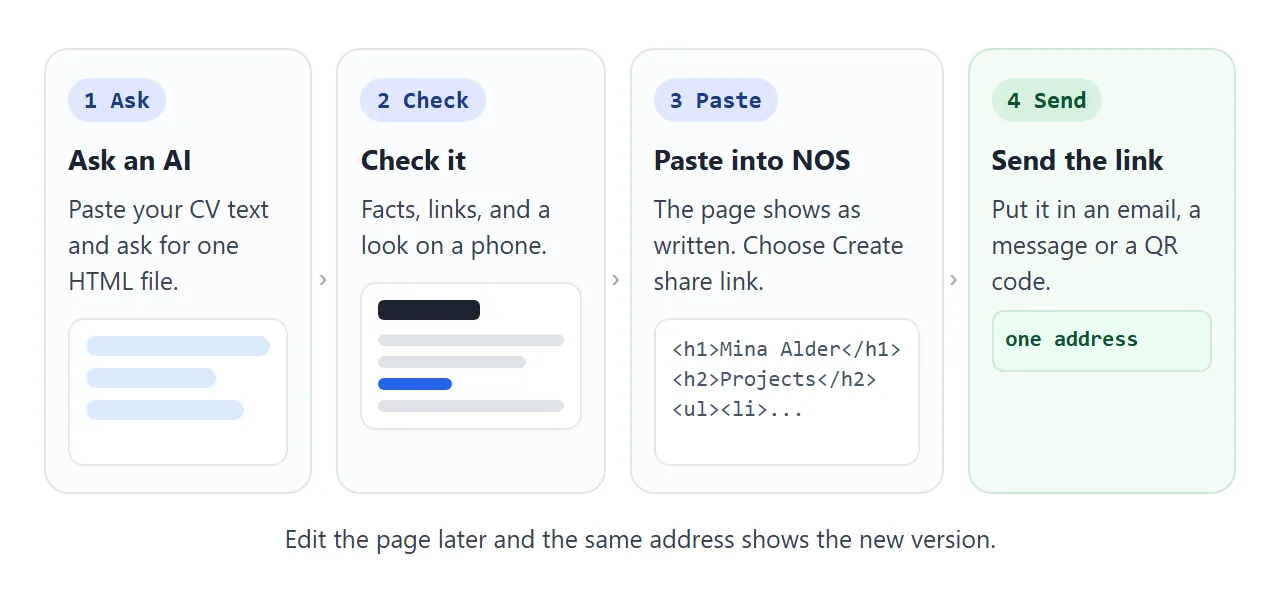
Check the result before you copy it:
- Every fact is yours. Read each line as if an interviewer will ask about it.
- Every link opens the right page. AI can make up web addresses, so click them all.
- No [ADD THIS] markers or sample lines are left.
- The page is easy to read in a narrow window, about the width of a phone.
To change the look, reply in the same chat: "same CV, but dark blue headings and bigger text". Paste the new version over the old one.
Send it as a link
Open a NOS document and paste the HTML in. The page shows as written, so you can test it yourself. Then choose Create share link and copy the address. HTML to link walks through it.
Anyone with the link can open the page in a browser, on a phone too, with no account. They can read it but cannot edit it. If you fix a typo later, the same link shows the new version.
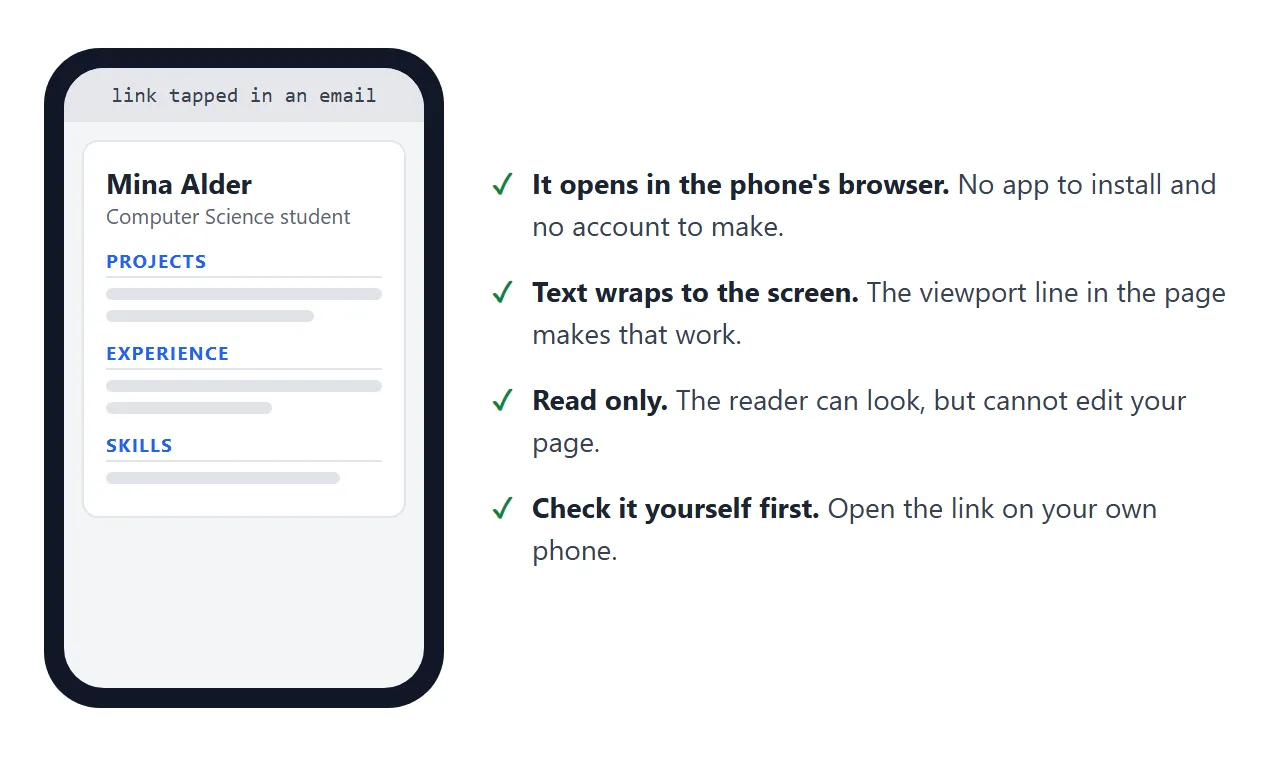
Open the link on your own phone before you send it. That is where many readers will see it first.
Why a link beats an attachment
An attachment is a copy that leaves your hands. A link points at the one page you keep.
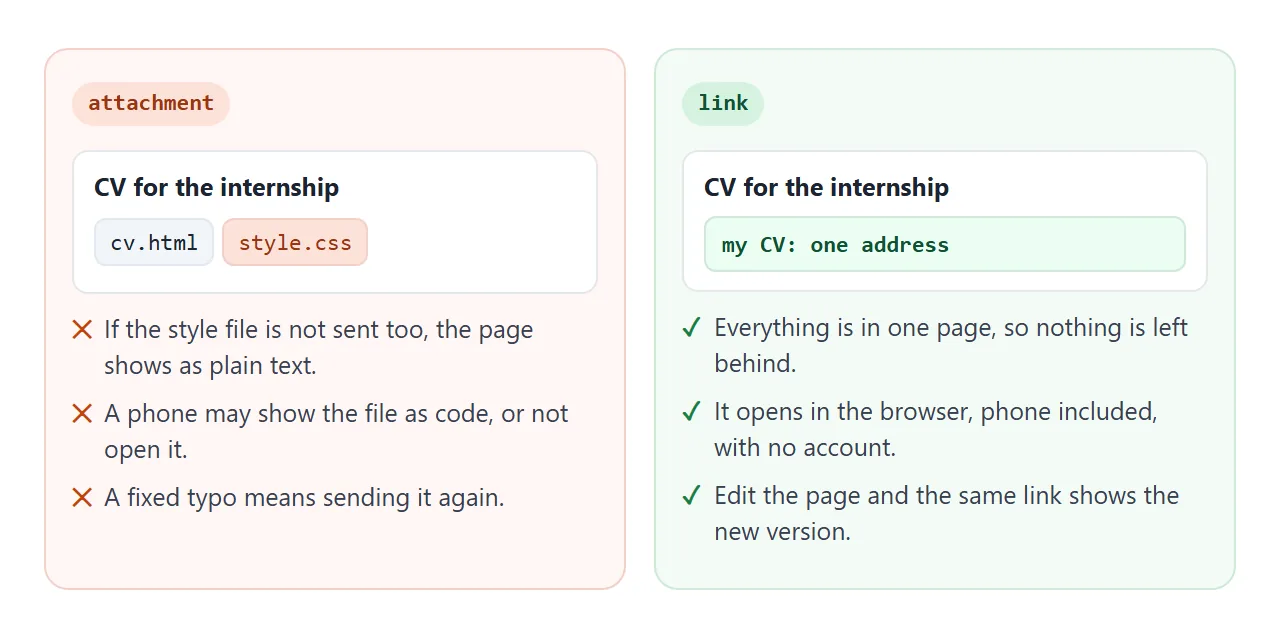
In a test, a page that points at a separate style file showed its colours when the two sat in one folder. Without that file it fell back to plain black text. Email the page without the style file and the reader gets the plain version.
Gmail is not the cause. As of October 2026, Google's list of file types Gmail blocks does not include .html. The file arrives. The trouble starts when it is opened on a phone, as opening an HTML file on a phone explains.
| Attachment | Share link | ||
|---|---|---|---|
| What you send | A copy of the file | One address | A copy of the file |
| Opens on a phone | May open as code, or not at all | In the browser | Depends on the phone |
| Fix a typo | Send it again | Edit it, same link | Export and send again |
| Works in an upload box | Only if the form accepts it | No, it is not a file | Yes |
Use the link where a person reads your CV. Use the PDF where a form wants a file. Share my resume as a link covers more places to put it.
Where to put the link
- Email: paste the address in your message, under your name.
- Paper: put the address in a printed code on a poster, a business card or a printed CV. QR code link shows how to make one that never needs reprinting.
- Messages: paste it into any chat.
If you also want a plain starting template, a simple HTML resume shows the minimum markup.
Check it before you send
Anyone with the link can read the page, and a shared page has no password. So leave off anything you want private, such as your home address.
<!doctype html>
<html lang="en">
<head>
<meta charset="utf-8">
<meta name="viewport" content="width=device-width, initial-scale=1">
<title>Check your CV link before you send it</title>
<style>
  * { box-sizing: border-box; }
  body { margin:0; padding:14px; background:#f4f5f7; color:#1d2330; font:16px/1.5 system-ui, sans-serif; }
  .card { max-width:34em; margin:0 auto; background:#fff; border:1px solid #e1e4ea; border-radius:12px; padding:20px 22px; }
  h1 { margin:0 0 4px; font-size:1.25rem; }
  .sub { margin:0 0 14px; color:#5b6472; font-size:.95rem; }
  label { display:flex; gap:10px; align-items:flex-start; padding:10px 0; border-top:1px solid #eef0f4; cursor:pointer; }
  label:first-of-type { border-top:0; }
  input { width:20px; height:20px; margin-top:2px; flex:none; accent-color:#16a34a; }
  label span small { display:block; color:#5b6472; font-size:.85rem; }
  input:checked + span { color:#6b7280; text-decoration:line-through; }
  input:checked + span small { text-decoration:none; }
  .status { margin-top:14px; padding:10px 12px; border-radius:8px; background:#fff7ed; color:#9a3412; font-weight:600; }
  .status.done { background:#ecfdf3; color:#0f5132; }
  .bar { height:8px; border-radius:99px; background:#e5e7eb; margin-top:14px; overflow:hidden; }
  .bar div { height:100%; width:0; background:#16a34a; transition:width .2s; }
</style>
</head>
<body>
<div class="card">
  <h1>Before you send your CV link</h1>
  <p class="sub">Tick each one as you check it.</p>

  <label><input type="checkbox"><span>I opened the link on my phone<small>Text readable without zooming, nothing cut off.</small></span></label>
  <label><input type="checkbox"><span>Every sample line is replaced<small>Dates, numbers, grades and the email address.</small></span></label>
  <label><input type="checkbox"><span>Every link on the page opens<small>AI can invent web addresses. Click them all.</small></span></label>
  <label><input type="checkbox"><span>Everything in the CV is true<small>Read each claim as if an interviewer will ask about it.</small></span></label>
  <label><input type="checkbox"><span>No address or phone number I want private<small>Anyone with the link can read the page.</small></span></label>
  <label><input type="checkbox"><span>I kept a PDF copy as well<small>Some application forms ask for a file upload.</small></span></label>

  <div class="bar"><div id="fill"></div></div>
  <div class="status" id="status">0 of 6 checked</div>
</div>

<script>
  const boxes = document.querySelectorAll('input[type="checkbox"]');
  const fill = document.getElementById('fill');
  const status = document.getElementById('status');

  function update() {
    const done = [...boxes].filter((b) => b.checked).length;
    fill.style.width = (done / boxes.length * 100) + '%';
    status.textContent = done === boxes.length ? 'All checked. Ready to send.' : done + ' of ' + boxes.length + ' checked';
    status.classList.toggle('done', done === boxes.length);
  }
  boxes.forEach((b) => b.addEventListener('change', update));
</script>
</body>
</html>
For print, a page can have its own print styles. MDN says the @media rule can set different styles when a page is printed on paper or as a PDF. In Chrome, the print dialog has a Save as PDF choice, per Google's help page.
When it does not work
| Symptom | Cause | Fix |
|---|---|---|
| The page is plain black text | A separate style file was left behind | Ask the AI for one file with the style block inside |
| A link on the page opens an error | The AI invented the address | Click every link and paste in the real one |
| The text is tiny on a phone | The page has no phone-width setting | Ask for a page that fits a phone screen |
| Invented dates or grades | The AI filled a gap | Tell it to use only your text, and read every line |
| The reader sees an old version | They have an old attachment | Send the link. It shows your latest edit |
| The upload box rejects the link | It wants a file, not an address | Print the page to PDF and upload that |