An HTML like button is a <button> with aria-pressed. Put a heart SVG inside, keep the count in a <span> beside it, and flip aria-pressed between "false" and "true" on each click. CSS fills the heart when the attribute says true.
Try it. Click the heart, or press Tab to reach it and then Enter or Space.
<!doctype html>
<html lang="en">
<head>
<meta charset="utf-8">
<meta name="viewport" content="width=device-width, initial-scale=1">
<title>Like button</title>
<style>
  body {
    margin: 0; min-height: 100vh; display: grid; place-items: center;
    font-family: system-ui, sans-serif; background: #f4f5f7;
  }
  .like-row { display: flex; align-items: center; gap: 8px; }
  .like {
    display: inline-grid; place-items: center;
    width: 48px; height: 48px; border-radius: 50%;
    border: 1px solid #d5d9e0; background: #fff; color: #6b7280;
    cursor: pointer;
  }
  .like svg { width: 26px; height: 26px; fill: none; stroke: currentColor; stroke-width: 2; }
  /* the ARIA state is the only source of truth for the look */
  .like[aria-pressed="true"] { color: #e11d48; border-color: #fecdd3; background: #fff1f2; }
  .like[aria-pressed="true"] svg { fill: currentColor; }
  .like:focus-visible { outline: 3px solid #2563eb; outline-offset: 2px; }
  .count { font-size: 18px; font-variant-numeric: tabular-nums; min-width: 2ch; }
</style>
</head>
<body>
<div class="like-row">
  <button class="like" id="like" type="button" aria-pressed="false" aria-label="Like">
    <svg viewBox="0 0 24 24" aria-hidden="true">
      <path d="M12 20.5s-7.5-4.6-9.3-9.4C1.4 7.7 3.6 4.5 7 4.5c2 0 3.5 1.1 5 3 1.5-1.9 3-3 5-3 3.4 0 5.6 3.2 4.3 6.6C19.5 15.9 12 20.5 12 20.5z"/>
    </svg>
  </button>
  <span class="count" id="count">12</span>
</div>

<script>
  const like = document.getElementById('like');
  const count = document.getElementById('count');

  like.addEventListener('click', () => {
    const liked = like.getAttribute('aria-pressed') === 'true';
    like.setAttribute('aria-pressed', String(!liked));  // flip the state
    count.textContent = Number(count.textContent) + (liked ? -1 : 1);
  });
</script>
</body>
</html>
That is the whole idea: about ten lines of JavaScript. The rest of this guide covers what makes it hold up for real use: the keyboard, screen readers, the animation, and saving the like to a server.
The markup: a toggle button
The button carries three attributes, and each one has a job.
<button class="like" type="button"
        aria-pressed="false" aria-label="Like">
  <svg viewBox="0 0 24 24" aria-hidden="true">
    <path d="M12 20.5s-7.5-4.6-9.3-9.4C1.4 7.7 ..."/>
  </svg>
</button>
<span class="count">12</span>
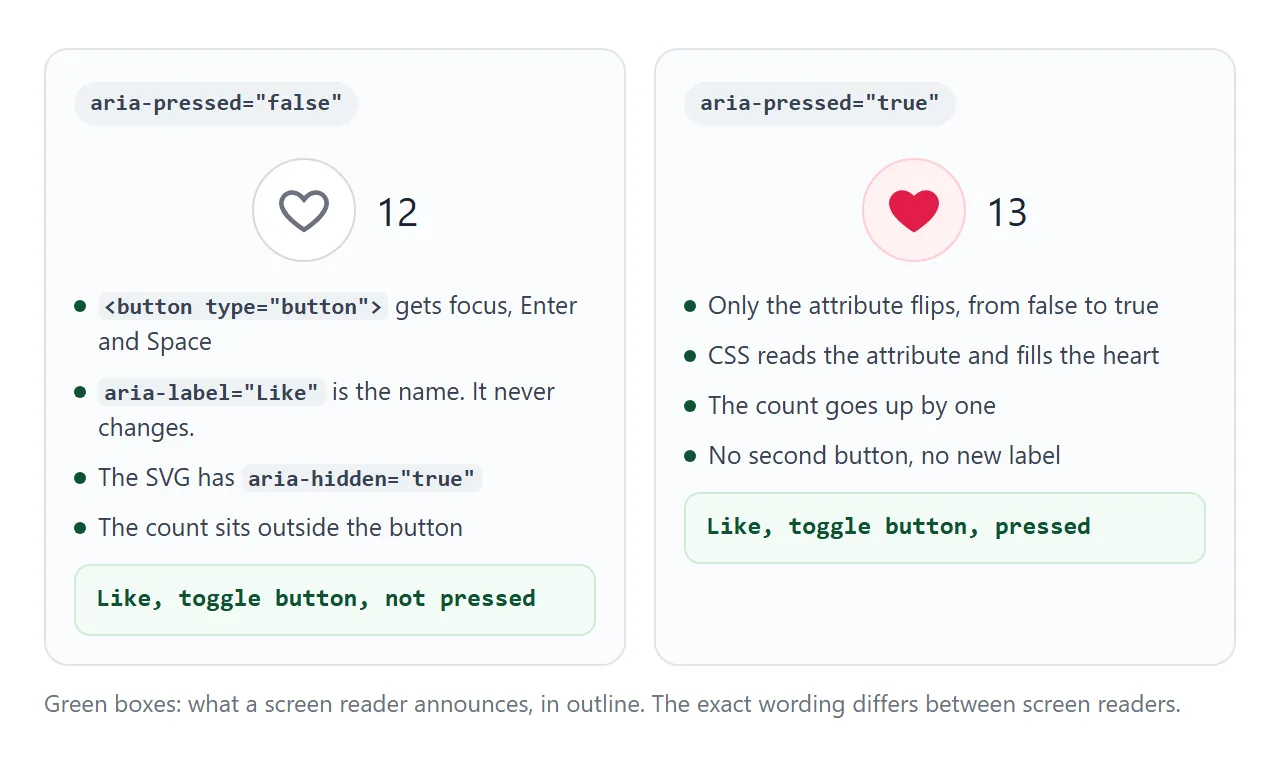
type="button"stops the button from submitting a form it happens to sit in. Inside a form, a button with no type is a submit button.aria-pressedturns an ordinary button into a toggle button. Screen readers announce it together with its pressed or not pressed state.aria-label="Like"gives the button a name, because an icon has no text. The aria-label guide covers when a label is needed.
The SVG gets aria-hidden="true" so it is not read as a separate image. The count lives outside the button. An aria-label replaces the text inside a button for screen readers, so a count placed inside would not be read.
Let the attribute drive the look
Do not keep a separate liked class or variable next to the attribute. If the two ever disagree, the screen shows one thing and a screen reader announces another. Style straight from the attribute instead:
.like svg { fill: none; stroke: currentColor; }
.like[aria-pressed="true"] { color: #e11d48; }
.like[aria-pressed="true"] svg { fill: currentColor; }
The heart outline uses stroke, and the pressed state adds a fill. With currentColor, one color value paints both. The SVG icons guide explains currentColor in more detail.
The click listener then reads the attribute, writes the opposite value, and moves the count by one:
like.addEventListener('click', () => {
  const liked = like.getAttribute('aria-pressed') === 'true';
  like.setAttribute('aria-pressed', String(!liked));
  count.textContent = Number(count.textContent) + (liked ? -1 : 1);
});
Why a div with onclick is not enough
A heart drawn in a <div> with a click listener works with a mouse, and nothing else. Compare the two with the keyboard: click inside the example, then press Tab.
<!doctype html>
<html lang="en">
<head>
<meta charset="utf-8">
<meta name="viewport" content="width=device-width, initial-scale=1">
<title>div vs button</title>
<style>
body {
margin: 0; min-height: 100vh; font-family: system-ui, sans-serif;
background: #f4f5f7; display: grid; grid-template-columns: 1fr 1fr;
}
.lane { padding: 14px; display: flex; flex-direction: column; align-items: center; gap: 10px; }
.lane + .lane { border-left: 1px dashed #c9cdd4; }
h3 { margin: 0; font-size: 14px; }
p { margin: 0; font-size: 12px; color: #5b6270; text-align: center; }
.like {
display: inline-grid; place-items: center; width: 48px; height: 48px;
border-radius: 50%; border: 1px solid #d5d9e0; background: #fff;
color: #6b7280; cursor: pointer;
}
.like svg { width: 26px; height: 26px; fill: none; stroke: currentColor; stroke-width: 2; }
.like.on, .like[aria-pressed="true"] { color: #e11d48; background: #fff1f2; }
.like.on svg, .like[aria-pressed="true"] svg { fill: currentColor; }
.like:focus-visible { outline: 3px solid #2563eb; outline-offset: 2px; }
.log { font: 12px ui-monospace, Consolas, monospace; color: #374151; min-height: 1.4em; }
</style>
</head>
<body>
<div class="lane">
<h3><div onclick></h3>
<p>Press Tab: focus skips it.<br>Enter and Space do nothing.</p>
<div class="like" id="d">
<svg viewBox="0 0 24 24" aria-hidden="true"><path d="M12 20.5s-7.5-4.6-9.3-9.4C1.4 7.7 3.6 4.5 7 4.5c2 0 3.5 1.1 5 3 1.5-1.9 3-3 5-3 3.4 0 5.6 3.2 4.3 6.6C19.5 15.9 12 20.5 12 20.5z"/></svg>
</div>
<div class="log" id="dlog">clicks: 0</div>
</div>
<div class="lane">
<h3><button aria-pressed></h3>
<p>Tab reaches it.<br>Enter and Space both toggle.</p>
<button class="like" id="b" type="button" aria-pressed="false" aria-label="Like">
<svg viewBox="0 0 24 24" aria-hidden="true"><path d="M12 20.5s-7.5-4.6-9.3-9.4C1.4 7.7 3.6 4.5 7 4.5c2 0 3.5 1.1 5 3 1.5-1.9 3-3 5-3 3.4 0 5.6 3.2 4.3 6.6C19.5 15.9 12 20.5 12 20.5z"/></svg>
</button>
<div class="log" id="blog">clicks: 0</div>
</div>
<script>
let dn = 0, bn = 0;
const d = document.getElementById('d'), b = document.getElementById('b');
// the div only knows about the mouse
d.addEventListener('click', () => {
d.classList.toggle('on');
document.getElementById('dlog').textContent = 'clicks: ' + (++dn);
});
// the button also gets click from Enter and Space
b.addEventListener('click', () => {
b.setAttribute('aria-pressed', String(b.getAttribute('aria-pressed') !== 'true'));
document.getElementById('blog').textContent = 'clicks: ' + (++bn);
});
</script>
</body>
</html>
<div onclick> |
<button aria-pressed> |
|
|---|---|---|
| Reached with Tab | No | Yes |
| Enter and Space | Do nothing | Fire click |
| Announced as | Nothing or plain text | Toggle button, pressed or not |
| Focus ring | Must be added | :focus-visible works |
Adding tabindex="0" to the div makes it focusable, but Enter and Space still do nothing until you write a key handler. The button does all of that already. The tabindex guide explains the difference.
Add a pop animation
A short scale-up when the heart fills tells people the tap landed. Define it once with CSS keyframes and run it by adding a class:
.like.pop svg { animation: pop .35s ease-out; }
@keyframes pop {
  40% { transform: scale(1.35); }
}
An animation added by a class plays once. Removing the class and adding it back in the same moment does not replay it, because the browser never sees the class missing. Read a layout value in between, and the next click plays it again:
btn.classList.remove('pop');
void btn.offsetWidth;  // forces a style update
btn.classList.add('pop');
Respect reduced motion
Some people turn on a "reduce motion" setting in their operating system because movement on screen makes them unwell. The prefers-reduced-motion media query reports that setting to CSS.
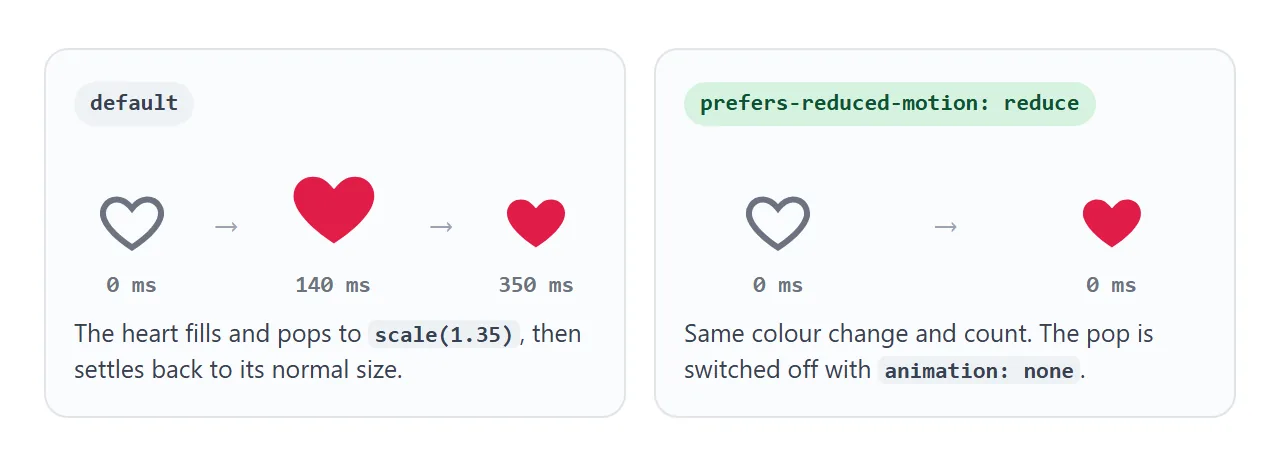
@media (prefers-reduced-motion: reduce) {
  .like.pop svg { animation: none; }
}
Keep the colour change. The state must still be visible; only the movement goes. The replay trick above still works, because it only adds and removes a class.
Save it with an optimistic update
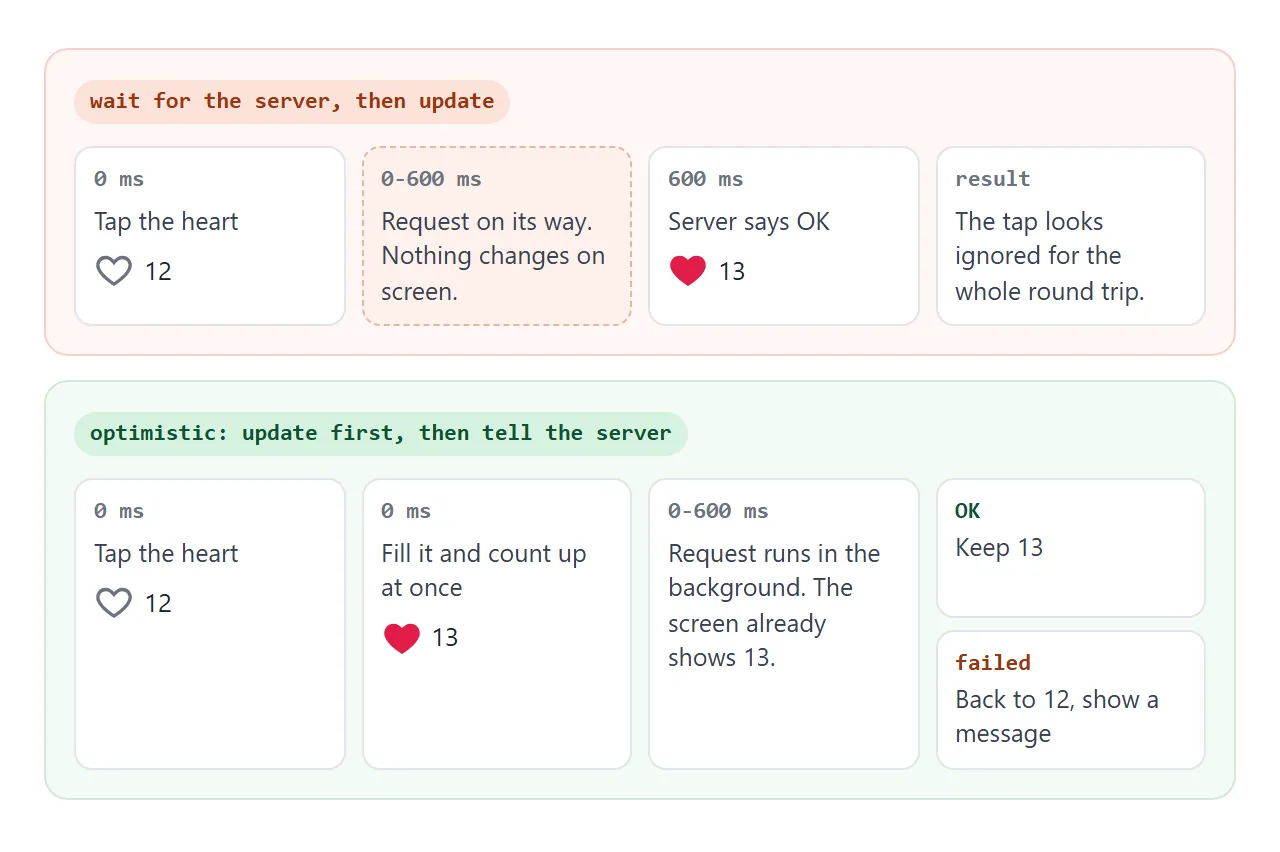
A real like is sent to a server, and the round trip takes time. If the heart waits for the answer, the tap looks ignored.
An optimistic update changes the screen at once and sends the request in the background. If the request fails, it puts the old state back.
The finished example below uses a fake server that answers after 600 ms. Tick the box to make it fail, then click a heart and watch it roll back.
<!doctype html>
<html lang="en">
<head>
<meta charset="utf-8">
<meta name="viewport" content="width=device-width, initial-scale=1">
<title>Like button with optimistic update</title>
<style>
  body { margin: 0; padding: 14px; font-family: system-ui, sans-serif; background: #f4f5f7; color: #1d2330; }
  .opts { font-size: 13px; margin-bottom: 10px; display: flex; gap: 6px; align-items: center; }
  .post {
    display: flex; align-items: center; gap: 12px; margin-bottom: 10px;
    padding: 12px 14px; border-radius: 12px; background: #fff;
    box-shadow: 0 2px 10px rgba(0, 0, 0, .08);
  }
  .post .text { flex: 1; font-size: 14px; }
  .like-row { display: flex; align-items: center; gap: 6px; }
  .like {
    display: inline-grid; place-items: center; width: 44px; height: 44px;
    border-radius: 50%; border: 1px solid #d5d9e0; background: #fff;
    color: #6b7280; cursor: pointer;
    touch-action: manipulation;  /* no double-tap zoom on phones */
  }
  .like svg { width: 24px; height: 24px; fill: none; stroke: currentColor; stroke-width: 2; }
  .like[aria-pressed="true"] { color: #e11d48; border-color: #fecdd3; background: #fff1f2; }
  .like[aria-pressed="true"] svg { fill: currentColor; }
  .like:focus-visible { outline: 3px solid #2563eb; outline-offset: 2px; }
  .count { min-width: 3ch; font-variant-numeric: tabular-nums; }
  .like.pop svg { animation: pop .35s ease-out; }
  @keyframes pop {
    0% { transform: scale(1); }
    40% { transform: scale(1.35); }
    100% { transform: scale(1); }
  }
  /* people who turned on "reduce motion" get the colour change only */
  @media (prefers-reduced-motion: reduce) {
    .like.pop svg { animation: none; }
  }
  #status { font-size: 13px; min-height: 1.4em; color: #9a3412; }
</style>
</head>
<body>
<label class="opts"><input type="checkbox" id="fail"> Make the fake server fail</label>

<div class="post">
  <div class="text">Sunset over the harbour</div>
  <div class="like-row">
    <button class="like" type="button" aria-pressed="false" aria-label="Like" data-id="p1">
      <svg viewBox="0 0 24 24" aria-hidden="true"><path d="M12 20.5s-7.5-4.6-9.3-9.4C1.4 7.7 3.6 4.5 7 4.5c2 0 3.5 1.1 5 3 1.5-1.9 3-3 5-3 3.4 0 5.6 3.2 4.3 6.6C19.5 15.9 12 20.5 12 20.5z"/></svg>
    </button>
    <span class="count">41</span>
  </div>
</div>
<div class="post">
  <div class="text">Notes from the design review</div>
  <div class="like-row">
    <button class="like" type="button" aria-pressed="true" aria-label="Like" data-id="p2">
      <svg viewBox="0 0 24 24" aria-hidden="true"><path d="M12 20.5s-7.5-4.6-9.3-9.4C1.4 7.7 3.6 4.5 7 4.5c2 0 3.5 1.1 5 3 1.5-1.9 3-3 5-3 3.4 0 5.6 3.2 4.3 6.6C19.5 15.9 12 20.5 12 20.5z"/></svg>
    </button>
    <span class="count">8</span>
  </div>
</div>

<p id="status" role="status"></p>

<script>
  // Fake server: answers after 600 ms, fails when the box is ticked.
  function saveLike(id, liked) {
    const fail = document.getElementById('fail').checked;
    return new Promise((resolve, reject) =>
      setTimeout(() => (fail ? reject(new Error('offline')) : resolve()), 600));
  }

  const status = document.getElementById('status');

  function show(btn, liked, n) {
    btn.setAttribute('aria-pressed', String(liked));
    btn.nextElementSibling.textContent = n;
  }

  document.querySelectorAll('.like').forEach((btn) => {
    // last state the server confirmed, used to roll back
    let saved = {
      liked: btn.getAttribute('aria-pressed') === 'true',
      n: Number(btn.nextElementSibling.textContent),
    };
    let version = 0;  // counts clicks, so only the latest failure rolls back

    btn.addEventListener('click', async () => {
      const liked = btn.getAttribute('aria-pressed') !== 'true';
      const n = Number(btn.nextElementSibling.textContent) + (liked ? 1 : -1);

      // 1. Update the screen at once
      show(btn, liked, n);
      btn.classList.remove('pop');
      void btn.offsetWidth;  // restart the animation
      if (liked) btn.classList.add('pop');
      status.textContent = '';

      // 2. Tell the server in the background
      const mine = ++version;
      try {
        await saveLike(btn.dataset.id, liked);
        saved = { liked, n };
      } catch (err) {
        if (mine !== version) return;  // a newer click is still on its way
        show(btn, saved.liked, saved.n);  // 3. Put it back
        status.textContent = 'Could not save your like. Try again.';
      }
    });
  });
</script>
</body>
</html>
Three details make it hold up:
- Remember the last saved state. Roll back to what the server last confirmed, not just to the state before this click.
- Only the latest click rolls back. A counter per button lets an older failed request see that a newer click has taken over.
- Say what happened. The message sits in an element with
role="status", so screen readers announce it without moving focus.
With a real server, only the saveLike function changes. Async and await explains the try and catch around it.
async function saveLike(id, liked) {
  const res = await fetch('/api/posts/' + id + '/like', {
    method: liked ? 'POST' : 'DELETE',
  });
  if (!res.ok) throw new Error(res.status);
}
A like button records one choice per post. For a score out of five, see the star rating guide, which builds on radio buttons instead.
When it does not work
| What you see | Cause | Fix |
|---|---|---|
| Clicking the heart reloads the page | The button is inside a form and has no type | Add type="button" |
| Tab skips the heart | It is a div or span |
Use a <button> |
| The heart never fills | The <path> has its own fill="none", which beats the fill it inherits from the SVG |
Remove the attribute from the path |
| The heart looks filled but a screen reader says not pressed | A class changed, the attribute did not | Style from aria-pressed only |
| The pop plays only the first time | The class was never removed | Remove it, read offsetWidth, add it |
| After fast clicks and a failure, the heart shows a state the server never saved | Each failed request rolls back to the state before its own click | Roll back only on the latest click, to the last saved state |
| A double tap zooms the page on a phone | Double-tap zoom is on for the button | touch-action: manipulation on the button |
Share it as a link
A like button is something people want to press, and a screenshot cannot be pressed. An .html attachment may open as plain code, or not at all, on a phone.
To send the working version, paste the page into a NOS document and choose Create share link. HTML to link walks through it.
The page renders as written and its scripts run, so the people you send it to can tap the hearts themselves. If you change the code later, the same link shows the new version.