Use <section> for one themed part of a bigger whole that has its own heading: the Features and Pricing parts of a page, or the chapters of a long post.
Use <article> when the content makes sense on its own, such as a post, a card or a comment. Use <div> when the wrapper is only there for CSS.
The three look identical on screen. What changes is what the browser tells assistive technology. Switch the blocks below and watch the lists on the right.
<!doctype html>
<html lang="en">
<head>
<meta charset="utf-8">
<meta name="viewport" content="width=device-width, initial-scale=1">
<title>section, article or div: structure viewer</title>
<style>
  body { margin: 0; padding: 12px; font-family: system-ui, sans-serif; background: #f4f5f7; color: #1d2330; }
  .wrap { display: grid; grid-template-columns: 1.2fr 1fr; gap: 12px; }
  @media (max-width: 560px) { .wrap { grid-template-columns: 1fr; } }
  #page { background: #fff; border-radius: 10px; padding: 10px; font-size: 13px; }
  #page header, #page footer { color: #6b7280; }
  .block { border: 1.5px dashed #c3c8d1; border-radius: 8px; padding: 6px 8px; margin: 8px 0; }
  .block h2, .block h3, .block h4 { margin: 0 0 4px; font-size: 14px; }
  .block p { margin: 0; }
  section.block { border-color: #2563eb; background: #eff5ff; }
  article.block { border-color: #16a34a; background: #effaf3; }
  .row { display: flex; gap: 6px; align-items: center; margin: 4px 0 8px; flex-wrap: wrap; }
  .row b { min-width: 70px; }
  select { font: inherit; padding: 2px 4px; }
  .panel { background: #fff; border-radius: 10px; padding: 10px 12px; font-size: 13px; }
  .panel h3 { margin: 10px 0 6px; font-size: 14px; }
  .lists h3 { margin-top: 4px; }
  @media (max-width: 560px) { .lists { display: grid; grid-template-columns: 1.3fr 1fr; gap: 8px; } }
  ul { margin: 0; padding-left: 18px; line-height: 1.6; }
  #outline li { list-style: none; margin-left: -18px; font-family: ui-monospace, Consolas, monospace; font-size: 12px; }
  .skip { color: #9a3412; font-weight: 600; }
  label { display: block; margin: 5px 0; }
</style>
</head>
<body>
<div class="wrap">
  <div>
    <div id="page">
      <header>Site header</header>
      <main>
        <h1>Acme Notes</h1>
        <div class="block" id="b1"><h2 id="t1">Features</h2><p>What the app does.</p></div>
        <div class="block" id="b2"><h2 id="t2">Pricing</h2><p>Three plans.</p></div>
        <div class="block" id="b3"><h2 id="t3">Release 2.4 is out</h2><p>A news post that makes sense on its own.</p></div>
      </main>
      <footer>Site footer</footer>
    </div>
    <div class="panel" style="margin-top:12px">
      <div class="row"><b>Features</b><select data-for="b1"><option>div</option><option selected>section</option><option>article</option></select></div>
      <div class="row"><b>Pricing</b><select data-for="b2"><option>div</option><option selected>section</option><option>article</option></select></div>
      <div class="row"><b>News post</b><select data-for="b3"><option>div</option><option>section</option><option selected>article</option></select></div>
      <label><input type="checkbox" id="named"> Name sections with aria-labelledby</label>
      <label><input type="checkbox" id="h4"> Make the news heading an h4</label>
    </div>
  </div>

  <div class="panel">
    <div class="lists">
      <div><h3>Landmarks</h3><ul id="landmarks"></ul></div>
      <div><h3>Articles</h3><ul id="articles"></ul></div>
    </div>
    <h3>Heading outline</h3>
    <ul id="outline"></ul>
  </div>
</div>

<script>
  // Browser rule: a section is a "region" landmark only when it has an accessible name.
  // An article is its own role (not a landmark). A div has no role.
  const page = document.getElementById('page');
  const $ = (id) => document.getElementById(id);

  function retag(el, tag) {
    if (el.tagName.toLowerCase() === tag) return;
    const n = document.createElement(tag);
    for (const a of el.attributes) n.setAttribute(a.name, a.value);
    while (el.firstChild) n.appendChild(el.firstChild);
    el.replaceWith(n);
  }

  function update() {
    // apply the choices
    document.querySelectorAll('select').forEach((s) => retag($(s.dataset.for), s.value));
    retag($('t3'), $('h4').checked ? 'h4' : 'h2');
    document.querySelectorAll('.block').forEach((b) => {
      const heading = b.querySelector('h2, h3, h4');
      if ($('named').checked && b.tagName === 'SECTION') b.setAttribute('aria-labelledby', heading.id);
      else b.removeAttribute('aria-labelledby');
    });

    // landmarks
    const lm = ['banner'];
    lm.push('main');
    page.querySelectorAll('section[aria-labelledby]').forEach((s) => {
      lm.push('region "' + $(s.getAttribute('aria-labelledby')).textContent + '"');
    });
    lm.push('contentinfo');
    $('landmarks').innerHTML = lm.map((t) => '<li>' + t + '</li>').join('');

    // articles
    const arts = [...page.querySelectorAll('article')].map((a) => a.querySelector('h2, h3, h4').textContent);
    $('articles').innerHTML = arts.length ? arts.map((t) => '<li>' + t + '</li>').join('') : '<li>none</li>';

    // headings: the level is the number in the tag, not the nesting
    let last = 0;
    $('outline').innerHTML = [...page.querySelectorAll('h1, h2, h3, h4, h5, h6')].map((h) => {
      const lvl = +h.tagName[1];
      const skipped = lvl > last + 1;
      last = lvl;
      return '<li style="padding-left:' + (lvl - 1) * 14 + 'px">' + h.tagName.toLowerCase() + ' ' + h.textContent +
        (skipped ? ' <span class="skip">skips a level</span>' : '') + '</li>';
    }).join('');
  }

  document.querySelectorAll('select, input').forEach((el) => el.addEventListener('change', update));
  update();
</script>
</body>
</html>
Two things stand out. A section only shows up as a landmark once it is named. And the heading outline follows the number in each tag, not the nesting. The rest of this page explains both.
section vs article vs div
Each element answers a different question about the content inside it.
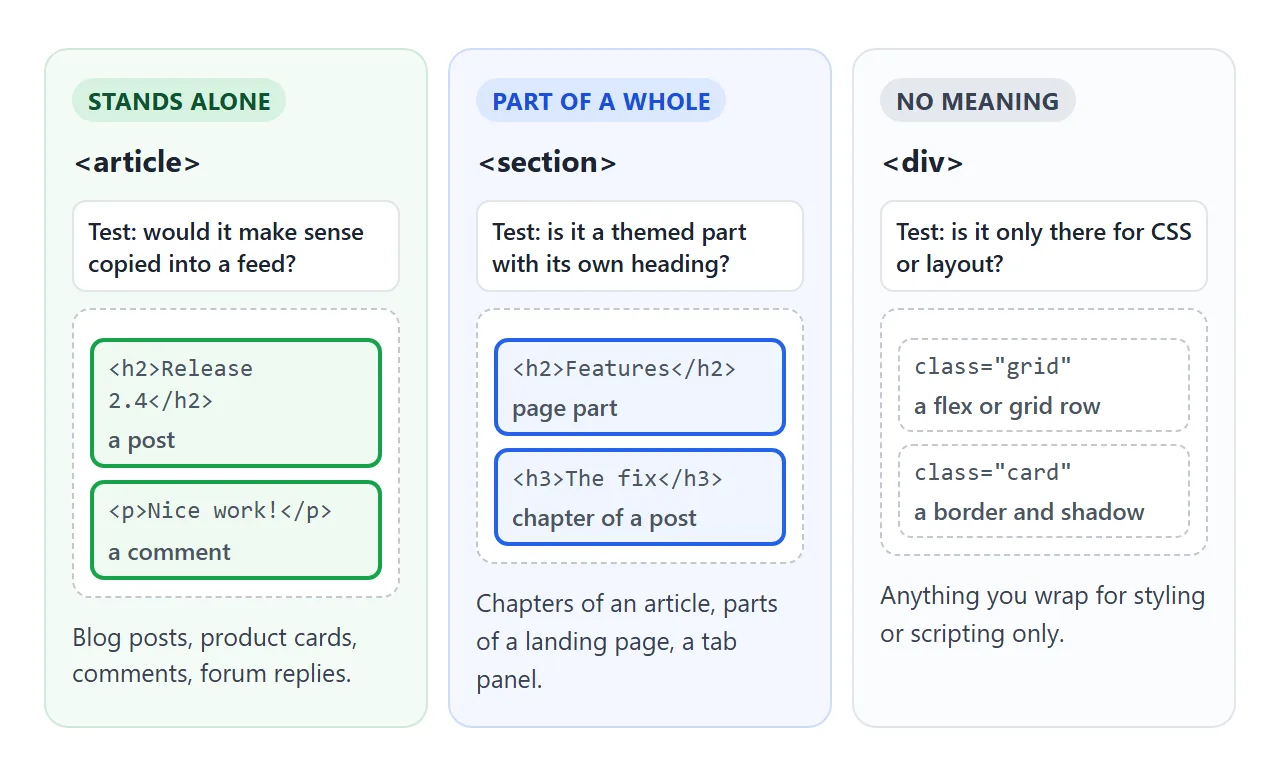
<article> |
<section> |
<div> |
|
|---|---|---|---|
| Means | Complete on its own | A themed part of something | Nothing |
| Heading | Usually | Yes | Not expected |
| Examples | Blog post, product card, comment | Chapter, Features, Pricing | Grid row, card frame |
| Browser role | article | region, only when named | none |
| Default look | A plain block | A plain block | A plain block |
The "complete on its own" test for article is concrete. Imagine the block copied into an RSS feed or another site. A blog post still reads fine there. A block called "Pricing" does not; it needs the page around it.
For the wider set of meaningful tags, see semantic HTML. The page-level wrappers have their own guides: main, nav and aside.
When a section becomes a region landmark
Screen readers can list the landmarks of a page and jump straight to one. header, main and footer at the top level are landmarks on their own. A section is different: it becomes a region landmark only when it has an accessible name.
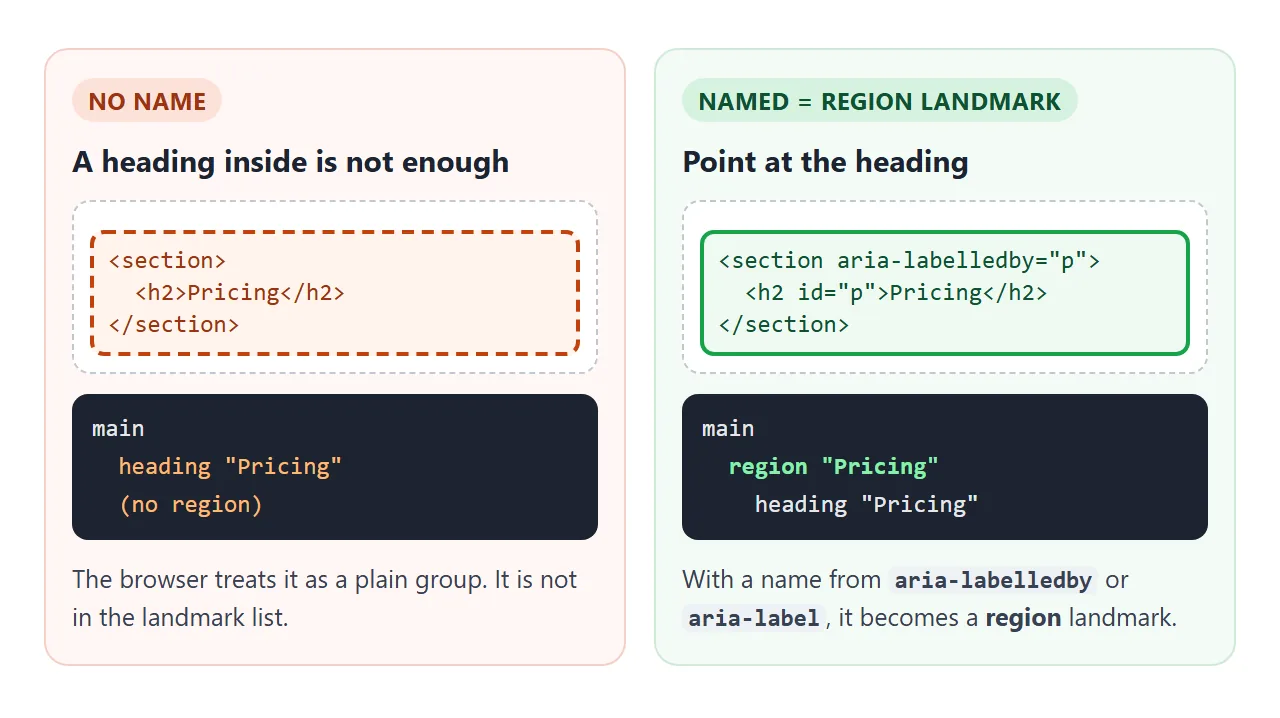
A heading inside the section does not name it automatically. Point at the heading with aria-labelledby:
<section aria-labelledby="pricing-title">
  <h2 id="pricing-title">Pricing</h2>
  <p>Three plans, billed monthly.</p>
</section>
aria-label="Pricing" also works when there is no visible heading to point at. aria-label covers the difference between the two.
Name only the parts a visitor would want to jump to. If every small section is a region, the landmark list grows long and stops being a shortcut.
Headings inside sections
The HTML standard once described an outline algorithm where an h1 inside a section counted as a lower level. That algorithm has since been removed from the standard. An h1 is level 1 wherever it sits.
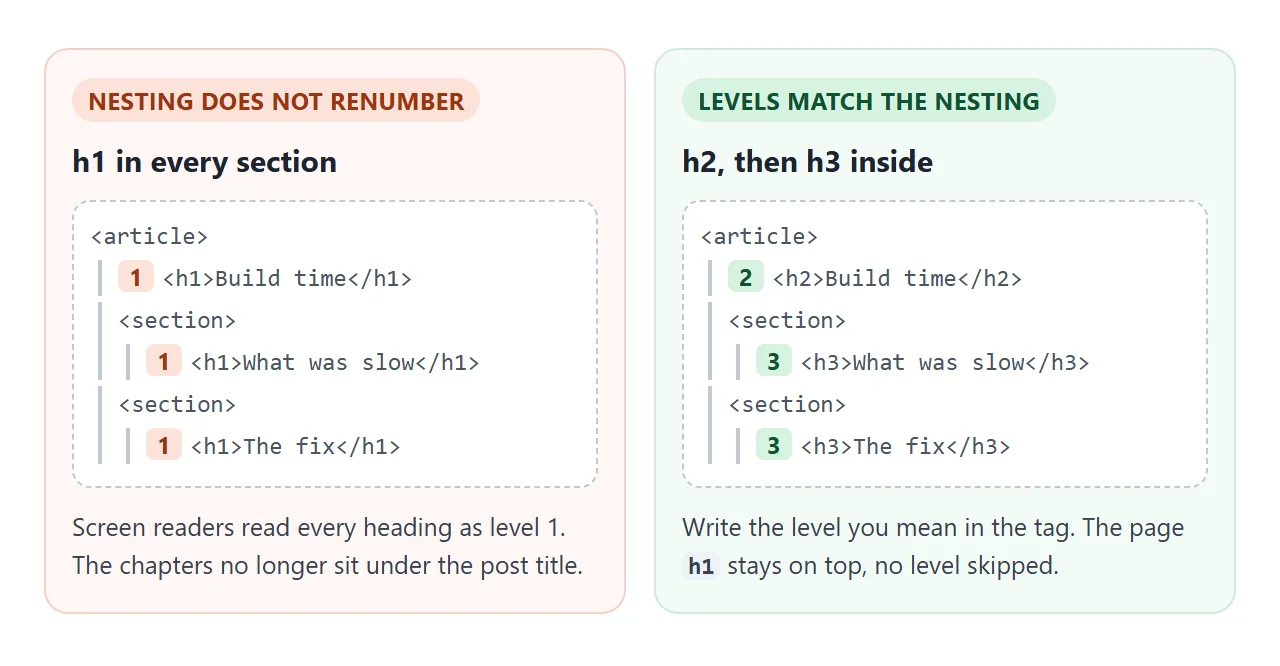
So the rule is simple. Keep one h1 for the page, as the h1 guide explains.
Use h2 for top-level sections and articles, and h3 inside those. Do not jump from h2 to h4 because the smaller size looks better; change the size with CSS instead.
In the first example, tick "Make the news heading an h4" to see a skipped level flagged in the outline.
Pick one in three questions
The order of the questions matters. Styling-only wrappers are ruled out first, then standalone content, then themed parts.
<!doctype html>
<html lang="en">
<head>
<meta charset="utf-8">
<meta name="viewport" content="width=device-width, initial-scale=1">
<title>section, article or div?</title>
<style>
  body { margin: 0; padding: 14px; font-family: system-ui, sans-serif; background: #f4f5f7; color: #1d2330; font-size: 14px; }
  fieldset { border: 0; background: #fff; border-radius: 10px; padding: 10px 12px; margin: 0 0 10px; }
  legend { font-weight: 700; padding: 0; float: left; width: 100%; margin-bottom: 6px; }
  legend small { display: block; font-weight: 400; color: #6b7280; }
  label { margin-right: 14px; white-space: nowrap; }
  #result { background: #fff; border-radius: 10px; padding: 12px; border-left: 5px solid #16a34a; }
  #tag { font: 700 20px ui-monospace, Consolas, monospace; color: #0f5132; }
  #why { margin: 6px 0 8px; line-height: 1.45; }
  pre { margin: 0; background: #1d2330; color: #e5e7eb; border-radius: 8px; padding: 10px; font-size: 12px; overflow-x: auto; }
</style>
</head>
<body>
<fieldset>
  <legend>1. Is the wrapper only there for CSS or layout?<small>A flex row, a card border, a max-width box.</small></legend>
  <label><input type="radio" name="style" value="yes"> Yes</label>
  <label><input type="radio" name="style" value="no" checked> No</label>
</fieldset>
<fieldset>
  <legend>2. Would it make sense on its own?<small>Pulled out into a feed or another page, it still reads complete.</small></legend>
  <label><input type="radio" name="alone" value="yes"> Yes</label>
  <label><input type="radio" name="alone" value="no" checked> No</label>
</fieldset>
<fieldset>
  <legend>3. Does it have its own heading?<small>Or could you write one that names the part.</small></legend>
  <label><input type="radio" name="heading" value="yes" checked> Yes</label>
  <label><input type="radio" name="heading" value="no"> No</label>
</fieldset>

<div id="result">
  Use <span id="tag"></span>
  <p id="why"></p>
  <pre id="code"></pre>
</div>

<script>
  const answers = {
    div: ['<div>', 'It groups things for styling only. A div adds no meaning, which is right here.',
      '<div class="cards">\n  <article class="card">...</article>\n  <article class="card">...</article>\n</div>'],
    article: ['<article>', 'It is complete on its own: a post, a product card, a comment. Give it a heading.',
      '<article>\n  <h2>Release 2.4 is out</h2>\n  <p>Dark mode, faster search...</p>\n</article>'],
    section: ['<section>', 'It is one themed part of something bigger, and the heading names that part.',
      '<section aria-labelledby="pricing-title">\n  <h2 id="pricing-title">Pricing</h2>\n  <p>Three plans...</p>\n</section>'],
    none: ['<div> or no wrapper', 'No heading and nothing to style means nothing to group. A section with no heading is just a div with extra letters.',
      '<p>Plain text can sit directly\n   in its parent.</p>'],
  };

  function pick() {
    const v = (n) => document.querySelector('input[name="' + n + '"]:checked').value;
    // order matters: styling first, then standalone, then heading
    if (v('style') === 'yes') return 'div';
    if (v('alone') === 'yes') return 'article';
    if (v('heading') === 'yes') return 'section';
    return 'none';
  }

  function show() {
    const [tag, why, code] = answers[pick()];
    document.getElementById('tag').textContent = tag;
    document.getElementById('why').textContent = why;
    document.getElementById('code').textContent = code;
  }

  document.querySelectorAll('input').forEach((i) => i.addEventListener('change', show));
  show();
</script>
</body>
</html>
- Is it only for CSS or layout? Use
div. - Would it make sense on its own? Use
article. - Is it a themed part with its own heading? Use
section. - None of the above? A
div, or no wrapper at all.
Nesting article and section, header and footer
The two elements nest both ways, and both shapes are correct.
- Sections inside an article: a long post split into chapters. Each chapter is a
sectionwith anh3. - Articles inside a section: a "Latest posts" section holding several post cards, or a comments section holding one
articleper comment. - Articles inside an article: comments are often nested in the post they belong to. Each comment is still complete on its own.
A header or footer can sit inside an article or section too. There it holds that block's title, byline or tags. It is not the page banner or page footer landmark.
Only a header and footer outside article, aside, main, nav and section play that role.
<article>
  <header>
    <h2>How we cut build time in half</h2>
    <p>By Dana Lee</p>
  </header>
  <section>
    <h3>What was slow</h3>
    <p>...</p>
  </section>
  <footer>Filed under: tooling</footer>
</article>
A finished example: a blog page
This page puts it together: posts as articles, chapters as sections, a named comments section, and each comment as a nested article.
<!doctype html>
<html lang="en">
<head>
<meta charset="utf-8">
<meta name="viewport" content="width=device-width, initial-scale=1">
<title>Field Notes blog</title>
<style>
  body { margin: 0; font-family: system-ui, sans-serif; background: #f4f5f7; color: #1d2330; font-size: 14px; line-height: 1.5; }
  .top { background: #1d2330; color: #fff; padding: 10px 14px; display: flex; justify-content: space-between; align-items: center; gap: 10px; }
  .top h1 { margin: 0; font-size: 18px; }
  .top label { font-size: 12px; white-space: nowrap; }
  main { max-width: 640px; margin: 0 auto; padding: 12px; }
  article, section { background: #fff; border-radius: 10px; padding: 10px 14px; margin: 0 0 12px; }
  article section, article article { background: #f8f9fb; padding: 6px 12px; margin: 8px 0; }
  h2 { font-size: 18px; margin: 4px 0 0; }
  h3 { font-size: 15px; margin: 6px 0 2px; }
  p { margin: 4px 0; }
  .meta, .by { color: #6b7280; font-size: 12px; }
  article footer { font-size: 12px; color: #6b7280; border-top: 1px solid #e5e7eb; padding-top: 6px; margin-top: 8px; }
  /* "Show the tags" mode: outline each element and print its name */
  .tags article, .tags section { outline: 2px dashed #16a34a; position: relative; padding-top: 22px; }
  .tags section { outline-color: #2563eb; }
  .tags article::before, .tags section::before {
    position: absolute; top: 3px; left: 8px; font: 700 11px ui-monospace, Consolas, monospace;
  }
  .tags article::before { content: "article"; color: #0f5132; }
  .tags section::before { content: "section"; color: #1d4ed8; }
  .tags section[aria-labelledby]::before { content: "section = region landmark"; }
</style>
</head>
<body>
<header class="top">
  <h1>Field Notes</h1>
  <label><input type="checkbox" id="show"> Show the tags</label>
</header>

<main>
  <article>
    <header>
      <h2>How we cut build time in half</h2>
      <p class="meta">By Dana Lee, <time datetime="2026-09-20">20 September 2026</time></p>
    </header>

    <section>
      <h3>What was slow</h3>
      <p>Every build downloaded the same packages again.</p>
    </section>
    <section>
      <h3>The fix</h3>
      <p>A shared cache, keyed by the lock file.</p>
    </section>

    <footer>Filed under: tooling</footer>

    <section aria-labelledby="comments-title">
      <h3 id="comments-title">Comments (2)</h3>
      <article>
        <p class="by"><b>Sam</b> wrote:</p>
        <p>Did you try it on the CI runners too?</p>
      </article>
      <article>
        <p class="by"><b>Dana Lee</b> wrote:</p>
        <p>Yes, same result there.</p>
      </article>
    </section>
  </article>

  <article>
    <h2>Three tools we stopped using</h2>
    <p class="meta"><time datetime="2026-09-02">2 September 2026</time></p>
    <p>A short post with no parts, so no sections inside.</p>
  </article>
</main>

<script>
  document.getElementById('show').addEventListener('change', (e) => {
    document.body.classList.toggle('tags', e.target.checked);
  });
</script>
</body>
</html>
- Page: a top
headerwith the blog name inh1, thenmain. - Posts: one
articleeach, with the title inh2. - Chapters:
sectionelements withh3, not named, so the landmark list stays short. - Comments: a
sectionnamed witharia-labelledby, holding onearticleper comment. - Short post: no sections at all, because it has no parts.
Sections with an id also make good jump targets for links inside the page. Link to a section of a page shows how.
When not to use section
A section is not a styled div. These are signs it should be something else:
- You wrapped it for a background colour, padding or a flex row. That is a
div. - It has no heading and you cannot think of one. It is not a themed part. Use a
div, or drop the wrapper. - It is the only wrapper around the whole page content. That is
main. - It is a sidebar, pull quote or related-links box. That is
aside. - It is a list of navigation links. That is
nav.
A div is never wrong for layout. Using one where no meaning is intended is better than a section that claims a meaning it does not have.
When it does not work
| What you see | Cause | Fix |
|---|---|---|
| The section is missing from the landmark list | It has no accessible name | Add aria-labelledby pointing at its heading id |
| aria-labelledby is set but no name appears | The id does not match the heading | Check the spelling of both ids |
| Dozens of region landmarks | Every styling wrapper became a named section | Use div for wrappers; name only key parts |
| A validator warns about a section with no heading | The section is a styling box | Add a heading, or change it to div |
| A card list reads as many articles that make no sense alone | article used for fragments |
Keep article for standalone items |
| The heading outline jumps from h2 to h4 | A level was picked for its size | Use the next level and resize with CSS |
| Every part reads as level 1 | h1 in each section |
Use h2 and h3 to match the nesting |
Share it as a link
Structure is easier to show than to explain. A screenshot hides the tags, and an .html attachment may open as plain code, or not at all, on a phone.
To send a page that works, paste it into a NOS document and choose Create share link. HTML to link walks through it.
The page renders as written and its scripts run, so the people you send it to can switch the blocks and tick the boxes themselves. If you change the code later, the same link shows the new version.