HTML has no swipe event. A swipe is something you read from pointer events: record where the press started, move the element while the pointer moves, and decide on release whether it went far enough or fast enough.
One CSS line, touch-action: pan-y, keeps the page scrollable.
Try it first. Drag the card sideways with a mouse, or swipe it with a finger. A long slow drag and a short quick flick both count. A small slow nudge slides back.
<!doctype html>
<html lang="en">
<head>
<meta charset="utf-8">
<meta name="viewport" content="width=device-width, initial-scale=1">
<title>Swipe a card</title>
<style>
  body {
    margin: 0; padding: 16px; font-family: system-ui, sans-serif;
    background: #f4f5f7; color: #1d2330;
  }
  .stage { height: 190px; display: grid; place-items: center; overflow: hidden; }
  .card {
    width: 220px; max-width: 70vw; height: 150px; border-radius: 14px; padding: 16px;
    box-sizing: border-box; background: linear-gradient(135deg, #4f7cff, #7c5cff);
    color: #fff; box-shadow: 0 8px 22px rgba(0, 0, 0, .18);
    cursor: grab; user-select: none;
    touch-action: pan-y;  /* sideways moves come to us, vertical ones still scroll */
  }
  .card b { font-size: 20px; }
  .out { margin-top: 12px; font: 14px/1.6 ui-monospace, Consolas, monospace; }
  .out span { display: inline-block; min-width: 90px; }
  #result { font-weight: 700; }
</style>
</head>
<body>
<div class="stage"><div class="card" id="card"><b>Swipe me</b><br>left or right</div></div>
<div class="out">
  <span>dx: <b id="dx">0</b></span>
  <span>speed: <b id="v">0</b></span><br>
  result: <span id="result">-</span>
</div>

<script>
  const card = document.getElementById('card');
  const show = (id, text) => (document.getElementById(id).textContent = text);

  let startX = 0, dx = 0;            // where the press began, how far it has moved
  let lastX = 0, lastT = 0, v = 0;   // for the release speed, in px per ms
  let dragging = false;

  card.addEventListener('pointerdown', (e) => {
    dragging = true;
    startX = lastX = e.clientX; lastT = e.timeStamp; dx = 0; v = 0;
    card.setPointerCapture(e.pointerId);
    card.style.transition = 'none';  // follow the finger with no delay
  });

  card.addEventListener('pointermove', (e) => {
    if (!dragging) return;
    dx = e.clientX - startX;
    const dt = e.timeStamp - lastT;
    if (dt > 0) v = 0.7 * ((e.clientX - lastX) / dt) + 0.3 * v;  // smoothed speed
    lastX = e.clientX; lastT = e.timeStamp;
    card.style.transform = `translateX(${dx}px) rotate(${dx / 20}deg)`;
    show('dx', Math.round(dx)); show('v', v.toFixed(2));
  });

  card.addEventListener('pointerup', (e) => {
    if (!dragging) return;
    dragging = false;
    if (e.timeStamp - lastT > 100) v = 0;  // the finger stopped before lifting
    const far = Math.abs(dx) > card.offsetWidth * 0.35;
    const fast = Math.abs(v) > 0.5 && Math.abs(dx) > 20 && Math.sign(v) === Math.sign(dx);
    show('v', v.toFixed(2));
    if (far || fast) flyOff(dx > 0 ? 1 : -1, far ? 'distance' : 'speed');
    else snapBack('snapped back');
  });

  // the browser took the gesture (for example a vertical scroll)
  card.addEventListener('pointercancel', () => {
    dragging = false;
    snapBack('cancelled by the browser');
  });

  function snapBack(why) {
    card.style.transition = 'transform .25s ease-out';
    card.style.transform = '';
    show('result', why);
  }

  function flyOff(dir, why) {
    card.style.transition = 'transform .3s ease-in';
    card.style.transform = `translateX(${dir * 600}px) rotate(${dir * 30}deg)`;
    show('result', `swiped ${dir > 0 ? 'right' : 'left'} (${why})`);
    setTimeout(() => {  // bring the card back for another try
      card.style.transition = 'none';
      card.style.transform = 'scale(.8)';
      requestAnimationFrame(() => requestAnimationFrame(() => {
        card.style.transition = 'transform .2s ease-out';
        card.style.transform = '';
      }));
    }, 450);
  }
</script>
</body>
</html>
Touch events in JavaScript covers how to detect a swipe after the fact, at release. This guide is about the other half: an element that moves with the finger, then commits or springs back.
The five pieces of a swipe
Every swipe in this guide uses the same steps:
- Record the start on
pointerdown: position and time. Settransition: noneso the element follows with no lag. - Decide the direction once the pointer leaves a small dead zone. Sideways is a swipe, up or down is not.
- Follow the pointer on
pointermovewithtranslateX(dx), and keep track of the speed. - Decide on release in
pointerup: commit, or animate back. - Handle
pointercancelby animating back. It fires when the browser takes over the gesture.
The follow step is short. Moving with transform instead of left means nothing else on the page has to be laid out again:
dx = e.clientX - startX;
card.style.transform = `translateX(${dx}px) rotate(${dx / 20}deg)`;
Threshold and velocity: when a swipe counts
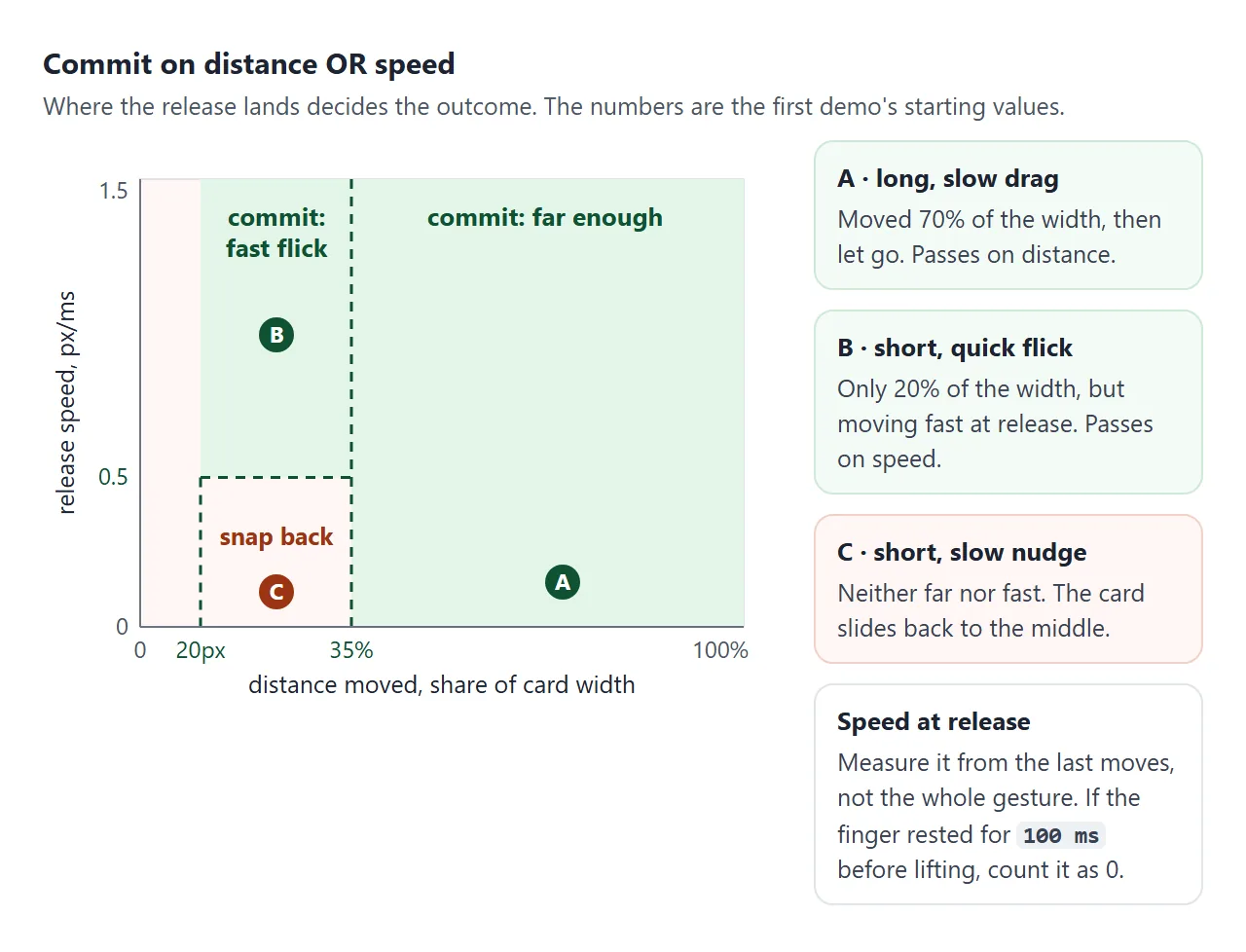
A distance rule alone feels stiff. A quick flick of 40 pixels clearly means "swipe", but it never reaches a threshold of a third of the card. A speed rule alone misses slow, deliberate drags. Use both, joined by OR.
// on pointermove: smoothed speed in px per ms
const dt = e.timeStamp - lastT;
if (dt > 0) v = 0.7 * ((e.clientX - lastX) / dt) + 0.3 * v;

// on pointerup
if (e.timeStamp - lastT > 100) v = 0;   // finger rested before lifting
const far  = Math.abs(dx) > card.offsetWidth * 0.35;
const fast = Math.abs(v) > 0.5 && Math.abs(dx) > 20;
Measure speed from the latest moves, not from the whole gesture. If the user drags slowly, stops, then lifts, the speed at release is zero, and the swipe should only count on distance.
The first demo also checks that the speed points the same way as dx. A drag to the right that ends with a flick back to the left should not fly off to the right.
| Rule | Starting value | Catches |
|---|---|---|
| Distance | 35% of the element width | Slow, long drags |
| Speed at release | 0.5 px per ms, and at least 20 px | Short, quick flicks |
| Rest before release | Over 100 ms without a move | Sets speed to 0 |
These are starting values, not standards. Try them on a phone and adjust.
Horizontal or vertical: lock the intent
A finger rarely moves in a straight line. A user scrolling down a list drifts a few pixels sideways, and a user swiping a row drifts up or down. If the row reacts to every sideways pixel, scrolling the list makes the rows wobble.
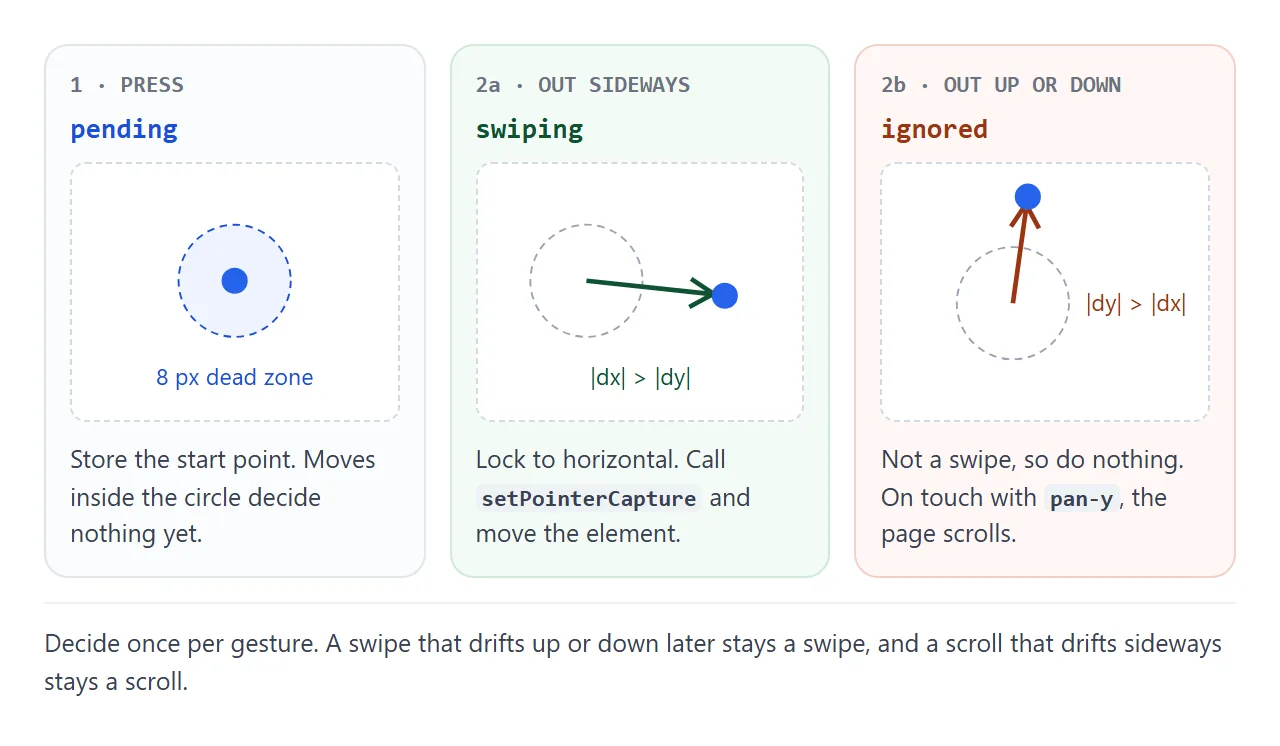
The fix is a small state machine. Start in pending. Once the pointer is 8 pixels from the start, compare the two distances once and stay with that answer:
if (state === 'pending') {
  const ax = Math.abs(e.clientX - x0), ay = Math.abs(e.clientY - y0);
  if (ax < 8 && ay < 8) return;               // too early to tell
  if (ay > ax) { state = 'ignored'; return; } // vertical: not ours
  state = 'swiping';
  row.setPointerCapture(e.pointerId);
}
Call setPointerCapture only after the lock. Until then, a plain tap on a button inside the row stays a normal tap.
touch-action: pan-y keeps the page scrolling
On a phone the browser gets the first say over a finger. With the default touch-action: auto, a drag can become a scroll, and when the browser takes it, your element gets pointercancel and no more moves.
touch-action: none hands every finger to your code, but then a list made of swipeable rows can no longer be scrolled by touch. pan-y is the value for sideways swipes: vertical panning stays with the browser, horizontal moves come to your listeners.
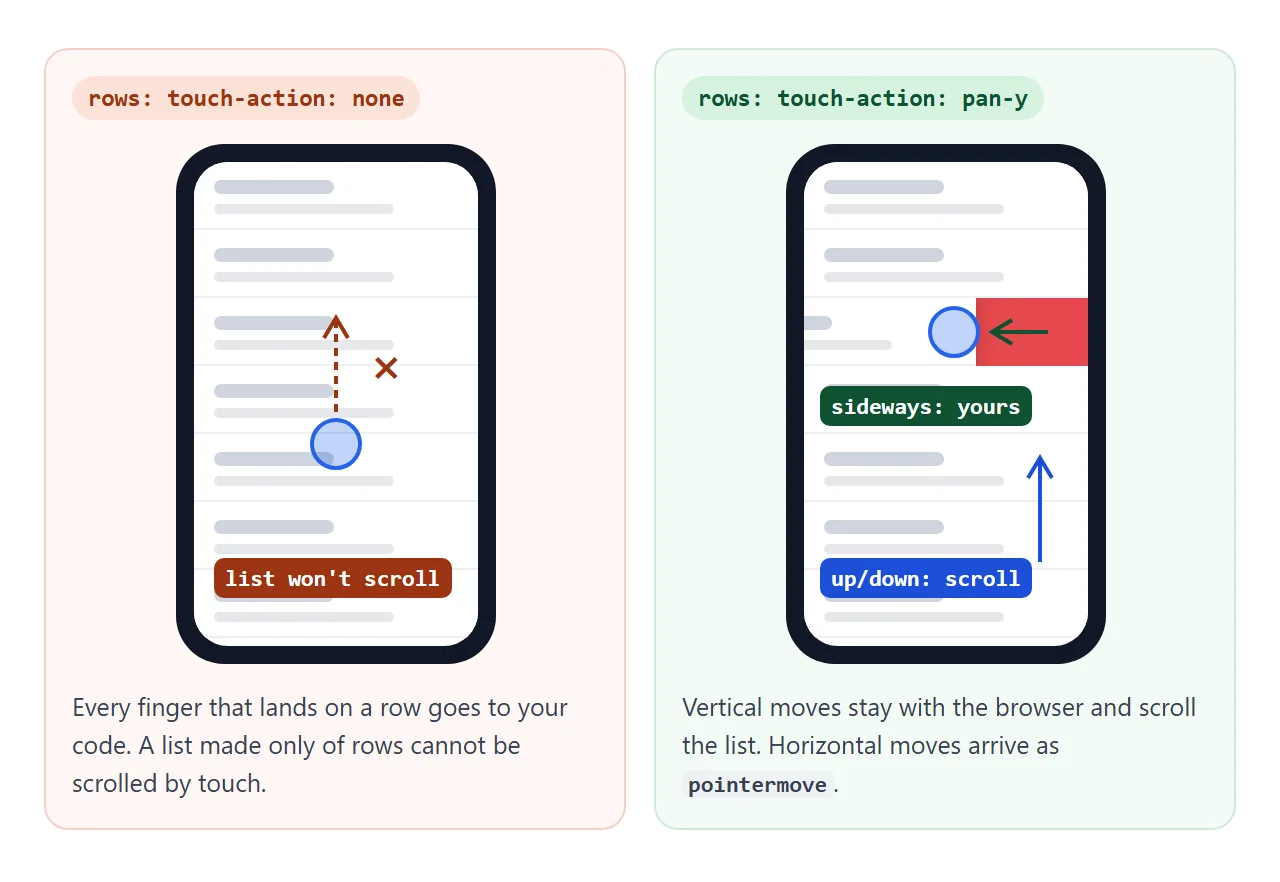
Swipe rows left in this inbox, and scroll it up and down. On a phone, switch the rows to none and try to scroll the list by starting on a row.
<!doctype html>
<html lang="en">
<head>
<meta charset="utf-8">
<meta name="viewport" content="width=device-width, initial-scale=1">
<title>Swipe to dismiss</title>
<style>
  body { margin: 0; padding: 14px; font-family: system-ui, sans-serif; background: #eceef1; color: #1d2330; }
  .bar { display: flex; flex-wrap: wrap; gap: 8px; align-items: center; font-size: 14px; margin-bottom: 10px; }
  .bar button { font: inherit; padding: 5px 10px; border-radius: 8px; border: 1px solid #c9ced6; background: #fff; }
  .bar button[aria-pressed="true"] { background: #1d2330; color: #fff; border-color: #1d2330; }
  .list { height: 300px; overflow-y: auto; border-radius: 12px; background: #fff; }
  .item { position: relative; overflow: hidden; background: #e5484d; transition: height .2s; }
  .item::after {  /* the red layer shown behind the row */
    content: 'Delete'; position: absolute; right: 18px; top: 50%;
    transform: translateY(-50%); color: #fff; font-weight: 700;
  }
  .row {
    position: relative; z-index: 1; padding: 14px 16px; background: #fff;
    border-bottom: 1px solid #eef0f3; user-select: none;
    touch-action: pan-y;  /* vertical: the list scrolls. horizontal: our code */
  }
  .row small { color: #6b7280; }
  #log { margin-top: 8px; font: 13px ui-monospace, Consolas, monospace; color: #374151; }
</style>
</head>
<body>
<div class="bar">
  touch-action on rows:
  <button data-ta="pan-y" aria-pressed="true">pan-y</button>
  <button data-ta="none" aria-pressed="false">none</button>
  <button id="reset">Reset list</button>
</div>
<div class="list" id="list"></div>
<div id="log">Swipe a row left. Scroll the list up and down.</div>

<script>
  const list = document.getElementById('list');
  const log = (t) => (document.getElementById('log').textContent = t);
  const SLOP = 8;  // px to move before we decide the direction

  function fill() {
    list.innerHTML = '';
    for (let i = 1; i <= 12; i++) {
      list.insertAdjacentHTML('beforeend',
        `<div class="item"><div class="row"><b>Message ${i}</b><br><small>Swipe left to delete</small></div></div>`);
    }
    list.querySelectorAll('.row').forEach(addSwipe);
    applyTouchAction();
  }

  function addSwipe(row) {
    let x0 = 0, y0 = 0, dx = 0, lastX = 0, lastT = 0, v = 0;
    let state = 'idle';  // idle -> pending -> swiping | ignored

    row.addEventListener('pointerdown', (e) => {
      state = 'pending'; x0 = lastX = e.clientX; y0 = e.clientY; lastT = e.timeStamp; dx = 0; v = 0;
      row.style.transition = 'none';
    });

    row.addEventListener('pointermove', (e) => {
      if (state === 'pending') {
        const ax = Math.abs(e.clientX - x0), ay = Math.abs(e.clientY - y0);
        if (ax < SLOP && ay < SLOP) return;       // too small to tell yet
        if (ay > ax) { state = 'ignored'; log('vertical: left to the page'); return; }
        state = 'swiping'; log('horizontal: swiping');
        row.setPointerCapture(e.pointerId);        // keep the row until release
      }
      if (state !== 'swiping') return;
      dx = Math.min(0, e.clientX - x0);            // left only
      const dt = e.timeStamp - lastT;
      if (dt > 0) v = 0.7 * ((e.clientX - lastX) / dt) + 0.3 * v;
      lastX = e.clientX; lastT = e.timeStamp;
      row.style.transform = `translateX(${dx}px)`;
    });

    const end = (e) => {
      const was = state; state = 'idle';
      if (was !== 'swiping') return;
      if (e.type === 'pointercancel') return settle(row, false);
      if (e.timeStamp - lastT > 100) v = 0;
      const gone = -dx > row.offsetWidth * 0.4 || (v < -0.5 && -dx > 20);
      settle(row, gone);
    };
    row.addEventListener('pointerup', end);
    row.addEventListener('pointercancel', end);
  }

  function settle(row, gone) {
    row.style.transition = 'transform .2s ease-out';
    if (!gone) { row.style.transform = ''; log('snapped back'); return; }
    row.style.transform = 'translateX(-100%)';
    const item = row.parentElement;
    item.style.height = item.offsetHeight + 'px';  // fix the height, then collapse it
    setTimeout(() => { item.style.height = '0px'; }, 200);
    setTimeout(() => item.remove(), 420);
    log('deleted ' + row.querySelector('b').textContent);
  }

  let ta = 'pan-y';
  function applyTouchAction() {
    list.querySelectorAll('.row').forEach((r) => (r.style.touchAction = ta));
  }
  document.querySelectorAll('[data-ta]').forEach((b) => b.addEventListener('click', () => {
    ta = b.dataset.ta;
    document.querySelectorAll('[data-ta]').forEach((x) => x.setAttribute('aria-pressed', x === b));
    applyTouchAction();
    log(ta === 'none' ? 'none: on a phone, the list will not scroll from a row' : 'pan-y: rows scroll and swipe');
  }));
  document.getElementById('reset').addEventListener('click', fill);
  fill();
</script>
</body>
</html>
A few details make the row feel right:
- Only one direction.
Math.min(0, dx)keeps the row from moving right. - A layer behind. The red Delete area sits under the row, so it shows as the row slides away.
- Collapse after. Fix the item's height in pixels, then animate it to 0, so the rows below slide up instead of jumping.
More on the property itself, including pan-x for vertical swipes inside a sideways row, is in CSS touch-action.
A finished example: a swipe carousel
The same pieces drive a carousel. The track holds the slides in a row, and translateX moves it by whole slides plus the live drag offset.
<!doctype html>
<html lang="en">
<head>
<meta charset="utf-8">
<meta name="viewport" content="width=device-width, initial-scale=1">
<title>Swipe carousel</title>
<style>
body { margin: 0; padding: 14px; font-family: system-ui, sans-serif; background: #f4f5f7; color: #1d2330; }
.carousel { max-width: 520px; margin: 0 auto; }
.viewport {
overflow: hidden; border-radius: 14px; outline-offset: 3px;
touch-action: pan-y; /* the page still scrolls up and down over the slides */
user-select: none; cursor: grab;
}
.track { display: flex; transition: transform .3s ease-out; }
.slide {
flex: 0 0 100%; height: 220px; box-sizing: border-box; padding: 20px;
display: flex; flex-direction: column; justify-content: flex-end; color: #fff;
}
.slide h2 { margin: 0 0 8px; font-size: 22px; }
.slide button { align-self: flex-start; font: inherit; padding: 6px 12px; border: 0; border-radius: 8px; background: rgba(255,255,255,.9); color: #1d2330; }
.s1 { background: linear-gradient(135deg, #ff7a59, #ff3d77); }
.s2 { background: linear-gradient(135deg, #3fb8af, #2d6cdf); }
.s3 { background: linear-gradient(135deg, #8e5cff, #4f7cff); }
.s4 { background: linear-gradient(135deg, #f7b733, #fc4a1a); }
.s5 { background: linear-gradient(135deg, #22a06b, #0f766e); }
.controls { display: flex; align-items: center; justify-content: space-between; margin-top: 10px; }
.controls > button { font: inherit; width: 40px; height: 40px; border-radius: 50%; border: 1px solid #c9ced6; background: #fff; }
.dots { display: flex; gap: 8px; }
.dots button { width: 10px; height: 10px; padding: 0; border-radius: 50%; border: 0; background: #c3c8d0; }
.dots button[aria-current="true"] { background: #1d2330; }
#msg { text-align: center; font-size: 14px; color: #4b5563; margin-top: 8px; min-height: 20px; }
</style>
</head>
<body>
<div class="carousel" role="region" aria-roledescription="carousel" aria-label="Swipe demo">
<div class="viewport" id="viewport" tabindex="0">
<div class="track" id="track">
<div class="slide s1"><h2>Slide 1</h2><button>Open</button></div>
<div class="slide s2"><h2>Slide 2</h2><button>Open</button></div>
<div class="slide s3"><h2>Slide 3</h2><button>Open</button></div>
<div class="slide s4"><h2>Slide 4</h2><button>Open</button></div>
<div class="slide s5"><h2>Slide 5</h2><button>Open</button></div>
</div>
</div>
<div class="controls">
<button id="prev" aria-label="Previous slide">←</button>
<div class="dots" id="dots"></div>
<button id="next" aria-label="Next slide">→</button>
</div>
<div id="msg">Swipe, drag, use the arrows, or tap Open.</div>
</div>
<script>
const viewport = document.getElementById('viewport');
const track = document.getElementById('track');
const slides = track.children, count = slides.length;
const dots = document.getElementById('dots');
const msg = (t) => (document.getElementById('msg').textContent = t);
let index = 0;
for (let i = 0; i < count; i++) {
const d = document.createElement('button');
d.setAttribute('aria-label', `Slide ${i + 1}`);
d.addEventListener('click', () => go(i));
dots.append(d);
}
function go(i, dx = 0) {
index = Math.max(0, Math.min(count - 1, i));
track.style.transform =
  `translateX(calc(${-index * 100}% + ${dx}px))`;
[...dots.children].forEach((d, k) => d.setAttribute('aria-current', k === index));
}
// ---- swipe ----
let x0 = 0, y0 = 0, dx = 0, lastX = 0, lastT = 0, v = 0;
let state = 'idle', dragged = false;
viewport.addEventListener('pointerdown', (e) => {
state = 'pending'; dragged = false;
x0 = lastX = e.clientX; y0 = e.clientY; lastT = e.timeStamp; dx = 0; v = 0;
});
viewport.addEventListener('pointermove', (e) => {
if (state === 'pending') {
const ax = Math.abs(e.clientX - x0), ay = Math.abs(e.clientY - y0);
if (ax < 8 && ay < 8) return;
if (ay > ax) { state = 'ignored'; return; } // vertical: not ours
state = 'swiping'; dragged = true;
viewport.setPointerCapture(e.pointerId);
track.style.transition = 'none';
}
if (state !== 'swiping') return;
dx = e.clientX - x0;
const atEdge = (index === 0 && dx > 0) || (index === count - 1 && dx < 0);
if (atEdge) dx /= 3; // rubber band: resist past the first and last slide
const dt = e.timeStamp - lastT;
if (dt > 0) v = 0.7 * ((e.clientX - lastX) / dt) + 0.3 * v;
lastX = e.clientX; lastT = e.timeStamp;
go(index, dx);
});
function end(e) {
const was = state; state = 'idle';
if (was !== 'swiping') return;
track.style.transition = '';
if (e.type === 'pointercancel' || e.timeStamp - lastT > 100) v = 0;
const w = viewport.offsetWidth;
let next = index;
if (dx < -w * 0.2 || (v < -0.4 && dx < -20)) next = index + 1;
if (dx > w * 0.2 || (v > 0.4 && dx > 20)) next = index - 1;
go(next);
}
viewport.addEventListener('pointerup', end);
viewport.addEventListener('pointercancel', end);
// a drag also ends with a click; swallow that one click
viewport.addEventListener('click', (e) => {
if (dragged) { e.stopPropagation(); e.preventDefault(); dragged = false; }
}, true);
// ---- buttons and keys ----
track.querySelectorAll('.slide button').forEach((b, i) =>
b.addEventListener('click', () => msg(`Opened slide ${i + 1}`)));
document.getElementById('prev').addEventListener('click', () => go(index - 1));
document.getElementById('next').addEventListener('click', () => go(index + 1));
viewport.addEventListener('keydown', (e) => {
if (e.key === 'ArrowLeft') go(index - 1);
if (e.key === 'ArrowRight') go(index + 1);
});
go(0);
</script>
</body>
</html>
track.style.transform =
`translateX(calc(${-index * 100}% + ${dx}px))`;
- Rubber band at the ends. On the first and last slide, divide
dxby 3 so the track resists instead of sliding into empty space. - Lower threshold. A slide is wide, so 20% of the width, or a flick, is enough to move on.
- No click after a drag. A mouse press and release still fire
clickafter a drag. Set a flag when the gesture locks to swiping, and cancel the next click in a capture-phase listener on the carousel. - Other ways in. Real buttons, dots and arrow keys, so the carousel works without a swipe at all.
For layouts that need no swipe code, such as scroll-snap rows, dots and autoplay, see Carousel in HTML.
When it does not work
| What you see | Cause | Fix |
|---|---|---|
| On a phone, the element moves a little and snaps back | The browser took the gesture as a scroll and sent pointercancel |
touch-action: pan-y on the element |
| The list or page will not scroll when the finger starts on a row | touch-action: none on the rows |
Use pan-y |
| Rows wobble while the user scrolls | No direction lock | Wait for 8 px, then lock one axis |
| Short flicks do nothing | Distance rule only | Add a speed rule |
| A slow drag that stopped still flies off | Speed from an old move | Set speed to 0 if the last move was over 100 ms ago |
| The element lags behind the finger | A CSS transition is still on | transition: none on pointerdown |
| A button inside fires after a swipe | The press and release still make a click | Cancel the next click after a drag |
| With a mouse, an image drags as a ghost and the swipe stops | Native image drag starts and sends pointercancel |
draggable="false" on the image |
Share it as a link
A swipe has to be felt. A screen recording shows it, but nobody can try the threshold or feel the rubber band. An .html attachment may open as plain code on a phone, which is exactly where a swipe matters.
To send the working version, paste the page into a NOS document and choose Create share link. HTML to link walks through it.
The page renders as written and its scripts run, so the people you send it to can swipe the cards on their own phones. If you change the code later, the same link shows the new version.