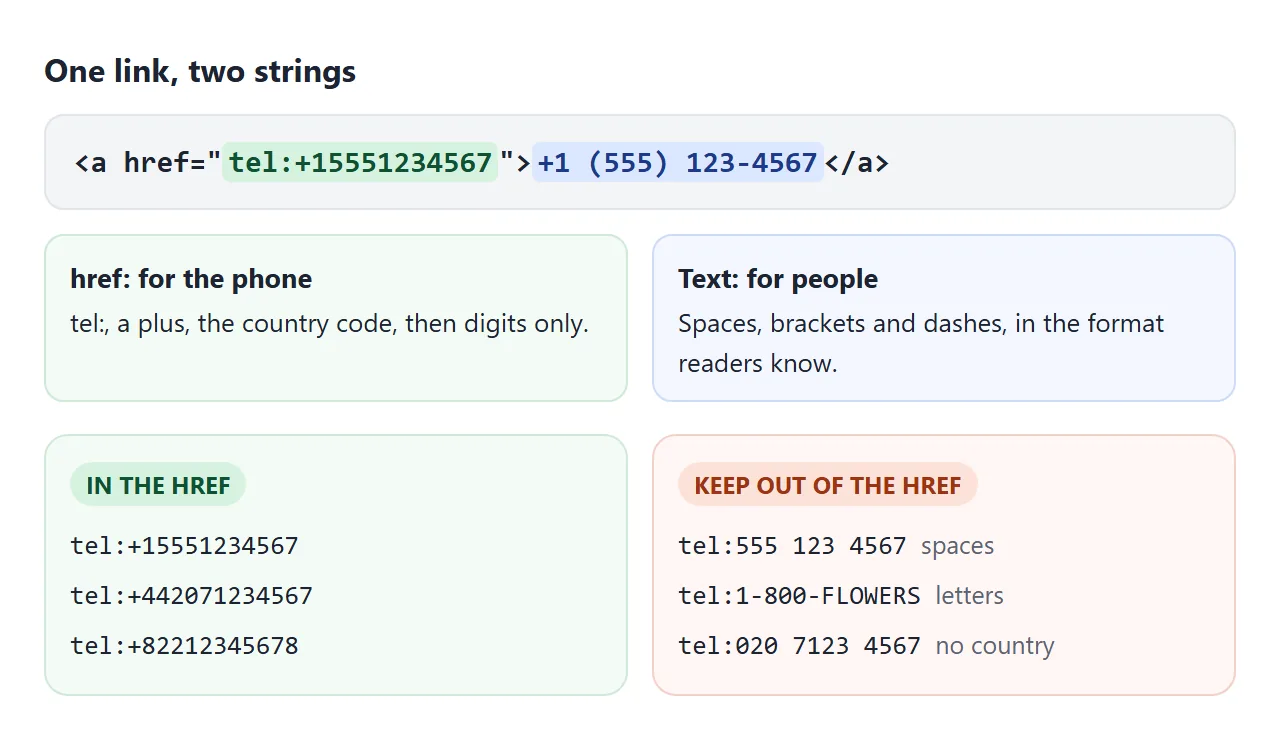
A phone link in HTML is an ordinary anchor with a tel: address. The href holds the full international number with no spaces. The visible text can be formatted any way you like:
<a href="tel:+15551234567">+1 (555) 123-4567</a>
On a phone, tapping it opens the dialer with the number filled in. Type a number below in the way people usually write it, and the builder gives you the href and the HTML.
<!doctype html>
<html lang="en">
<head>
<meta charset="utf-8">
<meta name="viewport" content="width=device-width, initial-scale=1">
<title>tel: link builder</title>
<style>
body { margin: 0; padding: 16px; font-family: system-ui, sans-serif; background: #f4f5f7; color: #1d2330; }
.box { max-width: 520px; margin: 0 auto; background: #fff; border-radius: 12px; padding: 16px; box-shadow: 0 4px 16px rgba(0,0,0,.08); }
label { display: block; font-size: 13px; font-weight: 600; margin: 10px 0 4px; }
select, input { width: 100%; box-sizing: border-box; font: inherit; padding: 9px 10px; border: 1px solid #cfd4dc; border-radius: 8px; }
.row { display: grid; grid-template-columns: 110px 1fr; gap: 8px; }
.msg { font-size: 13px; margin: 10px 0 0; min-height: 18px; }
.msg.err { color: #b42318; } .msg.warn { color: #9a6700; } .msg.ok { color: #0f7a3d; }
.out { margin-top: 12px; padding: 12px; border-radius: 8px; background: #f7f8fa; font-size: 14px; }
.out b { display: inline-block; width: 64px; color: #5b6472; font-weight: 600; }
code { font: 13px ui-monospace, Consolas, monospace; overflow-wrap: anywhere; }
.call { display: inline-block; margin-top: 12px; padding: 12px 18px; border-radius: 10px; background: #0f7a3d; color: #fff; text-decoration: none; font-weight: 600; }
.call[aria-disabled="true"] { background: #b8bec8; pointer-events: none; }
</style>
</head>
<body>
<div class="box">
<div class="row">
<div>
<label for="cc">Country</label>
<select id="cc">
<option value="1">+1 US/CA</option>
<option value="44">+44 UK</option>
<option value="61">+61 AU</option>
<option value="49">+49 DE</option>
<option value="82">+82 KR</option>
</select>
</div>
<div>
<label for="num">Number, as people write it</label>
<input id="num" value="(555) 123-4567" autocomplete="off">
</div>
</div>
<label for="shown">Visible text</label>
<select id="shown">
<option value="typed">As typed (local format)</option>
<option value="intl">International (+ and country code)</option>
</select>
<p class="msg" id="msg" aria-live="polite"></p>
<div class="out">
<div><b>href</b><code id="href"></code></div>
<div><b>text</b><code id="text"></code></div>
<div><b>HTML</b><code id="html"></code></div>
</div>
<a class="call" id="call" href="#">Call</a>
</div>
<script>
const $ = (id) => document.getElementById(id);
const KEYPAD = { a:2,b:2,c:2,d:3,e:3,f:3,g:4,h:4,i:4,j:5,k:5,l:5,m:6,n:6,o:6,p:7,q:7,r:7,s:7,t:8,u:8,v:8,w:9,x:9,y:9,z:9 };
const esc = (s) => s.replace(/&/g, '&').replace(/</g, '<');
function build() {
let cc = $('cc').value;
const typed = $('num').value.trim();
const notes = [];
// letters such as 1-800-FLOWERS: turn them into keypad digits
let raw = typed.replace(/[a-z]/gi, (ch) => KEYPAD[ch.toLowerCase()]);
if (raw !== typed) notes.push('Letters were changed to keypad digits.');
let digits = raw.replace(/\D/g, ''); // drop spaces, dashes, brackets, dots
if (raw.startsWith('+')) { // already international: keep it, ignore the menu
cc = '';
notes.push('The number already starts with +, so the country menu was ignored.');
} else if (cc === '1' && digits.length === 11 && digits[0] === '1') {
digits = digits.slice(1);
} else if (cc !== '1' && digits[0] === '0') { // the leading 0 is dialled only inside the country
digits = digits.slice(1);
notes.push('The leading 0 was dropped after the country code.');
}
const total = cc.length + digits.length;
let error = '';
if (!digits) error = 'Type a number.';
else if (total > 15) error = 'Too long: a full international number has at most 15 digits.';
else if (digits.length < 6) error = 'Too short to be a full phone number.';
const href = 'tel:+' + cc + digits;
// international text: + country code, then the local part without its trunk prefix
const local = cc === '1' ? raw.replace(/^\s*1[\s.-]*/, '') : raw.replace(/^\s*0\s*/, '');
const text = $('shown').value === 'intl' && cc ? '+' + cc + ' ' + local.trim() : typed;
$('msg').className = 'msg ' + (error ? 'err' : notes.length ? 'warn' : 'ok');
$('msg').textContent = error || notes.join(' ') || 'Looks good.';
$('href').textContent = error ? '-' : href;
$('text').textContent = error ? '-' : text;
$('html').textContent = error ? '-' : '<a href="' + href + '">' + esc(text) + '</a>';
const call = $('call');
call.href = error ? '#' : href;
call.textContent = error ? 'Call' : 'Call ' + text;
call.setAttribute('aria-disabled', error ? 'true' : 'false');
}
['cc', 'num', 'shown'].forEach((id) => $(id).addEventListener('input', build));
build();
</script>
</body>
</html>
The href is for the phone, the text is for people
A tel: link carries two strings. The href is read by the phone, so keep it to tel:, a plus, the country code and digits. The link text is read by people, so it can use the spaces, brackets and dashes they expect.
The builder does three clean-ups you would otherwise do by hand:
- Removes spaces, dashes, dots and brackets. A space is not allowed in a URL.
- Drops the leading 0 used for calls inside many countries. The country code replaces it, so London's 020 7123 4567 becomes
tel:+442071234567. - Turns letters into keypad digits, so 1-800-FLOWERS becomes
+18003569377.
A complete international number has at most 15 digits, which is why the builder stops there. Extensions and pauses have their own quirks; HTML link for a phone number covers them.
Text messages with sms:
sms: works like tel: but opens the messaging app. A body parameter can prefill the message:
<a href="sms:+15551234567?body=Hi%2C%20I%27d%20like%20to%20book.">Text us</a>
Treat the body as a nice extra. Phones and messaging apps have not always read the parameter the same way, and some may ignore it. The link should still make sense when the message box opens empty.
Email with mailto: encode the subject and body
mailto: takes subject and body parameters in the same style. The trap is that & separates parameters. A subject such as "Smith & Sons" ends at the ampersand, and the rest is lost.
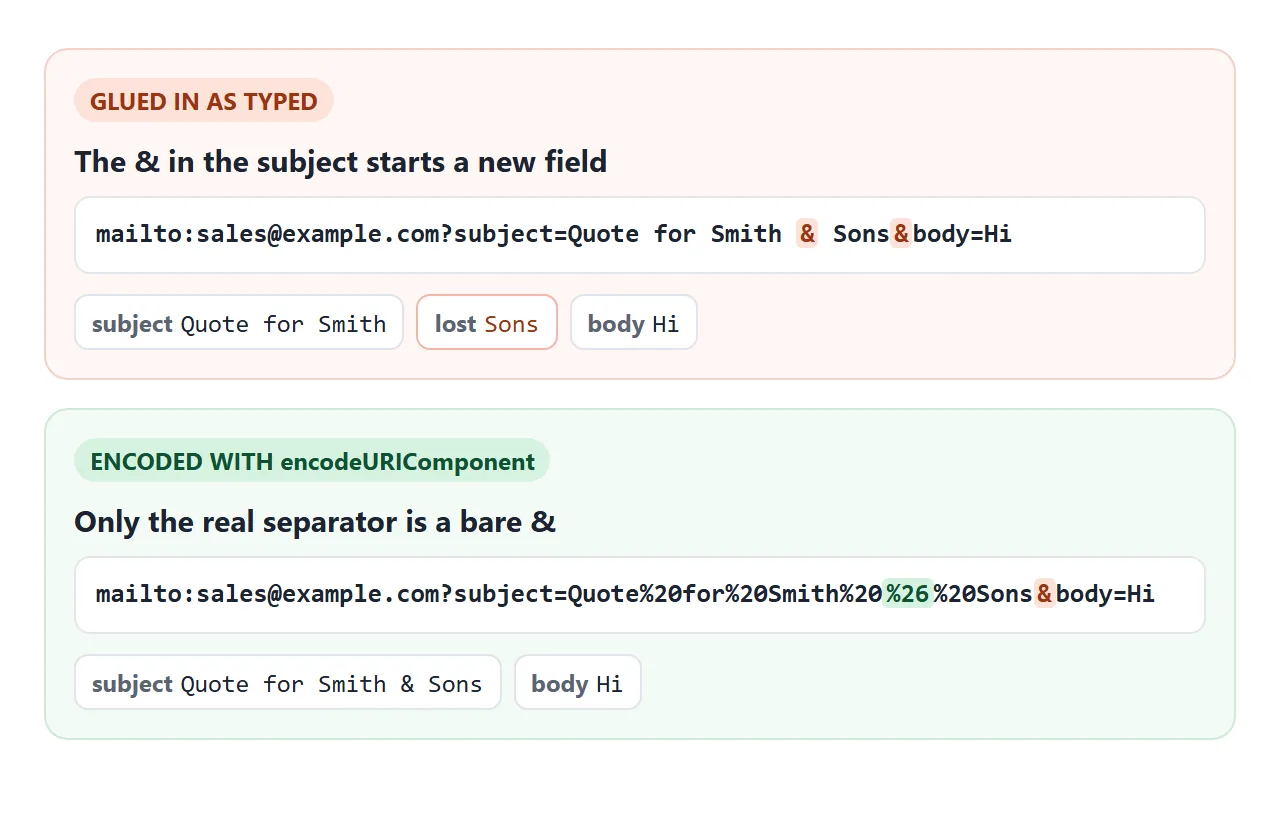
Run each value through encodeURIComponent() before you join them. It turns & into %26, a space into %20 and a new line into %0A. Try it with your own text:
<!doctype html>
<html lang="en">
<head>
<meta charset="utf-8">
<meta name="viewport" content="width=device-width, initial-scale=1">
<title>tel, sms and mailto links</title>
<style>
  body { margin: 0; padding: 16px; font-family: system-ui, sans-serif; background: #f4f5f7; color: #1d2330; }
  form, .out { max-width: 560px; margin: 0 auto; background: #fff; border-radius: 12px; padding: 14px 16px; box-shadow: 0 4px 16px rgba(0,0,0,.08); }
  .out { margin-top: 12px; }
  label { display: block; font-size: 13px; font-weight: 600; margin: 8px 0 4px; }
  input, textarea { width: 100%; box-sizing: border-box; font: inherit; padding: 8px 10px; border: 1px solid #cfd4dc; border-radius: 8px; }
  textarea { height: 54px; resize: vertical; }
  .two { display: grid; grid-template-columns: 1fr 1fr; gap: 10px; }
  h3 { font-size: 14px; margin: 10px 0 4px; }
  h3:first-child { margin-top: 0; }
  code { display: block; font: 12.5px ui-monospace, Consolas, monospace; background: #f7f8fa; border-radius: 6px; padding: 6px 8px; overflow-wrap: anywhere; }
  .bad code { background: #fff4f0; color: #9a3412; }
  .note { font-size: 12.5px; color: #5b6472; margin: 4px 0 0; }
  @media (max-width: 420px) { .two { grid-template-columns: 1fr; } }
</style>
</head>
<body>
<form id="f">
  <div class="two">
    <div><label for="phone">Phone (international)</label><input id="phone" name="phone" value="+15551234567"></div>
    <div><label for="email">Email</label><input id="email" name="email" value="sales@example.com"></div>
  </div>
  <label for="subject">Email subject</label>
  <input id="subject" name="subject" value="Quote for Smith & Sons">
  <label for="body">Message (used for the text and the email)</label>
  <textarea id="body" name="body">Hi, I'd like a quote.
Size: 10 & 12</textarea>
</form>

<div class="out">
  <h3>Call</h3><code id="tel"></code>
  <h3>Text message</h3><code id="sms"></code>
  <p class="note">Some messaging apps may ignore the body. The number still works.</p>
  <h3>Email, encoded</h3><code id="mail"></code>
  <div class="bad">
    <h3>Email, not encoded</h3><code id="raw"></code>
    <p class="note" id="split"></p>
  </div>
</div>

<script>
  const $ = (id) => document.getElementById(id);
  // encodeURIComponent turns & into %26, spaces into %20 and a new line into %0A
  const enc = encodeURIComponent;

  function build() {
    const phone = $('phone').value.replace(/[^\d+]/g, '');  // only + and digits in the href
    const body = $('body').value.replace(/\r?\n/g, '\r\n');   // mailto wants CRLF line breaks

    $('tel').textContent = 'tel:' + phone;
    $('sms').textContent = 'sms:' + phone + '?body=' + enc($('body').value);
    const mail = 'mailto:' + $('email').value + '?subject=' + enc($('subject').value) + '&body=' + enc(body);
    $('mail').textContent = mail;

    // the same link glued together without encoding
    const raw = 'mailto:' + $('email').value + '?subject=' + $('subject').value + '&body=' + $('body').value;
    $('raw').textContent = raw;
    // what an email app reads: every & starts a new field
    const fields = raw.slice(raw.indexOf('?') + 1).split('&').map((p) => p.split('=')[0].trim() || '(empty)');
    $('split').textContent = 'An email app splits this at every &, so it sees ' + fields.length +
      ' fields: ' + fields.join(', ') + '. The subject stops at the first &.';
  }

  $('f').addEventListener('input', build);
  $('f').addEventListener('submit', (e) => e.preventDefault());
  build();
</script>
</body>
</html>
In the example, line breaks in the email body are sent as %0D%0A, the form the mailto standard uses. For several recipients, cc and bcc, see mailto with multiple recipients.
| Scheme | Opens | Extra text | Watch out for |
|---|---|---|---|
tel: |
The dialer | None | Spaces and letters in the href |
sms: |
Messaging app | ?body= |
Some apps may ignore the body |
mailto: |
Email app | ?subject= and &body= |
Unencoded &, # and ? |
What happens on a desktop
On a computer, the browser passes the link to whatever app is set up for that scheme. That may be a calling app, a prompt asking which app to use, or nothing at all. The page cannot tell which.
So never hide the number behind the link. Write it out as the link text, or next to a button that only says "Call". Desktop readers can then copy it or dial it from their own phone.
Style them as buttons for thumbs
A contact link is still an <a> element. Style it to look like a button rather than wrapping it in a <button>, as HTML button with a link explains.
On a phone, three buttons in a bar fixed to the bottom of the screen stay within reach of a thumb.
<!doctype html>
<html lang="en">
<head>
<meta charset="utf-8">
<meta name="viewport" content="width=device-width, initial-scale=1">
<title>Contact card with call, text and email buttons</title>
<style>
body { margin: 0; padding: 16px 16px 96px; font-family: system-ui, sans-serif; background: #f4f5f7; color: #1d2330; }
.card { max-width: 420px; margin: 0 auto; background: #fff; border-radius: 14px; padding: 18px; box-shadow: 0 4px 16px rgba(0,0,0,.08); }
h1 { font-size: 20px; margin: 0 0 2px; }
.role { color: #5b6472; margin: 0 0 12px; font-size: 14px; }
address { font-style: normal; line-height: 1.6; font-size: 15px; }
address a { color: #1a56db; }
.hours { font-size: 14px; color: #5b6472; margin: 12px 0 0; }
/* the bar: three big targets, always on screen */
.bar { position: fixed; left: 0; right: 0; bottom: 0; display: flex; gap: 8px; padding: 10px 12px;
background: #fff; box-shadow: 0 -4px 14px rgba(0,0,0,.1); }
.bar a { flex: 1; min-height: 48px; display: flex; align-items: center; justify-content: center; gap: 6px;
border-radius: 10px; font-weight: 600; text-decoration: none; color: #fff; background: #0f7a3d; }
.bar a.text { background: #1a56db; }
.bar a.mail { background: #374151; }
.bar a:focus-visible { outline: 3px solid #f59e0b; outline-offset: 2px; }
.bar svg { width: 18px; height: 18px; fill: currentColor; }
</style>
</head>
<body>
<div class="card">
<h1>Harbor Street Dental</h1>
<p class="role">Reception and bookings</p>
<!-- address = contact details for the page or the section it sits in -->
<address>
120 Harbor Street, Suite 4<br>
Portland, OR 97201<br>
Phone: <a href="tel:+15551234567">+1 (555) 123-4567</a><br>
Email: <a href="mailto:hello@example.com">hello@example.com</a>
</address>
<p class="hours">Mon-Fri 8:00-17:00. Text us any time.</p>
</div>
<nav class="bar" aria-label="Contact Harbor Street Dental">
<!-- the visible word starts the accessible name, the number completes it -->
<a href="tel:+15551234567" aria-label="Call reception, +1 (555) 123-4567">
<svg viewBox="0 0 24 24" aria-hidden="true"><path d="M6.6 10.8a15.1 15.1 0 0 0 6.6 6.6l2.2-2.2c.3-.3.7-.4 1-.2 1.1.4 2.3.6 3.6.6.6 0 1 .4 1 1V20c0 .6-.4 1-1 1A17 17 0 0 1 3 4c0-.6.4-1 1-1h3.5c.6 0 1 .4 1 1 0 1.3.2 2.5.6 3.6.1.3 0 .7-.2 1z"/></svg>
Call
</a>
<a class="text" href="sms:+15551234567?body=Hi%2C%20I%27d%20like%20to%20book%20a%20check-up." aria-label="Text reception, +1 (555) 123-4567">
<svg viewBox="0 0 24 24" aria-hidden="true"><path d="M4 3h16c1.1 0 2 .9 2 2v11c0 1.1-.9 2-2 2H8l-4 4V5c0-1.1.9-2 2-2z"/></svg>
Text
</a>
<a class="mail" href="mailto:hello@example.com?subject=Booking%20request&body=Name%3A%20%0D%0APreferred%20day%3A%20" aria-label="Email hello@example.com">
<svg viewBox="0 0 24 24" aria-hidden="true"><path d="M3 5h18v14H3zm9 7 8-5H4z"/></svg>
Email
</a>
</nav>
</body>
</html>
- Size: WCAG 2.2 asks for targets of at least 24 by 24 CSS pixels, and 44 by 44 at its stricter level. The bar uses a 48px height.
- Spacing: leave a gap between buttons so a thumb does not hit the wrong one.
- Focus: keep a visible
:focus-visibleoutline for keyboard users.
Link text that makes sense out loud
Screen reader users often move through a list of the page's links. "Click here" or a bare phone icon tells them nothing. Say what the link does: "Call sales, +1 555 123 4567".
The bar in the example shows the short words Call, Text and Email, and adds an aria-label with the number.
The visible word comes first in the label, so someone using voice control can still say "click Call". The icons have aria-hidden="true", so they are not read out.
The card's <address> element marks the block as contact details. It is not only for street addresses: phone numbers and email links belong in it too. For turning the street address into a map link, see address links.
iPhone Safari turns numbers into links by itself
Safari on iOS can spot text that looks like a phone number and make it tappable, even without a tel: link. That helps with plain numbers, but it can also catch order numbers or dates.
To turn the guessing off for a page, add this to the <head>:
<meta name="format-detection" content="telephone=no">
It only stops the automatic detection. The tel: links you write yourself keep working, so real numbers stay tappable.
Why the buttons can do nothing inside a frame
The live examples on this page run in an iframe with a sandbox attribute. A sandbox limits what the page inside can do, including opening outside apps.
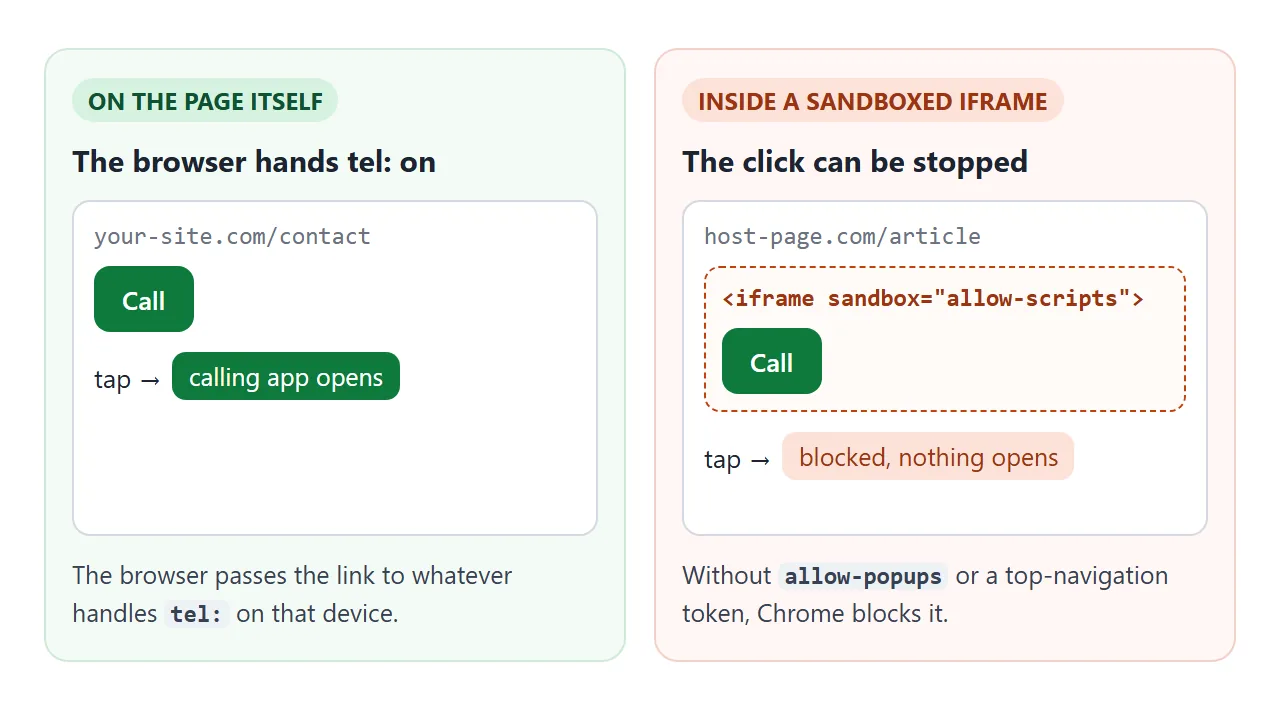
When we clicked the tel: link inside such a frame in Chrome, nothing opened. The frame stayed as it was, and the console said the navigation to an external protocol was blocked by the sandbox.
The sms: and mailto: links behaved the same way. Other browsers may handle it differently.
The message listed the tokens that lift the block, among them allow-popups and allow-top-navigation-to-custom-protocols. If you embed your own contact page, test it inside the frame. The sandbox attribute explains each token.
When it does not work
| What you see | Cause | Fix |
|---|---|---|
| Nothing happens on a laptop | No app is set up for tel: on that computer |
Keep the number visible as text |
| Wrong number or no dial | Spaces, letters or a local-only format in the href | Use tel:, a plus, the country code, digits only |
| Text app opens empty | The app ignores the body parameter |
Write the link so it works without the body |
| Email subject cut short | A bare & in the subject or body |
Encode each value with encodeURIComponent |
| Click does nothing in an embedded page | The link sits in a sandboxed iframe | Open the page on its own, or allow popups on the frame |
| Order numbers turn blue on iPhone | Safari's phone number detection | Add the format-detection meta tag |
Share it as a link
A contact card is meant to be opened on a phone, and an .html attachment often opens there as plain code, if at all. Opening an HTML file on a phone explains why.
To send the working card, paste the page into a NOS document and choose Create share link. HTML to link walks through it. The page renders as written and its scripts run, so people see the working card on their own phone.
Open the link on your phone and tap each button before you send it. If you change the number later, the same link shows the new version.