An internship portfolio can be one web page: your name and the kind of internship you want, three projects, the coursework that fits, and one way to reach you. Paste it into NOS, create a share link, and put that link in your application.
One question on Quora asks, "What are some free websites to build a portfolio?" For a single page you may not need a site builder at all. Ask an AI chat for the HTML, check it, and turn it into a link.
Here is a finished example with made-up details. Tap Data, Team or Writing to filter the projects.
<!doctype html>
<html lang="en">
<head>
<meta charset="utf-8">
<meta name="viewport" content="width=device-width, initial-scale=1">
<title>Mira Voss - Internship portfolio</title>
<style>
  * { box-sizing: border-box; }
  body {
    margin: 0; font-family: system-ui, -apple-system, "Segoe UI", sans-serif;
    color: #1c2430; background: #f6f7f9; line-height: 1.5;
  }
  .wrap { max-width: 760px; margin: 0 auto; padding: 28px 20px 40px; }
  header h1 { margin: 0; font-size: 28px; line-height: 1.15; }
  header .role { margin: 6px 0 0; font-size: 16px; color: #334155; }
  header .contact { margin: 10px 0 0; font-size: 14px; color: #475569; }
  header .contact span { white-space: nowrap; margin-right: 14px; }
  h2 { font-size: 13px; letter-spacing: .08em; text-transform: uppercase; color: #64748b; margin: 30px 0 10px; }
  .chips { display: flex; flex-wrap: wrap; gap: 8px; margin-bottom: 12px; }
  .chip {
    font: inherit; font-size: 13px; padding: 6px 12px; border-radius: 999px;
    border: 1px solid #cbd5e1; background: #fff; color: #334155; cursor: pointer;
  }
  .chip[aria-pressed="true"] { background: #0f766e; border-color: #0f766e; color: #fff; }
  .project {
    background: #fff; border: 1px solid #e2e8f0; border-radius: 12px;
    padding: 16px 18px; margin-bottom: 12px;
  }
  .project[hidden] { display: none; }
  .project h3 { margin: 0 0 2px; font-size: 18px; }
  .project .meta { font-size: 13px; color: #64748b; margin: 0 0 8px; }
  .project p { margin: 4px 0; font-size: 15px; }
  .project b { color: #0f766e; }
  .course { display: grid; grid-template-columns: 1fr 1fr; gap: 6px 18px; padding: 0; margin: 0; list-style: none; font-size: 15px; }
  .course li { padding: 6px 0; border-bottom: 1px solid #e2e8f0; }
  .course small { color: #64748b; }
  .skills { font-size: 15px; margin: 0; }
  @media (max-width: 520px) {
    .course { grid-template-columns: 1fr; }
    header h1 { font-size: 24px; }
  }
</style>
</head>
<body>
<div class="wrap">

  <header>
    <h1>Mira Voss</h1>
    <p class="role">Business analytics student, looking for a summer 2027 data analyst internship</p>
    <p class="contact">
      <span>mira.voss@example.com</span>
      <span>Third year, Northfield University</span>
      <span>Available June to August</span>
    </p>
  </header>

  <h2>Projects</h2>
  <div class="chips" id="chips">
    <button class="chip" data-tag="all" aria-pressed="true">All</button>
    <button class="chip" data-tag="data" aria-pressed="false">Data</button>
    <button class="chip" data-tag="team" aria-pressed="false">Team</button>
    <button class="chip" data-tag="writing" aria-pressed="false">Writing</button>
  </div>

  <article class="project" data-tags="data">
    <h3>Campus cafe sales: what sells when</h3>
    <p class="meta">Course project, Data Analysis II, autumn 2026 - spreadsheet and charts</p>
    <p><b>Question:</b> which items should the cafe stock more of on Monday mornings?</p>
    <p><b>What I did:</b> cleaned a practice sales file, grouped sales by weekday and hour, and made three charts.</p>
    <p><b>Result:</b> a one-page recommendation that I presented to the class.</p>
  </article>

  <article class="project" data-tags="data team">
    <h3>Student survey on study spaces</h3>
    <p class="meta">Group project of four, Research Methods, spring 2026 - survey and report</p>
    <p><b>Question:</b> why do students avoid the library at peak hours?</p>
    <p><b>What I did:</b> wrote half of the survey questions and analysed the free-text answers.</p>
    <p><b>Result:</b> a 10-page report. My part: sections 3 and 4.</p>
  </article>

  <article class="project" data-tags="writing">
    <h3>Plain-language guide to budgeting</h3>
    <p class="meta">Volunteer work, student finance club, 2025 - handout</p>
    <p><b>Question:</b> how do first-year students plan a term budget?</p>
    <p><b>What I did:</b> wrote a two-page guide with a worked example and a blank table.</p>
    <p><b>Result:</b> the club handed it out at orientation week.</p>
  </article>

  <h2>Relevant coursework</h2>
  <ul class="course">
    <li>Data Analysis II <small>- B+</small></li>
    <li>Statistics for Business</li>
    <li>Research Methods</li>
    <li>Databases <small>- in progress</small></li>
  </ul>

  <h2>Tools</h2>
  <p class="skills">Excel and Google Sheets (pivot tables, lookups), SQL basics, charts, short written reports.</p>

</div>

<script>
  // Filter the project cards by tag. Cards can have more than one tag.
  const chips = document.querySelectorAll('.chip');
  const cards = document.querySelectorAll('.project');

  chips.forEach((chip) => {
    chip.addEventListener('click', () => {
      const tag = chip.dataset.tag;
      chips.forEach((c) => c.setAttribute('aria-pressed', c === chip ? 'true' : 'false'));
      cards.forEach((card) => {
        const tags = card.dataset.tags.split(' ');
        card.hidden = tag !== 'all' && !tags.includes(tag);
      });
    });
  });
</script>
</body>
</html>
The page has four blocks, and each one has a job.
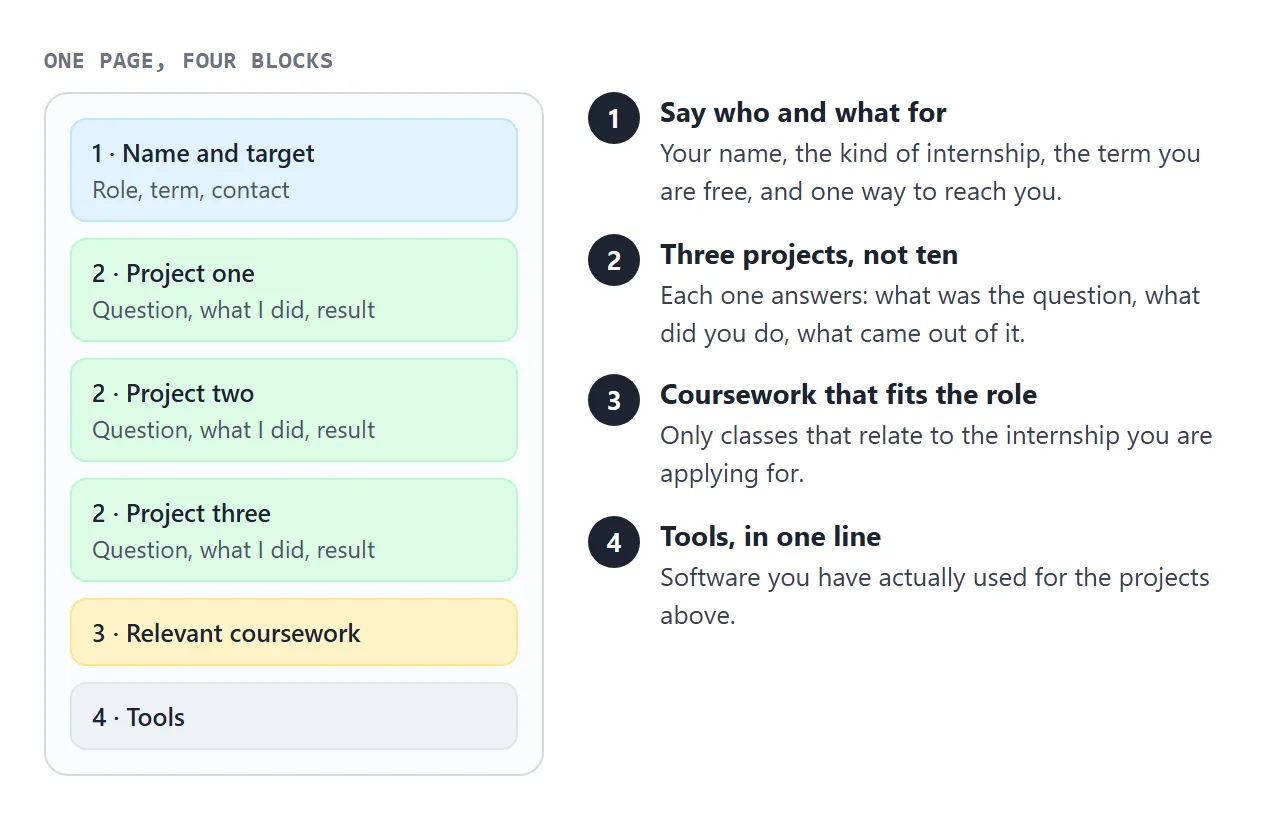
Notice what is missing: no long biography, no list of every class, no photo gallery. The reader should know in one screen who you are, what you want and where the proof is.
Make it with AI
You supply the facts; the AI supplies the layout. Paste this into ChatGPT, Claude or Gemini, then fill in the list at the end with your own details.
Make one self-contained HTML page: an internship portfolio for a student.
Use only the facts I give below. Do not invent projects, grades, numbers or employers. If something is missing, write [add this] in its place.

Layout, top to bottom:
1. My name, the internship I want, the term I am free, my email.
2. Three projects. For each: title, where it was done (course, club or on my own), the question, what I did, the result. For a group project, say which part was mine.
3. Relevant coursework, as a short list.
4. Tools I have used, in one line.

Rules: one HTML file with CSS and JavaScript inside it. No images from other websites; use plain shapes or inline SVG if a picture is needed. No contact form. It must read well on a phone and a laptop. Plain colours and large readable text.

My details:
- Name:
- Internship I want and the term:
- Email:
- Project 1:
- Project 2:
- Project 3:
- Coursework:
- Tools:
Then check the result before you send it to anyone.
- Every sentence is true. AI fills gaps with things that sound right. Delete any number, grade or claim you cannot back up.
- No placeholders left. Search the page for the square brackets.
- Your part is clear. In group projects, the page must say what you did.
- It fits a phone. The page needs the viewport meta tag, and the text should be readable without zooming.
The tag looks like this:
<meta name="viewport" content="width=device-width, initial-scale=1">
MDN recommends setting the viewport width to the device width, which keeps a phone from showing a shrunken desktop layout. If your chat does not give you a ready file, host ChatGPT HTML output shows how to copy the code out.
Send it as a link
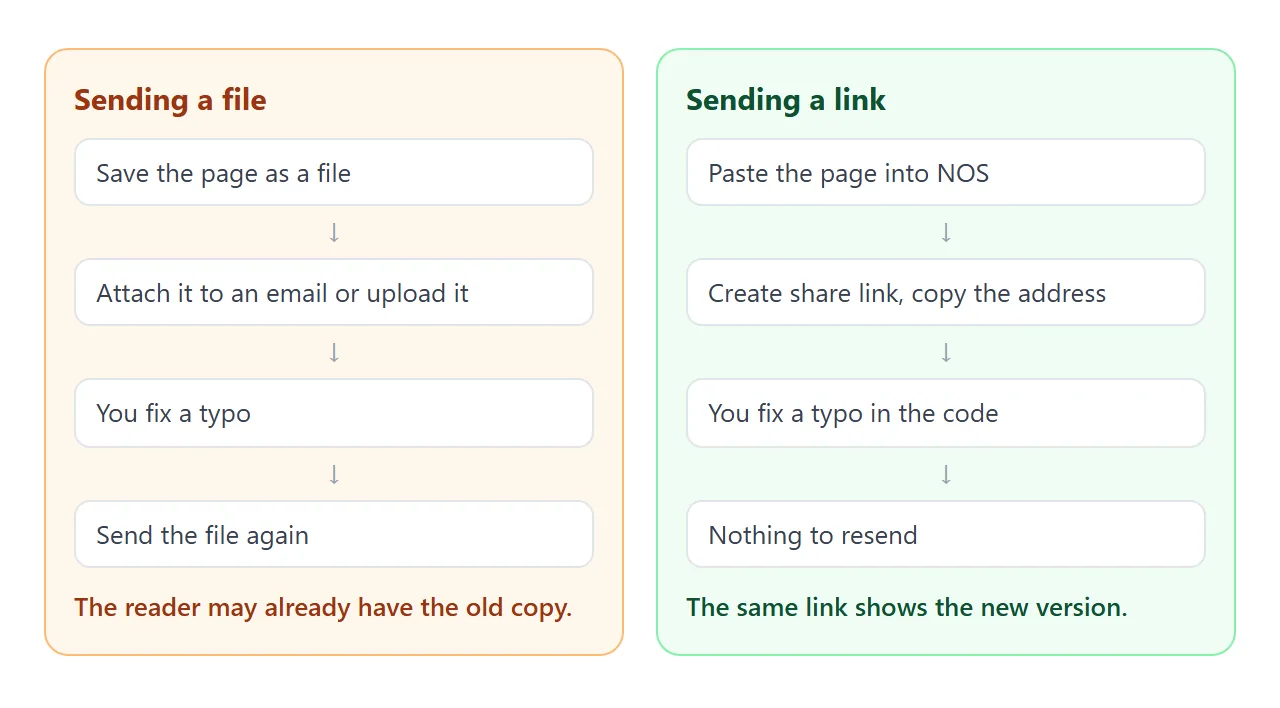
Attaching an HTML file asks the reader to open it correctly. A link does not. Opening an HTML file on a phone covers why attachments can fail there.
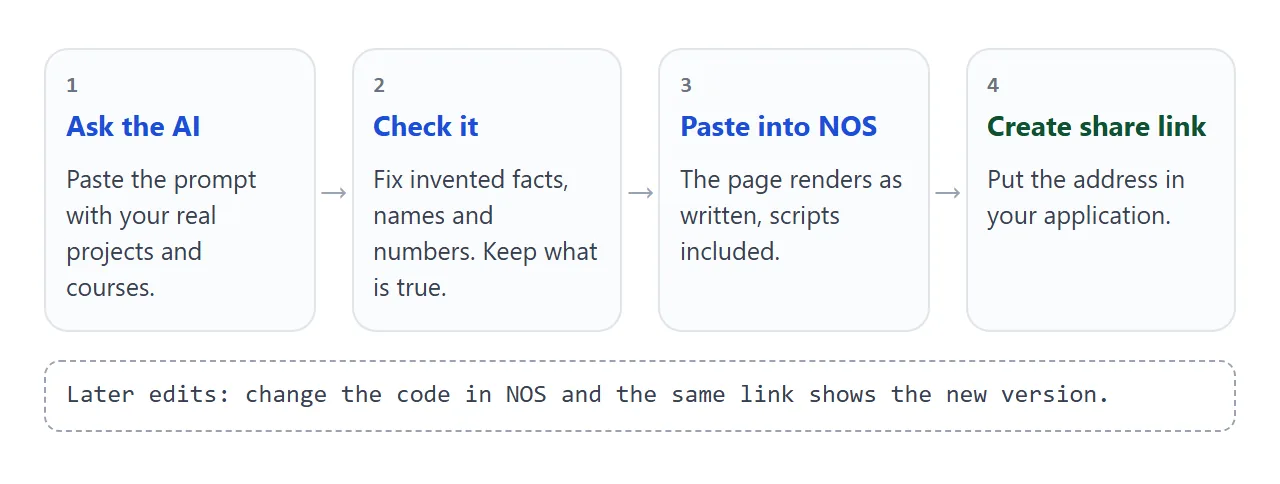
- Open NOS and paste the full HTML. HTML to link walks through it.
- Choose Create share link and copy the address.
- Open the address on your phone and read it once as a stranger would.
- Put the address in the application.
The page renders as written and its scripts run, so the filter buttons in the example work for the reader. Anyone with the link can open it in a browser, on a phone too, without an account. They cannot edit it.
Found a typo after you applied? Change the code in NOS. The same link shows the new version, so you do not need to send anything again.
Where the link goes:
- On your resume, written out as text next to your name. Link a portfolio in a resume explains why it should be short enough to type.
- In any form field that asks for a website or portfolio.
- In the first lines of an email, before the attachment.
- On LinkedIn: the Featured section lets you add external links such as a portfolio, according to LinkedIn Help as of October 2026.
One page, a PDF, or both
A PDF and a link do different jobs, and you can use both.
| Long document as attachment | One page as a link | |
|---|---|---|
| Reader opens it | In a file viewer or after a download | In a browser, phone included |
| After you fix a typo | Send the file again | Same link, new version |
| On a phone | Depends on the phone and mail app | Opens in the phone's browser |
| Fits a "website" field | No | Yes |
| Fits an "upload" box | Yes | No |
If the form wants a file, upload the PDF and put the link inside it. Sharing your resume as a link goes through that case.
When you have little to show
You do not need a finished project from outside class. Look for work that already exists.
A course assignment with a question and a result is a project. So is a group report, if you say which sections were yours.
A handout for a club, a spreadsheet you built for a family budget, or an analysis you did for fun also counts.
Write each one the same way: the question, what you did, what came out. Keep the claims small and true. If a project is unfinished, say so in the meta line, as the example does with a course that is still in progress.
For more on choosing and ordering pieces, see How to make a portfolio. Student-specific options are in Student portfolio.
A second example shows one project on its own page, with a small chart and a "what I would do next" note. It is useful when an application asks for one piece of work rather than a whole portfolio.
<!doctype html>
<html lang="en">
<head>
<meta charset="utf-8">
<meta name="viewport" content="width=device-width, initial-scale=1">
<title>Campus cafe sales - project page</title>
<style>
  * { box-sizing: border-box; }
  body {
    margin: 0; font-family: system-ui, -apple-system, "Segoe UI", sans-serif;
    color: #1c2430; background: #fff; line-height: 1.55;
  }
  .wrap { max-width: 680px; margin: 0 auto; padding: 26px 20px 40px; }
  .back { font-size: 14px; color: #64748b; margin: 0 0 8px; }
  h1 { margin: 0; font-size: 26px; line-height: 1.2; }
  .by { margin: 6px 0 18px; font-size: 14px; color: #64748b; }
  h2 { font-size: 17px; margin: 24px 0 6px; color: #0f766e; }
  p { margin: 6px 0; font-size: 16px; }
  .tabs { display: flex; gap: 6px; margin: 10px 0; flex-wrap: wrap; }
  .tab {
    font: inherit; font-size: 14px; padding: 7px 14px; border-radius: 8px;
    border: 1px solid #cbd5e1; background: #fff; color: #334155; cursor: pointer;
  }
  .tab[aria-selected="true"] { background: #0f766e; border-color: #0f766e; color: #fff; }
  .chart { border: 1px solid #e2e8f0; border-radius: 12px; padding: 12px 14px 8px; background: #f8fafc; }
  .chart svg { width: 100%; height: auto; display: block; }
  .chart .cap { font-size: 13px; color: #64748b; margin: 4px 0 0; }
  .note { background: #f0fdfa; border-left: 4px solid #0f766e; padding: 10px 14px; border-radius: 6px; font-size: 15px; margin-top: 18px; }
</style>
</head>
<body>
<div class="wrap">
  <p class="back">Mira Voss / Projects</p>
  <h1>Campus cafe sales: what sells when</h1>
  <p class="by">Course project, Data Analysis II. Practice data supplied by the course. Worked alone.</p>

  <h2>The question</h2>
  <p>Which items should the cafe stock more of on Monday mornings?</p>

  <h2>What I did</h2>
  <p>Cleaned the sales file, grouped sales by weekday and hour, and compared the busiest hours across items.</p>

  <h2>What I found</h2>
  <div class="tabs" role="tablist">
    <button class="tab" role="tab" aria-selected="true" data-view="a">Coffee</button>
    <button class="tab" role="tab" aria-selected="false" data-view="b">Pastries</button>
  </div>
  <div class="chart">
    <svg viewBox="0 0 400 150" role="img" aria-label="Bar chart of sales by weekday">
      <line x1="30" y1="120" x2="390" y2="120" stroke="#cbd5e1"/>
      <g id="bars"></g>
      <g font-size="12" fill="#64748b" text-anchor="middle">
        <text x="63" y="138">Mon</text><text x="123" y="138">Tue</text><text x="183" y="138">Wed</text>
        <text x="243" y="138">Thu</text><text x="303" y="138">Fri</text><text x="363" y="138">Sat</text>
      </g>
    </svg>
    <p class="cap" id="cap"></p>
  </div>

  <p class="note"><b>What I would do next:</b> repeat the check with a full term of data, and ask the cafe staff whether the Monday rush matches what they see.</p>
</div>

<script>
  // Sample figures for the example. Replace them with your own.
  const views = {
    a: { values: [95, 60, 55, 58, 70, 40], cap: 'Coffee: units sold per weekday (sample data). Monday is the highest.' },
    b: { values: [30, 45, 50, 48, 62, 66], cap: 'Pastries: units sold per weekday (sample data). Friday and Saturday are the highest.' },
  };
  const bars = document.getElementById('bars');
  const cap = document.getElementById('cap');

  function draw(key) {
    const v = views[key];
    bars.innerHTML = v.values.map((n, i) => {
      const h = n * 1.0;
      return '<rect x="' + (45 + i * 60) + '" y="' + (120 - h) + '" width="36" height="' + h + '" rx="4" fill="#0f766e"/>' +
             '<text x="' + (63 + i * 60) + '" y="' + (114 - h) + '" font-size="12" text-anchor="middle" fill="#1c2430">' + n + '</text>';
    }).join('');
    cap.textContent = v.cap;
  }

  document.querySelectorAll('.tab').forEach((tab) => {
    tab.addEventListener('click', () => {
      document.querySelectorAll('.tab').forEach((t) => t.setAttribute('aria-selected', t === tab ? 'true' : 'false'));
      draw(tab.dataset.view);
    });
  });
  draw('a');
</script>
</body>
</html>
When it does not work
| Symptom | Cause | Fix |
|---|---|---|
| The page looks tiny on a phone | The viewport meta tag is missing | Add the tag shown above |
| A picture is missing | It was loaded from another website, which is blocked | Use inline SVG or CSS, or describe it in text |
| The contact form does nothing | Sending a form to a server is blocked | Write your email address as plain text |
| The page contains a made-up grade | The AI filled a gap | Delete it and re-read every line |
| Text still says [add this] | A placeholder was never filled | Search for the square brackets and fix them |
| The reader cannot change the page | Share links are view-only | Edit the code in NOS yourself |
Make the link the first thing they see
An internship portfolio on one page is small enough to keep honest and easy enough to keep current. Choose three projects, let AI do the layout, check every fact, and send the link.
Then, when you finish another course project in the spring, you add one block and everyone who has your link sees it.