If you searched for how to create a brochure online, the version a stockist wants is a line sheet. It is one page listing each style with its style number, wholesale price and suggested retail price, plus your minimums and dates.
You can build it as a web page and send one link instead of a file.
Below is a line sheet for a made-up brand. Filter by category, enter some quantities, and watch the total and the opening-order check change. The button at the bottom turns the order into text.
<!doctype html>
<html lang="en">
<head>
<meta charset="utf-8">
<meta name="viewport" content="width=device-width, initial-scale=1">
<title>Fernlake Goods line sheet</title>
<style>
* { box-sizing: border-box; }
body { margin: 0; font-family: system-ui, sans-serif; background: #f6f4ef; color: #23262d; line-height: 1.45; padding-bottom: 84px; }
.wrap { max-width: 980px; margin: 0 auto; padding: 0 14px; }
header { background: #2f4a3c; color: #fff; padding: 22px 0 18px; }
header h1 { margin: 0 0 2px; font-size: 24px; }
header p { margin: 0; font-size: 14px; opacity: .92; }
.terms { background: #fff; border: 1px solid #e3ded2; border-radius: 12px; margin: 14px 0; padding: 12px 14px; display: grid; grid-template-columns: repeat(auto-fit, minmax(150px, 1fr)); gap: 8px 14px; }
.terms dt { font-size: 11px; font-weight: 700; text-transform: uppercase; letter-spacing: .04em; color: #6a6f78; }
.terms dd { margin: 0 0 2px; font-size: 14px; font-weight: 600; overflow-wrap: anywhere; }
.chips { display: flex; gap: 6px; flex-wrap: wrap; margin: 0 0 12px; }
.chip { border: 1px solid #c9c3b3; background: #fff; border-radius: 999px; padding: 7px 14px; font: inherit; font-size: 14px; cursor: pointer; }
.chip[aria-pressed="true"] { background: #2f4a3c; color: #fff; border-color: #2f4a3c; }
.grid { display: grid; grid-template-columns: repeat(auto-fill, minmax(270px, 1fr)); gap: 12px; }
.card { background: #fff; border: 1px solid #e3ded2; border-radius: 12px; overflow: hidden; display: flex; flex-direction: column; }
.card.warn { border-color: #d98a3d; }
.art { background: #ece8dc; height: 130px; display: flex; align-items: center; justify-content: center; position: relative; }
.art svg { height: 100px; width: auto; }
.tag { position: absolute; top: 8px; left: 8px; font-size: 12px; font-weight: 700; padding: 2px 8px; border-radius: 999px; background: #ffe9a8; color: #6b4a00; }
.tag.out { background: #e6e6e6; color: #555; }
.body { padding: 10px 12px 12px; display: flex; flex-direction: column; gap: 4px; flex: 1; }
.sku { font-size: 12px; font-weight: 700; color: #6a6f78; letter-spacing: .03em; }
.name { font-size: 16px; font-weight: 700; margin: 0; }
.desc, .meta { font-size: 13px; color: #4a4f58; margin: 0; }
.sw { display: inline-block; width: 12px; height: 12px; border-radius: 50%; border: 1px solid #0003; vertical-align: -1px; margin-right: 3px; }
.prices { display: flex; gap: 14px; margin: 6px 0 2px; }
.prices div { font-size: 12px; color: #6a6f78; }
.prices b { display: block; font-size: 19px; color: #23262d; }
.prices .w b { color: #2f4a3c; }
.order { margin-top: auto; padding-top: 8px; display: flex; align-items: center; gap: 8px; font-size: 13px; }
.order input { width: 76px; padding: 7px 8px; font: inherit; font-size: 15px; border: 1px solid #b9b3a3; border-radius: 8px; }
.order .note { color: #b4470c; font-weight: 600; }
.bar { position: fixed; left: 0; right: 0; bottom: 0; background: #fff; border-top: 1px solid #d9d3c4; padding: 10px 0; box-shadow: 0 -2px 10px #0001; }
.bar .wrap { display: flex; align-items: center; justify-content: space-between; gap: 10px; flex-wrap: wrap; }
.tot { font-size: 18px; font-weight: 700; }
.min { font-size: 13px; font-weight: 600; }
.min.ok { color: #0f6b3a; } .min.no { color: #b4470c; }
.btn { background: #2f4a3c; color: #fff; border: 0; border-radius: 8px; padding: 10px 14px; font: inherit; font-size: 14px; font-weight: 600; cursor: pointer; }
#summary { display: none; margin: 14px 0; }
#summary.on { display: block; }
#summary textarea { width: 100%; min-height: 130px; font: 13px/1.4 ui-monospace, Consolas, monospace; padding: 8px; border: 1px solid #b9b3a3; border-radius: 8px; }
footer { font-size: 13px; color: #6a6f78; padding: 14px 0 0; }
@media print { .bar, .chips, .order, #summary { display: none; } body { background: #fff; padding: 0; } .card { break-inside: avoid; } }
</style>
</head>
<body>
<header><div class="wrap">
<h1>Fernlake Goods</h1>
<p>Spring 2027 line sheet · prices in USD · updated 1 Oct 2026 (fictional brand)</p>
</div></header>
<div class="wrap">
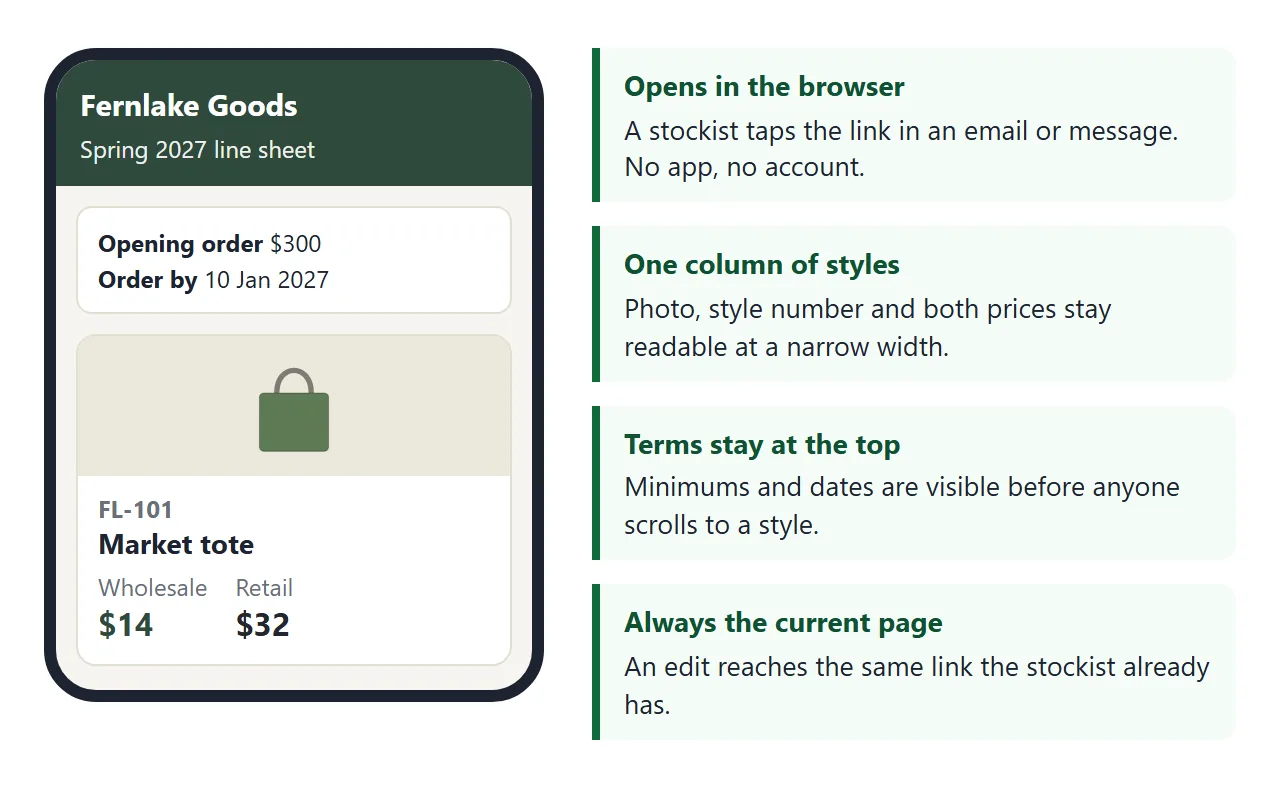
<dl class="terms">
<div><dt>Opening order</dt><dd>$300 minimum</dd></div>
<div><dt>Per style</dt><dd>Sold in packs (see card)</dd></div>
<div><dt>Order by</dt><dd>10 Jan 2027</dd></div>
<div><dt>Ships from</dt><dd>15 Feb 2027</dd></div>
<div><dt>Orders to</dt><dd>orders@fernlake.example</dd></div>
</dl>
<div class="chips" id="chips"></div>
<div class="grid" id="grid"></div>
<section id="summary">
<h2 style="font-size:16px;margin:0 0 6px">Your order, as text</h2>
<textarea id="text" readonly></textarea>
<p style="font-size:13px;margin:6px 0 0">Select the text, copy it, and paste it into your email to orders@fernlake.example. Nothing is sent from this page.</p>
</section>
<footer>Wholesale prices exclude shipping. Retail prices are suggested.</footer>
</div>
<div class="bar"><div class="wrap">
<div><div class="tot" id="total">Order total $0</div><div class="min no" id="min">$300 to reach the opening order</div></div>
<button class="btn" id="show" type="button">Show order as text</button>
</div></div>
<script>
// Edit this list to change the page. One object per style.
const OPENING_MIN = 300;
const COLORS = { Oat: '#d8c9a8', Moss: '#5d7a54', Ink: '#27324a', Rust: '#b0583a', Cream: '#efe7d3', Slate: '#5f6b73', Pine: '#2f5a45', Fig: '#6d3b52', Heather: '#a59cb0', Plum: '#5a2d4f', Sand: '#cdb88f' };
const STYLES = [
{ sku: 'FL-101', name: 'Market tote', cat: 'Bags', art: 'tote', desc: 'Heavy cotton canvas with an inside pocket.', colors: ['Oat', 'Moss', 'Ink'], size: 'One size, 38 x 40 cm', w: 14, r: 32, pack: 6 },
{ sku: 'FL-102', name: 'Linen napkins, set of 4', cat: 'Home', art: 'napkin', desc: 'Stonewashed linen, hemmed edges.', colors: ['Oat', 'Rust'], size: '45 x 45 cm', w: 18, r: 40, pack: 4 },
{ sku: 'FL-201', name: 'Stoneware mug', cat: 'Kitchen', art: 'mug', desc: 'Hand-glazed, dishwasher safe.', colors: ['Slate', 'Cream'], size: '350 ml', w: 9, r: 22, pack: 12 },
{ sku: 'FL-202', name: 'Soy candle', cat: 'Home', art: 'candle', desc: 'Poured in small batches. About 40 hours.', colors: ['Pine', 'Fig'], size: '180 g', w: 11, r: 26, pack: 6 },
{ sku: 'FL-301', name: 'Wool scarf', cat: 'Accessories', art: 'scarf', desc: 'Soft lambswool with a fringed end.', colors: ['Heather', 'Plum'], size: '180 x 30 cm', w: 22, r: 52, pack: 4, status: 'New' },
{ sku: 'FL-302', name: 'Bucket hat', cat: 'Accessories', art: 'hat', desc: 'Washed cotton twill.', colors: ['Moss', 'Sand'], size: 'S/M and M/L', w: 12, r: 30, pack: 6, status: 'Sold out' }
];
const ART = {
tote: (c) => '<svg viewBox="0 0 100 100"><path d="M34 38 C34 10 66 10 66 38" fill="none" stroke="#0007" stroke-width="4"/><rect x="18" y="38" width="64" height="54" rx="4" fill="' + c + '" stroke="#0004"/></svg>',
napkin: (c) => '<svg viewBox="0 0 100 100"><rect x="26" y="26" width="52" height="52" fill="#0002" transform="rotate(8 52 52)"/><rect x="22" y="22" width="52" height="52" fill="' + c + '" stroke="#0004" transform="rotate(-6 48 48)"/></svg>',
mug: (c) => '<svg viewBox="0 0 100 100"><path d="M72 40 h8 a10 10 0 0 1 0 24 h-8" fill="none" stroke="' + c + '" stroke-width="6"/><rect x="22" y="28" width="52" height="60" rx="8" fill="' + c + '" stroke="#0004"/></svg>',
candle: (c) => '<svg viewBox="0 0 100 100"><path d="M50 8 C58 20 56 28 50 32 C44 28 42 20 50 8Z" fill="#f2a93b"/><rect x="48" y="30" width="4" height="10" fill="#333"/><rect x="26" y="40" width="48" height="50" rx="6" fill="' + c + '" stroke="#0004"/></svg>',
scarf: (c) => '<svg viewBox="0 0 100 100"><path d="M14 30 Q50 10 86 30 L86 48 Q50 28 14 48Z" fill="' + c + '" stroke="#0004"/><rect x="62" y="40" width="20" height="46" fill="' + c + '" stroke="#0004"/></svg>',
hat: (c) => '<svg viewBox="0 0 100 100"><path d="M30 60 C30 20 70 20 70 60Z" fill="' + c + '" stroke="#0004"/><ellipse cx="50" cy="62" rx="40" ry="10" fill="' + c + '" stroke="#0004"/></svg>'
};
const grid = document.getElementById('grid');
const chips = document.getElementById('chips');
let filter = 'All';
function money(n) { return '$' + n.toLocaleString('en-US'); }
function render() {
grid.innerHTML = '';
STYLES.filter((s) => filter === 'All' || s.cat === filter).forEach((s) => {
const out = s.status === 'Sold out';
const margin = Math.round(((s.r - s.w) / s.r) * 100);
const card = document.createElement('article');
card.className = 'card';
card.dataset.sku = s.sku;
card.innerHTML =
'<div class="art">' + ART[s.art](COLORS[s.colors[0]]) + (s.status ? '<span class="tag' + (out ? ' out' : '') + '">' + s.status + '</span>' : '') + '</div>' +
'<div class="body">' +
'<div class="sku">' + s.sku + '</div><h3 class="name">' + s.name + '</h3>' +
'<p class="desc">' + s.desc + '</p>' +
'<p class="meta">' + s.colors.map((c) => '<span class="sw" style="background:' + COLORS[c] + '"></span>' + c).join(' ') + '</p>' +
'<p class="meta">' + s.size + ' · packs of ' + s.pack + '</p>' +
'<div class="prices"><div class="w">Wholesale<b>' + money(s.w) + '</b></div><div>Suggested retail<b>' + money(s.r) + '</b></div><div>Margin<b>' + margin + '%</b></div></div>' +
'<div class="order">' + (out ? '<span class="meta">Not available this season</span>' :
'<label>Units <input type="number" min="0" step="' + s.pack + '" value="' + (qty[s.sku] || 0) + '" inputmode="numeric"></label><span class="note"></span>') + '</div>' +
'</div>';
grid.appendChild(card);
const input = card.querySelector('input');
if (input) input.addEventListener('input', () => { qty[s.sku] = Math.max(0, parseInt(input.value, 10) || 0); update(); });
});
update();
}
const qty = {};
function update() {
let total = 0;
document.querySelectorAll('.card').forEach((card) => {
const s = STYLES.find((x) => x.sku === card.dataset.sku);
const q = qty[s.sku] || 0;
const bad = q > 0 && q % s.pack !== 0;
card.classList.toggle('warn', bad);
const note = card.querySelector('.note');
if (note) note.textContent = bad ? 'Multiples of ' + s.pack : '';
});
STYLES.forEach((s) => { total += (qty[s.sku] || 0) * s.w; });
document.getElementById('total').textContent = 'Order total ' + money(total);
const min = document.getElementById('min');
const ok = total >= OPENING_MIN;
min.className = 'min ' + (ok ? 'ok' : 'no');
min.textContent = ok ? 'Opening order minimum met' : money(OPENING_MIN - total) + ' to reach the opening order';
return total;
}
document.getElementById('show').addEventListener('click', () => {
const lines = STYLES.filter((s) => qty[s.sku] > 0).map((s) => s.sku + ' ' + s.name + ' x ' + qty[s.sku] + ' = ' + money(qty[s.sku] * s.w));
document.getElementById('text').value = lines.length ? lines.join('\n') + '\nTotal: ' + money(update()) : 'No units entered yet.';
const box = document.getElementById('summary');
box.classList.add('on');
box.scrollIntoView({ behavior: 'smooth', block: 'center' });
});
['All', 'Bags', 'Home', 'Kitchen', 'Accessories'].forEach((c) => {
const b = document.createElement('button');
b.type = 'button'; b.className = 'chip'; b.textContent = c;
b.setAttribute('aria-pressed', c === 'All');
b.addEventListener('click', () => {
filter = c;
chips.querySelectorAll('.chip').forEach((x) => x.setAttribute('aria-pressed', x === b));
render();
});
chips.appendChild(b);
});
render();
</script>
</body>
</html>
A stockist sees prices, margin and terms together, and can try an order without writing to you first. Your own changes are a one-line edit in the list. A visitor's quantities are not saved.
Make it with AI
You do not have to write the page yourself. Paste your product list into ChatGPT, Claude or Gemini with this prompt.
Make one HTML page that works as a wholesale line sheet.
Header with brand name, season and an "updated" date. Under it,
a terms box: opening order minimum, order-by date, ship date,
contact email. Then one card per style with style number, name,
colours, size, pack size, wholesale price and suggested retail
price. Put the styles in one JavaScript list near the bottom.
Category filter buttons at the top. Large text, works on a phone.
No outside libraries, images or fonts. Do not save data.

[paste your styles here]
Then check the result before you send it:
- Every price. Compare wholesale and retail for each style with your own sheet. An AI can swap two numbers without telling you.
- Every minimum and date. Opening order, pack size, order-by and ship dates are the terms a stockist will hold you to.
- Style numbers. Stockists order by them, so one typo costs you a wrong order.
- Pictures. The example draws each product as a simple shape, because pictures loaded from other websites are blocked on a shared page.
- Phone width. Make the browser window narrow and confirm the cards still read.
Send it as a link
- Copy all of the code the AI returned.
- Paste it into a NOS document. The page renders and its scripts run, so test the filters and quantities yourself.
- Choose Create share link and copy the address. HTML to link walks through it.
- Put that address in your email to the stockist.
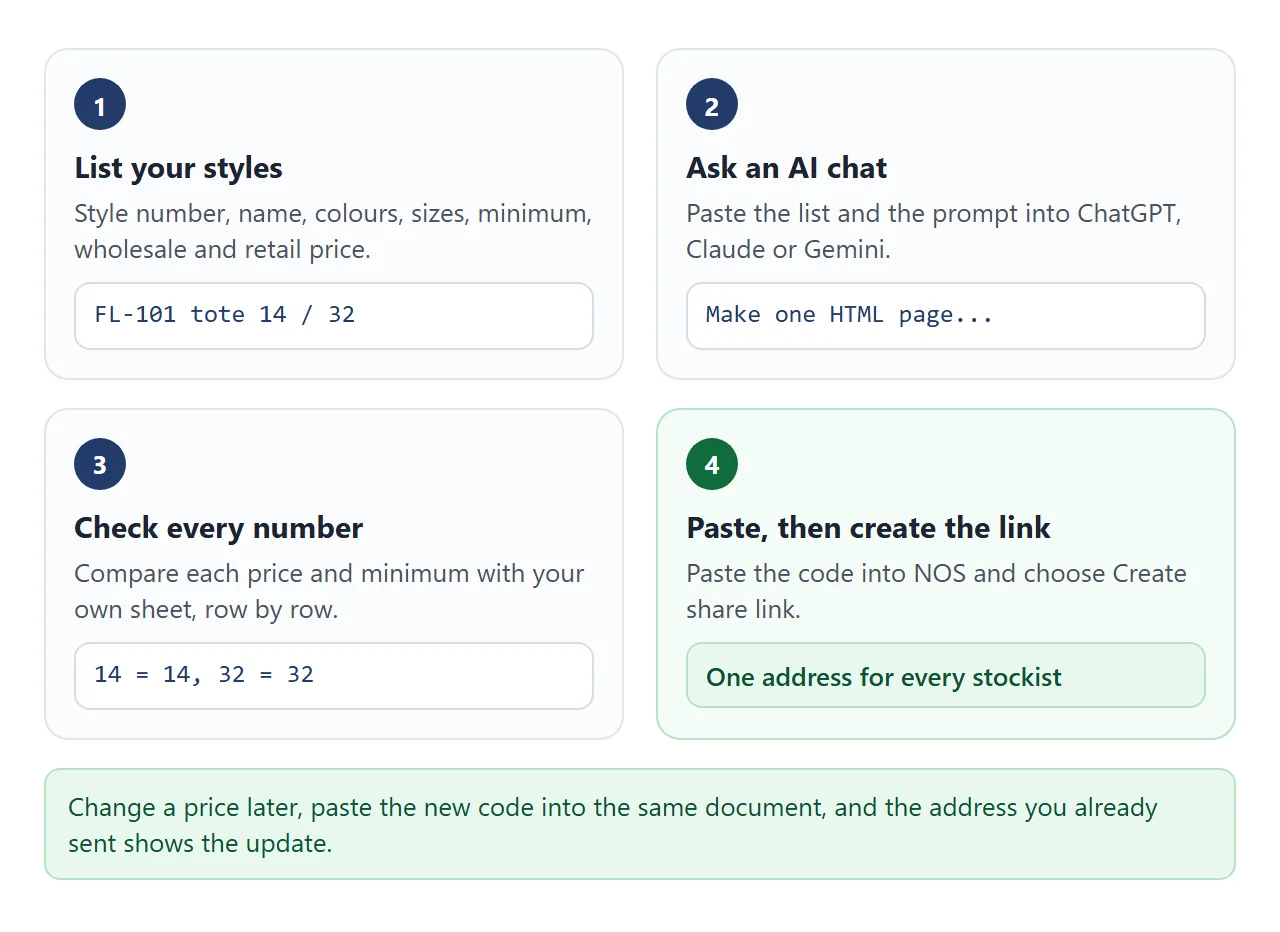
Anyone with the link can open the page in a browser, on a phone or a laptop, without an account. They cannot edit it, and the quantities they type are not saved.
If a phone shows a file you sent as plain text, see opening an HTML file on a phone.
Some stockists will still want a file for their records. As of October 2026, Chrome's help says to open the print preview with Ctrl+P and choose Save as PDF. Do that from the open page.
Email size is another reason to send a link. Gmail's help says the limit for a personal account is 25 MB, and that larger attachments are replaced by a Google Drive link. Work and school accounts have limits their administrators set.
For a trade-show table, print the link as a QR code. QR code link explains why a printed code stays useful when the page behind it changes.
What to put on each style
Two sources agree on the core fields. Maker's Row lists a photo or sketch, style number, description, sizes, colours and prices.
It also lists minimum order, case pack, delivery date and contact. RepSpark adds order deadlines and terms.
| Field | Why a stockist looks for it |
|---|---|
| Photo | To judge the product at a glance |
| Style number | To write the order and to reorder |
| Sizes and colours | To pick what fits their shop |
| Wholesale price | What they pay per unit |
| Suggested retail price | What they would charge, so they can see their margin |
| Minimum and pack size | To see whether your minimums fit their shop |
| Order-by and ship dates | To plan their season |
Maker's Row also advises stating minimums, case pack and delivery date plainly rather than writing "contact us". The example page works out each style's margin from your two prices, so you never type it.
Link, PDF or attachment compared
| PDF attachment | Link to a page | |
|---|---|---|
| What the stockist holds | A copy | An address |
| After a price change | Send a new file | Edit once, same link |
| Size in email | Counts toward the mail limit | A short address |
| Stock or sold-out tags | Out of date once sent | Update the page |
| Printing | Prints as laid out | Print from the browser |
A PDF is not wrong. Maker's Row says a simple PDF or spreadsheet works for a first line sheet. A link helps when the numbers move.
Keep prices and stock current
RepSpark describes static line sheets as going stale as soon as inventory or prices change. A buyer holding last month's file orders from last month's numbers.
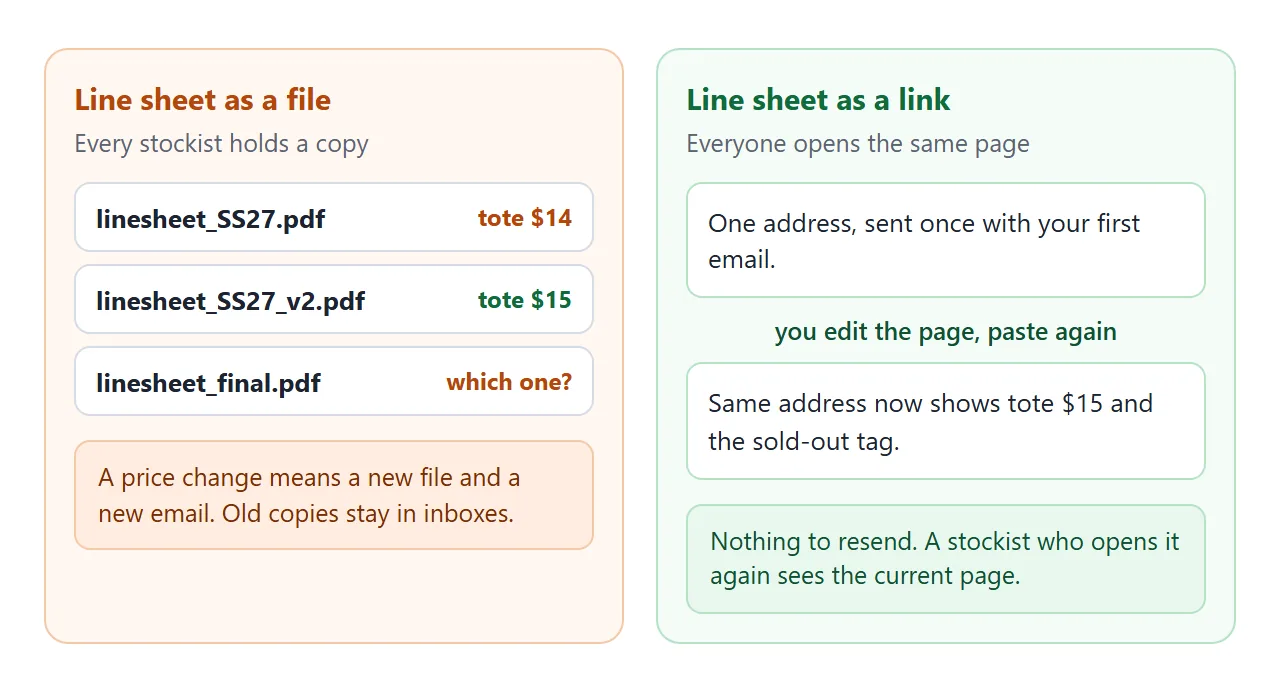
On a page, you fix the line in the list and paste the code again into the same NOS document. The address already in your stockists' emails shows the change.
Put an updated date at the top so they can see it is current. For a long range, this table version keeps one row per style and adds a status tag.
<!doctype html>
<html lang="en">
<head>
<meta charset="utf-8">
<meta name="viewport" content="width=device-width, initial-scale=1">
<title>Lanternfly Paper line sheet</title>
<style>
* { box-sizing: border-box; }
body { margin: 0; font-family: system-ui, sans-serif; background: #f4f6fa; color: #1d2330; line-height: 1.45; }
.wrap { max-width: 860px; margin: 0 auto; padding: 0 14px 24px; }
header { padding: 20px 0 10px; }
header h1 { margin: 0; font-size: 22px; }
header p { margin: 2px 0 0; font-size: 14px; color: #5b6472; }
.tools { display: flex; gap: 8px; flex-wrap: wrap; align-items: center; margin: 10px 0; }
.tab { border: 1px solid #c4cbd8; background: #fff; border-radius: 8px; padding: 8px 14px; font: inherit; font-size: 14px; font-weight: 600; cursor: pointer; }
.tab[aria-pressed="true"] { background: #243b6b; border-color: #243b6b; color: #fff; }
.tools input[type=search] { flex: 1; min-width: 140px; padding: 8px 10px; font: inherit; font-size: 14px; border: 1px solid #c4cbd8; border-radius: 8px; }
.tools label { font-size: 14px; display: flex; gap: 6px; align-items: center; }
table { width: 100%; border-collapse: collapse; background: #fff; border-radius: 10px; overflow: hidden; font-size: 14px; }
th { text-align: left; background: #243b6b; color: #fff; font-size: 12px; text-transform: uppercase; letter-spacing: .04em; padding: 9px 8px; }
td { padding: 9px 8px; border-bottom: 1px solid #e7eaf1; vertical-align: top; }
td.n, th.n { text-align: right; font-variant-numeric: tabular-nums; white-space: nowrap; }
.sku { font-weight: 700; white-space: nowrap; }
.st { display: inline-block; font-size: 12px; font-weight: 700; padding: 1px 8px; border-radius: 999px; }
.st.in { background: #dff3e6; color: #0f5132; }
.st.soon { background: #ffe9a8; color: #6b4a00; }
.st.out { background: #e6e8ee; color: #4a5260; }
.sold td { color: #7a8190; }
.m { display: none; }
.showm .m { display: table-cell; }
.empty { padding: 16px; text-align: center; color: #5b6472; background: #fff; }
.foot { font-size: 13px; color: #5b6472; margin-top: 10px; }
@media (max-width: 560px) {
thead { display: none; }
table, tbody, tr, td { display: block; width: 100%; }
tr { padding: 10px 12px; border-bottom: 1px solid #e7eaf1; }
td { border: 0; padding: 1px 0; text-align: left !important; }
td.n { display: inline-block; width: auto; margin-right: 14px; }
td[data-l]::before { content: attr(data-l) ": "; color: #5b6472; font-size: 12px; }
.m { display: none !important; }
.showm td.m { display: inline-block !important; }
}
</style>
</head>
<body>
<div class="wrap">
<header>
<h1>Lanternfly Paper Co.</h1>
<p>Line sheet · prices in USD · updated 1 Oct 2026 (fictional brand)</p>
</header>
<div class="tools">
<button class="tab" data-season="Autumn 2026" type="button" aria-pressed="true">Autumn 2026</button>
<button class="tab" data-season="Spring 2027" type="button" aria-pressed="false">Spring 2027</button>
<input id="q" type="search" placeholder="Search style or name" aria-label="Search styles">
<label><input id="mg" type="checkbox"> Show margin</label>
</div>
<div id="wrap"></div>
<p class="foot" id="foot"></p>
</div>
<script>
// Edit this list to change the page. status: in, soon or out.
const STYLES = [
{ season: 'Autumn 2026', sku: 'LP-A10', name: 'Pocket notebook, 3-pack', colors: 'Kraft, Sage, Dusk', min: 6, w: 8, r: 18, status: 'in' },
{ season: 'Autumn 2026', sku: 'LP-A11', name: 'Weekly planner pad', colors: 'Cream', min: 6, w: 7, r: 16, status: 'in' },
{ season: 'Autumn 2026', sku: 'LP-A20', name: 'Letterpress card, set of 6', colors: 'Mixed', min: 12, w: 9, r: 20, status: 'soon', note: 'Ships 20 Nov' },
{ season: 'Autumn 2026', sku: 'LP-A30', name: 'Brass bookmark', colors: 'Brass', min: 12, w: 4, r: 10, status: 'out' },
{ season: 'Autumn 2026', sku: 'LP-A40', name: 'Gift wrap, 3 sheets', colors: 'Moss, Ink', min: 10, w: 5, r: 12, status: 'in' },
{ season: 'Spring 2027', sku: 'LP-S10', name: 'Seed-paper card, set of 4', colors: 'Mixed', min: 12, w: 8, r: 18, status: 'soon', note: 'Ships 15 Feb' },
{ season: 'Spring 2027', sku: 'LP-S20', name: 'Garden journal', colors: 'Leaf, Clay', min: 6, w: 11, r: 24, status: 'soon', note: 'Ships 15 Feb' },
{ season: 'Spring 2027', sku: 'LP-S30', name: 'Sticker sheet, 5-pack', colors: 'Mixed', min: 20, w: 6, r: 14, status: 'soon', note: 'Ships 1 Mar' }
];
const LABEL = { in: 'In stock', soon: 'Coming', out: 'Sold out' };
let season = 'Autumn 2026';
function money(n) { return '$' + n.toFixed(2); }
function cell(text, label, cls) {
const td = document.createElement('td');
td.textContent = text;
if (label) td.dataset.l = label;
if (cls) td.className = cls;
return td;
}
function render() {
const q = document.getElementById('q').value.trim().toLowerCase();
const rows = STYLES.filter((s) => s.season === season && (s.sku + ' ' + s.name).toLowerCase().includes(q));
const host = document.getElementById('wrap');
host.innerHTML = '';
if (!rows.length) { host.innerHTML = '<div class="empty">No styles match.</div>'; return; }
const table = document.createElement('table');
table.innerHTML = '<thead><tr><th>Style</th><th>Item</th><th>Colours</th><th class="n">Min</th><th class="n">Wholesale</th><th class="n">Retail</th><th class="n m">Margin</th><th>Status</th></tr></thead>';
const body = document.createElement('tbody');
rows.forEach((s) => {
const tr = document.createElement('tr');
if (s.status === 'out') tr.className = 'sold';
tr.appendChild(cell(s.sku, '', 'sku'));
tr.appendChild(cell(s.name, ''));
tr.appendChild(cell(s.colors, 'Colours'));
tr.appendChild(cell(s.min, 'Min', 'n'));
tr.appendChild(cell(money(s.w), 'Wholesale', 'n'));
tr.appendChild(cell(money(s.r), 'Retail', 'n'));
tr.appendChild(cell(Math.round(((s.r - s.w) / s.r) * 100) + '%', 'Margin', 'n m'));
const st = document.createElement('td');
const tag = document.createElement('span');
tag.className = 'st ' + s.status;
tag.textContent = LABEL[s.status] + (s.note ? ' - ' + s.note : '');
st.appendChild(tag);
tr.appendChild(st);
body.appendChild(tr);
});
table.appendChild(body);
host.appendChild(table);
document.getElementById('foot').textContent = rows.length + ' styles. Min is the smallest order per style, in units.';
}
document.querySelectorAll('.tab').forEach((b) => b.addEventListener('click', () => {
season = b.dataset.season;
document.querySelectorAll('.tab').forEach((x) => x.setAttribute('aria-pressed', x === b));
render();
}));
document.getElementById('q').addEventListener('input', render);
document.getElementById('mg').addEventListener('change', (e) => document.body.classList.toggle('showm', e.target.checked));
render();
</script>
</body>
</html>
If your prices are for one account only, see price list link. For a catalogue with photos, see catalogue as a link.
When it does not work
| Symptom | Cause | Fix |
|---|---|---|
| The stockist sees code, not a page | The file was sent as an attachment and opened as text | Send the link, not the file |
| A price is wrong on the page | The AI changed or swapped it | Fix the line in the list, paste again |
| The category buttons do nothing | A line was lost when copying | Copy all of the AI's code again |
| Photos or fonts are missing | They come from another website, which the page blocks | Ask for a version with drawn shapes and no outside images |
| An order cannot be sent from the page | NOS blocks forms that send to a server | Use the order-as-text button and email it |
| You cannot see who opened it | NOS does not record opens | Ask the stockist to reply |
For a deeper check before you send any page an AI wrote, read share AI-generated HTML. To change one price without touching code, see edit AI-generated HTML without code.