To use marked in a web page, add one script tag that loads the library and call marked.parse(text). You do not need npm. The npm package is for projects with a build step. A plain HTML file fetches the same code from a CDN.
Here is the smallest working page. The Markdown sits in a script block, and three lines of JavaScript turn it into a heading, a list and a quote.
<!doctype html>
<html lang="en">
<head>
<meta charset="utf-8">
<meta name="viewport" content="width=device-width, initial-scale=1">
<title>marked in one file</title>
<style>
  body { margin: 0; padding: 16px; font: 16px/1.55 system-ui, sans-serif; color: #1d2330; }
  #out { max-width: 34rem; }
  #out h1 { font-size: 1.5rem; margin: 0 0 .5rem; }
  #out code { background: #eef1f5; border-radius: 4px; padding: 0 4px; }
  #out blockquote { margin: .8rem 0; padding: .1rem .9rem; border-left: 4px solid #cbd5e1; color: #475569; }
</style>
</head>
<body>
<div id="out"></div>

<!-- the Markdown lives in a data block: the browser never runs it -->
<script type="text/markdown" id="src">
# Hello from Markdown

This page was written as **Markdown** and turned into HTML by `marked.parse()`.

- one script tag loads the library
- one line converts the text

> No npm, no build step.
</script>

<!-- pinned version, global variable "marked" -->
<script src="https://cdn.jsdelivr.net/npm/marked@18.0.14/lib/marked.umd.js"></script>
<script>
  const md = document.getElementById('src').textContent;
  // text is ours, so no sanitizing is needed here
  document.getElementById('out').innerHTML = marked.parse(md);
</script>
</body>
</html>
Marked is an open-source Markdown parser written in JavaScript. Its own documentation describes it as a low-level markdown compiler with zero dependencies, and it works in a browser, on a server or from a command line.
npm install or a script tag?
The words "marked js npm" usually come from one question: do I have to install it? It depends on where your code runs.
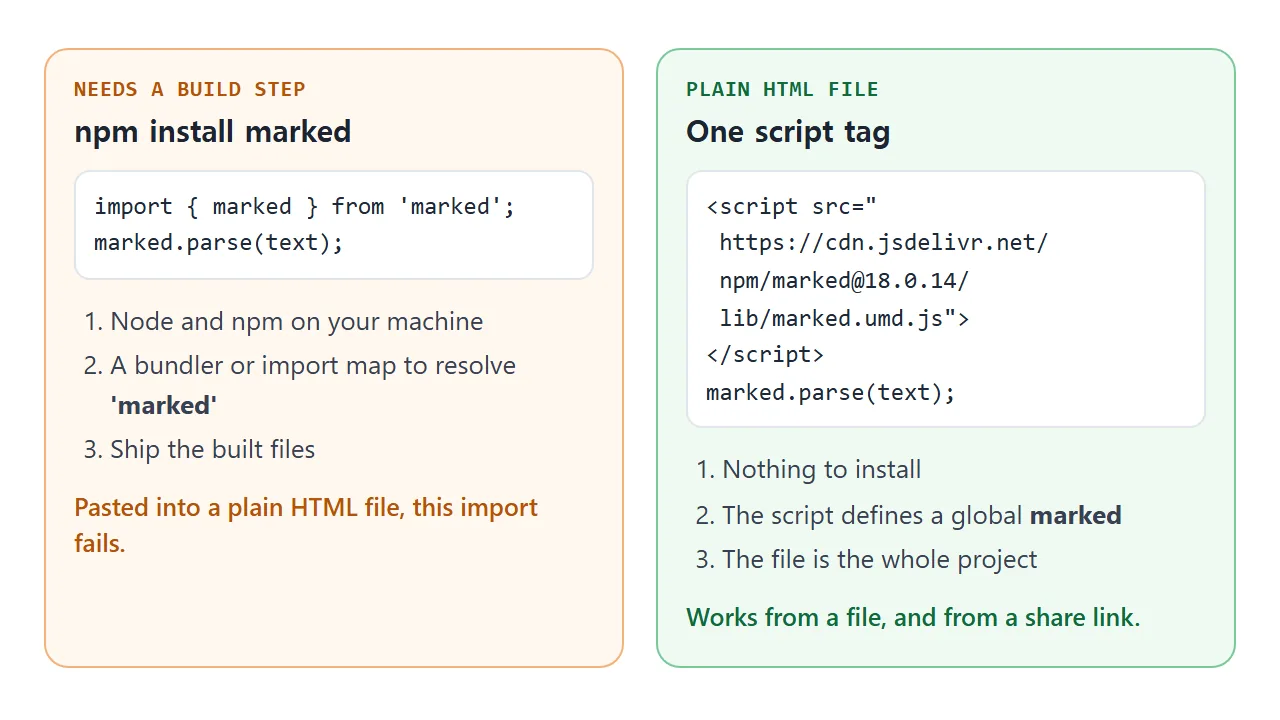
The marked README gives npm install marked for use in a project. It then gives a browser example that loads a script from jsDelivr. Both routes run the same library.
A single HTML file has no build step. So the second route is the one to use. Marked ships a UMD build, which defines a global variable named marked as soon as the script loads.
Pin the version in the URL
The README example leaves the version out of the URL. That loads whatever is newest on the day the page opens. jsDelivr says this is not recommended for production, because major versions usually come with breaking changes.
Pin an exact version instead. On 2026-10-01 the latest version of marked on npm was 18.0.14:
<script src="https://cdn.jsdelivr.net/npm/marked@18.0.14/lib/marked.umd.js"></script>
Put that tag before any script that calls marked. A classic script is fetched and run in order, so code placed above the tag sees marked as undefined.
The ES module form, and the import that fails
Marked also ships an ES module file. In a plain page you may import it from a full URL, inside a script whose type is module:
<script type="module">
  import { marked } from 'https://cdn.jsdelivr.net/npm/marked@18.0.14/lib/marked.esm.js';
  document.body.innerHTML = marked.parse('# Hello');
</script>
The form that goes with npm install is import { marked } from 'marked'. It works when a bundler resolves the name.
A browser alone throws a TypeError, because a bare name needs an import map. MDN says so, and the error reads "Failed to resolve module specifier". The UMD tag avoids all of this.
Do not insert the output as it is
marked.parse() returns a string of HTML. Raw HTML inside the Markdown passes straight through into that string. The marked documentation says plainly that it does not sanitize the output, and recommends DOMPurify.
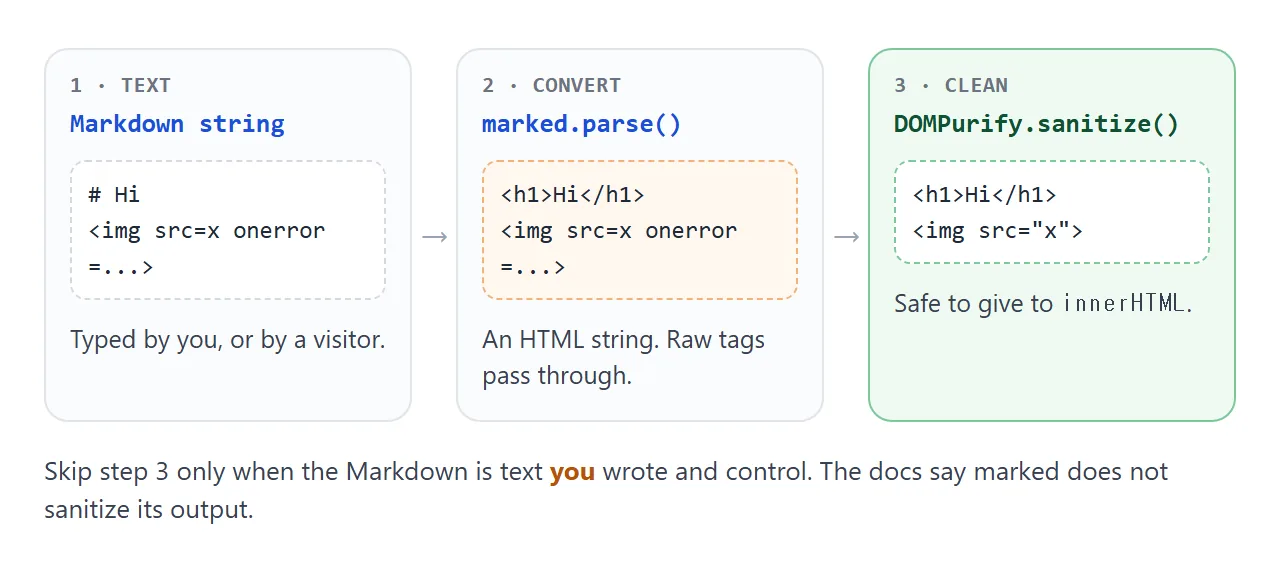
This matters as soon as the text is not yours. MDN calls innerHTML a common route for cross-site scripting. An img with a bad src and an onerror attribute runs its code the moment it is inserted.
The next example shows the strings as text, so nothing runs. Edit the Markdown and compare the two outputs.
<!doctype html>
<html lang="en">
<head>
<meta charset="utf-8">
<meta name="viewport" content="width=device-width, initial-scale=1">
<title>marked output vs DOMPurify</title>
<style>
  body { margin: 0; padding: 14px; font: 15px/1.5 system-ui, sans-serif; color: #1d2330; }
  h2 { font-size: .8rem; letter-spacing: .04em; text-transform: uppercase; margin: 14px 0 6px; color: #475569; }
  h2 b { font-weight: 700; }
  textarea { width: 100%; box-sizing: border-box; height: 96px; padding: 8px; font: 13px/1.4 ui-monospace, Consolas, monospace; border: 1px solid #cbd5e1; border-radius: 8px; }
  pre { margin: 0; padding: 8px 10px; border-radius: 8px; font: 12.5px/1.45 ui-monospace, Consolas, monospace; white-space: pre-wrap; word-break: break-all; }
  #raw { background: #fff1e6; border: 1px solid #f5b88a; }
  #clean { background: #e8f7ee; border: 1px solid #8fd1a8; }
  #view { padding: 8px 10px; border: 1px solid #e1e4ea; border-radius: 8px; }
  #note { font-size: 13px; color: #475569; margin: 6px 0 0; }
</style>
</head>
<body>
<h2>Markdown typed by a visitor</h2>
<textarea id="md" spellcheck="false">Hello **world**

<img src="x" onerror="alert('hacked')">

[click me](javascript:alert(1))</textarea>

<h2><b>1</b> · marked.parse() output (shown as text)</h2>
<pre id="raw"></pre>

<h2><b>2</b> · after DOMPurify.sanitize() (shown as text)</h2>
<pre id="clean"></pre>

<h2><b>3</b> · what the page renders (step 2 only)</h2>
<div id="view"></div>
<p id="note"></p>

<script src="https://cdn.jsdelivr.net/npm/marked@18.0.14/lib/marked.umd.js"></script>
<script src="https://cdn.jsdelivr.net/npm/dompurify@3.4.16/dist/purify.min.js"></script>
<script>
  const md = document.getElementById('md');

  function update() {
    const dirty = marked.parse(md.value);        // HTML string, NOT safe
    const clean = DOMPurify.sanitize(dirty);     // safe to insert
    // textContent shows the strings without running anything
    document.getElementById('raw').textContent = dirty;
    document.getElementById('clean').textContent = clean;
    document.getElementById('view').innerHTML = clean;
    document.getElementById('note').textContent =
      dirty === clean ? 'Nothing was removed.' : 'DOMPurify changed the HTML before it reached the page.';
  }

  md.addEventListener('input', update);
  update();
</script>
</body>
</html>
Load DOMPurify with its own pinned script tag, then wrap the call:
const dirty = marked.parse(text);
box.innerHTML = DOMPurify.sanitize(dirty);
If the Markdown is text you wrote yourself in the same file, the sanitize step is optional. For visitor text, a textarea, or anything pulled from elsewhere, keep it. See innerHTML for the other ways to put text on a page safely.
Options that change the output
Pass options as the second argument. Two matter most in a first project:
gfmistrueby default. It follows the GitHub Flavored Markdown spec, which is why tables work.breaksisfalseby default. Set it totrueand a single line break inside a paragraph becomes abrtag.
marked.parse(text, { breaks: true });
There is also async, which defaults to false. With async: true, marked.parse() returns a Promise instead of a string. That mode exists for extensions that need to wait, so leave it off unless you use one.
The indentation trap
The most common surprise is a page that shows # Title as plain text in a grey box instead of a heading. The cause is leading spaces.
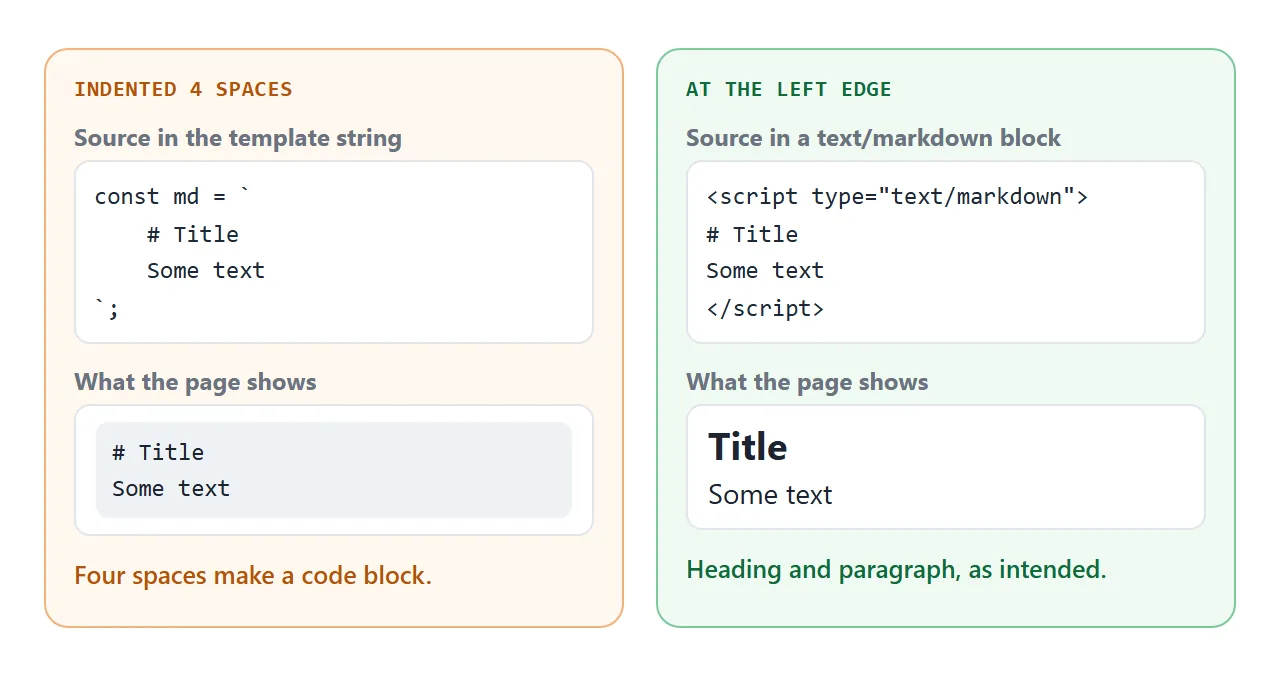
In Markdown, a line indented four or more spaces is an indented code block. If you write the Markdown inside a JavaScript template string and indent it to match your code, every line is code.
Two fixes. Keep the Markdown at the left edge, or use a type="text/markdown" script block as the first example does.
MDN says a script with a non-JavaScript type is a data block that the browser does not process. It stays plain text, and you read it with textContent.
A finished example: a page maker
This editor combines the pieces. Type Markdown on the left, see the page on the right. It sanitizes the output, builds a list of section links from the rendered headings, and has a breaks switch.
<!doctype html>
<html lang="en">
<head>
<meta charset="utf-8">
<meta name="viewport" content="width=device-width, initial-scale=1">
<title>Markdown page maker</title>
<style>
* { box-sizing: border-box; }
body { margin: 0; padding: 12px; font: 15px/1.5 system-ui, sans-serif; color: #1d2330; background: #f6f7f9; }
.bar { display: flex; flex-wrap: wrap; gap: 10px 14px; align-items: center; margin-bottom: 10px; }
.bar label { font-size: 14px; }
button { font: inherit; font-size: 14px; padding: 6px 12px; border: 1px solid #2563eb; background: #2563eb; color: #fff; border-radius: 8px; cursor: pointer; }
.grid { display: grid; grid-template-columns: 1fr 1fr; gap: 10px; }
@media (max-width: 640px) { .grid { grid-template-columns: 1fr; } }
textarea { width: 100%; height: 250px; padding: 8px; font: 13px/1.4 ui-monospace, Consolas, monospace; border: 1px solid #cbd5e1; border-radius: 8px; resize: vertical; }
#page { background: #fff; border: 1px solid #e1e4ea; border-radius: 8px; padding: 4px 14px 10px; height: 250px; overflow: auto; }
#page h1 { font-size: 1.35rem; } #page h2 { font-size: 1.1rem; }
#page code { background: #eef1f5; border-radius: 4px; padding: 0 4px; }
#page table { border-collapse: collapse; } #page th, #page td { border: 1px solid #cbd5e1; padding: 3px 8px; }
#toc { margin: 10px 0 0; font-size: 14px; }
#toc a { margin-right: 12px; color: #1d4ed8; }
#msg { font-size: 13px; color: #475569; margin: 8px 0 0; }
</style>
</head>
<body>
<div class="bar">
<label><input type="checkbox" id="breaks"> Line breaks (<code>breaks: true</code>)</label>
<button id="dl" type="button">Download as .html</button>
</div>
<div class="grid">
<textarea id="md" spellcheck="false"># Trip notes
## Day 1
Landed at noon
checked in at three
## Packing list
| Item | Done |
| --- | --- |
| Passport | yes |
| Charger | no |
Use `marked.parse()` to turn this into HTML.</textarea>
<div id="page"></div>
</div>
<div id="toc"></div>
<p id="msg"></p>
<script src="https://cdn.jsdelivr.net/npm/marked@18.0.14/lib/marked.umd.js"></script>
<script src="https://cdn.jsdelivr.net/npm/dompurify@3.4.16/dist/purify.min.js"></script>
<script>
const md = document.getElementById('md');
const page = document.getElementById('page');
const breaks = document.getElementById('breaks');
let html = '';
function render() {
// parse with the chosen option, then sanitize before inserting
html = DOMPurify.sanitize(marked.parse(md.value, { breaks: breaks.checked }));
page.innerHTML = html;
// table of contents from the rendered headings
const toc = document.getElementById('toc');
toc.textContent = '';
page.querySelectorAll('h2').forEach((h, i) => {
h.id = 'sec-' + i;
const a = document.createElement('a');
a.href = '#sec-' + i;
a.textContent = h.textContent;
a.addEventListener('click', (e) => { e.preventDefault(); h.scrollIntoView(); });
toc.appendChild(a);
});
}
// the downloaded file has the HTML baked in: no library needed to open it
document.getElementById('dl').addEventListener('click', () => {
const title = (page.querySelector('h1') || { textContent: 'Page' }).textContent;
const doc = '<!doctype html>\n<html lang="en">\n<head>\n<meta charset="utf-8">\n' +
'<meta name="viewport" content="width=device-width, initial-scale=1">\n' +
'<title>' + title.replace(/</g, '<') + '</title>\n' +
'<style>body{max-width:40rem;margin:2rem auto;padding:0 1rem;font:16px/1.6 system-ui}</style>\n' +
'</head>\n<body>\n' + html + '\n</body>\n</html>\n';
const a = document.createElement('a');
a.href = URL.createObjectURL(new Blob([doc], { type: 'text/html' }));
a.download = 'page.html';
a.click();
document.getElementById('msg').textContent = 'Saved page.html (' + doc.length + ' characters, no script tag inside).';
});
md.addEventListener('input', render);
breaks.addEventListener('change', render);
render();
</script>
</body>
</html>
Look at what the download button does. It takes the HTML string and writes it into a full page: doctype, title, viewport line and a small style block. The saved file contains no script tag. It opens anywhere, with or without the library.
That is the same idea as converting Markdown to HTML with a script. Do the conversion once and ship the result when the content does not change. Keep marked in the page when readers edit the text themselves.
When it does not work
| Symptom | Cause | Fix |
|---|---|---|
marked is not defined |
The tag is below your code, the URL is wrong, or the script was blocked | Put the script tag above your code and check the Network tab |
| Failed to resolve module specifier | A bare import from 'marked' in a browser |
Use the UMD script tag or a full URL |
import gives a SyntaxError |
The script is not type="module" | Add type="module" to that tag |
| Heading shows as grey code | Lines indented four or more spaces | Move the Markdown to the left edge |
Markdown inside a div stays raw |
The div starts an HTML block that is not parsed | Put blank lines after the opening tag and before the closing tag |
| Lines run together | Single line breaks are not breaks | Set breaks: true |
| Table shows as text | gfm was set to false |
Leave gfm on, its default is true |
| Output is a Promise | async: true was set |
Remove it, or use await |
| An image from another site is missing on the shared page | Outside images are blocked there | Use a data: URI or an inline SVG |
Share it as a link
A Markdown viewer is more useful when people can type into it. A screenshot cannot be edited, and an .html attachment may open as plain code, or not at all, on a phone. Opening an HTML file on a phone covers why.
To send the working version, paste the page into a NOS document and choose Create share link. HTML to link walks through it.
The page renders as written and the script from jsDelivr loads and runs. Anyone with the link can open it without an account and type their own Markdown. If you change the code later, the same link shows the new version.