A massage price list works best as one web page: each type of massage with its session lengths and prices, then add-ons, then your policies. You send clients one link to that page instead of a brochure file.
The usual starting point is a brochure or a PDF made once. Then a price rises, a new length is added, or the cancellation rule needs restating, and the old file is still on clients' phones.
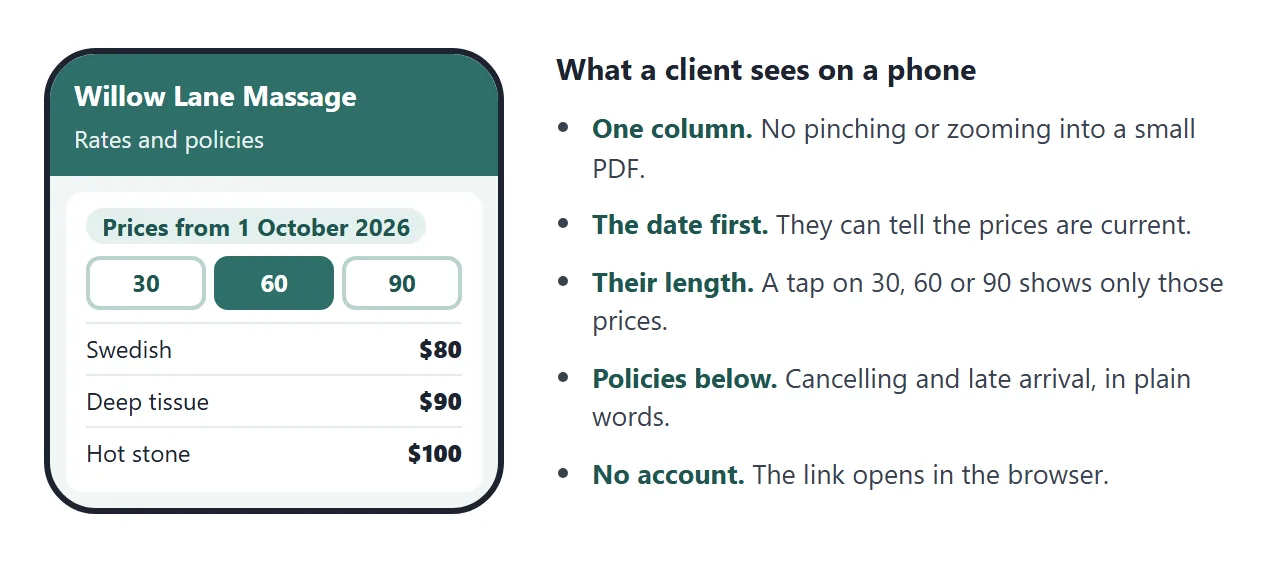
Here is a rates page for a made-up studio. Tap 30, 60 or 90 to see only the prices for that length, and open a policy at the bottom.
<!doctype html>
<html lang="en">
<head>
<meta charset="utf-8">
<meta name="viewport" content="width=device-width, initial-scale=1">
<title>Willow Lane Massage: rates</title>
<style>
* { box-sizing: border-box; }
body { margin: 0; font-family: system-ui, sans-serif; background: #f2f6f5; color: #1c2b2a; line-height: 1.5; }
header { background: #2f6f6a; color: #fff; padding: 22px 16px 18px; }
.in { max-width: 640px; margin: 0 auto; }
header h1 { margin: 0 0 4px; font-size: 24px; }
header p { margin: 0; font-size: 14px; opacity: .92; }
main { max-width: 640px; margin: 0 auto; padding: 14px 16px 6px; }
section { background: #fff; border-radius: 12px; padding: 16px; margin-bottom: 14px; box-shadow: 0 1px 6px rgba(0,0,0,.06); }
h2 { margin: 0 0 10px; font-size: 18px; }
.updated { display: inline-block; margin: 0 0 12px; padding: 3px 10px; border-radius: 999px; background: #e3f0ee; color: #1f5550; font-size: 13px; font-weight: 700; }
.chips { display: flex; gap: 8px; margin: 0 0 12px; }
.chips button { flex: 1; padding: 10px 6px; border: 2px solid #b9d3cf; border-radius: 10px; background: #fff; color: #1f5550; font: inherit; font-weight: 700; cursor: pointer; }
.chips button[aria-pressed="true"] { background: #2f6f6a; border-color: #2f6f6a; color: #fff; }
.item { display: flex; justify-content: space-between; gap: 12px; align-items: baseline; padding: 10px 0; border-top: 1px solid #e4ecea; }
.item:first-of-type { border-top: 0; }
.item b { display: block; font-size: 16px; }
.item span.d { display: block; font-size: 13px; color: #556967; }
.price { font-size: 20px; font-weight: 800; font-variant-numeric: tabular-nums; white-space: nowrap; }
.addon { display: flex; justify-content: space-between; padding: 7px 0; font-size: 15px; border-top: 1px solid #e4ecea; }
.addon:first-of-type { border-top: 0; }
details { border-top: 1px solid #e4ecea; padding: 9px 0; }
details:first-of-type { border-top: 0; }
summary { cursor: pointer; font-weight: 700; font-size: 15px; }
details p { margin: 6px 0 2px; font-size: 14px; }
footer { max-width: 640px; margin: 0 auto; padding: 4px 16px 22px; font-size: 13px; color: #556967; text-align: center; }
</style>
</head>
<body>
<header><div class="in">
<h1>Willow Lane Massage</h1>
<p>Rates and policies · Tue to Sat, 10:00 to 18:00 · fictional studio</p>
</div></header>
<main>
<section>
<h2>Massage rates</h2>
<p class="updated">Prices from 1 October 2026</p>
<div class="chips" id="chips" role="group" aria-label="Session length"></div>
<div id="list"></div>
</section>
<section>
<h2>Add-ons</h2>
<div id="addons"></div>
</section>
<section>
<h2>Policies</h2>
<details open><summary>Cancelling or moving a session</summary><p>Please give 24 hours' notice. Inside 24 hours the session is charged in full.</p></details>
<details><summary>Arriving late</summary><p>Your session still ends at the booked time, so a late start means a shorter massage at the full price.</p></details>
<details><summary>Before your first visit</summary><p>Arrive 10 minutes early to fill in a short health form. Tell me about injuries, pregnancy or allergies to oils.</p></details>
<details><summary>Payment</summary><p>Cash or card at the end of the session.</p></details>
</section>
<section>
<h2>Book</h2>
<p style="margin:0;font-size:15px">Message: hello@example.com (fictional)<br>Phone: 555 0142 (fictional)</p>
</section>
</main>
<footer>This page is the current price list. Last changed 1 October 2026.</footer>
<script>
// To change a price, edit one number below. null means "not offered at that length".
const LENGTHS = [30, 60, 90];
const SERVICES = [
{ name: 'Swedish massage', note: 'Long, gentle strokes. Good for a first visit.', price: { 30: 45, 60: 80, 90: 115 } },
{ name: 'Deep tissue', note: 'Slower and firmer, on knots and tight areas.', price: { 30: 50, 60: 90, 90: 130 } },
{ name: 'Hot stone', note: 'Warm stones and Swedish strokes.', price: { 30: null, 60: 100, 90: 140 } },
{ name: 'Prenatal', note: 'Side-lying, for the second and third trimester.', price: { 30: null, 60: 90, 90: 125 } }
];
const ADDONS = [
{ name: 'Aromatherapy oil', price: 10 },
{ name: 'Hot towels', price: 8 },
{ name: 'Scalp massage (10 min)', price: 15 }
];
let length = 60;
const chips = document.getElementById('chips');
const list = document.getElementById('list');
function show() {
chips.querySelectorAll('button').forEach((b) => {
b.setAttribute('aria-pressed', String(Number(b.dataset.len) === length));
});
list.textContent = '';
SERVICES.filter((s) => s.price[length] != null).forEach((s) => {
const row = document.createElement('div');
row.className = 'item';
const left = document.createElement('div');
const b = document.createElement('b');
b.textContent = s.name;
const d = document.createElement('span');
d.className = 'd';
d.textContent = s.note;
left.append(b, d);
const p = document.createElement('div');
p.className = 'price';
p.textContent = '$' + s.price[length];
row.append(left, p);
list.appendChild(row);
});
}
LENGTHS.forEach((n) => {
const b = document.createElement('button');
b.type = 'button';
b.dataset.len = n;
b.textContent = n + ' min';
b.addEventListener('click', () => { length = n; show(); });
chips.appendChild(b);
});
const addons = document.getElementById('addons');
ADDONS.forEach((a) => {
const r = document.createElement('div');
r.className = 'addon';
const n = document.createElement('span');
n.textContent = a.name;
const p = document.createElement('b');
p.textContent = '$' + a.price;
r.append(n, p);
addons.appendChild(r);
});
show();
</script>
</body>
</html>
The prices are one list, so a change is a one-number edit. A dated line at the top tells a client the list is current, and the policies sit on the same page as the prices, so nobody pays before reading them.
Make it with AI
You do not need to write the page yourself. Type your rates as plain text, then paste them into ChatGPT, Claude or Gemini with this prompt.
Make one HTML page from the massage rates below. Header with the
studio name and opening hours. A line "Prices from <date>". Three
buttons for session length (30, 60, 90 minutes); tapping one shows
only the massage types offered at that length, each with its price.
Put the prices in one JavaScript list near the bottom. Then an
Add-ons section and a Policies section with collapsible items.
Large text, works on a phone. No outside libraries, images or fonts.
Do not save data. If a price is missing, write TODO, do not guess.

[paste your rates here]
Then check the result before you send it:
- Every price. Compare each one with your own list. An AI can swap two numbers or fill a gap with a guess.
- Every policy. Make sure the wording is yours. A rule the AI invented is now your rule.
- Phone width. Make the browser window narrow. Buttons and prices should still be easy to tap and read.
Send it as a link
- Copy all of the code the AI returned.
- Paste it into a NOS document. The page renders and its scripts run, so tap the buttons yourself.
- Choose Create share link and copy the address. HTML to link walks through it.
- Send that address once, wherever clients ask about prices.
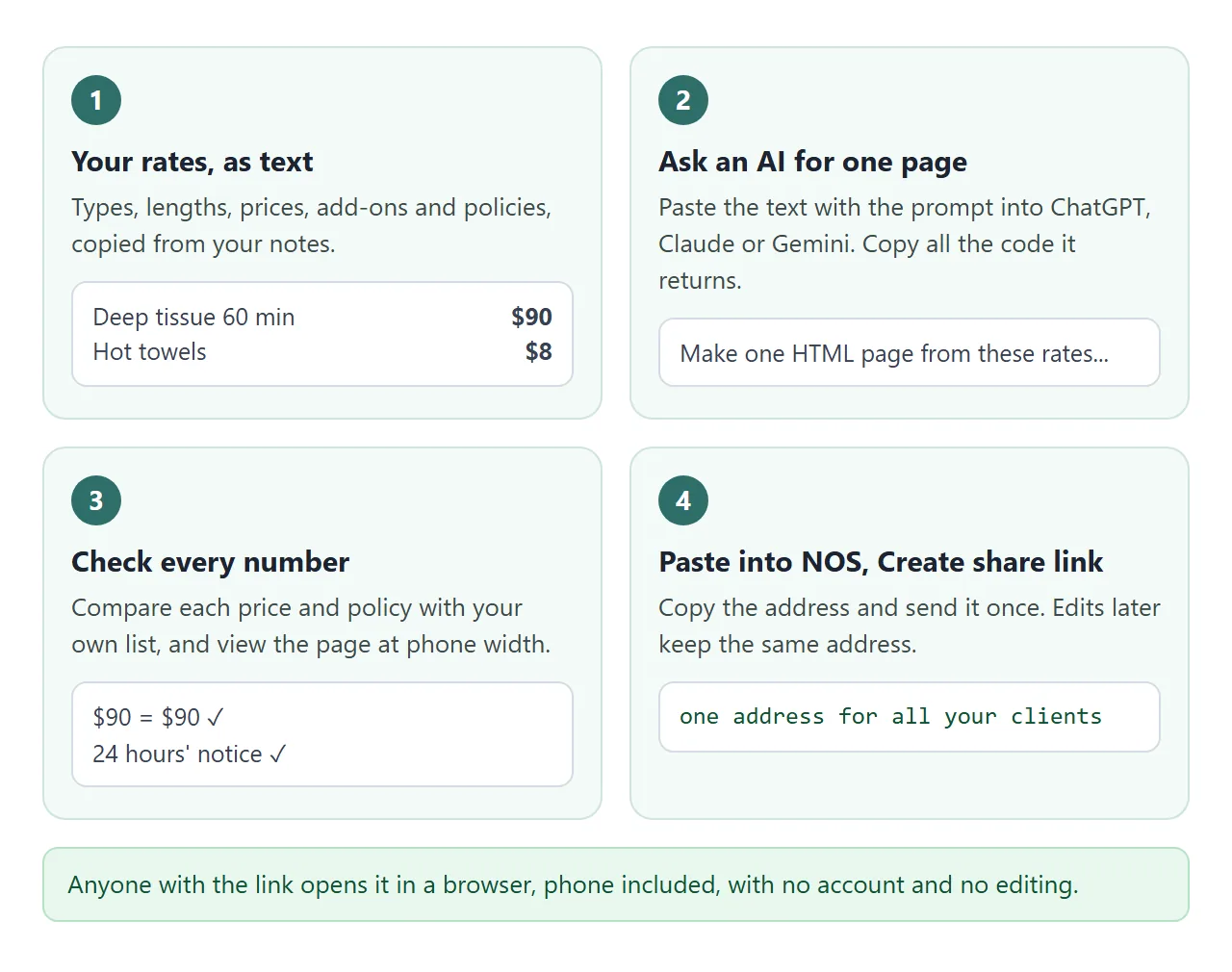
Anyone with the link can open the page in a browser, on a phone or a laptop, without an account. They cannot edit it. Editing the code in your document keeps the same link.
For a sign at the front desk, turn the link into a QR code. QR code link explains why a printed code stays useful when the page behind it changes.
If you want paper, open the page in Chrome on a computer and choose File, then Print, then save as PDF. As of October 2026 that is the route Google's help describes, so check the current help page.
What goes on the page
A price list is read by someone deciding whether to book. These parts answer the questions they would otherwise send you.
| Part | What to write |
|---|---|
| Date line | When these prices started, for example 1 October 2026 |
| Rates | Each type, each length, one price per cell |
| Add-ons | A short list, each with its own price |
| Cancelling | How much notice, and what happens inside it |
| Late arrival | Whether the session ends at the booked time |
| First visit | How early to come and what to tell you |
| Payment | Which ways you take payment |
| How to book | An email address or phone number |
These parts are suggestions, not rules. Leave out anything you do not use. For more on tables of prices, see HTML pricing tables.
Ways to share a price list compared
| Image or PDF in a chat | Link to a page | |
|---|---|---|
| What a client holds | A copy | An address |
| After a price change | Send a new file | Edit once, same link |
| On a phone | Small text to pinch and zoom | One column that fits the screen |
| Which version is current | Unclear | Always the page |
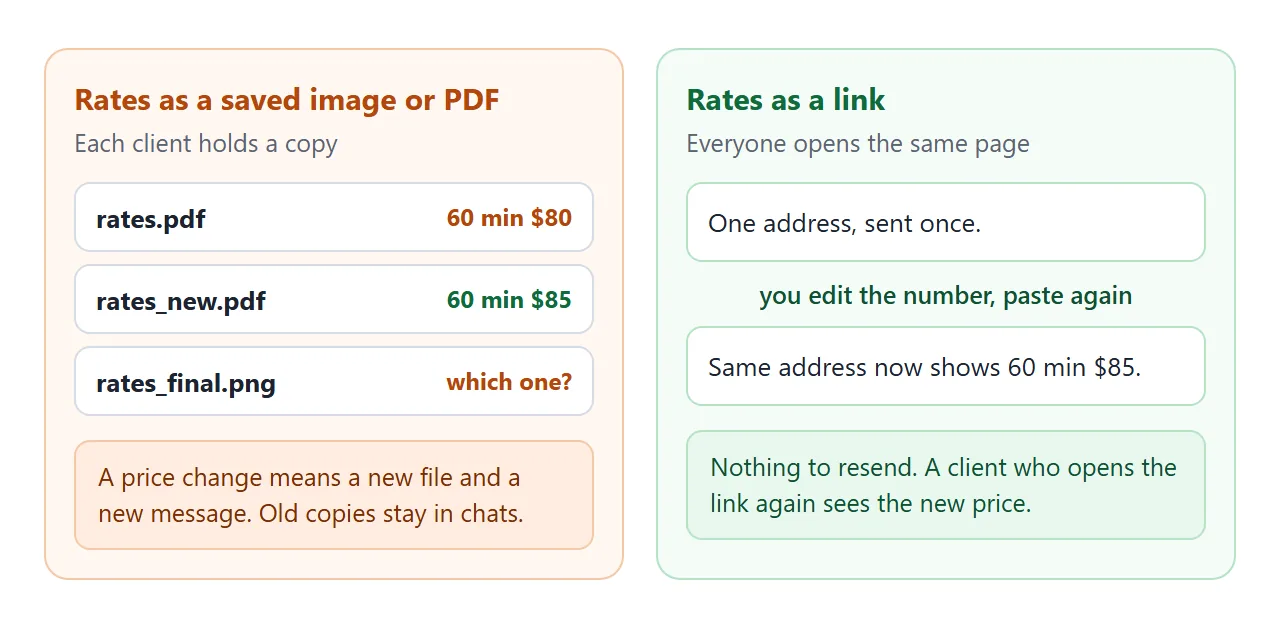
A file still has a place if you need a dated copy for your records. Use the page for what clients read when they decide.
Link vs attachment covers the differences in more detail, and the price list link guide goes deeper on dates and customer groups.
A second page: work out the session price
Some clients like to see a total before they message you. This page lets them pick a length, a type and add-ons, and shows the price. Types that are not offered at a length are greyed out.
<!doctype html>
<html lang="en">
<head>
<meta charset="utf-8">
<meta name="viewport" content="width=device-width, initial-scale=1">
<title>Work out your session price</title>
<style>
  * { box-sizing: border-box; }
  body { margin: 0; font-family: system-ui, sans-serif; background: #f2f6f5; color: #1c2b2a; line-height: 1.5; }
  main { max-width: 560px; margin: 0 auto; padding: 18px 16px 24px; }
  h1 { margin: 0 0 4px; font-size: 22px; }
  .sub { margin: 0 0 14px; font-size: 14px; color: #556967; }
  fieldset { border: 0; background: #fff; border-radius: 12px; padding: 14px 16px; margin: 0 0 12px; box-shadow: 0 1px 6px rgba(0,0,0,.06); }
  legend { float: left; width: 100%; padding: 0; margin: 0 0 8px; font-weight: 800; font-size: 16px; }
  label { display: flex; align-items: center; gap: 10px; padding: 9px 0; border-top: 1px solid #e4ecea; font-size: 15px; cursor: pointer; clear: both; }
  label:first-of-type { border-top: 0; }
  label .amt { margin-left: auto; font-weight: 700; font-variant-numeric: tabular-nums; }
  input { width: 20px; height: 20px; accent-color: #2f6f6a; }
  label.off { color: #98a6a4; cursor: not-allowed; }
  .total { background: #2f6f6a; color: #fff; border-radius: 12px; padding: 14px 16px; }
  .total .big { font-size: 30px; font-weight: 800; font-variant-numeric: tabular-nums; }
  .total p { margin: 2px 0 0; font-size: 14px; opacity: .95; }
</style>
</head>
<body>
<main>
  <h1>Work out your session price</h1>
  <p class="sub">Willow Lane Massage (fictional). Prices from 1 October 2026.</p>

  <fieldset><legend>1. Length</legend><div id="lengths"></div></fieldset>
  <fieldset><legend>2. Type</legend><div id="types"></div></fieldset>
  <fieldset><legend>3. Add-ons</legend><div id="addons"></div></fieldset>

  <div class="total" aria-live="polite">
    <div class="big" id="sum">$0</div>
    <p id="line"></p>
  </div>
</main>

<script>
  // Edit the prices here. null means that length is not offered for that type.
  const TYPES = [
    { name: 'Swedish massage', price: { 30: 45, 60: 80,  90: 115 } },
    { name: 'Deep tissue',     price: { 30: 50, 60: 90,  90: 130 } },
    { name: 'Hot stone',       price: { 30: null, 60: 100, 90: 140 } },
    { name: 'Prenatal',        price: { 30: null, 60: 90,  90: 125 } }
  ];
  const ADDONS = [
    { name: 'Aromatherapy oil', price: 10 },
    { name: 'Hot towels', price: 8 },
    { name: 'Scalp massage (10 min)', price: 15 }
  ];

  let length = 60;
  let type = 0;
  const picked = new Set();

  const lengthsBox = document.getElementById('lengths');
  const typesBox = document.getElementById('types');
  const addonsBox = document.getElementById('addons');

  function row(kind, name, value, amount, checked, onChange, group) {
    const l = document.createElement('label');
    const i = document.createElement('input');
    i.type = kind;
    if (group) i.name = group;
    i.checked = checked;
    i.addEventListener('change', onChange);
    const t = document.createElement('span');
    t.textContent = name;
    const a = document.createElement('span');
    a.className = 'amt';
    a.textContent = amount;
    l.append(i, t, a);
    return { l, i };
  }

  function draw() {
    lengthsBox.textContent = '';
    typesBox.textContent = '';
    addonsBox.textContent = '';
    if (TYPES[type].price[length] == null) type = TYPES.findIndex((t) => t.price[length] != null);

    [30, 60, 90].forEach((n) => {
      const r = row('radio', n + ' minutes', n, '', n === length, () => { length = n; draw(); }, 'len');
      lengthsBox.appendChild(r.l);
    });
    TYPES.forEach((t, idx) => {
      const p = t.price[length];
      const r = row('radio', t.name, idx, p == null ? 'not at ' + length + ' min' : '$' + p, idx === type, () => { type = idx; draw(); }, 'type');
      if (p == null) { r.i.disabled = true; r.l.className = 'off'; }
      typesBox.appendChild(r.l);
    });
    ADDONS.forEach((a, idx) => {
      const r = row('checkbox', a.name, idx, '+$' + a.price, picked.has(idx), (e) => {
        if (e.target.checked) picked.add(idx); else picked.delete(idx);
        draw();
      });
      addonsBox.appendChild(r.l);
    });

    let sum = TYPES[type].price[length];
    const names = [length + ' min ' + TYPES[type].name.toLowerCase()];
    picked.forEach((idx) => { sum += ADDONS[idx].price; names.push(ADDONS[idx].name.toLowerCase()); });
    document.getElementById('sum').textContent = '$' + sum;
    document.getElementById('line').textContent = names.join(' + ');
  }

  draw();
</script>
</body>
</html>
Ask the AI for it by changing the prompt: "a page where the client picks length, massage type and add-ons, and sees the total." The total is only a guide. Keep your own rules, such as when you charge extra, in the policies.
When it does not work
| Symptom | Cause | Fix |
|---|---|---|
| A client sees code, not a page | The file was sent as an attachment and opened as text | Send the link, not the file |
| A price on the page is wrong | The AI changed or dropped it | Fix the number in the code, paste again |
| The length buttons do nothing | A line was lost when copying | Copy all of the AI's code again |
| Your logo or photos are missing | They load from another website, which the page blocks | Ask for a page with no outside images or fonts |
| A booking form does not send | A page cannot send a form to a server | Show your email or phone, or use your booking tool |
| You cannot see who opened it | NOS does not record opens | Ask clients to confirm in your booking messages |
If a phone shows a sent file as plain text, see opening an HTML file on a phone. To send the link in a chat app, sharing an HTML page on WhatsApp covers what the preview needs.