A media kit template is a fixed order of sections you fill in with your own numbers: who you are, how big your audience is, what a brand can book, and how to reach you.
You can skip the design file. Ask an AI to write the page, type your numbers in, and send it as a link.
People often ask this as a design question: "What is the best Canva template to create a professional media kit for beginner influencers?" The layout is the easy part. What a brand reads is the numbers and whether they are dated.
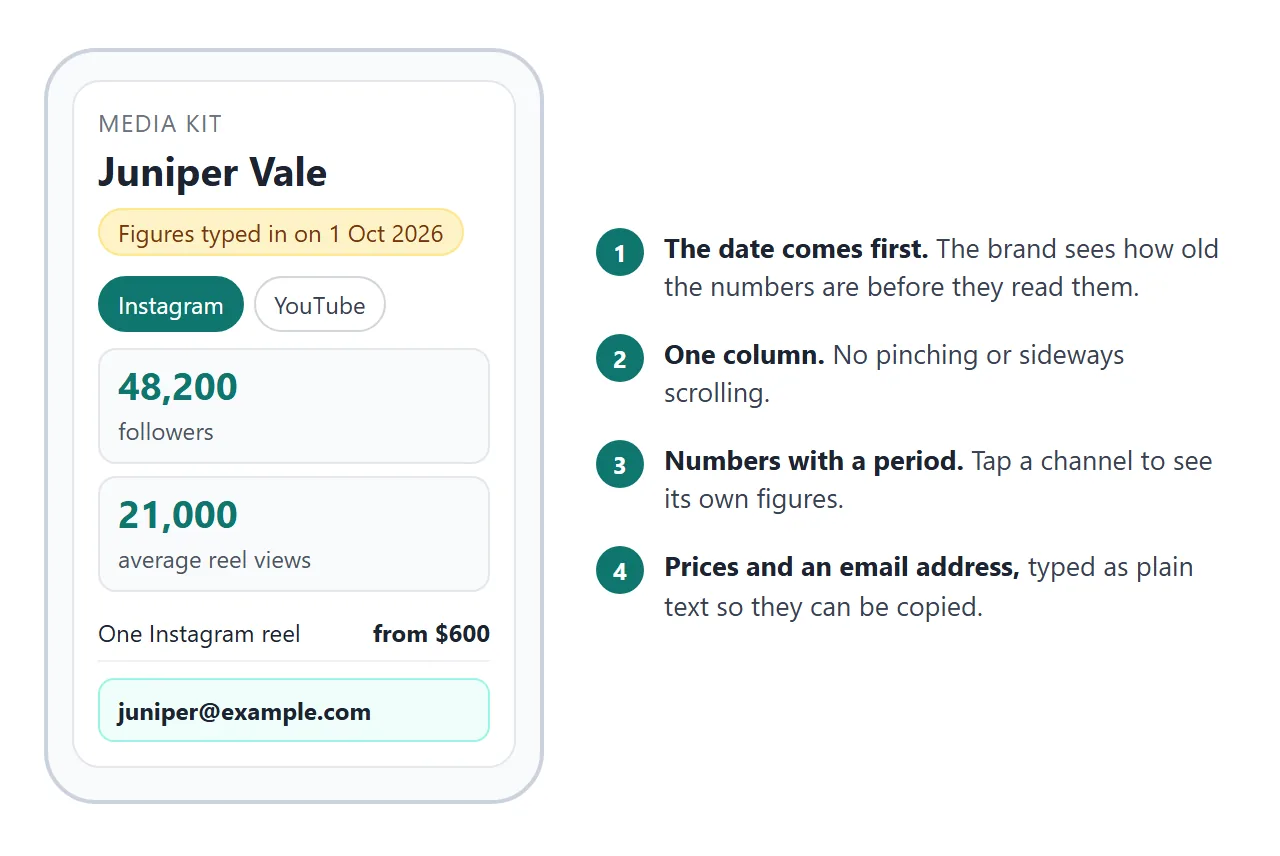
Here is a finished example. Tap the channel buttons and the figures change.
<!doctype html>
<html lang="en">
<head>
<meta charset="utf-8">
<meta name="viewport" content="width=device-width, initial-scale=1">
<title>Media kit - Juniper Vale</title>
<style>
  * { box-sizing: border-box; }
  body { margin: 0; background: #f3f4f6; font-family: system-ui, -apple-system, "Segoe UI", sans-serif; color: #1f2937; line-height: 1.55; }
  .page { max-width: 720px; margin: 0 auto; background: #fff; padding: 24px 20px 32px; min-height: 100vh; }
  .tag { margin: 0; font-size: 13px; letter-spacing: .06em; text-transform: uppercase; color: #6b7280; }
  h1 { margin: 6px 0 4px; font-size: 30px; line-height: 1.15; }
  .sub { margin: 0 0 16px; font-size: 16px; color: #4b5563; }
  .asof { display: inline-block; font-size: 14px; background: #fef3c7; border: 1px solid #fde68a; color: #78350f; border-radius: 99px; padding: 4px 12px; margin-bottom: 8px; }
  h2 { margin: 26px 0 8px; font-size: 13px; letter-spacing: .08em; text-transform: uppercase; color: #6b7280; }
  p { margin: 0 0 8px; font-size: 16px; }
  .tabs { display: flex; flex-wrap: wrap; gap: 8px; margin-bottom: 10px; }
  .tabs button { font: inherit; font-size: 15px; padding: 8px 14px; min-height: 40px; border-radius: 99px; border: 1px solid #d1d5db; background: #fff; color: #374151; cursor: pointer; }
  .tabs button[aria-pressed="true"] { background: #0f766e; border-color: #0f766e; color: #fff; }
  .stats { display: grid; grid-template-columns: repeat(auto-fit, minmax(150px, 1fr)); gap: 10px; }
  .stat { border: 1px solid #e5e7eb; border-radius: 12px; padding: 12px 14px; background: #f9fafb; }
  .stat b { display: block; font-size: 26px; line-height: 1.1; color: #0f766e; }
  .stat span { font-size: 14px; color: #4b5563; }
  .src { font-size: 14px; color: #6b7280; margin-top: 8px; }
  .bar { display: flex; align-items: center; gap: 10px; margin: 6px 0; font-size: 15px; }
  .bar .n { width: 92px; flex: none; }
  .bar .t { flex: 1; height: 12px; background: #e5e7eb; border-radius: 6px; overflow: hidden; }
  .bar .t i { display: block; height: 100%; background: #14b8a6; }
  .bar .v { width: 44px; text-align: right; flex: none; font-weight: 600; }
  .offer { display: flex; justify-content: space-between; gap: 12px; padding: 10px 0; border-bottom: 1px solid #eef0f3; }
  .offer b { white-space: nowrap; }
  .work { border: 1px solid #e5e7eb; border-radius: 12px; padding: 12px 14px; margin-bottom: 8px; }
  .work b { display: block; }
  .contact { margin-top: 26px; padding: 14px 16px; background: #f0fdfa; border: 1px solid #99f6e4; border-radius: 12px; }
  .contact b { font-size: 18px; word-break: break-all; }
  .note { font-size: 13px; color: #6b7280; margin-top: 18px; }
</style>
</head>
<body>
<div class="page">
  <p class="tag">Media kit</p>
  <h1>Juniper Vale</h1>
  <p class="sub">Slow travel and street food videos. Based in Lisbon, working in English and Portuguese.</p>
  <span class="asof">Figures typed in on <span id="asof"></span></span>

  <h2>Audience</h2>
  <div class="tabs" id="tabs"></div>
  <div class="stats" id="stats"></div>
  <p class="src" id="src"></p>

  <h2>Who watches</h2>
  <div id="age"></div>
  <p class="src">Share of followers by age group, across all channels.</p>

  <h2>What brands can book</h2>
  <div id="offers"></div>

  <h2>Recent work</h2>
  <div class="work"><b>Tram 28 street food map</b>Sponsored by a fictional pastry brand. 8-part series, filmed over two weekends.</div>
  <div class="work"><b>Market stall season</b>Unpaid collaboration with a fictional olive oil maker, one video a month.</div>

  <div class="contact">
    <p>Booking and questions</p>
    <b>juniper@example.com</b>
    <p class="src">I reply within two working days.</p>
  </div>
  <p class="note">Sample page. Every name and number here is made up. Replace them with your own.</p>
</div>

<script>
  // Change the numbers here. They are typed text, not live counters.
  const AS_OF = '1 October 2026';
  const CHANNELS = [
    { name: 'Instagram', stats: [['48,200', 'followers'], ['21,000', 'average reel views'], ['4.1%', 'engagement']], period: 'Last 30 days to 30 September 2026. Taken from the app\'s own analytics.' },
    { name: 'YouTube', stats: [['12,900', 'subscribers'], ['9,400', 'average video views'], ['6 min', 'average watch time']], period: 'Last 28 days to 30 September 2026. Taken from the channel\'s own analytics.' },
    { name: 'Newsletter', stats: [['3,150', 'subscribers'], ['44%', 'open rate']], period: 'Last 5 issues to 28 September 2026.' }
  ];
  const AGES = [['18-24', 22], ['25-34', 46], ['35-44', 24], ['45+', 8]];
  const OFFERS = [['One Instagram reel', 'from $600'], ['Story set of three', 'from $250'], ['YouTube integration', 'from $900'], ['Newsletter mention', 'from $150']];

  document.getElementById('asof').textContent = AS_OF;
  const tabs = document.getElementById('tabs');
  const stats = document.getElementById('stats');
  const src = document.getElementById('src');

  function show(i) {
    const c = CHANNELS[i];
    stats.innerHTML = c.stats.map(s => '<div class="stat"><b>' + s[0] + '</b><span>' + s[1] + '</span></div>').join('');
    src.textContent = c.period;
    [...tabs.children].forEach((b, j) => b.setAttribute('aria-pressed', j === i ? 'true' : 'false'));
  }
  CHANNELS.forEach((c, i) => {
    const b = document.createElement('button');
    b.type = 'button';
    b.textContent = c.name;
    b.addEventListener('click', () => show(i));
    tabs.appendChild(b);
  });
  show(0);

  document.getElementById('age').innerHTML = AGES.map(a =>
    '<div class="bar"><span class="n">' + a[0] + '</span><span class="t"><i style="width:' + a[1] + '%"></i></span><span class="v">' + a[1] + '%</span></div>').join('');
  document.getElementById('offers').innerHTML = OFFERS.map(o =>
    '<div class="offer"><span>' + o[0] + '</span><b>' + o[1] + '</b></div>').join('');
</script>
</body>
</html>
The sections, in the order used here
This order is the choice made in the example, not a rule. It puts the date and the audience first, so the numbers can be judged straight away.
- Name and one line. What you make and where you are based.
- Numbers, with a date. Followers or subscribers, average views, the period they cover.
- Who watches. Age groups, countries, whatever you can read from your analytics.
- What a brand can book. A list with a starting price.
- Recent work. Two examples, in a sentence each.
- Contact. An email address typed as plain text.
For what brands look for and why prices help, see how to host a media kit.
Type the numbers in, do not embed them
A live follower counter sounds appealing. On a NOS share link it will not load: iframes, images from other sites and requests to other sites are blocked. So the counts in your kit are text that you type.
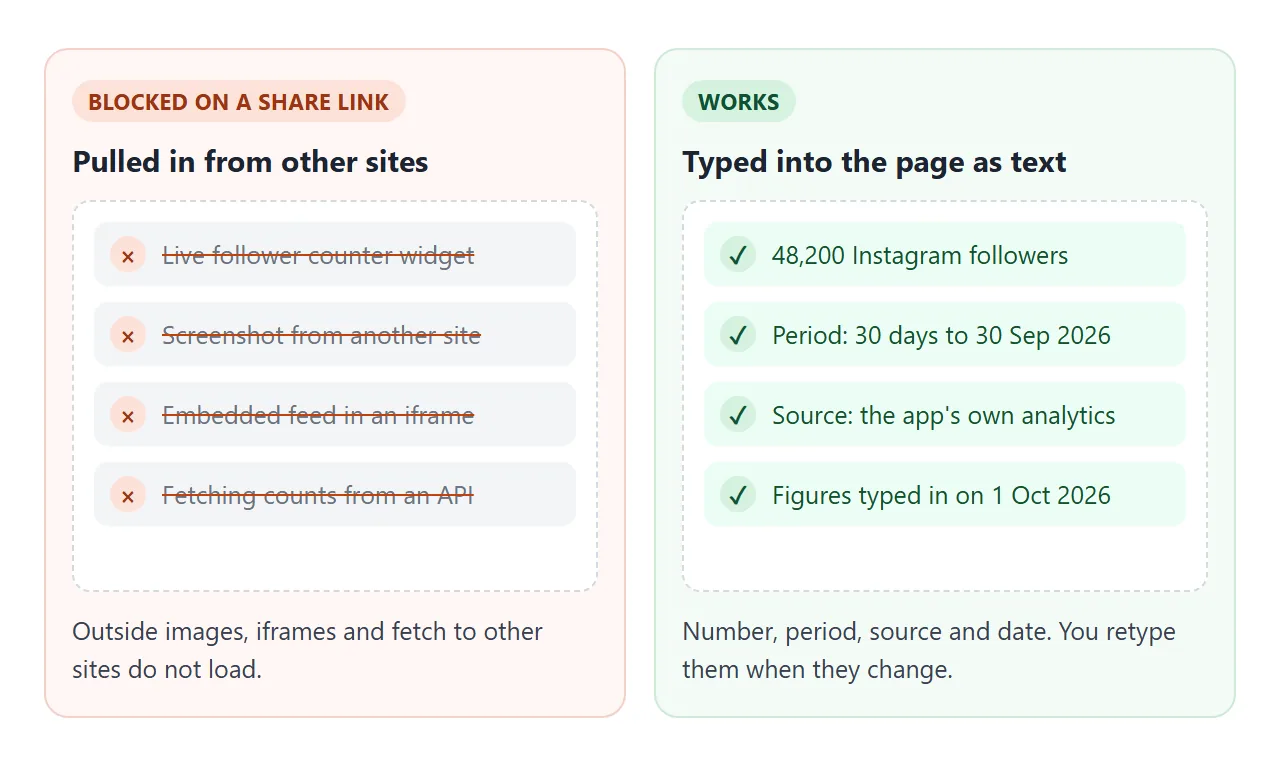
That is not a loss. A bare number tells a brand little. A number with its period, its source and the date you typed it in tells them how far to trust it.
Write each one the same way: the figure, what it counts, the period, and where you read it. When a number changes, you retype it and the date.
Make it with AI
Paste this prompt into ChatGPT, Claude or Gemini. Put your own facts at the bottom.
Write ONE self-contained HTML file: a media kit for a content creator, to be read on a phone.
Rules:
- Plain HTML, CSS and JavaScript in one file. No images, no external files, no embedded feeds or widgets, no form that sends data.
- One column. Add a viewport meta tag. Text at least 16px.
- Sections in this order: name and one line, audience numbers, who watches, what brands can book, recent work, contact.
- Show a line near the top: "Figures typed in on" and the date.
- Show every number with its period and source. Let me switch between channels with buttons.
- Put every number and date in one block at the top of the script, with the comment "Change the numbers here".
- Show my email address as plain text.
- If I did not give you a fact, write TODO. Do not invent numbers, brands or past work.
My facts:
Name and what I make: ...
Channels, counts, periods, sources: ...
Audience breakdown: ...
What brands can book, starting prices: ...
Recent work: ...
Email: ...
The block of numbers matters. It means a monthly update is one edit, not a search through the page.
What to check in the result. An AI is good at layout and loose with facts. Read the page as the brand will.
- Every number. Compare each figure with your own analytics.
- Every date and period. They should say when and what the number covers.
- Every TODO. Replace it, or delete the line.
- Invented details. Brands, results or audience facts you did not give it.
- The channel buttons. Tap each one and read what changes.
- The phone. Open it on your own phone first.
If the page looks off, fixing AI-generated HTML covers the usual causes.
Send it as a link
Paste the HTML into a NOS document and choose Create share link. HTML to link walks through it.
The result is a page anyone with the link can open in a browser, on a phone too, with no account. They can read it but not edit it. Scripts run, so the channel buttons work for them.
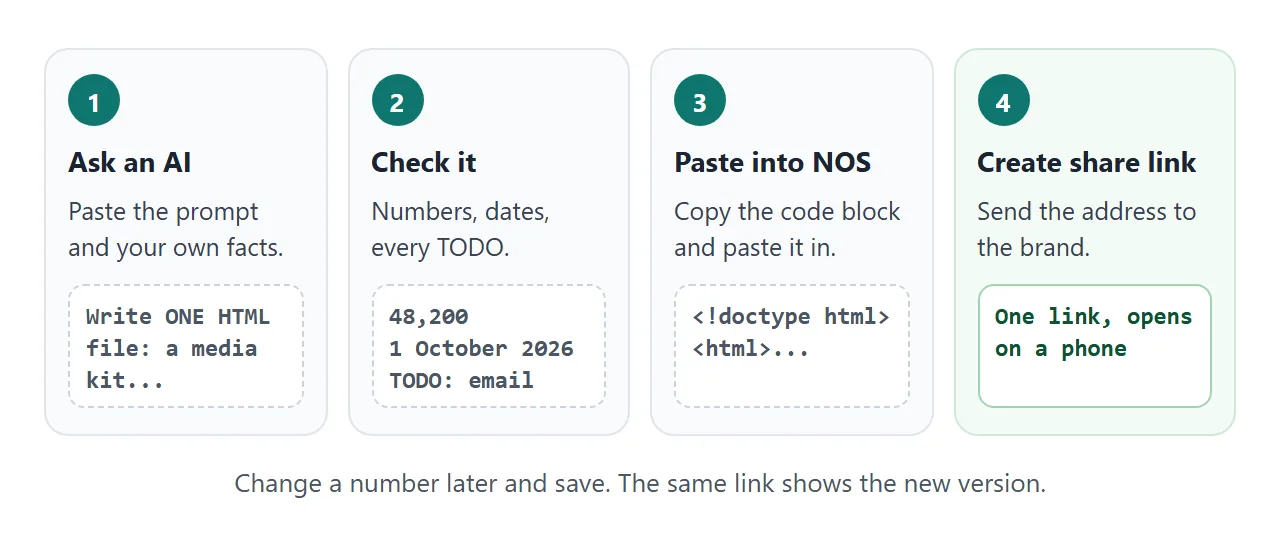
Put the address in the body of your message with one line saying what it is. A media kit as a link covers what to write around it.
To update numbers: open the page in NOS, change the figures in the block at the top of the script, and save. The same link now shows the new version, so a brand who saved the address sees current numbers.
A second page: a rate card
Some brands ask for prices before anything else. This second example is a rate card. The brand ticks the content they want, how long they can use it, and any extras, and sees an estimate.
<!doctype html>
<html lang="en">
<head>
<meta charset="utf-8">
<meta name="viewport" content="width=device-width, initial-scale=1">
<title>Rate card - Juniper Vale</title>
<style>
  * { box-sizing: border-box; }
  body { margin: 0; background: #f3f4f6; font-family: system-ui, -apple-system, "Segoe UI", sans-serif; color: #1f2937; line-height: 1.55; }
  .page { max-width: 720px; margin: 0 auto; background: #fff; padding: 24px 20px 32px; min-height: 100vh; }
  .tag { margin: 0; font-size: 13px; letter-spacing: .06em; text-transform: uppercase; color: #6b7280; }
  h1 { margin: 6px 0 4px; font-size: 28px; line-height: 1.15; }
  .meta { margin: 0 0 16px; font-size: 14px; color: #6b7280; }
  h2 { margin: 22px 0 8px; font-size: 13px; letter-spacing: .08em; text-transform: uppercase; color: #6b7280; }
  .opt { display: flex; align-items: center; gap: 10px; padding: 10px 12px; border: 1px solid #e5e7eb; border-radius: 10px; margin-bottom: 8px; cursor: pointer; }
  .opt input { width: 20px; height: 20px; flex: none; }
  .opt .t { flex: 1; font-size: 15px; }
  .opt .p { font-weight: 600; white-space: nowrap; }
  .total { display: flex; justify-content: space-between; align-items: baseline; margin-top: 16px; padding: 14px 16px; background: #f0fdfa; border: 1px solid #99f6e4; border-radius: 12px; }
  .total b { font-size: 28px; color: #0f766e; }
  .small { font-size: 14px; color: #6b7280; margin: 8px 0 0; }
  .sum { font-size: 15px; color: #374151; margin: 10px 0 0; min-height: 24px; }
</style>
</head>
<body>
<div class="page">
  <p class="tag">Rate card</p>
  <h1>Partnership rates</h1>
  <p class="meta">Juniper Vale · prices in US dollars · last changed <span id="asof"></span></p>

  <h2>1. Pick the content</h2>
  <div id="items"></div>

  <h2>2. How long can you use it?</h2>
  <div id="usage"></div>

  <h2>3. Extras</h2>
  <div id="extras"></div>

  <div class="total"><span>Estimate</span><b id="total"></b></div>
  <p class="sum" id="sum"></p>
  <p class="small">This is an estimate to start a conversation, not a quote. Sample page with made-up prices.</p>
</div>

<script>
  // Change the prices here.
  const AS_OF = '1 October 2026';
  const ITEMS = [['One Instagram reel', 600], ['Story set of three', 250], ['YouTube integration', 900], ['Newsletter mention', 150]];
  const USAGE = [['Organic only, no paid use', 0], ['Brand may run it as an ad for 90 days', 150], ['Brand may run it as an ad for 12 months', 500]];
  const EXTRAS = [['Exclusivity: no rival brand for 30 days', 300], ['Rush: delivered within 5 working days', 200]];

  const $ = (id) => document.getElementById(id);
  const money = (n) => '$' + n.toLocaleString('en-US');
  $('asof').textContent = AS_OF;

  function row(type, name, label, price, checked) {
    return '<label class="opt"><input type="' + type + '" name="' + name + '" data-p="' + price + '"' + (checked ? ' checked' : '') + '>' +
      '<span class="t">' + label + '</span><span class="p">' + (price ? '+' + money(price) : 'included') + '</span></label>';
  }
  $('items').innerHTML = ITEMS.map((x, i) => row('checkbox', 'item', x[0], x[1], i === 0)).join('');
  $('usage').innerHTML = USAGE.map((x, i) => row('radio', 'usage', x[0], x[1], i === 0)).join('');
  $('extras').innerHTML = EXTRAS.map((x) => row('checkbox', 'extra', x[0], x[1], false)).join('');

  function update() {
    let total = 0, picked = 0;
    document.querySelectorAll('input:checked').forEach((el) => {
      total += Number(el.dataset.p);
      if (el.name === 'item') picked++;
    });
    $('total').textContent = money(total);
    $('sum').textContent = picked === 0 ? 'Tick at least one piece of content.' : picked + ' piece' + (picked > 1 ? 's' : '') + ' of content selected.';
  }
  document.addEventListener('change', update);
  update();
</script>
</body>
</html>
The brand's ticks are theirs alone. They are not saved and you do not see them. Only you change the prices, by editing the code. Treat the total as a starting point for a conversation, and say so on the page.
Ways to send a media kit, compared
| Attached file | Text in the email | Link to a page | |
|---|---|---|---|
| Opens on a phone | After a download | Yes | Yes, in the browser |
| Change a number after sending | Send a new file | Send a new email | Edit the page, same link |
| Rate estimate with ticks | No | No | Yes |
| Brand needs an account | No | No | No |
| Forwarded inside the brand | Many copies | Pasted text | One address |
Google's help page says the attachment limit for personal Gmail accounts is 25 MB, and Gmail adds a larger file as a Drive link instead (as of October 2026). Work and school accounts can have limits set by an administrator.
A one-page kit is far below that, so size is rarely the problem. A stale number is. See email vs link for documents.
When it does not work
| What you see | Cause | Fix |
|---|---|---|
| The page shows raw code in the chat | You copied the chat text, not the code block | Copy only the code, from the doctype line to the last html tag |
| A logo or photo is missing | Images from other sites are blocked | Ask for no images, or a logo drawn in SVG |
| A follower widget is empty | Widgets and iframes from other sites are blocked | Type the number as text, with period and date |
| The numbers look old | Brand opened a file you sent earlier | Send only the link, never the file |
| A contact form does nothing | Forms cannot send to a server from the link | Write your email address as plain text |
| The text is tiny on a phone | No viewport meta tag | Ask the AI to add one, and a 16px base size |