A memorial website template can be as small as one page: a name and dates, the service details, a short life story, and a photograph with a sentence describing it. You do not need a site builder for that.
It is a single HTML file, and a link to it is all the people who knew them need.
People often ask which free or cheap site builder is best for a simple one-page personal site. For a memorial, the shorter answer is one file and one address. Here is a finished page to copy.
<!doctype html>
<html lang="en">
<head>
<meta charset="utf-8">
<meta name="viewport" content="width=device-width, initial-scale=1">
<title>In memory of Margaret Ellery</title>
<style>
* { box-sizing: border-box; }
html { font-size: 100%; }
html.big { font-size: 125%; }
body { margin: 0; background: #f3f1ed; color: #2a2724; font-family: Georgia, "Times New Roman", serif; line-height: 1.65; }
.wrap { max-width: 560px; margin: 0 auto; padding: 18px 18px 36px; }
.tools { text-align: right; font: .8rem system-ui, sans-serif; }
.tools button { border: 1px solid #b9b2a8; background: #fff; border-radius: 6px; padding: 5px 10px; font: inherit; color: #4a443d; cursor: pointer; }
header { text-align: center; padding: 8px 0 18px; }
header svg { width: 168px; height: 168px; border-radius: 50%; border: 4px solid #fff; box-shadow: 0 2px 8px rgba(40, 30, 20, .18); }
h1 { font-size: 1.9rem; font-weight: 400; margin: 14px 0 2px; }
.dates { margin: 0; color: #6b635a; font-style: italic; }
.card { background: #fff; border-radius: 12px; padding: 16px 18px; box-shadow: 0 1px 4px rgba(40, 30, 20, .08); font-family: system-ui, sans-serif; }
.card h2 { font-size: .78rem; letter-spacing: 1.3px; text-transform: uppercase; color: #6a5a45; margin: 0 0 8px; }
.when { font-size: 1.15rem; font-weight: 600; margin: 0; }
.where { margin: 2px 0 12px; color: #4a443d; }
.btn { display: inline-block; background: #4d6a5b; color: #fff; text-decoration: none; border-radius: 8px; padding: 10px 16px; font-weight: 600; }
details { margin-top: 12px; border-top: 1px solid #e6e1d9; padding-top: 10px; }
summary { cursor: pointer; font-weight: 600; }
details p { margin: 8px 0 0; color: #4a443d; }
section { margin-top: 26px; }
section > h2 { font-size: 1.3rem; font-weight: 400; margin: 0 0 6px; }
section p { margin: 0 0 12px; }
figure { margin: 0; }
figure svg { width: 100%; height: auto; border-radius: 10px; display: block; }
figcaption { font-size: .92rem; color: #5d564e; margin-top: 8px; font-style: italic; }
.quiet { text-align: center; color: #6b635a; font-size: .92rem; margin-top: 28px; }
</style>
</head>
<body>
<div class="wrap">
<div class="tools"><button type="button" id="size" aria-pressed="false">Larger text</button></div>
<header>
<svg viewBox="0 0 200 200" role="img" aria-label="Portrait placeholder: a soft green and gold sky over a hill">
<rect width="200" height="200" fill="#e9dcc3"/>
<circle cx="140" cy="60" r="26" fill="#f4c76b"/>
<path d="M0 150 Q60 100 120 140 T200 130 V200 H0Z" fill="#7d9a86"/>
<path d="M0 175 Q70 140 130 168 T200 160 V200 H0Z" fill="#4d6a5b"/>
</svg>
<h1>Margaret Ellery</h1>
<p class="dates">12 March 1942 – 18 September 2026</p>
</header>
<div class="card">
<h2>Funeral service</h2>
<p class="when">Saturday 10 October 2026, 2:00 pm</p>
<p class="where">Rosewood Chapel, 14 Linden Road, Fairfield</p>
<a class="btn" href="https://www.google.com/maps/search/?api=1&query=Rosewood+Chapel+14+Linden+Road+Fairfield">Open in Maps</a>
<details>
<summary>Afterwards</summary>
<p>Tea and sandwiches in the parish hall next to the chapel, from 3:00 pm. Everyone is welcome.</p>
</details>
<details>
<summary>Parking and getting there</summary>
<p>The chapel car park has room for thirty cars. Linden Road also has free parking on the street. The bus stop is a two-minute walk.</p>
</details>
<details>
<summary>Flowers and donations</summary>
<p>Margaret loved her garden, so flowers are welcome. If you prefer, donations to the Fairfield Library Friends would have pleased her.</p>
</details>
</div>
<section>
<h2>Her life</h2>
<p>Margaret was born in Fairfield, the middle of three sisters. She taught music at the primary school for thirty-one years and ran the choir that sang at every school fair.</p>
<p>She grew sweet peas along the back fence, kept a notebook of every bird that visited, and never let a visitor leave without something to eat. She is missed by her two children and four grandchildren.</p>
</section>
<section>
<h2>Photographs</h2>
<figure>
<svg viewBox="0 0 320 180" role="img" aria-label="Illustration standing in for a photograph of a garden">
<rect width="320" height="180" fill="#dfe9df"/>
<rect y="120" width="320" height="60" fill="#8fae94"/>
<g stroke="#6b8f74" stroke-width="3"><path d="M40 120V60M80 120V50M120 120V66M200 120V54M240 120V62M280 120V48"/></g>
<g fill="#d98aa8"><circle cx="40" cy="58" r="9"/><circle cx="80" cy="48" r="9"/><circle cx="120" cy="64" r="9"/><circle cx="200" cy="52" r="9"/><circle cx="240" cy="60" r="9"/><circle cx="280" cy="46" r="9"/></g>
</svg>
<figcaption>Margaret in her garden at the back of the house, summer 2019, among the sweet peas she grew every year.</figcaption>
</figure>
</section>
<section>
<h2>Share a memory</h2>
<p>If you would like to share a memory, please send it to the family by message or email. They will read every one.</p>
</section>
<p class="quiet">Please reload this page before the day. The family may update the details.</p>
</div>
<script>
// Larger text for older readers: change the root font size, everything else scales with it
const btn = document.getElementById('size');
btn.addEventListener('click', () => {
const big = document.documentElement.classList.toggle('big');
btn.setAttribute('aria-pressed', big);
btn.textContent = big ? 'Normal text' : 'Larger text';
});
</script>
</body>
</html>
Every name, date and place here is made up. Swap in yours. The Larger text button is a few lines of script, and it still runs on the shared link.
What goes on the page
Most people will open the link on a phone, and they open it to find out when and where. So the service details sit right under the name, and the longer writing comes after.
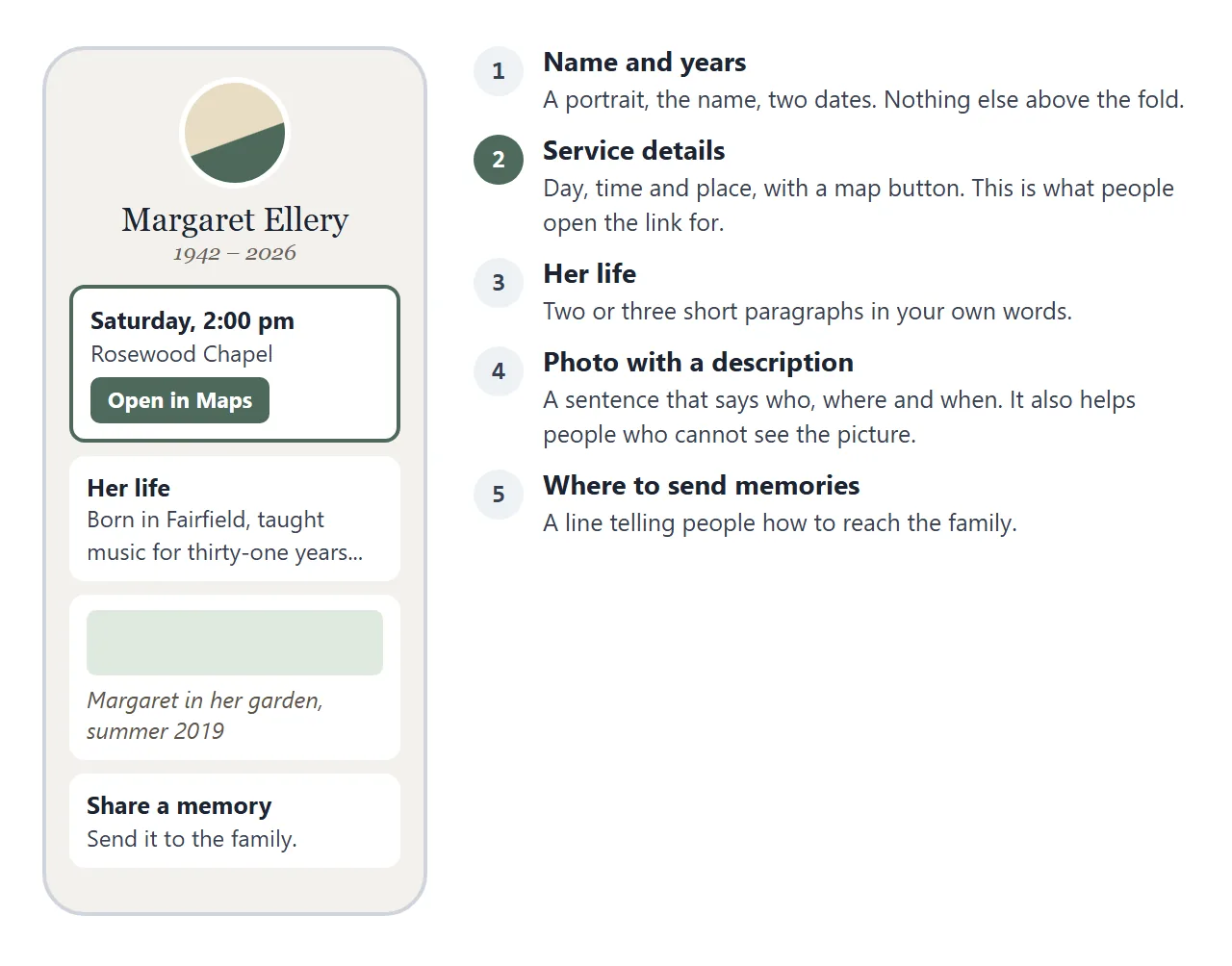
The photograph needs a sentence of its own. Say who is in it, where and roughly when.
The example puts that sentence in a caption under the picture, and the picture carries a short label for screen readers. MDN documents both.
The folds under the service card use a native HTML element called details. It shows a heading that opens and closes the text below it, with no JavaScript. Parking, food afterwards and flowers can stay out of sight until someone wants them.
For the wider question of putting an event at one address, see event link.
Make it with AI
Paste this prompt into ChatGPT, Claude or Gemini after replacing the words in capitals. Write the facts in your own words first, because the AI will not know them.
Write one self-contained HTML file: a one-page memorial page.
Name: FULL NAME. Dates: BORN DATE - DIED DATE.
Service: DAY, DATE, TIME at PLACE NAME, FULL ADDRESS.
Afterwards, parking, flowers or donations: ONE LINE EACH.
Life story: TWO SHORT PARAGRAPHS, my words.
Photo caption: WHO, WHERE, WHEN (one sentence).
Layout: one column, readable on a phone, include the viewport meta tag.
Put name and dates at the top, then the service details with a button
linking to a Google Maps search URL for the address. Use details and
summary for the extra notes. Use a calm serif font, soft colours.
Where the photo goes, draw a simple SVG placeholder with a label.
No external images, no iframes, no libraries. Return only the code.
Then check the result yourself. The AI can change a fact without any sign.
- The day of the week matches the date.
- The name is spelled exactly as the family writes it.
- The time and the address are as you wrote them, and the map button opens the right place.
- The caption says what you meant, and no placeholder text is left.
- Nothing is on the page that you would not want a stranger to read.
Send it as a link
Paste the finished code into a NOS document and choose Create share link. The page renders as written, scripts included. HTML to link walks through it.
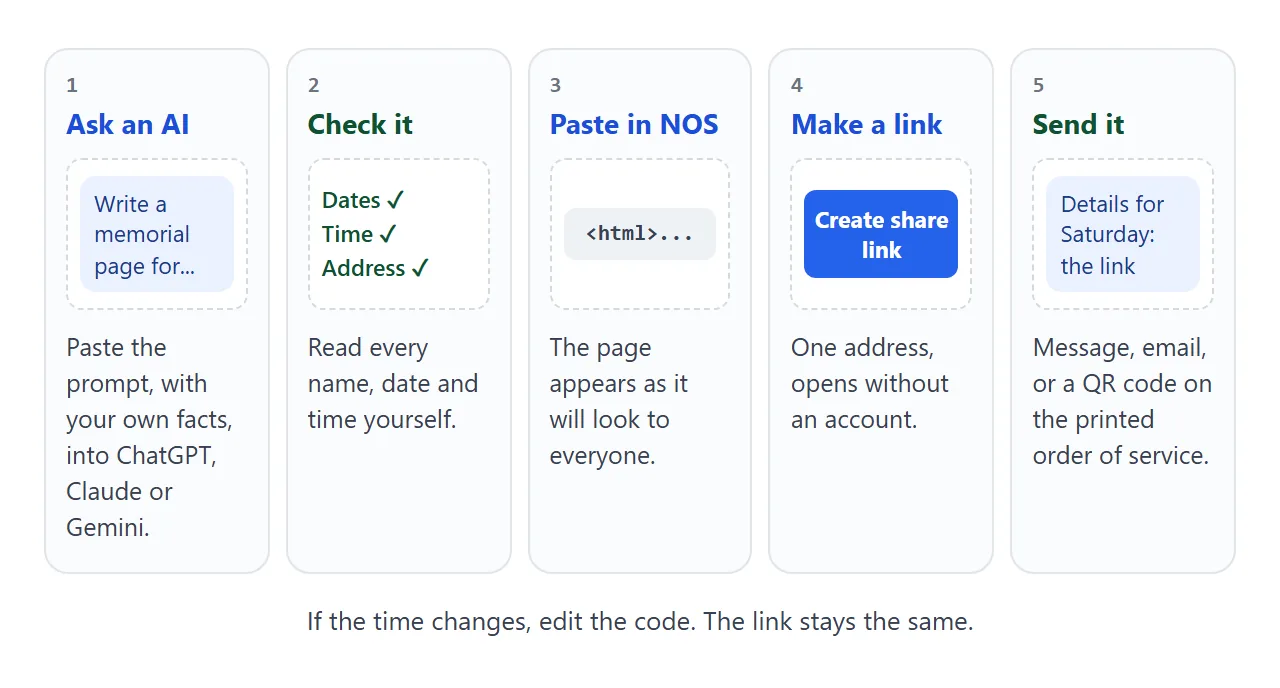
Anyone with the link opens the page in a browser, on a phone too, with no account. They cannot edit it. If the time changes, edit the code and the same link shows the new version.
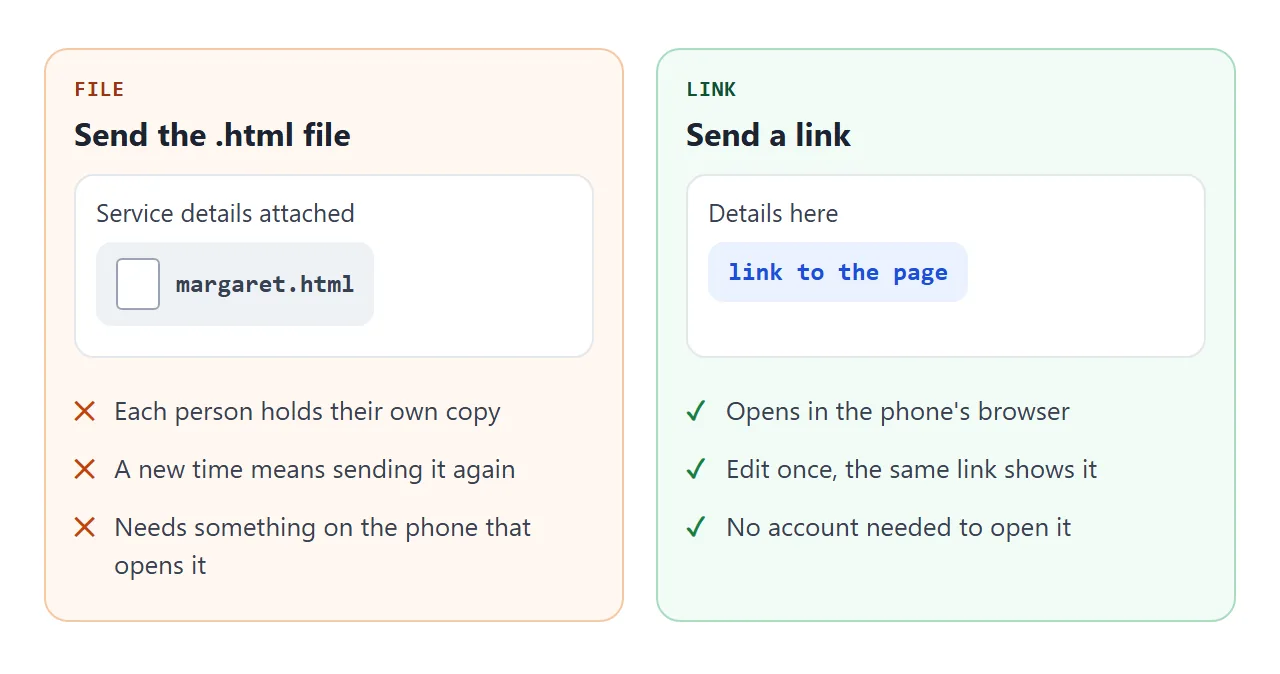
A file is a copy, so a change never reaches the copies already sent. A link is the page itself. Why a file often fails on a phone is covered in opening an HTML file on a phone.
NOS gives the page no password, and a link can be forwarded. Share it in the places you would share the service details anyway. To use a chat app, see sharing a page on WhatsApp.
For a printed order of service, turn the link into a QR code. QR code link shows how.
Ways to share the page compared
| Way | How people open it | A change reaches them |
|---|---|---|
| HTML file as attachment | Depends on the phone and the app | Only if you send it again |
| NOS share link | In the browser, no account | Yes, the same link updates |
| Google Sites page | In the browser, once published | See Google's help |
| QR code on paper | Scan, then the link opens | Yes, if the code holds the share link |
Google Sites is a separate tool with its own page editor. As of October 2026, Google's help says you publish a site with a web address and choose whether it is restricted to people you invite or public.
If only invited people should see the page, weigh that against a link that opens for anyone who has it.
Photographs and the file
Images hosted on other sites are blocked in NOS, so a photo has to be inside the file itself, written as text in what is called a data URI (MDN describes it as a way to embed small files inline).
That makes the file larger with every photo. Ask the AI for the placeholder first, check the whole page, and add one small photograph last. Base64 images explains how and why to keep it small.
Share a memory without a server
Visitors often want to write something. A form on the page can collect a name and a few lines.
It cannot send them to the family, because NOS blocks sending a form to a server. What works is a form that writes the message as text.
<!doctype html>
<html lang="en">
<head>
<meta charset="utf-8">
<meta name="viewport" content="width=device-width, initial-scale=1">
<title>Share a memory of Margaret</title>
<style>
  * { box-sizing: border-box; }
  body { margin: 0; background: #f3f1ed; color: #2a2724; font-family: system-ui, sans-serif; line-height: 1.5; }
  .wrap { max-width: 520px; margin: 0 auto; padding: 22px 18px 30px; }
  h1 { font: 400 1.6rem Georgia, serif; margin: 0 0 4px; }
  .lead { margin: 0 0 16px; color: #6b635a; }
  form { background: #fff; border-radius: 12px; padding: 16px 18px; box-shadow: 0 1px 4px rgba(40, 30, 20, .08); }
  label { display: block; font-weight: 600; margin: 12px 0 4px; }
  label:first-child { margin-top: 0; }
  input, textarea { width: 100%; padding: 9px 10px; border: 1px solid #c9c1b6; border-radius: 8px; font: inherit; }
  .count { font-size: .8rem; color: #6b635a; text-align: right; margin-top: 2px; }
  button { margin-top: 14px; padding: 10px 18px; border: 0; border-radius: 8px; background: #4d6a5b; color: #fff; font: 600 1rem system-ui, sans-serif; cursor: pointer; }
  button.alt { background: #fff; color: #4d6a5b; border: 1px solid #4d6a5b; margin-left: 8px; }
  #out { display: none; margin-top: 16px; background: #fff; border: 2px dashed #9db3a5; border-radius: 12px; padding: 14px 18px; }
  #out.show { display: block; }
  #out h2 { font-size: .8rem; letter-spacing: 1.2px; text-transform: uppercase; color: #4d6a5b; margin: 0 0 6px; }
  #msg { width: 100%; min-height: 120px; border: 0; padding: 0; background: transparent; resize: none; white-space: pre-wrap; }
  #out small { color: #6b635a; display: block; margin-top: 6px; }
</style>
</head>
<body>
<div class="wrap">
  <h1>Share a memory of Margaret</h1>
  <p class="lead">Write a few lines. The page turns them into a message you can send to the family.</p>

  <form id="memory">
    <label for="name">Your name</label>
    <input type="text" id="name" name="name" required>

    <label for="rel">How you knew her</label>
    <input type="text" id="rel" name="rel" placeholder="Neighbour, former pupil, cousin...">

    <label for="text">Your memory</label>
    <textarea id="text" name="text" rows="5" maxlength="600" required></textarea>
    <div class="count"><span id="left">600</span> characters left</div>

    <button type="submit">Write my message</button>
  </form>

  <div id="out" aria-live="polite">
    <h2>Your message</h2>
    <textarea id="msg" readonly></textarea>
    <button type="button" class="alt" id="select">Select the text</button>
    <small>Nothing has been sent. Select the text, copy it, and send it to the family by message or email.</small>
  </div>
</div>

<script>
  const form = document.getElementById('memory');
  const text = document.getElementById('text');
  const msg = document.getElementById('msg');

  text.addEventListener('input', () => {
    document.getElementById('left').textContent = 600 - text.value.length;
  });

  form.addEventListener('submit', (e) => {
    e.preventDefault();                        // stay on the page; nothing is sent anywhere
    const f = new FormData(form);              // read the answers
    const rel = f.get('rel').trim();
    msg.value = 'A memory of Margaret\n\n' + f.get('text').trim() +
      '\n\n' + f.get('name').trim() + (rel ? ' (' + rel + ')' : '');
    document.getElementById('out').classList.add('show');
    msg.scrollIntoView({ block: 'nearest' });
  });

  document.getElementById('select').addEventListener('click', () => { msg.focus(); msg.select(); });
</script>
</body>
</html>
The visitor copies the text and sends it by message or email, so memories arrive where the family already reads. The code stops the form from leaving the page and builds the text:
form.addEventListener('submit', (e) => {
  e.preventDefault();
  const f = new FormData(form);  // read the answers
});
Ask the AI to add this form to the main page. A form the visitor fills in is not saved for the next visitor, so a public guestbook is not something this page can do.
When it does not work
| What you see | Cause | Fix |
|---|---|---|
| The page looks tiny on a phone | The viewport meta tag is missing | Ask the AI to add it, see viewport meta tag |
| A photo is missing | The image is hosted on another site, which NOS blocks | Put it inside the file, or use a placeholder |
| The map area is empty | An embedded map uses an iframe, which NOS blocks | Use a button that links to the map |
| Messages do not reach the family | NOS blocks sending a form to a server | Show a text to copy, as in the memory example |
| Someone still sees the old time | They have the old page open | Ask them to reload the link |
| The AI changed a date or a name | Generated text can drift from your input | Read every fact in the result before sharing |