A nursing portfolio can be one web page: your rotations, certifications and skills, with no patient information on it. Make it with an AI chat, paste it into NOS, create a share link, and put the link in your applications.
One Quora question asks, "What are some free websites to build a portfolio?" For a single page you may not need a site builder at all. You need accurate facts about your training and a page that opens on any phone.
Here is a finished example with made-up details. Tap a rotation to open it.
<!doctype html>
<html lang="en">
<head>
<meta charset="utf-8">
<meta name="viewport" content="width=device-width">
<title>Riley Hart - Nursing student portfolio</title>
<style>
* { box-sizing: border-box; }
body { margin: 0; font-family: system-ui, -apple-system, "Segoe UI", sans-serif; color: #1f2933; background: #f3f7f7; line-height: 1.5; }
.wrap { max-width: 760px; margin: 0 auto; padding: 20px 16px 28px; }
header { background: #0f5c63; color: #fff; border-radius: 14px; padding: 20px 20px 18px; }
header h1 { margin: 0 0 2px; font-size: 26px; line-height: 1.2; }
header p { margin: 2px 0; font-size: 15px; opacity: .95; }
.total { display: inline-block; margin-top: 10px; background: rgba(255,255,255,.16); border-radius: 999px; padding: 4px 12px; font-size: 14px; font-weight: 600; }
h2 { font-size: 13px; letter-spacing: .08em; text-transform: uppercase; color: #0f5c63; margin: 24px 0 8px; }
.grid { display: grid; grid-template-columns: 1fr 1fr; gap: 10px; align-items: start; }
@media (max-width: 560px) { .grid { grid-template-columns: 1fr; } }
details { background: #fff; border: 1px solid #d8e3e4; border-radius: 10px; padding: 10px 12px; }
summary { cursor: pointer; font-weight: 600; list-style: none; display: flex; justify-content: space-between; gap: 8px; }
summary::-webkit-details-marker { display: none; }
summary span { font-weight: 500; color: #0f5c63; white-space: nowrap; }
details[open] { border-color: #0f5c63; }
details p { margin: 8px 0 0; font-size: 14px; color: #3e4c59; }
.meta { font-size: 13px; color: #52606d; }
.cert { background: #fff; border: 1px solid #d8e3e4; border-radius: 10px; padding: 10px 12px; display: flex; justify-content: space-between; gap: 10px; align-items: flex-start; margin-bottom: 8px; }
.cert b { display: block; }
.badge { font-size: 12px; font-weight: 700; border-radius: 999px; padding: 2px 10px; white-space: nowrap; }
.ok { background: #d9f2e3; color: #14532d; }
.done { background: #e3eefc; color: #1e3a8a; }
.chips { display: flex; flex-wrap: wrap; gap: 6px; margin: 0 0 8px; }
.chip { background: #fff; border: 1px solid #c5d4d6; border-radius: 999px; padding: 3px 11px; font-size: 14px; }
.label { font-size: 13px; font-weight: 700; color: #52606d; margin: 10px 0 4px; }
footer { margin-top: 22px; font-size: 14px; color: #52606d; }
footer a { color: #0f5c63; }
.note { margin-top: 16px; font-size: 12.5px; color: #7b8794; }
</style>
</head>
<body>
<div class="wrap">
<header>
<h1>Riley Hart</h1>
<p>Nursing student, BSN program at Example University</p>
<p>Expected graduation: May 2027 · Looking for new-graduate roles in medical-surgical or pediatric nursing</p>
<span class="total" id="total"></span>
</header>
<h2>Clinical rotations</h2>
<div class="grid" id="rotations">
<details data-hours="144"><summary>Medical-surgical <span>144 h</span></summary>
<div class="meta">Adult acute-care unit, 30 beds</div>
<p>Head-to-toe assessments, vital signs, supervised medication administration, shift report with SBAR, and discharge teaching practice.</p></details>
<details data-hours="96"><summary>Pediatrics <span>96 h</span></summary>
<div class="meta">Children’s outpatient and inpatient units</div>
<p>Age-based assessments, weight-based dose checks with my instructor, and explaining procedures to children and parents.</p></details>
<details data-hours="72"><summary>Maternal-newborn <span>72 h</span></summary>
<div class="meta">Postpartum and newborn unit</div>
<p>Postpartum checks, newborn feeding support, and safe-sleep teaching under supervision.</p></details>
<details data-hours="72"><summary>Mental health <span>72 h</span></summary>
<div class="meta">Inpatient psychiatric unit</div>
<p>Therapeutic communication, safety rounds, and group-session observation.</p></details>
<details data-hours="60"><summary>Community health <span>60 h</span></summary>
<div class="meta">County health clinic and school health fair</div>
<p>Blood-pressure screening and a hand-washing teaching station for a class of fourth graders.</p></details>
<details data-hours="120"><summary>Leadership capstone <span>120 h</span></summary>
<div class="meta">Medical-surgical unit, one-to-one with a preceptor</div>
<p>Cared for a full patient assignment with my preceptor, led one team huddle, and wrote a short unit quality-improvement proposal.</p></details>
</div>
<h2>Certifications and training</h2>
<div class="cert"><div><b>Basic Life Support (BLS) for healthcare providers</b><span class="meta">Example Resuscitation Council · expires March 2028</span></div><span class="badge ok">Active</span></div>
<div class="cert"><div><b>Bloodborne pathogens training</b><span class="meta">Example University · completed August 2026</span></div><span class="badge done">Completed</span></div>
<div class="cert"><div><b>Patient privacy training</b><span class="meta">Example University · completed August 2026</span></div><span class="badge done">Completed</span></div>
<h2>Skills</h2>
<div class="label">Clinical</div>
<div class="chips"><span class="chip">Vital signs</span><span class="chip">Head-to-toe assessment</span><span class="chip">Medication administration (supervised)</span><span class="chip">Dressing changes (supervised)</span><span class="chip">Practice electronic health record</span></div>
<div class="label">Communication</div>
<div class="chips"><span class="chip">SBAR handoff</span><span class="chip">Patient teaching</span><span class="chip">Conversational Spanish</span></div>
<footer>Contact: <a href="mailto:riley.hart@example.com">riley.hart@example.com</a></footer>
<div class="note">Everything on this page is made up. Replace it with your own details. No patient information is on it.</div>
</div>
<script>
// Add up the hours written on each rotation card
const cards = document.querySelectorAll('#rotations details');
let sum = 0;
cards.forEach((c) => { sum += Number(c.dataset.hours); });
document.getElementById('total').textContent = sum + ' clinical hours across ' + cards.length + ' rotations';
</script>
</body>
</html>
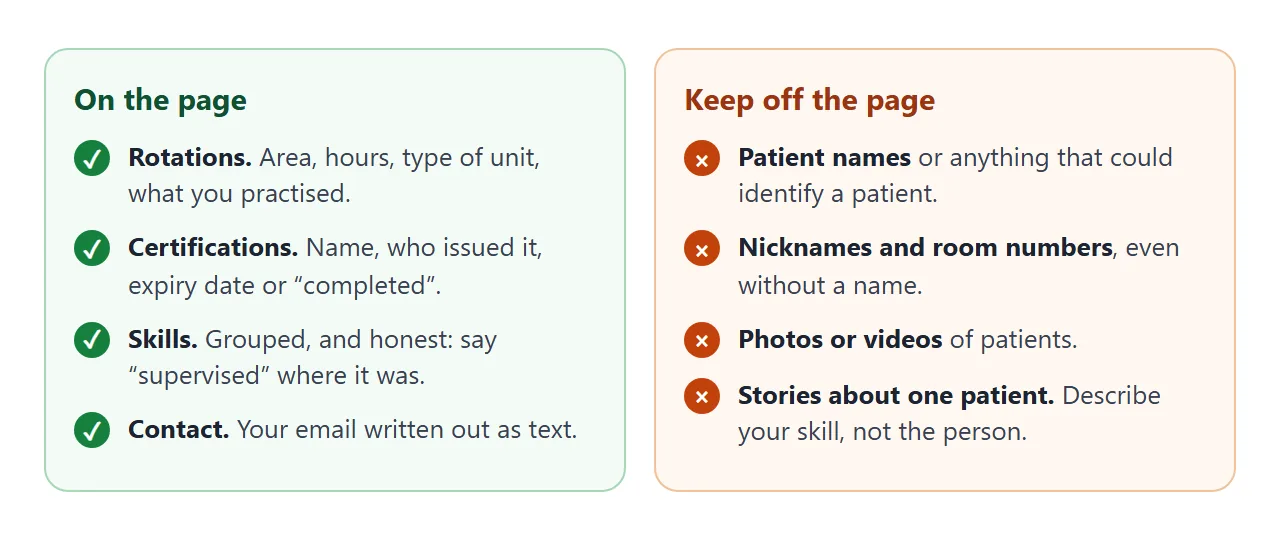
The page has four blocks, and each one has a job. Notice the right-hand side of the picture too, because what you leave out matters as much as what you put in.
Make it with AI
You supply the facts; the AI supplies the layout. Paste this into ChatGPT, Claude or Gemini, then fill in the list at the end with your own details.
Make one self-contained HTML page: a portfolio for a nursing student.
Use only the facts I give below. Do not invent rotations, hours, certifications, skills or dates. If something is missing, write [add this] in its place.

Layout, top to bottom:
1. My name, program, expected graduation date, the kind of role I want, my email.
2. Clinical rotations. For each: area, hours, type of unit, and two short lines on what I practised. Show the total hours.
3. Certifications and training: name, who issued it, and the expiry date, or "completed" with the month.
4. Skills in two groups, clinical and communication. Where I did it only under supervision, say "supervised".

Rules: no patient names, initials, room numbers, photos or stories. No facility names. One HTML file with CSS and JavaScript inside it. No images from other websites; use plain shapes or inline SVG if a picture is needed. No contact form; show my email as plain text. It must read well on a phone and a laptop. Plain colours and large readable text.

My details:
- Name, program, graduation date:
- Role I want:
- Email:
- Rotations (area, hours, unit type, what I practised):
- Certifications (name, issuer, expiry or completed):
- Skills:
Then check the result before you send it to anyone.
- Every line is true. AI fills gaps with things that sound right. Delete any hour count, date or skill you cannot back up, and add the hours up yourself.
- Titles are accurate. Write "nursing student" until you hold the title you want to claim.
- No placeholders left. Search the page for the square brackets.
- No patient detail slipped in. Read each rotation line as a stranger would.
- It fits a phone. The page needs the viewport meta tag, and the text should be readable without zooming.
MDN gives this as the recommended setting, which sets the viewport to match the device's width:
<meta name="viewport" content="width=device-width">
If your chat does not give you a ready file, host ChatGPT HTML output shows how to copy the code out.
Send it as a link
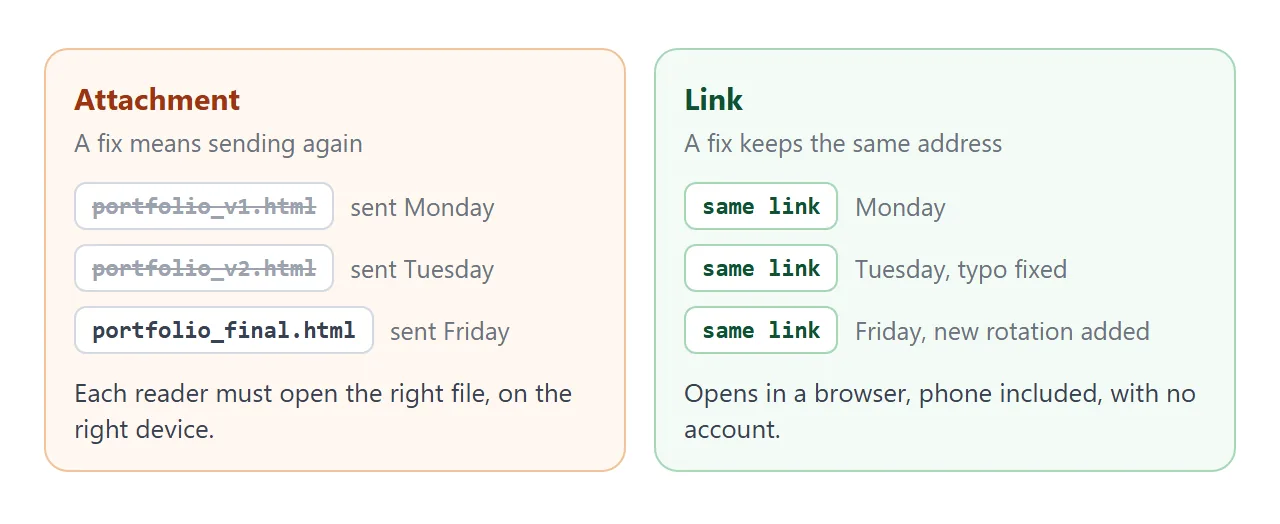
Attaching an HTML file asks the reader to open it correctly. A link does not. Opening an HTML file on a phone covers why attachments can fail there.
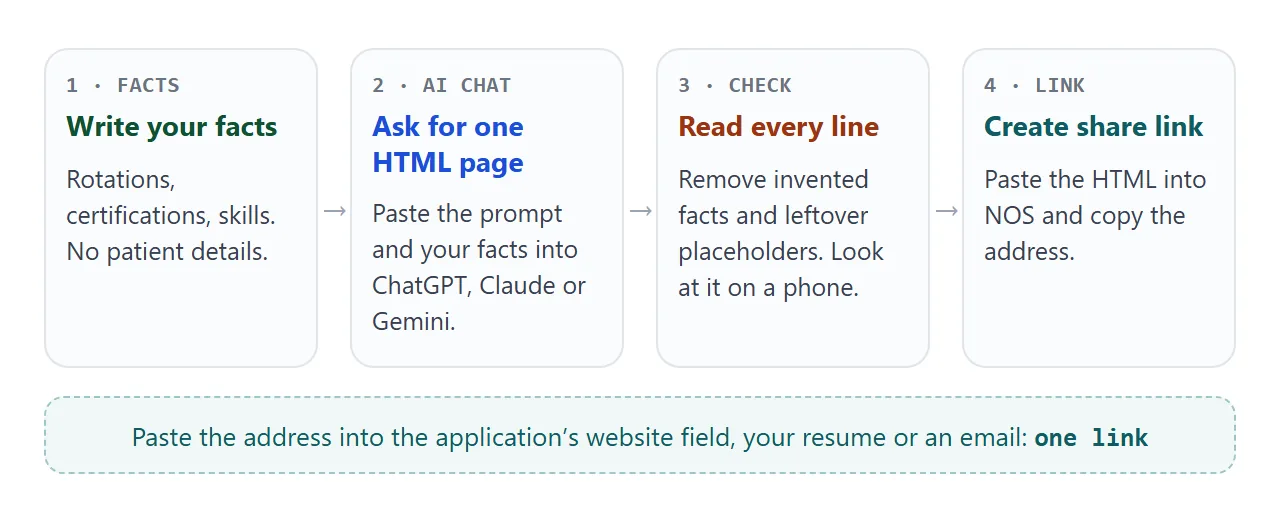
- Open NOS and paste the full HTML. HTML to link walks through it.
- Choose Create share link and copy the address.
- Open the address on your phone and read it once as a stranger would.
- Paste the address into the application.
The page renders as written and its scripts run, so the rotation cards in the example open for the reader. Anyone with the link can open it in a browser, on a phone too, without an account. They cannot edit it.
Found a typo after you applied? Change the code in NOS. The same link shows the new version, so you do not need to send anything again. When you finish the next rotation, add one card and everyone with the link sees it.
Where the link goes:
- In a website or portfolio field on an application form.
- On your resume, written out as text under your name. Link a portfolio in a resume explains why it should be short enough to type.
- At the top of an email, before any attachment.
- Next to your LinkedIn credentials. LinkedIn Help describes a Licenses & certifications section with an issuing organization field, as of October 2026.
- On paper, as a QR code made from the link. HTML file to QR code covers it.
Keep patient information off the page
Anyone with the link can open your page, so treat it as a public page.
NCSBN's guide, A Nurse's Guide to the Use of Social Media, says nurses must not identify patients by name, or post information that may lead to the identification of a patient. It also says limiting access through privacy settings is not sufficient to ensure privacy.
The same guide lists a mistaken belief: that it is acceptable to refer to patients by a nickname, room number, diagnosis or condition if the name is left out. Among its examples of problem posts, it lists posting videos or photos of patients.
So the page describes you, not your patients. "Practised postpartum checks under supervision" says what a hiring manager needs. A story about one memorable patient does not belong, even with the name removed.
Your program and your clinical sites may have their own rules on top of this. Ask your clinical instructor before you name a facility.
Show your hours at a glance
An application may ask for your clinical hours. A small chart makes a long list quick to scan, and the page can total the hours for you. Tap an area to filter.
<!doctype html>
<html lang="en">
<head>
<meta charset="utf-8">
<meta name="viewport" content="width=device-width">
<title>Clinical hours by area</title>
<style>
  * { box-sizing: border-box; }
  body { margin: 0; font-family: system-ui, -apple-system, "Segoe UI", sans-serif; color: #1f2933; background: #f3f7f7; line-height: 1.45; }
  .wrap { max-width: 640px; margin: 0 auto; padding: 18px 16px 22px; }
  h1 { font-size: 20px; margin: 0 0 4px; }
  p.sub { margin: 0 0 12px; font-size: 14px; color: #52606d; }
  .tabs { display: flex; flex-wrap: wrap; gap: 6px; margin-bottom: 12px; }
  .tabs button { font: inherit; font-size: 14px; border: 1px solid #0f5c63; background: #fff; color: #0f5c63; border-radius: 999px; padding: 6px 14px; cursor: pointer; min-height: 36px; }
  .tabs button[aria-pressed="true"] { background: #0f5c63; color: #fff; }
  .row { display: grid; grid-template-columns: 130px 1fr 52px; align-items: center; gap: 8px; margin-bottom: 8px; font-size: 14px; }
  .row.hide { display: none; }
  .bar { background: #dde8e9; border-radius: 6px; height: 16px; overflow: hidden; }
  .bar i { display: block; height: 100%; background: #0f5c63; border-radius: 6px; }
  .row b { text-align: right; font-weight: 600; }
  .sum { margin-top: 12px; padding-top: 10px; border-top: 1px solid #c5d4d6; font-weight: 700; font-size: 16px; }
  @media (max-width: 420px) { .row { grid-template-columns: 96px 1fr 44px; font-size: 13px; } }
</style>
</head>
<body>
<div class="wrap">
  <h1>Clinical hours by area</h1>
  <p class="sub">Made-up numbers. Tap an area to see only those rotations.</p>
  <div class="tabs" id="tabs">
    <button data-area="all" aria-pressed="true">All</button>
    <button data-area="acute" aria-pressed="false">Acute care</button>
    <button data-area="specialty" aria-pressed="false">Specialty</button>
    <button data-area="community" aria-pressed="false">Community</button>
  </div>
  <div id="list">
    <div class="row" data-area="acute" data-h="144"><span>Medical-surgical</span><div class="bar"><i></i></div><b>144 h</b></div>
    <div class="row" data-area="acute" data-h="120"><span>Leadership capstone</span><div class="bar"><i></i></div><b>120 h</b></div>
    <div class="row" data-area="specialty" data-h="96"><span>Pediatrics</span><div class="bar"><i></i></div><b>96 h</b></div>
    <div class="row" data-area="specialty" data-h="72"><span>Maternal-newborn</span><div class="bar"><i></i></div><b>72 h</b></div>
    <div class="row" data-area="specialty" data-h="72"><span>Mental health</span><div class="bar"><i></i></div><b>72 h</b></div>
    <div class="row" data-area="community" data-h="60"><span>Community health</span><div class="bar"><i></i></div><b>60 h</b></div>
  </div>
  <div class="sum" id="sum"></div>
</div>

<script>
  const rows = document.querySelectorAll('#list .row');
  const buttons = document.querySelectorAll('#tabs button');
  const max = 144;  // longest rotation sets the full bar width

  rows.forEach((r) => { r.querySelector('i').style.width = (r.dataset.h / max * 100) + '%'; });

  function show(area) {
    let sum = 0, n = 0;
    rows.forEach((r) => {
      const on = area === 'all' || r.dataset.area === area;
      r.classList.toggle('hide', !on);
      if (on) { sum += Number(r.dataset.h); n += 1; }
    });
    document.getElementById('sum').textContent = 'Total: ' + sum + ' hours in ' + n + (n === 1 ? ' rotation' : ' rotations');
    buttons.forEach((b) => b.setAttribute('aria-pressed', String(b.dataset.area === area)));
  }

  buttons.forEach((b) => b.addEventListener('click', () => show(b.dataset.area)));
  show('all');
</script>
</body>
</html>
You can ask the AI chat for this as a second page, or add it to the first one. Give it your real hours, and then check the total against your own records.
Link, PDF or attachment
A link, a PDF and an HTML attachment do different jobs, and you can use more than one.
| HTML attachment | Link | ||
|---|---|---|---|
| After you fix a typo | Send it again | Send it again | Same link, new version |
| The reader needs | A way to open an HTML file | A PDF viewer | A browser, phone included |
| Fits a "website" field | No | No | Yes |
| Fits a file-upload box | Only if it accepts HTML | If it accepts PDF | No |
If the form wants a file, upload the PDF and put the link inside it. For choosing and ordering what goes into a portfolio, see How to make a portfolio.
When it does not work
| Symptom | Cause | Fix |
|---|---|---|
| The page looks tiny on a phone | The viewport meta tag is missing | Add the tag shown above |
| A picture is missing | It was loaded from another website, which is blocked | Use inline SVG or CSS, or describe it in text |
| The contact form does nothing | Sending a form to a server is blocked | Write your email address as plain text |
| A rotation line has a made-up detail | The AI filled a gap | Delete it and re-read every line |
| Text still says [add this] | A placeholder was never filled | Search for the square brackets and fix them |
| A patient detail is on the page | It slipped in from your notes | Delete it and describe the skill instead |
| The reader cannot change the page | Share links are view-only | Edit the code in NOS yourself |