An OKR template for a team works best as one page: each objective, its key results with start, current and target numbers, a status and a note. As a web page, its layout is already finished, so there is nothing to export.
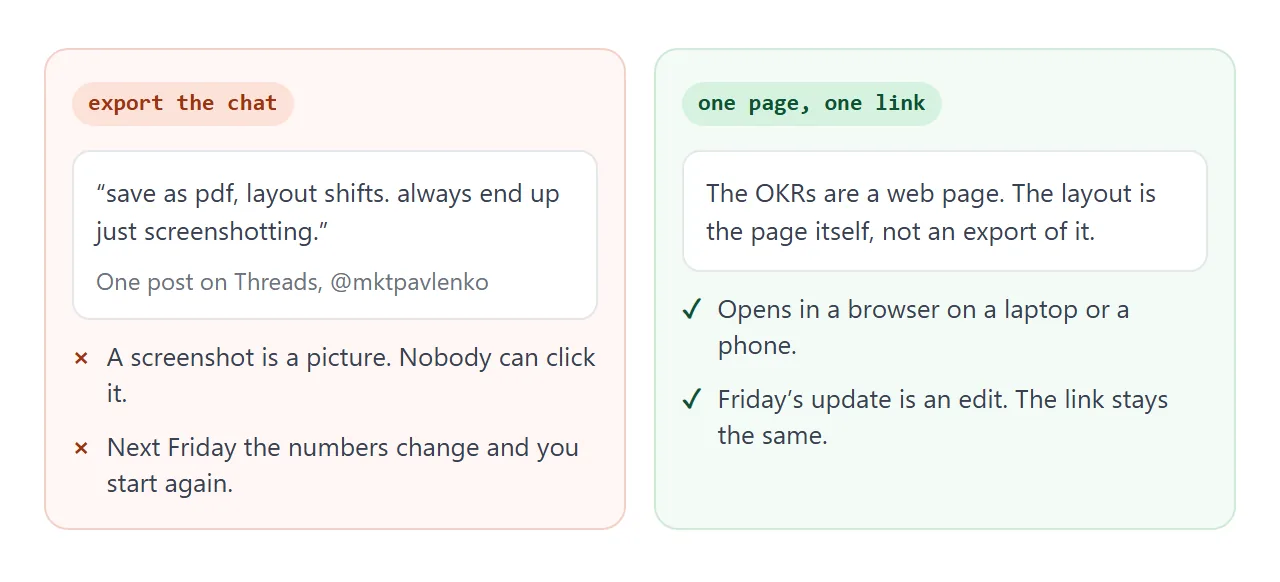
Exporting is where it can go wrong. One post on Threads, about getting text out of Claude, puts it this way: "save as pdf, layout shifts. always end up just screenshotting." A screenshot is a picture, and next Friday it is out of date.
Try the page below. Click a blue dashed number and type a new value. Click week 6 of 13 to move the quarter on. Click a grey note to write in it.
<!doctype html>
<html lang="en">
<head>
<meta charset="utf-8">
<meta name="viewport" content="width=device-width, initial-scale=1">
<title>Q4 team OKRs</title>
<style>
  * { box-sizing: border-box; }
  body { margin: 0; padding: 16px; font-family: system-ui, sans-serif; color: #1f2937; background: #f3f4f6; }
  .sheet { max-width: 720px; margin: 0 auto; background: #fff; border-radius: 12px; padding: 22px; box-shadow: 0 1px 4px rgba(0,0,0,.08); }
  h1 { margin: 0 0 4px; font-size: 22px; }
  .meta { margin: 0 0 14px; color: #6b7280; font-size: 14px; }
  .weekbar { display: flex; flex-wrap: wrap; align-items: center; gap: 10px; background: #eef4ff; border-left: 4px solid #2563eb; border-radius: 6px; padding: 10px 12px; font-size: 14px; margin-bottom: 18px; }
  .linkish { font: inherit; color: #1d4ed8; background: none; border: 0; border-bottom: 1px dashed #1d4ed8; padding: 0; cursor: pointer; }
  .obj { margin-top: 20px; }
  .obj h2 { display: flex; justify-content: space-between; gap: 10px; align-items: baseline; font-size: 17px; margin: 0 0 8px; }
  .obj h2 span { font-size: 14px; font-weight: 600; color: #374151; white-space: nowrap; }
  .kr { border-top: 1px solid #e5e7eb; padding: 12px 0; }
  .top { display: flex; justify-content: space-between; gap: 10px; align-items: flex-start; }
  .name { font-size: 15px; font-weight: 600; }
  .nums { font-size: 13px; color: #6b7280; margin-top: 3px; }
  .chip { flex: none; font-size: 12px; font-weight: 700; padding: 3px 9px; border-radius: 99px; }
  .ok { background: #d6f2df; color: #0f5132; } .risk { background: #fef3c7; color: #92400e; } .bad { background: #fde2da; color: #9a3412; }
  .bar { position: relative; height: 10px; background: #e5e7eb; border-radius: 99px; margin: 10px 0 6px; overflow: visible; }
  .fill { height: 100%; border-radius: 99px; background: #2563eb; }
  .pace { position: absolute; top: -3px; width: 2px; height: 16px; background: #1f2937; }
  .pct { font-size: 13px; color: #374151; }
  .note { display: block; margin-top: 6px; font-size: 14px; color: #374151; background: #fafafa; border: 1px dashed #d1d5db; border-radius: 6px; padding: 6px 8px; min-height: 32px; }
  .note:empty::before { content: attr(data-ph); color: #9ca3af; }
  .note:focus { outline: 2px solid #2563eb; background: #fff; }
  input.edit { width: 72px; font: inherit; font-size: 13px; padding: 1px 4px; border: 1px solid #2563eb; border-radius: 4px; }
  .out { margin-top: 20px; }
  .out button { font: inherit; font-size: 14px; padding: 7px 14px; border: 0; border-radius: 6px; background: #2563eb; color: #fff; cursor: pointer; }
  textarea { display: none; width: 100%; height: 150px; margin-top: 10px; font: 13px/1.4 ui-monospace, Consolas, monospace; padding: 8px; border: 1px solid #d1d5db; border-radius: 6px; }
  .hint { font-size: 13px; color: #6b7280; margin: 14px 0 0; }
</style>
</head>
<body>
<div class="sheet">
  <h1>Northwind Support: Q4 team OKRs</h1>
  <p class="meta">Owner: Priya Nair · Reviewed every Friday</p>
  <div class="weekbar">
    <span>Quarter progress: <button class="linkish" id="week" title="Click to move one week on"></button></span>
    <span id="paceNote"></span>
  </div>
  <div id="okrs"></div>
  <div class="out">
    <button id="txt">Show as plain text</button>
    <textarea id="plain" readonly aria-label="Plain text version"></textarea>
  </div>
  <p class="hint">Click a blue dashed number to change it. Click a grey note to type in it.</p>
</div>

<script>
  // One list holds everything. Progress is worked out from start, current and target.
  const WEEKS = 13;
  let week = 6;
  const okrs = [
    { o: 'Customers get an answer the same day', krs: [
      { t: 'Cut first reply time', unit: 'h', start: 8, cur: 5.5, target: 4, note: 'Night shift added in week 4. Gap is now weekends.' },
      { t: 'Solve more tickets in one reply', unit: '%', start: 52, cur: 61, target: 70, note: 'Reply templates rolled out to the whole team.' },
      { t: 'Rewrite help articles', unit: ' of 12', start: 0, cur: 3, target: 12, note: 'Billing set is done. Shipping set not started.' }
    ]},
    { o: 'New hires are useful by week two', krs: [
      { t: 'Finish the onboarding checklist', unit: ' of 10', start: 0, cur: 6, target: 10, note: 'Waiting on laptop access for the next hire.' },
      { t: 'Shadow sessions per new hire', unit: ' of 4', start: 0, cur: 1, target: 4, note: '' }
    ]}
  ];

  const clamp = (n) => Math.max(0, Math.min(1, n));
  const prog = (k) => clamp((k.cur - k.start) / (k.target - k.start));
  const status = (p) => {
    const gap = p - week / WEEKS;
    return gap >= -0.1 ? ['On track', 'ok'] : gap >= -0.25 ? ['At risk', 'risk'] : ['Behind', 'bad'];
  };
  const pc = (x) => Math.round(x * 100) + '%';

  function render() {
    document.getElementById('week').textContent = 'week ' + week + ' of ' + WEEKS;
    document.getElementById('paceNote').textContent = pc(week / WEEKS) + ' of the quarter has passed (black marker)';
    const root = document.getElementById('okrs');
    root.innerHTML = '';
    okrs.forEach((ob, oi) => {
      const avg = ob.krs.reduce((s, k) => s + prog(k), 0) / ob.krs.length;
      const sec = document.createElement('section');
      sec.className = 'obj';
      sec.innerHTML = '<h2><b></b><span>' + pc(avg) + ' overall</span></h2>';
      sec.querySelector('b').textContent = 'O' + (oi + 1) + ' · ' + ob.o;
      ob.krs.forEach((k, ki) => {
        const p = prog(k), [label, cls] = status(p);
        const d = document.createElement('div');
        d.className = 'kr';
        d.innerHTML =
          '<div class="top"><div><div class="name"></div>' +
          '<div class="nums">Now <button class="linkish val" data-o="' + oi + '" data-k="' + ki + '"></button> · start ' + k.start + ' · target ' + k.target + '</div></div>' +
          '<span class="chip ' + cls + '">' + label + '</span></div>' +
          '<div class="bar"><div class="fill" style="width:' + pc(p) + '"></div><div class="pace" style="left:' + pc(week / WEEKS) + '"></div></div>' +
          '<div class="pct">' + pc(p) + ' of the way</div>' +
          '<span class="note" contenteditable="true" data-o="' + oi + '" data-k="' + ki + '" data-ph="Add a progress note"></span>';
        d.querySelector('.name').textContent = 'KR' + (ki + 1) + ' · ' + k.t;
        d.querySelector('.val').textContent = k.cur + k.unit;
        d.querySelector('.note').textContent = k.note;
        sec.appendChild(d);
      });
      root.appendChild(sec);
    });
  }

  document.getElementById('week').addEventListener('click', () => { week = week % WEEKS + 1; render(); });

  document.getElementById('okrs').addEventListener('click', (e) => {
    const b = e.target.closest('.val');
    if (!b) return;
    const k = okrs[b.dataset.o].krs[b.dataset.k];
    const inp = document.createElement('input');
    inp.type = 'number'; inp.step = 'any'; inp.value = k.cur; inp.className = 'edit';
    b.replaceWith(inp); inp.focus(); inp.select();
    let done = false;
    const finish = (save) => {
      if (done) return; done = true;
      if (save && inp.value !== '') k.cur = Number(inp.value);
      render();
    };
    inp.addEventListener('keydown', (ev) => { if (ev.key === 'Enter') finish(true); if (ev.key === 'Escape') finish(false); });
    inp.addEventListener('blur', () => finish(true));
  });

  document.getElementById('okrs').addEventListener('input', (e) => {
    const n = e.target.closest('.note');
    if (n) okrs[n.dataset.o].krs[n.dataset.k].note = n.textContent;
  });

  document.getElementById('txt').addEventListener('click', () => {
    const lines = ['Northwind Support Q4 OKRs, week ' + week + ' of ' + WEEKS];
    okrs.forEach((ob, oi) => {
      lines.push('', 'O' + (oi + 1) + ' ' + ob.o);
      ob.krs.forEach((k, ki) => {
        const p = prog(k);
        lines.push('  KR' + (ki + 1) + ' ' + k.t + ': ' + k.cur + k.unit + ', ' + pc(p) + ', ' + status(p)[0] + (k.note ? ' - ' + k.note : ''));
      });
    });
    const t = document.getElementById('plain');
    t.value = lines.join('\n'); t.style.display = 'block';
  });

  render();
</script>
</body>
</html>
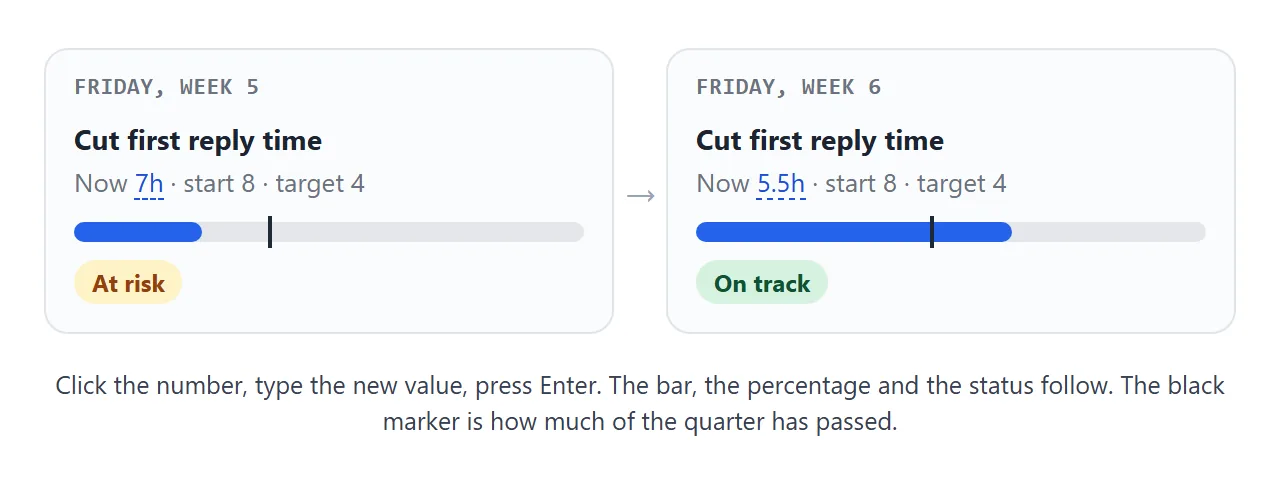
Each key result shows how far it has come between its start and its target. The black marker shows how much of the quarter has passed, so you can see at a glance whether a bar is ahead of or behind time.
What goes on the page
The wording of OKRs is yours, and the structure is small. Google's re:Work guide, read in October 2026, describes objectives as ambitious and key results as measurable, easy to grade with a number.
The same guide suggests three to five objectives, with about three key results for each.
That limit suits a one-page layout. Two objectives with three and two key results fill the page above. A sixth objective would no longer fit on one screen.
The status chip in the demo uses a rule of its own, not a standard. A key result is On track when its progress is within 10 points of the share of the quarter gone, and At risk within 25.
Beyond that it shows Behind. Change the rule in the code to fit your team.
Make it with AI
You do not need to write the page yourself. Paste this into ChatGPT, Claude or Gemini and swap in your own objectives:
Make one self-contained HTML file: a one-page team OKR tracker.
Team: Customer Support, Q4, week 6 of 13, owner Priya Nair.
Keep every objective, key result and number in one list at the top of the script, so I can update numbers in one place.
For each key result show: name, start, current, target, a progress bar, a percentage, and a one-line note.
Work out progress from start, current and target (it must also work when lower is better, such as hours).
Show a marker for how much of the quarter has passed. Status is On track, At risk or Behind, compared with that marker.
Let me click a current value to type a new one. Use only my numbers. Write TBC where something is missing.
No external images, fonts or scripts. Include a viewport meta tag so it reads well on a phone.
O1: Answer customers the same day. KR1 first reply time, 8 to 4 hours, now 5.5. KR2 solved in one reply, 52 to 70 percent, now 61.
O2: New hires useful by week two. KR1 onboarding checklist, 0 to 10 items, now 6.
Then check four things before you share it:
- Every number and name is one you typed. AI tools sometimes fill a gap with a plausible figure.
- The percentage is right for a key result where lower is better, such as hours.
- Gaps say TBC, not an invented date or owner.
- Open it on your phone. Nothing should run off the edge of the screen.
Send it as a link
Copy the code the AI gave you. Paste it into a NOS document and choose Create share link. HTML to link walks through it.
The recipient gets a normal page in their browser. It opens on a phone as well as a laptop, needs no account, and cannot be edited by the person reading it. The page renders as written and its scripts run.
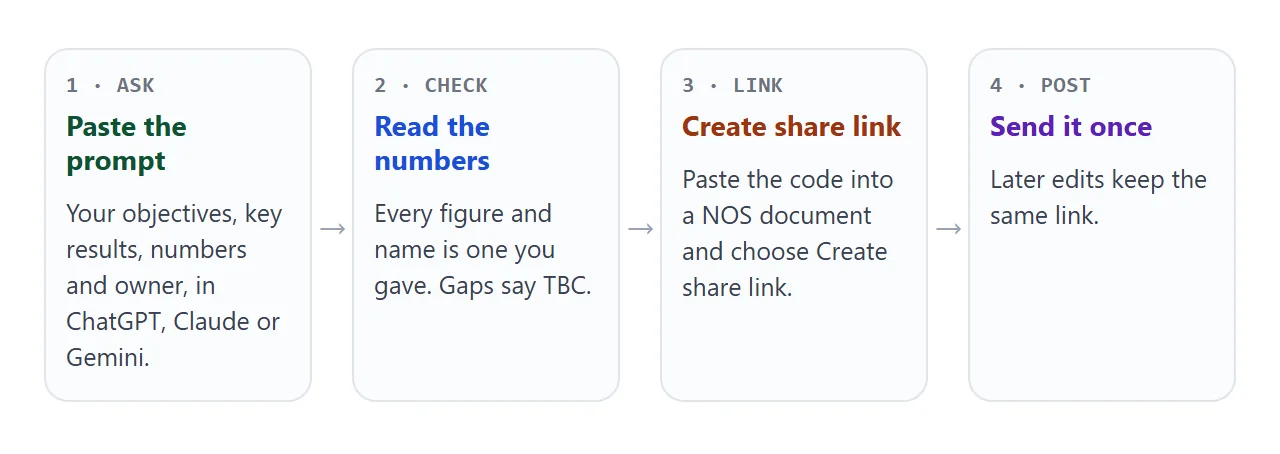
If you change the code later, the link stays the same and shows the new version. You post it once, and it keeps pointing at the latest page.
In Slack. Paste the link into the message field and send. As of October 2026, Slack's help lists reasons a preview may not appear, such as no preview data on the page or more than five links in one message. The link still opens.
See sending an HTML file in Slack.
In Teams. Microsoft's help says to select Start a new post in a channel, write your message, then select Post. Paste the link into that message. Sharing HTML in Teams has more.
By email or on paper. A link is text, so it pastes into an email body. For a printed pack, a QR code on the sheet opens the current page. See QR code links.
Update it on Friday
How an update reaches everyone depends on what you change. A tick or an added row you make as the owner in View mode is saved. A visitor's ticks and rows are not saved.
Numbers, status labels and notes are different: a value you type in the page is for trying things out. To publish a new number, change it in the list at the top of the code. That is why the prompt asks for one list.
The second page below works on ticks. Each key result is a short list of steps, so progress is steps ticked out of steps total. Tick a step, click the coloured label to change the status, or add a step.
<!doctype html>
<html lang="en">
<head>
<meta charset="utf-8">
<meta name="viewport" content="width=device-width, initial-scale=1">
<title>Week 6 OKR check-in</title>
<style>
  * { box-sizing: border-box; }
  body { margin: 0; padding: 16px; font-family: system-ui, sans-serif; color: #1f2937; background: #f3f4f6; }
  .sheet { max-width: 720px; margin: 0 auto; background: #fff; border-radius: 12px; padding: 22px; box-shadow: 0 1px 4px rgba(0,0,0,.08); }
  h1 { margin: 0 0 4px; font-size: 22px; }
  .meta { margin: 0 0 16px; color: #6b7280; font-size: 14px; }
  .kr { border: 1px solid #e5e7eb; border-radius: 10px; padding: 14px; margin-bottom: 14px; }
  .head { display: flex; justify-content: space-between; align-items: flex-start; gap: 10px; }
  .head b { font-size: 16px; }
  .conf { flex: none; font: inherit; font-size: 12px; font-weight: 700; padding: 4px 10px; border: 0; border-radius: 99px; cursor: pointer; }
  .ok { background: #d6f2df; color: #0f5132; } .risk { background: #fef3c7; color: #92400e; } .bad { background: #fde2da; color: #9a3412; }
  .count { font-size: 13px; color: #6b7280; margin: 4px 0 8px; }
  .bar { height: 8px; background: #e5e7eb; border-radius: 99px; overflow: hidden; }
  .fill { height: 100%; background: #2563eb; }
  ul { list-style: none; margin: 10px 0 0; padding: 0; }
  li label { display: flex; gap: 10px; align-items: center; padding: 7px 0; font-size: 15px; cursor: pointer; }
  li.done span { text-decoration: line-through; color: #9ca3af; }
  input[type=checkbox] { width: 20px; height: 20px; flex: none; }
  .note { display: block; margin-top: 8px; font-size: 14px; background: #fafafa; border: 1px dashed #d1d5db; border-radius: 6px; padding: 6px 8px; min-height: 32px; }
  .note:empty::before { content: attr(data-ph); color: #9ca3af; }
  .note:focus { outline: 2px solid #2563eb; background: #fff; }
  form { display: flex; gap: 8px; margin-top: 10px; }
  form input { flex: 1; min-width: 0; font: inherit; font-size: 14px; padding: 6px 8px; border: 1px solid #d1d5db; border-radius: 6px; }
  button.add, #txt { font: inherit; font-size: 14px; padding: 6px 12px; border: 0; border-radius: 6px; background: #2563eb; color: #fff; cursor: pointer; }
  textarea { display: none; width: 100%; height: 150px; margin-top: 10px; font: 13px/1.4 ui-monospace, Consolas, monospace; padding: 8px; border: 1px solid #d1d5db; border-radius: 6px; }
  .hint { font-size: 13px; color: #6b7280; margin: 12px 0 0; }
</style>
</head>
<body>
<div class="sheet">
  <h1>Week 6 check-in: Customer portal launch</h1>
  <p class="meta">Objective: customers can see their own orders without asking us · Owner: Marcus Webb</p>
  <div id="krs"></div>
  <button id="txt">Show as plain text</button>
  <textarea id="plain" readonly aria-label="Plain text version"></textarea>
  <p class="hint">Tick a step, click the coloured label to change the status, click a grey note to type in it.</p>
</div>

<script>
  // Each key result is a short list of steps. Progress is steps ticked out of steps total.
  const COLORS = [['On track', 'ok'], ['At risk', 'risk'], ['Off track', 'bad']];
  const krs = [
    { t: 'KR1 · Order lookup page live for all customers', c: 0, note: 'Design signed off. Build starts Monday.', steps: [
      ['Wireframes approved', true], ['Order data connected', true], ['Page built', false], ['Tested on a phone', false], ['Announced to customers', false]] },
    { t: 'KR2 · Support emails about order status halved', c: 1, note: 'Waiting on the baseline count from Lena.', steps: [
      ['Baseline counted', false], ['Auto-reply links to the page', false], ['Monthly count compared', false]] },
    { t: 'KR3 · Five customers try it before launch', c: 2, note: 'Only two have said yes so far.', steps: [
      ['Invite list of ten made', true], ['Two customers confirmed', true], ['Five customers confirmed', false], ['Feedback collected', false]] }
  ];

  function render() {
    const root = document.getElementById('krs');
    root.innerHTML = '';
    krs.forEach((k, i) => {
      const n = k.steps.filter((s) => s[1]).length;
      const pct = Math.round(100 * n / k.steps.length);
      const [label, cls] = COLORS[k.c];
      const box = document.createElement('div');
      box.className = 'kr';
      box.innerHTML =
        '<div class="head"><b></b><button class="conf ' + cls + '" data-i="' + i + '" title="Click to change status">' + label + '</button></div>' +
        '<div class="count">' + n + ' of ' + k.steps.length + ' steps · ' + pct + '%</div>' +
        '<div class="bar"><div class="fill" style="width:' + pct + '%"></div></div><ul></ul>' +
        '<span class="note" contenteditable="true" data-i="' + i + '" data-ph="Add a progress note"></span>' +
        '<form data-i="' + i + '"><input name="step" placeholder="Add a step" aria-label="New step" required><button class="add">Add</button></form>';
      box.querySelector('b').textContent = k.t;
      box.querySelector('.note').textContent = k.note;
      const ul = box.querySelector('ul');
      k.steps.forEach((s, j) => {
        const li = document.createElement('li');
        if (s[1]) li.className = 'done';
        li.innerHTML = '<label><input type="checkbox" data-i="' + i + '" data-j="' + j + '"' + (s[1] ? ' checked' : '') + '><span></span></label>';
        li.querySelector('span').textContent = s[0];
        ul.appendChild(li);
      });
      root.appendChild(box);
    });
  }

  const root = document.getElementById('krs');
  root.addEventListener('click', (e) => {
    const b = e.target.closest('.conf');
    if (!b) return;
    krs[b.dataset.i].c = (krs[b.dataset.i].c + 1) % COLORS.length;
    render();
  });
  root.addEventListener('change', (e) => {
    const c = e.target;
    if (c.type === 'checkbox') { krs[c.dataset.i].steps[c.dataset.j][1] = c.checked; render(); }
  });
  root.addEventListener('input', (e) => {
    const n = e.target.closest('.note');
    if (n) krs[n.dataset.i].note = n.textContent;
  });
  root.addEventListener('submit', (e) => {
    e.preventDefault();
    const f = e.target;
    krs[f.dataset.i].steps.push([f.step.value.trim(), false]);
    render();
  });

  document.getElementById('txt').addEventListener('click', () => {
    const lines = ['Customer portal launch, week 6 check-in'];
    krs.forEach((k) => {
      const n = k.steps.filter((s) => s[1]).length;
      lines.push('', k.t + ' - ' + COLORS[k.c][0] + ' (' + n + ' of ' + k.steps.length + ' steps)');
      if (k.note) lines.push('  Note: ' + k.note);
    });
    const t = document.getElementById('plain');
    t.value = lines.join('\n'); t.style.display = 'block';
  });

  render();
</script>
</body>
</html>
Use the number version when a key result is a measure, such as hours or a percentage. Use the step version when it is a piece of work with stages. Show as plain text builds a short summary to paste into a message.
Ways to share OKRs compared
| Way to share | What people get | When a number changes | Fits best |
|---|---|---|---|
| PDF attachment | A fixed file | Send a new file | A copy for the board pack |
| Screenshot | A picture | Take it again | A quick look in a chat |
| Share link to the page | A page in the browser, phone included | Edit the code; same link | A weekly team update |
| Link pinned in a channel | The link, always near the top | Same link, nothing to pin again | A standing review |
| QR code on paper | The link, printed | The paper stays old, the page is current | Printed packs and wall boards |
For more on why a link beats a file in a thread, see why links beat attachments. For a looser format, weekly updates as a page uses the same method.
If you do need a PDF, turning HTML into a PDF covers what to check first.
When it does not work
| What you see | Cause | Fix |
|---|---|---|
| People see last week's numbers | They opened an old tab, or you edited a different document | Reload the page. Edit the NOS document the link came from |
| Your typed number is gone after a reload | Values typed on the page are for trying out | Change the number in the list at the top of the code |
| A visitor's tick does not stay | Visitors' changes are not saved | Only you, as the owner in View mode, change what everyone sees |
| A percentage looks wrong for hours | The page treats higher as better | Ask the AI to work progress from start, current and target |
| A name or figure you did not give appears | The AI filled a gap | Tell it to use only your numbers and write TBC |
| Slack posts the link with no preview | No preview data, a recent post of the same link, or many links in one message | The link still opens. Add one line saying what it is |
| A picture from another site is missing | Images from other sites are blocked | Use an inline SVG or a CSS colour block |
If a form on the page tries to send answers to a server, that is blocked too. Collect replies in your usual channel.