A one page summary template needs five blocks: the bottom line, the key findings, the numbers that matter, the decision you need, and where the detail is. Put them on one web page and send a link, so nobody has to open a heavy file.
The first draft is rarely the problem. One developer, writing about AI-made slides, said they "couldn't tweak one bullet without regenerating the whole thing". A summary page you can edit line by line avoids that.
Here is a page you can copy. It summarises a made-up 42-page vendor review.
<!doctype html>
<html lang="en">
<head>
<meta charset="utf-8">
<meta name="viewport" content="width=device-width, initial-scale=1">
<title>Vendor review: one-page summary</title>
<style>
* { box-sizing: border-box; }
body { margin: 0; padding: 16px; background: #eef0f3; font-family: system-ui, "Segoe UI", sans-serif; color: #1d2330; line-height: 1.5; }
.page { max-width: 720px; margin: 0 auto; background: #fff; border-radius: 12px; padding: 22px 22px 18px; box-shadow: 0 2px 10px rgba(0,0,0,.08); }
.kicker { margin: 0; font-size: 12px; font-weight: 700; letter-spacing: .06em; text-transform: uppercase; color: #6b7280; }
h1 { margin: 4px 0 4px; font-size: 24px; line-height: 1.25; }
.meta { margin: 0 0 16px; font-size: 13px; color: #6b7280; }
.bottom { background: #eef6ff; border-left: 4px solid #2563eb; border-radius: 6px; padding: 12px 14px; margin-bottom: 18px; }
.bottom b { display: block; font-size: 12px; letter-spacing: .06em; text-transform: uppercase; color: #1d4ed8; margin-bottom: 2px; }
.bottom p { margin: 0; font-size: 16px; }
h2 { margin: 18px 0 8px; font-size: 15px; }
ul { margin: 0; padding-left: 20px; }
li { margin-bottom: 6px; }
.nums { display: grid; grid-template-columns: repeat(3, 1fr); gap: 10px; margin-top: 4px; }
.num { border: 1px solid #e1e4ea; border-radius: 8px; padding: 10px; text-align: center; }
.num strong { display: block; font-size: 22px; }
.num span { font-size: 12.5px; color: #4b5563; }
.ask { background: #fff8e6; border: 1px solid #f1d58a; border-radius: 8px; padding: 12px 14px; }
.ask p { margin: 0; }
table { width: 100%; border-collapse: collapse; font-size: 14px; }
td { padding: 6px 0; border-top: 1px solid #eceef1; }
td:last-child { text-align: right; color: #6b7280; white-space: nowrap; padding-left: 10px; }
footer { margin-top: 16px; font-size: 12.5px; color: #6b7280; }
@media (max-width: 480px) {
.page { padding: 18px 16px 14px; }
h1 { font-size: 21px; }
.nums { grid-template-columns: 1fr; }
}
</style>
</head>
<body>
<main class="page">
<p class="kicker">One-page summary</p>
<h1>Vendor review: print and packaging suppliers</h1>
<p class="meta">Summary of the 42-page review (v3) · prepared for the Operations meeting · read time 2 minutes</p>
<div class="bottom">
<b>Bottom line</b>
<p>Keep two of the four suppliers and move the rest of the volume to Harbor Print, which is cheaper and ships faster.</p>
</div>
<h2>Key findings</h2>
<ul>
<li>Harbor Print is the lowest quote on 5 of the 6 sample jobs.</li>
<li>Two suppliers missed the delivery date more than once in the trial.</li>
<li>Switching all volume at once would leave no backup supplier.</li>
</ul>
<h2>Numbers that matter</h2>
<div class="nums">
<div class="num"><strong>-12%</strong><span>average unit cost</span></div>
<div class="num"><strong>3 days</strong><span>typical lead time</span></div>
<div class="num"><strong>4 → 3</strong><span>active suppliers</span></div>
</div>
<h2>Decision needed</h2>
<div class="ask"><p>Approve the move by <strong>Friday 16 October</strong> so the new contract starts with the November orders.</p></div>
<h2>Where the detail is</h2>
<table>
<tr><td>Cost comparison, all six jobs</td><td>Section 3, p. 14</td></tr>
<tr><td>Delivery record per supplier</td><td>Section 4, p. 22</td></tr>
<tr><td>Risks and the backup plan</td><td>Section 6, p. 35</td></tr>
</table>
<footer>Figures are from the review dated 3 October. Questions: Operations team.</footer>
</main>
</body>
</html>
The reader gets the answer in the first box. Anyone who wants proof follows the section and page numbers at the bottom into the full document.
What goes on the page
A summary is not a shorter copy of the document. It answers three questions in order: what do you conclude, why, and what do you need from me?
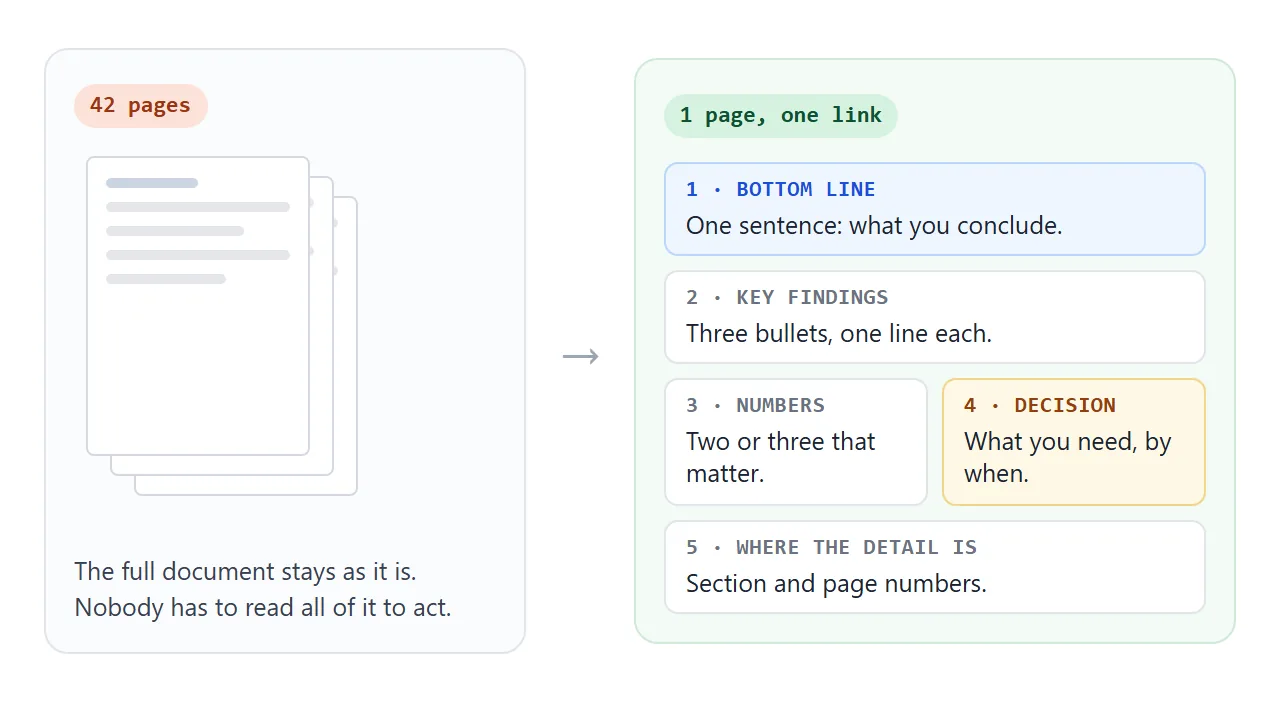
- Bottom line: one or two sentences. If the reader stops here, they still know the outcome.
- Key findings: three bullets, one line each. Put each bullet on its own line in the code, so you can change one later.
- Numbers that matter: two or three, each with a unit and what it is.
- Decision needed: the action, the person, the date. Leave the box out if nothing is needed.
- Where the detail is: section and page numbers in the full document.
Add a line saying which version of the document the summary came from. When the long file changes, the reader can tell whether the summary is stale.
Make it with AI
Paste the prompt below into ChatGPT, Claude or Gemini, then paste the text of your document under it. Use only what your employer allows you to put into an AI chat.
Summarise the document below as ONE self-contained HTML page.
No external files, no images, no localStorage. One column that
reads well on a phone.

Blocks, in this order:
1. Title, and "Summary of <document name>, <version or date>"
2. Bottom line: one or two sentences
3. Key findings: three bullets, each in its own <li> on its own line
4. Numbers that matter: two or three, with units
5. Decision needed: the action, who, and by when. If the
   document does not say, write "decision needed: TBC"
6. Where the detail is: section names and page numbers

Rules: use only facts that appear in the document. Do not round
or invent numbers. If something is missing, write TODO.

Document:
(paste here)
The AI is good at layout and shortening, and it is the part you should check hardest. Before you send anything:
- Every number, date and name matches the original.
- The bottom line says what the document concludes, not what it covers.
- Page numbers point to the right sections.
- Nothing was added that the document does not say.
Send it as a link
Copy the HTML from the chat. Paste it into a NOS document, then choose Create share link. HTML to link walks through it.
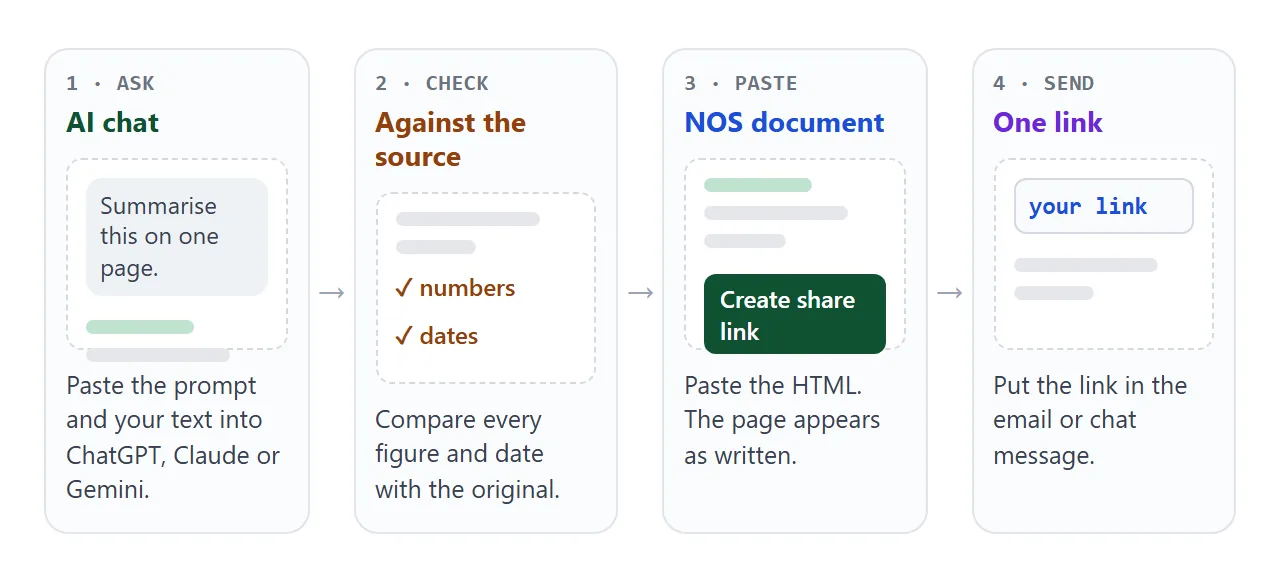
The page renders as written. The people you send it to open it in a browser, on a computer or a phone, with no account. They can read it but cannot edit it.
If a number changes, edit that one line in the code. The link stays the same, so you do not resend anything.
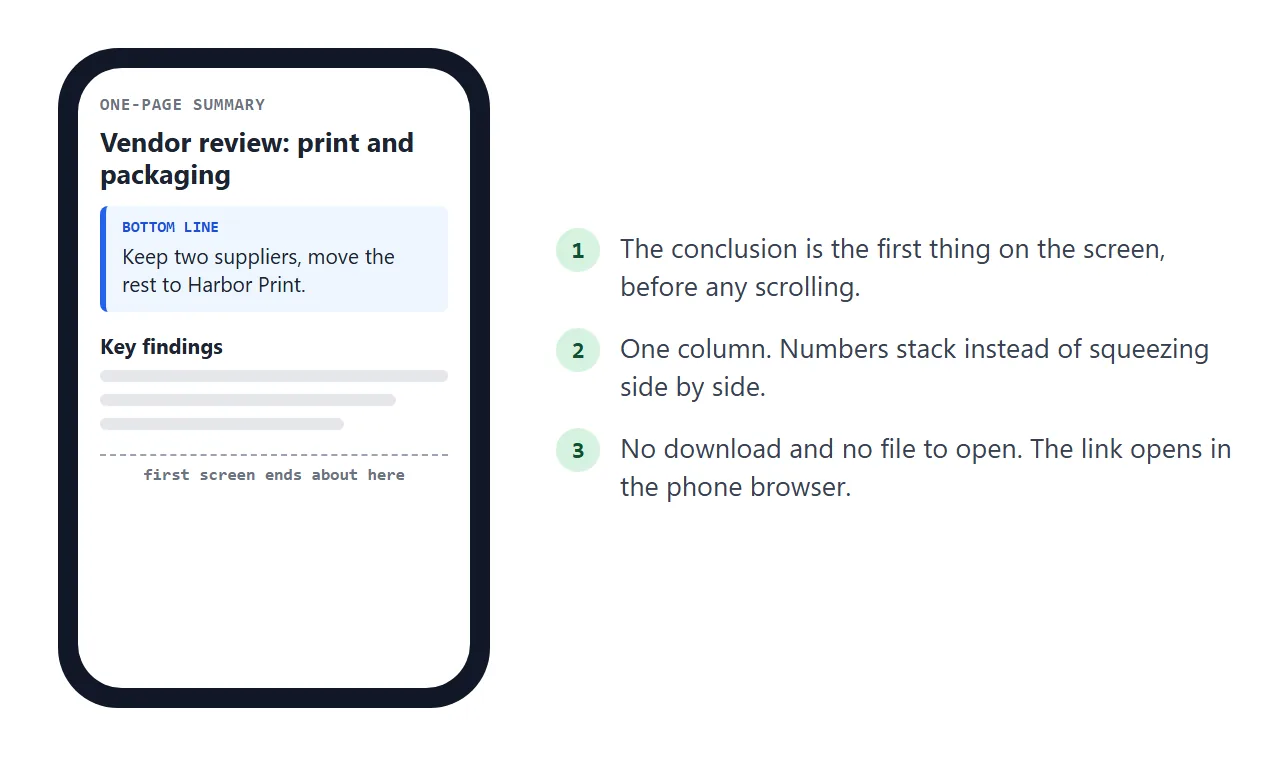
Paste the link into the message where you would have attached the file, with the bottom line in one sentence above it.
Chat tools are covered in guides for Slack and Teams. For paper or a slide, a QR code can point at the same link.
Link, attachment or PDF
Gmail's help page says the attachment limit for personal accounts is 25 MB, and that Gmail replaces a larger attachment with a Google Drive link. Work and school limits are set by administrators. That is as of October 2026.
A link to a summary page has no file size to worry about.
| What the reader gets | After you fix a number | |
|---|---|---|
| Full document attached | A big file, to download and open | You send a new file |
| PDF of the summary | A fixed copy, saved wherever they like | You send a new PDF |
| Summary pasted into the email | Text, no layout | A second email |
| Link to a NOS page | One page in a browser | Edit once, same link |
The summary and the full document do different jobs. PDF or web page and email vs link for documents compare them in more detail, and why links beat attachments covers the version problem.
One document, three lengths
Some readers want one line, some want thirty seconds, some want the whole page. You can put all three on one link. Tap through the tabs.
<!doctype html>
<html lang="en">
<head>
<meta charset="utf-8">
<meta name="viewport" content="width=device-width, initial-scale=1">
<title>Remote work policy: three lengths</title>
<style>
  * { box-sizing: border-box; }
  body { margin: 0; padding: 16px; background: #eef0f3; font-family: system-ui, "Segoe UI", sans-serif; color: #1d2330; line-height: 1.5; }
  .page { max-width: 720px; margin: 0 auto; background: #fff; border-radius: 12px; padding: 20px 22px; box-shadow: 0 2px 10px rgba(0,0,0,.08); }
  h1 { margin: 0 0 2px; font-size: 22px; line-height: 1.25; }
  .meta { margin: 0 0 14px; font-size: 13px; color: #6b7280; }
  .tabs { display: flex; gap: 6px; margin-bottom: 14px; flex-wrap: wrap; }
  .tabs button { font: inherit; font-size: 14px; padding: 8px 14px; border: 1px solid #cfd5df; background: #fff; border-radius: 99px; cursor: pointer; color: #374151; }
  .tabs button[aria-pressed="true"] { background: #1d4ed8; border-color: #1d4ed8; color: #fff; }
  .lvl { display: none; }
  .lvl.on { display: block; }
  .lvl p { margin: 0 0 10px; }
  .lvl ul { margin: 0 0 10px; padding-left: 20px; }
  .lvl li { margin-bottom: 6px; }
  .big { font-size: 18px; font-weight: 600; }
  .note { font-size: 12.5px; color: #6b7280; margin: 12px 0 0; }
</style>
</head>
<body>
<main class="page">
  <h1>Remote work policy, 38 pages</h1>
  <p class="meta">Same document, three lengths. Pick how much you have time for.</p>

  <div class="tabs" id="tabs">
    <button type="button" data-lvl="one" aria-pressed="true">One line</button>
    <button type="button" data-lvl="short" aria-pressed="false">30 seconds</button>
    <button type="button" data-lvl="full" aria-pressed="false">Full page</button>
  </div>

  <section class="lvl on" id="one">
    <p class="big">Staff may work from home up to three days a week, with manager approval, from 1 November.</p>
  </section>

  <section class="lvl" id="short">
    <ul>
      <li>Up to three remote days a week; two office days are set by each team.</li>
      <li>Your manager approves the pattern once, not every week.</li>
      <li>Equipment requests go through the IT form.</li>
      <li>Starts 1 November.</li>
    </ul>
  </section>

  <section class="lvl" id="full">
    <p><strong>Who it covers.</strong> All permanent staff after the probation period.</p>
    <ul>
      <li><strong>Days:</strong> up to three remote days a week. Teams choose the two shared office days.</li>
      <li><strong>Approval:</strong> manager approves a standing pattern; changes need a week's notice.</li>
      <li><strong>Equipment:</strong> laptop and screen on request through the IT form.</li>
      <li><strong>Expenses:</strong> covered in section 7 of the policy, not in this summary.</li>
      <li><strong>Review:</strong> HR reviews the policy after six months.</li>
    </ul>
    <p>Full text: Remote Work Policy v2, sections 2 to 7.</p>
  </section>

  <p class="note">Fictional example. The three versions are all written from the same source.</p>
</main>

<script>
  // Show one level at a time and mark the active button
  const tabs = document.getElementById('tabs');
  tabs.addEventListener('click', (e) => {
    const btn = e.target.closest('button');
    if (!btn) return;
    tabs.querySelectorAll('button').forEach((b) => b.setAttribute('aria-pressed', String(b === btn)));
    document.querySelectorAll('.lvl').forEach((s) => s.classList.toggle('on', s.id === btn.dataset.lvl));
  });
</script>
</body>
</html>
Ask the AI for all three in one go: "also write a one-line version and a four-bullet version". Then check that the three agree with each other. If the one-liner says three days and the page says two, something is wrong.
When it does not work
| What you see | Cause | Fix |
|---|---|---|
| A number differs from the document | The AI rounded or guessed | Ask for the exact figure, then check it yourself |
| The summary repeats the table of contents | The prompt asked for what the document covers | Ask for conclusions, not topics |
| The page looks plain in the preview | The chat returned only part of the HTML | Ask for the complete page, starting at the doctype |
| The page is longer than a screen or two | Too many findings | Keep three, link the rest by page number |
| A reader cannot edit the page | Share links are read-only | Edit it yourself, the link stays the same |
| The page cannot send a form to a server | Sending a form to a server is blocked | Collect replies by email or chat |