A pomodoro timer in JavaScript is a countdown with a saved end time. On Start, store Date.now() plus 25 minutes.
A setInterval repaints the digits a few times a second, and each repaint asks the clock how much time is left. The whole page is one .html file, so there is nothing to install.
Try the smallest working version. Press Start and it counts down from 25:00.
<!doctype html>
<html lang="en">
<head>
<meta charset="utf-8">
<meta name="viewport" content="width=device-width, initial-scale=1">
<title>Smallest pomodoro timer</title>
<style>
  body {
    margin: 0; min-height: 100vh; display: grid; place-content: center; justify-items: center; gap: 14px;
    font-family: system-ui, sans-serif; background: #f4f5f7; color: #1d2330;
  }
  #time { font: 700 64px/1 ui-monospace, Consolas, monospace; font-variant-numeric: tabular-nums; }
  #time.done { color: #16a34a; }
  button {
    font: inherit; font-size: 16px; padding: 10px 22px; border-radius: 10px;
    border: 0; background: #1d2330; color: #fff; cursor: pointer;
  }
  p { margin: 0; font-size: 13px; color: #4b5563; }
</style>
</head>
<body>
<div id="time">25:00</div>
<button id="go">Start</button>
<p id="note">Change 25 to 0.1 in the code to watch it finish in 6 seconds.</p>

<script>
  const LENGTH = 25 * 60 * 1000;   // 25 minutes, in milliseconds
  const time = document.getElementById('time');
  const go = document.getElementById('go');
  let endAt = 0;                   // the moment the timer should end
  let tick = null;                 // id of the running interval

  function paint() {
    const left = Math.max(0, endAt - Date.now());     // ask the clock, never count ticks
    const s = Math.ceil(left / 1000);
    time.textContent = String(Math.floor(s / 60)).padStart(2, '0') + ':' + String(s % 60).padStart(2, '0');
    if (left === 0) {
      clearInterval(tick);
      time.classList.add('done');
      go.textContent = 'Start again';
    }
  }

  go.addEventListener('click', () => {
    clearInterval(tick);                  // never keep two intervals running
    time.classList.remove('done');
    go.textContent = 'Restart';
    endAt = Date.now() + LENGTH;
    tick = setInterval(paint, 250);       // repaint a few times a second
    paint();
  });
</script>
</body>
</html>
The rest of this page explains each line, shows the mistake that makes timers lose seconds, and builds the full cycle of focus rounds and breaks.
How to make a pomodoro timer in JavaScript, step by step
The code in the example above has three parts. They run in this order:
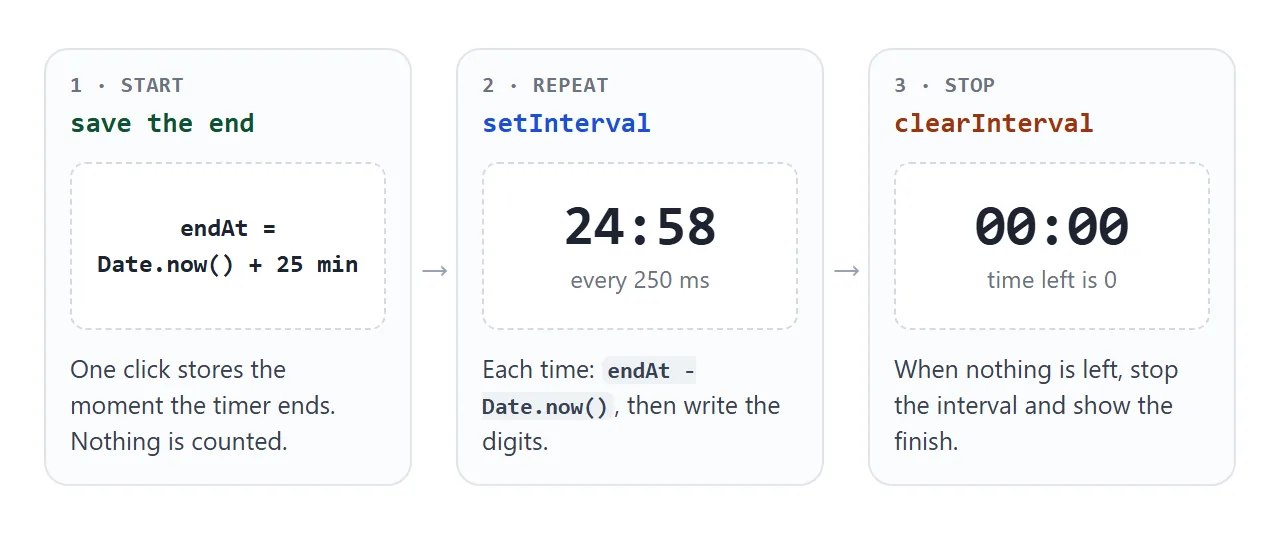
- Save the end time. On click,
endAt = Date.now() + LENGTH.Date.now()returns milliseconds since the start of 1970 (UTC), so adding a length in milliseconds gives the moment the round ends. - Repaint on an interval.
setInterval(paint, 250)callspaintfour times a second and returns an id. Keep the id, becauseclearInterval(id)is the only way to stop it. - Work out the time left. In
paint,endAt - Date.now()is the milliseconds left. Divide by 1000, round up withMath.ceil, then split into minutes and seconds. - Pad the digits.
padStart(2, '0')fills a number from the left until it is two characters long, so 5 seconds shows as05and not5. - Stop at zero. When the time left is 0, call
clearIntervaland change the page to show the round is over.
Math.ceil is why the screen shows 25:00 for the first second and reaches 00:00 exactly when the round ends. With Math.floor, 24:59 would appear immediately.
Why it saves an end time instead of counting
The obvious first version does left = left - 1 inside a one-second interval. It works until the page is busy.
A timer function cannot run while other code is running, so a late tick is not made up later. The MDN page for setTimeout says the code cannot run until the thread that called it has finished.
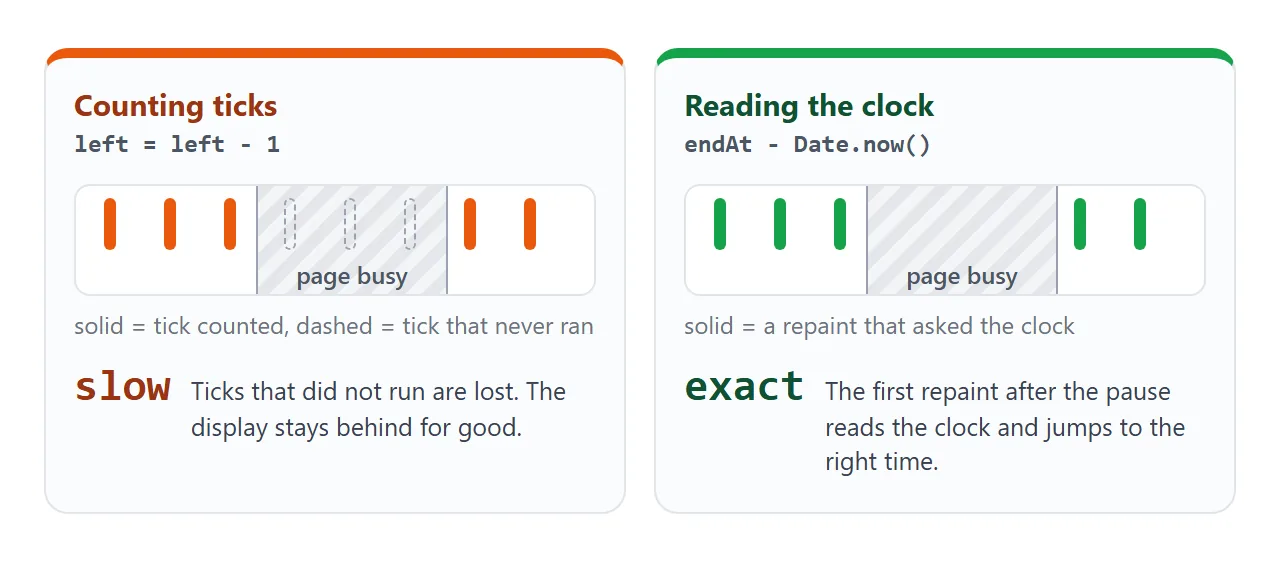
The next example runs both versions side by side. Press Start both, then Freeze the page for 3 s, which keeps the page busy with a loop. When the page wakes up, the counter is behind and the clock reader is right.
<!doctype html>
<html lang="en">
<head>
<meta charset="utf-8">
<meta name="viewport" content="width=device-width, initial-scale=1">
<title>Counting ticks vs reading the clock</title>
<style>
  body { margin: 0; padding: 14px; font-family: system-ui, sans-serif; background: #f4f5f7; color: #1d2330; }
  .grid { display: grid; grid-template-columns: 1fr 1fr; gap: 10px; }
  .box { background: #fff; border: 1px solid #e1e4ea; border-radius: 12px; padding: 10px 10px 12px; text-align: center; }
  .box h3 { margin: 0 0 6px; font-size: 13px; line-height: 1.25; min-height: 33px; }
  .box.bad { border-top: 4px solid #ea580c; }
  .box.good { border-top: 4px solid #16a34a; }
  .time { font: 700 36px/1.1 ui-monospace, Consolas, monospace; font-variant-numeric: tabular-nums; }
  .box code { display: block; margin-top: 6px; font: 12px ui-monospace, Consolas, monospace; color: #4b5563; }
  .row { display: flex; flex-wrap: wrap; gap: 8px; justify-content: center; margin: 12px 0 8px; }
  button { font: inherit; font-size: 14px; padding: 8px 14px; border-radius: 8px; border: 1px solid #c9ced6; background: #fff; cursor: pointer; }
  button.main { background: #1d2330; border-color: #1d2330; color: #fff; }
  .info { font-size: 13px; line-height: 1.5; text-align: center; color: #374151; margin: 0; }
  .info b { font-variant-numeric: tabular-nums; }
</style>
</head>
<body>
<div class="grid">
  <div class="box bad"><h3>Counts ticks</h3><div class="time" id="a">02:00</div><code>left = left - 1</code></div>
  <div class="box good"><h3>Reads the clock</h3><div class="time" id="b">02:00</div><code>endAt - Date.now()</code></div>
</div>
<div class="row">
  <button class="main" id="start">Start both</button>
  <button id="freeze">Freeze the page for 3 s</button>
</div>
<p class="info" id="info">Press Start, then Freeze, and compare the two numbers.</p>

<script>
  const fmt = (s) => String(Math.floor(s / 60)).padStart(2, '0') + ':' + String(s % 60).padStart(2, '0');
  const a = document.getElementById('a');
  const b = document.getElementById('b');
  const info = document.getElementById('info');
  let counted = 120;     // timer A: seconds left, lowered by one on every tick
  let endAt = 0;         // timer B: the moment it ends
  let startedAt = 0;
  let tickA = null;

  document.getElementById('start').addEventListener('click', () => {
    clearInterval(tickA);
    counted = 120;
    startedAt = Date.now();
    endAt = startedAt + 120 * 1000;
    // A believes every tick is exactly one second
    tickA = setInterval(() => { counted = Math.max(0, counted - 1); a.textContent = fmt(counted); }, 1000);
  });

  // B only repaints; the number comes from the clock
  setInterval(() => {
    if (!startedAt) return;
    const left = Math.max(0, Math.ceil((endAt - Date.now()) / 1000));
    b.textContent = fmt(left);
    const late = counted - left;
    info.innerHTML = 'Timer A is <b>' + late + ' s</b> ' + (late > 0 ? 'slow' : 'off by 0') + '. Timer B is exact.';
  }, 200);

  // Busy loop: no timer callback can run until it ends
  document.getElementById('freeze').addEventListener('click', () => {
    const t = Date.now();
    while (Date.now() - t < 3000) { /* do nothing, but keep the thread busy */ }
  });
</script>
</body>
</html>
The same idea keeps pause and resume honest. On pause, store the time left. On resume, build a new end time from it:
function pause() {
  remaining = Math.max(0, endAt - Date.now()); // time left right now
  endAt = null;                                // null means "not running"
  clearInterval(tick);
}
function resume() {
  endAt = Date.now() + remaining;              // a new end, same time left
  tick = setInterval(paint, 250);
}
setTimeout and setInterval goes deeper on ids, drift and why clearInterval sometimes seems to do nothing. A plain countdown to a date is in HTML countdown timer.
How to set the focus and break lengths
The Pomodoro Technique was developed by Francesco Cirillo, who split work into 25-minute rounds with 5-minute breaks. Guides to the method add a longer break of 15 to 30 minutes after every fourth round.
Keep those numbers in one object, so changing a length means changing one value:
const modes = {
  focus: { label: 'Focus',       minutes: 25 },
  short: { label: 'Short break', minutes: 5 },
  long:  { label: 'Long break',  minutes: 15 },
};
The cycle itself is a counter. Count finished focus rounds in done. When a focus round ends, done % 4 === 0 means a long break, anything else a short one. When any break ends, go back to focus.
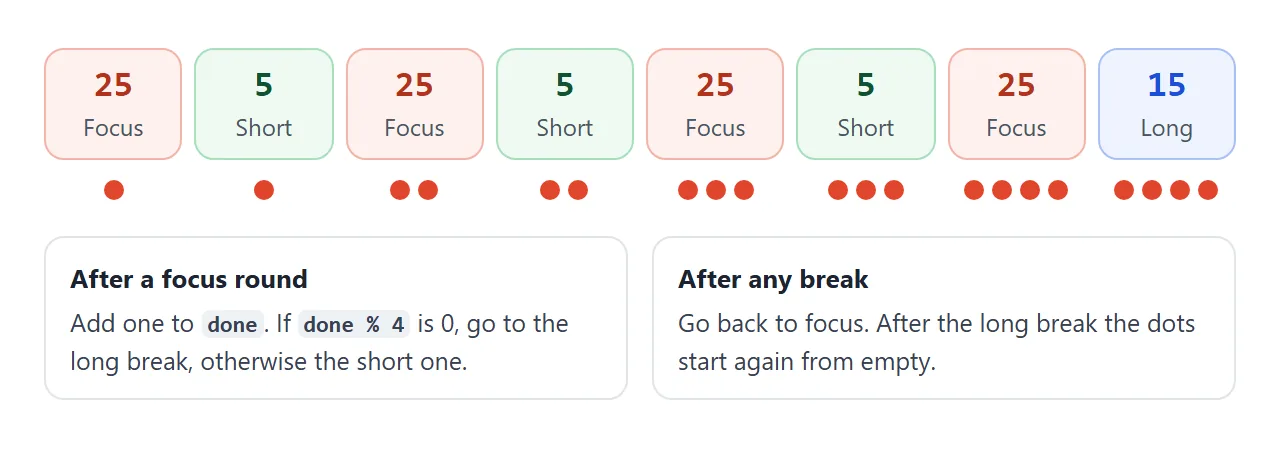
A finished example: focus, breaks, dial and beep
This version adds the cycle, three boxes for your own lengths, a progress dial, round dots, a beep, and the time in the browser tab title.
It is the same two ideas as before, the end time and the repaint, with a small state around them.
<!doctype html>
<html lang="en">
<head>
<meta charset="utf-8">
<meta name="viewport" content="width=device-width, initial-scale=1">
<title>Pomodoro 25:00</title>
<style>
  body { margin: 0; padding: 14px; font-family: system-ui, sans-serif; background: #f4f5f7; color: #1d2330; }
  .app { max-width: 360px; margin: 0 auto; background: #fff; border: 1px solid #e1e4ea; border-radius: 16px; padding: 14px 16px 16px; text-align: center; }
  .tabs { display: flex; gap: 6px; justify-content: center; }
  .tabs button { flex: 1; font: inherit; font-size: 13px; padding: 7px 4px; border-radius: 8px; border: 1px solid #c9ced6; background: #fff; cursor: pointer; }
  .tabs button[aria-pressed="true"] { background: #1d2330; border-color: #1d2330; color: #fff; }
  .dial { position: relative; width: 210px; height: 210px; margin: 14px auto 6px; }
  .dial svg { width: 100%; height: 100%; transform: rotate(-90deg); }
  .dial circle { fill: none; stroke-width: 9; }
  .track { stroke: #e8eaee; }
  #ring { stroke: #e0452c; stroke-linecap: round; stroke-dasharray: 100; transition: stroke-dashoffset .25s linear; }
  [data-mode="short"] #ring { stroke: #16a34a; }
  [data-mode="long"] #ring { stroke: #2563eb; }
  .center { position: absolute; inset: 0; display: grid; place-content: center; }
  #time { font: 700 46px/1 ui-monospace, Consolas, monospace; font-variant-numeric: tabular-nums; }
  #label { font-size: 13px; color: #4b5563; margin-top: 4px; }
  .dots { display: flex; gap: 8px; justify-content: center; margin: 4px 0 10px; }
  .dots i { width: 11px; height: 11px; border-radius: 50%; border: 2px solid #c9ced6; box-sizing: border-box; }
  .dots i.on { background: #e0452c; border-color: #e0452c; }
  .row { display: flex; gap: 8px; justify-content: center; }
  .row button { font: inherit; font-size: 15px; padding: 9px 20px; border-radius: 10px; border: 1px solid #c9ced6; background: #fff; cursor: pointer; }
  .row button.main { background: #1d2330; border-color: #1d2330; color: #fff; min-width: 110px; }
  #msg { min-height: 20px; margin: 10px 0 4px; font-size: 13px; color: #374151; }
  .set { display: flex; gap: 8px; justify-content: center; margin-top: 8px; }
  .set label { font-size: 12px; color: #4b5563; display: grid; gap: 3px; }
  .set input[type="number"] { width: 70px; font: inherit; font-size: 16px; padding: 6px; border: 1px solid #c9ced6; border-radius: 8px; text-align: center; box-sizing: border-box; }
  .snd { display: block; margin-top: 10px; font-size: 13px; color: #4b5563; }
</style>
</head>
<body>
<div class="app" id="app" data-mode="focus">
  <div class="tabs" id="tabs">
    <button data-mode="focus" aria-pressed="true">Focus</button>
    <button data-mode="short" aria-pressed="false">Short break</button>
    <button data-mode="long" aria-pressed="false">Long break</button>
  </div>
  <div class="dial">
    <svg viewBox="0 0 100 100" aria-hidden="true">
      <circle class="track" cx="50" cy="50" r="44"></circle>
      <circle id="ring" cx="50" cy="50" r="44" pathLength="100"></circle>
    </svg>
    <div class="center"><div id="time">25:00</div><div id="label">Focus</div></div>
  </div>
  <div class="dots" id="dots" title="Focus rounds finished in this set of four"><i></i><i></i><i></i><i></i></div>
  <div class="row">
    <button class="main" id="toggle">Start</button>
    <button id="reset">Reset</button>
  </div>
  <div id="msg" aria-live="polite"></div>
  <div class="set">
    <label>Focus (min)<input type="number" id="m-focus" value="25" min="0.1" step="0.1"></label>
    <label>Short (min)<input type="number" id="m-short" value="5" min="0.1" step="0.1"></label>
    <label>Long (min)<input type="number" id="m-long" value="15" min="0.1" step="0.1"></label>
  </div>
  <label class="snd"><input type="checkbox" id="sound" checked> Beep when a round ends</label>
</div>

<script>
  const modes = {
    focus: { label: 'Focus', minutes: 25 },
    short: { label: 'Short break', minutes: 5 },
    long:  { label: 'Long break', minutes: 15 },
  };
  const $ = (id) => document.getElementById(id);
  let mode = 'focus';
  let done = 0;                    // focus rounds finished so far
  let total = 0, remaining = 0;    // milliseconds
  let endAt = null;                // end moment while running, null while paused
  let tick = null;
  let audio = null;

  const pad = (n) => String(n).padStart(2, '0');
  const fmt = (ms) => { const s = Math.ceil(ms / 1000); return pad(Math.floor(s / 60)) + ':' + pad(s % 60); };

  function paint() {
    if (endAt) remaining = Math.max(0, endAt - Date.now());   // the clock decides, not the tick count
    $('time').textContent = fmt(remaining);
    $('ring').style.strokeDashoffset = 100 * (1 - remaining / total);
    document.title = fmt(remaining) + ' ' + modes[mode].label;   // time shows in the browser tab
    if (endAt && remaining === 0) finish();
  }

  function start() {
    if (remaining === 0) return;
    if (!audio && window.AudioContext) audio = new AudioContext();   // made inside a click, so sound is allowed
    if (audio && audio.state === 'suspended') audio.resume();
    endAt = Date.now() + remaining;
    clearInterval(tick);
    tick = setInterval(paint, 250);
    $('toggle').textContent = 'Pause';
    $('msg').textContent = '';
  }

  function pause() {
    paint();
    endAt = null;
    clearInterval(tick);
    tick = null;
    $('toggle').textContent = remaining < total ? 'Resume' : 'Start';
  }

  function setMode(m) {
    pause();
    mode = m;
    total = remaining = modes[m].minutes * 60 * 1000;
    $('app').dataset.mode = m;
    $('label').textContent = modes[m].label;
    document.querySelectorAll('#tabs button').forEach((b) => b.setAttribute('aria-pressed', b.dataset.mode === m));
    const filled = done > 0 && done % 4 === 0 && m !== 'focus' ? 4 : done % 4;
    document.querySelectorAll('#dots i').forEach((d, i) => d.classList.toggle('on', i < filled));
    $('toggle').textContent = 'Start';
    paint();
  }

  function finish() {
    endAt = null;
    if ($('sound').checked) beep();
    if (mode === 'focus') {
      done++;
      setMode(done % 4 === 0 ? 'long' : 'short');
      $('msg').textContent = 'Focus round ' + done + ' done. Start your break.';
    } else {
      setMode('focus');
      $('msg').textContent = 'Break over. Ready for the next round.';
    }
  }

  function beep() {
    if (!audio) return;
    const osc = audio.createOscillator();
    const gain = audio.createGain();
    gain.gain.value = 0.15;
    osc.frequency.value = 880;
    osc.connect(gain);
    gain.connect(audio.destination);
    osc.start();
    osc.stop(audio.currentTime + 0.4);
  }

  $('toggle').addEventListener('click', () => (endAt ? pause() : start()));
  $('reset').addEventListener('click', () => setMode(mode));
  document.querySelectorAll('#tabs button').forEach((b) => b.addEventListener('click', () => setMode(b.dataset.mode)));
  ['focus', 'short', 'long'].forEach((m) => $('m-' + m).addEventListener('change', (e) => {
    const v = Number(e.target.value);
    if (!(v > 0)) { e.target.value = modes[m].minutes; return; }
    modes[m].minutes = v;
    if (m === mode && !endAt) setMode(mode);
  }));
  document.addEventListener('visibilitychange', paint);   // repaint the moment the tab comes back

  setMode('focus');
</script>
</body>
</html>
- Dial: an SVG circle with
pathLength="100". The browser then treats the circle as 100 units long, sostroke-dashoffsetcan be a plain percentage. - Tab title:
document.titlesets the text of the browser tab, so you can read the time from another tab. - Steady digits:
font-variant-numeric: tabular-numsgives every digit the same width, so the number does not wobble as it changes. - Repaint on return: a
visibilitychangelistener callspaintwhen the tab becomes visible again.
Adding a sound
Sound is the part most likely to go wrong. Starting audio with the Web Audio API outside a user action is subject to the browser's autoplay rules.
So the finished example creates its AudioContext inside the Start click, and plays a short beep from an oscillator when a round ends:
function beep() {
  const osc = audio.createOscillator();
  const gain = audio.createGain();
  gain.gain.value = 0.15;          // keep it quiet
  osc.frequency.value = 880;
  osc.connect(gain);
  gain.connect(audio.destination);
  osc.start();
  osc.stop(audio.currentTime + 0.4);
}
Play a sound in JavaScript covers sound files and the other ways to make a noise.
When it does not work
| Symptom | Cause | Fix |
|---|---|---|
| A tick-counting timer runs twice as fast after two clicks on Start | Each click started another interval, and both lower the counter | Call clearInterval(tick) before starting a new one |
| The timer slowly falls behind | It counts ticks | Store endAt and read Date.now() on each repaint |
| Resume starts again from 25:00 | Pause did not keep the time left | Save remaining on pause, build a new endAt on resume |
| Seconds show as 5 instead of 05 | The number is not padded | Use padStart(2, '0') |
| The digits wobble as they change | Digits have different widths | Add font-variant-numeric: tabular-nums or a monospace font |
| No beep at the end | Audio started without a user action | Create the AudioContext inside the Start click |
| The beep is late when the tab is hidden | Browsers can slow timers in background tabs | Keep the tab visible, and repaint on visibilitychange |
| Nothing happens at all | The script has an error | See HTML JavaScript not working |
Share it as a link
A timer is easier to show than to describe. A screenshot cannot count down, and an .html attachment may open as plain code, or not at all, on a phone. Opening an HTML file on a phone covers why.
To send the working version, paste the page into a NOS document and choose Create share link. HTML to link walks through it.
The page renders as written and its scripts run, so the people you send it to can press Start themselves. If you change the code later, the same link shows the new version.