A portfolio website with no code is one page that an AI writes for you. You paste a prompt into ChatGPT, Claude or Gemini, check the page on screen, and turn it into a link.
There is no site builder to learn, no GitHub account and no domain to buy first.
If you searched for free ways to build a portfolio and ended up comparing services, this route is shorter for a one-page portfolio.
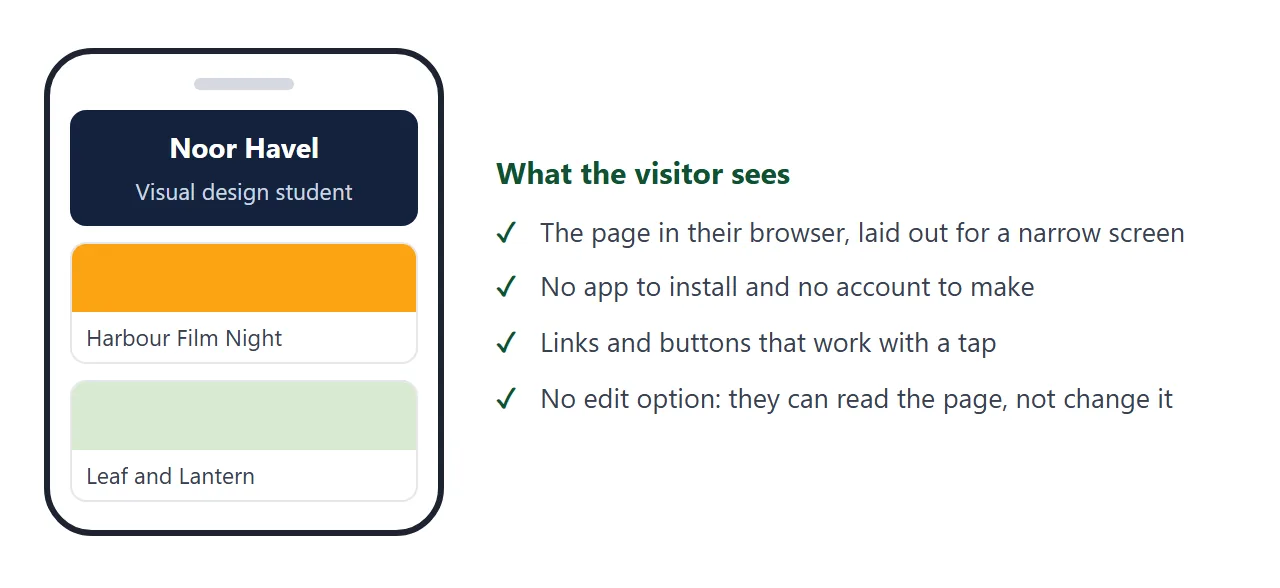
Here is a finished page of the kind you will end up with. Scroll it, tap the menu links, and try it at phone width.
<!doctype html>
<html lang="en">
<head>
<meta charset="utf-8">
<meta name="viewport" content="width=device-width, initial-scale=1">
<title>Noor Havel | Portfolio</title>
<style>
  * { box-sizing: border-box; }
  body { margin: 0; font-family: system-ui, sans-serif; color: #1f2937; background: #f7f7f5; line-height: 1.55; }
  header { background: #14213d; color: #fff; padding: 28px 20px 24px; text-align: center; }
  header h1 { margin: 0 0 4px; font-size: 1.7rem; }
  header p { margin: 0; color: #cbd5e1; }
  nav { display: flex; justify-content: center; gap: 18px; flex-wrap: wrap; margin-top: 14px; }
  nav a { color: #fca311; text-decoration: none; font-weight: 600; }
  main { max-width: 760px; margin: 0 auto; padding: 8px 20px 40px; }
  section { padding-top: 24px; }
  h2 { margin: 0 0 10px; font-size: 1.2rem; color: #14213d; }
  .grid { display: grid; grid-template-columns: repeat(auto-fit, minmax(210px, 1fr)); gap: 14px; }
  .card { background: #fff; border: 1px solid #e5e7eb; border-radius: 12px; overflow: hidden; }
  .card svg { display: block; width: 100%; height: 110px; }
  .card div { padding: 12px 14px 14px; }
  .card h3 { margin: 0 0 4px; font-size: 1rem; }
  .card p { margin: 0; font-size: .92rem; color: #4b5563; }
  .chips { display: flex; flex-wrap: wrap; gap: 8px; padding: 0; margin: 0; list-style: none; }
  .chips li { background: #e8eefc; color: #1e3a8a; border-radius: 999px; padding: 4px 12px; font-size: .9rem; }
  .contact a { display: inline-block; background: #14213d; color: #fff; padding: 10px 18px; border-radius: 8px; text-decoration: none; font-weight: 600; }
  footer { text-align: center; color: #6b7280; font-size: .85rem; padding-bottom: 24px; }
</style>
</head>
<body>
<header>
  <h1>Noor Havel</h1>
  <p>Visual design student, final year</p>
  <nav>
    <a href="#about">About</a>
    <a href="#work">Work</a>
    <a href="#skills">Skills</a>
    <a href="#contact">Contact</a>
  </nav>
</header>

<main>
  <section id="about">
    <h2>About</h2>
    <p>I design posters, packaging and small interfaces. I am looking for a summer internship in a design studio.</p>
  </section>

  <section id="work">
    <h2>Selected work</h2>
    <div class="grid">
      <article class="card">
        <svg viewBox="0 0 300 110" preserveAspectRatio="xMidYMid slice" role="img" aria-label="Orange poster with a large circle"><rect width="300" height="110" fill="#fca311"/><circle cx="150" cy="55" r="38" fill="#14213d"/><rect x="40" y="86" width="220" height="8" rx="4" fill="#fff"/></svg>
        <div><h3>Harbour Film Night</h3><p>Poster series for a student film society. Coursework, 2026.</p></div>
      </article>
      <article class="card">
        <svg viewBox="0 0 300 110" preserveAspectRatio="xMidYMid slice" role="img" aria-label="Green tea tin packaging"><rect width="300" height="110" fill="#d9ead3"/><rect x="105" y="14" width="90" height="82" rx="10" fill="#2f6f4f"/><rect x="118" y="40" width="64" height="24" rx="4" fill="#fff"/></svg>
        <div><h3>Leaf and Lantern</h3><p>Tea tin packaging for a brief set by my tutor. Coursework, 2025.</p></div>
      </article>
      <article class="card">
        <svg viewBox="0 0 300 110" preserveAspectRatio="xMidYMid slice" role="img" aria-label="Phone screen with three coloured bars"><rect width="300" height="110" fill="#e8eefc"/><rect x="110" y="10" width="80" height="92" rx="12" fill="#fff" stroke="#14213d" stroke-width="3"/><rect x="122" y="26" width="56" height="10" rx="5" fill="#3b82f6"/><rect x="122" y="46" width="56" height="10" rx="5" fill="#fca311"/><rect x="122" y="66" width="56" height="10" rx="5" fill="#2f6f4f"/></svg>
        <div><h3>Bus Timetable App</h3><p>A redesign of a bus timetable screen. Personal project, 2026.</p></div>
      </article>
    </div>
  </section>

  <section id="skills">
    <h2>Skills</h2>
    <ul class="chips">
      <li>Layout</li><li>Typography</li><li>Illustration</li><li>Figma</li><li>Photo editing</li>
    </ul>
  </section>

  <section id="contact" class="contact">
    <h2>Contact</h2>
    <p><a href="mailto:noor.havel@example.com">Email Noor</a></p>
  </section>
</main>
<footer>Fictional example page. Replace every name, project and email with your own.</footer>
</body>
</html>
Make it with AI
The AI needs two things from you: what the page should contain and a few rules that keep the result simple. Paste this into a chat, then replace the last line with your own details.
Make a one-page portfolio website as a single HTML file.
- Everything in one file: CSS in a style tag, no external images, fonts or scripts.
- Where a picture would go, draw a simple shape or colour block.
- It must read well on a phone and on a laptop. Include the viewport meta tag.
- Sections: my name and one-line intro, three projects, skills, contact.
- Each project: a title, one sentence on the brief, one on what I did.
- Contact is a mailto link. Do not add a contact form.
- Reply with the complete code in one code block and nothing else.
My details: [name, course or field, three projects, email address]
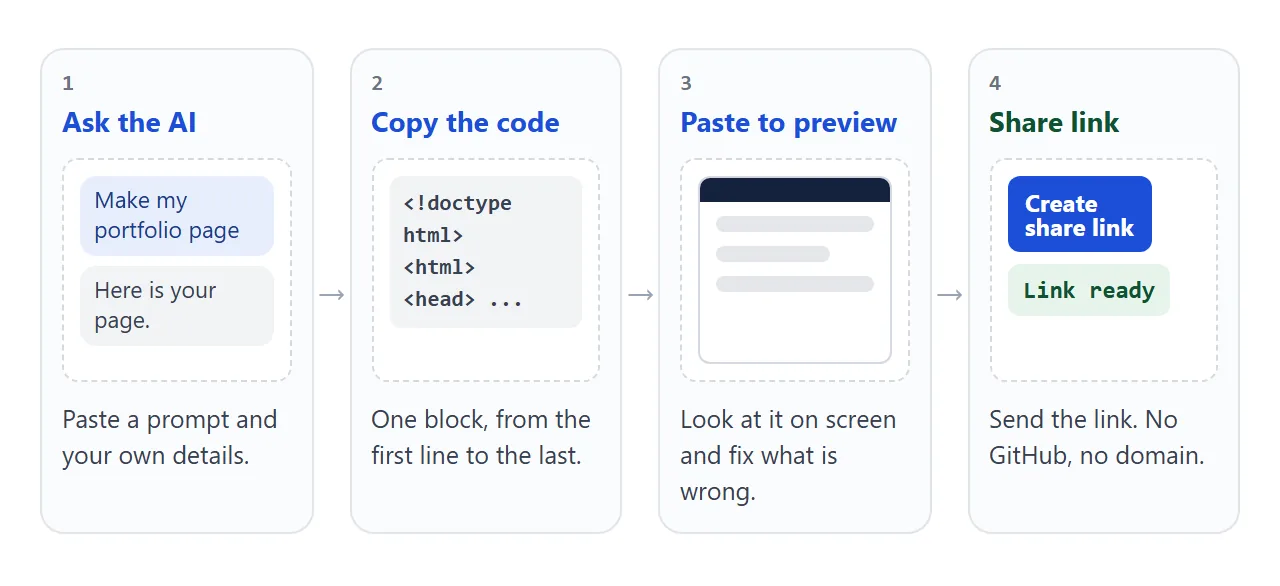
The rules do real work. One file means you only have one thing to copy. No external images means nothing shows up empty later. The mailto link avoids a form that cannot send anywhere.
For more on writing these prompts, see creating a website with an AI assistant.
Check the page before you publish
Read it once as a visitor would. The AI can invent things, and a portfolio is judged on its weakest line.
- Your facts. Names, course titles, dates and the email address are exactly as you gave them.
- Nothing made up. Remove any award, client or result you did not provide. Coursework is fine as long as it says it is coursework; student portfolio covers what to show.
- Placeholders. No leftover words like "Lorem ipsum" or "Your name here".
- Phone width. Text is readable and nothing runs off the side. The page needs the viewport tag, which MDN recommends, to size itself correctly on a phone.
If something is wrong, do not fix the code. Reply in the same chat with what you want changed and copy the new complete code.
Send it as a link
Paste the code into a NOS document. The page appears as written, and its scripts run, so menus and buttons behave as they will for your visitors. Choose Create share link and copy the address. HTML to link walks through the screens.
Anyone who has the link can open the page in a browser, phone included, with no account. They cannot edit it. When you change the code later, the same link shows the new version, so the address you printed on a resume still works.
Because anyone with the link can open it, leave out anything private, such as a home address or a phone number you do not want strangers to have.
To put the link on a resume, see linking a portfolio in a resume. For a printed card or poster, file to QR code explains why the code holds the address and not the page.
Ways to publish compared
The common alternatives need more setup than a one-page portfolio asks for. This compares the three routes a student without code is likely to meet. Platform rules change, so the GitHub column is as of October 2026.
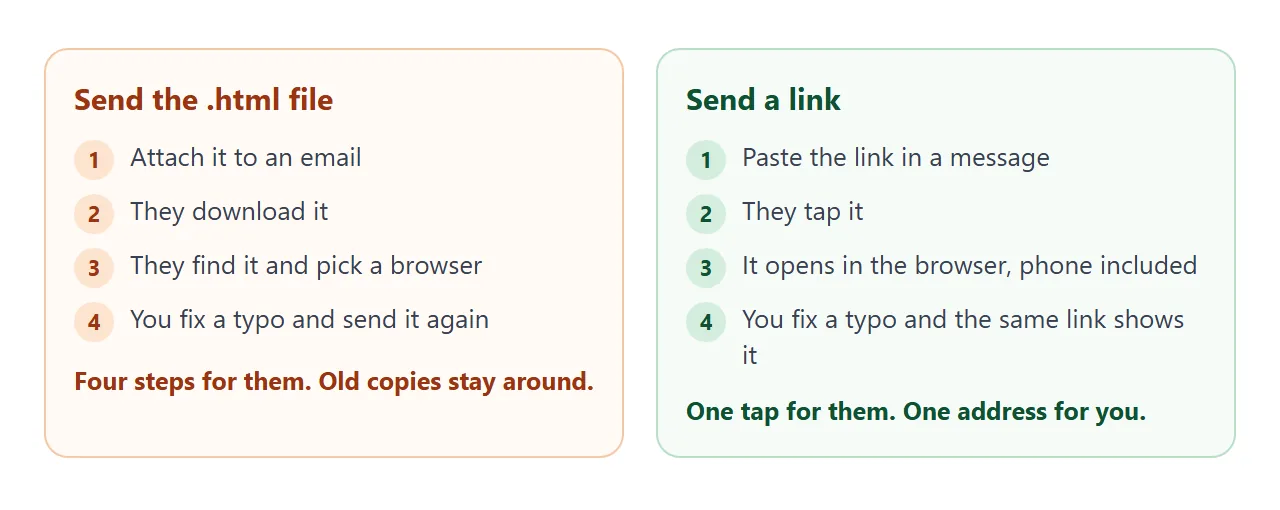
| Share link from NOS | GitHub Pages | Attach the .html file | |
|---|---|---|---|
| Account needed | None for visitors | A GitHub account for you | None |
| Setup | Paste, then Create share link | A repository, a publishing source, an entry file | None |
| Visitor opens it | Tap the link | Tap the link | Download, find the file, open it |
| Fix a typo later | Edit, same link | Commit the change | Send the file again |
GitHub's documentation says a Pages site needs a repository, and that on GitHub Free the repository must be public.
That is fine if you already use GitHub; if you do not, a GitHub Pages alternative explains the trade. Attachments are covered in opening an HTML file on a phone.
A second layout: projects you can open
A portfolio is judged on the thinking behind the work as much as the result.
This version gives each project a short write-up that opens on a tap, and the buttons filter by type.
Ask the AI for it with one extra line in your prompt: "make each project a section I can open and close, with problem, what I did and outcome."
<!doctype html>
<html lang="en">
<head>
<meta charset="utf-8">
<meta name="viewport" content="width=device-width, initial-scale=1">
<title>Eli Brandt | Projects</title>
<style>
  * { box-sizing: border-box; }
  body { margin: 0; font-family: system-ui, sans-serif; color: #e5e7eb; background: #111827; line-height: 1.55; }
  .wrap { max-width: 720px; margin: 0 auto; padding: 28px 18px 36px; }
  h1 { margin: 0; font-size: 1.6rem; color: #fff; }
  .sub { margin: 4px 0 18px; color: #9ca3af; }
  .tabs { display: flex; flex-wrap: wrap; gap: 8px; margin-bottom: 14px; }
  .tabs button { font: inherit; padding: 6px 14px; border-radius: 999px; border: 1px solid #374151; background: #1f2937; color: #e5e7eb; cursor: pointer; }
  .tabs button[aria-pressed="true"] { background: #34d399; border-color: #34d399; color: #064e3b; font-weight: 600; }
  details { background: #1f2937; border: 1px solid #374151; border-radius: 10px; padding: 12px 14px; margin-bottom: 10px; }
  summary { cursor: pointer; font-weight: 600; color: #fff; }
  summary span { display: inline-block; margin-left: 8px; font-size: .78rem; font-weight: 500; color: #34d399; border: 1px solid #34d399; border-radius: 999px; padding: 0 8px; }
  details p { margin: 8px 0 0; color: #d1d5db; font-size: .95rem; }
  details strong { color: #fff; }
  .count { color: #9ca3af; font-size: .88rem; margin: 0 0 10px; }
</style>
</head>
<body>
<div class="wrap">
  <h1>Eli Brandt</h1>
  <p class="sub">Data and writing student. Four projects, tap one to read it.</p>

  <div class="tabs" id="tabs">
    <button data-f="all" aria-pressed="true">All</button>
    <button data-f="Data" aria-pressed="false">Data</button>
    <button data-f="Writing" aria-pressed="false">Writing</button>
  </div>
  <p class="count" id="count"></p>

  <div id="list">
    <details data-t="Data" open>
      <summary>Campus Bike Counts <span>Data</span></summary>
      <p><strong>Problem:</strong> nobody knew which racks were full. <strong>What I did:</strong> counted bikes at six racks for two weeks and charted the result. <strong>Outcome:</strong> my tutor used the chart in a seminar.</p>
    </details>
    <details data-t="Data">
      <summary>Library Hours Dashboard <span>Data</span></summary>
      <p><strong>Problem:</strong> opening hours were spread over four pages. <strong>What I did:</strong> put them in one table that highlights today. <strong>Outcome:</strong> a course project that I presented in class.</p>
    </details>
    <details data-t="Writing">
      <summary>Local Market Feature <span>Writing</span></summary>
      <p><strong>Problem:</strong> a 600-word feature with three interviews. <strong>What I did:</strong> interviewed stallholders and cut the draft twice. <strong>Outcome:</strong> printed in the student newspaper.</p>
    </details>
    <details data-t="Writing">
      <summary>Product Page Rewrite <span>Writing</span></summary>
      <p><strong>Problem:</strong> a product page full of jargon. <strong>What I did:</strong> rewrote it for a first-time buyer. <strong>Outcome:</strong> a class exercise, kept as a before and after.</p>
    </details>
  </div>
  <p class="sub">Fictional example page. Replace every name and project with your own.</p>
</div>

<script>
  const tabs = document.querySelectorAll('#tabs button');
  const items = document.querySelectorAll('#list details');
  const count = document.getElementById('count');

  function show(filter) {
    let n = 0;
    items.forEach((d) => {
      const on = filter === 'all' || d.dataset.t === filter;
      d.hidden = !on;
      if (on) n++;
    });
    tabs.forEach((b) => b.setAttribute('aria-pressed', String(b.dataset.f === filter)));
    count.textContent = n + (n === 1 ? ' project' : ' projects');
  }

  tabs.forEach((b) => b.addEventListener('click', () => show(b.dataset.f)));
  show('all');
</script>
</body>
</html>
When it does not work
| What you see | Cause | Fix |
|---|---|---|
| Boxes where pictures should be | The AI linked images from another website | Ask for shapes, colour blocks or text instead |
| Pasted text appears as code, not a page | Only part of the code was copied, or the reply had extra words | Copy the whole code block again, from the first line |
| The contact form does nothing | Forms cannot send to a server from the page | Use a mailto link instead |
| Text is tiny on a phone | The viewport tag is missing | Ask the AI to add the viewport meta tag |
| A friend says the page is old | They opened an old copy you sent as a file | Send the link, not the file |
| The AI added work you did not do | It filled gaps on its own | Delete it and re-ask with "use only the details I give you" |