A pricing sheet template is one page with three parts: packages, add-ons and terms. Replying to every enquiry means retyping the same prices, options and extras in a new email, and each old email keeps the price it had that day.
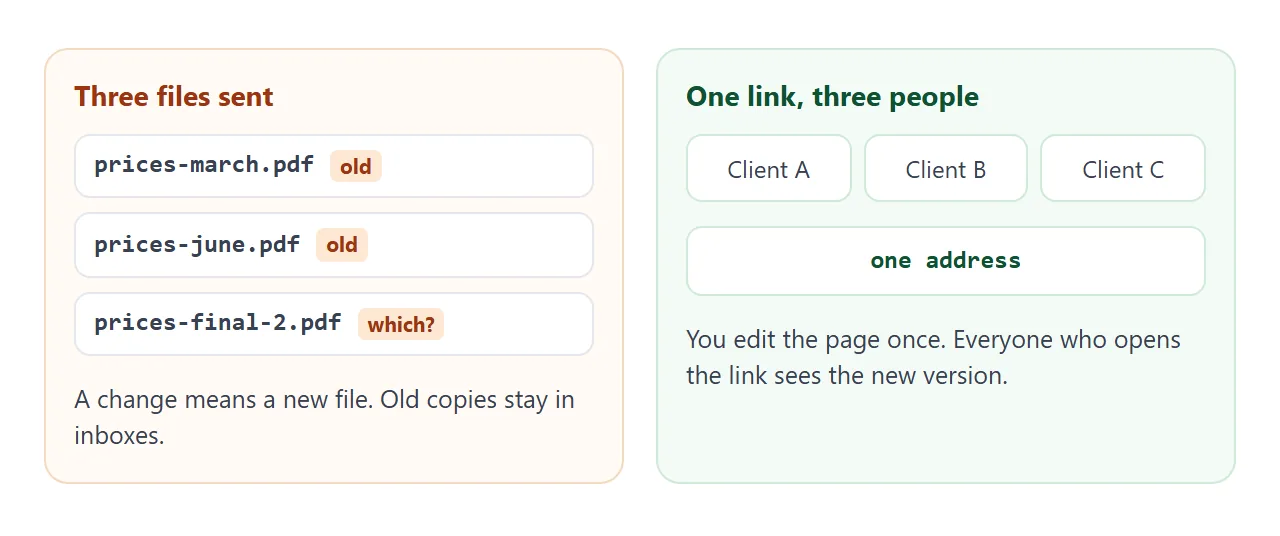
Build the sheet as a web page and the email shrinks to one line and a link. Edit the page when a price changes, and the link stays the same.
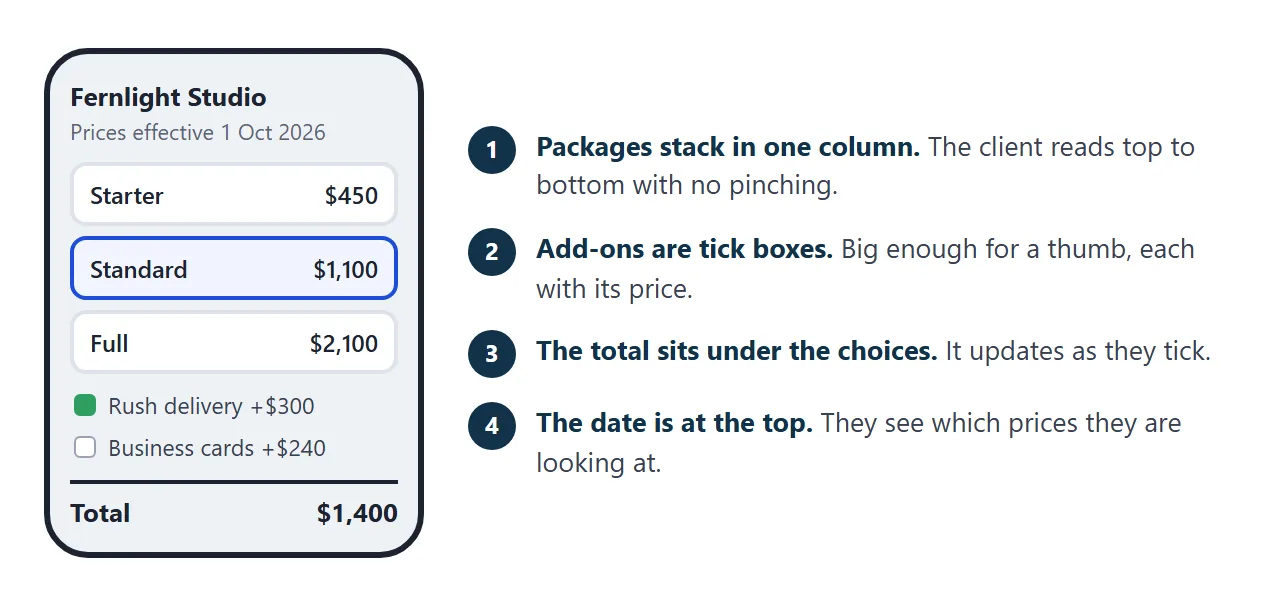
The example below is a made-up design studio. Pick a package, tick the add-ons and watch the total.
<!doctype html>
<html lang="en">
<head>
<meta charset="utf-8">
<meta name="viewport" content="width=device-width, initial-scale=1">
<title>Pricing sheet: packages and add-ons</title>
<style>
* { box-sizing: border-box; }
body { margin: 0; padding: 16px; font-family: system-ui, -apple-system, "Segoe UI", sans-serif; color: #1d2330; background: #eef1f5; line-height: 1.5; }
.wrap { max-width: 760px; margin: 0 auto; }
.card { background: #fff; border: 1px solid #dde3ea; border-radius: 12px; padding: 16px 18px; margin-bottom: 12px; }
h1 { margin: 0 0 2px; font-size: 1.3rem; }
.sub { margin: 0; color: #5b6676; font-size: .9rem; }
h2 { margin: 0 0 10px; font-size: .8rem; letter-spacing: .08em; text-transform: uppercase; color: #12324a; }
.pkgs { display: grid; grid-template-columns: repeat(3, 1fr); gap: 10px; }
.pkg { display: block; border: 2px solid #dde3ea; border-radius: 10px; padding: 12px; cursor: pointer; background: #fafbfc; }
.pkg:has(input:checked) { border-color: #1d4ed8; background: #f1f5ff; }
.pkg input { position: absolute; opacity: 0; pointer-events: none; }
.pkg .name { font-weight: 700; }
.pkg .price { font-size: 1.4rem; font-weight: 700; margin: 2px 0 6px; }
.pkg ul { margin: 0; padding-left: 18px; font-size: .85rem; color: #374151; }
.pkg:has(input:focus-visible) { outline: 3px solid #93b4ff; }
.addon { display: flex; align-items: center; gap: 10px; padding: 9px 0; border-top: 1px solid #e6eaf0; }
.addon:first-of-type { border-top: 0; }
.addon input[type=checkbox] { width: 18px; height: 18px; flex: none; }
.addon .t { flex: 1; font-size: .93rem; }
.addon .t small { display: block; color: #5b6676; font-size: .8rem; }
.addon .p { font-weight: 600; white-space: nowrap; font-size: .93rem; }
.addon.inc .p { color: #0f5132; }
.addon.inc .t { color: #6b7280; }
.step { display: flex; align-items: center; gap: 8px; }
.step button { width: 32px; height: 32px; border-radius: 8px; border: 1px solid #c8d0db; background: #fff; font-size: 1.1rem; cursor: pointer; }
.step output { min-width: 18px; text-align: center; font-weight: 600; }
.total { display: flex; justify-content: space-between; align-items: baseline; border-top: 2px solid #1d2330; margin-top: 8px; padding-top: 8px; font-weight: 700; font-size: 1.15rem; }
#lines { margin: 0; padding: 0; list-style: none; font-size: .92rem; }
#lines li { display: flex; justify-content: space-between; gap: 10px; padding: 3px 0; }
.fine { margin: 8px 0 0; font-size: .82rem; color: #5b6676; }
label.sum { display: block; font-size: .85rem; font-weight: 600; margin: 12px 0 4px; }
textarea { width: 100%; height: 64px; font: inherit; font-size: .88rem; padding: 8px; border: 1px solid #c8d0db; border-radius: 8px; resize: vertical; }
@media (max-width: 600px) { .pkgs { grid-template-columns: 1fr; } }
</style>
</head>
<body>
<div class="wrap">
<div class="card">
<h1>Fernlight Studio: brand design</h1>
<p class="sub">Prices effective 1 October 2026 · USD · excludes tax · made-up example</p>
</div>
<div class="card">
<h2>1. Pick a package</h2>
<div class="pkgs">
<label class="pkg"><input type="radio" name="pkg" value="starter" data-price="450" data-name="Starter" checked>
<div class="name">Starter</div><div class="price">$450</div>
<ul><li>Logo, 3 concepts</li><li>2 revision rounds</li><li>5 working days</li></ul></label>
<label class="pkg"><input type="radio" name="pkg" value="standard" data-price="1100" data-name="Standard">
<div class="name">Standard</div><div class="price">$1,100</div>
<ul><li>Logo and brand sheet</li><li>3 revision rounds</li><li>10 working days</li></ul></label>
<label class="pkg"><input type="radio" name="pkg" value="full" data-price="2100" data-name="Full">
<div class="name">Full</div><div class="price">$2,100</div>
<ul><li>Logo, brand sheet, social kit</li><li>Source files included</li><li>15 working days</li></ul></label>
</div>
</div>
<div class="card">
<h2>2. Add what you need</h2>
<label class="addon" data-in="full"><input type="checkbox" class="ad" data-price="150" data-name="Source files">
<span class="t">Source files<small>Editable originals of the logo</small></span><span class="p">+$150</span></label>
<label class="addon"><input type="checkbox" class="ad" data-price="300" data-name="Rush delivery">
<span class="t">Rush delivery<small>Done in half the working days</small></span><span class="p">+$300</span></label>
<label class="addon"><input type="checkbox" class="ad" data-price="240" data-name="Business card design">
<span class="t">Business card design<small>Print-ready file</small></span><span class="p">+$240</span></label>
<div class="addon">
<span class="t">Extra revision round<small>Each round after the ones included</small></span>
<span class="step"><button type="button" id="less" aria-label="One fewer round">−</button><output id="rev">0</output><button type="button" id="more" aria-label="One more round">+</button></span>
<span class="p">$80 each</span>
</div>
</div>
<div class="card">
<h2>3. Your total</h2>
<ul id="lines"></ul>
<div class="total"><span>Total</span><span id="total">$0</span></div>
<p class="fine">Tax is not included. Work starts after the first payment.</p>
<label class="sum" for="summary">Copy this line into your reply</label>
<textarea id="summary" readonly></textarea>
</div>
</div>
<script>
const money = (n) => '$' + n.toLocaleString('en-US');
const pkgs = document.querySelectorAll('input[name=pkg]');
const adds = document.querySelectorAll('.ad');
const rev = document.getElementById('rev');
const REV_PRICE = 80;
let rounds = 0;
function update() {
const pkg = document.querySelector('input[name=pkg]:checked');
const rows = [[pkg.dataset.name + ' package', +pkg.dataset.price]];
adds.forEach((box) => {
const row = box.closest('.addon');
const included = row.dataset.in === pkg.value; // this package already contains it
box.disabled = included;
row.classList.toggle('inc', included);
row.querySelector('.p').textContent = included ? 'Included' : '+' + money(+box.dataset.price);
if (!included && box.checked) rows.push([box.dataset.name, +box.dataset.price]);
});
if (rounds > 0) rows.push([rounds + ' extra revision round' + (rounds > 1 ? 's' : ''), rounds * REV_PRICE]);
const total = rows.reduce((sum, r) => sum + r[1], 0);
document.getElementById('lines').innerHTML = rows
.map((r) => '<li><span>' + r[0] + '</span><span>' + money(r[1]) + '</span></li>').join('');
document.getElementById('total').textContent = money(total);
document.getElementById('summary').value =
'I would like: ' + rows.map((r) => r[0]).join(', ') + '. Total ' + money(total) + ' excl. tax.';
}
pkgs.forEach((r) => r.addEventListener('change', update));
adds.forEach((b) => b.addEventListener('change', update));
document.getElementById('more').addEventListener('click', () => { rounds++; rev.textContent = rounds; update(); });
document.getElementById('less').addEventListener('click', () => { rounds = Math.max(0, rounds - 1); rev.textContent = rounds; update(); });
update();
</script>
</body>
</html>
Notice two details. The Full package already contains source files, so that add-on switches to Included. And the page ends with a line the client can copy into a reply, because their ticks are not sent back to you.
What goes on the sheet
Keep it to one screen of choices. A client comparing three packages decides faster than one scrolling through ten.
| Part | What to write | Keep it to |
|---|---|---|
| Effective date | When these prices became current | One line at the top |
| Packages | Name, price, what is inside | 2 to 3 |
| Add-ons | One extra, one price | 3 to 5 |
| Not included | What costs more or is out of scope | A short list |
| How to order | What the client does next | One sentence |
Say whether prices include tax once, in the date line. Then every row inherits it. For more on that, see HTML pricing sheets.
Make it with AI
Give an AI your real prices and ask for one HTML file. Paste this into ChatGPT, Claude or Gemini, then add your details at the end.
Make a pricing sheet as ONE self-contained HTML file.
Order: header with business name and effective date,
3 packages as radio cards (price and 3 bullet points each),
add-ons as checkboxes with a price, one add-on as a +/- stepper,
a total that updates, a Not included list, and a text box
with a summary line the client can copy.
Rules: use only the prices I give. Never invent a price or
a discount. Where I gave nothing, write TODO.
Inline CSS and JavaScript only, no external images or fonts.
One column that reads well at 390 px wide.
Do not use localStorage or send a form anywhere.
My prices:
[paste your packages, add-ons and terms]
Then check the result before you send anything.
- Every price is yours. AI fills gaps with believable numbers. Delete any you did not give.
- The totals are right. Tick each box and add it up by hand.
- No TODO is left. Search the page for it.
- It reads on a phone. Open it on one. If text is tiny, see the viewport meta tag.
Send it as a link
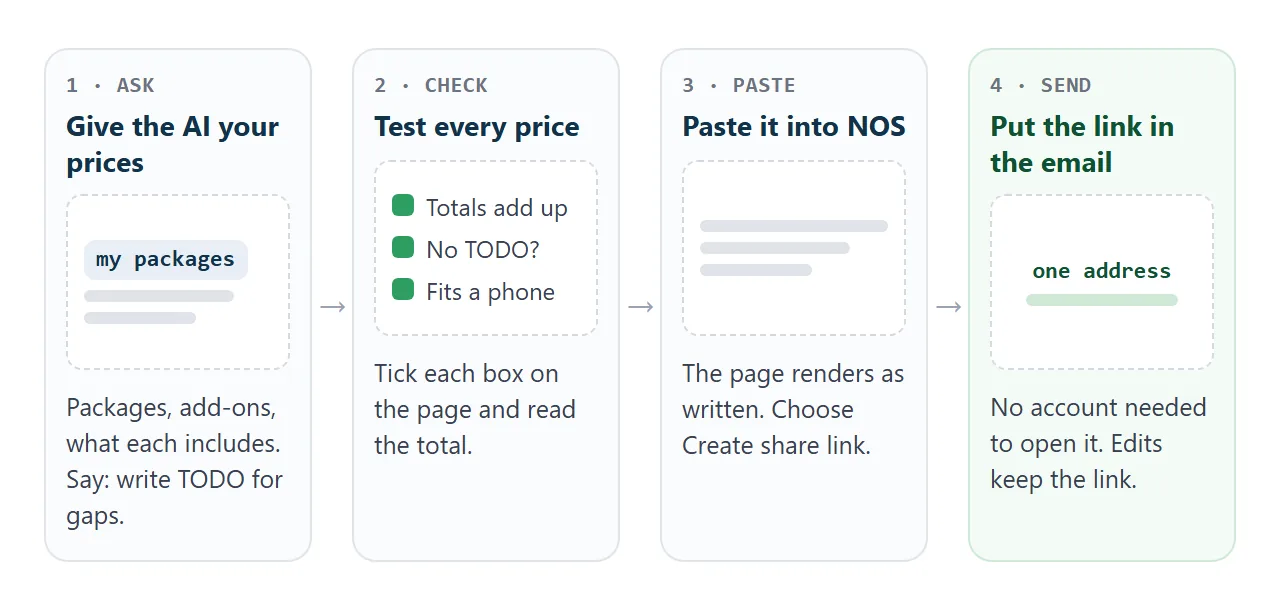
- Open a NOS document and paste the HTML in. The page renders as written, scripts included, so the total works.
- Choose Create share link. HTML to link walks through it.
- Paste the link into your email, in the body, with one line saying what it is.
The client taps the link and the page opens in their browser, on a phone too. They need no account and cannot edit it. Their ticks are not saved, so ask them to reply with the summary line.
When a price changes, edit the code in your NOS document. The same link shows the new version. NOS does not show who opened it, so end the email with a question that invites a reply.
Anyone with the link can open it. Leave out anything you would not put on a public notice board, such as a private discount for one client.
For printed material, a QR code can point to the same link. See QR code link.
Link, PDF or spreadsheet
| Link to the page | PDF attachment | Spreadsheet file | |
|---|---|---|---|
| What the client does | Taps and reads | Downloads and opens | Downloads, opens an app |
| Changing a price | Edit, same link | Send a new file | Send a new file |
| Live total from ticks | Yes, in the page | No | Only if they edit it |
| Old copies | One address, one version | Stay in inboxes | Stay in inboxes |
| Use it when | Answering an enquiry | A client asks for a file | You need to hand over numbers |
If you need a file, make a PDF from the same page. In Chrome on a computer, choose File, then Print, then Save as PDF (Chrome Help, as of October 2026). For more on the choice, see HTML vs PDF for clients.
Turn the sheet into a quote
The sheet changes whenever your prices do. A quote must not. When a client agrees, copy their choices into a second page with a number, a date and a valid-until line.
<!doctype html>
<html lang="en">
<head>
<meta charset="utf-8">
<meta name="viewport" content="width=device-width, initial-scale=1">
<title>Quote from the pricing sheet</title>
<style>
* { box-sizing: border-box; }
body { margin: 0; padding: 16px; font-family: system-ui, -apple-system, "Segoe UI", sans-serif; color: #1d2330; background: #eef1f5; line-height: 1.5; }
.wrap { max-width: 720px; margin: 0 auto; }
.card { background: #fff; border: 1px solid #dde3ea; border-radius: 12px; padding: 16px 18px; margin-bottom: 12px; }
h1 { margin: 0 0 2px; font-size: 1.25rem; }
.sub { margin: 0; color: #5b6676; font-size: .9rem; }
.badge { display: inline-block; margin-top: 8px; padding: 3px 10px; border-radius: 99px; background: #fff4e5; color: #9a3412; font-size: .82rem; font-weight: 600; }
h2 { margin: 0 0 8px; font-size: .8rem; letter-spacing: .08em; text-transform: uppercase; color: #12324a; }
table { width: 100%; border-collapse: collapse; font-size: .93rem; }
th { text-align: left; font-size: .78rem; color: #5b6676; font-weight: 600; padding: 4px 0; border-bottom: 1px solid #dde3ea; }
td { padding: 7px 0; border-bottom: 1px solid #eef1f5; vertical-align: top; }
th.n, td.n { text-align: right; font-variant-numeric: tabular-nums; white-space: nowrap; padding-left: 10px; }
tfoot td { border-bottom: 0; font-weight: 700; font-size: 1.05rem; border-top: 2px solid #1d2330; }
.cols { display: grid; grid-template-columns: 1fr 1fr; gap: 12px; }
ul.list { margin: 0; padding-left: 18px; font-size: .9rem; }
button { font: inherit; font-size: .9rem; padding: 8px 14px; border-radius: 8px; border: 1px solid #1d4ed8; background: #1d4ed8; color: #fff; cursor: pointer; }
#sched { margin-top: 10px; display: none; font-size: .92rem; }
#sched.show { display: block; }
#sched div { display: flex; justify-content: space-between; padding: 4px 0; border-bottom: 1px dashed #dde3ea; }
.fine { font-size: .85rem; color: #5b6676; margin: 8px 0 0; }
@media (max-width: 600px) { .cols { grid-template-columns: 1fr; } }
</style>
</head>
<body>
<div class="wrap">
<div class="card">
<h1>Quote 2026-031</h1>
<p class="sub">Prepared for Alder & Finch Bakery (made-up) on 1 October 2026 by Fernlight Studio</p>
<span class="badge">Valid until 31 October 2026 · this page does not change</span>
</div>
<div class="card">
<h2>What you chose from the pricing sheet</h2>
<table>
<thead><tr><th>Item</th><th class="n">Price</th></tr></thead>
<tbody id="items">
<tr><td>Standard package: logo and brand sheet, 3 revision rounds</td><td class="n" data-p="1100">$1,100</td></tr>
<tr><td>Business card design, print-ready file</td><td class="n" data-p="240">$240</td></tr>
<tr><td>2 extra revision rounds at $80</td><td class="n" data-p="160">$160</td></tr>
</tbody>
<tfoot><tr><td>Total, excludes tax</td><td class="n" id="total">$0</td></tr></tfoot>
</table>
</div>
<div class="cols">
<div class="card">
<h2>Included</h2>
<ul class="list"><li>Logo in 3 concepts, then one chosen</li><li>One-page brand sheet</li><li>3 revision rounds plus 2 extra</li><li>Delivery in 10 working days</li></ul>
</div>
<div class="card">
<h2>Not included</h2>
<ul class="list"><li>Tax</li><li>Printing costs</li><li>Source files</li><li>Rush delivery</li></ul>
</div>
</div>
<div class="card">
<h2>Payment</h2>
<button type="button" id="show">Show payment schedule</button>
<div id="sched"></div>
<p class="fine">To accept, reply to the email with the word Accepted. Work starts after the first payment.</p>
</div>
</div>
<script>
const money = (n) => '$' + n.toLocaleString('en-US');
const cells = document.querySelectorAll('#items [data-p]');
const total = [...cells].reduce((sum, c) => sum + Number(c.dataset.p), 0);
document.getElementById('total').textContent = money(total); // sum of the rows above
document.getElementById('show').addEventListener('click', () => {
const half = total / 2;
const box = document.getElementById('sched');
box.innerHTML =
'<div><span>On acceptance (50%)</span><b>' + money(half) + '</b></div>' +
'<div><span>On delivery (50%)</span><b>' + money(total - half) + '</b></div>';
box.classList.toggle('show');
});
</script>
</body>
</html>
Paste it into a new NOS document, so the sheet and its link stay as they are.
Never edit a quote after you send it. If the client wants a change, issue a new one. See quote link for more, and price list link for the sheet side.
When it does not work
| Symptom | Cause | Fix |
|---|---|---|
| The total is wrong | The AI made an arithmetic or logic slip | Tick every combination, then ask it to fix the one that fails |
| A price you never gave appears | The AI filled a gap | Delete it and re-run the prompt with only real prices |
| TODO shows on the page | You left a gap unfilled | Fill it, or remove the line |
| The client's choice does not reach you | Visitor ticks are not saved and forms do not send | Ask them to reply with the summary line |
| Your logo is missing | Images loaded from other sites are blocked | Use text, or an inline SVG drawn in the page |
| The page looks tiny on a phone | No viewport tag, or a wide fixed layout | Ask for one column and a viewport tag |
| A client holds an old price | You changed the sheet after agreeing | Keep agreed prices on a separate quote page |