A product catalog template for a maker is one page where each product is a line of text: a code, a name, a size, a wholesale price, a case size and a suggested retail price. Photos are optional. Buyers compare numbers.
Built as a web page, it goes out as one link. Change a price in the page and the link a buyer saved last season shows the new price.
Here is a page you can copy. Filter by type, enter cases, and the order total and a ready-to-paste order text update as you go.
<!doctype html>
<html lang="en">
<head>
<meta charset="utf-8">
<meta name="viewport" content="width=device-width, initial-scale=1">
<title>Wholesale catalog</title>
<style>
* { box-sizing: border-box; }
body { margin: 0; font-family: system-ui, sans-serif; color: #2a2420; background: #fff; }
.wrap { max-width: 900px; margin: 0 auto; padding: 20px 16px 28px; }
h1 { margin: 0; font-size: 24px; font-family: Georgia, serif; color: #8a2f3c; }
.sub { margin: 4px 0 14px; font-size: 14px; color: #6b625a; line-height: 1.5; }
.filters { display: flex; flex-wrap: wrap; gap: 8px; margin-bottom: 12px; }
.filters button { font: inherit; font-size: 14px; padding: 7px 12px; border-radius: 999px; border: 1px solid #d8cdc2; background: #fff; cursor: pointer; }
.filters button[aria-pressed=true] { background: #8a2f3c; border-color: #8a2f3c; color: #fff; }
.item { display: grid; grid-template-columns: 56px 1fr 84px 84px 84px 76px; gap: 0 12px; align-items: center; padding: 10px 0; border-bottom: 1px solid #efe7de; }
.item.head { font-size: 12px; letter-spacing: .06em; text-transform: uppercase; color: #6b625a; border-bottom: 2px solid #e6dccf; padding: 6px 0; }
.jar { width: 48px; height: 56px; }
.name { font-weight: 600; }
.name small { display: block; font-weight: 400; font-size: 13px; color: #6b625a; margin-top: 2px; }
.num { text-align: right; font-variant-numeric: tabular-nums; white-space: nowrap; }
.num em { display: none; font-style: normal; font-size: 12px; color: #6b625a; }
.tag { display: inline-block; font-size: 11px; font-weight: 600; padding: 1px 7px; border-radius: 999px; margin-left: 6px; vertical-align: 1px; }
.tag.new { background: #e3f0dc; color: #2f5a1c; }
.tag.out { background: #f3e1dc; color: #8a2f1c; }
.qty { width: 100%; font: inherit; font-size: 15px; padding: 6px; border: 1px solid #cfc3b6; border-radius: 6px; text-align: right; }
.qty:disabled { background: #f4efe9; color: #9a9189; }
.order { margin-top: 18px; padding: 14px 16px; border-radius: 12px; background: #faf5ef; border: 1px solid #eadfd2; }
.order h2 { margin: 0 0 6px; font-size: 16px; }
.total { font-size: 22px; font-weight: 700; font-variant-numeric: tabular-nums; }
.min { margin: 4px 0 10px; font-size: 14px; }
.min.ok { color: #2f6b2c; } .min.low { color: #a1431f; }
textarea { width: 100%; height: 150px; font: 13px/1.45 ui-monospace, Consolas, monospace; padding: 8px; border: 1px solid #d8cdc2; border-radius: 8px; background: #fff; resize: vertical; }
.hint { margin: 6px 0 0; font-size: 13px; color: #6b625a; }
.foot { margin-top: 14px; font-size: 13px; color: #6b625a; line-height: 1.5; }
@media (max-width: 640px) {
.item.head { display: none; }
.item { grid-template-columns: 56px 1fr 76px; grid-template-areas: "jar name qty" "jar w qty" "jar c qty" "jar r qty"; gap: 1px 12px; padding: 12px 0; align-items: start; }
.jar { grid-area: jar; }
.name { grid-area: name; }
.item .qty-cell { grid-area: qty; align-self: center; }
.item .w { grid-area: w; } .item .c { grid-area: c; } .item .r { grid-area: r; }
.num { text-align: left; font-size: 14px; }
.num em { display: inline; margin-right: 6px; }
}
</style>
</head>
<body>
<div class="wrap">
<h1>Alder Lane Preserves</h1>
<p class="sub">Wholesale price list. Updated 1 October 2026. Minimum order $150. Ships within 5 working days. Prices in US dollars.</p>
<div class="filters" id="filters">
<button type="button" data-f="all" aria-pressed="true">All</button>
<button type="button" data-f="Jam" aria-pressed="false">Jam</button>
<button type="button" data-f="Savory" aria-pressed="false">Savory</button>
<button type="button" data-f="Gift" aria-pressed="false">Gift sets</button>
</div>
<div class="item head"><span></span><span>Product</span><span class="num">Per jar</span><span class="num">Per case</span><span class="num">Retail</span><span class="num">Cases</span></div>
<div id="list"></div>
<div class="order">
<h2>Your order</h2>
<div class="total" id="total">$0.00</div>
<div class="min low" id="min">Add $150.00 more to reach the minimum order.</div>
<textarea id="summary" readonly aria-label="Order text to paste into an email"></textarea>
<p class="hint">Select the text above and paste it into an email to us.</p>
</div>
<p class="foot">Orders: orders@alderlane.example. Case sizes are fixed: 12 jars of jam or savory, 6 gift sets. Retail is our suggested shelf price.</p>
</div>
<script>
// Edit this list. Prices are in cents so the maths stays exact.
const products = [
{ sku: 'AL-101', name: 'Strawberry jam', size: '8 oz', cat: 'Jam', pack: 12, unit: 420, retail: 850, color: '#c0394f' },
{ sku: 'AL-102', name: 'Apricot jam', size: '8 oz', cat: 'Jam', pack: 12, unit: 420, retail: 850, color: '#e0903a' },
{ sku: 'AL-103', name: 'Blackberry jam', size: '8 oz', cat: 'Jam', pack: 12, unit: 460, retail: 900, color: '#4a2d5c', tag: 'new' },
{ sku: 'AL-201', name: 'Orange marmalade', size: '8 oz', cat: 'Jam', pack: 12, unit: 440, retail: 875, color: '#d9741a' },
{ sku: 'AL-301', name: 'Tomato chutney', size: '10 oz', cat: 'Savory', pack: 12, unit: 510, retail: 1000, color: '#a8321f' },
{ sku: 'AL-302', name: 'Red onion relish', size: '10 oz', cat: 'Savory', pack: 12, unit: 510, retail: 1000, color: '#7a2c52', tag: 'out' },
{ sku: 'AL-401', name: 'Jam trio gift set', size: '3 x 4 oz', cat: 'Gift', pack: 6, unit: 980, retail: 1900, color: '#8a2f3c' }
];
const MIN_ORDER = 15000;
const money = (c) => '$' + (c / 100).toFixed(2);
const list = document.getElementById('list');
products.forEach((p) => {
const row = document.createElement('div');
row.className = 'item';
row.dataset.cat = p.cat;
const out = p.tag === 'out';
const tag = p.tag === 'new' ? '<span class="tag new">New</span>' : out ? '<span class="tag out">Sold out</span>' : '';
row.innerHTML =
'<svg class="jar" viewBox="0 0 48 56" aria-hidden="true"><rect x="8" y="2" width="32" height="8" rx="2" fill="#b9a78f"/><rect x="5" y="10" width="38" height="44" rx="9" fill="' + p.color + '"/><rect x="12" y="24" width="24" height="16" rx="3" fill="#fff" opacity=".85"/></svg>' +
'<div class="name">' + p.name + tag + '<small>' + p.sku + ' · ' + p.size + ' · case of ' + p.pack + '</small></div>' +
'<div class="num w"><em>Per jar</em>' + money(p.unit) + '</div>' +
'<div class="num c"><em>Per case</em>' + money(p.unit * p.pack) + '</div>' +
'<div class="num r"><em>Retail</em>' + money(p.retail) + '</div>' +
'<div class="qty-cell"><input class="qty" type="number" min="0" step="1" value="0" inputmode="numeric" aria-label="Cases of ' + p.name + '"' + (out ? ' disabled' : '') + '></div>';
p.input = row.querySelector('.qty');
p.input.addEventListener('input', update);
p.row = row;
list.appendChild(row);
});
function update() {
let total = 0;
const lines = [];
products.forEach((p) => {
const n = Math.max(0, Math.floor(Number(p.input.value) || 0));
if (n > 0) {
total += n * p.pack * p.unit;
lines.push(n + ' case' + (n > 1 ? 's' : '') + ' ' + p.sku + ' ' + p.name + ' (' + n * p.pack + ' x ' + money(p.unit) + ') = ' + money(n * p.pack * p.unit));
}
});
document.getElementById('total').textContent = money(total);
const min = document.getElementById('min');
const ok = total >= MIN_ORDER;
min.className = 'min ' + (ok ? 'ok' : 'low');
min.textContent = ok ? 'Minimum order met.' : 'Add ' + money(MIN_ORDER - total) + ' more to reach the minimum order.';
document.getElementById('summary').value = lines.length
? 'Wholesale order, Alder Lane Preserves\n' + lines.join('\n') + '\nTotal: ' + money(total)
: 'Enter a number of cases above.';
}
const buttons = document.querySelectorAll('#filters button');
buttons.forEach((b) => b.addEventListener('click', () => {
buttons.forEach((x) => x.setAttribute('aria-pressed', x === b));
products.forEach((p) => { p.row.style.display = (b.dataset.f === 'all' || p.cat === b.dataset.f) ? '' : 'none'; });
}));
update();
</script>
</body>
</html>
What to put on the page
Each product gets one row, and the same fields every time. Buyers scan down a column of prices, so keep the order of fields fixed.
- Code. A short product code so a buyer can quote it back to you.
- Size and case. Say what is in a case, since wholesale buyers order by the case.
- Wholesale and retail. Show your price and the suggested shelf price, labelled.
- Status. A word such as New or Sold out, instead of deleting a line.
- Top of page. An updated date, your minimum order, lead time and how to order.
Prices read best when the digits line up. The CSS value tabular-nums makes every digit the same width, and both demo pages use it.
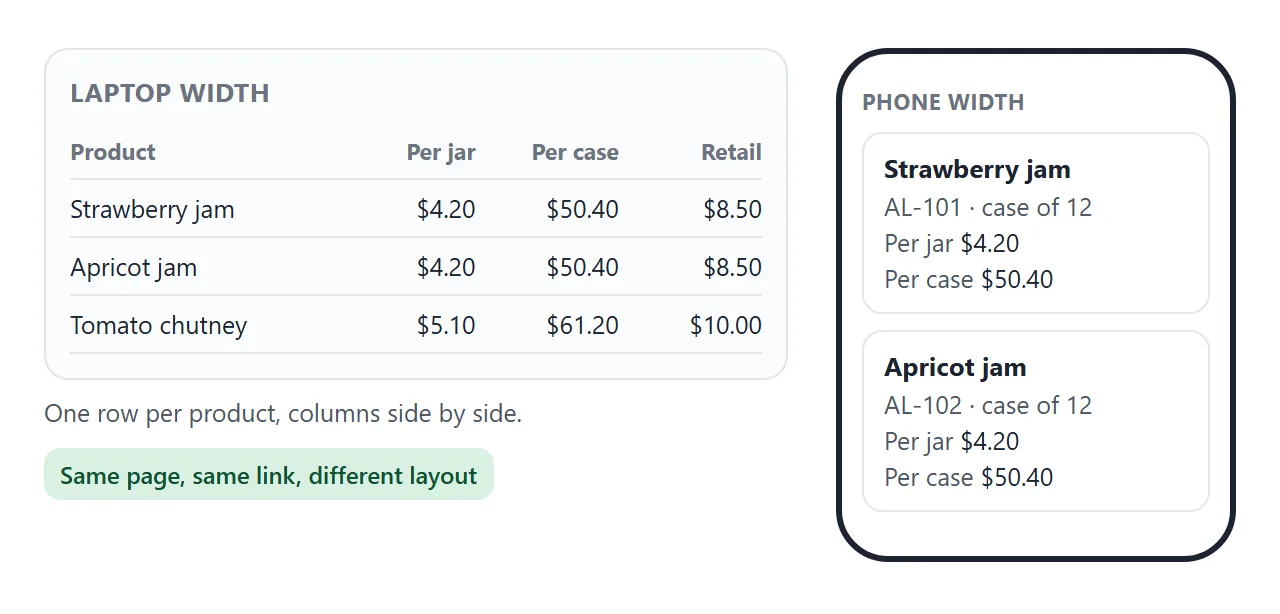
The page also needs the viewport meta tag. MDN notes that some mobile devices draw a page in a wider virtual window and shrink it to fit, and the tag mitigates that.
Make it with AI
Paste this into ChatGPT, Claude or Gemini. Replace everything in square brackets with your own details and keep the rules as they are.
Make one self-contained HTML page: a wholesale product
catalog for [business name]. Use inline CSS and JavaScript
only. No external images, fonts or libraries. Add a viewport
meta tag and make it read well on a phone.

Top of page: "Wholesale price list. Updated [date]. Minimum
order [amount]. Ships within [days]."

Products (use only these; do not add products or change
numbers). Code, name, size, case size, wholesale price per
unit, suggested retail price, status:
[AL-101, Strawberry jam, 8 oz, 12, 4.20, 8.50, available]
[AL-102, ...]

Layout: one row per product, with a small shape drawn in
inline SVG instead of a photo. Columns on a wide screen,
stacked cards on a phone. Put the product list in one array
at the top of the script so I can edit it. Show prices in
equal-width digits. Add filter buttons by type, a cases box
per product, an order total, and a plain-text order summary
the buyer can copy. Disable the cases box for sold out
products. Do not add a form that sends data
anywhere. End with: [email or phone].
Before you use the result, check these:
- Every price, size and case size matches your own list. An AI can round a number or invent a product.
- Enter cases for three products and compare the total with a calculator.
- A Sold out product cannot be added to the order.
- If a picture is missing, the AI probably linked a photo. Ask for inline SVG shapes instead.
If you use Claude, sharing HTML from Claude covers the route from the chat to a page.
Send it as a link
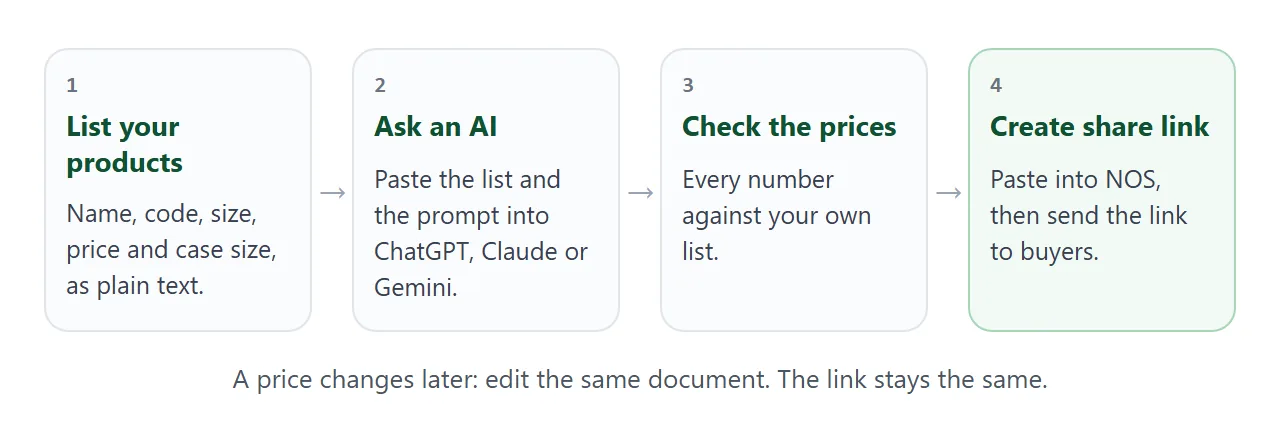
Copy the HTML the AI gave you, paste it into a NOS document and choose Create share link. HTML to link walks through it.
Whoever opens the link sees the page in a browser, on a phone too, with no account. They cannot edit it. The scripts run, so the filter and the cases boxes work for them, although what they type is not saved.
When a price changes, edit the code in the same document. The link stays the same.
Put the link in an email or a text message. For a trade-show card or a box insert, make it a QR code. QR code link explains why the code should point at an address you keep.
Photos: show products without outside images
A catalog page often wants photos, but a picture loaded from another web address will not show here. NOS blocks images from outside, so the buyer sees a blank box where the photo should be, and the text beside it still works.
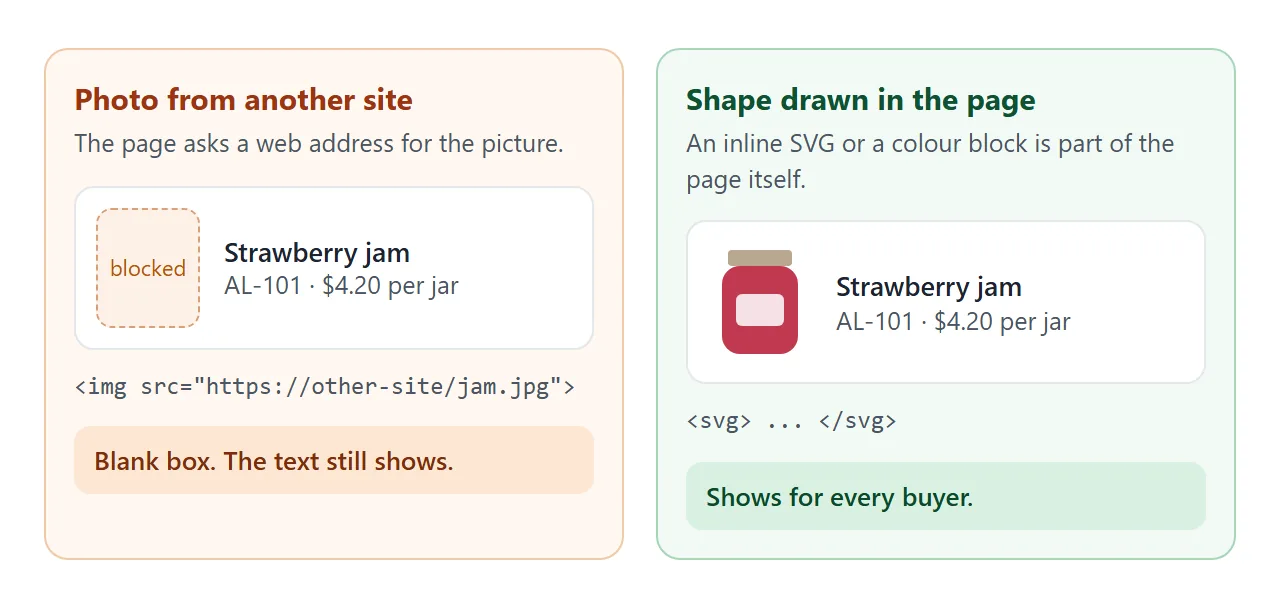
Draw each product as a small inline SVG shape or a block of colour, as the demos do. It needs nothing from outside.
For the real photographs, send them as files when a buyer asks. Why images do not show in HTML lists the other causes.
Ways to send a catalog
The difference shows up the first time a price changes.
| PDF attachment | Link to a page | |
|---|---|---|
| A price changes | Export a new file and send it again | Edit the page. The link stays the same |
| Copies in circulation | Every saved copy keeps the old price | A saved link shows the current page |
| Opening it | Open the attachment | Opens in a browser, phone included, no account |
| Finding a product | Scroll the file | Filter or search on the page |
For a longer range, with one page per product, see online catalog. For a plain list of prices only, see price list link.
A search box for a longer list
When the list grows past a screen, a search box beats filter buttons. This second page is a ceramics catalog with a search field and a Hide sold out box. It matches on name, code or glaze.
<!doctype html>
<html lang="en">
<head>
<meta charset="utf-8">
<meta name="viewport" content="width=device-width, initial-scale=1">
<title>Ceramics catalog</title>
<style>
* { box-sizing: border-box; }
body { margin: 0; font-family: system-ui, sans-serif; color: #22282b; background: #fff; }
.wrap { max-width: 760px; margin: 0 auto; padding: 20px 16px 24px; }
h1 { margin: 0; font-size: 22px; font-family: Georgia, serif; color: #1f5a63; }
.sub { margin: 4px 0 14px; font-size: 14px; color: #5c666a; line-height: 1.5; }
.bar { display: flex; flex-wrap: wrap; gap: 10px 16px; align-items: center; margin-bottom: 8px; }
.bar input[type=search] { flex: 1 1 200px; font: inherit; font-size: 15px; padding: 9px 11px; border: 1px solid #c4cfd2; border-radius: 8px; }
.bar label { font-size: 14px; display: flex; gap: 6px; align-items: center; }
.count { font-size: 13px; color: #5c666a; margin: 0 0 6px; }
.p { display: grid; grid-template-columns: 44px 1fr auto; gap: 12px; align-items: center; padding: 11px 0; border-bottom: 1px solid #e6ecee; }
.sw { width: 44px; height: 44px; }
.t { font-weight: 600; }
.t small { display: block; font-weight: 400; font-size: 13px; color: #5c666a; margin-top: 2px; }
.pr { text-align: right; font-variant-numeric: tabular-nums; white-space: nowrap; font-size: 15px; }
.pr small { display: block; font-size: 12px; color: #5c666a; }
.tag { display: inline-block; font-size: 11px; font-weight: 600; padding: 1px 7px; border-radius: 999px; margin-left: 6px; background: #f3e1dc; color: #8a2f1c; vertical-align: 1px; }
.none { display: none; padding: 14px 0; color: #5c666a; }
.foot { margin-top: 14px; font-size: 13px; color: #5c666a; line-height: 1.5; }
</style>
</head>
<body>
<div class="wrap">
<h1>Tidewater Ceramics</h1>
<p class="sub">Wholesale catalog. Updated 1 October 2026. Sold in sets of 6 per style. Made to order in about 3 weeks.</p>
<div class="bar">
<input type="search" id="q" placeholder="Search name, code or glaze" aria-label="Search the catalog">
<label><input type="checkbox" id="hide"> Hide sold out</label>
</div>
<p class="count" id="count"></p>
<div id="rows">
<div class="p" data-out="0"><svg class="sw" viewBox="0 0 44 44" aria-hidden="true"><path d="M8 12h28l-3 24a4 4 0 0 1-4 3H15a4 4 0 0 1-4-3z" fill="#2b7a86"/><path d="M36 17h2a4 4 0 0 1 0 10h-3" fill="none" stroke="#2b7a86" stroke-width="3"/></svg><div class="t">Stoneware mug<small>TW-110 · 12 oz · sea glaze</small></div><div class="pr">$9.50<small>retail $19</small></div></div>
<div class="p" data-out="0"><svg class="sw" viewBox="0 0 44 44" aria-hidden="true"><path d="M8 12h28l-3 24a4 4 0 0 1-4 3H15a4 4 0 0 1-4-3z" fill="#d8cdb8"/><path d="M36 17h2a4 4 0 0 1 0 10h-3" fill="none" stroke="#d8cdb8" stroke-width="3"/></svg><div class="t">Stoneware mug<small>TW-111 · 12 oz · oat glaze</small></div><div class="pr">$9.50<small>retail $19</small></div></div>
<div class="p" data-out="0"><svg class="sw" viewBox="0 0 44 44" aria-hidden="true"><path d="M4 18h36a18 18 0 0 1-36 0z" fill="#2b7a86"/></svg><div class="t">Cereal bowl<small>TW-220 · 6 in · sea glaze</small></div><div class="pr">$11.00<small>retail $22</small></div></div>
<div class="p" data-out="1"><svg class="sw" viewBox="0 0 44 44" aria-hidden="true"><path d="M4 18h36a18 18 0 0 1-36 0z" fill="#d8cdb8"/></svg><div class="t">Cereal bowl<small>TW-221 · 6 in · oat glaze</small><span class="tag">Sold out</span></div><div class="pr">$11.00<small>retail $22</small></div></div>
<div class="p" data-out="0"><svg class="sw" viewBox="0 0 44 44" aria-hidden="true"><ellipse cx="22" cy="26" rx="19" ry="9" fill="#2b7a86"/><ellipse cx="22" cy="24" rx="13" ry="5" fill="#fff" opacity=".7"/></svg><div class="t">Serving platter<small>TW-310 · 14 in · sea glaze</small></div><div class="pr">$26.00<small>retail $52</small></div></div>
<div class="p" data-out="0"><svg class="sw" viewBox="0 0 44 44" aria-hidden="true"><path d="M14 8h16l3 8v22H11V16z" fill="#a45a3c"/><rect x="16" y="5" width="12" height="5" rx="2" fill="#7a3f27"/></svg><div class="t">Utensil crock<small>TW-410 · 5 in · rust glaze</small></div><div class="pr">$14.50<small>retail $29</small></div></div>
<div class="p" data-out="1"><svg class="sw" viewBox="0 0 44 44" aria-hidden="true"><path d="M10 16h24v4a12 12 0 0 1-24 0z" fill="#a45a3c"/><rect x="21" y="30" width="2" height="8" fill="#7a3f27"/><rect x="14" y="37" width="16" height="3" rx="1.5" fill="#7a3f27"/></svg><div class="t">Egg cup<small>TW-510 · rust glaze</small><span class="tag">Sold out</span></div><div class="pr">$6.00<small>retail $12</small></div></div>
</div>
<p class="none" id="none">Nothing matches that search.</p>
<p class="foot">Prices are per piece in US dollars. Order by email: studio@tidewater.example.</p>
</div>
<script>
const q = document.getElementById('q');
const hide = document.getElementById('hide');
const rows = document.querySelectorAll('#rows .p');
function filter() {
const term = q.value.trim().toLowerCase();
let shown = 0;
rows.forEach((r) => {
const match = r.textContent.toLowerCase().includes(term);
const ok = match && !(hide.checked && r.dataset.out === '1');
r.style.display = ok ? '' : 'none';
if (ok) shown++;
});
document.getElementById('count').textContent = shown + ' of ' + rows.length + ' products shown';
document.getElementById('none').style.display = shown ? 'none' : 'block';
}
q.addEventListener('input', filter);
hide.addEventListener('change', filter);
filter();
</script>
</body>
</html>
It is plain HTML rows with about twenty lines of script. Ask the AI to add a search box to your page, then test a code you know and a word that matches nothing.
When it does not work
| What you see | Cause | Fix |
|---|---|---|
| A blank box where the photo should be | The page loads the photo from a web address, and outside images are blocked | Use inline SVG shapes or colour blocks |
| Prices do not line up | The font uses digits of different widths | Add tabular-nums to the price cells |
| The total looks wrong | The AI changed a price or a case size | Compare with your list and ask it to fix the array |
| Tiny text on a phone | The viewport meta tag is missing | Ask the AI to add it |
| An Order button does nothing | Sending a form to a server is blocked | Use the order text and your email address |
| A map or video box is blank | Iframes are blocked | Write the address as text |
| Quantities reset when reopened | A visitor's changes are not saved | Nothing to fix. Each visit starts from your page |
| The link still shows an old price | The change went into a different copy | Edit the document the link was made from |
If buyers only need prices, send a price list to customers keeps it shorter. Catalog link covers larger ranges.