For a report email to your boss, keep the email to three lines: the result, what you need from them, and a link.
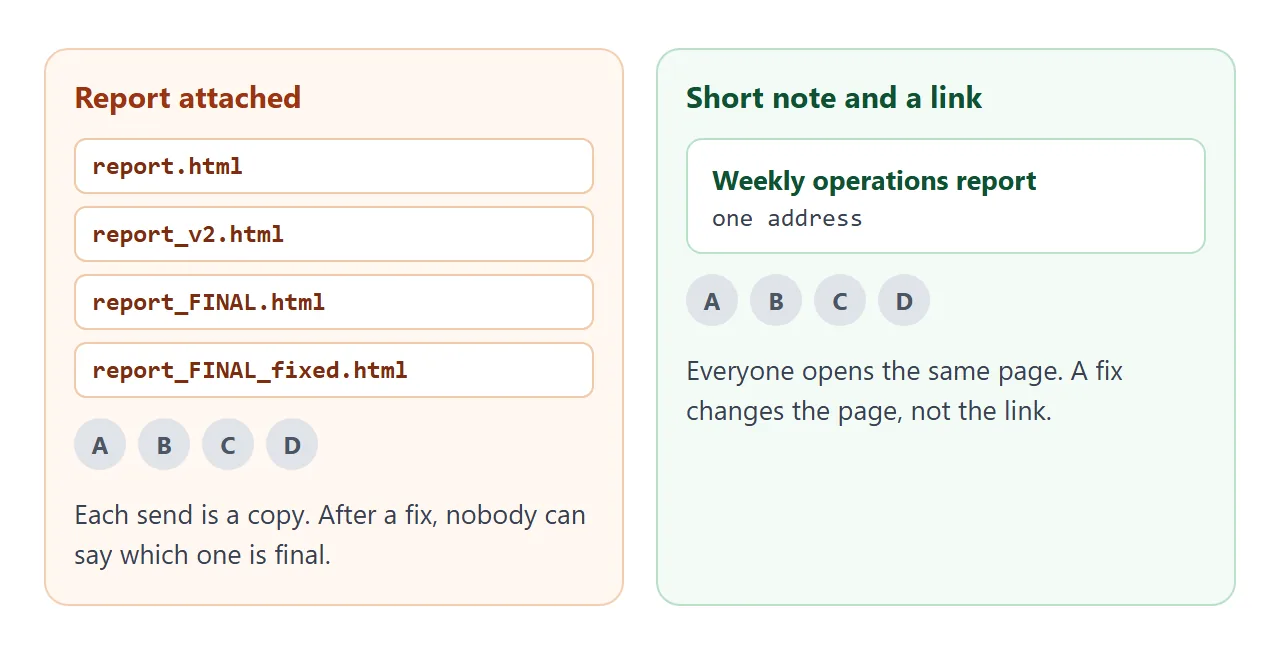
Put the report itself on a page behind that link. Pasting the full report into the email makes it long to read, and attaching it makes a separate copy.
Copies are also where the confusion starts. You fix one number, send another file, and soon several versions are moving through email and chat while nobody can say which is final. A link points at one page, so there is nothing to compare.
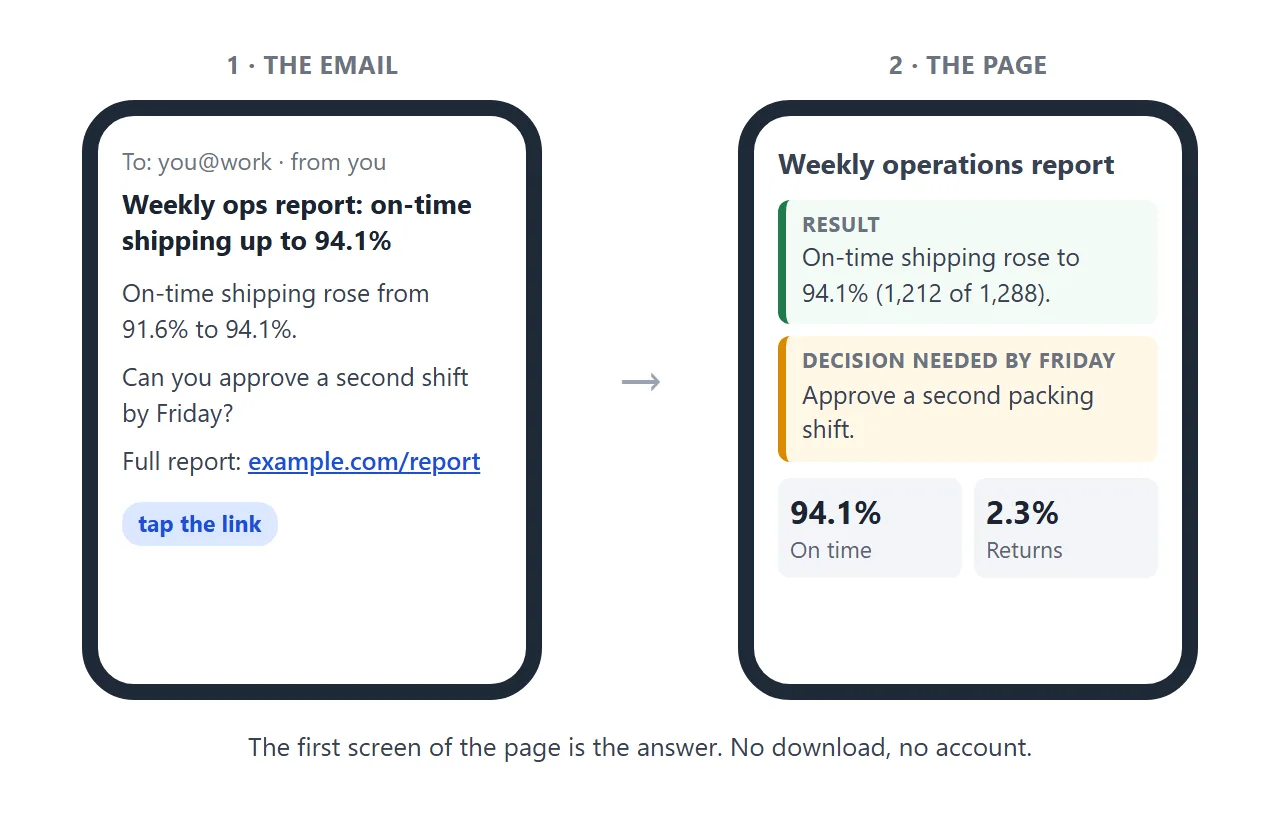
Here is a report page you can copy and adapt. The answer and the decision sit at the top, so the first screen on a phone is the part your boss needs.
<!doctype html>
<html lang="en">
<head>
<meta charset="utf-8">
<meta name="viewport" content="width=device-width, initial-scale=1">
<title>Weekly operations report, week 39</title>
<style>
* { box-sizing: border-box; }
body { margin: 0; background: #f3f5f8; color: #1d2330; font-family: system-ui, -apple-system, "Segoe UI", sans-serif; line-height: 1.5; }
.page { max-width: 720px; margin: 0 auto; padding: 18px 16px 28px; }
.meta { font-size: 13px; color: #5b6472; margin: 0 0 6px; }
h1 { font-size: 24px; line-height: 1.25; margin: 0 0 14px; }
.answer { background: #fff; border-left: 5px solid #1f7a4d; border-radius: 8px; padding: 14px 16px; box-shadow: 0 1px 3px rgba(0,0,0,.08); }
.answer p { margin: 0; font-size: 17px; }
.answer p + p { margin-top: 8px; }
.ask { background: #fff7e6; border-left-color: #d98a00; margin-top: 12px; }
.label { display: block; font-size: 12px; font-weight: 700; letter-spacing: .5px; text-transform: uppercase; color: #5b6472; margin-bottom: 4px; }
.kpis { display: grid; grid-template-columns: repeat(3, 1fr); gap: 10px; margin: 16px 0; }
.kpi { background: #fff; border-radius: 8px; padding: 12px; box-shadow: 0 1px 3px rgba(0,0,0,.08); }
.kpi b { display: block; font-size: 24px; line-height: 1.1; }
.kpi span { display: block; font-size: 13px; color: #5b6472; margin-top: 4px; }
h2 { font-size: 17px; margin: 22px 0 8px; }
.rows { background: #fff; border-radius: 8px; padding: 6px; box-shadow: 0 1px 3px rgba(0,0,0,.08); }
.row { display: grid; grid-template-columns: 64px 1fr 56px; align-items: center; gap: 10px; width: 100%; padding: 10px; border: 0; background: none; font: inherit; color: inherit; text-align: left; cursor: pointer; border-radius: 6px; }
.row:hover, .row.on { background: #eef6f1; }
.bar { height: 12px; background: #e3e7ed; border-radius: 6px; overflow: hidden; }
.bar i { display: block; height: 100%; background: #1f7a4d; }
.pct { text-align: right; font-weight: 700; }
#detail { margin: 8px 4px 0; font-size: 14px; color: #374151; min-height: 21px; }
details { background: #fff; border-radius: 8px; padding: 10px 14px; margin-top: 12px; box-shadow: 0 1px 3px rgba(0,0,0,.08); font-size: 14px; }
summary { cursor: pointer; font-weight: 600; }
details p { margin: 8px 0 0; }
@media (max-width: 480px) {
.kpis { grid-template-columns: 1fr; }
h1 { font-size: 21px; }
}
</style>
</head>
<body>
<div class="page">
<p class="meta">Brightline Supply (sample data) · Operations · Week 39, Sep 21–27</p>
<h1>Weekly operations report</h1>
<div class="answer">
<span class="label">Result</span>
<p>On-time shipping rose to <b>94.1%</b> (1,212 of 1,288 orders), up from 91.6% last week.</p>
</div>
<div class="answer ask">
<span class="label">Decision needed by Friday</span>
<p>Approve a second packing shift for the October peak. Yes or no is enough.</p>
</div>
<div class="kpis">
<div class="kpi"><b>94.1%</b><span>On time: 1,212 of 1,288</span></div>
<div class="kpi"><b>2.3%</b><span>Returns: 30 of 1,288</span></div>
<div class="kpi"><b>61 h</b><span>Overtime, down from 84 h</span></div>
</div>
<h2>On-time shipping by warehouse</h2>
<div class="rows" id="rows">
<button class="row" data-note="North: 461 of 480 orders shipped on time."><span>North</span><span class="bar"><i style="width:96%"></i></span><span class="pct">96.0%</span></button>
<button class="row" data-note="East: 429 of 460 orders shipped on time."><span>East</span><span class="bar"><i style="width:93.3%"></i></span><span class="pct">93.3%</span></button>
<button class="row" data-note="South: 322 of 348 orders shipped on time."><span>South</span><span class="bar"><i style="width:92.5%"></i></span><span class="pct">92.5%</span></button>
</div>
<p id="detail">Tap a warehouse to see the counts.</p>
<details>
<summary>How the numbers were counted</summary>
<p>An order counts as on time if it left the dock by the promised date. Returns are orders sent back within 14 days of delivery. Source: the weekly export from the order system.</p>
</details>
</div>
<script>
// Tap a warehouse row to see the counts behind its percentage
const rows = document.querySelectorAll('.row');
const detail = document.getElementById('detail');
rows.forEach((row) => {
row.addEventListener('click', () => {
rows.forEach((r) => r.classList.remove('on'));
row.classList.add('on');
detail.textContent = row.dataset.note;
});
});
</script>
</body>
</html>
The structure is the part to keep. A result with its base, one clearly marked request, three numbers, then the detail for anyone who wants to check.
A longer report follows the same order: how to share an HTML report as a link covers anchors and sections.
Make it with AI
You do not need to write the HTML. Paste a prompt like this into ChatGPT, Claude or Gemini, and replace the bracketed parts with your own facts.
Make one self-contained HTML page for a weekly report to my manager.
Put at the top: a one-sentence result with its number and base,
then a box called "Decision needed" with one request and a date.
Below that: three key numbers, a small table with simple CSS bars,
and a collapsed "How the numbers were counted" section.
Use only the figures I give you. Do not invent or round anything.
No external images, no external scripts. It must read well on a phone.

My facts:
- Period: [week or month]
- Result: [what changed, from X to Y, with the count behind it]
- Decision needed: [what you need, by when]
- Numbers: [the three figures, each with its base]
- Breakdown: [rows for the table]
Then check the result before you send it.
- Every number matches your source. The chat only knows the figures you gave it, so compare each one with your spreadsheet.
- The first screen holds the answer. If your boss has to scroll to find the result, ask the chat to move it up.
- Nothing depends on another website. Images from other sites are blocked on a share link, so charts should be CSS or inline SVG.
If you want a fuller structure, an HTML report template lists the sections and the figures to check.
Send it as a link
Once the page looks right, turn it into an address. HTML to link walks through the same steps.
- Paste the HTML into a NOS document and check the preview.
- Choose Share, then Share link, then Create share link.
- Copy the address.
- Paste it into your email as the third line of the note.
The page opens in an ordinary browser, on a computer or a phone, and your boss does not need an account.
Scripts in the page run, so a tap-to-expand row or a small calculator works as it did in your preview. Visitors cannot edit the page.
If you change the code later, the link stays the same and shows the new version. That is the fix for a wrong number: correct it once, and nobody has to hunt for the latest file.
A link is plain text, so the same address can go into an email, a chat message or a calendar invite. For chat tools that treat uploaded HTML as a file card, see sending an HTML file in Slack.
Write the three-line note
The email does one job: tell your boss what the report says and what you need. Build yours below. Change the lines and the note updates, with a word count for the two body lines.
<!doctype html>
<html lang="en">
<head>
<meta charset="utf-8">
<meta name="viewport" content="width=device-width, initial-scale=1">
<title>Three-line note builder</title>
<style>
  * { box-sizing: border-box; }
  body { margin: 0; padding: 14px; background: #f3f5f8; color: #1d2330; font-family: system-ui, -apple-system, "Segoe UI", sans-serif; }
  .wrap { max-width: 720px; margin: 0 auto; display: grid; gap: 14px; }
  .card { background: #fff; border-radius: 10px; padding: 14px; box-shadow: 0 1px 3px rgba(0,0,0,.08); }
  label { display: block; font-size: 13px; font-weight: 600; margin: 10px 0 4px; }
  label:first-child { margin-top: 0; }
  input { width: 100%; padding: 9px 10px; font: inherit; font-size: 15px; border: 1px solid #c9ced8; border-radius: 6px; }
  .mail { font-size: 15px; line-height: 1.55; }
  .subject { font-weight: 700; padding-bottom: 8px; border-bottom: 1px solid #e3e7ed; margin-bottom: 10px; }
  .mail p { margin: 0 0 8px; }
  .mail p:last-child { margin-bottom: 0; }
  .bar { display: flex; align-items: center; gap: 10px; flex-wrap: wrap; margin-top: 12px; }
  button { font: inherit; font-size: 14px; font-weight: 600; padding: 8px 14px; border: 0; border-radius: 6px; background: #1f5fd0; color: #fff; cursor: pointer; }
  .count { font-size: 13px; color: #5b6472; }
  .count.long { color: #b3470f; font-weight: 600; }
  .hint { font-size: 13px; color: #5b6472; margin: 0; }
</style>
</head>
<body>
<div class="wrap">
  <div class="card">
    <label for="subj">Subject: what the report says</label>
    <input id="subj" value="Weekly ops report: on-time shipping up to 94.1%">
    <label for="res">Line 1: the result, with its number</label>
    <input id="res" value="On-time shipping rose from 91.6% to 94.1% (1,212 of 1,288 orders).">
    <label for="ask">Line 2: what you need, and by when</label>
    <input id="ask" value="Can you approve a second packing shift for October by Friday?">
    <label for="link">Line 3: the link</label>
    <input id="link" value="https://example.com/your-share-link">
  </div>

  <div class="card">
    <div class="mail" id="mail" tabindex="0">
      <div class="subject" id="o-subj"></div>
      <p>Hi,</p>
      <p id="o-res"></p>
      <p id="o-ask"></p>
      <p>Full report, same link every week: <span id="o-link"></span></p>
    </div>
    <div class="bar">
      <button type="button" id="sel">Select the note</button>
      <span class="count" id="count"></span>
    </div>
    <p class="hint">After selecting, press Ctrl+C (Cmd+C on a Mac) and paste into your email.</p>
  </div>
</div>

<script>
  const ids = { subj: 'o-subj', res: 'o-res', ask: 'o-ask', link: 'o-link' };
  const count = document.getElementById('count');

  function update() {
    for (const [input, out] of Object.entries(ids)) {
      document.getElementById(out).textContent = document.getElementById(input).value;
    }
    // Count the words in the body lines only (not the subject)
    const body = ['res', 'ask'].map((k) => document.getElementById(k).value).join(' ');
    const words = body.trim().split(/\s+/).filter(Boolean).length;
    count.textContent = words + ' words in the two lines';
    count.className = 'count' + (words > 45 ? ' long' : '');
  }

  document.querySelectorAll('input').forEach((el) => el.addEventListener('input', update));

  // Select the whole note so the reader can copy it
  document.getElementById('sel').addEventListener('click', () => {
    const range = document.createRange();
    range.selectNodeContents(document.getElementById('mail'));
    const sel = window.getSelection();
    sel.removeAllRanges();
    sel.addRange(range);
  });

  update();
</script>
</body>
</html>
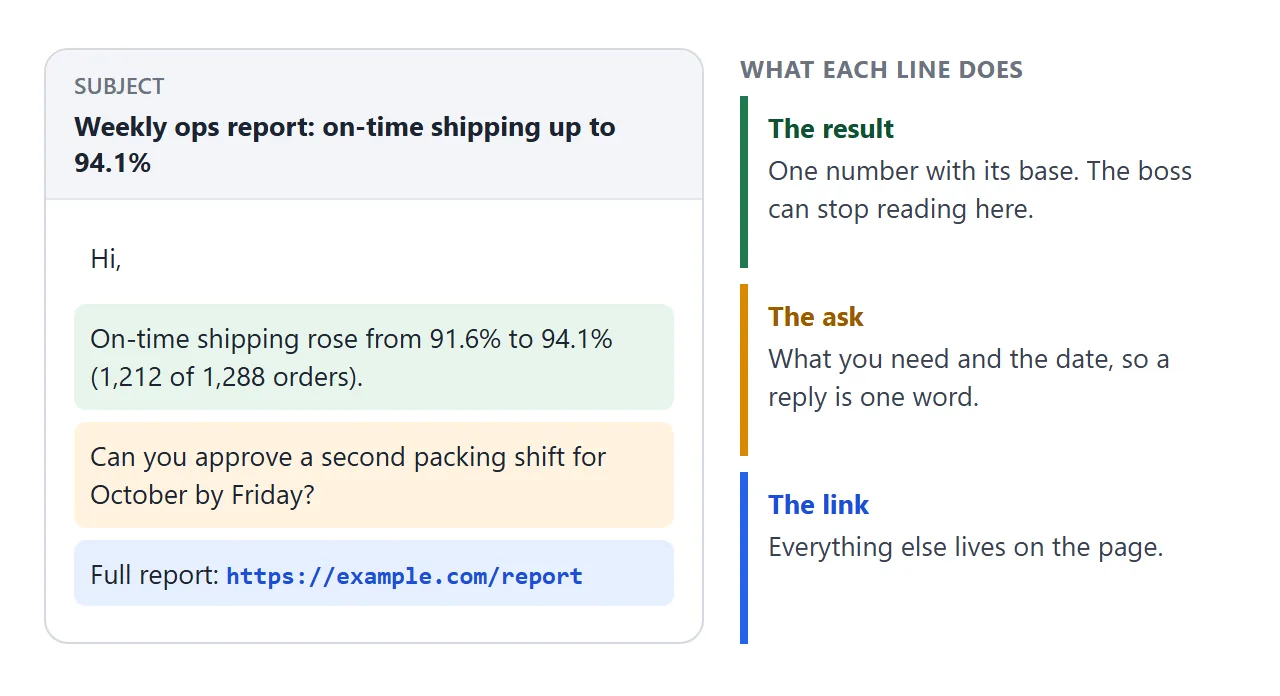
A few habits make the note work:
- Put the result in the subject. Your boss sees the subject before opening anything, so let it carry the finding and not only the word "Report".
- Give one number with its base. "94.1% (1,212 of 1,288 orders)" can be checked. "Improved a lot" cannot.
- Ask for one thing, with a date. A request that can be answered in a word makes the reply quick.
- Skip "see attached". There is no attachment, and the link line already says where the rest is.
One link or one per week
Because editing keeps the same link, a page you update every week always shows the newest week. That is useful for a dashboard. It is a problem if your boss may want to look back at last month.
If history matters, make one page per period and name each clearly. A weekly status report template shows how to add an index page that lists them.
Attachment, pasted text or link
| Attached file | Pasted in the email | Link to a page | |
|---|---|---|---|
| After you fix a number | Recipients keep the old copy | The old text stays in their inbox | The same address shows the fix |
| When it is forwarded | The copy you sent goes along | The text goes along | The current page opens |
| Length of your email | Short | Long | Short |
| Size | Gmail personal accounts: 25 MB, larger files become Drive links | Not applicable | Only the address is sent |
The size row is how Gmail worked as of October 2026. Link versus attachment compares the two in more detail.
When it does not work
| What you see | Cause | Fix |
|---|---|---|
| The page is blank or half-drawn | The HTML was copied only in part | Copy again from the first line to the last, including the closing tag |
| A chart or logo is missing | Images from other websites are blocked | Draw it with CSS or inline SVG, or ask the AI chat to |
| A Send or Submit button does nothing | Sending a form to a server is blocked | Ask for the reply by email, or handle the form inside the page |
| Your boss still sees the old numbers | The old page is open in a tab | Reload the page |
| The link does not open | The address was cut off when pasted | Copy the whole address and check that the email shows it in full |
| The page is hard to read on a phone | The page has no viewport tag or a fixed width | Ask the AI chat to make it mobile-friendly |