To make a save the date with ChatGPT, ask it for one web page with your names, the date, the city, and a line saying the formal invitation will follow. Paste the result into NOS and send the link.
Guests open it on their phones, and you can fix a detail later without sending anything again.
People often start by searching for a free online invitation maker and end up comparing sites. A save the date is much shorter than an invitation, so a single page you control can be enough.
Here is a page like the one the prompt below produces. Try the details line, and change the date in the code to see the countdown follow it.
<!doctype html>
<html lang="en">
<head>
<meta charset="utf-8">
<meta name="viewport" content="width=device-width, initial-scale=1">
<title>Save the date</title>
<style>
* { box-sizing: border-box; }
body {
margin: 0; padding: 24px 16px 32px;
font-family: Georgia, 'Times New Roman', serif;
background: #f6f1ea; color: #2b2a28; line-height: 1.5;
}
.card {
max-width: 460px; margin: 0 auto; padding: 32px 24px 28px;
background: #fffdf9; border: 1px solid #e4d9c8; border-radius: 16px;
text-align: center; box-shadow: 0 8px 28px rgba(80, 60, 30, .10);
}
.kicker { font: 600 13px/1 system-ui, sans-serif; letter-spacing: .22em; text-transform: uppercase; color: #8a5a3c; }
.mono { margin: 16px auto 4px; display: block; }
h1 { margin: 0; font-size: 34px; font-weight: 400; line-height: 1.15; }
.when { margin: 18px 0 2px; font-size: 22px; }
.where { margin: 0; color: #6a625a; }
.count {
display: inline-block; margin: 20px 0 6px; padding: 10px 18px;
background: #f3e7d8; border-radius: 999px; font: 600 15px/1.2 system-ui, sans-serif; color: #6b3f22;
}
.follow { margin: 10px 0 0; font-style: italic; color: #6a625a; }
details {
margin-top: 22px; text-align: left; border-top: 1px solid #e4d9c8; padding-top: 14px;
font: 16px/1.5 system-ui, sans-serif;
}
summary { cursor: pointer; font-weight: 600; color: #6b3f22; }
summary:focus-visible { outline: 3px solid #8a5a3c; outline-offset: 3px; }
details ul { margin: 10px 0 0; padding-left: 20px; }
details li { margin: 6px 0; }
.contact { margin: 22px 0 0; font: 15px/1.5 system-ui, sans-serif; color: #4a443d; }
</style>
</head>
<body>
<main class="card">
<div class="kicker">Save the date</div>
<svg class="mono" width="84" height="84" viewBox="0 0 84 84" role="img" aria-label="Monogram I and R">
<circle cx="42" cy="42" r="39" fill="none" stroke="#8a5a3c" stroke-width="2"/>
<circle cx="42" cy="42" r="33" fill="none" stroke="#d9c3a8" stroke-width="1"/>
<text x="42" y="52" text-anchor="middle" font-family="Georgia, serif" font-size="24" fill="#6b3f22">I & R</text>
</svg>
<h1>Imogen & Rafael</h1>
<p class="when"><time datetime="2027-06-12">Saturday, 12 June 2027</time></p>
<p class="where">Porto, Portugal</p>
<div class="count" id="count" aria-live="polite"> </div>
<p class="follow">The formal invitation will follow in March.</p>
<details>
<summary>What we know so far</summary>
<ul>
<li>The ceremony is in the afternoon; the exact time is still to be confirmed.</li>
<li>A list of nearby hotels will be added to this page.</li>
<li>If the date does not work for you, tell us now so we can plan.</li>
</ul>
</details>
<p class="contact">Questions? Write to imogen.and.rafael@example.com</p>
</main>
<script>
// The event date. Months count from 0, so 5 means June.
const eventDate = new Date(2027, 5, 12);
const out = document.getElementById('count');
function update() {
const now = new Date();
const today = new Date(now.getFullYear(), now.getMonth(), now.getDate());
const days = Math.round((eventDate - today) / 86400000);
if (days > 1) out.textContent = days + ' days to go';
else if (days === 1) out.textContent = 'Tomorrow!';
else if (days === 0) out.textContent = 'Today is the day';
else out.textContent = 'Thank you for celebrating with us';
}
update();
</script>
</body>
</html>
Make it with AI
Paste this into ChatGPT, Claude or Gemini. Replace everything in square brackets with your real details before you send it.
Make a save-the-date page as ONE self-contained HTML file.
All CSS and JavaScript go inside the file. No images, no
fonts or scripts from other sites, no forms.

Details to use exactly as written:
- Names: [Imogen and Rafael]
- Date: [Saturday, 12 June 2027]
- City: [Porto, Portugal]
- Line under the date: [The formal invitation will follow in March.]
- Contact: [email address]

Design: one centred card, large readable text on a phone
390 px wide, one accent colour, a serif heading. Include
the viewport meta tag. Add a "days to go" line worked out
in JavaScript from the date; months count from 0 there.
Add a closed "What we know so far" section with three short
bullets. Do not invent any detail I did not give. Where
something is missing, write TODO.

Return the complete file in one code block.
Three lines in the prompt do real work. "Do not invent" and "write TODO" stop the AI from filling gaps with plausible details. "No forms" keeps it from adding an RSVP button that cannot send anywhere. "One file" gives you something you can paste whole.
Then check the result:
- Every name is spelled the way you spell it.
- The weekday matches the date. Look it up in a calendar; AI tools can get this wrong.
- The city and contact line are yours, and no TODO is left.
- The code starts with a doctype line and ends with a closing html tag. If it is cut off, ask it to continue, or see how to save HTML from ChatGPT.
What belongs on a save the date
Keep it to what guests need to hold the day: who, when, and roughly where. The formal details come later, in the invitation. Everything else is optional.
- Names and the event. Say what it is, so nobody has to guess from a first name.
- Date with the weekday. A guest checks it against their own week.
- City, and the venue only if it is settled. Guessing a venue causes more trouble than leaving it out.
- When more will follow. "Invitation in March" tells people what to wait for.
- One way to reach you. An email address or phone number replaces an RSVP box.
Send it as a link
A link is the part that makes this simple. The steps are the same whichever AI wrote the page.
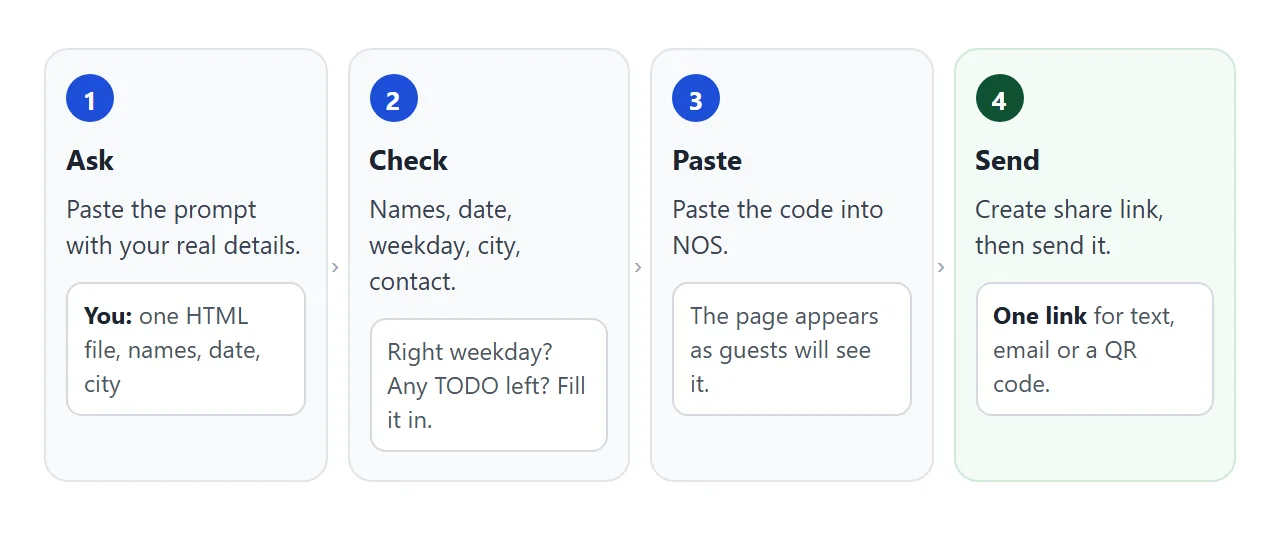
- Open a new NOS document and paste the whole code block.
- The page appears as guests will see it. Click through it once.
- Choose Create share link and copy the address.
- Paste the address into a text, an email or a chat.
HTML to link walks through the same steps with screenshots.
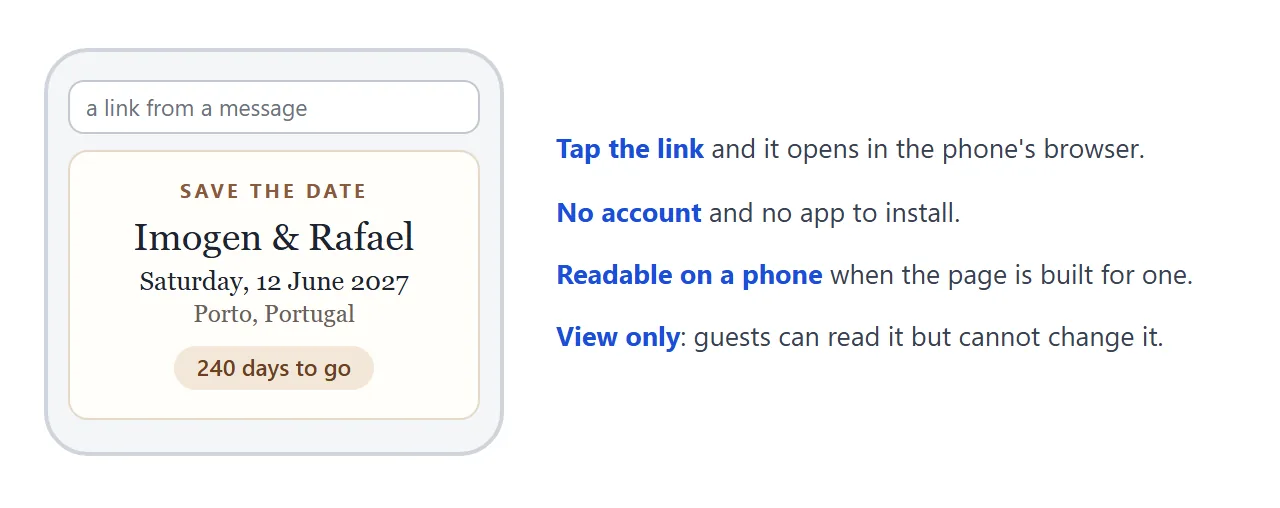
Anyone with the link can open it in a browser, phone included, without an account. They cannot edit it. The page renders as written, so a countdown or a details list works for them too.
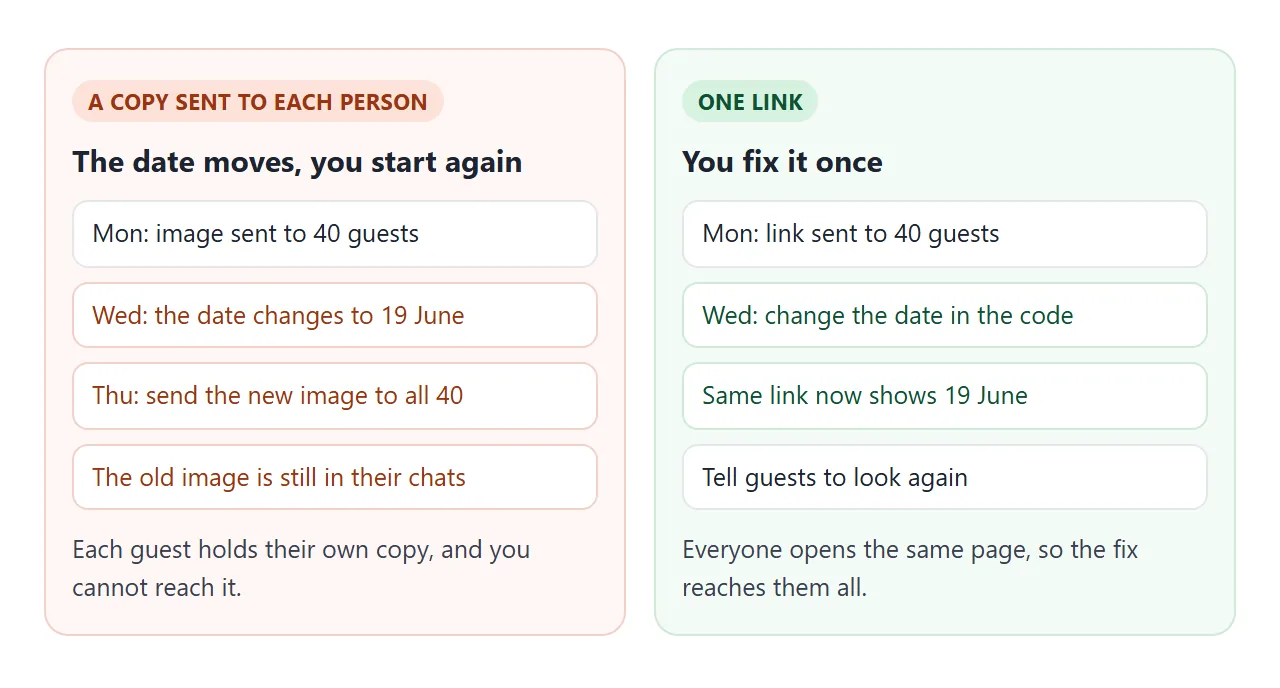
If the date changes, edit the code in your document. The link stays the same and shows the new version. People who already have the page open may need to reload it.
Another version: a page you fill in as you plan
Some events are announced before the details exist. This second page lists what is decided and what is not, so guests see progress rather than a blank. Tick a line and the bar moves.
<!doctype html>
<html lang="en">
<head>
<meta charset="utf-8">
<meta name="viewport" content="width=device-width, initial-scale=1">
<title>Save the date: family reunion</title>
<style>
* { box-sizing: border-box; }
body {
margin: 0; padding: 20px 14px 30px;
font-family: system-ui, -apple-system, 'Segoe UI', sans-serif;
background: #eef3ef; color: #1f2a24; line-height: 1.5;
}
.page { max-width: 520px; margin: 0 auto; }
header {
background: #1f4d3a; color: #fff; border-radius: 16px; padding: 24px 22px;
}
.tag { font-size: 13px; font-weight: 700; letter-spacing: .16em; text-transform: uppercase; color: #bfe3cf; }
h1 { margin: 8px 0 4px; font-size: 28px; line-height: 1.2; }
.date { margin: 0; font-size: 18px; }
.count { margin: 14px 0 0; display: inline-block; background: rgba(255,255,255,.16); padding: 6px 14px; border-radius: 999px; font-weight: 600; font-size: 15px; }
section { margin-top: 16px; background: #fff; border: 1px solid #d6e2da; border-radius: 14px; padding: 18px 18px 14px; }
h2 { margin: 0 0 4px; font-size: 18px; }
.sub { margin: 0 0 12px; color: #4c5d53; font-size: 15px; }
.bar { height: 10px; background: #e1ece5; border-radius: 99px; overflow: hidden; margin-bottom: 12px; }
.bar span { display: block; height: 100%; width: 0; background: #2f8f62; transition: width .25s; }
ul { list-style: none; margin: 0; padding: 0; }
li { border-top: 1px solid #edf2ee; }
label { display: flex; gap: 12px; align-items: flex-start; padding: 12px 2px; cursor: pointer; font-size: 16px; }
input[type=checkbox] { width: 22px; height: 22px; margin: 1px 0 0; accent-color: #2f8f62; flex: none; }
li.done label span { color: #5a6b60; text-decoration: line-through; }
.note { margin: 4px 0 0; font-size: 14px; color: #5a6b60; }
</style>
</head>
<body>
<div class="page">
<header>
<div class="tag">Save the date</div>
<h1>Hartwell Family Reunion</h1>
<p class="date"><time datetime="2027-08-07">Saturday, 7 August 2027</time> · Lakeside Park, Ohio</p>
<div class="count" id="count"> </div>
</header>
<section>
<h2>What is decided so far</h2>
<p class="sub" id="progress"></p>
<div class="bar" aria-hidden="true"><span id="fill"></span></div>
<ul id="list">
<li><label><input type="checkbox" checked><span>Date: Saturday, 7 August</span></label></li>
<li><label><input type="checkbox" checked><span>Place: Lakeside Park, shelter area</span></label></li>
<li><label><input type="checkbox"><span>Start time</span></label></li>
<li><label><input type="checkbox"><span>Food: who brings what</span></label></li>
<li><label><input type="checkbox"><span>Rain plan</span></label></li>
<li><label><input type="checkbox"><span>Formal invitation sent</span></label></li>
</ul>
<p class="note">A ticked line means it is settled. The rest will be filled in here.</p>
</section>
</div>
<script>
const boxes = document.querySelectorAll('#list input');
const progress = document.getElementById('progress');
const fill = document.getElementById('fill');
const count = document.getElementById('count');
function refresh() {
let done = 0;
boxes.forEach((b) => {
b.closest('li').classList.toggle('done', b.checked);
if (b.checked) done++;
});
progress.textContent = done + ' of ' + boxes.length + ' settled';
fill.style.width = (done / boxes.length * 100) + '%';
}
boxes.forEach((b) => b.addEventListener('change', refresh));
refresh();
// Months count from 0, so 7 means August.
const eventDate = new Date(2027, 7, 7);
const now = new Date();
const today = new Date(now.getFullYear(), now.getMonth(), now.getDate());
const days = Math.round((eventDate - today) / 86400000);
count.textContent = days > 1 ? days + ' days to go'
: days === 1 ? 'Tomorrow'
: days === 0 ? 'Today'
: 'Thanks for coming';
</script>
</body>
</html>
On a NOS page you own, your ticks made in View mode are saved. A visitor's ticks are not, so guests cannot change your list.
Ask the AI to turn "what we know so far" into a checklist.
Ways to send a save the date
| Image or PDF | Link to this page | Printed card with a QR code | |
|---|---|---|---|
| What guests do | Download or open the file | Tap the link | Scan the code |
| After the date changes | Send a new file to everyone | Edit once, same link | Printed card stays as it was |
| Good for | A keepsake picture | Anything that may change | Paper mail and posters |
A QR code on paper can still point at your link, so a change reaches people who scanned it later. Turning HTML into a QR code covers that. A calendar entry is a separate job, covered in calendar invite link.
For a fuller invitation after the save the date, see wedding invitation HTML and event invitation online.
When it does not work
| What you see | Cause | Fix |
|---|---|---|
| The weekday is wrong | The AI guessed it | Check a calendar and correct the code |
| TODO shows on the page | You left a detail out of the prompt | Fill it in, or delete the line |
| The countdown is a day off | The month was counted from 1 | In JavaScript, January is 0 |
| An RSVP button does nothing | A form that sends to a server is blocked | Use an email or phone line |
| A picture is missing | It came from another site, which is blocked | Use text, or ask for an inline drawing |
| The page shows code as text | The paste included chat wording, or missed the ending | Paste only the code block, start to end |
| Guests see the old date | They opened the page before your edit | Ask them to reload the page |
The countdown counts from midnight on the date, in the device's own time zone, so a guest in another country can see a different number on the same day.