A unit converter is a number box, two dropdowns and one line of arithmetic. Keep a table of how big each unit is, multiply the number by the first unit's size, then divide by the second's.
Try it: change the number or either unit.
<!doctype html>
<html lang="en">
<head>
<meta charset="utf-8">
<meta name="viewport" content="width=device-width, initial-scale=1">
<title>Unit converter</title>
<style>
  body { margin: 0; padding: 18px; font-family: system-ui, sans-serif; background: #f4f5f7; color: #1d2330; }
  .box { max-width: 460px; margin: 0 auto; background: #fff; border-radius: 12px; padding: 16px; box-shadow: 0 4px 16px rgba(0, 0, 0, .1); }
  .row { display: flex; flex-wrap: wrap; gap: 8px; align-items: center; }
  input, select { font: inherit; font-size: 16px; padding: 8px; border: 1px solid #c9ced8; border-radius: 8px; background: #fff; }
  input { width: 110px; }
  output { display: block; margin-top: 14px; font-size: 24px; font-weight: 700; }
</style>
</head>
<body>
<div class="box">
  <div class="row">
    <input id="num" type="number" step="any" value="12" aria-label="Amount">
    <select id="from" aria-label="From unit"></select>
    <span>to</span>
    <select id="to" aria-label="To unit"></select>
  </div>
  <output id="out"></output>
</div>

<script>
  // metres in one of each unit: the only numbers the converter needs
  const metres = { mm: 0.001, cm: 0.01, m: 1, km: 1000, in: 0.0254, ft: 0.3048, mi: 1609.344 };

  const num = document.getElementById('num');
  const from = document.getElementById('from');
  const to = document.getElementById('to');
  const out = document.getElementById('out');

  // build both dropdowns from the table
  const options = Object.keys(metres).map((u) => '<option value="' + u + '">' + u + '</option>').join('');
  from.innerHTML = options;
  to.innerHTML = options;
  from.value = 'in';
  to.value = 'cm';

  const fmt = new Intl.NumberFormat(undefined, { maximumSignificantDigits: 8 });

  function convert() {
    const n = num.valueAsNumber;                    // NaN when the box is empty
    if (!Number.isFinite(n)) { out.textContent = 'Type a number'; return; }
    const result = n * metres[from.value] / metres[to.value];  // via metres
    out.textContent = fmt.format(n) + ' ' + from.value + ' = ' + fmt.format(result) + ' ' + to.value;
  }

  num.addEventListener('input', convert);
  from.addEventListener('input', convert);
  to.addEventListener('input', convert);
  convert();
</script>
</body>
</html>
Everything lives in one HTML file: the controls in HTML, the looks in a <style> block, the logic in a <script> block. No library is needed. For a general-purpose calculator instead, see HTML calculator code.
How the code works, step by step
The whole converter is one small table and one function.
- Write the table. One entry per unit, holding how many metres it is.
mi: 1609.344means one mile is 1609.344 metres. - Build the dropdowns from the table. Loop over the keys and write one
<option>each. Adding a unit later is one new line. - Read the number.
valueAsNumberon atype="number"input returns a number, orNaNwhen the box is empty. - Convert through metres. The result is
n * metres[from] / metres[to]. - Print it and listen. Write the text into an
<output>element. Call the function on theinputevent of all three controls, and once on page load.
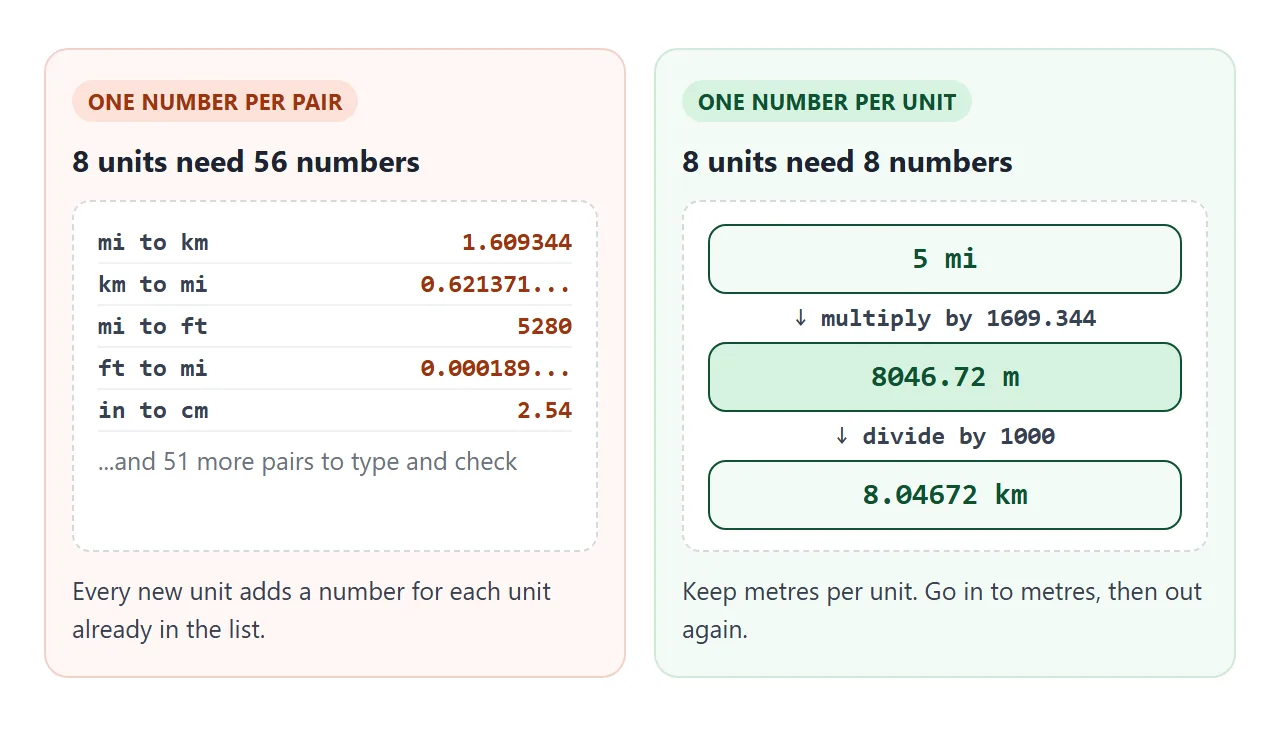
Going through one base unit is what keeps the table short. Eight units converted pair by pair need 56 numbers. Through metres they need 8. The inch, foot and mile factors are exact by definition, so the table can use them as written.
The input event fires for a <select> as well as for a text box, whenever the user changes the value, so one listener style covers every control.
The <output> element is made for the result of a calculation, and many browsers announce changes inside it to screen readers.
Read the number safely, print it cleanly
A text box hands you a string, never a number. Turning that string into a number is where most converters break.
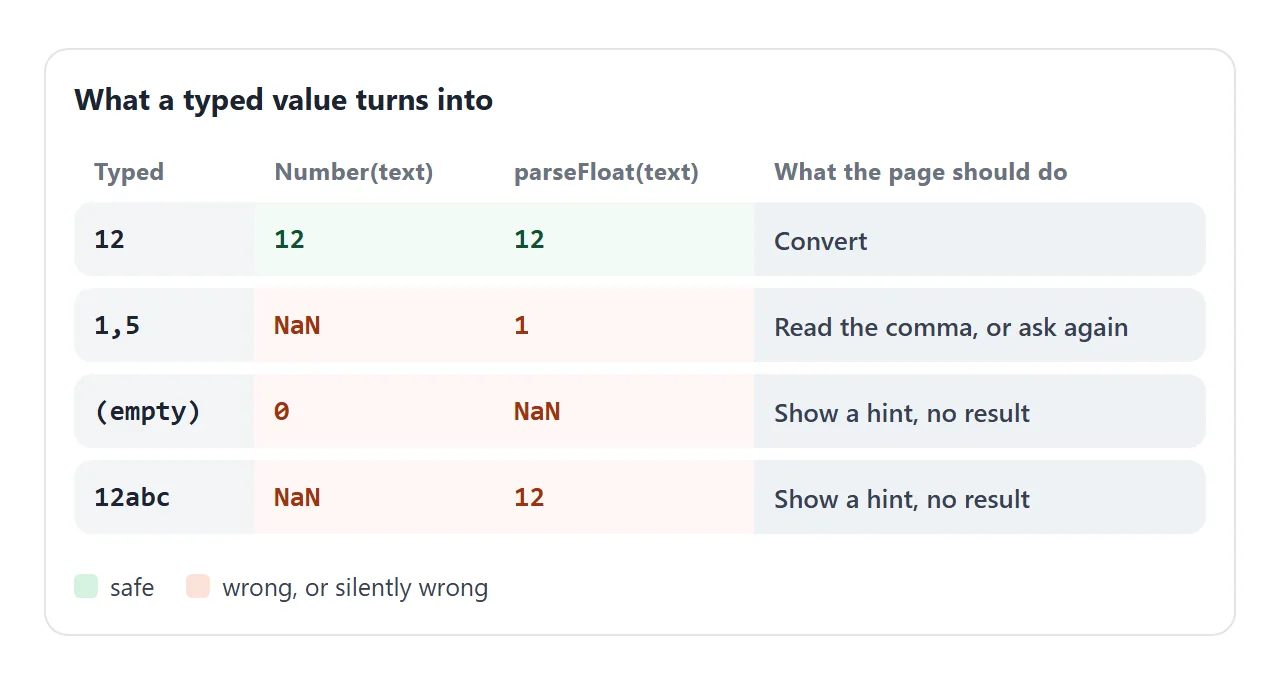
The empty box is the quiet one. Number('') is 0, so a blank input produces a confident 0. With valueAsNumber an empty box gives NaN, and Number.isFinite rejects both NaN and Infinity in one test:
const n = num.valueAsNumber;
if (!Number.isFinite(n)) { out.textContent = 'Type a number'; return; }
With a plain text box you must decide what a comma means. parseFloat('1,5') returns 1 because it stops at the comma, and Number('1,5') is NaN.
The demo below reads a single comma as a decimal point. That is a choice, not a rule: it would read 1,234 as 1.234.
Add step="any" to the number input. Its default step is 1, which allows only whole numbers, so a value such as 1.5 does not match it.
The second trap is the output. JavaScript numbers are IEEE 754 doubles, so a result can carry a tiny error. Twelve inches in feet comes out as 0.9999999999999998.
<!doctype html>
<html lang="en">
<head>
<meta charset="utf-8">
<meta name="viewport" content="width=device-width, initial-scale=1">
<title>Converter mistakes</title>
<style>
  body { margin: 0; padding: 16px; font-family: system-ui, sans-serif; background: #f4f5f7; color: #1d2330; }
  .wrap { max-width: 560px; margin: 0 auto; }
  label { font-weight: 600; }
  input[type=text] { font: inherit; font-size: 16px; width: 130px; padding: 8px; border: 1px solid #c9ced8; border-radius: 8px; margin: 0 6px 0 4px; }
  .presets { margin: 10px 0 14px; display: flex; flex-wrap: wrap; gap: 6px; align-items: center; }
  .presets button { font: inherit; font-size: 14px; padding: 6px 10px; border: 1px solid #c9ced8; border-radius: 99px; background: #fff; cursor: pointer; }
  .cards { display: grid; grid-template-columns: 1fr 1fr; gap: 12px; }
  @media (max-width: 480px) { .cards { grid-template-columns: 1fr; } }
  .card { border-radius: 12px; padding: 12px 14px; border: 1px solid; }
  .bad { background: #fff7f5; border-color: #f3d1c8; }
  .good { background: #f4fbf6; border-color: #cfe9d7; }
  .tag { font-size: 11px; font-weight: 700; letter-spacing: .3px; }
  .bad .tag { color: #9a3412; } .good .tag { color: #0f5132; }
  code { font: 600 12px ui-monospace, Consolas, monospace; display: block; margin: 6px 0; color: #4b5563; overflow-wrap: anywhere; }
  .res { font-size: 18px; font-weight: 700; overflow-wrap: anywhere; min-height: 1.4em; }
</style>
</head>
<body>
<div class="wrap">
  <label for="t">Inches</label><input id="t" type="text" value="12">
  <span>to feet</span>
  <div class="presets">
    Try:
    <button type="button" data-v="12">12</button>
    <button type="button" data-v="1,5">1,5</button>
    <button type="button" data-v="">(empty)</button>
    <button type="button" data-v="abc">abc</button>
  </div>
  <div class="cards">
    <div class="card bad">
      <span class="tag">NAIVE</span>
      <code>Number(text) * 0.0254 / 0.3048</code>
      <div class="res" id="bad"></div>
    </div>
    <div class="card good">
      <span class="tag">CHECKED + FORMATTED</span>
      <code>validate, then Intl.NumberFormat</code>
      <div class="res" id="good"></div>
    </div>
  </div>
</div>

<script>
  const t = document.getElementById('t');
  const bad = document.getElementById('bad');
  const good = document.getElementById('good');
  const fmt = new Intl.NumberFormat('en-US', { maximumSignificantDigits: 8 });

  function run() {
    const text = t.value;

    // naive: no check, raw number printed
    bad.textContent = String(Number(text) * 0.0254 / 0.3048) + ' ft';

    // checked: trim, accept one comma as a decimal point, reject empty and NaN
    const clean = text.trim().replace(',', '.');
    const n = clean === '' ? NaN : Number(clean);
    good.textContent = Number.isFinite(n)
      ? fmt.format(n * 0.0254 / 0.3048) + ' ft'
      : 'Type a number';
  }

  t.addEventListener('input', run);
  document.querySelectorAll('.presets button').forEach((b) => {
    b.addEventListener('click', () => { t.value = b.dataset.v; run(); });  // setting .value fires no input event, so call run()
  });
  run();
</script>
</body>
</html>
Round when you print, not when you calculate. Intl.NumberFormat with maximumSignificantDigits: 8 prints that result as 1 and leaves 8.04672 as it is. Keep the unrounded number for any further math. Intl.NumberFormat covers currency, percent and compact styles.
toFixed(2) is the common shortcut. It returns a string with a fixed number of decimals, which suits money but turns 0.0003 into 0.00.
For more on reading values from inputs and dropdowns, see get input value in JavaScript and the select tag.
Temperature does not fit a factor table
Metres, grams and miles all start at zero together, so one multiplication converts them. Temperature scales do not: 0 °C is 273.15 K, and the Fahrenheit scale adds an offset of 32.
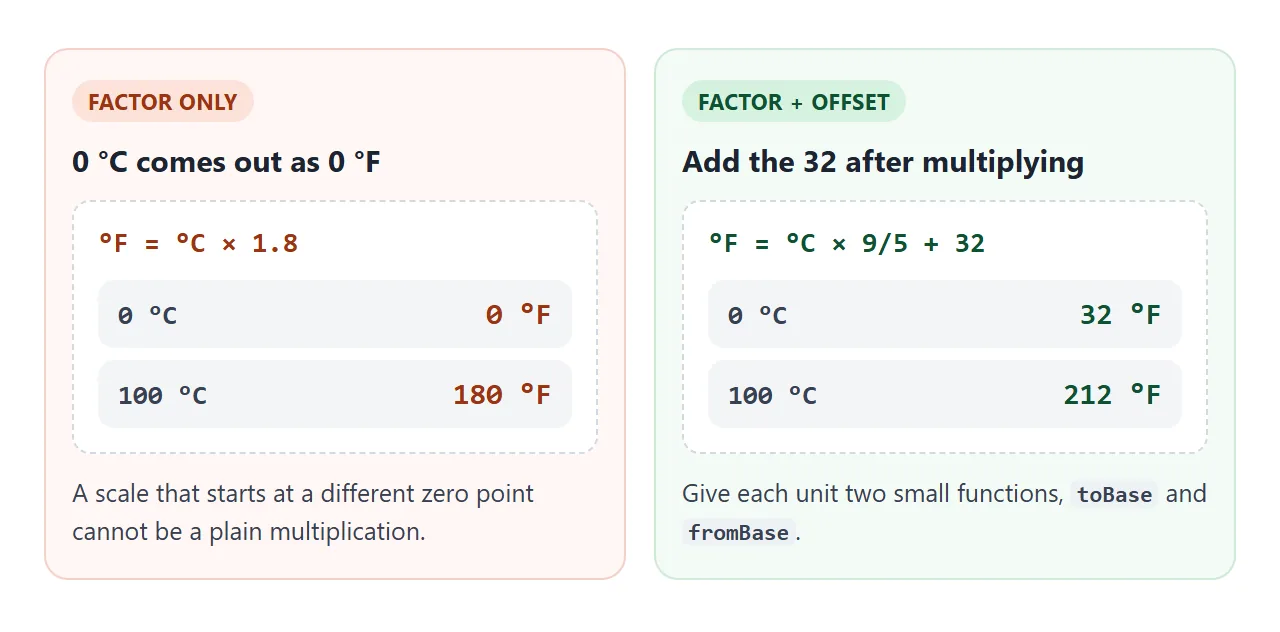
The fix is to give every unit two small functions instead of one number: one into the base unit, one out of it. For length they are multiply and divide. For Fahrenheit and Kelvin they include the offset:
const linear = (f) => ({ toBase: (x) => x * f, fromBase: (x) => x / f });

const temperature = {
  '°C': { toBase: (x) => x, fromBase: (x) => x },
  '°F': { toBase: (x) => (x - 32) * 5 / 9, fromBase: (x) => x * 9 / 5 + 32 },
  'K':  { toBase: (x) => x - 273.15, fromBase: (x) => x + 273.15 },
};
The converter itself does not change. It computes base = from.toBase(n), then result = to.fromBase(base).
Currency: same code, rates you supply
A currency converter is the same program with exchange rates in the table. Pick one base currency, store how many units of each currency one base unit buys, and convert through it.
The hard part is the rates, not the code. Rates change, so a fixed table goes stale.
A page shared from NOS cannot make requests to other sites, so the finished example below has rate boxes you type into. Its numbers are made-up samples, not real rates.
Format the answer with style: 'currency' and an ISO 4217 code such as USD or JPY. The number of decimals follows the currency, so yen shows none:
new Intl.NumberFormat(undefined, { style: 'currency', currency: 'JPY' }).format(15000);
To keep rates live, fill the table from a rates service on a page that is allowed to make that request. The converter code stays the same. Only the source of the numbers changes.
A finished converter
The same pieces, plus tabs for four categories, a swap button, a list of the value in every unit, and editable rates for currency.
<!doctype html>
<html lang="en">
<head>
<meta charset="utf-8">
<meta name="viewport" content="width=device-width, initial-scale=1">
<title>Unit and currency converter</title>
<style>
  body { margin: 0; padding: 14px; font-family: system-ui, sans-serif; background: #f4f5f7; color: #1d2330; }
  .app { max-width: 520px; margin: 0 auto; background: #fff; border-radius: 12px; padding: 14px; box-shadow: 0 4px 16px rgba(0, 0, 0, .1); }
  .tabs { display: flex; flex-wrap: wrap; gap: 6px; margin-bottom: 12px; }
  .tabs button { font: inherit; font-size: 14px; padding: 6px 12px; border: 1px solid #c9ced8; border-radius: 99px; background: #fff; cursor: pointer; }
  .tabs button.on { background: #1d4ed8; border-color: #1d4ed8; color: #fff; }
  .row { display: flex; flex-wrap: wrap; gap: 8px; align-items: center; }
  input, select, .swap { font: inherit; font-size: 16px; padding: 8px; border: 1px solid #c9ced8; border-radius: 8px; background: #fff; }
  #num { width: 100px; }
  .swap { cursor: pointer; }
  output { display: block; margin: 14px 0 6px; font-size: 22px; font-weight: 700; overflow-wrap: anywhere; }
  .note { font-size: 13px; color: #4b5563; margin: 12px 0 6px; }
  .rates { display: grid; grid-template-columns: repeat(auto-fill, minmax(120px, 1fr)); gap: 8px; }
  .rates label { font-size: 14px; display: flex; align-items: center; gap: 6px; }
  .rates input { width: 76px; padding: 6px; font-size: 15px; }
  ul { list-style: none; margin: 12px 0 0; padding: 0; display: grid; grid-template-columns: repeat(auto-fill, minmax(150px, 1fr)); gap: 6px; }
  li { display: flex; justify-content: space-between; gap: 8px; font-size: 14px; background: #f4f5f7; border-radius: 8px; padding: 6px 10px; }
  li b { overflow-wrap: anywhere; text-align: right; }
</style>
</head>
<body>
<div class="app">
  <div class="tabs" id="tabs"></div>
  <div class="row">
    <input id="num" type="number" step="any" aria-label="Amount">
    <select id="from" aria-label="From unit"></select>
    <button type="button" class="swap" id="swap">Swap</button>
    <select id="to" aria-label="To unit"></select>
  </div>
  <output id="out"></output>
  <div id="ratesBox" hidden>
    <p class="note">Sample rates, units per 1 USD. Type your own.</p>
    <div class="rates" id="rates"></div>
  </div>
  <ul id="all"></ul>
</div>

<script>
  // every unit knows how to go to the category's base unit and back
  const linear = (f) => ({ toBase: (x) => x * f, fromBase: (x) => x / f });

  const rates = { EUR: 0.9, GBP: 0.78, JPY: 150, KRW: 1350 };  // sample numbers, not live
  const rateOf = (code) => {
    if (code === 'USD') return 1;
    const v = document.getElementById('rate-' + code).valueAsNumber;
    return v > 0 ? v : NaN;
  };

  const cats = {
    Length: {
      units: { mm: linear(0.001), cm: linear(0.01), m: linear(1), km: linear(1000),
               in: linear(0.0254), ft: linear(0.3048), mi: linear(1609.344) },
      pair: ['mi', 'km'], start: 5,
    },
    Mass: {
      units: { g: linear(0.001), kg: linear(1), lb: linear(0.4535924) },
      pair: ['lb', 'kg'], start: 150,
    },
    Temperature: {  // not a plain factor: Fahrenheit and Kelvin have an offset
      units: {
        '°C': { toBase: (x) => x, fromBase: (x) => x },
        '°F': { toBase: (x) => (x - 32) * 5 / 9, fromBase: (x) => x * 9 / 5 + 32 },
        'K':  { toBase: (x) => x - 273.15, fromBase: (x) => x + 273.15 },
      },
      pair: ['°C', '°F'], start: 100,
    },
    Currency: { units: {}, pair: ['USD', 'EUR'], start: 100, money: true },
  };
  for (const code of ['USD', ...Object.keys(rates)]) {
    cats.Currency.units[code] = {
      toBase: (x) => x / rateOf(code),
      fromBase: (x) => x * rateOf(code),
    };
  }

  const $ = (id) => document.getElementById(id);
  const num = $('num'), from = $('from'), to = $('to'), out = $('out'), all = $('all');
  const fmt = new Intl.NumberFormat(undefined, { maximumSignificantDigits: 8 });
  let cat = 'Length';

  const show = (v, unit) => cats[cat].money
    ? new Intl.NumberFormat(undefined, { style: 'currency', currency: unit }).format(v)
    : fmt.format(v) + ' ' + unit;

  function convert() {
    const c = cats[cat];
    const n = num.valueAsNumber;
    if (!Number.isFinite(n)) { out.textContent = 'Type a number'; all.innerHTML = ''; return; }
    const base = c.units[from.value].toBase(n);
    const result = c.units[to.value].fromBase(base);
    if (!Number.isFinite(result)) { out.textContent = 'Check the rates'; all.innerHTML = ''; return; }
    out.textContent = show(n, from.value) + ' = ' + show(result, to.value);
    all.innerHTML = Object.keys(c.units).map((u) =>
      '<li><span>' + u + '</span><b>' + show(c.units[u].fromBase(base), u) + '</b></li>').join('');
  }

  function setCategory(name) {
    cat = name;
    const c = cats[name];
    const options = Object.keys(c.units).map((u) => '<option value="' + u + '">' + u + '</option>').join('');
    from.innerHTML = options;
    to.innerHTML = options;
    from.value = c.pair[0];
    to.value = c.pair[1];
    num.value = c.start;
    $('ratesBox').hidden = !c.money;
    document.querySelectorAll('#tabs button').forEach((b) => b.classList.toggle('on', b.textContent === name));
    convert();
  }

  // tabs
  Object.keys(cats).forEach((name) => {
    const b = document.createElement('button');
    b.type = 'button';
    b.textContent = name;
    b.addEventListener('click', () => setCategory(name));
    $('tabs').appendChild(b);
  });

  // editable rate boxes
  Object.keys(rates).forEach((code) => {
    const label = document.createElement('label');
    label.innerHTML = code + ' <input id="rate-' + code + '" type="number" step="any" value="' + rates[code] + '">';
    label.querySelector('input').addEventListener('input', convert);
    $('rates').appendChild(label);
  });

  [num, from, to].forEach((el) => el.addEventListener('input', convert));
  $('swap').addEventListener('click', () => {
    [from.value, to.value] = [to.value, from.value];
    convert();  // setting .value from code fires no input event
  });

  setCategory('Length');
</script>
</body>
</html>
- Tabs:
setCategory()rebuilds both dropdowns from the chosen table and picks a starting pair. - Swap: exchange the two dropdown values, then call
convert()yourself. Setting.valuefrom code does not fire aninputevent. - Guards: an empty box says "Type a number", and a zero or empty rate says "Check the rates" instead of showing a broken result.
- Phones: the viewport meta tag keeps the layout phone-sized, and the controls wrap onto a second line on narrow screens.
For other pages built the same way, see single HTML file apps.
When it does not work
| What you see | Cause | Fix |
|---|---|---|
The result says NaN |
The text was not a number, such as a comma or letters | Use type="number", or clean the text first |
| A blank box shows 0 | Number('') is 0 |
Test Number.isFinite(valueAsNumber) |
| 0.9999999999999998 or 12.000000000000002 | Doubles carry tiny rounding errors | Round only when printing, with Intl.NumberFormat |
| 1.5 does not match the field | The default step is 1 | Add step="any" |
| The result is NaN for one unit only | The option value is not a key in the table | Build the options from the table keys |
| Changing a dropdown does nothing | The listener is only on the number box | Listen to all three controls |
| Swap shows the old result | Setting .value fires no input event |
Call convert() after swapping |
| 0 °C shows 0 °F | A factor cannot add the offset | Give each unit toBase and fromBase |
Share it as a link
A converter is something people want to use, not read. A screenshot cannot convert anything, and an .html attachment may open as plain code, or not at all, on a phone. Opening an HTML file on a phone covers why.
To send the working version, paste the page into a NOS document and choose Create share link. HTML to link walks through it.
Anyone with the link can open it without an account, and the scripts run, so they can type their own numbers and pick their own units. If you change the code later, the same link shows the new version.