Vibe coding for teachers means telling an AI in plain words what you want, such as a group maker or a practice quiz, and testing what it builds. You do not write code. The hard step is the last one: getting it to students.
The AI hands you one HTML file. Attached to a message, it asks every student to download it and open it. As a link, it behaves like any website.
A Class Tech Tips post on vibe coding for teachers names one route: "In Google Sites there is the option to add a full page of HTML." This guide covers that route and a link route that needs no site.
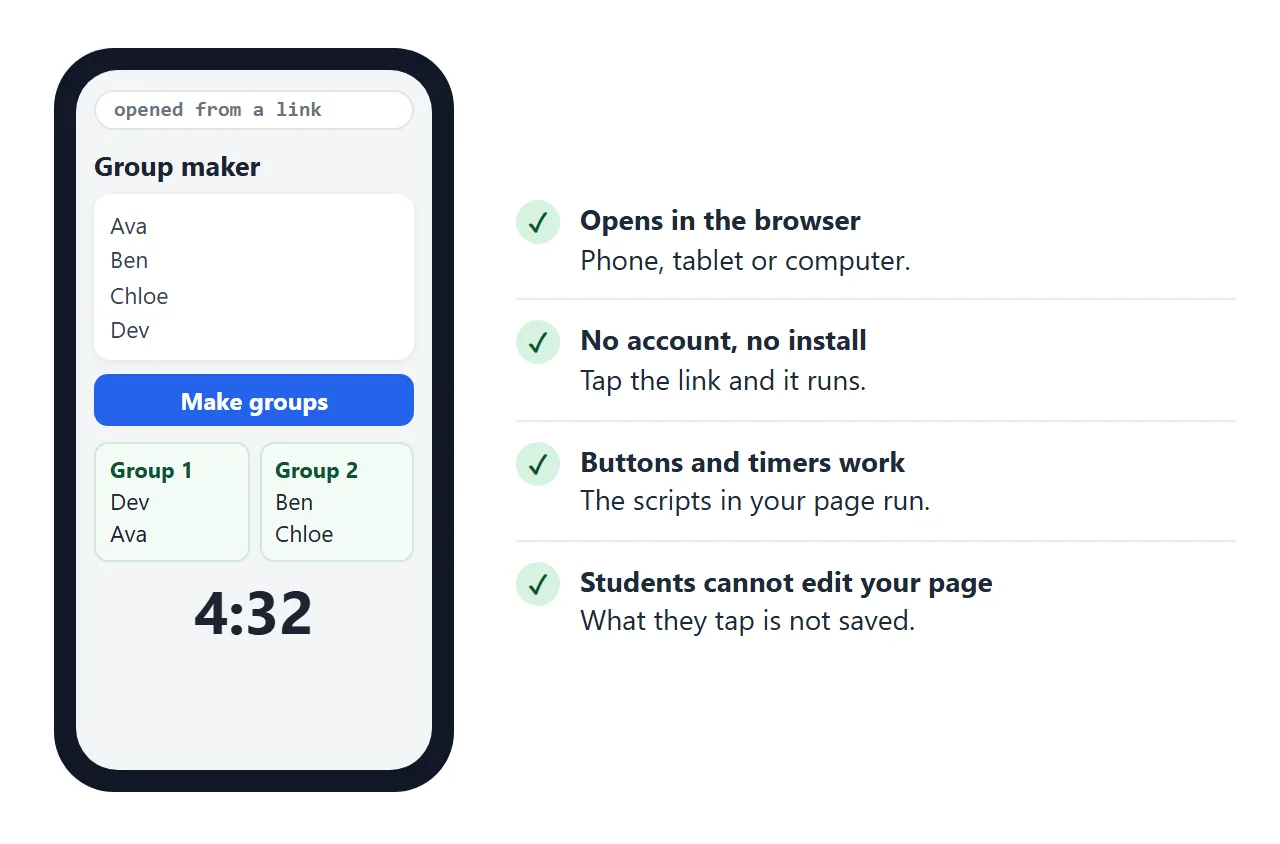
Here is a finished example of what you might ask for. It splits a class into groups and runs a timer. The names are made up. Type your own into the box, and nothing you type is saved.
<!doctype html>
<html lang="en">
<head>
<meta charset="utf-8">
<meta name="viewport" content="width=device-width, initial-scale=1">
<title>Group maker and timer</title>
<style>
  * { box-sizing: border-box; }
  body { margin: 0; padding: 16px; font-family: system-ui, sans-serif; background: #f4f5f7; color: #1d2330; }
  .wrap { max-width: 640px; margin: 0 auto; }
  h1 { font-size: 20px; margin: 0 0 12px; }
  .card { background: #fff; border-radius: 12px; padding: 14px; margin-bottom: 12px; box-shadow: 0 2px 8px rgba(0,0,0,.08); }
  label { display: block; font-size: 13px; font-weight: 600; margin-bottom: 4px; }
  textarea, select { width: 100%; font: inherit; padding: 8px; border: 1px solid #cdd3dc; border-radius: 8px; background: #fff; }
  textarea { height: 96px; resize: vertical; }
  .row { display: flex; gap: 10px; align-items: flex-end; margin-top: 10px; flex-wrap: wrap; }
  .row > div { flex: 1; min-width: 120px; }
  button { font: inherit; font-weight: 600; padding: 9px 16px; border: 0; border-radius: 8px; background: #2563eb; color: #fff; cursor: pointer; }
  button.alt { background: #e5e9f0; color: #1d2330; }
  .groups { display: grid; grid-template-columns: repeat(auto-fill, minmax(130px, 1fr)); gap: 8px; margin-top: 12px; }
  .g { border: 1px solid #cfe9d7; background: #f4fbf6; border-radius: 10px; padding: 8px 10px; }
  .g b { display: block; font-size: 12px; color: #0f5132; margin-bottom: 4px; }
  .g span { display: block; font-size: 14px; }
  .clock { font-size: 44px; font-weight: 700; text-align: center; font-variant-numeric: tabular-nums; margin: 6px 0; }
  .clock.done { color: #c2410c; }
  .hint { font-size: 12.5px; color: #5b6472; margin: 6px 0 0; }
</style>
</head>
<body>
<div class="wrap">
  <h1>Group maker and timer</h1>

  <div class="card">
    <label for="names">Names, one per line</label>
    <textarea id="names">Ava
Ben
Chloe
Dev
Elena
Felix
Grace
Hugo
Iris
Jonas</textarea>
    <div class="row">
      <div>
        <label for="size">People per group</label>
        <select id="size">
          <option>2</option><option selected>3</option><option>4</option><option>5</option>
        </select>
      </div>
      <button id="make" type="button">Make groups</button>
    </div>
    <div class="groups" id="groups"></div>
    <p class="hint" id="note">Press the button again for a new mix.</p>
  </div>

  <div class="card">
    <label for="mins">Work time</label>
    <div class="row" style="margin-top:0">
      <div>
        <select id="mins">
          <option value="1">1 minute</option><option value="3">3 minutes</option>
          <option value="5" selected>5 minutes</option><option value="10">10 minutes</option>
        </select>
      </div>
      <button id="start" type="button">Start</button>
      <button id="reset" type="button" class="alt">Reset</button>
    </div>
    <div class="clock" id="clock">5:00</div>
  </div>
</div>

<script>
  const $ = (id) => document.getElementById(id);

  // Shuffle a copy of the list (Fisher-Yates)
  function shuffle(list) {
    const a = list.slice();
    for (let i = a.length - 1; i > 0; i--) {
      const j = Math.floor(Math.random() * (i + 1));
      [a[i], a[j]] = [a[j], a[i]];
    }
    return a;
  }

  $('make').addEventListener('click', () => {
    const names = $('names').value.split('\n').map((s) => s.trim()).filter(Boolean);
    const size = Number($('size').value);
    const box = $('groups');
    box.innerHTML = '';
    if (names.length < 2) { $('note').textContent = 'Type at least two names first.'; return; }
    const count = Math.ceil(names.length / size);
    const groups = Array.from({ length: count }, () => []);
    // Deal names round-robin so group sizes differ by at most one
    shuffle(names).forEach((n, i) => groups[i % count].push(n));
    groups.forEach((members, i) => {
      const g = document.createElement('div');
      g.className = 'g';
      const h = document.createElement('b');
      h.textContent = 'Group ' + (i + 1);
      g.appendChild(h);
      members.forEach((m) => {
        const s = document.createElement('span');
        s.textContent = m;  // textContent keeps typed names from being read as HTML
        g.appendChild(s);
      });
      box.appendChild(g);
    });
    $('note').textContent = count + (count === 1 ? ' group. Press' : ' groups. Press') + ' the button again for a new mix.';
  });

  // Countdown: compare against an end time so it stays correct if the tab is busy
  let timer = null, endAt = 0;
  const clock = $('clock');
  const show = (ms) => {
    const s = Math.max(0, Math.ceil(ms / 1000));
    clock.textContent = Math.floor(s / 60) + ':' + String(s % 60).padStart(2, '0');
  };
  const stop = () => { clearInterval(timer); timer = null; };

  $('start').addEventListener('click', () => {
    stop();
    clock.classList.remove('done');
    endAt = Date.now() + Number($('mins').value) * 60000;
    show(endAt - Date.now());
    timer = setInterval(() => {
      const left = endAt - Date.now();
      show(left);
      if (left <= 0) { stop(); clock.textContent = 'Time!'; clock.classList.add('done'); }
    }, 250);
  });

  function resetClock() {
    stop();
    clock.classList.remove('done');
    show(Number($('mins').value) * 60000);
  }
  $('reset').addEventListener('click', resetClock);
  $('mins').addEventListener('change', resetClock);
</script>
</body>
</html>
Make it with AI
Open ChatGPT, Claude or Gemini and describe the tool the way you would explain it to a colleague. Say who will use it, on what devices, and what it must do. Then ask for everything in one file.
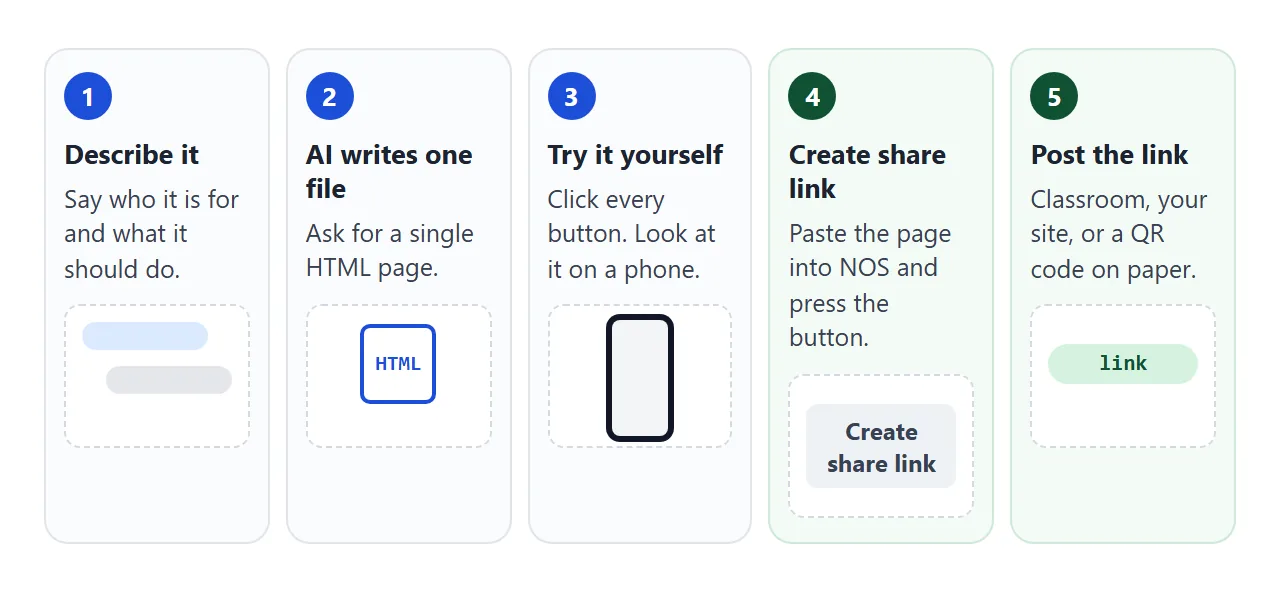
Paste this, and replace the line in brackets with your own idea:
Make a classroom tool as ONE self-contained HTML file.
Audience: students aged 10 to 12, on phones and school laptops.
What it does: [for example, splits a list of names into groups
and has a countdown timer].
Rules:
- Put all CSS and JavaScript inside the same file.
- Do not load images, fonts or scripts from other websites.
- No sign-in, and nothing is sent to a server.
- Large buttons and large text, easy to read on a phone.
- Use made-up example names, never real students.
Reply with the complete file in one code block.
Check it before students do
Before you share anything, test the result yourself:
- Open it alone. Save the code as a file ending in .html, or paste it into a NOS document, and click every button.
- Try to break it. Leave a box empty, type a wrong answer, press a button twice.
- Look at it on a phone. If the text is small or the buttons are close together, say so in your next message.
- Check the facts. AI can get facts and arithmetic wrong, so test every question and answer yourself.
- Keep real names out. Anyone who has the link can open the page, so a class list does not belong inside it.
If something is wrong, tell the AI in plain words ("the Start button is too small on my phone") and ask for the whole file again. Editing AI-generated HTML without code covers small changes, and AI HTML mobile layout covers phone problems.
Send it as a link
Copy the whole file into a NOS document and choose Create share link. HTML to link walks through it. The page renders as written and its scripts run, so buttons, timers and quizzes work for the people you send it to.
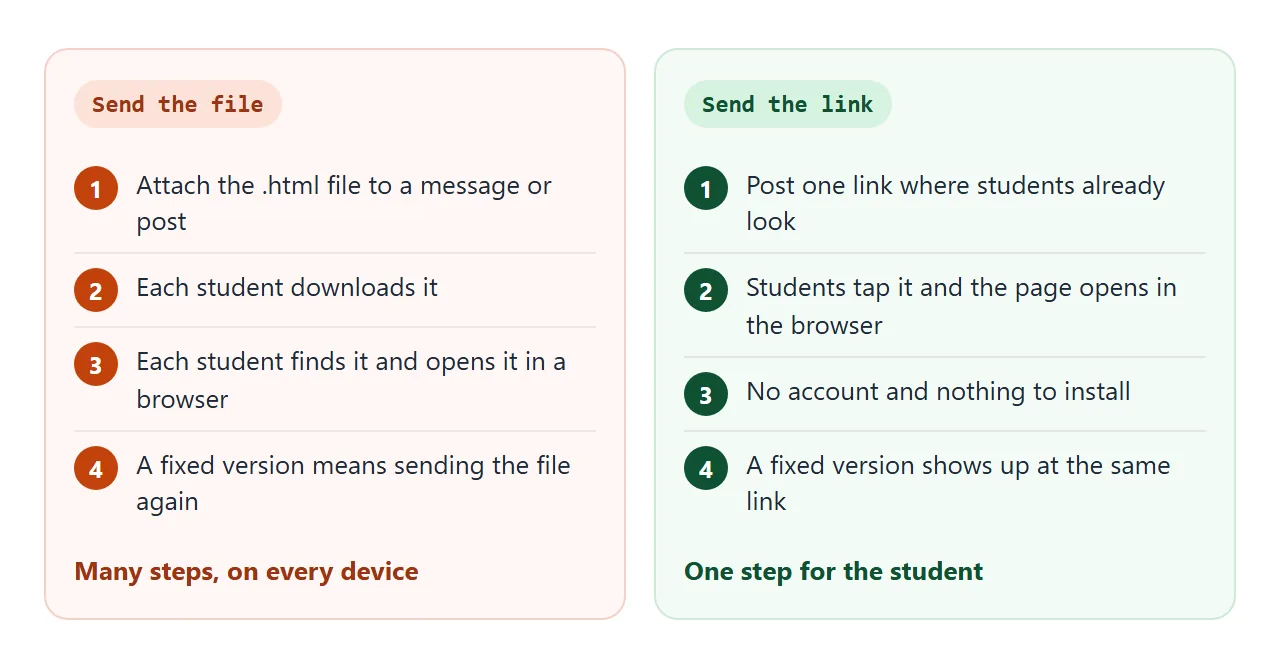
Anyone with the link opens it in a browser, on a phone too, with no account. They cannot edit your page.
If you spot a mistake after posting, change the code in NOS. The same link then shows the new version, so nothing needs sending again.
Put the link where students look
A link is one line of text, so it fits anywhere you already post. Pick the place your students check without being reminded.
| Where | What the student does | What you do |
|---|---|---|
| Google Classroom assignment | Opens the link from the assignment | Classwork, Create, Assignment, then Link |
| Google Classroom material | Opens the link from Classwork | Classwork, Create, Material, Add, Link |
| Full page of HTML in Google Sites | Visits your published site | Pages, Add, Full page embed, then Publish |
| QR code on paper | Scans it with a phone camera | Turn the link into a QR code with any QR maker |
| The .html file as an attachment | Downloads it, then opens it in a browser | Attach the file |
In Classroom, the help page for assignments describes the Link option as "Attach a link to your assignment". For a material post, you click Add, then Link, then Post. Menus can change, so this is as of October 2026.
For Google Sites, Google's help says to open your site on a computer and click Insert, then Embed, then Embed code. Add your code, then click Next and Insert. Or click Pages, hover over Add, and choose Full page embed.
JavaScript must be inside script tags and CSS inside style tags. Click Publish to make it live.
Under Share, a published site is Restricted or Public. With Restricted, only the people you add can open it.
Google notes that work or school accounts may show other options. Google Sites embed goes through the snippet in detail. A QR code for paper is covered in QR code link.
What a page can and cannot do in a class
A single page can do a lot: practice with fresh questions each time, timers, sorting games, calculators, checklists. This one makes new times-table questions, marks each answer on the screen and keeps a running score.
<!doctype html>
<html lang="en">
<head>
<meta charset="utf-8">
<meta name="viewport" content="width=device-width, initial-scale=1">
<title>Times tables practice</title>
<style>
  * { box-sizing: border-box; }
  body { margin: 0; padding: 16px; font-family: system-ui, sans-serif; background: #f4f5f7; color: #1d2330; }
  .wrap { max-width: 460px; margin: 0 auto; background: #fff; border-radius: 14px; padding: 18px; box-shadow: 0 2px 10px rgba(0,0,0,.08); }
  h1 { font-size: 20px; margin: 0 0 10px; }
  label { font-size: 13px; font-weight: 600; }
  select { font: inherit; padding: 6px 8px; border: 1px solid #cdd3dc; border-radius: 8px; margin-left: 6px; }
  .q { font-size: 44px; font-weight: 700; text-align: center; margin: 18px 0 10px; font-variant-numeric: tabular-nums; }
  form { display: flex; gap: 8px; }
  input { flex: 1; min-width: 0; font: inherit; font-size: 22px; padding: 8px 10px; border: 2px solid #cdd3dc; border-radius: 10px; text-align: center; }
  button { font: inherit; font-weight: 600; padding: 9px 16px; border: 0; border-radius: 10px; background: #2563eb; color: #fff; cursor: pointer; }
  button.alt { background: #e5e9f0; color: #1d2330; }
  .msg { min-height: 26px; text-align: center; font-weight: 600; margin: 12px 0 4px; }
  .msg.ok { color: #0f5132; }
  .msg.no { color: #c2410c; }
  .score { display: flex; justify-content: space-between; align-items: center; font-size: 14px; color: #374151; margin-top: 8px; }
</style>
</head>
<body>
<div class="wrap">
  <h1>Times tables practice</h1>
  <label for="table">Practise
    <select id="table">
      <option value="0">Mixed (2 to 12)</option>
      <option>2</option><option>3</option><option>4</option><option>5</option><option>6</option>
      <option>7</option><option>8</option><option>9</option><option>10</option><option>11</option><option>12</option>
    </select>
  </label>

  <div class="q" id="q"></div>
  <form id="f" autocomplete="off">
    <input id="ans" type="number" inputmode="numeric" aria-label="Your answer">
    <button type="submit">Check</button>
  </form>
  <div class="msg" id="msg" aria-live="polite"></div>
  <div class="score">
    <span id="score">Right: 0 of 0</span>
    <button type="button" class="alt" id="reset">Start over</button>
  </div>
</div>

<script>
  const $ = (id) => document.getElementById(id);
  let a = 0, b = 0, right = 0, total = 0, answered = false;

  function nextQuestion() {
    const t = Number($('table').value);
    a = t || 2 + Math.floor(Math.random() * 11);
    b = 1 + Math.floor(Math.random() * 12);
    answered = false;
    $('q').textContent = a + ' × ' + b + ' = ?';
    $('ans').value = '';
    $('ans').focus();
  }

  $('f').addEventListener('submit', (e) => {
    e.preventDefault();  // no server: the page marks the answer itself
    const raw = $('ans').value;
    if (raw === '') return;
    if (answered) { $('msg').textContent = ''; nextQuestion(); return; }
    answered = true;
    total++;
    const msg = $('msg');
    if (Number(raw) === a * b) {
      right++;
      msg.className = 'msg ok';
      msg.textContent = 'Correct. Press Check for the next one.';
    } else {
      msg.className = 'msg no';
      msg.textContent = 'Not quite: ' + a + ' × ' + b + ' = ' + (a * b) + '. Press Check to go on.';
    }
    $('score').textContent = 'Right: ' + right + ' of ' + total;
  });

  function startOver() {
    right = 0; total = 0;
    $('score').textContent = 'Right: 0 of 0';
    $('msg').textContent = '';
    nextQuestion();
  }
  $('reset').addEventListener('click', startOver);
  $('table').addEventListener('change', startOver);
  nextQuestion();
</script>
</body>
</html>
Some things need more than a page. Know the limits before you promise students anything:
- No answers come back to you. Sending a form to a server is blocked, and what a visitor taps is not saved. The page does not report who finished.
- No record of who opened it. NOS has no view counts or names.
- Quiz answers can be found. If the right answers are in the page, a student who views the code can read them.
- Anyone with the link can open it. Treat the link as public.
When you need the same changing data for the whole class, or answers sent to you, that is a job for something running on a server. Vibe coding hosting explains where that line sits.
When it does not work
| What you see | Cause | Fix |
|---|---|---|
| The page shows code as plain text | Only part of the reply was copied, or the text around the code came along | Copy from the first line of the file to the last line only |
| Buttons do nothing in Google Sites | JavaScript sits outside script tags | Wrap the JavaScript in script tags, the CSS in style tags |
| Pictures are missing | Images from other websites are blocked | Ask the AI to draw them inside the page |
| The text is tiny on a phone | The page has no phone layout | Ask for large text and buttons on a narrow screen |
| Students cannot open your Google Site | The published site is set to Restricted | Add them under Share, or set it to Public |
| It opens at home but not on school devices | A school setting may block the address | Ask your school IT whether it can be allowed |
| Answers vanish when the page reloads | A visitor's changes are not saved | Treat the page as practice, not a record |
If clicks still do nothing in a page you made, HTML JavaScript not working lists the usual causes.