A weather app in JavaScript is one HTML page with a short script: build a URL, await fetch it, check response.ok, read response.json(), and put the values on the page with textContent. A city list, a button and one output box are enough to start.
Try the smallest version. Pick a city and press the button.
<!doctype html>
<html lang="en">
<head>
<meta charset="utf-8">
<meta name="viewport" content="width=device-width, initial-scale=1">
<title>Smallest weather app</title>
<style>
  body { margin: 0; padding: 18px; font-family: system-ui, sans-serif; background: #f4f5f7; color: #1d2330; }
  .row { display: flex; gap: 8px; flex-wrap: wrap; }
  select, button { font: inherit; padding: 9px 12px; border-radius: 8px; border: 1px solid #c9ced8; background: #fff; }
  button { background: #2563eb; border-color: #2563eb; color: #fff; cursor: pointer; }
  #out { margin: 16px 0 0; padding: 16px 18px; border-radius: 12px; background: #fff; box-shadow: 0 4px 14px rgba(0,0,0,.08); font-size: 18px; min-height: 56px; }
  small { display: block; margin-top: 12px; color: #6b7280; }
</style>
</head>
<body>
<div class="row">
  <select id="city">
    <option value="37.57,126.98">Seoul</option>
    <option value="51.51,-0.13">London</option>
    <option value="-1.29,36.82">Nairobi</option>
    <option value="64.15,-21.94">Reykjavik</option>
  </select>
  <button id="go">Show weather</button>
</div>
<p id="out">Pick a city, then press the button.</p>
<small>Sample data made in this page, not a real forecast.</small>

<script>
  const out = document.getElementById('out');

  // WMO weather codes, a short version of the table in the Open-Meteo docs
  function describe(code) {
    if (code === 0) return 'Clear sky';
    if (code <= 3) return 'Cloudy';
    if (code <= 48) return 'Fog';
    if (code <= 55) return 'Drizzle';
    if (code <= 65) return 'Rain';
    if (code <= 75) return 'Snow';
    if (code <= 82) return 'Rain showers';
    return 'Thunderstorm';
  }

  async function getWeather(lat, lon) {
    const params = new URLSearchParams({
      latitude: lat,
      longitude: lon,
      current: 'temperature_2m,weather_code',
    });
    const url = 'https://api.open-meteo.com/v1/forecast?' + params;
    const res = await fakeFetch(url);   // on a page you host, write fetch(url)
    if (!res.ok) throw new Error('Server answered ' + res.status);
    return res.json();
  }

  document.getElementById('go').addEventListener('click', async () => {
    const [lat, lon] = document.getElementById('city').value.split(',');
    out.textContent = 'Loading...';
    try {
      const data = await getWeather(lat, lon);
      const c = data.current;
      out.textContent = Math.round(c.temperature_2m) + ' °C, ' + describe(c.weather_code);
    } catch (err) {
      out.textContent = 'Could not load: ' + err.message;
    }
  });

  /* ---- Stand-in for the network. It returns a real Response with the same
     JSON shape as the Open-Meteo forecast endpoint. ---- */
  function fakeFetch(url) {
    const q = new URL(url).searchParams;
    const lat = Number(q.get('latitude')), lon = Number(q.get('longitude'));
    const seed = Math.abs(Math.round(lat * 7 + lon * 3));
    const codes = [0, 1, 2, 3, 45, 61, 63, 71, 80, 95];
    const body = { current: {
      temperature_2m: 27 - Math.abs(lat) * 0.4 + (seed % 5),
      weather_code: codes[seed % codes.length],
    } };
    return new Promise((resolve) => setTimeout(() => resolve(new Response(JSON.stringify(body), {
      status: 200, headers: { 'Content-Type': 'application/json' },
    })), 350));
  }
</script>
</body>
</html>
The numbers here are made up inside the page. A shared NOS page cannot call another site, so a stand-in named fakeFetch returns a real Response with the same JSON shape as the Open-Meteo forecast endpoint. Everything above it is the code you would keep.
How the code works, step by step
Every weather app, small or large, repeats the same moves.
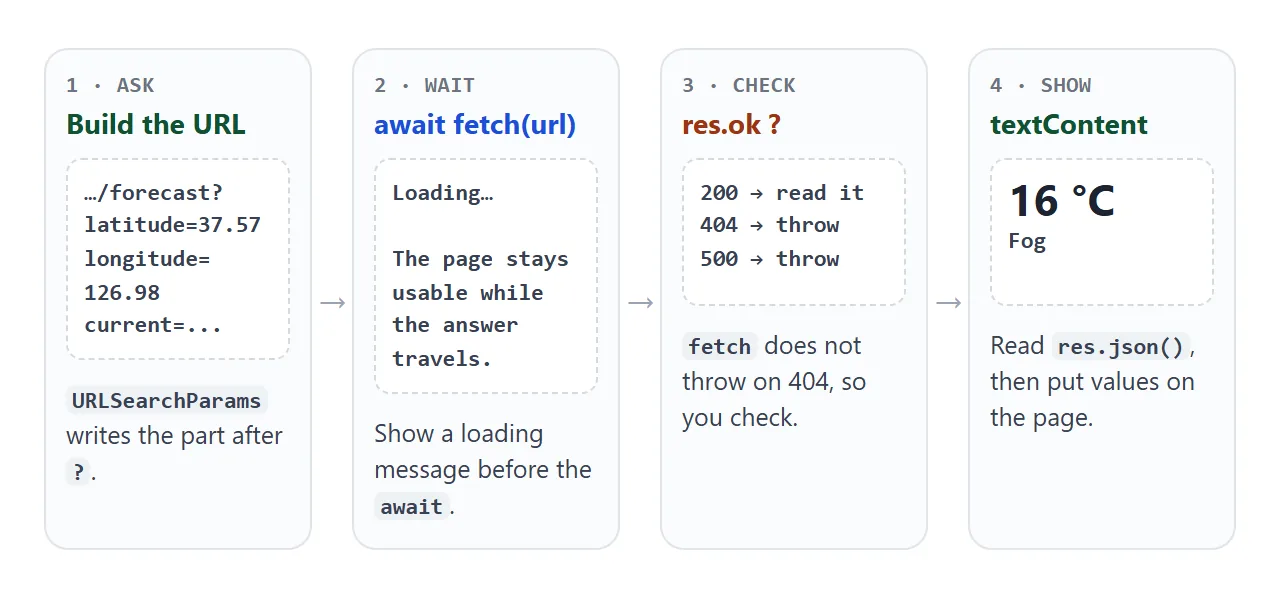
- Build the URL.
URLSearchParamsturns an object of names and values into the text after the question mark. - Show a loading message. Set the status text before the
await. - Call fetch.
await fetch(url)pauses this function, not the page. async and await explains the keywords. - Check the answer. Test
response.ok, readresponse.json(), and confirm the object you need exists. - Write it to the page.
textContentputs the value in as plain text, so data from outside is never run as HTML.
What the weather API sends back
Open-Meteo is one provider that returns weather for a latitude and longitude. Its forecast endpoint is on the host api.open-meteo.com, at the path /v1/forecast. You choose the variables in the current parameter, and the answer contains only those.
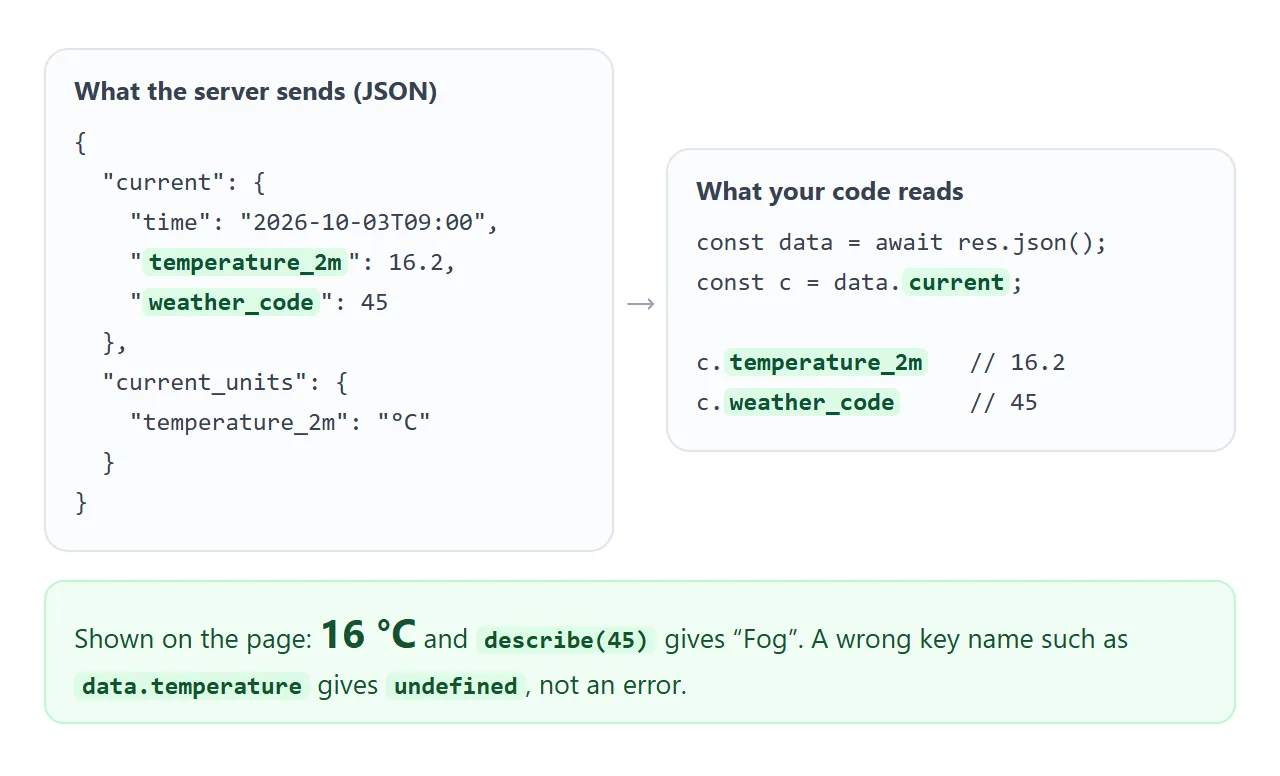
These are the parameters used in this guide:
| Parameter | What it does |
|---|---|
latitude, longitude |
The place. Required. |
current |
Variables for right now, such as temperature_2m and weather_code |
daily |
Variables per day, such as temperature_2m_max |
forecast_days |
How many days of forecast to return |
timezone |
Set to auto to use the place's own time zone |
The weather_code is a number from the WMO table in the Open-Meteo docs, where 0 is clear sky and 95 is a thunderstorm. Your page turns the number into words with a small describe function.
The call on a page you host
On your own page, the stand-in becomes a plain fetch. Nothing else changes.
async function getWeather(lat, lon) {
  const params = new URLSearchParams({
    latitude: lat,
    longitude: lon,
    current: 'temperature_2m,weather_code',
  });
  const res = await fetch('https://api.open-meteo.com/v1/forecast?' + params);
  if (!res.ok) throw new Error('Server answered ' + res.status);
  return res.json();
}
A server on another site must allow your page, or the browser will not let your script read the answer. CORS explained covers that.
Open-Meteo's documentation says no API key is needed for non-commercial use. Commercial use needs one, so check the provider's terms before you publish.
To search by city name, Open-Meteo has a geocoding endpoint that turns a name into coordinates:
const url = 'https://geocoding-api.open-meteo.com/v1/search?name='
  + encodeURIComponent(city) + '&count=1';
The answer has a results array, and each entry has name, latitude and longitude. Guard against an empty array before you read the first entry.
Mistakes that break a weather app
Three things go wrong: the server answers with an error page, the answer lacks the part you read, and the network is down. Compare the same three cases with and without checks.
<!doctype html>
<html lang="en">
<head>
<meta charset="utf-8">
<meta name="viewport" content="width=device-width, initial-scale=1">
<title>Weather app mistakes</title>
<style>
body { margin: 0; padding: 16px; font-family: system-ui, sans-serif; background: #f4f5f7; color: #1d2330; }
label { font-size: 14px; }
select { font: inherit; padding: 8px 10px; border-radius: 8px; border: 1px solid #c9ced8; background: #fff; margin-left: 6px; }
.cols { display: grid; grid-template-columns: 1fr 1fr; gap: 12px; margin-top: 14px; }
@media (max-width: 520px) { .cols { grid-template-columns: 1fr; } }
.box { padding: 12px 14px; border-radius: 12px; background: #fff; border: 2px solid #e1e4ea; }
.box.bad { border-color: #f59e0b; }
.box.good { border-color: #16a34a; }
h2 { margin: 0 0 6px; font-size: 14px; }
.bad h2 { color: #9a3412; }
.good h2 { color: #0f5132; }
.res { font-size: 17px; min-height: 48px; word-break: break-word; }
code { font: 12px ui-monospace, Consolas, monospace; background: #eef1f5; border-radius: 4px; padding: 1px 4px; }
</style>
</head>
<body>
<label>The server answers:
<select id="mode">
<option value="ok">normally</option>
<option value="404">404 with an HTML error page</option>
<option value="empty">200 with no weather in it</option>
<option value="offline">network failure</option>
</select>
</label>
<div class="cols">
<div class="box bad"><h2>Without checks</h2><div class="res" id="bad">-</div><code>res.json()</code> then <code>data.current</code></div>
<div class="box good"><h2>With checks</h2><div class="res" id="good">-</div><code>res.ok</code>, <code>data.current</code>, <code>catch</code></div>
</div>
<script>
const mode = document.getElementById('mode');
const url = 'https://api.open-meteo.com/v1/forecast?latitude=37.57&longitude=126.98¤t=temperature_2m';
// No checks: trusts that everything worked
async function noChecks() {
const res = await fakeFetch(url, mode.value);
const data = await res.json();
return data.current.temperature_2m + ' °C';
}
// Checks: status, shape of the data, and a catch
async function withChecks() {
try {
const res = await fakeFetch(url, mode.value);
if (!res.ok) throw new Error('Server answered ' + res.status);
const data = await res.json();
if (!data.current) throw new Error('No weather in the answer');
return data.current.temperature_2m + ' °C';
} catch (err) {
return 'Could not load weather (' + err.message + ')';
}
}
async function run() {
document.getElementById('bad').textContent = '...';
document.getElementById('good').textContent = '...';
noChecks()
.then((t) => { document.getElementById('bad').textContent = t; })
.catch((e) => { document.getElementById('bad').textContent = e.name + ': ' + e.message; });
withChecks().then((t) => { document.getElementById('good').textContent = t; });
}
mode.addEventListener('change', run);
run();
/* ---- Stand-in for the network ---- */
function fakeFetch(u, how) {
return new Promise((resolve, reject) => setTimeout(() => {
if (how === 'offline') return reject(new TypeError('Failed to fetch'));
if (how === '404') return resolve(new Response('<!doctype html><h1>Not found</h1>', { status: 404, headers: { 'Content-Type': 'text/html' } }));
const body = how === 'empty' ? {} : { current: { temperature_2m: 18.4 } };
resolve(new Response(JSON.stringify(body), { status: 200, headers: { 'Content-Type': 'application/json' } }));
}, 250));
}
</script>
</body>
</html>
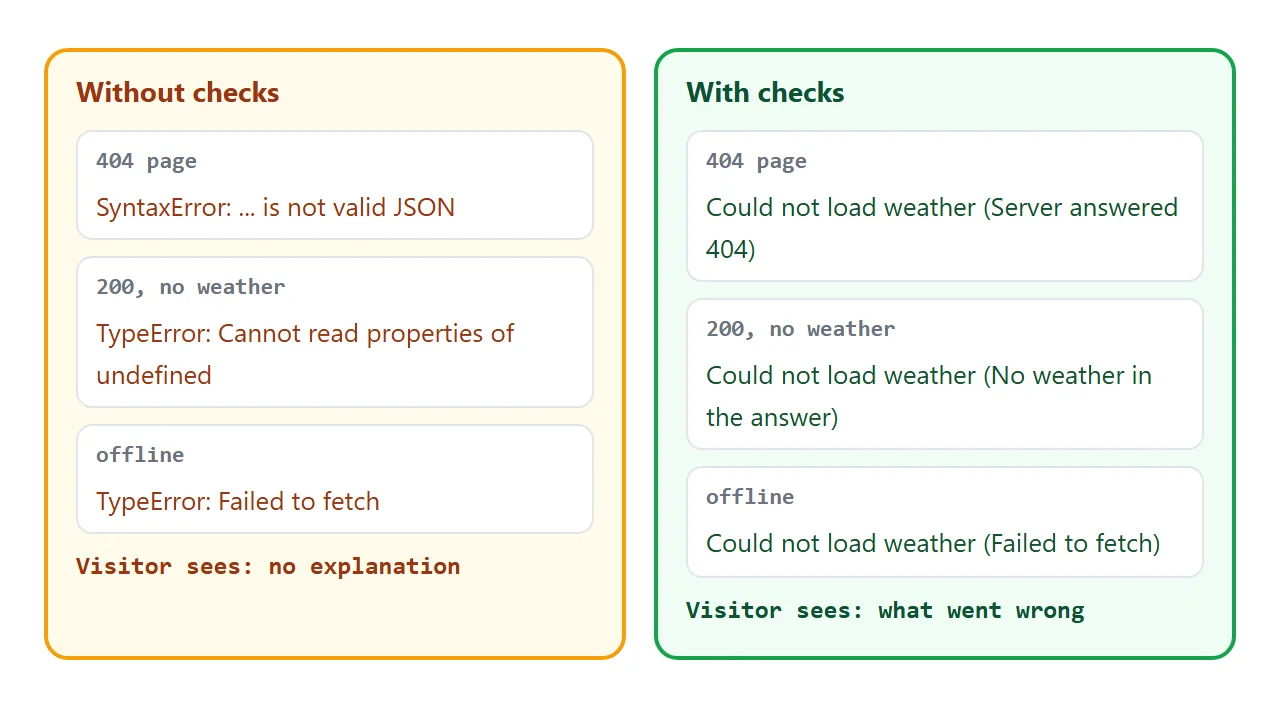
- Status:
fetchonly rejects on a network failure. A 404 still resolves, so testresponse.ok. It is true for statuses from 200 to 299. - Body:
response.json()throws if the body is not JSON, for example an HTML error page. - Shape: a missing
currentobject makesdata.current.temperature_2mthrow. A misspelled key givesundefinedinstead, with no error at all.
City list and "use my location"
A fixed list of cities needs no permission, so it makes a dependable base. Add the visitor's location as an extra.
The getCurrentPosition method of navigator.geolocation takes a success function and an error function. The browser asks the visitor for permission first.
If they refuse, or the browser has no location, the error function runs. Your page should say so and leave the city list working. Geolocation in HTML covers the permission flow.
A finished example: search, location, five days
This version adds a city search, a button that tries the visitor's location, a five-day row and a °C and °F switch.
<!doctype html>
<html lang="en">
<head>
<meta charset="utf-8">
<meta name="viewport" content="width=device-width, initial-scale=1">
<title>Weather app</title>
<style>
  * { box-sizing: border-box; }
  body { margin: 0; padding: 14px; font-family: system-ui, sans-serif; background: #eaf1fb; color: #1d2330; }
  .bar { display: flex; gap: 8px; flex-wrap: wrap; }
  input, button { font: inherit; padding: 9px 12px; border-radius: 8px; border: 1px solid #c9ced8; background: #fff; }
  input { flex: 1; min-width: 120px; }
  button { cursor: pointer; }
  button.on { background: #2563eb; border-color: #2563eb; color: #fff; }
  #suggest { display: flex; gap: 6px; flex-wrap: wrap; margin: 8px 0 0; }
  #suggest button { padding: 5px 10px; font-size: 13px; }
  #card { margin-top: 12px; padding: 16px 18px; border-radius: 14px; background: #fff; box-shadow: 0 4px 14px rgba(0,0,0,.08); }
  #place { font-size: 14px; color: #6b7280; }
  #now { font-size: 44px; font-weight: 700; line-height: 1.1; margin: 4px 0; }
  #desc { font-size: 17px; }
  #days { display: grid; grid-template-columns: repeat(auto-fit, minmax(92px, 1fr)); gap: 8px; margin-top: 12px; }
  .day { padding: 10px 6px; border-radius: 10px; background: #fff; text-align: center; font-size: 13px; overflow-wrap: anywhere; }
  .day b { display: block; margin-bottom: 4px; }
  #msg { margin: 10px 0 0; font-size: 13px; color: #6b7280; min-height: 18px; }
  #msg.err { color: #b45309; }
</style>
</head>
<body>
<div class="bar">
  <input id="q" placeholder="Search a city" aria-label="Search a city" autocomplete="off">
  <button id="loc">Use my location</button>
  <button id="unit">°C</button>
</div>
<div id="suggest"></div>
<div id="card">
  <div id="place">Loading...</div>
  <div id="now">--</div>
  <div id="desc"></div>
</div>
<div id="days"></div>
<p id="msg">Sample data made in this page, not a real forecast.</p>

<script>
  const CITIES = [
    { name: 'Seoul', lat: 37.57, lon: 126.98 }, { name: 'London', lat: 51.51, lon: -0.13 },
    { name: 'Nairobi', lat: -1.29, lon: 36.82 }, { name: 'Reykjavik', lat: 64.15, lon: -21.94 },
    { name: 'Lima', lat: -12.05, lon: -77.04 }, { name: 'Sydney', lat: -33.87, lon: 151.21 },
  ];
  const $ = (id) => document.getElementById(id);
  let fahrenheit = false, last = null;

  function describe(code) {
    if (code === 0) return 'Clear sky';
    if (code <= 3) return 'Cloudy';
    if (code <= 48) return 'Fog';
    if (code <= 55) return 'Drizzle';
    if (code <= 65) return 'Rain';
    if (code <= 75) return 'Snow';
    if (code <= 82) return 'Rain showers';
    return 'Thunderstorm';
  }
  const temp = (c) => Math.round(fahrenheit ? c * 9 / 5 + 32 : c) + '°';

  async function getWeather(lat, lon) {
    const params = new URLSearchParams({
      latitude: lat, longitude: lon, timezone: 'auto', forecast_days: 5,
      current: 'temperature_2m,weather_code,wind_speed_10m',
      daily: 'weather_code,temperature_2m_max,temperature_2m_min',
    });
    const res = await fakeFetch('https://api.open-meteo.com/v1/forecast?' + params);
    if (!res.ok) throw new Error('Server answered ' + res.status);
    const data = await res.json();
    if (!data.current || !data.daily) throw new Error('No weather in the answer');
    return data;
  }

  function render() {
    if (!last) return;
    const { label, data } = last;
    $('place').textContent = label;
    $('now').textContent = temp(data.current.temperature_2m);
    $('desc').textContent = describe(data.current.weather_code) + ', wind ' + Math.round(data.current.wind_speed_10m) + ' km/h';
    $('days').textContent = '';
    data.daily.time.forEach((t, i) => {
      const d = document.createElement('div');
      d.className = 'day';
      const name = document.createElement('b');
      name.textContent = new Date(t + 'T12:00:00').toLocaleDateString('en', { weekday: 'short' });
      d.append(name, describe(data.daily.weather_code[i]), document.createElement('br'),
        temp(data.daily.temperature_2m_max[i]) + ' / ' + temp(data.daily.temperature_2m_min[i]));
      $('days').append(d);
    });
  }

  async function show(label, lat, lon) {
    $('msg').className = '';
    $('msg').textContent = 'Loading...';
    try {
      last = { label, data: await getWeather(lat, lon) };
      render();
      $('msg').textContent = 'Sample data made in this page, not a real forecast.';
    } catch (err) {
      $('msg').className = 'err';
      $('msg').textContent = 'Could not load weather: ' + err.message;
    }
  }

  function suggest() {
    const text = $('q').value.trim().toLowerCase();
    $('suggest').textContent = '';
    CITIES.filter((c) => c.name.toLowerCase().includes(text)).forEach((c) => {
      const b = document.createElement('button');
      b.textContent = c.name;
      b.addEventListener('click', () => show(c.name, c.lat, c.lon));
      $('suggest').append(b);
    });
    if (!$('suggest').children.length) $('suggest').textContent = 'No city in this small list matches.';
  }
  $('q').addEventListener('input', suggest);

  $('unit').addEventListener('click', () => {
    fahrenheit = !fahrenheit;
    $('unit').textContent = fahrenheit ? '°F' : '°C';
    render();
  });

  // Geolocation asks the user first. If it is missing or refused, the city list still works.
  $('loc').addEventListener('click', () => {
    if (!('geolocation' in navigator)) {
      $('msg').className = 'err';
      $('msg').textContent = 'No location here. Pick a city instead.';
      return;
    }
    navigator.geolocation.getCurrentPosition(
      (pos) => show('Your location', pos.coords.latitude, pos.coords.longitude),
      (err) => {
        $('msg').className = 'err';
        $('msg').textContent = 'Location not available (' + err.message + '). Pick a city instead.';
      }
    );
  });

  suggest();
  show('Seoul', 37.57, 126.98);

  /* ---- Stand-in for the network: same JSON shape as the Open-Meteo forecast endpoint ---- */
  function fakeFetch(url) {
    const q = new URL(url).searchParams;
    const lat = Number(q.get('latitude')), lon = Number(q.get('longitude'));
    const seed = Math.abs(Math.round(lat * 7 + lon * 3));
    const codes = [0, 1, 2, 3, 45, 61, 63, 71, 80, 95];
    const base = 27 - Math.abs(lat) * 0.4;
    const daily = { time: [], weather_code: [], temperature_2m_max: [], temperature_2m_min: [] };
    for (let i = 0; i < Number(q.get('forecast_days')); i++) {
      const day = new Date(Date.now() + i * 864e5);
      daily.time.push(day.toISOString().slice(0, 10));
      daily.weather_code.push(codes[(seed + i * 3) % codes.length]);
      daily.temperature_2m_max.push(base + 3 + ((seed + i) % 4));
      daily.temperature_2m_min.push(base - 5 + ((seed + i * 2) % 3));
    }
    const body = {
      current: { temperature_2m: base + (seed % 5), weather_code: codes[seed % codes.length], wind_speed_10m: 6 + (seed % 14) },
      daily,
    };
    return new Promise((resolve) => setTimeout(() => resolve(new Response(JSON.stringify(body), {
      status: 200, headers: { 'Content-Type': 'application/json' },
    })), 300));
  }
</script>
</body>
</html>
- Units: the switch converts the stored Celsius number in JavaScript, so it does not call the server again.
- Search: the buttons are rebuilt from the list on every keystroke.
- Forecast: one
dailyrequest returns arrays, and a loop makes one card per day. - Fallback: a refused location prompt changes the message, nothing else.
For a first look at how a page reads data from other APIs, see APIs in JavaScript. If the page shows only the loading message, work through HTML JavaScript not working.
When it does not work
| What you see | Cause | Fix |
|---|---|---|
undefined on the page |
The key is spelled differently, or not requested | Read data.current and list the variable in current |
SyntaxError from json() |
The server sent an HTML error page | Check response.ok first |
| Cannot read properties of undefined | The answer has no current object |
Check it before reading |
| Failed to fetch | Network down, blocked address or no CORS permission | Show a message, check the console |
| Stuck on Loading | An error was thrown and never caught | Wrap the call in try...catch |
| Location button does nothing | Permission refused or no location available | Show a message and keep the city list |
| Fetch fails on a shared NOS page | Calls to other sites are blocked there | Use a stand-in, or host the page yourself |
Share it as a link
A weather app is easier to try than to describe. A screenshot cannot switch cities, and an .html attachment may open as plain code on a phone. Opening an HTML file on a phone covers why.
To send the working version, paste the page into a NOS document and choose Create share link. HTML to link walks through it.
The page renders as written and its scripts run, so anyone with the link can pick cities and press the buttons without an account. If you change the code later, the same link shows the new version.
On the shared page, fetch calls to other sites are blocked, which is why the examples here use a stand-in. The layout, the checks, the unit switch and the city search all work as written.