You keep a wedding website private by not publishing it anywhere. Make one page for guests, create one link, and send that link only to the people invited. A NOS share link is unlisted: it is not listed anywhere, and it has no password.
That is the honest shape of "private" here. The link is the only door, so who holds it decides who can open the page. Plan for the link being forwarded, and put nothing on the page that would worry you if it were.
Try a guest page first. Tap the three tabs.
<!doctype html>
<html lang="en">
<head>
<meta charset="utf-8">
<meta name="viewport" content="width=device-width, initial-scale=1">
<title>Ari and Sol, 12 June 2027</title>
<style>
* { box-sizing: border-box; }
body { margin: 0; font-family: Georgia, "Times New Roman", serif; background: #f6f1ea; color: #3b2f2f; }
.wrap { max-width: 520px; margin: 0 auto; padding: 22px 18px 28px; text-align: center; }
.rings { width: 64px; height: 40px; }
h1 { font-weight: 400; font-size: 34px; margin: 6px 0 2px; letter-spacing: .5px; }
.when { font: 600 13px/1.4 system-ui, sans-serif; letter-spacing: 2px; text-transform: uppercase; color: #8a5a44; }
.tabs { display: flex; gap: 6px; justify-content: center; margin: 20px 0 14px; }
.tabs button { font: 600 14px system-ui, sans-serif; padding: 9px 14px; border: 1px solid #d9c9b8; background: #fff; color: #5a4636; border-radius: 99px; cursor: pointer; }
.tabs button[aria-selected="true"] { background: #8a5a44; border-color: #8a5a44; color: #fff; }
.panel { background: #fff; border-radius: 14px; padding: 16px 18px; text-align: left; font: 15px/1.55 system-ui, sans-serif; box-shadow: 0 3px 14px rgba(90, 70, 54, .1); }
.panel[hidden] { display: none; }
.row { display: flex; gap: 12px; padding: 7px 0; border-bottom: 1px solid #f0e8de; }
.row:last-child { border-bottom: 0; }
.row b { min-width: 52px; color: #8a5a44; }
.note { font: 13px/1.5 system-ui, sans-serif; color: #7a6a5c; margin-top: 16px; }
</style>
</head>
<body>
<div class="wrap">
<svg class="rings" viewBox="0 0 64 40" aria-hidden="true">
<circle cx="24" cy="22" r="14" fill="none" stroke="#c9a27e" stroke-width="3"/>
<circle cx="40" cy="22" r="14" fill="none" stroke="#8a5a44" stroke-width="3"/>
</svg>
<h1>Ari & Sol</h1>
<div class="when">Saturday 12 June 2027</div>
<div class="tabs" role="tablist">
<button role="tab" aria-selected="true" data-tab="day">The day</button>
<button role="tab" aria-selected="false" data-tab="getting">Getting there</button>
<button role="tab" aria-selected="false" data-tab="reply">Reply</button>
</div>
<div class="panel" id="day">
<div class="row"><b>14:00</b><span>Ceremony, Harbour Hall</span></div>
<div class="row"><b>15:00</b><span>Drinks on the terrace</span></div>
<div class="row"><b>18:00</b><span>Dinner</span></div>
<div class="row"><b>22:00</b><span>Last song, taxis outside</span></div>
</div>
<div class="panel" id="getting" hidden>
<div class="row"><b>Where</b><span>Harbour Hall, 4 Quay Road, Brightwater</span></div>
<div class="row"><b>Park</b><span>The car park behind the hall opens at 13:00.</span></div>
<div class="row"><b>Wear</b><span>Smart, with shoes that cope with gravel.</span></div>
</div>
<div class="panel" id="reply" hidden>
<div class="row"><b>By</b><span>Please tell Ari or Sol by 1 May.</span></div>
<div class="row"><b>How</b><span>Send a message to the number you already have for us.</span></div>
</div>
<p class="note">This page is for invited guests. Please do not forward the link.</p>
</div>
<script>
const tabs = document.querySelectorAll('.tabs button');
const panels = document.querySelectorAll('.panel');
tabs.forEach((tab) => {
tab.addEventListener('click', () => {
tabs.forEach((t) => t.setAttribute('aria-selected', t === tab ? 'true' : 'false'));
panels.forEach((p) => { p.hidden = p.id !== tab.dataset.tab; });
});
});
</script>
</body>
</html>
It carries what a guest needs and little else. Note what is missing: no home address, no list of who is coming, no bank details.
Make it with AI
An AI chat can write this page in one go. The prompt below tells it what to include and, just as useful, what to leave out.
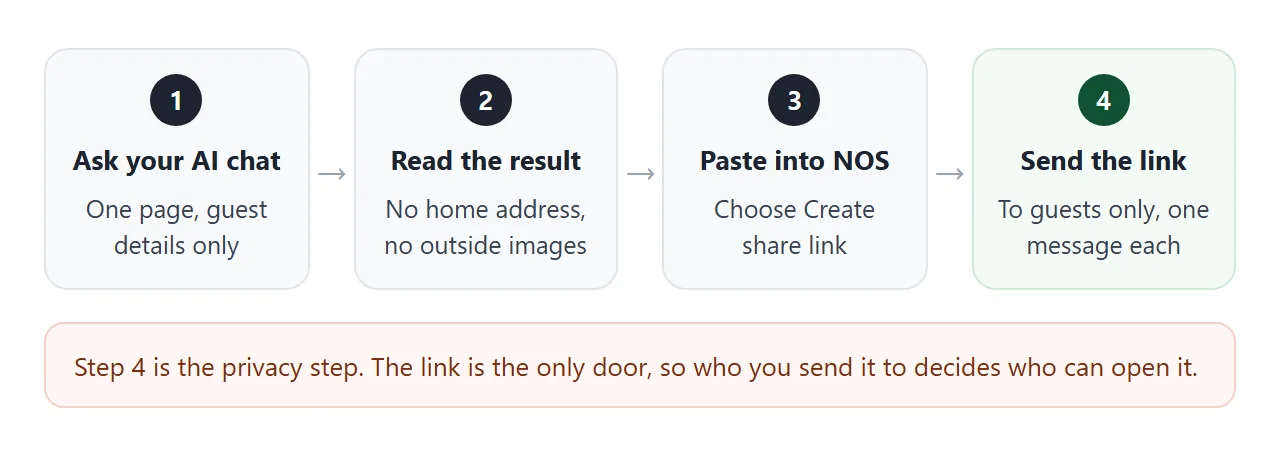
Write one self-contained HTML page for wedding guests.
Couple: Ari and Sol. Date: Saturday 12 June 2027.
Venue: Harbour Hall, 4 Quay Road, Brightwater.
Schedule: 14:00 ceremony, 15:00 drinks, 18:00 dinner, 22:00 end.
Add short sections for parking, dress code, and how to reply.
Reply by 1 May by sending Ari or Sol a message (plain text).
Rules: one HTML file, CSS and JavaScript inside it, no images
from other websites, no form that submits anywhere, readable
on a phone. Do not add a home address, phone numbers or a
guest list.
Swap in your own names, date and venue. Then read the result before you use it.
- Every detail is right. Date, weekday and times agree with each other.
- No extra personal details. Chat tools sometimes add a made-up address or a phone number.
- No outside images or fonts you did not ask for. Pictures from other sites will not show on a NOS link.
- A viewport line is present, so the page is sized for phones.
Send it as a link
Copy the finished HTML, paste it into a NOS document, and choose Create share link. HTML to link walks through it. The page renders as written and its scripts run, so the tabs in the demo above work for your guests too.
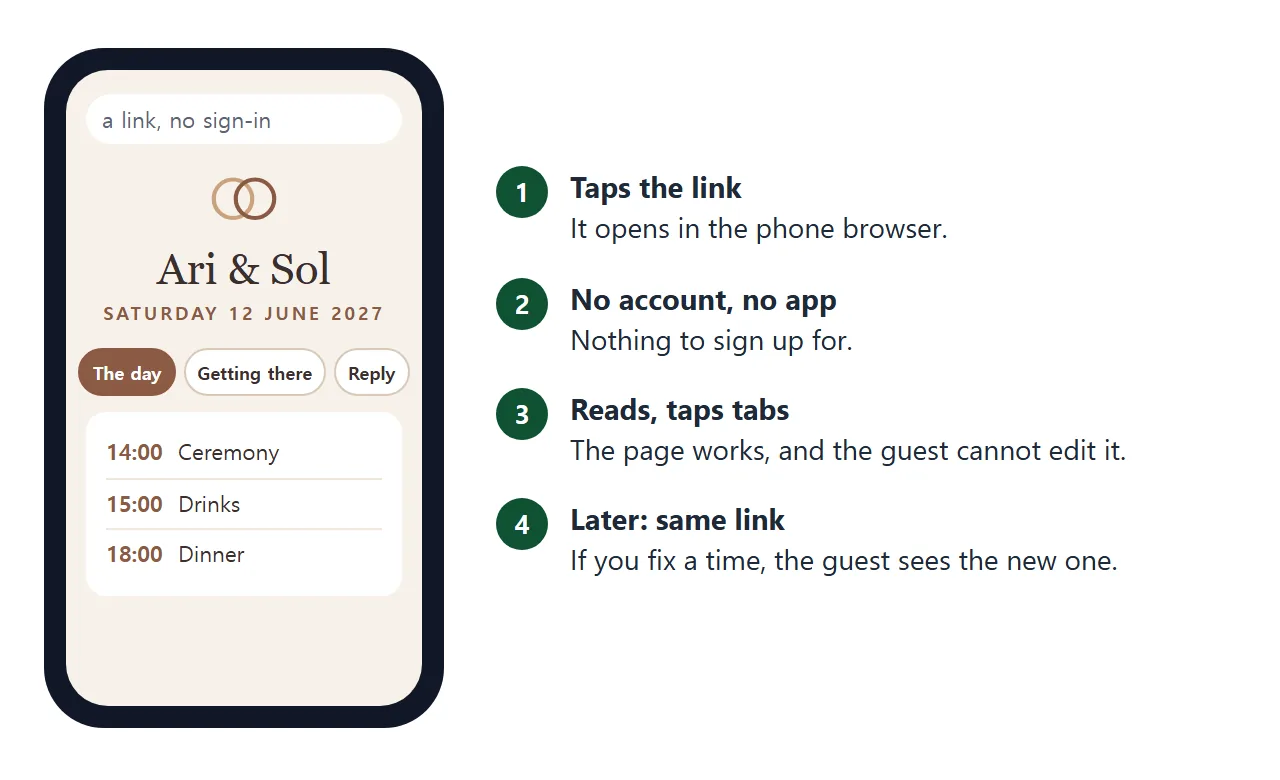
Guests open the link in a browser, on a phone or a computer, without an account. They can read the page but not edit it. If you fix a time later, edit your document and the same link shows the new version.
To put the link on paper, a QR code on the card opens the same page for anyone who scans it. See QR code link for that step.
What an unlisted link does and does not do
The link gives you a page that only link holders reach, with no sign-up for them. It does not give you a lock.
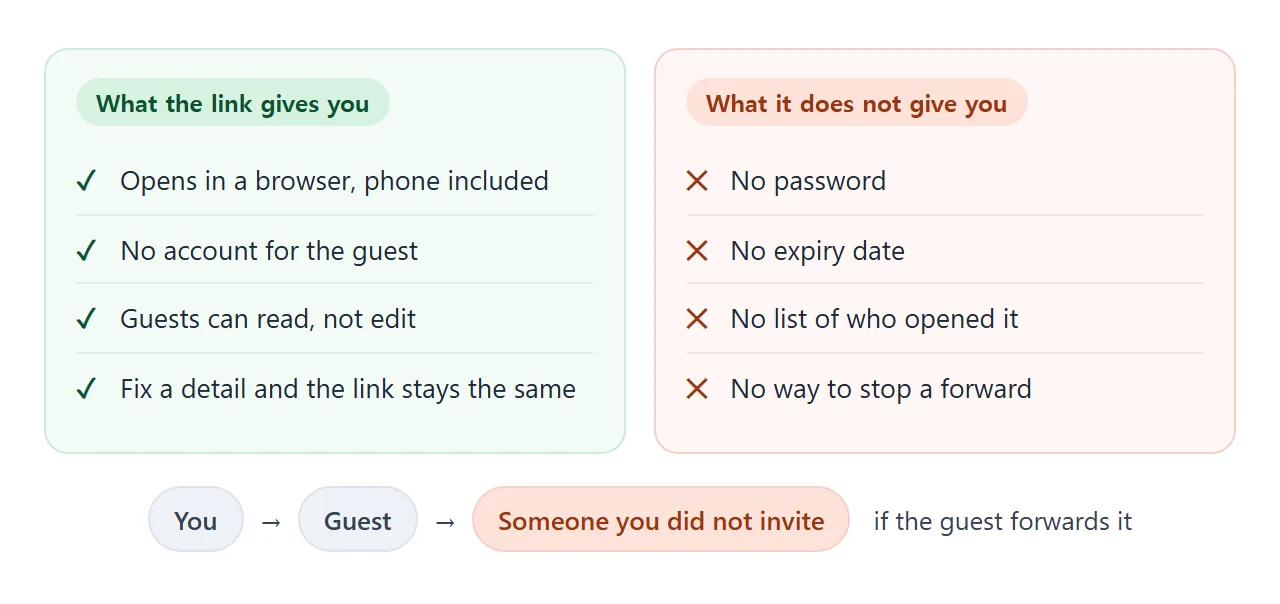
Google's documentation says it finds new pages by following links from pages it already knows, and from submitted sitemaps (as of October 2026).
A link sent in a private message is not on such a page. A link you paste into a public post or a public site is.
So keep the link out of public places. If you need real access control for a page, read how to password protect an HTML page, which explains why a password in the page itself does not work.
What to keep off the page
Because a forward cannot be stopped, the safest page is one where a stranger reading it learns nothing harmful. Sort your details with this list.
<!doctype html>
<html lang="en">
<head>
<meta charset="utf-8">
<meta name="viewport" content="width=device-width, initial-scale=1">
<title>On the page or off it</title>
<style>
  * { box-sizing: border-box; }
  body { margin: 0; padding: 16px; font: 15px/1.5 system-ui, sans-serif; background: #f4f5f7; color: #1d2330; }
  .box { max-width: 560px; margin: 0 auto; }
  h2 { font-size: 17px; margin: 0 0 4px; }
  .hint { font-size: 13px; color: #5b6472; margin: 0 0 12px; }
  .item { display: flex; align-items: center; gap: 10px; background: #fff; border: 1px solid #e1e4ea; border-radius: 10px; padding: 9px 12px; margin-bottom: 7px; }
  .item .txt { flex: 1; min-width: 0; }
  .item .why { display: block; font-size: 12.5px; color: #5b6472; }
  .tag { font: 700 11.5px system-ui, sans-serif; padding: 3px 8px; border-radius: 99px; white-space: nowrap; }
  .tag.ok { background: #d6f2df; color: #0f5132; }
  .tag.no { background: #fde2da; color: #9a3412; }
  .tog { font: 600 13px system-ui, sans-serif; width: 92px; padding: 7px 0; border-radius: 8px; border: 1px solid #c9ced6; background: #fff; cursor: pointer; }
  .tog[aria-pressed="true"] { background: #1d2330; color: #fff; border-color: #1d2330; }
  .sum { margin-top: 12px; padding: 12px 14px; border-radius: 10px; background: #fff; border: 1px solid #e1e4ea; }
  .sum.warn { background: #fff7f5; border-color: #f3d1c8; }
  @media (max-width: 460px) { .tag { display: none; } }
</style>
</head>
<body>
<div class="box">
  <h2>What goes on the guest page?</h2>
  <p class="hint">Tap a button to put a detail on the page or keep it off. Anyone who has the link can read what is on the page.</p>
  <div id="list"></div>
  <div class="sum" id="sum" aria-live="polite"></div>
</div>

<script>
  // fits = suggested for the page; the rest are better told to guests one to one
  const details = [
    { t: 'Date and start time', fits: true, why: 'Every guest needs it.' },
    { t: 'Venue name and street address', fits: true, why: 'The venue is public by nature.' },
    { t: 'Parking and travel tips', fits: true, why: 'Asked about by many guests.' },
    { t: 'Dress code', fits: true, why: 'Saves individual messages.' },
    { t: 'Schedule of the day', fits: true, why: 'Times change, so a page is easier to fix than a card.' },
    { t: 'Your home address', fits: false, why: 'Guests do not need it to attend.' },
    { t: 'Guests\' phone numbers', fits: false, why: 'Belongs to them, not to everyone who gets the link.' },
    { t: 'Full guest list with surnames', fits: false, why: 'A forwarded link would show it to people outside the list.' },
    { t: 'Bank details for gifts', fits: false, why: 'Give them to a guest who asks, in a private message.' },
    { t: 'Dates you will be away from home', fits: false, why: 'Not needed by guests, and not for a page that can be forwarded.' },
  ];

  const list = document.getElementById('list');
  const sum = document.getElementById('sum');
  const state = details.map((d) => d.fits);

  details.forEach((d, i) => {
    const row = document.createElement('div');
    row.className = 'item';
    row.innerHTML = '<div class="txt">' + d.t + '<span class="why">' + d.why + '</span></div>' +
      '<span class="tag ' + (d.fits ? 'ok' : 'no') + '">' + (d.fits ? 'fits' : 'keep off') + '</span>';
    const btn = document.createElement('button');
    btn.className = 'tog';
    btn.addEventListener('click', () => { state[i] = !state[i]; render(); });
    row.appendChild(btn);
    list.appendChild(row);
    d.btn = btn;
  });

  function render() {
    let on = 0, risky = 0;
    details.forEach((d, i) => {
      d.btn.setAttribute('aria-pressed', state[i] ? 'true' : 'false');
      d.btn.textContent = state[i] ? 'On the page' : 'Off the page';
      if (state[i]) { on++; if (!d.fits) risky++; }
    });
    sum.className = 'sum' + (risky ? ' warn' : '');
    sum.textContent = risky
      ? on + ' details on the page. ' + risky + ' better kept off: anyone with the link can read ' + (risky === 1 ? 'it.' : 'them.')
      : on + ' details on the page, ' + (details.length - on) + ' held back. Good for a page you send to guests.';
  }
  render();
</script>
</body>
</html>
A good rule: if a guest does not need it to arrive on time and dressed right, leave it off. Tell the few who ask, in a private message. For what else guests ask about, see share wedding details with guests.
Ways to share compared
| Way to share | Who can open it | Fix a detail later | Watch out for |
|---|---|---|---|
| Link in a direct message | Anyone who gets the link | Edit, same link | Forwarding |
| Link in a guest group chat | Everyone in that chat | Edit, same link | Who is in the chat |
| QR code on the printed card | Anyone who sees the card | Edit, same link | Cards left in public |
| HTML file attached | Whoever gets the file | Send a new file | Old copies stay wrong |
| Link posted publicly | Anyone who sees the post | Edit, same link | Not private at all |
Each of these can be forwarded or photographed. The link wins on corrections, because every guest sees the current page. Why links beat attachments goes into that.
When it does not work
| What you see | Cause | Fix |
|---|---|---|
| A guest asks for a password | NOS links have none | Tell them to open the link as sent |
| A stranger knows about the page | The link was forwarded or posted | Remove sensitive lines from the page and say who the link is for |
| Pictures are missing | They point to another website | Ask the AI for inline SVG or CSS shapes |
| The reply form does nothing | A form cannot send to a server here | Write the reply route as text |
| Text is tiny on a phone | No viewport line in the HTML | Ask the AI to add it |
| An old time is still showing | Guest has an old copy or a file | Send the link, not a file |