A church bulletin online is the same content you print on Sunday, put on one web page and sent as one link.
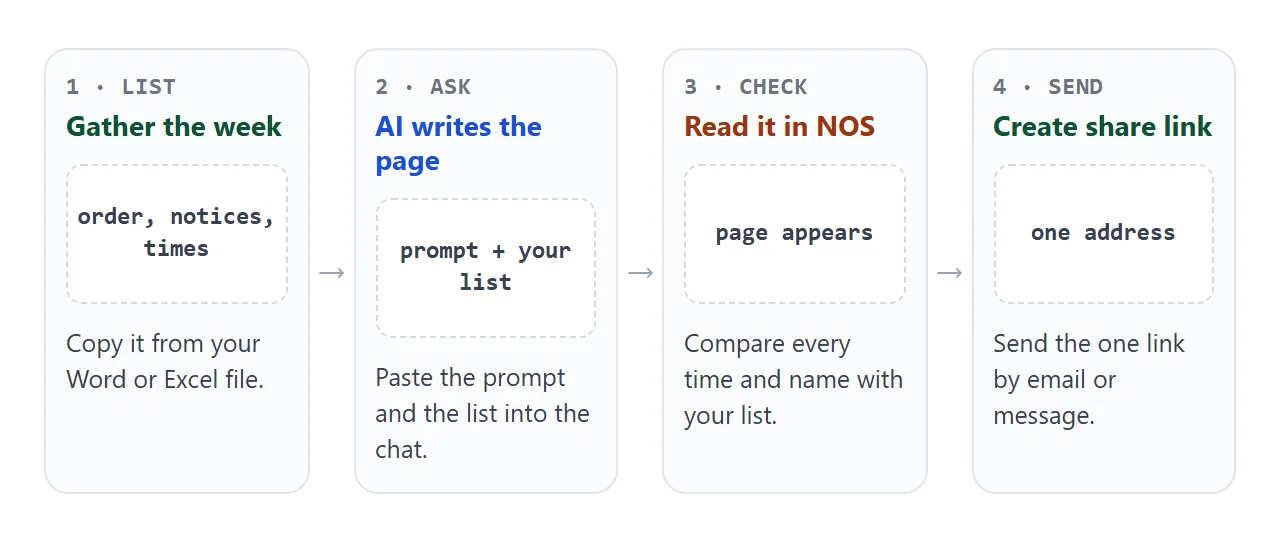
If your bulletin starts as a Word or Excel file, keep that file as the list and ask an AI chat to turn the list into a page.
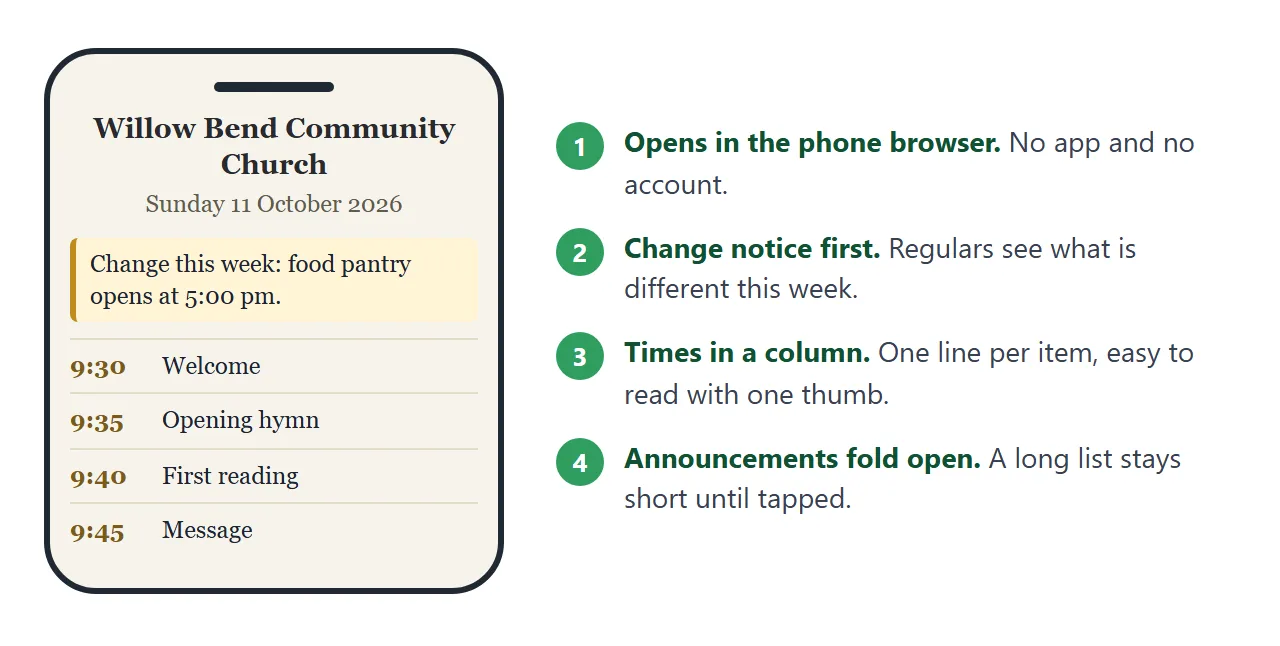
People open the link on a phone, with no account and no sign-up form. Here is a bulletin of that kind, for a made-up church.
<!doctype html>
<html lang="en">
<head>
<meta charset="utf-8">
<meta name="viewport" content="width=device-width, initial-scale=1">
<title>Willow Bend Community Church bulletin</title>
<style>
* { box-sizing: border-box; }
body {
margin: 0; font-family: Georgia, "Times New Roman", serif; font-size: 17px;
background: #f6f3ec; color: #2a2a2e; line-height: 1.55;
}
body.big { font-size: 21px; }
.wrap { max-width: 640px; margin: 0 auto; padding: 22px 16px 34px; }
header { text-align: center; padding-bottom: 14px; border-bottom: 2px solid #c9b88f; }
.logo { width: 64px; height: 64px; display: block; margin: 0 auto 6px; }
h1 { font-size: 1.55em; margin: 0; line-height: 1.2; font-weight: 600; }
.made { margin: 2px 0 0; font-size: .8em; color: #6a6354; }
.date { margin: 8px 0 0; font-weight: 700; color: #5a4520; }
.notice { margin: 14px 0 0; padding: 10px 14px; background: #fff4d6; border-left: 4px solid #c28a1c; border-radius: 6px; font-size: .92em; text-align: left; }
.tools { text-align: right; margin: 12px 0 0; }
.tools button {
font: inherit; font-size: .8em; padding: 6px 12px; border-radius: 8px; cursor: pointer;
background: #fff; border: 1px solid #b7aa8c; color: #3b3426;
}
.tools button[aria-pressed="true"] { background: #4a3d22; color: #fff; border-color: #4a3d22; }
h2 { font-size: 1.1em; margin: 22px 0 8px; color: #4a3d22; text-transform: uppercase; letter-spacing: .06em; }
ol.order { list-style: none; margin: 0; padding: 0; }
ol.order li {
display: grid; grid-template-columns: 4.6em 1fr; gap: 2px 12px;
padding: 9px 0; border-bottom: 1px solid #e4dccb;
}
ol.order time { font-weight: 700; color: #7b5b1c; font-variant-numeric: tabular-nums; }
ol.order .who { display: block; font-size: .88em; color: #625b4c; }
details { background: #fff; border-radius: 10px; padding: 10px 14px; margin: 0 0 8px; box-shadow: 0 1px 4px rgba(0,0,0,.06); }
summary { cursor: pointer; font-weight: 600; }
details p { margin: 8px 0 0; font-size: .94em; }
.week { width: 100%; border-collapse: collapse; font-size: .94em; }
.week td { padding: 7px 0; border-bottom: 1px solid #e4dccb; vertical-align: top; }
.week td:first-child { width: 6.8em; padding-right: 8px; font-weight: 700; color: #7b5b1c; }
.ask { margin-top: 24px; padding: 12px 14px; background: #ece6d6; border-radius: 10px; text-align: center; font-size: .92em; }
footer { margin-top: 18px; text-align: center; color: #6a6354; font-size: .82em; }
</style>
</head>
<body>
<div class="wrap">
<header>
<svg class="logo" viewBox="0 0 64 64" role="img" aria-label="A simple arched window">
<circle cx="32" cy="32" r="31" fill="#eadfc4"/>
<path d="M20 50V28a12 12 0 0 1 24 0v22z" fill="#fff" stroke="#8b6b25" stroke-width="2.5"/>
<path d="M32 16v34M20 33h24" stroke="#8b6b25" stroke-width="2"/>
</svg>
<h1>Willow Bend Community Church</h1>
<p class="made">A made-up church for this example</p>
<p class="date"><time datetime="2026-10-11">Sunday 11 October 2026</time></p>
<p class="notice" id="notice"><b>Change this week:</b> the food pantry opens at 5:00 pm on Tuesday, not 4:30.</p>
</header>
<div class="tools"><button id="big" type="button" aria-pressed="false">Larger text</button></div>
<h2>Order of worship</h2>
<ol class="order">
<li><time datetime="09:30">9:30</time><span>Welcome and call to worship<span class="who">Led by Marta Quill</span></span></li>
<li><time datetime="09:35">9:35</time><span>Opening hymn<span class="who">Number 112 in the blue hymnal</span></span></li>
<li><time datetime="09:40">9:40</time><span>First reading<span class="who">Read by Tomas Brennick</span></span></li>
<li><time datetime="09:45">9:45</time><span>Message: “Room at the Table”<span class="who">Pastor Eleni Rowe</span></span></li>
<li><time datetime="10:10">10:10</time><span>Prayers of the people</span></li>
<li><time datetime="10:20">10:20</time><span>Closing hymn and blessing<span class="who">Number 240</span></span></li>
</ol>
<h2>Announcements</h2>
<details open>
<summary>Food pantry volunteers needed</summary>
<p>Two more people are needed for the Tuesday shift. Doors open at 5:00 pm. Tell the office if you can help.</p>
</details>
<details>
<summary>Choir rehearsal moves to Wednesday</summary>
<p>This week only, rehearsal is on Wednesday at 7:00 pm in the hall. New singers are welcome.</p>
</details>
<details>
<summary>Youth supper</summary>
<p>Friday at 6:00 pm. Bring a dish to share and say how many are coming when you reply.</p>
</details>
<h2>This week</h2>
<table class="week">
<tr><td>Tuesday</td><td>Food pantry, 5:00 pm</td></tr>
<tr><td>Wednesday</td><td>Choir rehearsal, 7:00 pm</td></tr>
<tr><td>Friday</td><td>Youth supper, 6:00 pm</td></tr>
<tr><td>Sunday</td><td>Worship, 9:30 am</td></tr>
</table>
<p class="ask"><b>Questions or prayer requests?</b><br>Reply to the message this link came in.</p>
<footer>Next bulletin: Sunday 18 October 2026. All names are made up.</footer>
</div>
<script>
const big = document.getElementById('big');
big.addEventListener('click', () => {
const on = document.body.classList.toggle('big');
big.setAttribute('aria-pressed', on); // button looks pressed while text is large
big.textContent = on ? 'Normal text' : 'Larger text';
});
</script>
</body>
</html>
What goes in an online bulletin
Members open the link from a message and look for a few things. Put those first and keep the rest short.
- Date and service time. At the top, before anything else.
- A change notice. One line for what is different this week, so regulars see it at once.
- The order of worship. One line per item: the time, what it is, and who leads it.
- Announcements. Short ones. Longer ones can fold open.
- Where to reply. One sentence saying who to write to.
Ask each person whose name appears whether they are happy to be named. Take extra care with prayer requests and news about someone's health or family.
Make it with AI
An AI chat such as ChatGPT, Claude or Gemini can write the page from your list. Fill in the list below, which also gives you the plain text to paste.
<!doctype html>
<html lang="en">
<head>
<meta charset="utf-8">
<meta name="viewport" content="width=device-width, initial-scale=1">
<title>This week's list for the bulletin</title>
<style>
  * { box-sizing: border-box; }
  body { margin: 0; font-family: system-ui, "Segoe UI", sans-serif; font-size: 16px; background: #f4f5f7; color: #1f2430; line-height: 1.45; }
  .wrap { max-width: 640px; margin: 0 auto; padding: 18px 14px 28px; }
  h1 { font-size: 1.25em; margin: 0 0 4px; }
  .lead { margin: 0 0 14px; color: #4b5563; font-size: .92em; }
  label { display: block; font-weight: 600; font-size: .9em; margin: 12px 0 4px; }
  input, textarea {
    width: 100%; font: inherit; padding: 8px 10px; border: 1px solid #b8bec9; border-radius: 8px; background: #fff;
  }
  textarea { resize: vertical; }
  .day { font-size: .85em; font-weight: 500; margin-left: 6px; }
  .day.ok { color: #0f5132; }
  .day.warn { color: #9a3412; }
  h2 { font-size: 1.05em; margin: 22px 0 6px; }
  #out { background: #fff; font-family: ui-monospace, Consolas, monospace; font-size: .85em; min-height: 220px; }
  button { font: inherit; padding: 8px 14px; margin-top: 8px; border-radius: 8px; border: 1px solid #2563eb; background: #2563eb; color: #fff; cursor: pointer; }
  #msg { margin-left: 10px; font-size: .85em; color: #0f5132; }
</style>
</head>
<body>
<div class="wrap">
  <h1>This week's list</h1>
  <p class="lead">Fill in what changes each week. The list below updates as you type. Select it and paste it into your AI chat.</p>

  <label for="date">Sunday date<span class="day" id="day"></span></label>
  <input id="date" type="date" value="2026-10-18">

  <label for="title">Message title</label>
  <input id="title" type="text" value="Seeds and Soil">

  <label for="order">Order of worship (time, item, who: one per line)</label>
  <textarea id="order" rows="5">9:30, Welcome, Marta Quill
9:35, Opening hymn, number 118
9:45, Message, Pastor Eleni Rowe
10:15, Closing hymn, number 231</textarea>

  <label for="ann">Announcements (one per line)</label>
  <textarea id="ann" rows="3">Food pantry, Tuesday 5:00 pm
Youth supper, Friday 6:00 pm</textarea>

  <label for="note">Change notice (leave empty if none)</label>
  <input id="note" type="text" value="">

  <h2>Paste this into the chat</h2>
  <textarea id="out" readonly rows="12"></textarea>
  <button id="sel" type="button">Select the list</button><span id="msg"></span>
</div>

<script>
  const $ = (id) => document.getElementById(id);
  const names = ['Sunday', 'Monday', 'Tuesday', 'Wednesday', 'Thursday', 'Friday', 'Saturday'];

  function weekday(value) {
    if (!value) return '';
    const [y, m, d] = value.split('-').map(Number);
    return names[new Date(Date.UTC(y, m - 1, d, 12)).getUTCDay()];  // noon UTC avoids time-zone shifts
  }

  function render() {
    const wd = weekday($('date').value);
    $('day').textContent = wd ? '(' + wd + ')' : '';
    $('day').className = 'day ' + (wd === 'Sunday' ? 'ok' : 'warn');

    const lines = (id) => $(id).value.split('\n').map((s) => s.trim()).filter(Boolean);
    const out = [];
    out.push('Date: ' + (wd ? wd + ' ' : '') + $('date').value);
    out.push('Message title: ' + $('title').value.trim());
    if ($('note').value.trim()) out.push('Change notice: ' + $('note').value.trim());
    out.push('Order of worship:');
    lines('order').forEach((l) => out.push('- ' + l));
    out.push('Announcements:');
    lines('ann').forEach((l) => out.push('- ' + l));
    $('out').value = out.join('\n');
  }

  document.querySelectorAll('input, textarea#order, textarea#ann').forEach((el) => el.addEventListener('input', render));
  $('sel').addEventListener('click', () => {
    $('out').focus();
    $('out').select();
    $('msg').textContent = 'Selected. Copy it now.';
  });
  render();
</script>
</body>
</html>
Then paste this prompt, followed by the list.
Write one complete HTML page, in a single file, as this week's
church bulletin. Use a calm, light layout with large readable text.
It must work on a phone. Do not load anything from other websites:
no external images, scripts or fonts.
Use only the facts I give you. Do not invent times, names, hymns or readings.
Put the church name and date at the top, then a change notice line,
then the order of worship as a list with one line per item,
then announcements that fold open, then a short table for the week ahead,
then one line saying who to reply to.
Add a button that makes the text larger.
Draw any picture as a simple inline SVG.

Here is this week's list:
[paste the list]
When the page comes back, check these before anything else:
- Every time matches your list, and the order is the one you meant.
- Every name is spelled the way the person spells it.
- Nothing appears that you did not provide, such as a reading or a quote.
- The page reads well when you narrow the browser window to phone width.
If something is wrong, tell the chat the correction in plain words and copy the new version. Host ChatGPT HTML output covers the copy step.
Send it as a link
Copy the HTML from the chat, paste it into a NOS document, and choose Create share link. HTML to link walks through it. The page renders as written and its scripts run, so the larger-text button and the folding announcements work.
The people you send it to open it in a browser, phone included, with no account. They cannot edit it. Paste the link into an email or a text message, the way you would paste any web address.
Open the link on your own phone before you send it. Check the date and the change notice, then scroll to the end.
For a paper notice board or the back of the hall, a QR code can point to the same link. QR code link explains how.
Edit the same page each week
On Monday, paste the new list into the chat and ask for the same page with the new details. Copy the new HTML, replace the old code in the NOS document, and the same link shows the new bulletin.
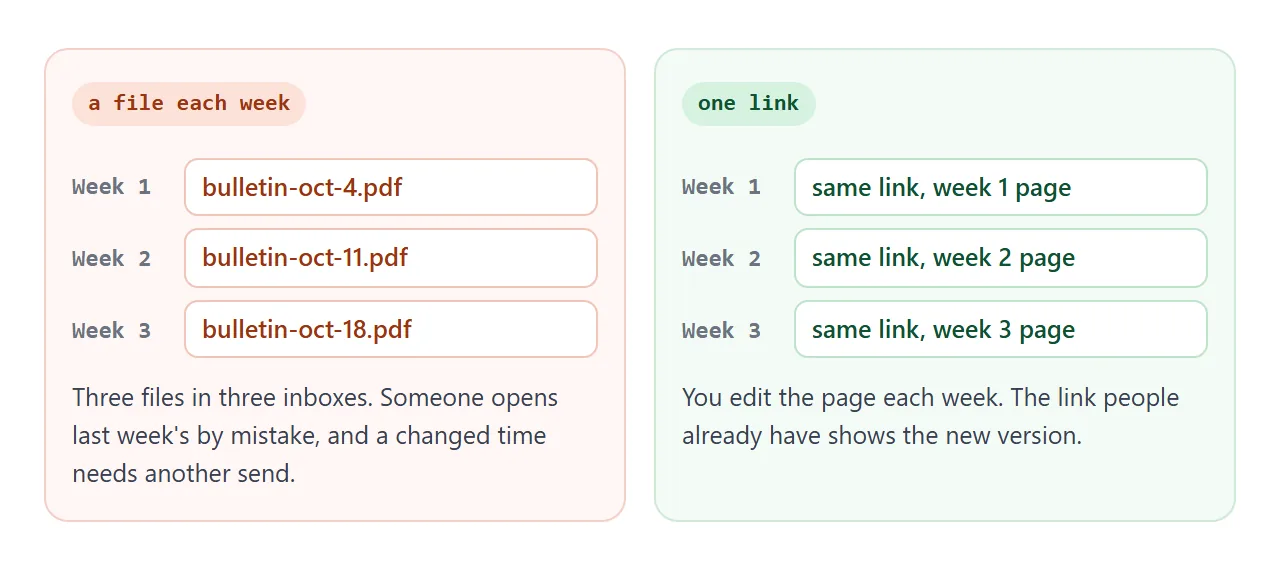
Members keep one link, and you send a short message each week saying the new bulletin is up. HTML for weekly updates covers the same habit for other kinds of updates.
Editing replaces what the link shows. If you want to keep past bulletins, paste each week into its own NOS document and share each one. Keep the text in your own files too.
A visitor can open an announcement or press the larger-text button, but nothing they do is saved. In View mode, the owner's own changes, such as ticks and added rows, are saved. Treat the page as something you publish, not something members fill in.
Print, attachment or link
A bulletin can travel three ways. They differ most when a time changes after you have sent it.
| Printed sheet | Attachment | Link | |
|---|---|---|---|
| Needs an account to open | No | No, but opening depends on the phone and the mail app | No |
| Fix a time after sending | Reprint. Copies already handed out stay as they were | Send the file again. The old one stays in inboxes | Edit the page. The same link shows the new version |
| Everyone sees the same version | Only if you collect the old ones | Only if everyone opens the newest | Yes |
| Good for | People who prefer paper | Keeping a copy | Phones and quick changes |
Paper and a link work well together. Print for the pews, and say on the sheet that the page has the latest order. Why links beat attachments compares more ways to send.
When it does not work
| What you see | Cause | Fix |
|---|---|---|
| A time or a name is wrong | The AI guessed a detail, or a line was mistyped | Correct it in the chat, copy the new version, paste it again |
| A picture is an empty box | The page asks another website for the image | Ask the AI to draw it as inline SVG, and check on a phone |
| The text is tiny on a phone | The page has no phone sizing | Ask the chat to make it work on a phone |
| Someone cannot open an attached file | An attachment depends on the phone and the app | Send the link, see open HTML on a phone |
| Members try to sign up on the page | A form inside the page cannot send answers to a server | Ask them to reply to your message |
| People ask for a password | NOS has no password feature | Send the link only to the people you choose |
| A member still sees last week's page | They opened an old file or an old message | Send the link again and say the page is current |