A client report template is a fixed order of sections you refill each month. An AI can write the page from your notes, and you send it as a link instead of a PDF, so the layout is not decided by an export.
That last part is where the time goes. One person, writing about exporting from Claude, put it this way: "save as pdf, layout shifts. always end up just screenshotting."
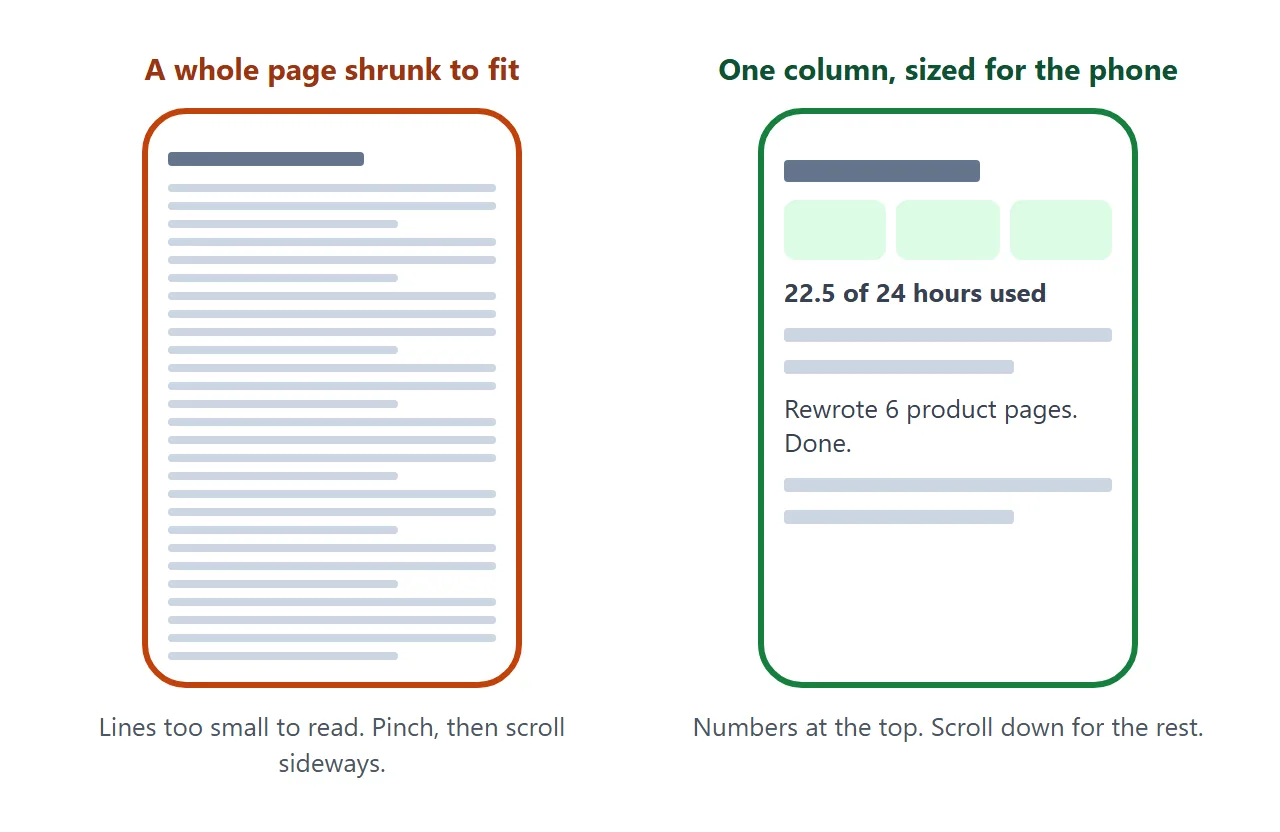
A page avoids the export step. The browser lays it out for the screen that opens it. Here is a finished monthly report. It is one column, written for a phone first.
<!doctype html>
<html lang="en">
<head>
<meta charset="utf-8">
<meta name="viewport" content="width=device-width, initial-scale=1">
<title>Monthly report - September - Harbor Tea Co.</title>
<style>
  * { box-sizing: border-box; }
  body { margin: 0; background: #f3f4f6; font-family: system-ui, -apple-system, "Segoe UI", sans-serif; color: #1f2937; line-height: 1.5; }
  .page { max-width: 640px; margin: 0 auto; background: #fff; padding: 22px 18px 30px; }
  h1 { margin: 0 0 2px; font-size: 24px; line-height: 1.2; }
  .sub { margin: 0 0 16px; font-size: 14px; color: #6b7280; }
  h2 { margin: 24px 0 8px; font-size: 18px; }
  .summary { display: grid; grid-template-columns: repeat(3, 1fr); gap: 8px; }
  .stat { background: #f0fdf4; border: 1px solid #bbf7d0; border-radius: 12px; padding: 10px 12px; }
  .stat.ask { background: #fff7ed; border-color: #fed7aa; }
  .stat b { display: block; font-size: 22px; line-height: 1.2; }
  .stat span { font-size: 13px; color: #4b5563; }
  .bar { height: 10px; background: #e5e7eb; border-radius: 6px; margin: 12px 0 4px; overflow: hidden; }
  .bar i { display: block; height: 100%; background: #16a34a; }
  .barnote { font-size: 14px; color: #6b7280; margin: 0; }
  .item { display: grid; grid-template-columns: 1fr auto; gap: 2px 10px; padding: 11px 0; border-bottom: 1px solid #eef0f3; break-inside: avoid; }
  .item .name { font-size: 16px; font-weight: 600; }
  .item .note { grid-column: 1; font-size: 14px; color: #6b7280; }
  .item .hrs { grid-row: 1 / span 2; grid-column: 2; text-align: right; font-size: 15px; }
  .chip { display: inline-block; font-size: 12px; font-weight: 600; padding: 1px 8px; border-radius: 999px; margin-left: 6px; vertical-align: 2px; }
  .done { background: #dcfce7; color: #166534; }
  .wip { background: #fef3c7; color: #92400e; }
  ul { margin: 0; padding-left: 20px; }
  li { margin: 4px 0; }
  .decision { background: #fff7ed; border: 1px solid #fed7aa; border-radius: 12px; padding: 12px 14px; break-inside: avoid; }
  .fine { margin-top: 20px; font-size: 14px; color: #6b7280; }
  @media print {
    @page { size: A4; margin: 16mm; }
    body { background: #fff; }
    .page { max-width: none; padding: 0; }
    .stat, .bar i, .chip, .decision { print-color-adjust: exact; -webkit-print-color-adjust: exact; }
  }
</style>
</head>
<body>
<div class="page">
  <h1>Monthly report: September</h1>
  <p class="sub">Prepared for Harbor Tea Co. by Dana Reyes · copywriting retainer</p>

  <div class="summary">
    <div class="stat"><b id="s-hours"></b><span>hours used</span></div>
    <div class="stat"><b id="s-done"></b><span>items finished</span></div>
    <div class="stat ask"><b id="s-ask"></b><span>decision needed</span></div>
  </div>
  <div class="bar"><i id="bar"></i></div>
  <p class="barnote" id="barnote"></p>

  <h2>What got done</h2>
  <div id="items"></div>

  <h2>Waiting on you</h2>
  <ul id="waiting"></ul>

  <h2>Next month</h2>
  <ul id="next"></ul>

  <h2>Decision needed</h2>
  <div class="decision" id="decision"></div>

  <p class="fine">Hours are from my own time log. Questions about any line: reply to the email this link came in.</p>
</div>

<script>
  // ---- Change the numbers here each month. ----
  const RETAINER_HOURS = 24;
  const ITEMS = [
    { name: 'Rewrote 6 product pages', note: 'All six are live on the shop.', hours: 9, status: 'done' },
    { name: 'Welcome email sequence', note: 'Three emails, scheduled for 3 October.', hours: 6.5, status: 'done' },
    { name: 'Homepage hero test copy', note: 'Two versions delivered for your A/B test.', hours: 3, status: 'done' },
    { name: 'Blog post: steeping guide', note: 'First draft sent; waiting for your edits.', hours: 4, status: 'wip' }
  ];
  const WAITING = ['Photos for the two new oolong pages'];
  const NEXT = ['Finish and publish the steeping guide', 'Write the October gift-set page', 'Review welcome email results with you'];
  const DECISION = 'Approve or comment on the steeping guide draft by 8 October so it can go live that week.';
  // ---------------------------------------------

  const fmt = (n) => String(Math.round(n * 10) / 10);
  const used = ITEMS.reduce((sum, it) => sum + it.hours, 0);
  const finished = ITEMS.filter((it) => it.status === 'done').length;

  document.getElementById('s-hours').textContent = fmt(used) + ' / ' + RETAINER_HOURS;
  document.getElementById('s-done').textContent = finished + ' of ' + ITEMS.length;
  document.getElementById('s-ask').textContent = '1';
  document.getElementById('bar').style.width = Math.min(100, used / RETAINER_HOURS * 100) + '%';
  document.getElementById('barnote').textContent = fmt(RETAINER_HOURS - used) + ' hours left in the retainer this month.';

  document.getElementById('items').innerHTML = ITEMS.map((it) =>
    '<div class="item"><span class="name">' + it.name +
    '<span class="chip ' + it.status + '">' + (it.status === 'done' ? 'Done' : 'In progress') + '</span></span>' +
    '<span class="note">' + it.note + '</span><span class="hrs">' + fmt(it.hours) + ' h</span></div>'
  ).join('');
  document.getElementById('waiting').innerHTML = WAITING.map((t) => '<li>' + t + '</li>').join('');
  document.getElementById('next').innerHTML = NEXT.map((t) => '<li>' + t + '</li>').join('');
  document.getElementById('decision').textContent = DECISION;
</script>
</body>
</html>
The six sections, in the order a client reads them
The example follows one order. It is an editorial choice, not a standard, and it puts the numbers first and flags the decision in the summary.
- Summary – hours used, items finished, decisions needed. Three numbers.
- What got done – one line per item, with its status and hours.
- Waiting on you – what is blocked until the client acts.
- Next month – three or four items, no more.
- Decision needed – one clear ask with a date.
- A line about the numbers – where the hours come from.
Clients skim. The first screen should answer "is this on track?" and "do you need something from me?" without scrolling.
For the wider case, including what to put in a report and how often, see sending a monthly report to a client.
Make it with AI
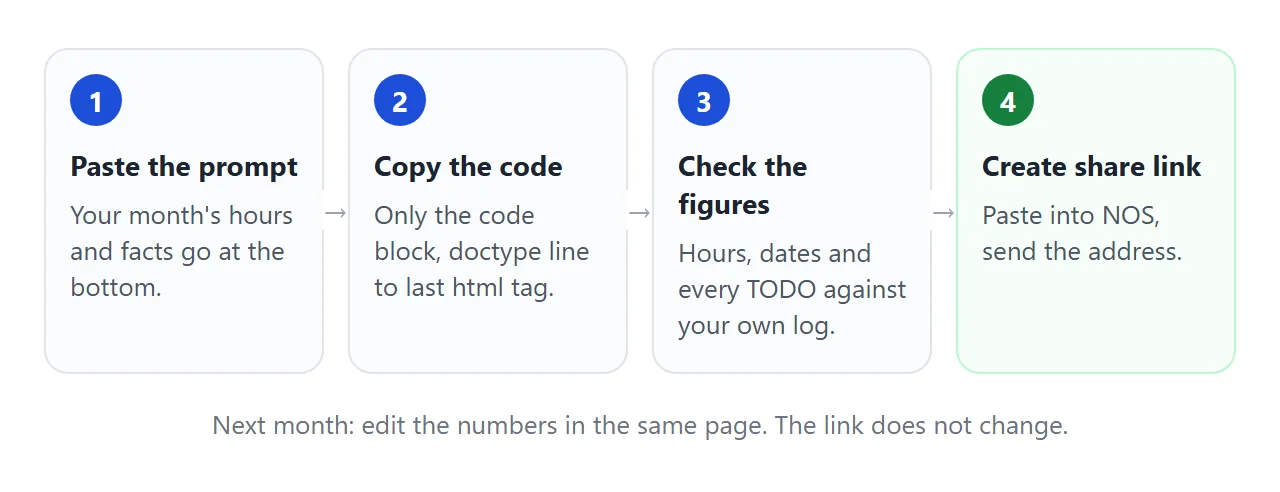
Paste this prompt into ChatGPT, Claude or Gemini. Put your own facts at the bottom.
Write ONE self-contained HTML file: a monthly client report, to be read on a phone.
Rules:
- Plain HTML, CSS and JavaScript in one file. No images, no external files, no form that sends data.
- One column. Add a viewport meta tag. Text at least 16px.
- Start with three summary boxes: hours used of the retainer, items finished, decisions needed.
- Then these sections in order: What got done, Waiting on you, Next month, Decision needed.
- Put every number, item and date in one block at the top of the script, with the comment "Change the numbers here each month".
- Add a print style: A4, no grey page background, items do not split across pages.
- If I did not give you a fact, write TODO. Do not invent work, hours or results.
My facts:
Client: ...
Month: ...
Retainer hours: ...
Work done, with hours and status: ...
Waiting on the client for: ...
Next month: ...
Decision I need, and by when: ...
The block-of-numbers line matters. It turns next month's report into one edit instead of a hunt through the page.
What to check in the result
An AI is good at layout and loose with facts. Read the page the way the client will.
- Every number. Hours, totals and the hours left. Compare them with your time log.
- Every TODO. Replace each one, or delete the line.
- Invented work. Items or results you did not give it.
- The phone. Open it on your own phone before the client does.
The longer version of this check is in the HTML report template guide. If the page looks wrong, fixing AI-generated HTML covers the usual causes.
Send it as a link
Paste the HTML into a NOS document and choose Create share link. HTML to link walks through it.
The result is a page anyone with the link can open in a browser, on a phone too, with no account. They can read it but not edit it.
Send the address in the body of your email or message, with one line saying which month it covers.
Next month: open the page in NOS, click into the code and change the figures in the block at the top of the script. Save, and the same link shows the new version.
If you want each month to stay readable, make a new page and a new link per month, and keep the old ones. The second example keeps three months on one page, with a tap to switch.
<!doctype html>
<html lang="en">
<head>
<meta charset="utf-8">
<meta name="viewport" content="width=device-width, initial-scale=1">
<title>Retainer hours by month - Larkspur Bakery</title>
<style>
  * { box-sizing: border-box; }
  body { margin: 0; background: #f3f4f6; font-family: system-ui, -apple-system, "Segoe UI", sans-serif; color: #1f2937; line-height: 1.5; }
  .page { max-width: 560px; margin: 0 auto; background: #fff; min-height: 100vh; padding: 22px 18px 28px; }
  h1 { margin: 0 0 4px; font-size: 24px; line-height: 1.2; }
  .sub { margin: 0 0 14px; font-size: 14px; color: #6b7280; }
  .tabs { display: flex; gap: 8px; margin-bottom: 14px; }
  .tabs button { flex: 1; min-height: 44px; border: 1px solid #d1d5db; border-radius: 10px; background: #fff; font-size: 16px; cursor: pointer; }
  .tabs button[aria-pressed="true"] { background: #1d4ed8; border-color: #1d4ed8; color: #fff; font-weight: 600; }
  .big { font-size: 30px; font-weight: 700; margin: 0; }
  .bar { height: 12px; background: #e5e7eb; border-radius: 6px; margin: 8px 0 4px; overflow: hidden; }
  .bar i { display: block; height: 100%; background: #1d4ed8; }
  .bar i.over { background: #c2410c; }
  .note { font-size: 14px; color: #6b7280; margin: 0 0 14px; }
  .row { display: flex; justify-content: space-between; gap: 10px; padding: 10px 0; border-bottom: 1px solid #eef0f3; font-size: 16px; }
  .row span:last-child { white-space: nowrap; }
  .fine { margin-top: 12px; font-size: 14px; color: #6b7280; }
</style>
</head>
<body>
<div class="page">
  <h1>Retainer hours</h1>
  <p class="sub">Larkspur Bakery · design support · tap a month</p>

  <div class="tabs" id="tabs"></div>

  <p class="big" id="big"></p>
  <div class="bar"><i id="bar"></i></div>
  <p class="note" id="note"></p>

  <div id="rows"></div>

  <p class="fine">Hours above the retainer are agreed with you before I start them.</p>
</div>

<script>
  // ---- Add a month here each time you send a report. ----
  const RETAINER_HOURS = 20;
  const MONTHS = [
    { name: 'July', work: [['Menu redesign', 8], ['Social templates', 6], ['Shop signage', 3]] },
    { name: 'August', work: [['Menu redesign', 4], ['Social templates', 5], ['Shop signage', 7], ['Loyalty card', 6]] },
    { name: 'September', work: [['Social templates', 4], ['Loyalty card', 9], ['Window poster', 6]] }
  ];
  // -------------------------------------------------------

  const tabs = document.getElementById('tabs');
  const big = document.getElementById('big');
  const bar = document.getElementById('bar');
  const note = document.getElementById('note');
  const rows = document.getElementById('rows');

  function show(i) {
    const m = MONTHS[i];
    const used = m.work.reduce((s, w) => s + w[1], 0);
    big.textContent = used + ' of ' + RETAINER_HOURS + ' hours';
    bar.style.width = Math.min(100, used / RETAINER_HOURS * 100) + '%';
    bar.className = used > RETAINER_HOURS ? 'over' : '';
    const gap = Math.abs(RETAINER_HOURS - used);
    const unit = gap === 1 ? ' hour' : ' hours';
    note.textContent = used > RETAINER_HOURS
      ? gap + unit + ' over the retainer in ' + m.name + '.'
      : gap + unit + ' left in ' + m.name + '.';
    rows.innerHTML = m.work.map((w) => '<div class="row"><span>' + w[0] + '</span><span>' + w[1] + ' h</span></div>').join('');
    tabs.querySelectorAll('button').forEach((b, j) => b.setAttribute('aria-pressed', j === i ? 'true' : 'false'));
  }

  MONTHS.forEach((m, i) => {
    const b = document.createElement('button');
    b.type = 'button';
    b.textContent = m.name;
    b.addEventListener('click', () => show(i));
    tabs.appendChild(b);
  });
  show(MONTHS.length - 1);
</script>
</body>
</html>
PDF, screenshot or page: how they compare
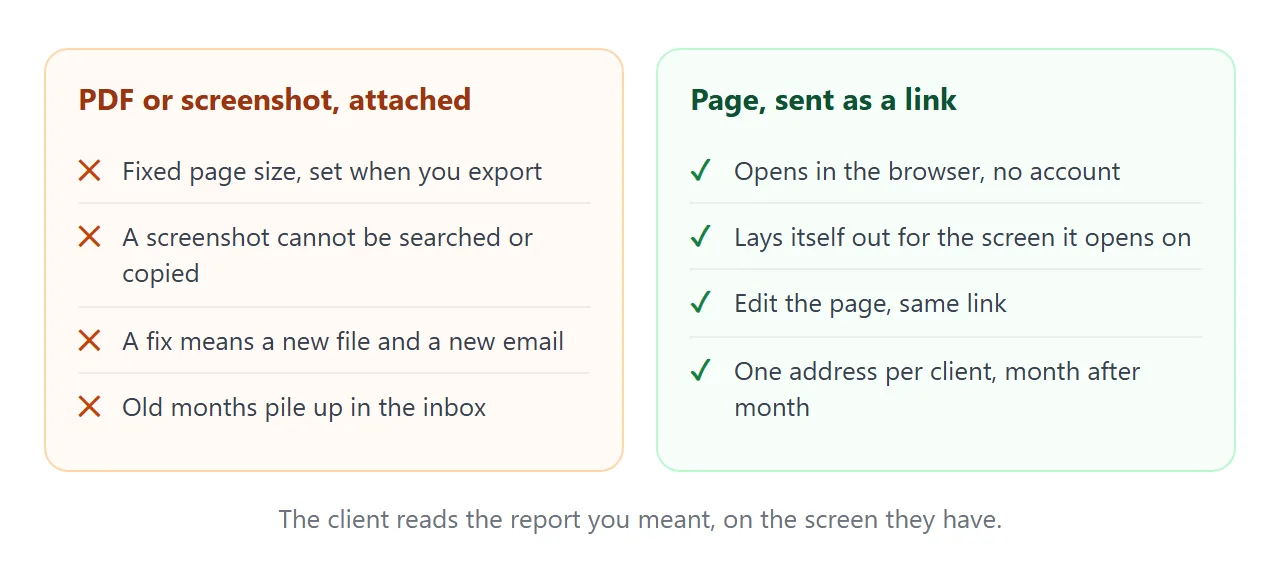
| PDF attached | Screenshot | Page as a link | |
|---|---|---|---|
| Layout on a phone | Fixed page size | Fixed picture | Fits the screen |
| Fix after sending | New file | New picture | Edit the page, same link |
| Needs an account to read | No | No | No |
| Old months | Pile up in the inbox | Pile up | One address per month |
For personal Gmail accounts, Google's help page says the attachment limit is 25 MB, and Gmail adds a larger file as a Drive link instead (as of October 2026).
A one-page report is far below that, so size is rarely the issue. The issue is what happens when you fix a number after sending. See email vs link for documents.
If the client wants a printed copy
Some clients file reports for their own records. The first example carries a print style, so the same page prints cleanly. MDN describes the print media type as the way to apply styles to printed documents.
@media print {
  @page { size: A4; margin: 16mm; }
  .item { break-inside: avoid; }
}
break-inside: avoid asks the browser not to split an item across two pages. @page sets the page size; use letter instead of A4 for North American paper. Print from your browser, check the preview, and then decide whether to send it.
By default, a browser may adjust colors when it prints. print-color-adjust: exact asks it to keep them, and the example uses it on the colored boxes. See print stylesheets for more.
When it does not work
| What you see | Cause | Fix |
|---|---|---|
| The page shows raw code in the chat | You copied the chat text, not the code block | Copy only the code, from the doctype line to the last html tag |
| A logo or chart image is missing | Images from other sites are blocked | Ask for no images, or a logo drawn in SVG |
| The numbers do not add up | The AI guessed or rounded a figure | Compare with your log and ask it to compute totals in the script |
| A contact form does nothing | Forms cannot send to a server from the link | Write your email address as plain text |
| The client sees last month | They opened an old file or an old link | Send only the link, never the file |
| The text is tiny on a phone | No viewport meta tag | Ask the AI to add one, and a 16px base size |
| The printout has no colors | The browser adjusted colors for print | Add print-color-adjust: exact to those boxes |
Related reading. A report is one document in a run. For the ongoing view, HTML for client reports covers what to put on the page, and HTML vs PDF for clients goes deeper on the PDF question.