GSAP is a JavaScript library that animates elements on a web page. To use it in plain HTML, add one <script> tag that loads GSAP from a CDN, then a second script that calls gsap.to(). The file runs from disk.
Press Play. The box slides and spins, and Reverse plays the same tween backwards.
<!doctype html>
<html lang="en">
<head>
<meta charset="utf-8">
<meta name="viewport" content="width=device-width, initial-scale=1">
<title>GSAP in one HTML file</title>
<style>
  body { margin: 0; padding: 18px; font-family: system-ui, sans-serif; background: #f4f5f7; color: #1d2330; }
  .track { position: relative; height: 110px; border-radius: 12px; background: #fff; overflow: hidden; }
  .box {
    position: absolute; left: 16px; top: 25px;
    width: 60px; height: 60px; border-radius: 12px; background: #0f766e;
  }
  .bar { display: flex; gap: 8px; align-items: center; margin-top: 14px; flex-wrap: wrap; }
  button { font: inherit; font-size: 15px; padding: 8px 14px; border: 0; border-radius: 8px; background: #1d2330; color: #fff; cursor: pointer; }
  #ver { font-size: 13px; color: #5b6270; }
</style>
</head>
<body>
<div class="track"><div class="box"></div></div>
<div class="bar">
  <button id="play">Play</button>
  <button id="reverse">Reverse</button>
  <button id="restart">Restart</button>
  <span id="ver"></span>
</div>

<!-- 1. Load GSAP first (pinned version) -->
<script src="https://cdn.jsdelivr.net/npm/gsap@3.15.0/dist/gsap.min.js"></script>

<!-- 2. Then your own code, which can use the global gsap -->
<script>
  const track = document.querySelector('.track');

  // One tween: move right and spin. paused: true waits for a click.
  const tween = gsap.to('.box', {
    x: () => track.clientWidth - 92,  // px; measured again on restart
    rotation: 360,
    duration: 1.2,
    ease: 'power2.inOut',
    paused: true
  });

  document.getElementById('play').addEventListener('click', () => tween.play());
  document.getElementById('reverse').addEventListener('click', () => tween.reverse());
  document.getElementById('restart').addEventListener('click', () => tween.invalidate().restart());
  document.getElementById('ver').textContent = 'GSAP ' + gsap.version;
</script>
</body>
</html>
The whole animation is one gsap.to() call that names the box, the end position, a full turn and a duration. GSAP works out every frame in between.
What GSAP is, and what it costs
GSAP describes itself as a framework-agnostic animation library. It animates CSS properties, SVG, canvas and plain JavaScript objects. Your page does not need React, Vue or any other framework.
GSAP is free. Its Standard "no charge" license allows commercial use and includes every plugin, among them the ones that were once for paying members only.
The license names one prohibited use: tools that let people build visual animations without code and compete with Webflow's animation builder. If you are making an ordinary page, that clause does not apply. Read the license if you build such a tool.
On 1 October 2026 the latest version on npm was 3.15.0. The examples here pin that exact version in the URL, so a future release cannot change how they behave.
The smallest working file, line by line
A GSAP page needs two script tags in the right order: the library first, then your code.
<div class="box"></div>

<script src="https://cdn.jsdelivr.net/npm/gsap@3.15.0/dist/gsap.min.js"></script>
<script>
  gsap.to('.box', { x: 200, rotation: 360, duration: 1 });
</script>
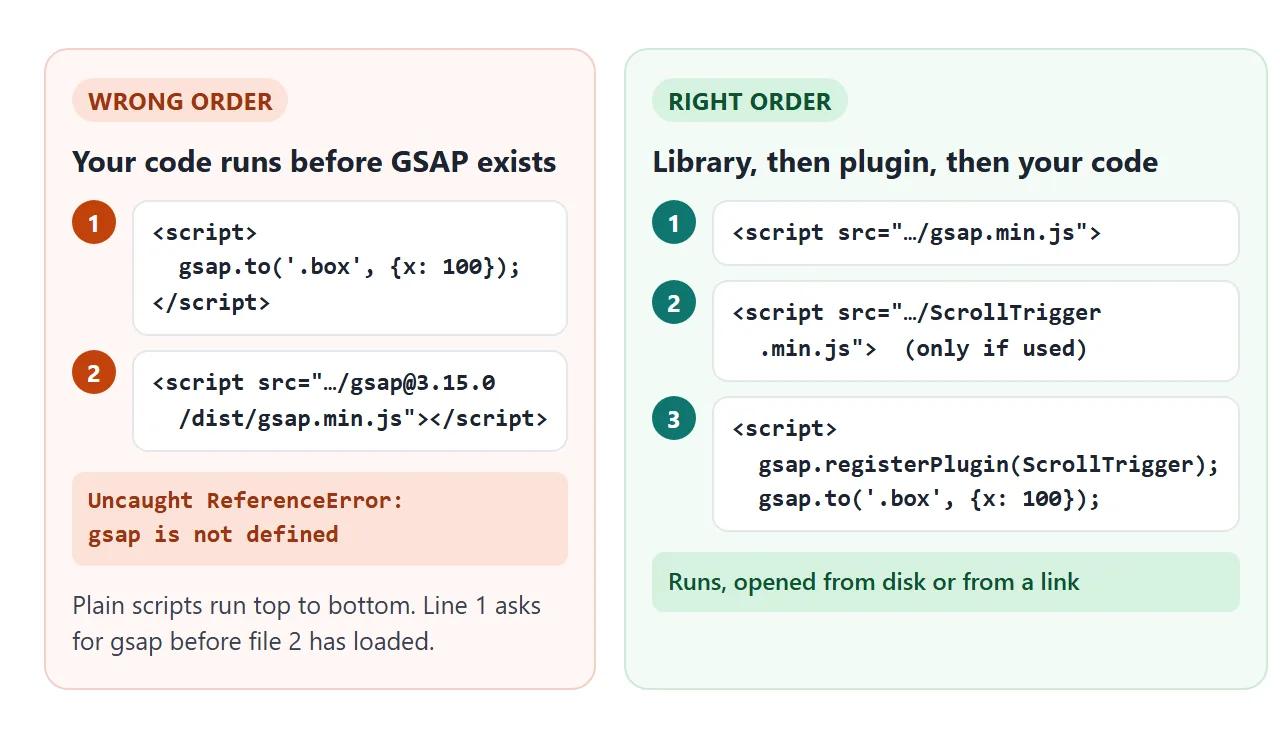
- The CDN tag creates a global
gsapobject. The same version is also on cdnjs.cloudflare.com, if you prefer that CDN. - The target can be a CSS selector, an element, or a list of elements. If the selector matches nothing, GSAP logs a console warning such as "GSAP target .boxx not found."
- The values are what to animate.
xandyare shorthand fortranslateX()andtranslateY()in pixels,rotationis degrees, andscaleis a factor.
When you leave them out, duration defaults to 0.5 seconds and ease to "power1.out". Other CSS properties are written in camelCase, for example backgroundColor.
to, from and fromTo
There are three ways to describe a tween. They differ only in which end of the movement you write down.
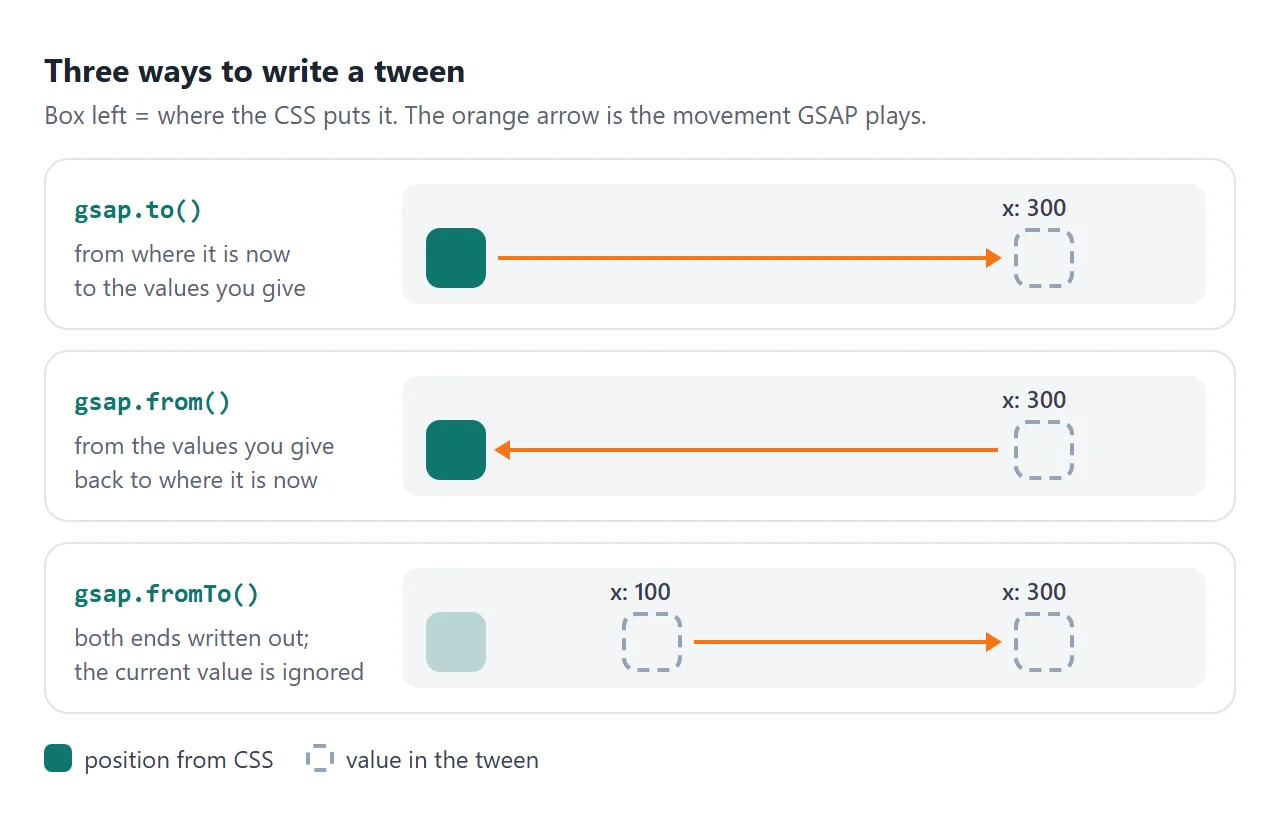
| Method | Starts at | Ends at | Typical use |
|---|---|---|---|
gsap.to() |
The current value | Your values | Moving something on click |
gsap.from() |
Your values | The current value | Entrance effects |
gsap.fromTo() |
Your first values | Your second values | Replaying from a known state |
from() is handy for entrances because the page's own CSS stays the finished layout. GSAP applies the start values straight away, since immediateRender defaults to true for from() and fromTo().
For fading in, use autoAlpha instead of opacity. It works the same way, and also sets visibility: hidden when the value reaches 0, so invisible elements cannot be clicked.
Sequences with a timeline
To play several steps in order, you could give each tween a delay. A timeline is easier: each tween you add starts when the previous one ends.
<!doctype html>
<html lang="en">
<head>
<meta charset="utf-8">
<meta name="viewport" content="width=device-width, initial-scale=1">
<title>GSAP timeline</title>
<style>
  body { margin: 0; padding: 16px; font-family: system-ui, sans-serif; background: #f4f5f7; color: #1d2330; }
  .stage { padding: 16px; border-radius: 12px; background: #fff; }
  h2 { margin: 0 0 12px; font-size: 20px; }
  .cards { display: grid; grid-template-columns: repeat(3, 1fr); gap: 10px; }
  .card { height: 70px; border-radius: 10px; background: linear-gradient(135deg, #34d399, #0f766e); }
  .line { height: 6px; margin-top: 14px; border-radius: 3px; background: #f97316; transform-origin: left center; }
  .bar { display: flex; gap: 8px; margin-top: 14px; flex-wrap: wrap; }
  button { font: inherit; font-size: 15px; padding: 8px 12px; border: 0; border-radius: 8px; background: #1d2330; color: #fff; cursor: pointer; }
  #time { margin: 10px 0 0; font-size: 13px; color: #5b6270; }
</style>
</head>
<body>
<div class="stage">
  <h2 class="title">Three steps, one timeline</h2>
  <div class="cards"><div class="card"></div><div class="card"></div><div class="card"></div></div>
  <div class="line"></div>
</div>
<div class="bar">
  <button id="play">Play</button>
  <button id="pause">Pause</button>
  <button id="reverse">Reverse</button>
  <button id="restart">Restart</button>
</div>
<p id="time">progress 100%</p>

<script src="https://cdn.jsdelivr.net/npm/gsap@3.15.0/dist/gsap.min.js"></script>
<script>
  // Each step starts when the one before it ends. No delays to add up.
  const tl = gsap.timeline({
    paused: true,
    onUpdate: () => {
      document.getElementById('time').textContent = 'progress ' + Math.round(tl.progress() * 100) + '%';
    }
  });

  tl.from('.title', { y: -30, autoAlpha: 0, duration: 0.5 })
    .from('.card', { y: 40, autoAlpha: 0, stagger: 0.15 })  // one card after another
    .from('.line', { scaleX: 0, duration: 0.6 }, '-=0.2');   // overlap the cards by 0.2s

  tl.progress(1);  // show the finished state until a button is pressed

  const on = (id, fn) => document.getElementById(id).addEventListener('click', fn);
  on('play', () => tl.play());
  on('pause', () => tl.pause());
  on('reverse', () => tl.reverse());
  on('restart', () => tl.restart());
</script>
</body>
</html>
const tl = gsap.timeline();
tl.from('.title', { y: -30, autoAlpha: 0, duration: 0.5 })
  .from('.card', { y: 40, autoAlpha: 0, stagger: 0.15 })
  .from('.line', { scaleX: 0, duration: 0.6 }, '-=0.2');
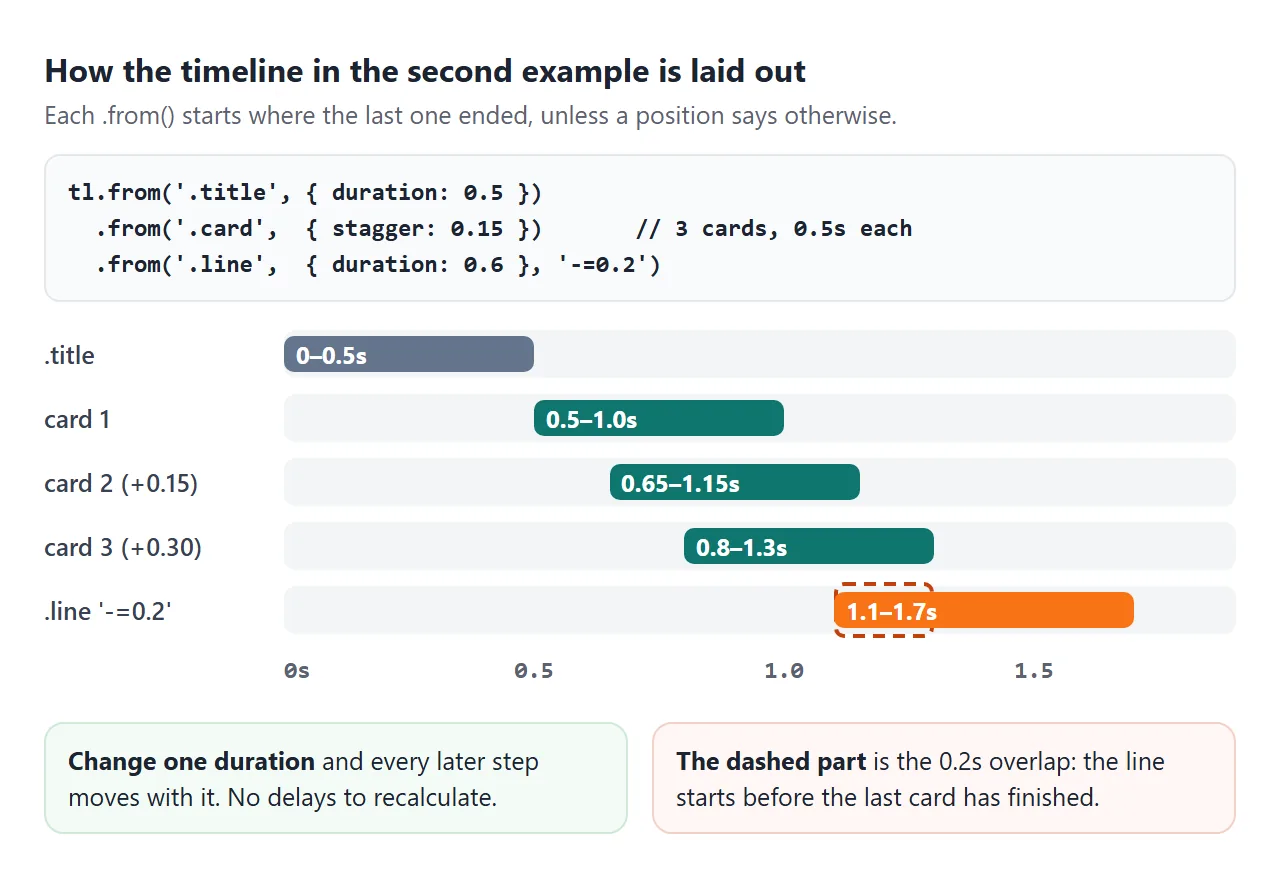
stagger: 0.15starts each matched card 0.15 seconds after the one before.- The position parameter, the third argument, moves a step.
'-=0.2'overlaps the end by 0.2 seconds,'<'starts with the previous step, and a number such as1places it at 1 second. - Controls:
play(),pause(),reverse()andrestart()act on the whole timeline at once.
Change the title's duration and every later step moves with it. With delays, you would edit each one by hand.
Scroll animations with ScrollTrigger
ScrollTrigger is a GSAP plugin that starts or scrubs animations as the page scrolls. Load it after the core, from the same version, and register it.
<script src="https://cdn.jsdelivr.net/npm/gsap@3.15.0/dist/gsap.min.js"></script>
<script src="https://cdn.jsdelivr.net/npm/gsap@3.15.0/dist/ScrollTrigger.min.js"></script>
<script>
  gsap.registerPlugin(ScrollTrigger);
</script>
Scroll inside the example below. The bar at the top follows the scrollbar, the cards fade up as they arrive, and the number counts up.
<!doctype html>
<html lang="en">
<head>
<meta charset="utf-8">
<meta name="viewport" content="width=device-width, initial-scale=1">
<title>GSAP ScrollTrigger page</title>
<style>
  * { box-sizing: border-box; }
  body { margin: 0; font-family: system-ui, sans-serif; background: #fff; color: #1d2330; line-height: 1.5; }
  .progress { position: fixed; top: 0; left: 0; right: 0; height: 5px; background: #0f766e; transform-origin: left center; transform: scaleX(0); z-index: 2; }
  header { padding: 44px 18px 60px; background: linear-gradient(160deg, #ecfdf5, #eff6ff); }
  header h1 { margin: 0 0 8px; font-size: 26px; line-height: 1.2; }
  header p { margin: 0; color: #4b5563; }
  section { max-width: 620px; margin: 0 auto; padding: 36px 18px; }
  h2 { margin: 0 0 14px; font-size: 20px; }
  .cards { display: grid; grid-template-columns: repeat(auto-fit, minmax(150px, 1fr)); gap: 12px; }
  .card { padding: 16px; border-radius: 12px; background: #f4f5f7; }
  .card b { display: block; }
  .num { font-size: 40px; font-weight: 700; color: #0f766e; }
  footer { padding: 40px 18px 90px; text-align: center; color: #6b7280; font-size: 14px; }
</style>
</head>
<body>
<div class="progress"></div>
<header>
  <h1 class="hero">Scroll down inside this box</h1>
  <p class="hero">The bar at the top follows the scroll. Cards fade up as they arrive.</p>
</header>

<section>
  <h2>What we offer</h2>
  <div class="cards">
    <div class="card reveal"><b>Plan</b>A short call to agree the goal.</div>
    <div class="card reveal"><b>Build</b>One page, made to fit your content.</div>
    <div class="card reveal"><b>Share</b>Sent as a link anyone can open.</div>
  </div>
</section>

<section>
  <h2>Projects finished</h2>
  <div class="num" id="count">120</div>
</section>

<section>
  <h2>How it works</h2>
  <div class="cards">
    <div class="card reveal"><b>1.</b>Tell us what you need.</div>
    <div class="card reveal"><b>2.</b>Check the draft link.</div>
    <div class="card reveal"><b>3.</b>Ask for changes. Same link.</div>
  </div>
</section>
<footer>End of the page. Scroll back up and the bar shrinks again.</footer>

<!-- Core first, then the plugin, both the same version -->
<script src="https://cdn.jsdelivr.net/npm/gsap@3.15.0/dist/gsap.min.js"></script>
<script src="https://cdn.jsdelivr.net/npm/gsap@3.15.0/dist/ScrollTrigger.min.js"></script>
<script>
  gsap.registerPlugin(ScrollTrigger);

  // Progress bar: scrub ties the tween to the scrollbar
  gsap.to('.progress', {
    scaleX: 1, ease: 'none',
    scrollTrigger: { start: 0, end: 'max', scrub: true }
  });

  const mm = gsap.matchMedia();

  // Motion only for people who have not asked for less of it
  mm.add('(prefers-reduced-motion: no-preference)', () => {
    gsap.from('.hero', { y: 20, autoAlpha: 0, stagger: 0.15 });

    gsap.utils.toArray('.reveal').forEach((card) => {
      gsap.from(card, {
        y: 40, autoAlpha: 0, duration: 0.6,
        scrollTrigger: { trigger: card, start: 'top 90%' }  // card top reaches 90% down the view
      });
    });

    // Count up from 0 when the number scrolls in
    const n = { value: 0 };
    gsap.to(n, {
      value: 120, duration: 1.5,
      onUpdate: () => { document.getElementById('count').textContent = Math.round(n.value); },
      scrollTrigger: { trigger: '#count', start: 'top 90%' }
    });
  });
</script>
</body>
</html>
| Option | What it does | Default |
|---|---|---|
trigger |
The element whose position is watched | none |
start |
When it begins: element edge, then viewport edge | "top bottom" |
end |
When it ends | "bottom top" |
scrub |
Ties progress to the scrollbar | off |
toggleActions |
What happens on enter, leave, enter back, leave back | "play none none none" |
markers |
Draws start and end lines while you debug | off |
The cards use start: 'top 90%': the animation plays when the top of the card reaches 90% of the way down the viewport.
The reveals sit inside gsap.matchMedia(), which runs them only while a media query matches:
const mm = gsap.matchMedia();
mm.add('(prefers-reduced-motion: no-preference)', () => {
  // reveal tweens go here
});
If the visitor has asked for less motion, they are never created and the cards simply stay visible. For a version without any library, see scroll reveal in plain JavaScript.
Without a build step, and with one
Everything above runs in one HTML file. The script tags load a UMD build that sets a global gsap, so no module or import map is needed.
In a project with npm and a bundler, the installation guide uses imports instead:
// npm install gsap
import { gsap } from "gsap";
import { ScrollTrigger } from "gsap/ScrollTrigger";

gsap.registerPlugin(ScrollTrigger);
That code needs a build tool to resolve "gsap", so it does not run pasted into a plain HTML file. The tween code itself is identical either way.
If all you need is one hover effect or a single fade, CSS may be enough. CSS transitions and keyframes cover those without a library. GSAP pays off with sequences, scroll links and controls such as reverse.
When it does not work
| What you see | Cause | Fix |
|---|---|---|
gsap is not defined in the console |
Your script runs before the GSAP tag | Put the GSAP tag first |
ScrollTrigger is not defined |
The plugin file is not loaded | Add ScrollTrigger.min.js after the core |
| Nothing moves, console says "target not found" | The selector matches no element | Check the class name and that the element exists before the script |
A <span> does not move or rotate |
Transforms do not apply to inline boxes | Give it display: inline-block |
| Content shows, then jumps to its start state | The page painted before the script ran | Hide it with visibility: hidden in CSS, reveal with autoAlpha |
| A scroll animation fires at the wrong moment | start or end is not where you think |
Add markers: true and look |
If nothing runs at all, the problem may be in the page rather than in GSAP. HTML JavaScript not working goes through the usual causes.
Share it as a link
An animation is hard to show in a screenshot, and an .html attachment may open as plain code on a phone. Opening an HTML file on a phone explains why.
To send the working version, paste the page into a NOS document and choose Create share link. HTML to link walks through it.
The page renders as written, scripts run, and GSAP loads from cdn.jsdelivr.net, so the people you send it to can press Play and scroll themselves.
They do not need an account. If you change the code later, the same link shows the new version.