HTML vs markdown for RAG has a two part answer. Store the HTML, and index markdown derived from it.
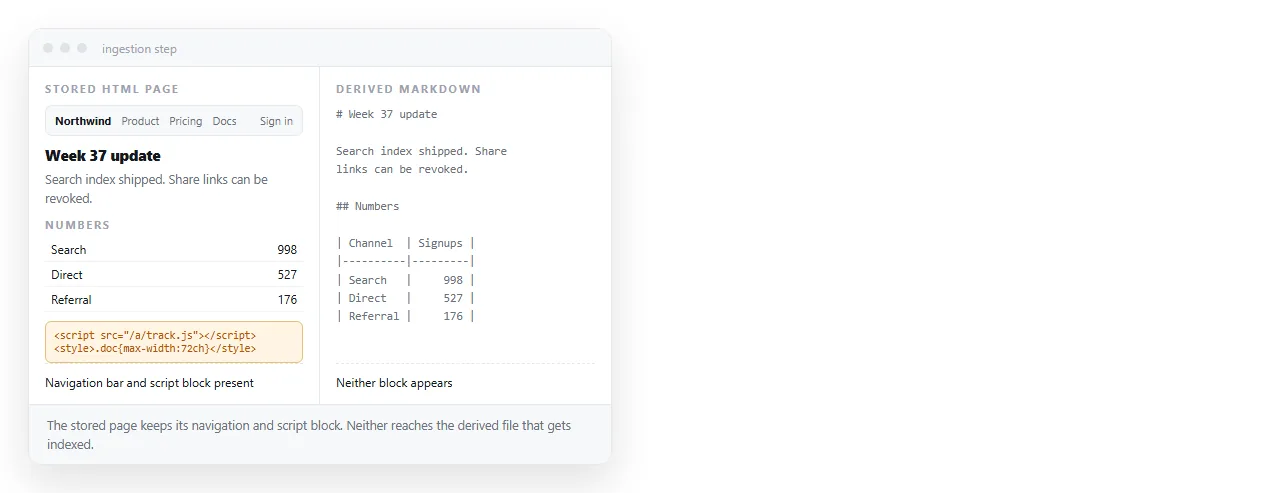
The original keeps tables and structure. The derived text keeps retrieval chunks short and clean.
Treating this as a single choice is what causes trouble. Storage and indexing have different requirements, and one format does not satisfy both.
HTML vs markdown for RAG: why not index HTML directly
In a page saved from a real site, content is usually the minority of the characters.
Script blocks, stylesheets, navigation, footers, consent banners and layout containers all get chunked alongside the text. A chunk that is half markup has less content in it, so the same chunk size retrieves less.
There is a second effect that is quiet. Repeated navigation text appears in every chunk of every page, which makes unrelated documents look similar to each other.
Why not discard the HTML either
Conversion is lossy in ways that are quiet rather than obvious.
| Lost in conversion | Consequence at query time |
|---|---|
| Merged and nested table cells | Numbers are attributed to the wrong heading |
| Content behind closed tabs | The answer is not in the index at all |
| Image alt text | Charts and diagrams become invisible |
| Attribute values | Codes and identifiers cannot be retrieved |
| Layout pairing | Side by side comparisons read as two unrelated lists |
None of these raise an error. The pipeline reports success and the answer is missing, which is the expensive kind of failure.
Keeping the original means you can re-derive the index when you discover one of these, without crawling everything again.
What a good conversion keeps
- Headings, with their level. They become chunk boundaries and context prefixes.
- Tables, as tables. Pipe tables are adequate when the table is rectangular. Keep the HTML table when it is not.
- Lists, as lists. Flattening a list into a paragraph merges items that were separate answers.
- Link text and targets. The text is content, and the target is often the answer to "where do I do this".
- Image alt text. It is the only textual form a diagram has.
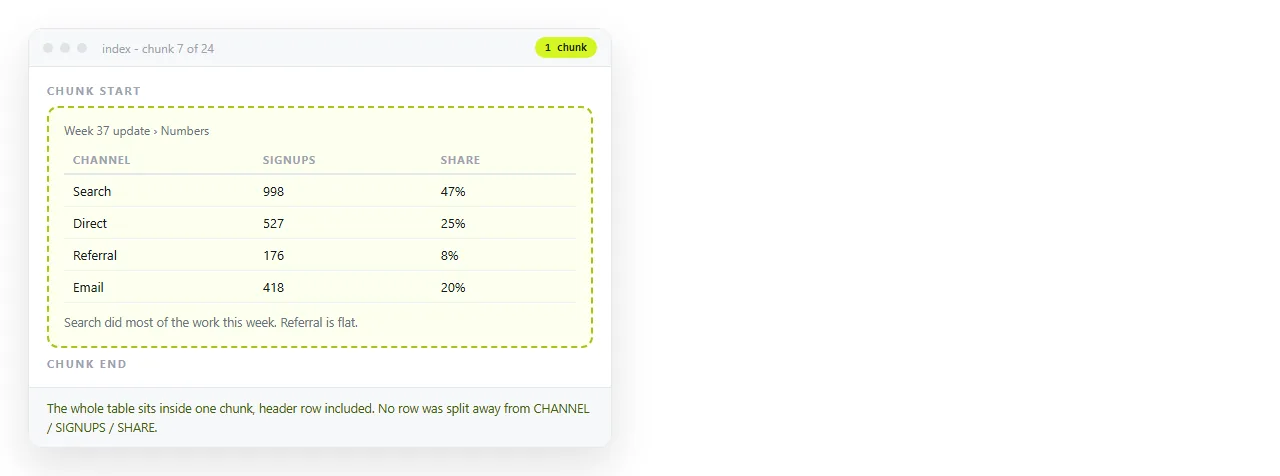
Splitting a table across chunk boundaries is the single most common retrieval bug in document pipelines. The second half arrives without headers and means nothing.
Chunking rules that follow from this
- Split at headings first, then by size within a section.
- Prefix each chunk with its heading path, so a chunk that says "the limit is three" also says which feature.
- Never split a table. If one is larger than the chunk size, split by rows and repeat the header.
- Keep code blocks whole for the same reason.
- Drop repeated navigation and boilerplate before chunking, not after.
Those five cover most of the difference between a pipeline that answers and one that retrieves something adjacent.
Where semantic markup pays off twice
Pages built from headings, lists, tables and sections convert cleanly. Pages built from nested generic containers do not, because there is nothing to tell the converter where a section starts.
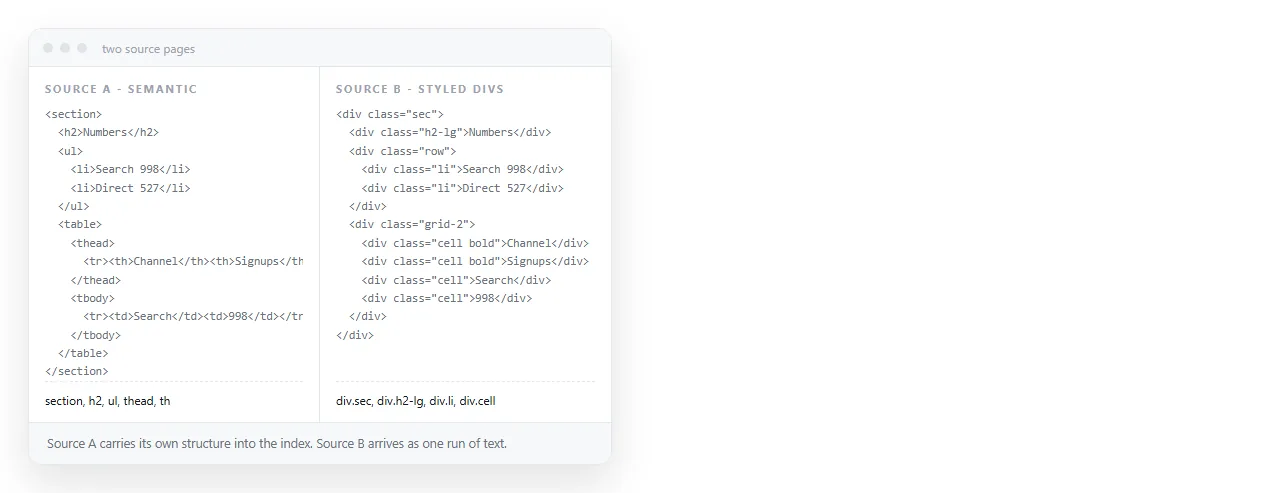
If you control the pages going into the index, this is the cheapest improvement available. Semantic HTML describes the tags involved, and the same choice helps people using assistive technology and helps search engines.
For pages your own team generates, ask for that structure at generation time. Getting HTML instead of markdown covers how to make the request stick.
Tables deserve a separate decision
Most retrieval failures that look like model errors turn out to be table handling.
Rectangular tables convert to pipe tables with nothing lost, and pipe tables chunk well. Keep those as markdown.
Check a sample by hand before trusting the converter across a whole corpus. Ten tables read by a person will tell you more about the pipeline than any aggregate score.
Tables with merged cells, nested tables or repeated header groups should stay as HTML in the indexed chunk, accepting the extra length, because the flattened version says something untrue.
A practical middle route is to store both forms for the same table and index the markdown, retrieving the HTML form when the chunk is selected. That keeps chunks short without losing the accurate version.
Keeping the source pages readable by people
Documents in a knowledge base get read by people too, usually the people who maintain them. A folder of raw HTML files is not something anyone opens twice.
Pasting a page into a NOS document renders it exactly as written, including dark theme, charts and scripts, and gives it an address through Share, then Share link, then Create link. The address stays the same when the content is corrected.
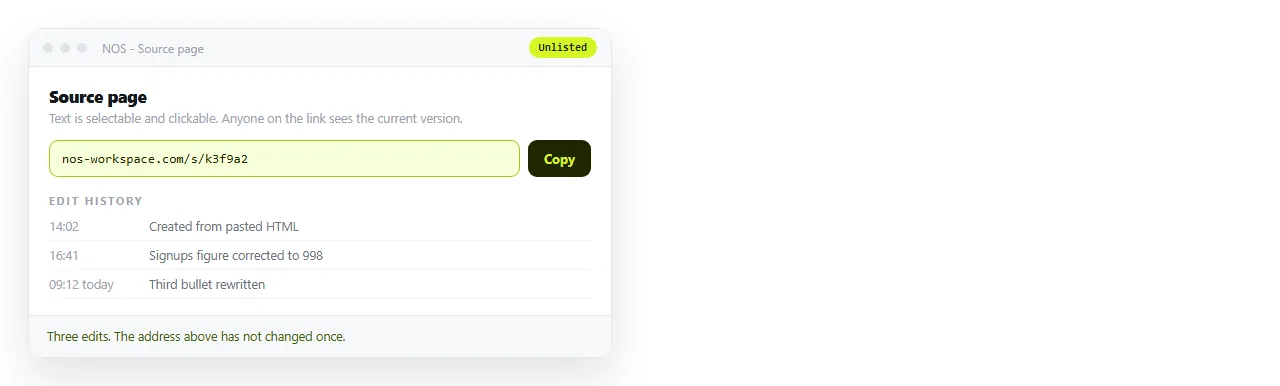
That matters for the maintenance loop. When retrieval surfaces a wrong or stale passage, the fix is clicking the text in the page and typing over it rather than regenerating a file and re-uploading it.
By default the link is unlisted, so internal pages stay internal unless Public on the web is ticked. Turning HTML into a link is that step on its own, and the HTML viewer is the quick check on a page before it enters the pipeline.
Short version. Store HTML. Index markdown derived from it. Keep tables whole, keep headings as context, and check what your converter does with merged cells and hidden panels before you trust a quiet success.