JSX is a syntax extension for JavaScript that lets you write HTML-like markup inside JavaScript. Here it means the markup syntax used with React, not a build setup. A browser cannot run it, so a single HTML file needs one extra script that compiles it.
Click the button. The heading, the text and the click handler are all written in JSX.
<!doctype html>
<html lang="en">
<head>
<meta charset="utf-8">
<meta name="viewport" content="width=device-width, initial-scale=1">
<title>JSX in one HTML file</title>
<style>
  body { margin: 0; padding: 20px; font-family: system-ui, sans-serif; background: #f4f5f7; }
  .card { max-width: 340px; padding: 18px 20px; border-radius: 12px; background: #fff; box-shadow: 0 6px 20px rgba(0, 0, 0, .1); }
  h1 { margin: 0 0 6px; font-size: 22px; }
  p { margin: 0 0 14px; color: #4b5563; }
  button { font: inherit; padding: 8px 16px; border: 0; border-radius: 8px; background: #2563eb; color: #fff; cursor: pointer; }
</style>
<!-- React, then ReactDOM, then Babel (it compiles the text/babel script below) -->
<script src="https://unpkg.com/react@18.3.1/umd/react.production.min.js"></script>
<script src="https://unpkg.com/react-dom@18.3.1/umd/react-dom.production.min.js"></script>
<script src="https://unpkg.com/@babel/standalone@7.26.4/babel.min.js"></script>
</head>
<body>
<div id="root"></div>

<script type="text/babel" data-presets="react">
  const { useState } = React;

  function App() {
    const [count, setCount] = useState(0);
    return (
      <div className="card">
        <h1>Hello, JSX</h1>
        <p>Clicked {count} times</p>
        <button onClick={() => setCount(count + 1)}>Click me</button>
      </div>
    );
  }

  ReactDOM.createRoot(document.getElementById('root')).render(<App />);
</script>
</body>
</html>
The whole page is one file with no install step. It needs an internet connection, because React and Babel load from a CDN.
The smallest working file
Three things have to be in the file.
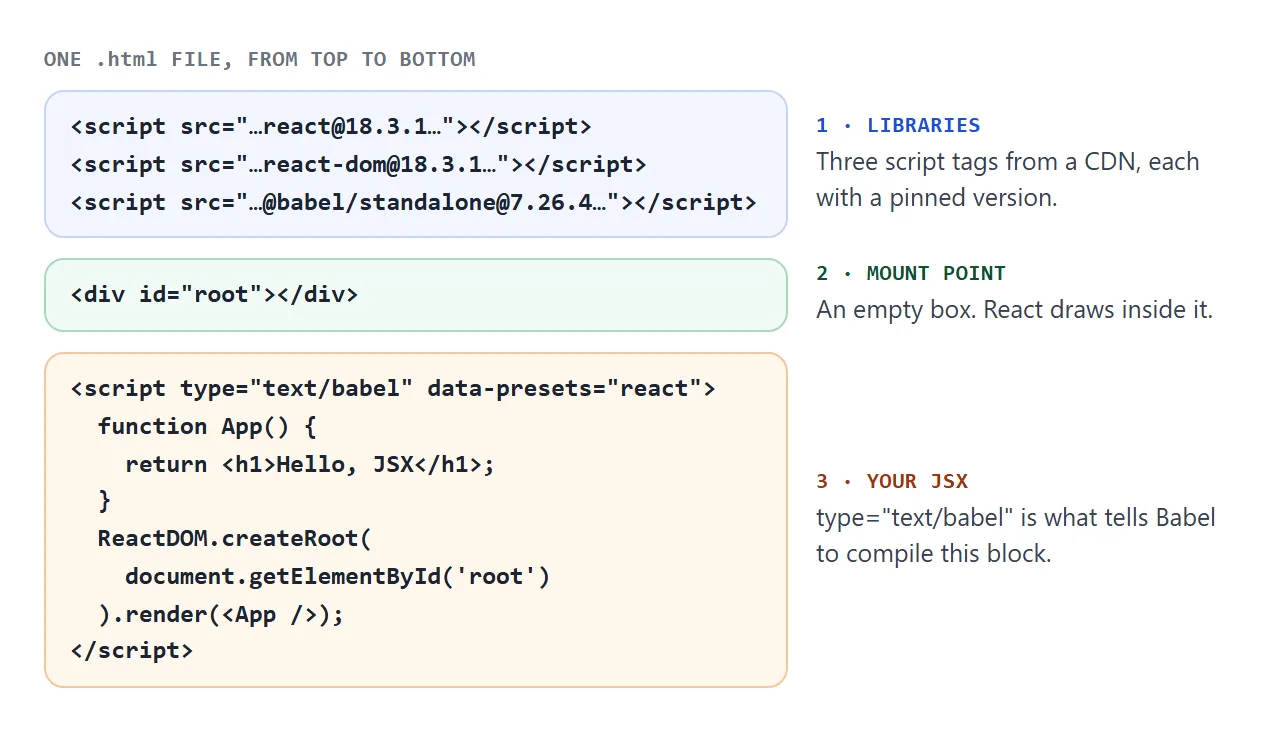
- Libraries. Script tags for React, ReactDOM and Babel standalone. Pin the version in each address, so the page does not change when a new release appears.
- A mount point. An empty
<div id="root">. React takes over managing the DOM inside it. - Your code. A script with
type="text/babel". Babel compiles its content when the page loads, and then it runs.
The type attribute matters. A script whose type is not JavaScript is treated as a data block, and the browser does not run it. Babel finds those blocks and compiles them.
What the JSX turns into
JSX never reaches the browser's JavaScript engine. Babel rewrites each tag as a call to React.createElement, which is what React documents as the alternative to writing JSX.
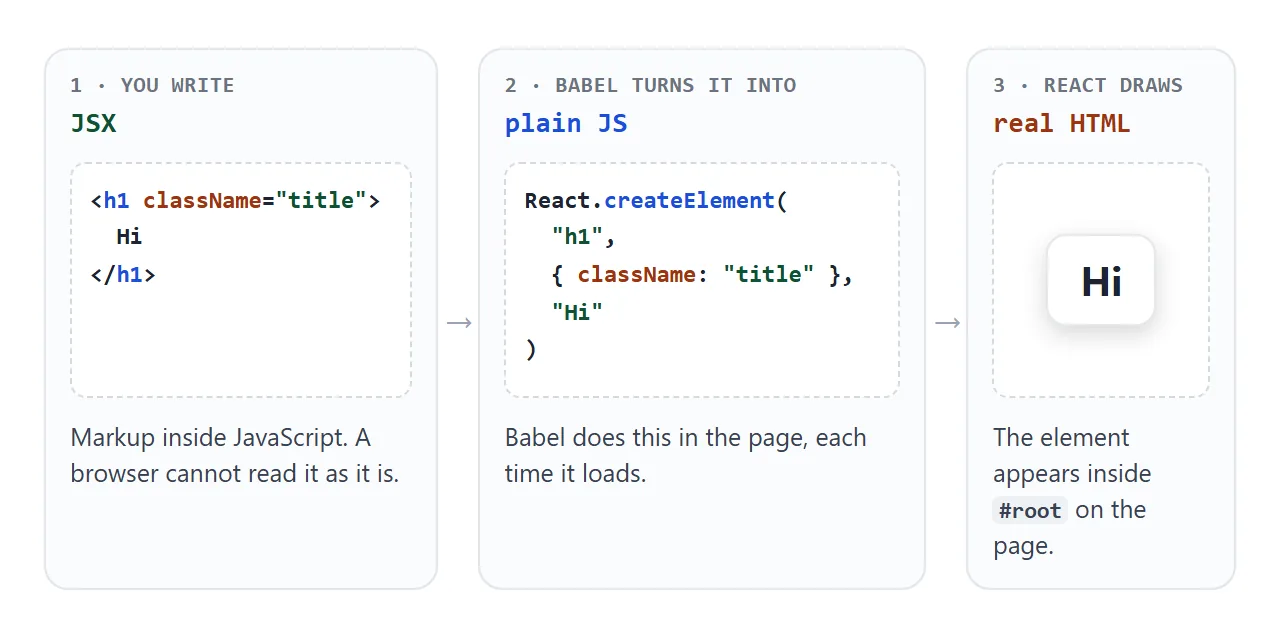
You can watch the rewrite. Type JSX below, or use the buttons to see what the common mistakes produce.
<!doctype html>
<html lang="en">
<head>
<meta charset="utf-8">
<meta name="viewport" content="width=device-width, initial-scale=1">
<title>What JSX turns into</title>
<style>
body { margin: 0; padding: 14px; font-family: system-ui, sans-serif; background: #f4f5f7; color: #1d2330; }
h2 { margin: 0 0 6px; font-size: 14px; }
.presets { display: flex; flex-wrap: wrap; gap: 6px; margin-bottom: 10px; }
.presets button { font: inherit; font-size: 13px; padding: 5px 10px; border: 1px solid #cfd4dc; border-radius: 8px; background: #fff; cursor: pointer; }
textarea, pre { box-sizing: border-box; width: 100%; margin: 0 0 12px; padding: 10px; border-radius: 8px; font: 13px/1.5 ui-monospace, Consolas, monospace; }
textarea { height: 110px; border: 1px solid #cfd4dc; resize: vertical; }
pre { min-height: 74px; white-space: pre-wrap; overflow-wrap: anywhere; background: #fff; border: 1px solid #e1e4ea; }
pre.ok { border-color: #86c5a0; }
pre.err { border-color: #f0a05a; background: #fff7ed; color: #9a3412; }
</style>
<script src="https://unpkg.com/@babel/standalone@7.26.4/babel.min.js"></script>
</head>
<body>
<h2>1. Type JSX</h2>
<div class="presets">
<button data-code="<h1 className="title">Hello, {name}</h1>">Valid</button>
<button data-code="<h1>Title</h1> <p>Text</p>">Two roots</button>
<button data-code="<> <h1>Title</h1> <p>Text</p> </>">Fragment</button>
<button data-code="<div> <img src="a.png"> </div>">Unclosed img</button>
</div>
<textarea id="src" spellcheck="false" aria-label="JSX input"></textarea>
<h2>2. What the browser actually runs</h2>
<pre id="out"></pre>
<script>
const src = document.getElementById('src');
const out = document.getElementById('out');
function compile() {
try {
// wrap in parentheses so the input is one JavaScript expression
const result = Babel.transform('(' + src.value + ');', {
presets: [['react', { runtime: 'classic' }]],
});
out.textContent = result.code;
out.className = 'ok';
} catch (err) {
out.textContent = err.message; // Babel names the problem and the line
out.className = 'err';
}
}
src.addEventListener('input', compile);
document.querySelectorAll('.presets button').forEach((b) => {
b.addEventListener('click', () => { src.value = b.dataset.code; compile(); });
});
src.value = '<h1 className="title">Hello, {name}</h1>';
compile();
</script>
</body>
</html>
Both error messages in that example are the ones you will meet in a real page, usually as a blank screen plus a line in the browser console.
Three rules that cause the first errors
JSX looks like HTML, but it is stricter. Three rules cover the first hour.
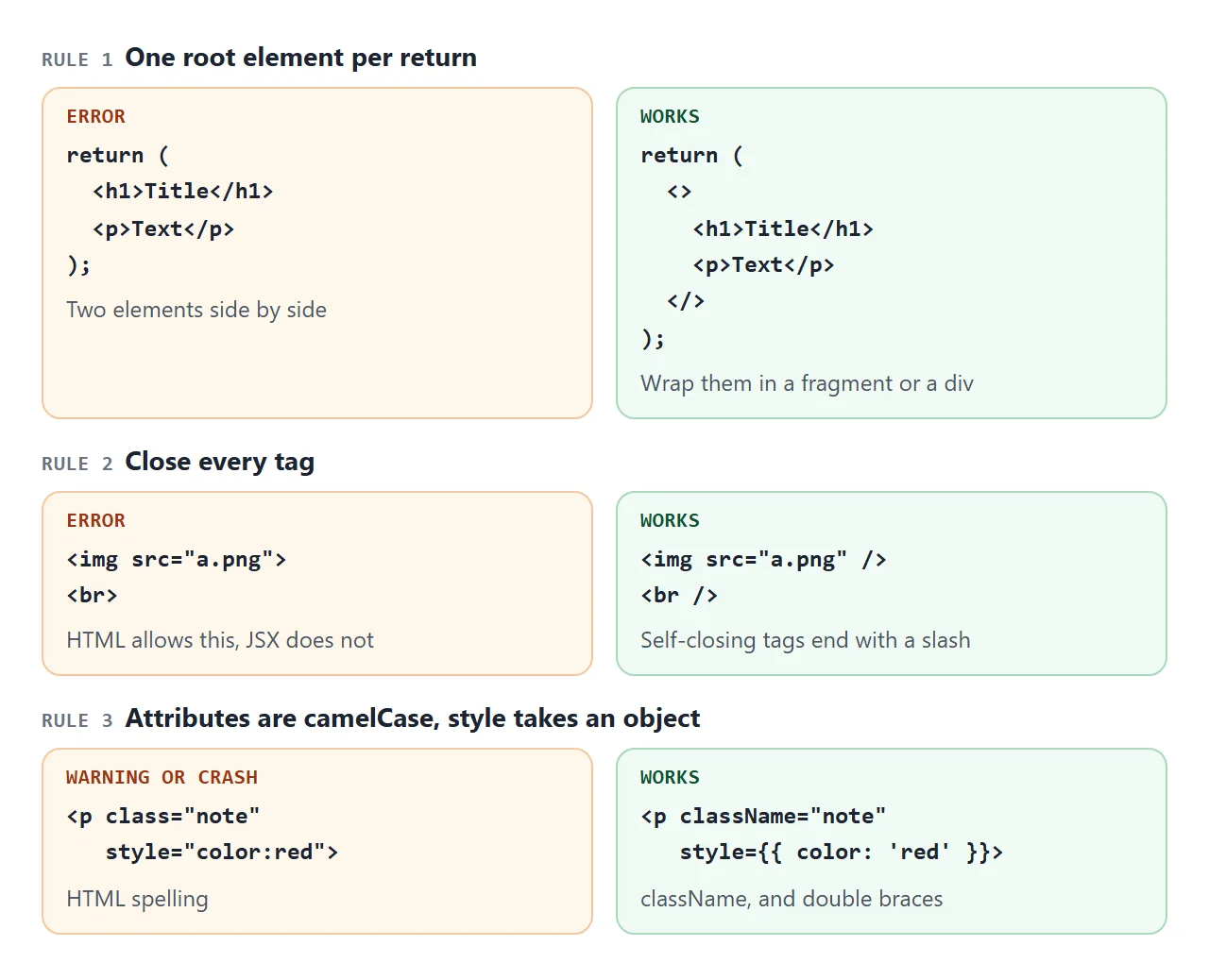
- One root element. A component returns a single element. To return several, wrap them in a div or in a fragment, written as an empty tag pair.
- Close every tag. An
<img>or<br>becomes<img />and<br />. - camelCase attributes. Write
className, notclass. Attributes that start witharia-ordata-keep their dashes.
Component names must start with a capital letter. A lowercase tag such as <app /> is treated as an HTML element, not as your function.
Curly braces: JavaScript inside the markup
Curly braces open a window into JavaScript. They work in two places: as text between tags, and as an attribute value right after the equals sign.
<h1>{name}'s list</h1>
<img src={avatar} alt={description} />
<p style={{ color: 'red' }}>Double braces: one pair for JSX, one for the object.</p>
Quotes turn the braces into plain text. src="{avatar}" passes the literal string, not the variable.
Two patterns come up in every app. A list uses map() and gives each item a key. A condition uses a ternary, or && when the left side is a true boolean.
{items.map((it) => <li key={it.id}>{it.text}</li>)}
{items.length > 0 ? <ul>...</ul> : <p>Nothing yet.</p>}
Do not put a number on the left of &&. When it is 0, React renders the 0 itself.
A finished example: a shopping list
This version adds state, a form handled inside the page, a list with keys, a checked style and a progress bar driven by an inline style object.
<!doctype html>
<html lang="en">
<head>
<meta charset="utf-8">
<meta name="viewport" content="width=device-width, initial-scale=1">
<title>Shopping list in JSX</title>
<style>
  body { margin: 0; padding: 16px; font-family: system-ui, sans-serif; background: #f4f5f7; color: #1d2330; }
  .app { max-width: 380px; margin: 0 auto; padding: 16px; border-radius: 12px; background: #fff; box-shadow: 0 6px 20px rgba(0, 0, 0, .1); }
  h1 { margin: 0 0 10px; font-size: 20px; }
  form { display: flex; gap: 8px; margin-bottom: 12px; }
  input[type=text] { flex: 1; min-width: 0; padding: 8px 10px; font: inherit; border: 1px solid #cfd4dc; border-radius: 8px; }
  button { font: inherit; padding: 8px 14px; border: 0; border-radius: 8px; background: #2563eb; color: #fff; cursor: pointer; }
  ul { margin: 0; padding: 0; list-style: none; }
  li { display: flex; align-items: center; gap: 8px; padding: 8px 0; border-top: 1px solid #eef0f3; }
  li label { flex: 1; cursor: pointer; }
  li.done label { color: #9aa3b2; text-decoration: line-through; }
  li button { padding: 3px 9px; background: #eef1f5; color: #4b5563; }
  .bar { height: 8px; margin-top: 12px; border-radius: 4px; background: #eef1f5; overflow: hidden; }
  .bar div { height: 100%; background: #16a34a; transition: width .2s; }
  .note { margin: 8px 0 0; font-size: 13px; color: #6b7280; }
</style>
<script src="https://unpkg.com/react@18.3.1/umd/react.production.min.js"></script>
<script src="https://unpkg.com/react-dom@18.3.1/umd/react-dom.production.min.js"></script>
<script src="https://unpkg.com/@babel/standalone@7.26.4/babel.min.js"></script>
</head>
<body>
<div id="root"></div>

<script type="text/babel" data-presets="react">
  const { useState } = React;

  function App() {
    const [items, setItems] = useState([
      { id: 1, text: 'Bread', done: true },
      { id: 2, text: 'Oat milk', done: false },
    ]);
    const [text, setText] = useState('');
    const [nextId, setNextId] = useState(3);

    function add(e) {
      e.preventDefault();                       // keep the page from reloading
      if (!text.trim()) return;
      setItems([...items, { id: nextId, text: text.trim(), done: false }]);
      setNextId(nextId + 1);
      setText('');
    }
    function toggle(id) {
      setItems(items.map((it) => (it.id === id ? { ...it, done: !it.done } : it)));
    }
    function remove(id) {
      setItems(items.filter((it) => it.id !== id));
    }

    const doneCount = items.filter((it) => it.done).length;
    const percent = items.length > 0 ? Math.round((doneCount / items.length) * 100) : 0;

    return (
      <div className="app">
        <h1>Shopping list</h1>
        <form onSubmit={add}>
          <input type="text" value={text} placeholder="Add an item"
                 onChange={(e) => setText(e.target.value)} aria-label="New item" />
          <button type="submit">Add</button>
        </form>

        <ul>
          {items.map((it) => (
            <li key={it.id} className={it.done ? 'done' : ''}>
              <input type="checkbox" id={'item-' + it.id} checked={it.done}
                     onChange={() => toggle(it.id)} />
              <label htmlFor={'item-' + it.id}>{it.text}</label>
              <button onClick={() => remove(it.id)} aria-label={'Remove ' + it.text}>x</button>
            </li>
          ))}
        </ul>

        {items.length === 0 ? <p className="note">Nothing on the list.</p> : null}

        <div className="bar"><div style={{ width: percent + '%' }}></div></div>
        <p className="note">{doneCount} of {items.length} done</p>
      </div>
    );
  }

  ReactDOM.createRoot(document.getElementById('root')).render(<App />);
</script>
</body>
</html>
- State:
useStatereturns the current value and a setter. Calling the setter makes React render the component again. - Form: the submit handler calls
e.preventDefault(), so the page does not reload. - Keys: each
<li>gets a stablekeyfrom the item's id, not from its position.
Call hooks such as useState at the top level of a component, never inside a condition or a loop.
What this setup is, and what it is not
Babel compiles the JSX in the visitor's browser every time the page loads. The Babel documentation says that in production you should normally not use the standalone build, and should compile ahead of time instead.
Babel also prints a console warning that says the same.
React 19 does not publish the UMD files used above. For React 19, the upgrade guide suggests an ESM-based CDN. This is its example, and it is not a page you can paste into NOS:
<script type="module">
  import React from "https://esm.sh/react@19/?dev"
  import ReactDOMClient from "https://esm.sh/react-dom@19/client?dev"
  ...
</script>
NOS loads scripts from cdnjs.cloudflare.com, cdn.jsdelivr.net, cdn.tailwindcss.com, code.jquery.com and unpkg.com. esm.sh is not on that list, so for a shared page, use the React 18.3.1 files from one of those hosts.
If the page grows into many files, the next step is a build tool. Hosting a built front end covers what to upload afterwards.
When it does not work
| Symptom | Cause | Fix |
|---|---|---|
| Blank page, console says Unexpected token | The script has no type="text/babel" |
Add the type attribute |
| Blank page, Adjacent JSX elements must be wrapped | Two elements returned side by side | Wrap them in a fragment or a div |
| Unterminated JSX contents | A tag such as <img> is not closed |
Write <img /> |
| Blank page, style prop expects a mapping | style was given a string |
Use style={{ color: 'red' }} |
| Console warning: Invalid DOM property class | HTML spelling of an attribute | Use className, and htmlFor on labels |
A tag such as <app /> shows nothing |
Lowercase name read as an HTML element | Start the component name with a capital |
| A stray 0 appears on the page | A number on the left of && |
Test count > 0 && ... |
| Console warning: unique key prop | A list from map() has no key |
Add key={item.id} |
| Cannot use import statement outside a module | An import line in a text/babel script |
Use the global React object, as above |
| ReactDOM or React is not defined | A library tag failed to load or is missing | Check the three script addresses |
Open the browser console first. Every row above shows up there.
Share it as a link
A React page is easier to show than to describe. A screenshot cannot be clicked, and a .html attachment may open as plain code on a phone. Opening an HTML file on a phone covers why.
To send the working version, paste the page into a NOS document and choose Create share link. HTML to link walks through it.
The page renders as written and its scripts run, so the people you send it to can click the buttons and use the list themselves. If you change the code later, the same link shows the new version.