A knowledge base template, in its simplest form, is one page with the questions people keep asking and a short checked answer under each. With no knowledge base tool, one HTML page shared as a link can do that job for now.
It has no search across many pages, no permissions and no edit history.
The pain is familiar: the same question comes up in chat every week, one person answers it again, and the answer sinks into old messages. Collecting the answers on one page stops the repeating.
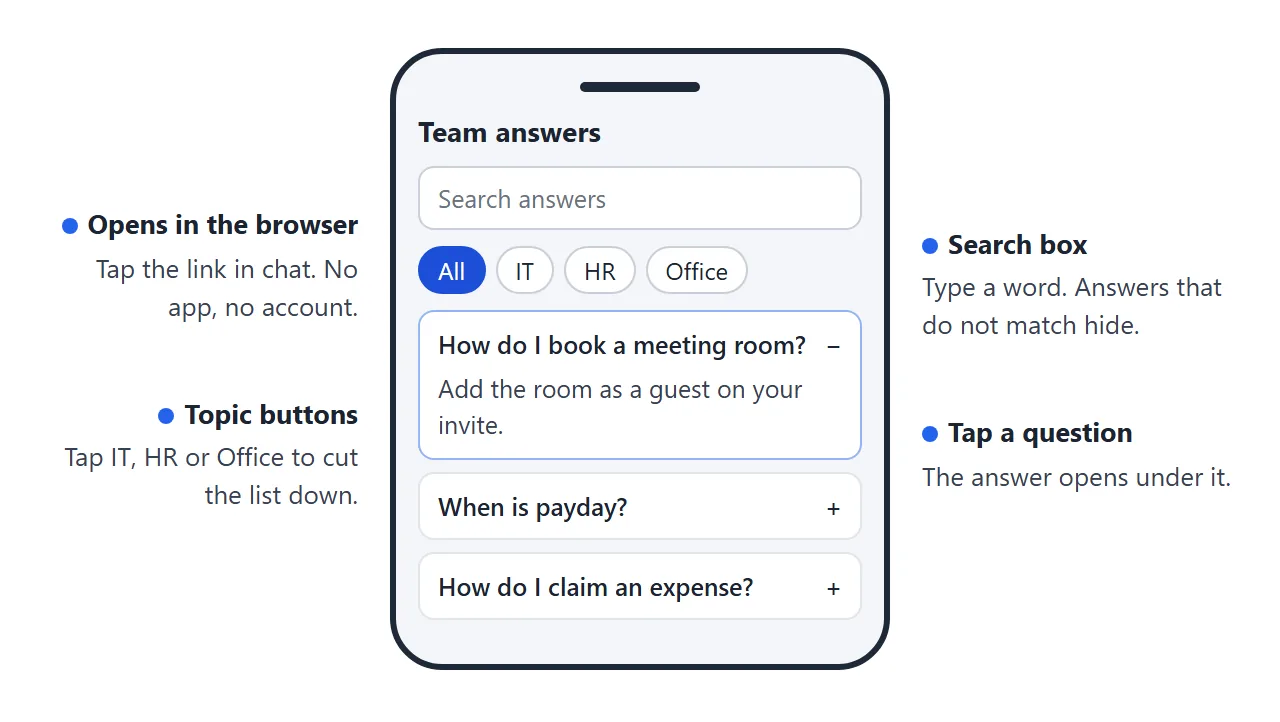
Try a page like this one. Search for "wifi", or tap a topic.
<!doctype html>
<html lang="en">
<head>
<meta charset="utf-8">
<meta name="viewport" content="width=device-width, initial-scale=1">
<title>Team answers</title>
<style>
* { box-sizing: border-box; }
body { margin: 0; padding: 16px; font-family: system-ui, sans-serif; background: #f4f6f9; color: #1d2330; }
.wrap { max-width: 720px; margin: 0 auto; }
h1 { font-size: 22px; margin: 0 0 4px; }
.sub { margin: 0 0 14px; color: #5b6472; font-size: 14px; }
.search { width: 100%; font: inherit; font-size: 16px; padding: 11px 13px; border: 1px solid #c9cfd8; border-radius: 10px; background: #fff; }
.search:focus { outline: 2px solid #2563eb; outline-offset: 1px; border-color: #2563eb; }
.chips { display: flex; flex-wrap: wrap; gap: 8px; margin: 12px 0; }
.chip { font: inherit; font-size: 14px; padding: 7px 13px; border-radius: 99px; border: 1px solid #c9cfd8; background: #fff; color: #1d2330; cursor: pointer; }
.chip[aria-pressed="true"] { background: #1d4ed8; border-color: #1d4ed8; color: #fff; }
.count { font-size: 13px; color: #5b6472; margin: 0 0 8px; }
details { background: #fff; border: 1px solid #e1e4ea; border-radius: 10px; margin-bottom: 8px; }
summary { cursor: pointer; padding: 13px 14px; font-weight: 600; font-size: 15px; list-style: none; display: flex; justify-content: space-between; gap: 10px; }
summary::-webkit-details-marker { display: none; }
summary::after { content: "+"; color: #5b6472; font-weight: 400; font-size: 20px; line-height: 1; }
details[open] summary::after { content: "\2212"; }
.body { padding: 0 14px 13px; font-size: 14.5px; line-height: 1.55; }
.body p { margin: 0 0 8px; }
.body ol { margin: 0 0 8px; padding-left: 20px; }
.meta { font-size: 12.5px; color: #5b6472; border-top: 1px solid #eef0f4; padding-top: 8px; margin-top: 4px; }
.tag { display: inline-block; font-size: 11.5px; font-weight: 700; background: #e8eefc; color: #1e40af; border-radius: 99px; padding: 2px 8px; margin-right: 6px; }
.none { display: none; background: #fff7ed; border: 1px solid #fed7aa; border-radius: 10px; padding: 13px 14px; font-size: 14.5px; }
</style>
</head>
<body>
<div class="wrap">
<h1>Harbor & Pine: team answers</h1>
<p class="sub">Search, or pick a topic. Last checked 1 Oct 2026. Not here? Ask in #help.</p>
<input class="search" id="q" type="search" placeholder="Search answers, e.g. wifi" aria-label="Search answers">
<div class="chips" id="chips">
<button class="chip" data-cat="all" aria-pressed="true">All</button>
<button class="chip" data-cat="IT" aria-pressed="false">IT</button>
<button class="chip" data-cat="HR" aria-pressed="false">HR</button>
<button class="chip" data-cat="Office" aria-pressed="false">Office</button>
<button class="chip" data-cat="Finance" aria-pressed="false">Finance</button>
</div>
<p class="count" id="count" aria-live="polite"></p>
<div id="list">
<details data-cat="IT"><summary>How do I connect to the office wifi?</summary><div class="body">
<p>Join the network called Harbor-Staff. Use your work email and the password from the welcome sheet.</p>
<p class="meta"><span class="tag">IT</span>Owner: Dana (IT) · Checked 1 Oct 2026</p></div></details>
<details data-cat="IT"><summary>I forgot my password. What now?</summary><div class="body">
<ol><li>Open the sign-in page and choose Forgot password.</li><li>Enter your work email.</li><li>Follow the link in the email you get.</li></ol>
<p>No email after ten minutes? Ask in #help.</p>
<p class="meta"><span class="tag">IT</span>Owner: Dana (IT) · Checked 1 Oct 2026</p></div></details>
<details data-cat="HR"><summary>How do I ask for time off?</summary><div class="body">
<p>Fill in the time-off form at least two weeks ahead for more than three days. Your manager approves it.</p>
<p class="meta"><span class="tag">HR</span>Owner: Priya (HR) · Checked 20 Sep 2026</p></div></details>
<details data-cat="HR"><summary>When is payday?</summary><div class="body">
<p>The last working day of each month. If it falls on a weekend, the Friday before.</p>
<p class="meta"><span class="tag">HR</span>Owner: Priya (HR) · Checked 20 Sep 2026</p></div></details>
<details data-cat="Office"><summary>How do I book a meeting room?</summary><div class="body">
<ol><li>Open the room calendar.</li><li>Pick a free slot.</li><li>Add the room as a guest on your invite.</li></ol>
<p class="meta"><span class="tag">Office</span>Owner: Marco (Ops) · Checked 1 Oct 2026</p></div></details>
<details data-cat="Office"><summary>Where do I get a visitor badge?</summary><div class="body">
<p>Visitors sign in at the front desk. Tell reception the day before so a badge is ready.</p>
<p class="meta"><span class="tag">Office</span>Owner: Marco (Ops) · Checked 12 Sep 2026</p></div></details>
<details data-cat="Finance"><summary>How do I claim an expense?</summary><div class="body">
<ol><li>Photograph the receipt.</li><li>Fill in the expense form and attach the photo.</li><li>Send it to your manager.</li></ol>
<p>Claims sent by the 25th are paid with that month's salary.</p>
<p class="meta"><span class="tag">Finance</span>Owner: Lena (Finance) · Checked 1 Oct 2026</p></div></details>
<details data-cat="Finance"><summary>Who approves a purchase over 500?</summary><div class="body">
<p>Your department head. Send them the quote first, then place the order.</p>
<p class="meta"><span class="tag">Finance</span>Owner: Lena (Finance) · Checked 12 Sep 2026</p></div></details>
</div>
<div class="none" id="none">No answer matches. Ask in #help, and the owner can add it to this page.</div>
</div>
<script>
const input = document.getElementById('q');
const chips = document.querySelectorAll('.chip');
const items = document.querySelectorAll('#list details');
const count = document.getElementById('count');
const none = document.getElementById('none');
let cat = 'all';
function apply() {
const words = input.value.toLowerCase().split(/\s+/).filter(Boolean);
let shown = 0;
items.forEach((d) => {
const text = d.textContent.toLowerCase();
const ok = (cat === 'all' || d.dataset.cat === cat) && words.every((w) => text.includes(w));
d.style.display = ok ? '' : 'none';
if (ok) shown++;
});
count.textContent = shown + (shown === 1 ? ' answer' : ' answers');
none.style.display = shown ? 'none' : 'block';
}
input.addEventListener('input', apply);
chips.forEach((c) => c.addEventListener('click', () => {
cat = c.dataset.cat;
chips.forEach((x) => x.setAttribute('aria-pressed', x === c ? 'true' : 'false'));
apply();
}));
apply();
</script>
</body>
</html>
What goes in each answer
Every entry follows the same few lines, so a reader knows where to look. Keep them short enough to read on a phone.
- Question: written the way people ask it in chat, not the way the department names it.
- Short answer: one or two sentences, first.
- Steps: only if the task has steps. Number them.
- Owner and last checked: a name and a date. They show how far to trust the entry.
Here is the same layout as a small builder. Type in the boxes and the card updates. Nothing is saved, so copy your text out when you are done.
<!doctype html>
<html lang="en">
<head>
<meta charset="utf-8">
<meta name="viewport" content="width=device-width, initial-scale=1">
<title>Answer entry builder</title>
<style>
  * { box-sizing: border-box; }
  body { margin: 0; padding: 16px; font-family: system-ui, sans-serif; background: #f4f6f9; color: #1d2330; }
  h1 { font-size: 20px; margin: 0 0 4px; }
  .sub { margin: 0 0 14px; color: #5b6472; font-size: 14px; }
  .grid { display: grid; grid-template-columns: 1fr 1fr; gap: 14px; align-items: start; }
  @media (max-width: 640px) { .grid { grid-template-columns: 1fr; } }
  .form, .card { background: #fff; border: 1px solid #e1e4ea; border-radius: 12px; padding: 14px; }
  label { display: block; font-size: 13px; font-weight: 600; margin: 10px 0 4px; }
  label:first-child { margin-top: 0; }
  input, textarea { width: 100%; font: inherit; font-size: 15px; padding: 9px 10px; border: 1px solid #c9cfd8; border-radius: 8px; }
  textarea { resize: vertical; min-height: 64px; }
  input:focus, textarea:focus { outline: 2px solid #2563eb; outline-offset: 1px; }
  .row { display: grid; grid-template-columns: 1fr 1fr; gap: 10px; }
  .hint { font-size: 12.5px; color: #5b6472; margin: 3px 0 0; }
  .card h2 { font-size: 18px; margin: 0 0 8px; line-height: 1.3; }
  .card .short { font-size: 15px; line-height: 1.5; margin: 0 0 10px; padding: 10px 12px; background: #eef4ff; border-radius: 8px; }
  .card h3 { font-size: 13px; text-transform: uppercase; letter-spacing: .4px; color: #5b6472; margin: 12px 0 4px; }
  .card ol { margin: 0; padding-left: 20px; font-size: 14.5px; line-height: 1.55; }
  .card p { font-size: 14.5px; line-height: 1.55; margin: 0; }
  .meta { margin-top: 14px; padding-top: 10px; border-top: 1px solid #eef0f4; font-size: 12.5px; color: #5b6472; }
  .empty { color: #9a3412; }
</style>
</head>
<body>
<h1>One answer, one card</h1>
<p class="sub">Type on the left. The card on the right is what your team would read.</p>
<div class="grid">
  <div class="form">
    <label for="f-q">Question, in the words people use</label>
    <input id="f-q" value="How do I book a meeting room?">
    <label for="f-s">Short answer (one or two sentences)</label>
    <textarea id="f-s">Add the room as a guest on your calendar invite. Free rooms accept at once.</textarea>
    <label for="f-st">Steps (one per line, optional)</label>
    <textarea id="f-st" rows="4">Open your calendar and start a new event.
Add the room as a guest.
Check that the room replies Accepted.</textarea>
    <label for="f-no">If it does not work</label>
    <input id="f-no" value="Ask Marco in #help.">
    <div class="row">
      <div><label for="f-o">Owner</label><input id="f-o" value="Marco (Ops)"></div>
      <div><label for="f-d">Last checked</label><input id="f-d" value="1 Oct 2026"></div>
    </div>
    <p class="hint">Nothing is saved. Copy your text out when you are happy with it.</p>
  </div>

  <article class="card" aria-live="polite">
    <h2 id="o-q"></h2>
    <p class="short" id="o-s"></p>
    <div id="o-st-wrap"><h3>Steps</h3><ol id="o-st"></ol></div>
    <div id="o-no-wrap"><h3>If it does not work</h3><p id="o-no"></p></div>
    <p class="meta" id="o-meta"></p>
  </article>
</div>

<script>
  const $ = (id) => document.getElementById(id);

  function render() {
    const q = $('f-q').value.trim();
    const s = $('f-s').value.trim();
    $('o-q').textContent = q || 'Write the question here';
    $('o-q').className = q ? '' : 'empty';
    $('o-s').textContent = s || 'No short answer yet.';
    $('o-s').className = s ? 'short' : 'short empty';

    const lines = $('f-st').value.split('\n').map((l) => l.trim()).filter(Boolean);
    const ol = $('o-st');
    ol.innerHTML = '';
    lines.forEach((l) => {
      const li = document.createElement('li');
      li.textContent = l;
      ol.appendChild(li);
    });
    $('o-st-wrap').style.display = lines.length ? '' : 'none';

    const no = $('f-no').value.trim();
    $('o-no').textContent = no;
    $('o-no-wrap').style.display = no ? '' : 'none';

    $('o-meta').textContent = 'Owner: ' + ($('f-o').value.trim() || 'not set') +
      ' · Last checked: ' + ($('f-d').value.trim() || 'not set');
  }

  document.querySelectorAll('input, textarea').forEach((el) => el.addEventListener('input', render));
  render();
</script>
</body>
</html>
Make it with AI
Gather the questions first. Ten to twenty is plenty. Copy each one with the answer you normally give. Then paste a prompt like this into ChatGPT, Claude or Gemini.
Make a team answers page as ONE HTML file. Put all CSS and JavaScript
inside the file. No external images, fonts or scripts. Show a search box,
topic buttons (All plus one per topic), and a list of questions. Tapping
a question opens its answer. Each answer shows an owner and a "last
checked" date. Hide questions that do not match the search or the topic.
Show a line "No answer matches. Ask in #help." when nothing is left.
Make it readable on a phone.

MY QUESTIONS AND ANSWERS:
(paste them here, with topic, owner and date if you know them)
When the page comes back, check these before you share it.
- Every answer. AI tools can reword an answer and change its meaning. Read each one against your original.
- The search. Type a word you know is on the page. Matching questions should stay and the rest should hide.
- The topic buttons. Tap each one and count the questions.
- Nothing private. No passwords, customer names or pay details.
- Dates and owners. Fill in real ones. A missing date is a reason to doubt the answer.
Send it as a link
Paste the finished code into a NOS document and choose Create share link. HTML to link walks through it. The page renders as written and its scripts run, so the search box and the open-and-close answers work for whoever opens it.
The link opens in a browser, on a phone too, and nobody needs an account. Visitors cannot edit the page.
When an answer changes, edit the code in your NOS document. The address you already shared shows the new version.
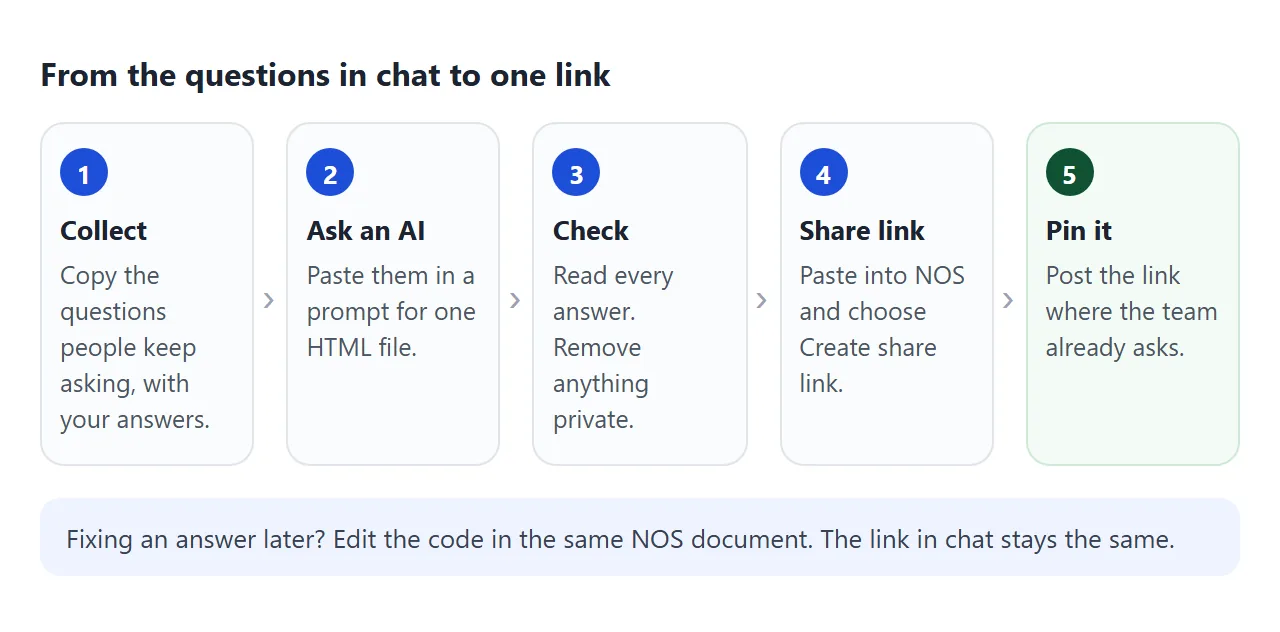
Before you post it, open the link on your phone and try the search once. That is what your colleagues will see.
Where to put the link
The page helps only if people find it where they already ask. As of October 2026, the official help pages say this about two common places. Plans and settings can change it.
Slack. Slack's help says to open a channel, click the plus sign at the top of the conversation, choose Link, enter the address, pick a folder and click Add.
It says anyone in the conversation can add and remove content in a folder, and that the feature is on all plans. Sending an HTML file in Slack covers the file side.
Microsoft Teams. Microsoft's help says to select a channel and then Add a tab. A Microsoft developer blog post says that starting in July 2024 the Website tab opens a link in a new browser tab instead of loading it inside Teams.
Try it in your own Teams. Sharing an HTML file in Teams covers the rest.
For the office wall or the break room, turn the link into a QR code. QR code link shows how, and the code keeps working after you edit the page.
Ways to share the page, compared
| Way | What people get | Watch out for |
|---|---|---|
| HTML file attached in chat | A file they must open in a browser | Old copies stay in chat after you fix an answer |
| Link posted in chat | The page, always the latest version | Scrolls away unless pinned |
| Slack channel link | The page, one click from the channel | Someone has to add it once |
| Teams channel tab | A tab for the link | Check whether it opens inside Teams or in a browser tab |
| QR code on the wall | The page, from a phone camera | Only useful where people can see it |
A link wins here because answers change. Link vs attachment lists six differences.
What one page does not do
One page suits the questions asked every week. It does not scale to hundreds of articles.
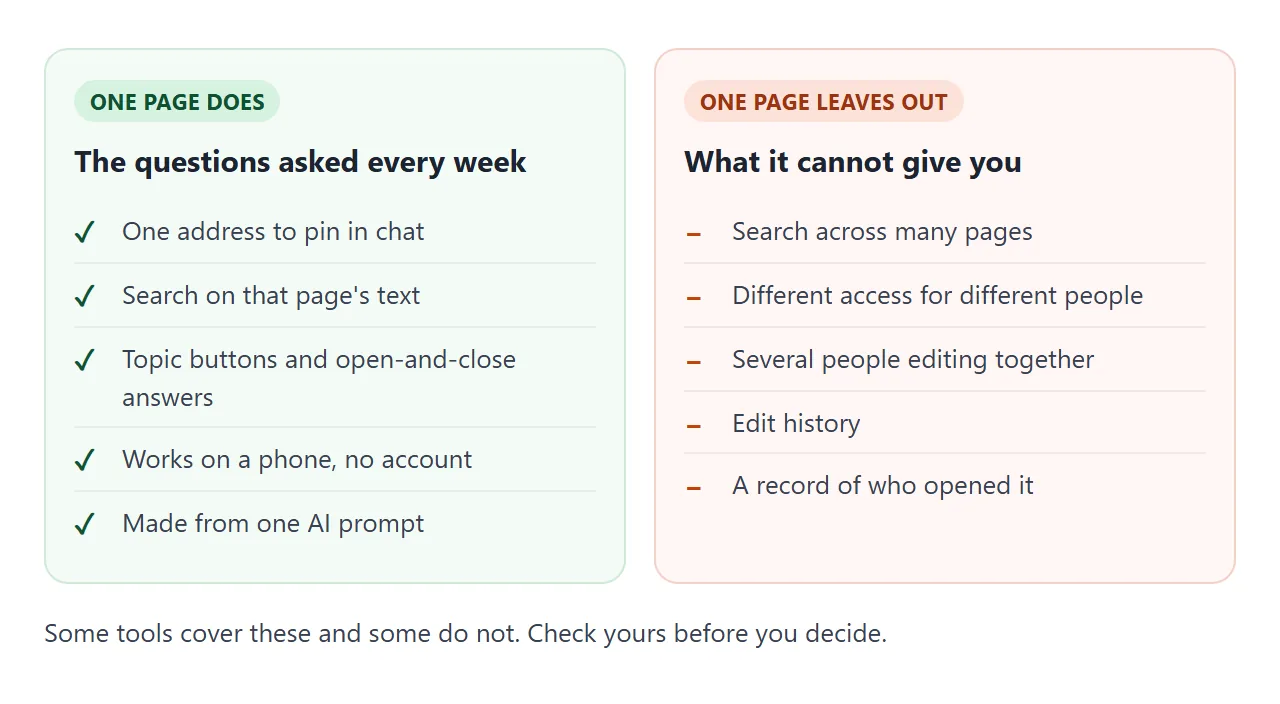
Move to a real tool when you need several editors, access for some people only, or search across many pages. Free Confluence alternatives and Notion alternatives for teams look at that step. The answers you collected carry over.
Until then, give the page one owner and a ten-minute check each month: read every answer, fix what changed, update the date. A page nobody maintains is worse than none, because people stop trusting it.
When it does not work
| What you see | Cause | Fix |
|---|---|---|
| Search finds nothing you know is there | The word is spelled differently on the page | Add the common spelling to the question |
| A topic button shows an empty list | The AI used a different topic name on some entries | Ask the AI to use one topic name for each entry |
| Colleagues cannot add answers | Visitors cannot edit a NOS share link | They send it in chat and the owner adds it |
| Someone outside the team opened it | The link was forwarded | Anyone with the link can open it. Move private answers elsewhere |
| An answer is out of date | Nobody owns the check | Name an owner and a date on every entry |
| Images are missing | Outside images are blocked | Ask for shapes or emoji drawn inside the file |