A one page company profile is a single page that tells a buyer who you are, what you do, what you have done, who is behind it and how to reach you.
For a small agency or studio, the quickest way to make one is to have an AI write it as a web page and send it as a link.
The sending is the awkward part. In a July 2026 feature request on Claude Code's GitHub, an independent consultant called the most natural flow one that can "hand a polished deliverable to someone outside your org".
Their workaround was a PDF by email, which lost the live address that updates while you iterate.
A company profile has the same shape. It goes to people outside your company, and its facts keep changing: a new hire, a new project, a new address. Here is a finished example you can copy.
<!doctype html>
<html lang="en">
<head>
<meta charset="utf-8">
<meta name="viewport" content="width=device-width, initial-scale=1">
<title>Fernhill Studio - company profile</title>
<style>
  * { box-sizing: border-box; }
  body { margin: 0; background: #eef2ee; font-family: system-ui, -apple-system, "Segoe UI", sans-serif; color: #1c2a22; line-height: 1.55; }
  .page { max-width: 760px; margin: 0 auto; background: #fff; padding: 26px 22px 34px; }
  .top { display: flex; align-items: center; gap: 12px; }
  .top svg { flex: none; }
  .top b { font-size: 20px; letter-spacing: .01em; }
  .top span { display: block; font-size: 13px; color: #5b6b61; }
  h1 { margin: 22px 0 8px; font-size: 28px; line-height: 1.2; }
  .lead { margin: 0; font-size: 17px; color: #33443a; }
  .facts { display: grid; grid-template-columns: repeat(3, 1fr); gap: 10px; margin: 20px 0 4px; }
  .facts div { background: #f1f6f2; border: 1px solid #d9e6dc; border-radius: 10px; padding: 10px 12px; }
  .facts b { display: block; font-size: 20px; color: #1f5a3a; }
  .facts span { font-size: 13px; color: #5b6b61; }
  h2 { margin: 28px 0 10px; font-size: 13px; letter-spacing: .08em; text-transform: uppercase; color: #5b6b61; }
  .cards { display: grid; grid-template-columns: repeat(3, 1fr); gap: 10px; }
  .card { border: 1px solid #dfe7e1; border-radius: 10px; padding: 12px 13px; }
  .card b { display: block; margin-bottom: 3px; font-size: 16px; }
  .card p { margin: 0; font-size: 14.5px; color: #44564b; }
  .work { list-style: none; margin: 0; padding: 0; }
  .work li { display: flex; gap: 12px; padding: 11px 0; border-bottom: 1px solid #e8eee9; }
  .work .dot { flex: none; width: 38px; height: 38px; border-radius: 9px; display: grid; place-items: center; color: #fff; font-weight: 700; font-size: 14px; }
  .work b { font-size: 16px; }
  .work p { margin: 2px 0 0; font-size: 14.5px; color: #44564b; }
  .team { display: grid; grid-template-columns: repeat(4, 1fr); gap: 10px; }
  .team div { text-align: center; }
  .team i { display: grid; place-items: center; width: 52px; height: 52px; margin: 0 auto 6px; border-radius: 50%; background: #d9e6dc; color: #1f5a3a; font-style: normal; font-weight: 700; }
  .team b { display: block; font-size: 14.5px; line-height: 1.25; }
  .team span { font-size: 13px; color: #5b6b61; }
  dl { margin: 0; display: grid; grid-template-columns: 150px 1fr; border: 1px solid #dfe7e1; border-radius: 10px; overflow: hidden; }
  dt, dd { margin: 0; padding: 9px 12px; font-size: 15px; border-bottom: 1px solid #e8eee9; }
  dt { background: #f6f9f6; color: #5b6b61; }
  dt:nth-last-of-type(1), dd:nth-last-of-type(1) { border-bottom: 0; }
  dd { overflow-wrap: anywhere; }
  .contact { margin-top: 22px; padding: 16px 18px; border-radius: 12px; background: #1f5a3a; color: #fff; }
  .contact b { display: block; font-size: 18px; }
  .contact a { color: #fff; }
  .upd { margin: 16px 0 0; font-size: 13px; color: #7a897f; }
  @media (max-width: 560px) {
    h1 { font-size: 24px; }
    .cards { grid-template-columns: 1fr; }
    .team { grid-template-columns: repeat(2, 1fr); }
    dl { grid-template-columns: 1fr; }
    dt { border-bottom: 0; padding-bottom: 0; background: #fff; font-size: 13px; }
  }
</style>
</head>
<body>
<div class="page">
  <div class="top">
    <svg width="44" height="44" viewBox="0 0 44 44" aria-hidden="true"><rect width="44" height="44" rx="10" fill="#1f5a3a"/><path d="M22 34V16M22 24c-5 0-8-3-8-8 5 0 8 3 8 8zm0 4c5 0 8-3 8-8-5 0-8 3-8 8z" fill="none" stroke="#fff" stroke-width="2.4" stroke-linecap="round" stroke-linejoin="round"/></svg>
    <div><b>Fernhill Studio</b><span>Design and web for small organisations</span></div>
  </div>

  <h1>We build clear websites and printed material for local businesses and nonprofits.</h1>
  <p class="lead">A four-person studio. One point of contact, fixed prices, and work that your own staff can update afterwards.</p>

  <div class="facts">
    <div><b id="years"></b><span>in business</span></div>
    <div><b>4</b><span>people</span></div>
    <div><b>Harbor City</b><span>based in</span></div>
  </div>

  <h2>What we do</h2>
  <div class="cards">
    <div class="card"><b>Websites</b><p>Small sites that load fast and read well on a phone.</p></div>
    <div class="card"><b>Brand basics</b><p>Logo, colours and type, written down on one page.</p></div>
    <div class="card"><b>Print</b><p>Menus, leaflets and signs from the same design files.</p></div>
  </div>

  <h2>Selected work</h2>
  <ul class="work">
    <li><span class="dot" style="background:#1f5a3a">LB</span><div><b>Larkspur Bakery</b><p>New website with an order form. Staff now update the menu themselves.</p></div></li>
    <li><span class="dot" style="background:#9a5b1f">HT</span><div><b>Harbor Tea Co.</b><p>Brand refresh and packaging labels for six products.</p></div></li>
    <li><span class="dot" style="background:#3b5b8c">CL</span><div><b>Cedar Lane Food Bank</b><p>Donation page and volunteer sign-up for a nonprofit.</p></div></li>
  </ul>

  <h2>The team</h2>
  <div class="team">
    <div><i>MO</i><b>Mira Okafor</b><span>Director</span></div>
    <div><i>TV</i><b>Tomas Varga</b><span>Web developer</span></div>
    <div><i>SL</i><b>Sana Lindqvist</b><span>Designer</span></div>
    <div><i>PR</i><b>Paulo Ribeiro</b><span>Print and production</span></div>
  </div>

  <h2>Company details</h2>
  <dl>
    <dt>Legal name</dt><dd>Fernhill Studio Ltd</dd>
    <dt>Registration no.</dt><dd>00-0000000 (example)</dd>
    <dt>Address</dt><dd>14 Quay Street, Harbor City (example)</dd>
    <dt>Insurance</dt><dd>Professional indemnity, certificate on request</dd>
    <dt>Contact</dt><dd>Mira Okafor, hello@fernhill.example</dd>
  </dl>

  <div class="contact">
    <b>Want to talk?</b>
    Write to <a href="mailto:hello@fernhill.example">hello@fernhill.example</a> and we will answer within two working days.
  </div>
  <p class="upd">Last updated October 2026</p>
</div>

<script>
  // Founded year: change it here and "in business" updates itself
  const FOUNDED = 2019;
  const years = new Date().getFullYear() - FOUNDED;
  document.getElementById('years').textContent = years + (years === 1 ? ' year' : ' years');
</script>
</body>
</html>
What goes on the page
Put the blocks in the order a stranger needs them, and leave out what does not help them decide.
| Block | What to write | Leave out |
|---|---|---|
| Headline | Who you serve and what you do, in one sentence | Slogans |
| Key facts | Year founded, team size, where you are based | Long history |
| Services | Three to five, each in one short line | Every task you can do |
| Selected work | Two or three projects, each with a result in one line | Projects you cannot name |
| Team | Names and roles | Long bios |
| Company details | Legal name, registration number, address, insurance, contact | Anything you cannot back up |
The company details block is the part you would otherwise retype into every response. Keep it in one place and copy from it.
Keep it to one scroll. If a buyer wants depth, link to a case study or a longer about page instead of stretching this one.
Make it with AI
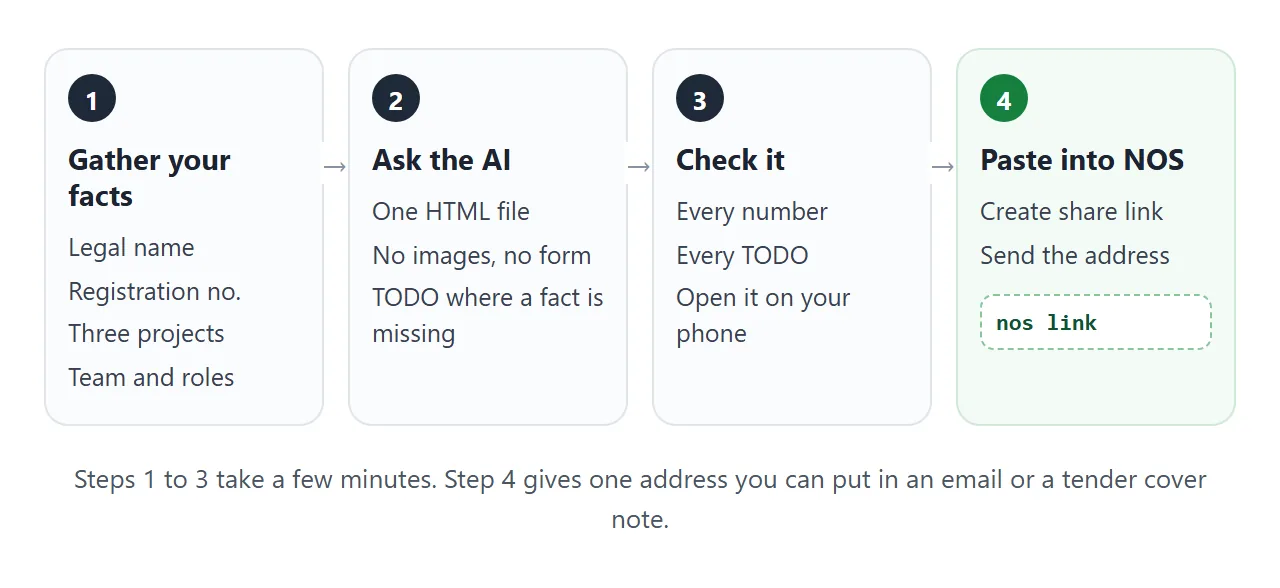
Paste this prompt into ChatGPT, Claude or Gemini. Put your own facts at the bottom.
Write ONE self-contained HTML file: a one page company profile, to be read on a phone.
Rules:
- Plain HTML, CSS and JavaScript in one file. No images, no external files, no form that sends data.
- One column on a phone. Add a viewport meta tag. Text at least 16px.
- Sections in this order: headline, key facts, what we do, selected work, the team, company details, contact.
- Use initials in a coloured circle for people and a simple shape for the logo. Do not use photos.
- Show "years in business" calculated from the founding year, and keep that year in one place at the top of the script.
- End with a "Last updated" line.
- If I did not give you a fact, write TODO. Do not invent clients, results, awards or numbers.
My facts:
Company: ...
Who we serve and what we do: ...
Founded / team size / city: ...
Services: ...
Projects (name, one line of result): ...
Team (name, role): ...
Legal name, registration number, address, insurance, contact: ...
The no-invention line matters most. An AI fills gaps with plausible clients and results, and a buyer may check them.
What to check in the result
An AI is good at layout and loose with facts. Read the page the way a procurement officer would.
- Every name and number. Legal name, registration number, address, team size, dates.
- Every TODO. Replace it with the fact or delete the line.
- Invented proof. Clients, results, awards and quotes you did not give it.
- Permission. Each client you name should know you are naming them.
- The phone. Open it on your own phone before anyone else does.
If something looks off, fixing AI-generated HTML covers the usual causes.
Send it as a link
Paste the HTML into a NOS document and choose Create share link. HTML to link walks through it.
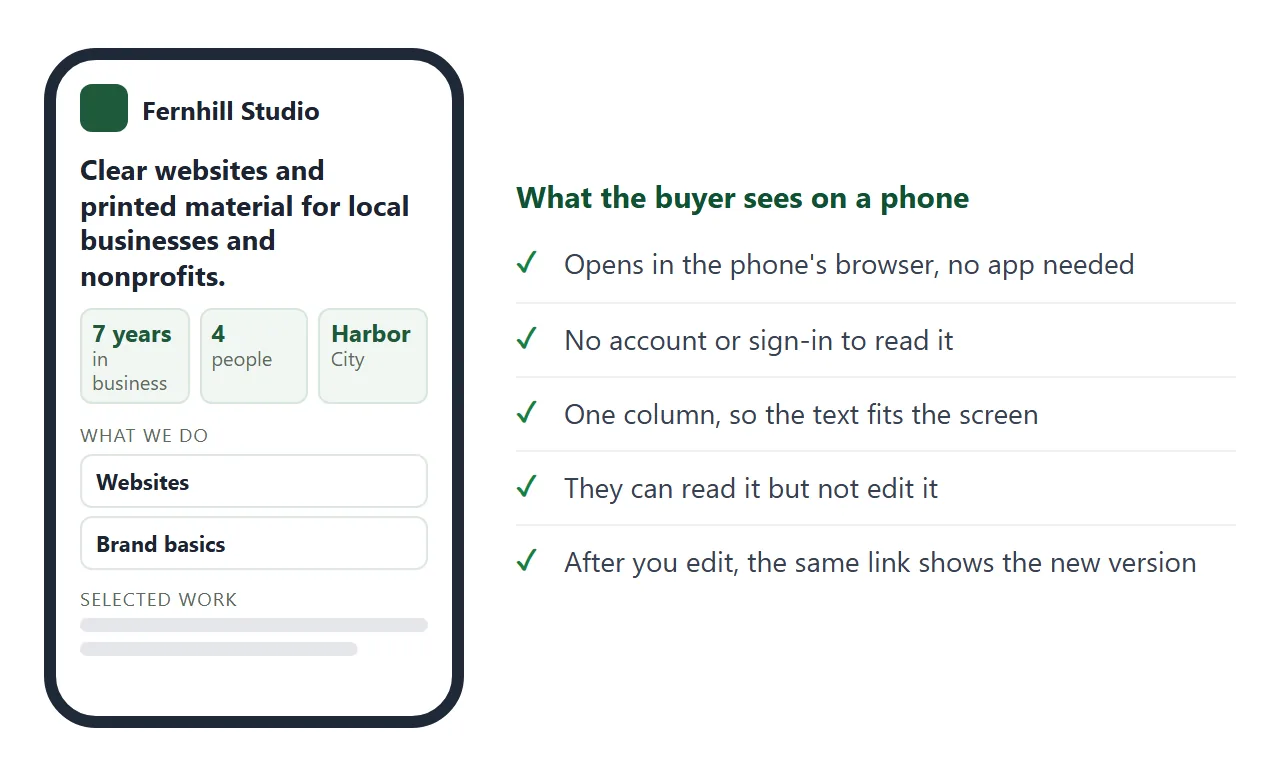
The result is a page anyone with the link can open in a browser, on a phone too, with no account. They can read it but not edit it. If you change the code later, the same link shows the new version.
Put the address in the body of your email or message, with one line on what it is. NOS does not tell you who opened it, so if you need to know whether it was read, ask in your follow-up.
Where a form field accepts a web address, you can paste the link there. If a tender portal only takes uploaded files, upload what it asks for and mention the link in your cover note.
One profile, one version per tender
Keep a master profile for intros. For a tender, make a second page that answers what that tender asks: the projects that match it, and a short table of requirement and answer.
<!doctype html>
<html lang="en">
<head>
<meta charset="utf-8">
<meta name="viewport" content="width=device-width, initial-scale=1">
<title>Fernhill Studio - tender sheet</title>
<style>
  * { box-sizing: border-box; }
  body { margin: 0; background: #eef2ee; font-family: system-ui, -apple-system, "Segoe UI", sans-serif; color: #1c2a22; line-height: 1.5; }
  .page { max-width: 760px; margin: 0 auto; background: #fff; padding: 24px 22px 32px; min-height: 100vh; }
  .tag { margin: 0; font-size: 13px; letter-spacing: .07em; text-transform: uppercase; color: #5b6b61; }
  h1 { margin: 4px 0 6px; font-size: 26px; line-height: 1.2; }
  .meta { margin: 0 0 6px; font-size: 14px; color: #5b6b61; }
  h2 { margin: 26px 0 10px; font-size: 13px; letter-spacing: .08em; text-transform: uppercase; color: #5b6b61; }
  .chips { display: flex; flex-wrap: wrap; gap: 8px; margin-bottom: 12px; }
  .chip { font: inherit; font-size: 14px; min-height: 40px; padding: 6px 14px; border: 1px solid #c9d8cd; border-radius: 999px; background: #fff; color: #1c2a22; cursor: pointer; }
  .chip[aria-pressed="true"] { background: #1f5a3a; border-color: #1f5a3a; color: #fff; }
  .proj { padding: 12px 0; border-bottom: 1px solid #e8eee9; }
  .proj[hidden] { display: none; }
  .proj b { font-size: 16px; }
  .proj small { display: inline-block; margin-left: 6px; padding: 1px 8px; border-radius: 999px; background: #e7f0e9; color: #1f5a3a; font-size: 12px; }
  .proj p { margin: 3px 0 0; font-size: 14.5px; color: #44564b; }
  .count { margin: 0 0 4px; font-size: 14px; color: #5b6b61; }
  table { width: 100%; border-collapse: collapse; font-size: 15px; }
  th, td { text-align: left; vertical-align: top; padding: 9px 10px; border-bottom: 1px solid #e8eee9; }
  th { width: 38%; background: #f6f9f6; color: #44564b; font-weight: 600; }
  .note { margin-top: 14px; padding: 12px 14px; border-radius: 10px; background: #fff7e8; border: 1px solid #f0dcae; font-size: 14.5px; color: #5b4a1c; }
  @media (max-width: 560px) {
    h1 { font-size: 22px; }
    th, td { display: block; width: 100%; }
    th { border-bottom: 0; padding-bottom: 2px; background: #fff; font-size: 13px; color: #5b6b61; }
    td { padding-top: 0; }
  }
</style>
</head>
<body>
<div class="page">
  <p class="tag">Tender response sheet</p>
  <h1>Fernhill Studio - website redesign for a public service</h1>
  <p class="meta">Prepared for the Harbor City Library tender (example) · Contact: Mira Okafor</p>

  <h2>Relevant projects</h2>
  <div class="chips" id="chips" role="group" aria-label="Filter projects by sector">
    <button class="chip" type="button" data-sector="all" aria-pressed="true">All</button>
    <button class="chip" type="button" data-sector="Public" aria-pressed="false">Public</button>
    <button class="chip" type="button" data-sector="Nonprofit" aria-pressed="false">Nonprofit</button>
    <button class="chip" type="button" data-sector="Retail" aria-pressed="false">Retail</button>
  </div>
  <p class="count" id="count"></p>
  <div id="list">
    <div class="proj" data-sector="Public"><b>Harbor Parks Department</b><small>Public</small><p>Event calendar and booking pages for six parks.</p></div>
    <div class="proj" data-sector="Public"><b>Eastside Community Centre</b><small>Public</small><p>Accessible redesign with large type and a plain-language menu.</p></div>
    <div class="proj" data-sector="Nonprofit"><b>Cedar Lane Food Bank</b><small>Nonprofit</small><p>Donation page and volunteer sign-up.</p></div>
    <div class="proj" data-sector="Nonprofit"><b>Riverbank Reading Club</b><small>Nonprofit</small><p>Membership page and a printed leaflet from the same design.</p></div>
    <div class="proj" data-sector="Retail"><b>Larkspur Bakery</b><small>Retail</small><p>New website with an order form.</p></div>
    <div class="proj" data-sector="Retail"><b>Harbor Tea Co.</b><small>Retail</small><p>Brand refresh and packaging labels.</p></div>
  </div>

  <h2>Requirement and our answer</h2>
  <table>
    <tr><th>Years trading</th><td id="years"></td></tr>
    <tr><th>Team who would work on it</th><td>Director, web developer, designer</td></tr>
    <tr><th>Accessibility</th><td>Pages checked with a keyboard and at 200% zoom before hand-over</td></tr>
    <tr><th>Insurance</th><td>Professional indemnity, certificate on request</td></tr>
    <tr><th>Registration no.</th><td>00-0000000 (example)</td></tr>
    <tr><th>Registered address</th><td>14 Quay Street, Harbor City (example)</td></tr>
  </table>
  <div class="note">Documents the tender asks for as separate files are sent as the tender instructs. This page sits beside them as a quick read.</div>
</div>

<script>
  const FOUNDED = 2019;  // change the year here
  const years = new Date().getFullYear() - FOUNDED;
  document.getElementById('years').textContent = years + ' years, founded ' + FOUNDED;

  const chips = document.querySelectorAll('.chip');
  const projects = document.querySelectorAll('.proj');
  const count = document.getElementById('count');

  function show(sector) {
    let n = 0;
    projects.forEach((p) => {
      const on = sector === 'all' || p.dataset.sector === sector;
      p.hidden = !on;
      if (on) n++;
    });
    chips.forEach((c) => c.setAttribute('aria-pressed', String(c.dataset.sector === sector)));
    count.textContent = n + ' of ' + projects.length + ' projects shown';
  }

  chips.forEach((c) => c.addEventListener('click', () => show(c.dataset.sector)));
  show('all');
</script>
</body>
</html>
Paste the tender version into its own NOS document and create its own link. The master stays as it is, and each buyer gets the page written for them. A tender sheet is a companion to the documents the tender asks for, not a replacement.
Link, attachment or both
| PDF attachment | Share link | Both | |
|---|---|---|---|
| How it reaches the buyer | In the email, downloaded to read | A web address that opens in a browser | Link in the text, file attached |
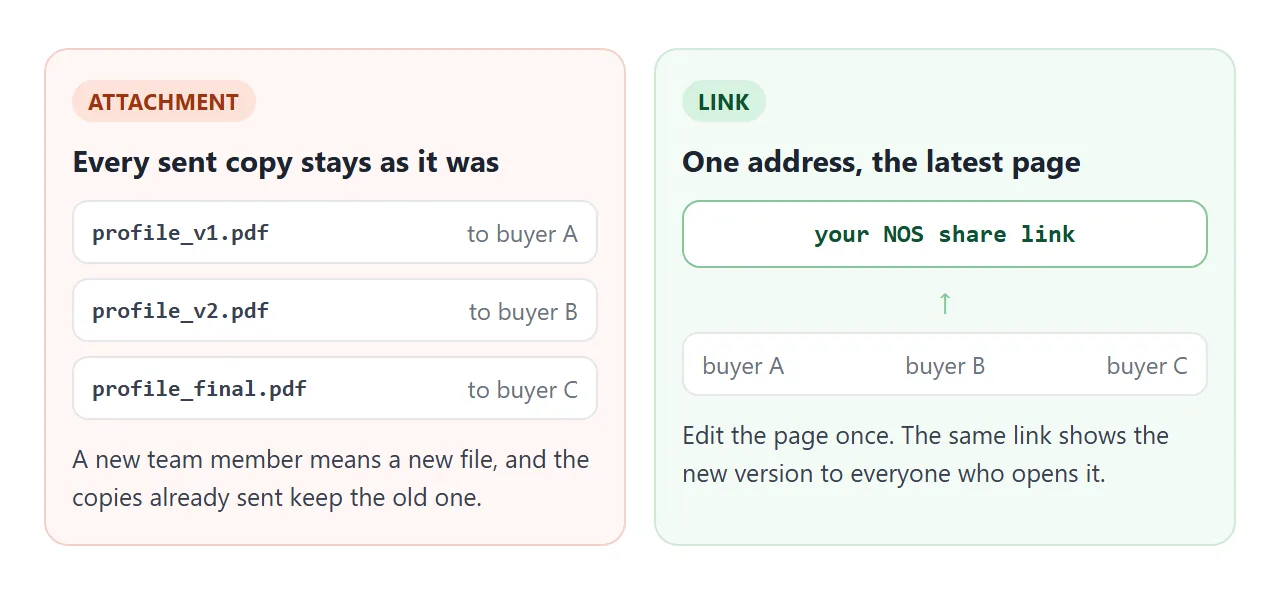
| Changing a fact later | Send a new file | Edit once, same link | Edit the page, replace the file |
| Reading on a phone | Opens in a PDF viewer | Opens as a normal page | Either |
| Size | Gmail personal accounts have a 25 MB limit | No file to attach | The file still counts |
| Fits when | The tender asks for a file | You send it by message or email | You are unsure |
As of October 2026, Google says the limit for personal Gmail accounts is 25 MB, and for work and school accounts an administrator sets it. Why links beat attachments and email vs link for documents go deeper.
When it does not work
| Symptom | Cause | Fix |
|---|---|---|
| The logo is missing | It is an image loaded from another website, which is blocked | Use an inline SVG or a text wordmark |
| A contact form does nothing | Forms that send to a server are blocked | Show your email address as text |
| A map does not show | Embedded frames are blocked | Write the address as text |
| The fonts look different | The AI picked a font that is not loaded | Ask for system fonts, or a Google Font |
| A buyer sees old facts | They saved a copy of an older file | Send the link, not the file |
| The page is too long | The AI added extra sections | Ask it to cut to the six blocks above |
For wording of an offer rather than a profile, see how to send a proposal to a client.