A one page website for a small business is a single web page with a few sections: what you do, when you are open, where you are and how to reach you.
An AI chat can write it as one HTML file, and a NOS share link puts it on customers' phones.
People ask which free or cheap site builder makes a simple one-page website. For a local business there is a shorter route that needs no builder: ask for one page, paste it, share the link.
Here is a page you can copy. The business is made up and so are the prices. Scroll inside the frame and look at today's row in the hours table, then replace the facts with yours.
<!doctype html>
<html lang="en">
<head>
<meta charset="utf-8">
<meta name="viewport" content="width=device-width, initial-scale=1">
<title>Muddy Paws Grooming</title>
<style>
* { box-sizing: border-box; }
html { scroll-behavior: smooth; }
body { margin: 0; font-family: system-ui, sans-serif; color: #1f2933; background: #fbf8f3; line-height: 1.5; }
a { color: #0f6b57; }
header { background: #0f6b57; color: #fff; padding: 26px 20px 22px; text-align: center; }
header svg { width: 40px; height: 40px; }
header h1 { margin: 6px 0 2px; font-size: 26px; }
header p { margin: 0; font-size: 14px; color: #d4efe7; }
nav { display: flex; justify-content: center; flex-wrap: wrap; gap: 6px 16px; padding: 10px 12px; background: #fff; border-bottom: 1px solid #e8e2d8; font-size: 14px; }
nav a { text-decoration: none; font-weight: 600; padding: 4px 2px; }
main { max-width: 600px; margin: 0 auto; padding: 8px 18px 40px; }
section { padding: 22px 0 6px; }
h2 { margin: 0 0 10px; font-size: 20px; }
.cta { display: inline-block; background: #c2410c; color: #fff; text-decoration: none; font-weight: 700; padding: 12px 20px; border-radius: 10px; margin-top: 6px; }
.svc { display: flex; align-items: baseline; gap: 8px; padding: 9px 0; border-top: 1px solid #ebe5da; }
.svc:first-of-type { border-top: 0; }
.svc .n { font-weight: 600; }
.svc small { display: block; font-weight: 400; color: #5b6670; font-size: 13px; }
.svc .d { flex: 1; border-bottom: 1px dotted #b9b2a4; transform: translateY(-4px); min-width: 10px; }
.svc .p { font-weight: 700; white-space: nowrap; }
table { width: 100%; border-collapse: collapse; }
td { padding: 8px 10px; border-top: 1px solid #ebe5da; }
td:last-child { text-align: right; }
tr:first-child td { border-top: 0; }
tr.today td { background: #e3f3ee; font-weight: 700; }
.note { font-size: 13px; color: #5b6670; margin: 8px 0 0; }
.box { background: #fff; border-radius: 12px; padding: 14px 16px; box-shadow: 0 1px 4px rgba(0,0,0,.08); }
.box p { margin: 4px 0; }
footer { text-align: center; font-size: 13px; color: #5b6670; padding: 0 16px 90px; }
.callbar { position: fixed; left: 0; right: 0; bottom: 0; display: flex; gap: 10px; padding: 10px 14px; background: #fff; border-top: 1px solid #e0d9cc; }
.callbar a { flex: 1; text-align: center; text-decoration: none; font-weight: 700; padding: 11px 6px; border-radius: 10px; }
.callbar .c { background: #c2410c; color: #fff; }
.callbar .m { background: #e3f3ee; color: #0f6b57; }
</style>
</head>
<body>
<header>
<svg viewBox="0 0 24 24" fill="#fff" aria-hidden="true">
<ellipse cx="12" cy="16" rx="5" ry="4"/><circle cx="5.5" cy="10.5" r="2.2"/><circle cx="9.5" cy="6" r="2.2"/><circle cx="14.5" cy="6" r="2.2"/><circle cx="18.5" cy="10.5" r="2.2"/>
</svg>
<h1>Muddy Paws Grooming</h1>
<p>Dog grooming in Lakeside · 14 Mill Lane</p>
</header>
<nav>
<a href="#services">Services</a>
<a href="#hours">Hours</a>
<a href="#find">Find us</a>
<a href="#contact">Contact</a>
</nav>
<main>
<section>
<p>Gentle baths and trims for dogs of every size. Book by phone or message, and we will find a time that suits you and your dog.</p>
<a class="cta" href="tel:+15550143">Call 555-0143</a>
</section>
<section id="services">
<h2>Services</h2>
<div class="svc"><span class="n">Bath and brush<small>Small dogs, about 45 min</small></span><span class="d"></span><span class="p">from $35</span></div>
<div class="svc"><span class="n">Bath and brush<small>Medium and large dogs, about 75 min</small></span><span class="d"></span><span class="p">from $55</span></div>
<div class="svc"><span class="n">Full groom<small>Bath, trim and tidy, about 2 hours</small></span><span class="d"></span><span class="p">from $70</span></div>
<div class="svc"><span class="n">Nail trim<small>Add to any visit, 10 min</small></span><span class="d"></span><span class="p">$12</span></div>
<p class="note">Example prices. The final price depends on coat and size.</p>
</section>
<section id="hours">
<h2>Opening hours</h2>
<table id="hoursTable">
<tr data-day="1"><td>Monday</td><td>Closed</td></tr>
<tr data-day="2"><td>Tuesday</td><td>9:00 to 17:00</td></tr>
<tr data-day="3"><td>Wednesday</td><td>9:00 to 17:00</td></tr>
<tr data-day="4"><td>Thursday</td><td>9:00 to 19:00</td></tr>
<tr data-day="5"><td>Friday</td><td>9:00 to 17:00</td></tr>
<tr data-day="6"><td>Saturday</td><td>10:00 to 14:00</td></tr>
<tr data-day="0"><td>Sunday</td><td>Closed</td></tr>
</table>
<p class="note">Today is highlighted from your device's clock. Closed on public holidays.</p>
</section>
<section id="find">
<h2>Find us</h2>
<div class="box">
<p><strong>14 Mill Lane, Lakeside</strong></p>
<p>Next to the post office. Free parking at the back.</p>
<p><a href="https://www.example.com/map" target="_blank" rel="noopener">Open in a map app</a></p>
</div>
</section>
<section id="contact">
<h2>Contact</h2>
<div class="box">
<p>Phone: <a href="tel:+15550143">555-0143</a></p>
<p>Email: <a href="mailto:hello@example.com">hello@example.com</a></p>
<p>Please say your dog's name, size and the service you would like.</p>
</div>
</section>
</main>
<footer>Muddy Paws Grooming is a made-up business used as an example.</footer>
<div class="callbar">
<a class="c" href="tel:+15550143">Call</a>
<a class="m" href="mailto:hello@example.com">Email</a>
</div>
<script>
// Highlight today's row using the visitor's device clock
var today = new Date().getDay();
var row = document.querySelector('#hoursTable tr[data-day="' + today + '"]');
if (row) row.className = 'today';
</script>
</body>
</html>
What goes on the page
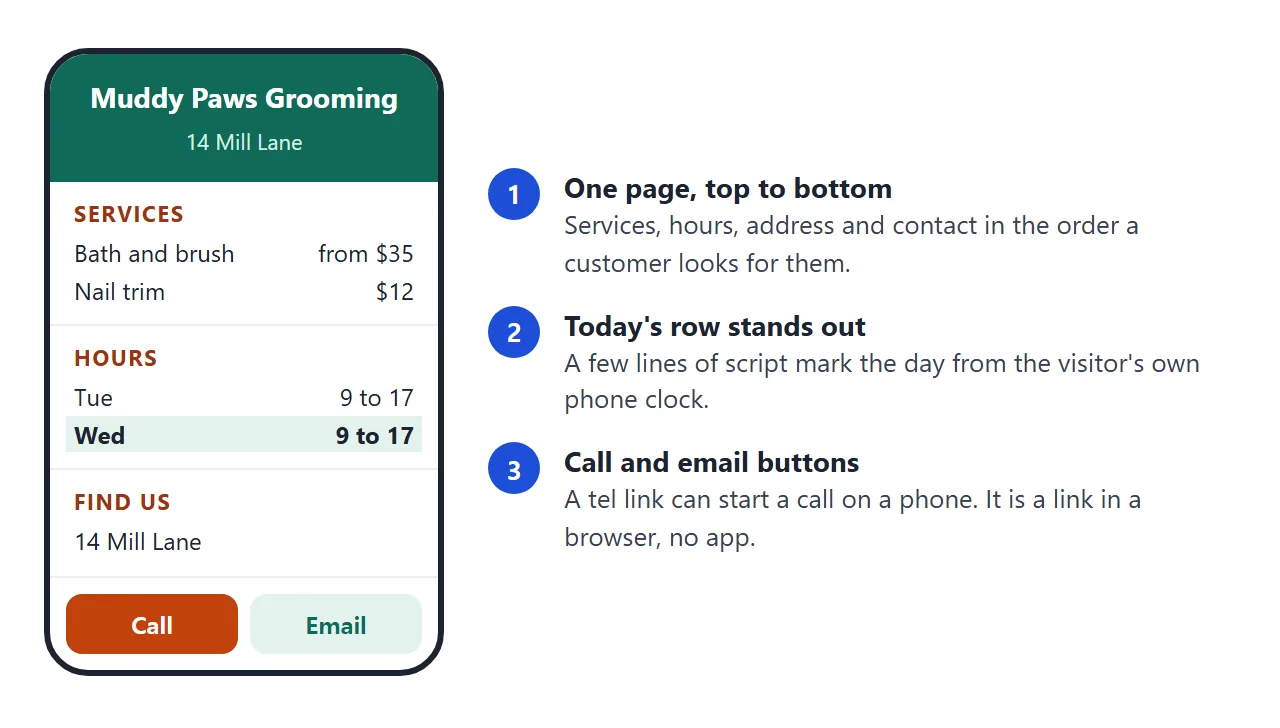
A customer opens a local business page for a few seconds, usually on a phone, and wants one of four things. Put them in this order, so nobody has to hunt.
- Name and what you do. One sentence. Add a call button right under it.
- Services, with prices if you can. A short list. Price list link explains why a date on prices helps.
- Opening hours. A small table. Mark holidays in plain words.
- Address and contact. The address as text, a phone number and an email address.
Leave off anything you would not put on a shop window. Anyone who has the link can open the page.
Make it with AI
Paste the prompt below into ChatGPT, Claude or Gemini. Replace the square brackets with your own facts.
Write one self-contained HTML page for a small business called [NAME].
Mobile first, easy to read on a phone. No external images, fonts or scripts.
Sections in this order: a short intro with a Call button, Services,
Opening hours, Find us (address as text), Contact.
Make the phone number a tel: link and the email address a mailto: link.
Use exactly these facts. Do not add, remove or round anything:
[PASTE: services and prices, hours, address, phone, email]
Highlight today's row in the hours table with a few lines of JavaScript.
Return only the HTML.
Then check the result before you share it:
- Every price, hour and number. Compare line by line. An AI can add a service you do not offer or change a time.
- The phone number. Tap it on a phone and see whether it dials the right number.
- A narrow screen. Make your browser window narrow. If text is cramped, ask for a mobile-first layout. The viewport meta tag is usually the cause.
- No pictures from other sites. Images loaded from other websites are blocked in NOS. Ask for a drawing in the page itself, or none.
Send it as a link
Copy the HTML and paste it into a NOS document. Choose Create share link. HTML to link walks through it.
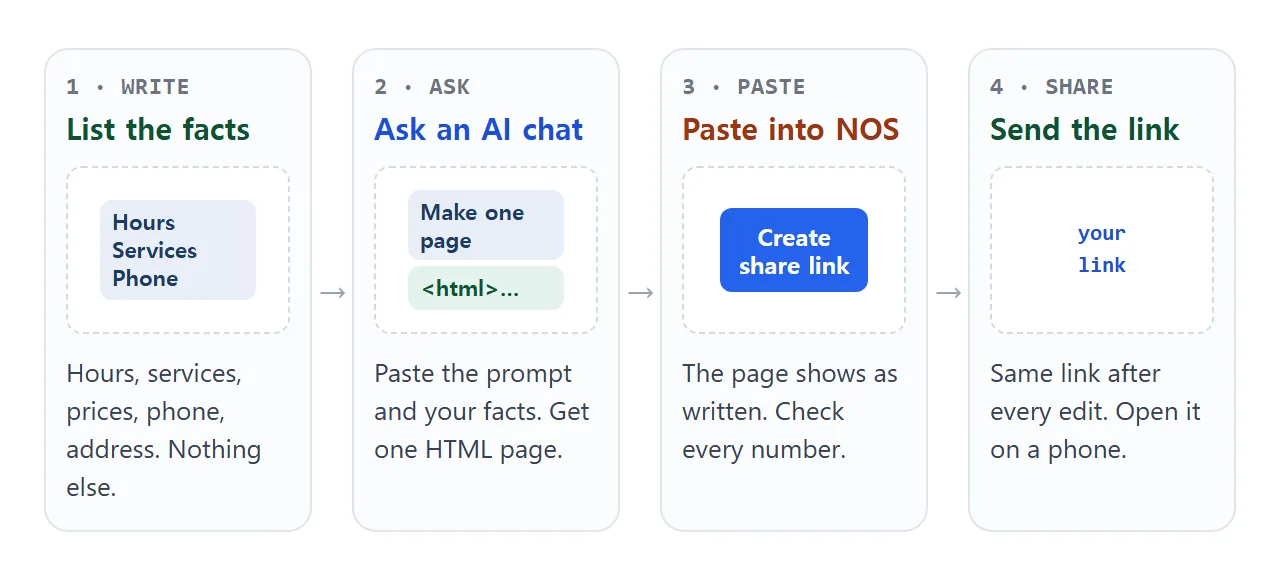
The customer opens the link in a browser, on a phone too, with no account, and can read the page but cannot edit it. The scripts in the page run, so the highlighted day works.
When your hours change, edit the code in your document. The link stays the same and shows the new version.
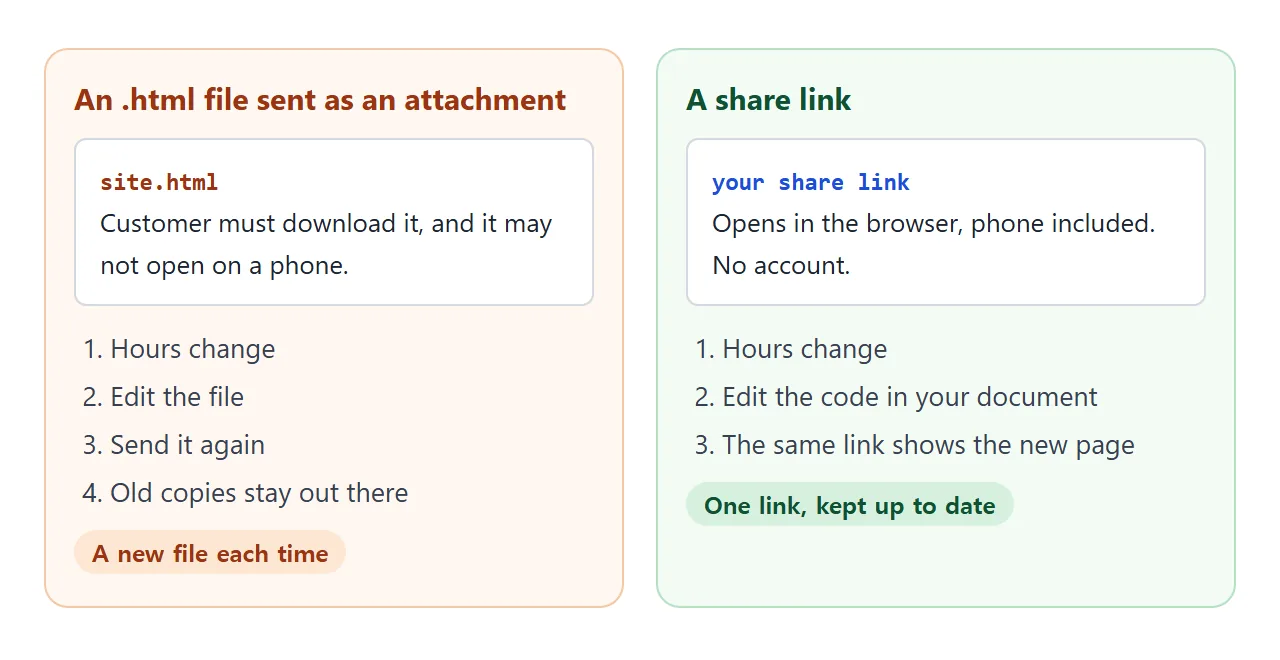
An attached file may not open on a phone at all. Open an HTML file on a phone covers why.
Phone and email links
A phone number is a link too. MDN describes the tel: address scheme: on a cellular device it dials the number, and other devices may offer a calling program or save the number. An email link uses mailto:. See HTML tel link for the details.
The page highlights today's row with the day from the visitor's own device. MDN says getDay() works in local time, so a visitor in another time zone may see a different day marked than you do.
The address and a map
Write the address as text. If you want a map, add a plain link that opens it in a map app, as link to a map location shows. A map embedded from another site is blocked in NOS, so a link is the way.
Telling Google about the page
Google's Business Profile help says you can share your business's website on your profile. As of October 2026 it asks for the full URL, including http:// or https://. It also says edits are reviewed before they go live. Paste your share link there.
One page, a website builder, or hosting
A one-page link suits a business whose customers need a few facts. It is not a substitute for every kind of site.
| One page from an AI chat | Site builder | Hosting you manage | |
|---|---|---|---|
| Good for | Services, hours, contact | Several pages, a shop or bookings | Full control of a site |
| Who edits | You, in one document | You, in the builder | You or someone technical |
| Customer opens it | A link, phone included | A link | A link |
| Orders and payments | No | Check the product's own page | Needs more work |
For a longer look at the hosting route, see web hosting for small business. For a page whose job is one action, a simple landing page is closer.
Let customers check your area
A second page can answer one question before the phone rings. The visitor types a town and the page says whether you cover it. It runs inside the page, so it works in a share link. Open the questions below it too.
<!doctype html>
<html lang="en">
<head>
<meta charset="utf-8">
<meta name="viewport" content="width=device-width, initial-scale=1">
<title>Ridgeline Heating and Plumbing</title>
<style>
  * { box-sizing: border-box; }
  body { margin: 0; font-family: system-ui, sans-serif; color: #1c2430; background: #f4f6f9; line-height: 1.5; }
  header { background: #1e3a5f; color: #fff; padding: 24px 20px 20px; text-align: center; }
  header svg { width: 38px; height: 38px; }
  header h1 { margin: 6px 0 2px; font-size: 24px; }
  header p { margin: 0; font-size: 14px; color: #c9d8ec; }
  main { max-width: 600px; margin: 0 auto; padding: 16px 16px 40px; }
  section { background: #fff; border-radius: 12px; padding: 16px; margin-bottom: 14px; box-shadow: 0 1px 4px rgba(0,0,0,.08); }
  h2 { margin: 0 0 8px; font-size: 18px; color: #1e3a5f; }
  p { margin: 6px 0; }
  .emergency { background: #fff4ea; border: 1px solid #f3c79c; }
  .emergency a.big { display: inline-block; background: #c2410c; color: #fff; text-decoration: none; font-weight: 700; padding: 12px 18px; border-radius: 10px; margin-top: 4px; }
  ul.list { margin: 6px 0 0; padding-left: 20px; }
  label { font-weight: 600; display: block; margin-bottom: 6px; }
  input { width: 100%; font: inherit; padding: 10px 12px; border: 1px solid #b7c0cc; border-radius: 8px; }
  #answer { margin-top: 10px; padding: 10px 12px; border-radius: 8px; min-height: 44px; background: #eef1f5; }
  #answer.yes { background: #e2f4e8; color: #14532d; }
  #answer.no { background: #fff0e0; color: #7c2d12; }
  .chips { display: flex; flex-wrap: wrap; gap: 6px; margin-top: 10px; padding: 0; list-style: none; }
  .chips li { background: #e8eef7; color: #1e3a5f; border-radius: 999px; padding: 3px 10px; font-size: 13px; }
  details { border-top: 1px solid #e3e8ef; padding: 10px 0; }
  details:first-of-type { border-top: 0; }
  summary { font-weight: 600; cursor: pointer; }
  details p { color: #3a4552; }
  .hours td { padding: 4px 12px 4px 0; }
  footer { text-align: center; font-size: 13px; color: #5b6670; }
</style>
</head>
<body>
<header>
  <svg viewBox="0 0 24 24" fill="none" stroke="#fff" stroke-width="1.8" stroke-linecap="round" stroke-linejoin="round" aria-hidden="true">
    <path d="M12 3c3 4 5 6.5 5 9.5a5 5 0 0 1-10 0C7 9.5 9 7 12 3z"/>
  </svg>
  <h1>Ridgeline Heating and Plumbing</h1>
  <p>Repairs and installs across Northfield and nearby</p>
</header>
<main>
  <section class="emergency">
    <h2>Burst pipe or no heat?</h2>
    <p>Call the emergency line any time, day or night.</p>
    <a class="big" href="tel:+15550177">Call 555-0177</a>
  </section>

  <section>
    <h2>Do you come to my area?</h2>
    <label for="area">Type your town or suburb</label>
    <input id="area" type="text" placeholder="For example: Elmwood" autocomplete="off">
    <div id="answer" aria-live="polite">Type a name above.</div>
    <ul class="chips" id="chips"></ul>
  </section>

  <section>
    <h2>What we do</h2>
    <ul class="list">
      <li>Boiler and furnace repair and yearly service</li>
      <li>Leaks, blocked drains and replacement taps</li>
      <li>New radiators, water heaters and pipework</li>
      <li>Free written quote for installs</li>
    </ul>
  </section>

  <section>
    <h2>Questions people ask</h2>
    <details>
      <summary>How soon can you come?</summary>
      <p>For normal jobs, usually within two working days. Call the emergency line for leaks and no heat.</p>
    </details>
    <details>
      <summary>Do you charge for a quote?</summary>
      <p>No. Quotes for installs are free and written down before any work starts.</p>
    </details>
    <details>
      <summary>What should I have ready when I call?</summary>
      <p>Your address, a short description of the problem, and a photo if you can send one by email.</p>
    </details>
  </section>

  <section>
    <h2>Office hours</h2>
    <table class="hours">
      <tr><td>Monday to Friday</td><td>8:00 to 17:30</td></tr>
      <tr><td>Saturday</td><td>8:00 to 12:00</td></tr>
      <tr><td>Sunday</td><td>Emergency line only</td></tr>
    </table>
    <p>Email: <a href="mailto:office@example.com">office@example.com</a></p>
  </section>
</main>
<footer>Ridgeline Heating and Plumbing is a made-up business used as an example.</footer>
<script>
  // Edit this list to match the places you really cover
  var covered = ['Northfield', 'Elmwood', 'Harbor Bay', 'Westgate', 'Pinecrest', 'Old Town'];
  var input = document.getElementById('area');
  var answer = document.getElementById('answer');
  var chips = document.getElementById('chips');

  covered.forEach(function (name) {
    var li = document.createElement('li');
    li.textContent = name;
    chips.appendChild(li);
  });

  input.addEventListener('input', function () {
    var q = input.value.trim().toLowerCase();
    answer.className = '';
    if (!q) { answer.textContent = 'Type a name above.'; return; }
    var hit = covered.filter(function (n) { return n.toLowerCase().indexOf(q) === 0; });
    if (hit.length) {
      answer.className = 'yes';
      answer.textContent = 'Yes, we cover ' + hit[0] + '.';
    } else {
      answer.className = 'no';
      answer.textContent = 'Not on our list yet. Call 555-0177 and ask, we may still be able to help.';
    }
  });
</script>
</body>
</html>
The list of towns sits in one line of the script. Ask the AI to "add a service-area check from this list" and give it your places.
When it does not work
| What you see | Cause | Fix |
|---|---|---|
| A price or hour is wrong | The AI changed or invented it | Compare with your own list and ask for that line to be fixed |
| The page looks cramped on a phone | The layout was made for a wide screen | Ask for a mobile-first layout |
| Tapping the number does nothing | The number is plain text, not a tel link | Ask for the number as a tel: link |
| No picture or map shows | Content from other sites is blocked | Use a drawing in the page and a plain map link |
| A booking form does nothing | Sending a form to a server is blocked | Show a phone number and email as links |
| The wrong day is highlighted | The visitor's device has another time zone or date | Keep the hours table readable without the highlight |