If you only need guests to see the details, you do not need an event app. One HTML page, sent as a link, opens in any phone's browser with no download and no sign-in.
What it will not do is track RSVPs. Replies come back as messages, and you count them.
People ask this as "what is the best free online invitation maker?" The answer depends on whether you need guests to see something or to answer something. For seeing, a page is enough. Here is one you could send.
<!doctype html>
<html lang="en">
<head>
<meta charset="utf-8">
<meta name="viewport" content="width=device-width, initial-scale=1">
<title>Rooftop taco night</title>
<style>
  * { box-sizing: border-box; }
  body {
    margin: 0; font-family: system-ui, sans-serif; color: #2a1f1a;
    background: #fff4e6; line-height: 1.5;
  }
  .wrap { max-width: 460px; margin: 0 auto; padding: 0 0 28px; }
  .hero {
    padding: 34px 22px 26px; color: #fff; text-align: center;
    background: linear-gradient(135deg, #e8590c 0%, #f08c00 60%, #f59f00 100%);
    border-radius: 0 0 28px 28px; position: relative; overflow: hidden;
  }
  .hero svg { position: absolute; right: -18px; top: -18px; opacity: .22; }
  .hero small { letter-spacing: .14em; text-transform: uppercase; font-size: 12px; font-weight: 700; }
  .hero h1 { margin: 6px 0 4px; font-size: 32px; line-height: 1.15; }
  .hero p { margin: 0; font-size: 16px; }
  .when { margin: 18px 18px 0; background: #fff; border-radius: 16px; padding: 16px 18px; box-shadow: 0 4px 14px rgba(120, 60, 0, .10); }
  .when b { font-size: 20px; display: block; }
  .when span { color: #6b5545; font-size: 15px; }
  .count { margin-top: 8px; font-weight: 700; color: #c2410c; font-size: 15px; }
  h2 { font-size: 13px; letter-spacing: .1em; text-transform: uppercase; color: #9a4a12; margin: 22px 20px 8px; }
  .card { margin: 0 18px; background: #fff; border-radius: 16px; padding: 6px 18px; box-shadow: 0 4px 14px rgba(120, 60, 0, .10); }
  .card p { margin: 12px 0; font-size: 16px; }
  label { display: flex; gap: 12px; align-items: center; padding: 11px 0; font-size: 16px; border-bottom: 1px solid #f3e2cf; }
  label:last-child { border-bottom: 0; }
  input[type=checkbox] { width: 22px; height: 22px; accent-color: #e8590c; flex: none; }
  .reply { margin: 22px 18px 0; background: #2a1f1a; color: #fff; border-radius: 16px; padding: 16px 18px; font-size: 16px; }
  .reply b { color: #ffd8a8; }
</style>
</head>
<body>
<div class="wrap">
  <div class="hero">
    <svg width="150" height="150" viewBox="0 0 100 100" aria-hidden="true"><circle cx="50" cy="50" r="46" fill="none" stroke="#fff" stroke-width="6"/><circle cx="50" cy="50" r="28" fill="none" stroke="#fff" stroke-width="6"/><circle cx="50" cy="50" r="10" fill="#fff"/></svg>
    <small>You are invited</small>
    <h1>Rooftop Taco Night</h1>
    <p>Hosted by Dana and Priya</p>
  </div>

  <div class="when">
    <b>Saturday 24 October, 6:30pm</b>
    <span>Food from 7. Wrapping up around 10.</span>
    <div class="count" id="count"></div>
  </div>

  <h2>Where</h2>
  <div class="card">
    <p><b>412 Larkspur Street, roof deck</b><br>
    Ring buzzer 5C. Take the lift to 6, then the stairs up.</p>
  </div>

  <h2>What to bring</h2>
  <div class="card">
    <label><input type="checkbox"> A drink you like</label>
    <label><input type="checkbox"> A jacket, it gets windy up there</label>
    <label><input type="checkbox"> A side dish, if you want to (optional)</label>
  </div>

  <div class="reply">
    <b>Coming?</b> Reply to the message this link came in, with how many of you, by Saturday 17 October.
  </div>
</div>

<script>
  // Days to go, worked out in the visitor's browser
  const party = new Date(2026, 9, 24);  // months start at 0, so 9 is October
  const today = new Date();
  today.setHours(0, 0, 0, 0);
  const days = Math.round((party - today) / 86400000);
  const el = document.getElementById('count');
  if (days > 1) el.textContent = days + ' days to go';
  else if (days === 1) el.textContent = 'Tomorrow';
  else if (days === 0) el.textContent = 'Today!';
</script>
</body>
</html>
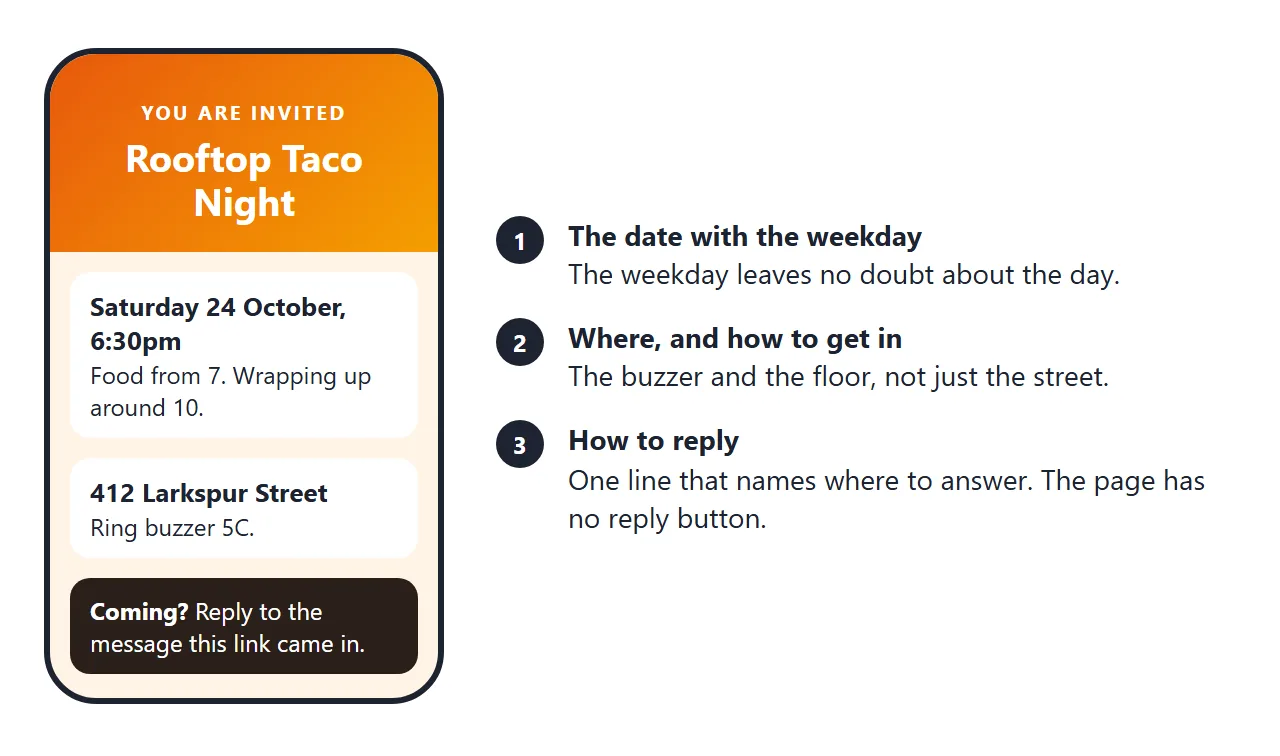
Make the browser window narrow to see it as a phone shows it. The ticks are only for the person holding the phone, so tell guests to answer in the message, not on the page.
Make it with AI
Describe the party in plain words and ask for one file. Paste this into ChatGPT, Claude or Gemini and replace the details in capitals.
Write one self-contained HTML file for a party invitation.
Event: ROOFTOP TACO NIGHT, hosted by DANA AND PRIYA.
When: Saturday 24 October, 6:30pm, ends around 10.
Where: 412 LARKSPUR STREET, ring buzzer 5C.
Bring: a drink, a jacket, an optional side dish.
Reply line: "Reply to the message this link came in, by 17 October."
Rules: one column that works on a phone, big readable text,
include the viewport meta tag, no form, no RSVP button,
no outside images (use CSS or inline SVG), no libraries.
Check four things in the result. The date has the weekday in words. The reply line says where to answer. There is no button that does nothing. Nothing loads from another site, such as a photo link.
Send it as a link
Paste the HTML into a NOS document and choose Create share link. HTML to link walks through it. Copy the address and put it in your message, email or group chat.
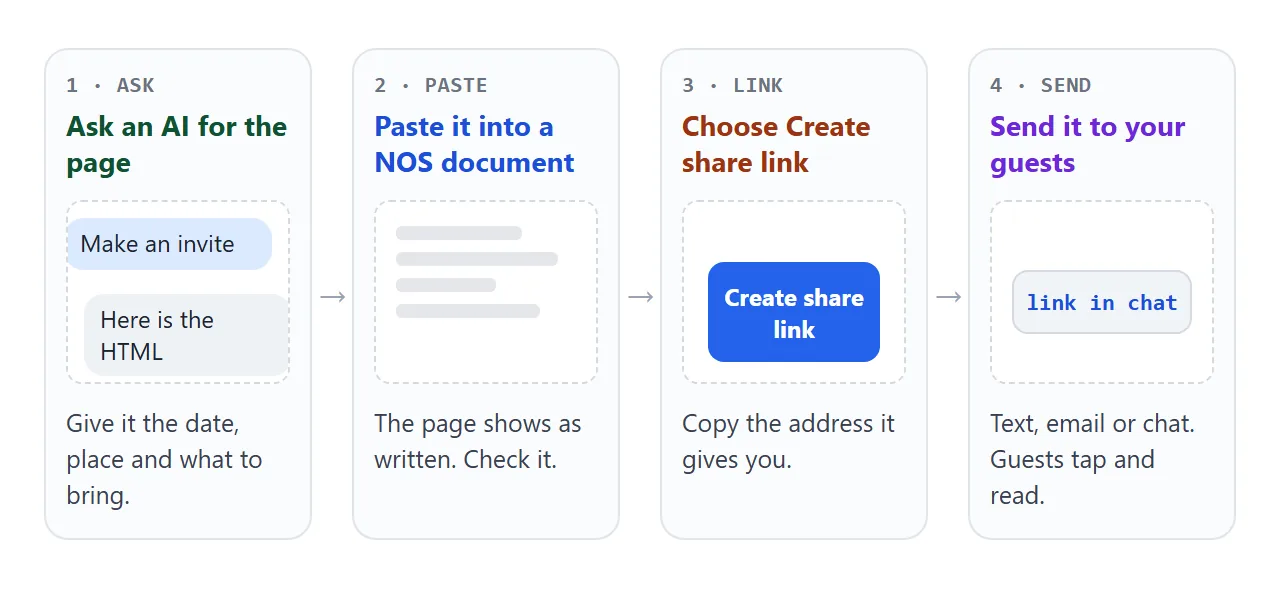
The link opens in a browser, phone included, with no account. Guests can read it but not edit it. If the time changes, edit the code and the same link shows the new version. A guest who saved the old message sees the corrected page.
Sending the file itself is the weaker route. An attached .html file may open as plain code on a phone. Opening an HTML file on a phone covers why.
For a printed card, a QR code can point to the link; QR code link shows how.
How the options compare
Three ways to get details to guests, and what each asks of them.
| Way | What a guest does | Where replies go |
|---|---|---|
| HTML invitation link | Taps the link, reads the page | Back to you in the message thread |
| Event app with RSVP, such as Partiful | Opens the link, taps a response, gives name and phone number, types a texted code | Collected by the service |
| Link to a form, such as Google Forms | Taps through, fills in the form | Collected by the form |
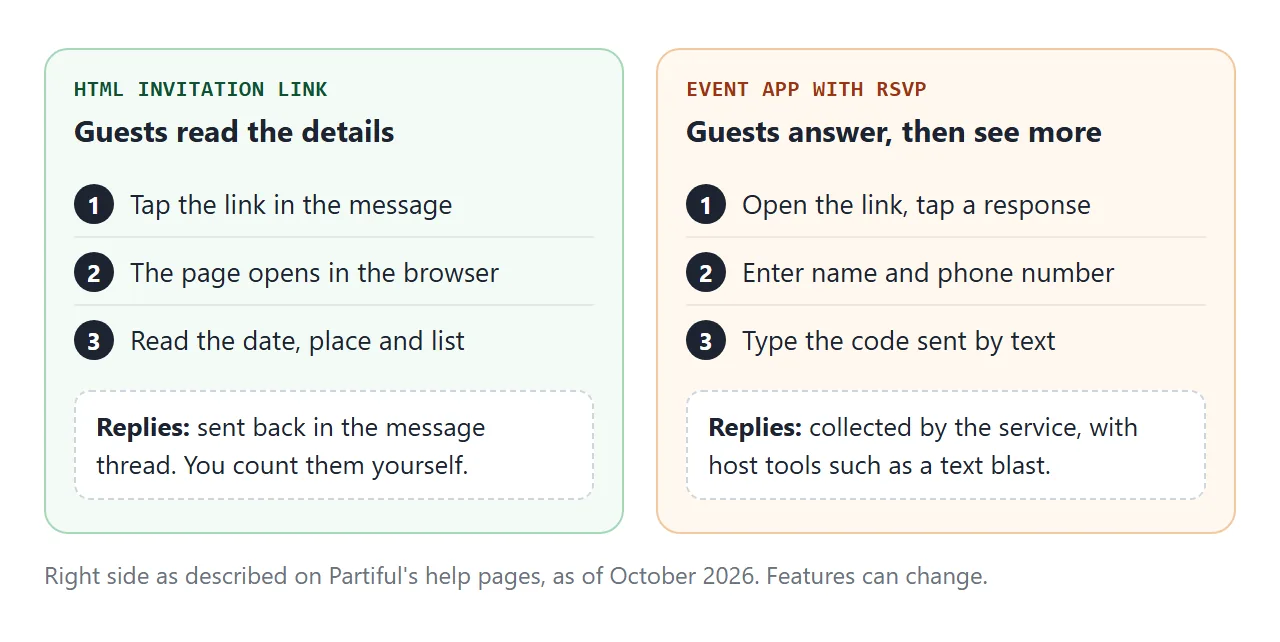
As of October 2026, Partiful's help pages say guests can open the event link in a browser or the app and click a response. They are then asked for a name and phone number, and a code is texted to verify it.
Hosts get settings such as a capacity limit, a waitlist, a cap on +1s, and a text blast to invited guests. Features can change, so check the current help pages.
That is real work done for you, and a plain page does none of it. Choose by the job: seeing, or answering.
Count replies without an app
A small gathering can be counted by hand. Put one reply line on the page, name the thread, and give a date. Then keep a tally as answers arrive.
This page is a scratch pad for that. It runs in the page and saves nothing.
<!doctype html>
<html lang="en">
<head>
<meta charset="utf-8">
<meta name="viewport" content="width=device-width, initial-scale=1">
<title>Headcount scratch pad</title>
<style>
  * { box-sizing: border-box; }
  body { margin: 0; padding: 16px; font-family: system-ui, sans-serif; background: #f4f5f7; color: #1d2330; }
  .box { max-width: 460px; margin: 0 auto; background: #fff; border-radius: 14px; padding: 16px; box-shadow: 0 4px 14px rgba(0, 0, 0, .08); }
  h1 { font-size: 18px; margin: 0 0 4px; }
  .note { font-size: 13.5px; color: #5b6472; margin: 0 0 12px; }
  .add { display: flex; gap: 8px; flex-wrap: wrap; }
  .add input[type=text] { flex: 1 1 150px; min-width: 0; padding: 10px; font-size: 16px; border: 1px solid #cfd4dc; border-radius: 8px; }
  .add input[type=number] { width: 70px; padding: 10px; font-size: 16px; border: 1px solid #cfd4dc; border-radius: 8px; }
  button { font: inherit; font-size: 15px; padding: 10px 14px; border: 0; border-radius: 8px; background: #2563eb; color: #fff; cursor: pointer; }
  button.ghost { background: #eef1f5; color: #1d2330; }
  .sum { display: grid; grid-template-columns: repeat(3, 1fr); gap: 8px; margin: 14px 0; text-align: center; }
  .sum div { background: #f4f5f7; border-radius: 10px; padding: 10px 4px; font-size: 13px; color: #5b6472; }
  .sum b { display: block; font-size: 24px; color: #1d2330; }
  ul { list-style: none; margin: 0; padding: 0; }
  li { display: flex; align-items: center; gap: 8px; padding: 9px 0; border-top: 1px solid #eceff3; font-size: 15px; }
  li .nm { flex: 1; min-width: 0; overflow-wrap: anywhere; }
  li select { font-size: 14px; padding: 6px; border-radius: 6px; border: 1px solid #cfd4dc; }
  li .x { background: none; color: #9aa3b2; padding: 4px 8px; font-size: 18px; }
  textarea { width: 100%; height: 84px; margin-top: 10px; font: 13px ui-monospace, Consolas, monospace; padding: 8px; border: 1px solid #cfd4dc; border-radius: 8px; }
</style>
</head>
<body>
<div class="box">
  <h1>Who said what</h1>
  <p class="note">For your own screen while replies arrive. It does not save anything; reloading clears it.</p>

  <form class="add" id="add">
    <input type="text" id="name" placeholder="Name" aria-label="Name" required>
    <input type="number" id="n" value="1" min="1" max="20" aria-label="How many people">
    <button type="submit">Add</button>
  </form>

  <div class="sum">
    <div><b id="yes">0</b>Going</div>
    <div><b id="maybe">0</b>Maybe</div>
    <div><b id="no">0</b>Can't</div>
  </div>

  <ul id="list"></ul>
  <textarea id="out" readonly aria-label="Text summary"></textarea>
</div>

<script>
  const rows = [];  // each row: name, party size, answer
  const list = document.getElementById('list');

  function render() {
    list.innerHTML = '';
    rows.forEach((r, i) => {
      const li = document.createElement('li');
      const nm = document.createElement('span');
      nm.className = 'nm';
      nm.textContent = r.name + ' (' + r.n + ')';
      const sel = document.createElement('select');
      ['yes', 'maybe', 'no'].forEach((v) => {
        const o = document.createElement('option');
        o.value = v;
        o.textContent = { yes: 'Going', maybe: 'Maybe', no: "Can't" }[v];
        if (v === r.answer) o.selected = true;
        sel.appendChild(o);
      });
      sel.addEventListener('change', () => { r.answer = sel.value; totals(); });
      const x = document.createElement('button');
      x.className = 'x';
      x.textContent = '×';
      x.setAttribute('aria-label', 'Remove ' + r.name);
      x.addEventListener('click', () => { rows.splice(i, 1); render(); });
      li.append(nm, sel, x);
      list.appendChild(li);
    });
    totals();
  }

  function totals() {
    const t = { yes: 0, maybe: 0, no: 0 };
    rows.forEach((r) => { t[r.answer] += r.n; });
    document.getElementById('yes').textContent = t.yes;
    document.getElementById('maybe').textContent = t.maybe;
    document.getElementById('no').textContent = t.no;
    const names = (a) => rows.filter((r) => r.answer === a).map((r) => r.name + ' ' + r.n).join(', ') || '-';
    document.getElementById('out').value =
      'Going (' + t.yes + '): ' + names('yes') + '\n' +
      'Maybe (' + t.maybe + '): ' + names('maybe') + '\n' +
      "Can't (" + t.no + '): ' + names('no');
  }

  document.getElementById('add').addEventListener('submit', (e) => {
    e.preventDefault();  // nothing is sent anywhere
    const name = document.getElementById('name').value.trim();
    const n = Math.max(1, parseInt(document.getElementById('n').value, 10) || 1);
    if (!name) return;
    rows.push({ name, n, answer: 'yes' });
    document.getElementById('name').value = '';
    document.getElementById('n').value = 1;
    render();
  });

  render();
</script>
</body>
</html>
If you want replies in one sheet, link to a form from the page. Google Forms is made at forms.google.com and can store responses in a Google Sheet.
Turning a form into a link explains why a form cannot be sent from inside a NOS page.
If the guest list is large, or you want reminders sent to people who have not answered, an event service with RSVP tools does that job and a plain page does not.
Who can open the link
Anyone who has the link can open the page, with no account. Guests may forward it. NOS has no password or expiry date for a page, so write it as if it were public.
Leave out door codes and anything you would not tell a guest's friend. Send those in the reply thread, to people who said yes. Event invitation online goes deeper on what an invitation page should carry, and HTML invitation template adds a calendar file.
When it does not work
| What you see | Cause | Fix |
|---|---|---|
| Guests ask how to RSVP | The page has no RSVP button | Add a reply line that names where to answer |
| The file opens as code on a phone | It was sent as an attachment | Send the share link instead |
| Tiny text on a phone | The page lacks the viewport tag | Ask the AI to include it, see viewport meta tag |
| A picture is missing | It loads from another site, which is blocked | Ask for CSS or inline SVG art |
| A submit button does nothing | A form cannot send to a server from a NOS page | Remove the form, reply by message |
| Ticks are gone when a guest returns | A visitor's changes are not saved | Treat ticks as personal, collect answers by message |
| Guests show up for the old time | They have not looked again | Edit the page, then message that it changed |