In this guide, "payment" means the Payment Request API: the browser JavaScript API that opens the browser's own payment sheet from an HTML page. It is not a card form and not a payment service.
Your page describes what to charge, and the browser collects the user's choice.
Try the smallest version first. Press the button and read the line under it.
<!doctype html>
<html lang="en">
<head>
<meta charset="utf-8">
<meta name="viewport" content="width=device-width, initial-scale=1">
<title>Payment Request: smallest example</title>
<style>
  body { margin: 0; padding: 16px; font-family: system-ui, sans-serif; background: #f4f5f7; color: #1d2330; }
  .card { max-width: 420px; padding: 16px 18px; border-radius: 12px; background: #fff; box-shadow: 0 6px 20px rgba(0, 0, 0, .1); }
  h1 { font-size: 17px; margin: 0 0 4px; }
  .price { color: #4b5563; margin: 0 0 12px; }
  button { font: inherit; font-weight: 600; padding: 10px 18px; border: 0; border-radius: 8px; background: #2563eb; color: #fff; cursor: pointer; }
  button:active { background: #1d4ed8; }
  dl { margin: 14px 0 0; display: grid; grid-template-columns: auto 1fr; gap: 4px 12px; font-size: 14px; }
  dt { color: #6b7280; }
  dd { margin: 0; font-weight: 600; }
  #out { margin: 12px 0 0; padding: 10px 12px; border-radius: 8px; background: #eef1f5; font-size: 14px; min-height: 20px; overflow-wrap: anywhere; }
  #out.ok { background: #e3f6e9; }
  #out.warn { background: #fff1e6; }
</style>
</head>
<body>
<div class="card">
  <h1>Coffee beans, 250 g</h1>
  <p class="price">$5.00</p>
  <button id="pay" type="button">Pay $5.00</button>

  <dl>
    <dt>window.PaymentRequest</dt><dd id="has">?</dd>
    <dt>window.isSecureContext</dt><dd id="secure">?</dd>
  </dl>
  <p id="out">Press the button. The result appears here.</p>
</div>

<script>
  const out = document.getElementById('out');
  document.getElementById('has').textContent = 'PaymentRequest' in window ? 'yes' : 'no';
  document.getElementById('secure').textContent = String(window.isSecureContext);

  function say(text, cls) { out.textContent = text; out.className = cls || ''; }

  document.getElementById('pay').addEventListener('click', async () => {
    if (!('PaymentRequest' in window)) { say('This browser has no Payment Request API.', 'warn'); return; }

    // 1) which payment methods you accept  2) what you charge
    const methods = [{ supportedMethods: 'https://example.com/pay' }];
    const details = { total: { label: 'Coffee beans', amount: { currency: 'USD', value: '5.00' } } };

    try {
      const request = new PaymentRequest(methods, details);
      const response = await request.show();   // must be called from a click
      say('Approved with ' + response.methodName, 'ok');
      await response.complete('success');       // close the browser payment sheet
    } catch (err) {
      say(err.name + ': ' + err.message, 'warn');  // cancelled, blocked, or no handler
    }
  });
</script>
</body>
</html>
The method identifier in this example is a placeholder. URL-based identifiers usually come from a payment provider, so with the placeholder expect an error line rather than a payment sheet. That error path is worth seeing, because every real page needs it.
How the code works: three objects and one click
A payment has a fixed route. Your page builds a request, the browser shows the sheet, and your page gets a response back.
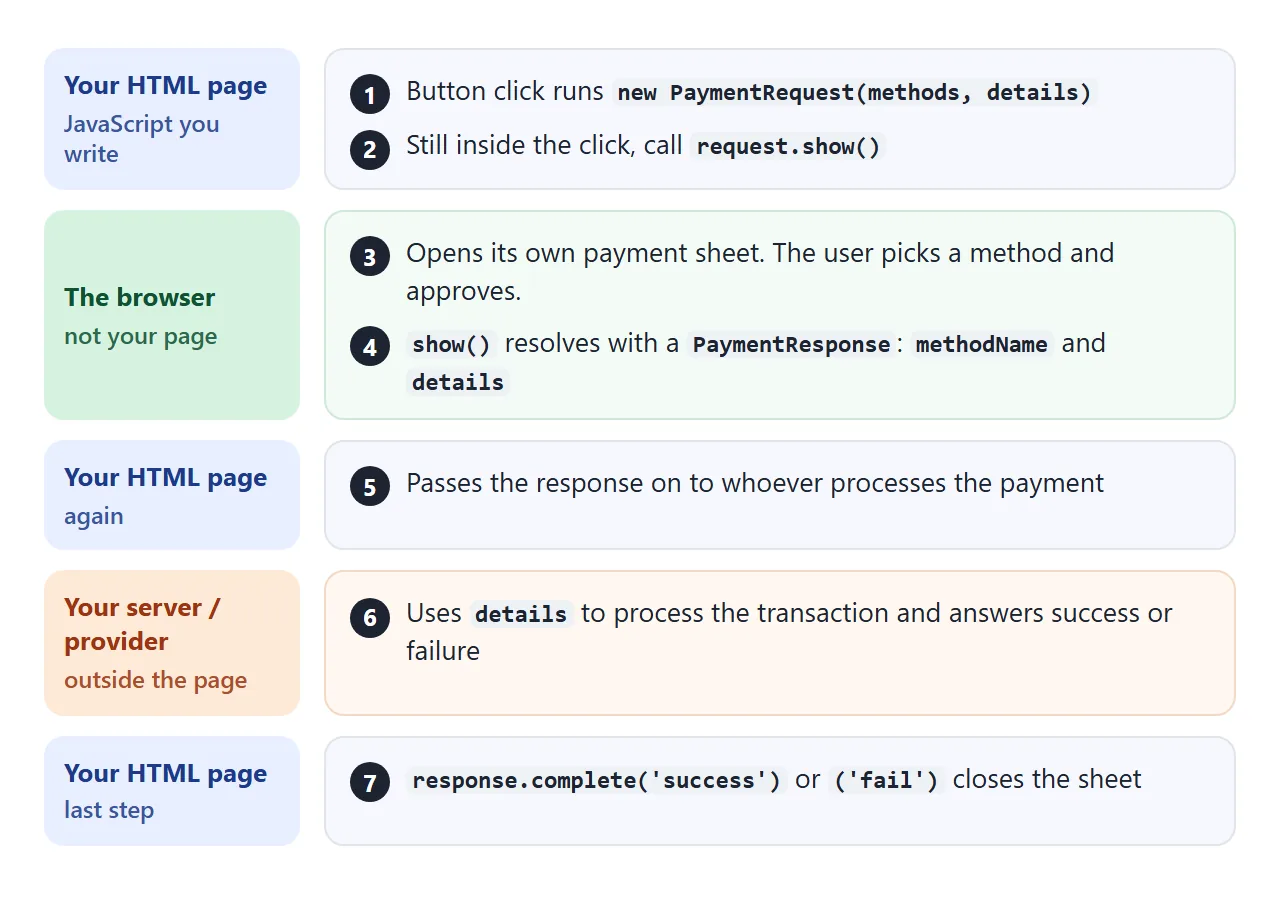
new PaymentRequest()– takes your methods and details, and describes what you accept and what you charge.request.show()– opens the browser's payment sheet. It returns a promise.response.complete()– tells the browser the interaction is over, so it closes the sheet.
The API never moves money by itself. In between, your side takes response.details and processes the transaction.
Browsers allow the API only in secure contexts, which means HTTPS. MDN lists localhost and file: URLs as secure too, so you can test from a file on disk.
Build the request object
The constructor takes a list of payment methods and a details object. Each method has a supportedMethods string. The details need a total with a label, a three-letter currency code and a value.
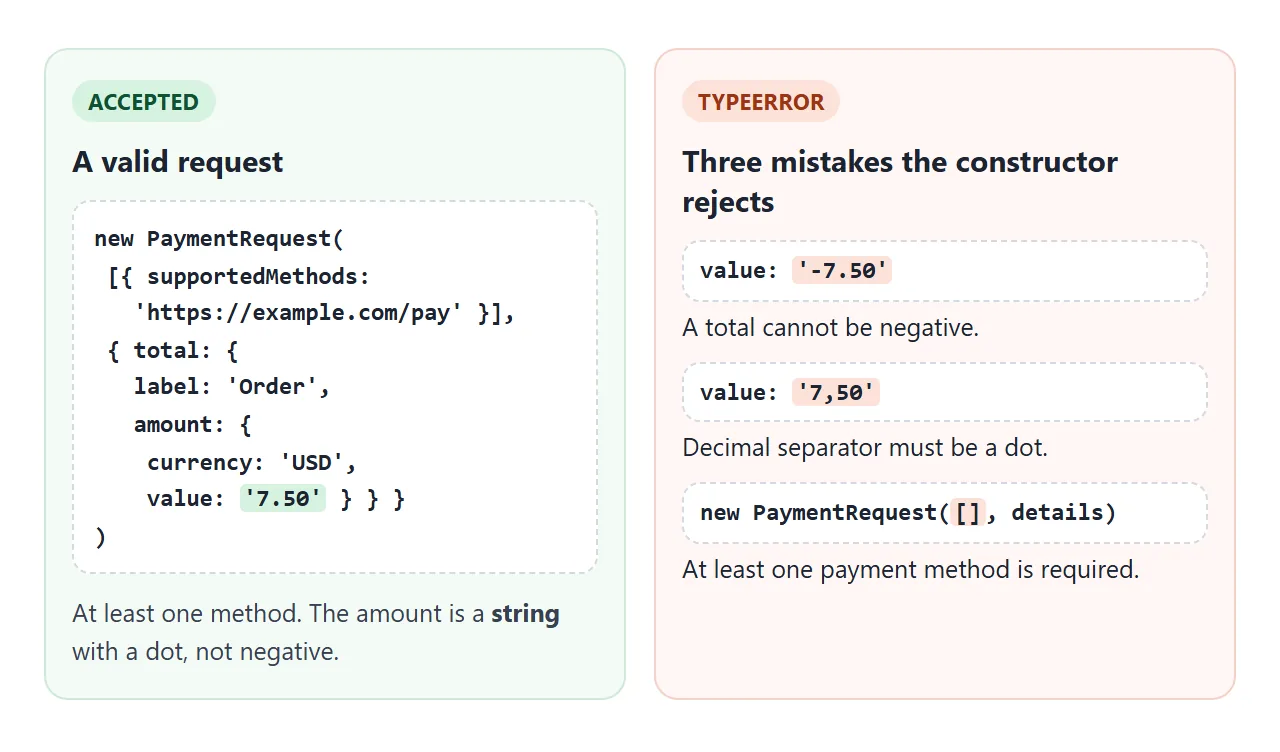
The value is a decimal string such as '7.50'. A negative total throws a TypeError, and so does an empty list of methods. The details builder below creates the object from a cart in integer cents, then lets you break it on purpose.
<!doctype html>
<html lang="en">
<head>
<meta charset="utf-8">
<meta name="viewport" content="width=device-width, initial-scale=1">
<title>Build the request object</title>
<style>
  body { margin: 0; padding: 14px; font-family: system-ui, sans-serif; background: #f4f5f7; color: #1d2330; }
  .wrap { max-width: 460px; }
  .row { display: flex; align-items: center; justify-content: space-between; gap: 10px; padding: 8px 0; border-bottom: 1px solid #e5e7eb; font-size: 15px; }
  .qty { display: flex; align-items: center; gap: 8px; }
  .qty button { width: 32px; height: 32px; border: 1px solid #cbd2dc; border-radius: 8px; background: #fff; font: inherit; font-size: 18px; cursor: pointer; }
  .qty output { min-width: 18px; text-align: center; font-weight: 600; }
  label { display: block; margin: 12px 0 4px; font-size: 13px; color: #4b5563; }
  select { font: inherit; width: 100%; padding: 8px; border: 1px solid #cbd2dc; border-radius: 8px; background: #fff; }
  pre { margin: 12px 0 0; padding: 10px 12px; border-radius: 8px; background: #1e2430; color: #e6edf7; font: 12.5px/1.5 ui-monospace, Consolas, monospace; overflow-x: auto; }
  #result { margin: 10px 0 0; padding: 10px 12px; border-radius: 8px; font-size: 14px; overflow-wrap: anywhere; }
  #result.ok { background: #e3f6e9; color: #0f5132; }
  #result.bad { background: #fff1e6; color: #9a3412; }
</style>
</head>
<body>
<div class="wrap">
  <div class="row"><span>Beans <small>$5.00</small></span><span class="qty"><button type="button" data-id="beans" data-d="-1" aria-label="Fewer beans">-</button><output id="q-beans">1</output><button type="button" data-id="beans" data-d="1" aria-label="More beans">+</button></span></div>
  <div class="row"><span>Filter <small>$1.25</small></span><span class="qty"><button type="button" data-id="filter" data-d="-1" aria-label="Fewer filters">-</button><output id="q-filter">2</output><button type="button" data-id="filter" data-d="1" aria-label="More filters">+</button></span></div>

  <label for="mode">Try a mistake</label>
  <select id="mode">
    <option value="none">None - a valid request</option>
    <option value="negative">Negative total</option>
    <option value="comma">Comma as decimal separator</option>
    <option value="nomethods">Empty list of payment methods</option>
  </select>

  <pre id="json"></pre>
  <p id="result"></p>
</div>

<script>
  const prices = { beans: 500, filter: 125 };   // integer cents avoid 0.1 + 0.2 rounding
  const qty = { beans: 1, filter: 2 };
  const $ = (id) => document.getElementById(id);

  function render() {
    const cents = Object.keys(prices).reduce((sum, id) => sum + prices[id] * qty[id], 0);
    const mode = $('mode').value;
    let value = (cents / 100).toFixed(2);                // "7.50"
    if (mode === 'negative') value = '-' + value;
    if (mode === 'comma') value = value.replace('.', ',');

    const methods = mode === 'nomethods' ? [] : [{ supportedMethods: 'https://example.com/pay' }];
    const details = { total: { label: 'Order', amount: { currency: 'USD', value } } };
    $('json').textContent = JSON.stringify({ methods, details }, null, 1);

    const result = $('result');
    if (!('PaymentRequest' in window)) {
      result.textContent = 'This browser has no PaymentRequest, so nothing can be checked here.';
      result.className = 'bad';
      return;
    }
    try {
      new PaymentRequest(methods, details);   // building it does not open anything
      result.textContent = 'Constructor accepted the request.';
      result.className = 'ok';
    } catch (err) {
      result.textContent = err.name + ': ' + err.message;
      result.className = 'bad';
    }
  }

  document.querySelectorAll('.qty button').forEach((b) => {
    b.addEventListener('click', () => {
      const id = b.dataset.id;
      qty[id] = Math.max(0, qty[id] + Number(b.dataset.d));
      $('q-' + id).textContent = qty[id];
      render();
    });
  });
  $('mode').addEventListener('change', render);
  render();
</script>
</body>
</html>
Count money in integer cents and format it once at the end with toFixed(2). The value is then always a clean string such as '7.50'.
Call show() from a click, and plan for failure
show() needs a user action. If it runs on page load or from a timer, it can reject with a SecurityError. Put it directly in the click handler.
When show() rejects, the error name tells you what happened:
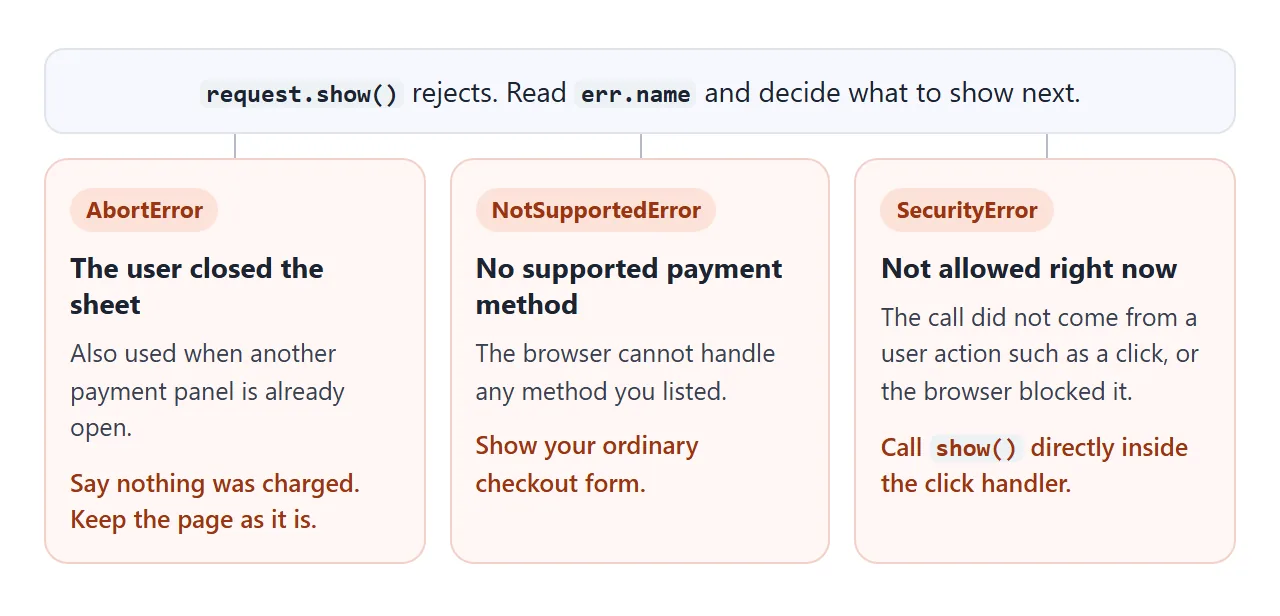
Closing the sheet is a normal outcome, not a bug. Do not show an error page for it.
Before you start, check that the API exists with 'PaymentRequest' in window. You can also call request.canMakePayment(), which resolves to true when the browser supports one of your methods. MDN warns that calling it too often can make the promise reject.
MDN marks the whole API as limited availability and not Baseline. Treat it as an upgrade over a normal form, never as the only way to pay.
A finished example: pay with the browser, or fall back
This checkout tries the browser sheet first. If the API is missing, canMakePayment() is false, or show() rejects for any reason except a closed sheet, it opens a plain invoice form. The form is handled inside the page, so nothing is sent anywhere.
<!doctype html>
<html lang="en">
<head>
<meta charset="utf-8">
<meta name="viewport" content="width=device-width, initial-scale=1">
<title>Checkout with a fallback</title>
<style>
  body { margin: 0; padding: 14px; font-family: system-ui, sans-serif; background: #f4f5f7; color: #1d2330; }
  .card { max-width: 440px; padding: 16px 18px; border-radius: 12px; background: #fff; box-shadow: 0 6px 20px rgba(0, 0, 0, .1); }
  h1 { font-size: 17px; margin: 0 0 8px; }
  table { width: 100%; border-collapse: collapse; font-size: 14px; }
  td { padding: 5px 0; border-bottom: 1px solid #eceff3; }
  td:last-child { text-align: right; }
  tr.total td { font-weight: 700; border-bottom: 0; }
  label { display: block; margin: 12px 0 4px; font-size: 13px; color: #4b5563; }
  input[type=text], input[type=email], input[type=url] { width: 100%; box-sizing: border-box; font: inherit; padding: 8px; border: 1px solid #cbd2dc; border-radius: 8px; }
  button { font: inherit; font-weight: 600; padding: 10px 16px; border: 0; border-radius: 8px; background: #2563eb; color: #fff; cursor: pointer; margin-top: 12px; }
  button.alt { background: #374151; }
  #status { margin: 12px 0 0; padding: 10px 12px; border-radius: 8px; background: #eef1f5; font-size: 14px; overflow-wrap: anywhere; }
  #status.ok { background: #e3f6e9; }
  #status.warn { background: #fff1e6; }
  #fallback { margin-top: 14px; padding-top: 4px; border-top: 1px dashed #cbd2dc; }
  #fallback[hidden] { display: none; }
  pre { margin: 10px 0 0; padding: 8px 10px; border-radius: 8px; background: #1e2430; color: #e6edf7; font: 12.5px/1.5 ui-monospace, Consolas, monospace; overflow-x: auto; }
</style>
</head>
<body>
<div class="card">
  <h1>Your order</h1>
  <table>
    <tr><td>Coffee beans x 1</td><td>$5.00</td></tr>
    <tr><td>Paper filter x 2</td><td>$2.50</td></tr>
    <tr class="total"><td>Total</td><td>$7.50</td></tr>
  </table>

  <label for="method">Payment method identifier (an https URL from your payment provider)</label>
  <input id="method" type="url" value="https://example.com/pay">

  <button id="pay" type="button">Pay with your browser</button>
  <p id="status">Press the button. Each step is reported here.</p>

  <form id="fallback" hidden>
    <strong>Or ask for an invoice</strong>
    <label for="name">Name</label>
    <input id="name" name="name" type="text" required>
    <label for="email">Email</label>
    <input id="email" name="email" type="email" required>
    <button class="alt" type="submit">Request invoice</button>
    <pre id="sent" hidden></pre>
  </form>
</div>

<script>
  const $ = (id) => document.getElementById(id);
  function say(text, cls) { $('status').textContent = text; $('status').className = cls || ''; }
  function showFallback() { $('fallback').hidden = false; }

  $('pay').addEventListener('click', async () => {
    if (!('PaymentRequest' in window)) { say('No Payment Request API here. Use the invoice form.', 'warn'); showFallback(); return; }

    try {
      // A PaymentRequest can be shown only once, so build a new one on every click
      const request = new PaymentRequest(
        [{ supportedMethods: $('method').value }],
        { total: { label: 'Order', amount: { currency: 'USD', value: '7.50' } } }
      );
      if (!(await request.canMakePayment())) {
        say('canMakePayment() said false: no usable payment method. Use the invoice form.', 'warn');
        showFallback();
        return;
      }
      const response = await request.show();            // opens the browser payment sheet
      // A real page would send response.details to its server here
      await response.complete('success');
      say('Approved with ' + response.methodName + '.', 'ok');
    } catch (err) {
      if (err.name === 'AbortError') {
        say('The payment sheet was closed. Nothing was charged.', 'warn');   // the user said no
      } else {
        say(err.name + ': ' + err.message + ' (Use the invoice form.)', 'warn');
        showFallback();
      }
    }
  });

  // The fallback form is handled inside the page: nothing is sent anywhere
  $('fallback').addEventListener('submit', (e) => {
    e.preventDefault();
    const data = Object.fromEntries(new FormData(e.target));
    $('sent').hidden = false;
    $('sent').textContent = JSON.stringify(data, null, 1);
  });
</script>
</body>
</html>
Notice that a new PaymentRequest is built on every click. A request can be shown only once, and a second show() on the same object rejects with InvalidStateError.
Where the payment is really processed
The browser sheet only gathers an approval. A real charge needs a server or a payment provider, which a plain HTML page does not have. The page forwards the result and then closes the sheet:
const response = await request.show();
const r = await fetch('/api/charge', {
  method: 'POST',
  headers: { 'Content-Type': 'application/json' },
  body: JSON.stringify({ method: response.methodName, details: response.details }),
});
await response.complete(r.ok ? 'success' : 'fail');
The /api/charge route is yours to write, or your provider's. It is not part of the HTML page and is not shown running here.
When it does not work
| What you see | Cause | Fix |
|---|---|---|
PaymentRequest is not defined |
The browser has no Payment Request API, or the page is not a secure context | Feature-detect first and serve over HTTPS |
SecurityError from show() |
The call did not come from a click or similar user action | Call show() inside the click handler |
SecurityError from the constructor |
A Permissions Policy blocks payment, for example inside a cross-origin iframe |
Add allow="payment" to the iframe |
NotSupportedError |
The browser supports none of your payment methods | Use an identifier from your provider, or show a normal form |
TypeError when building the request |
Negative total, comma in the value, or no payment methods | Use a string such as '7.50' and at least one method |
InvalidStateError on the second click |
The same request was shown twice | Build a new PaymentRequest on every click |
AbortError |
The user closed the sheet, or another payment panel was open | Show a short message and let them try again |
For the iframe row, see iframe and the sandbox attribute. If a page never reaches your script at all, JavaScript not working in HTML lists the usual causes.
Share it as a link
A payment button is hard to judge from a screenshot. A link lets the other person press the button in their own browser and see what it does there.
To send the working version, paste the page into a NOS document and choose Create share link. HTML to link walks through it.
The page renders as written and its scripts run, so the people you send it to can press the buttons themselves. If you change the code later, the same link shows the new version.