A real estate flyer template that works at an open house is a single web page. Put the price, photos, open house times and contact on it, give it a link, and print that link as a QR code on the sign.
An AI chat can write the page for you. The link comes from pasting it into NOS, and the same code then stays valid however often you change the page.
Here is a listing page built that way. Open it on a phone, tap the Kitchen and Garden buttons, and copy anything you like.
<!doctype html>
<html lang="en">
<head>
<meta charset="utf-8">
<meta name="viewport" content="width=device-width, initial-scale=1">
<title>48 Maple Court</title>
<style>
  * { box-sizing: border-box; }
  body { margin: 0; font-family: system-ui, sans-serif; color: #1f2937; background: #eef1f4; line-height: 1.45; }
  .page { max-width: 520px; margin: 0 auto; background: #fff; min-height: 100vh; }
  .hero { position: relative; }
  .hero svg { display: block; width: 100%; height: auto; }
  .badge { position: absolute; left: 12px; bottom: 12px; background: #b91c1c; color: #fff; font-weight: 700; font-size: 13px; padding: 6px 10px; border-radius: 6px; }
  .head { padding: 16px 18px 6px; }
  .price { font-size: 30px; font-weight: 800; letter-spacing: -.5px; margin: 0; }
  .addr { margin: 2px 0 0; color: #4b5563; }
  .facts { display: grid; grid-template-columns: repeat(4, 1fr); gap: 8px; padding: 12px 18px; }
  .fact { background: #f3f6f9; border-radius: 8px; padding: 8px 4px; text-align: center; }
  .fact b { display: block; font-size: 18px; }
  .fact span { font-size: 12px; color: #4b5563; }
  section { padding: 10px 18px 14px; }
  h2 { font-size: 17px; margin: 0 0 8px; }
  .tabs { display: flex; gap: 6px; margin-bottom: 8px; }
  .tabs button { flex: 1; font: inherit; font-size: 14px; padding: 8px 4px; border: 1px solid #cbd5e1; background: #fff; border-radius: 8px; cursor: pointer; min-height: 40px; }
  .tabs button[aria-pressed="true"] { background: #14532d; border-color: #14532d; color: #fff; }
  .shots svg { display: none; width: 100%; height: auto; border-radius: 10px; }
  .shots svg.on { display: block; }
  ul.hl { margin: 0; padding-left: 20px; }
  ul.hl li { margin: 3px 0; }
  table { width: 100%; border-collapse: collapse; font-size: 15px; }
  td { padding: 8px 6px; border-bottom: 1px solid #e5e7eb; }
  td:last-child { text-align: right; font-weight: 600; }
  .agent { background: #14532d; color: #fff; padding: 16px 18px 20px; }
  .agent h2 { margin-bottom: 2px; }
  .agent p { margin: 2px 0; }
  .agent a { color: #fff; font-weight: 700; }
  .btns { display: flex; gap: 8px; margin-top: 10px; flex-wrap: wrap; }
  .btns a { background: #fff; color: #14532d; text-decoration: none; padding: 10px 14px; border-radius: 8px; min-height: 40px; }
  .note { font-size: 12px; color: #6b7280; padding: 10px 18px 16px; }
</style>
</head>
<body>
<div class="page">
  <div class="hero">
    <svg viewBox="0 0 520 280" role="img" aria-label="Drawing of a two-storey house with a front lawn">
      <rect width="520" height="280" fill="#bfe3f7"/>
      <circle cx="440" cy="52" r="26" fill="#fde68a"/>
      <rect y="210" width="520" height="70" fill="#86c98a"/>
      <rect x="120" y="100" width="280" height="120" fill="#f5e6c8"/>
      <polygon points="100,104 260,36 420,104" fill="#9a3412"/>
      <rect x="236" y="150" width="48" height="70" fill="#7c4a2d"/>
      <rect x="150" y="130" width="52" height="44" fill="#9bd0ee" stroke="#fff" stroke-width="4"/>
      <rect x="318" y="130" width="52" height="44" fill="#9bd0ee" stroke="#fff" stroke-width="4"/>
      <rect x="236" y="214" width="48" height="66" fill="#d6c7a7"/>
    </svg>
    <div class="badge">Open house: Sat 1:00 - 3:00 pm</div>
  </div>

  <div class="head">
    <p class="price">$489,000</p>
    <p class="addr">48 Maple Court, Fairview</p>
  </div>

  <div class="facts">
    <div class="fact"><b>3</b><span>Beds</span></div>
    <div class="fact"><b>2</b><span>Baths</span></div>
    <div class="fact"><b>1,640</b><span>Sq ft</span></div>
    <div class="fact"><b>2</b><span>Garage</span></div>
  </div>

  <section>
    <h2>Look inside</h2>
    <div class="tabs" id="tabs">
      <button type="button" data-view="living" aria-pressed="true">Living</button>
      <button type="button" data-view="kitchen" aria-pressed="false">Kitchen</button>
      <button type="button" data-view="garden" aria-pressed="false">Garden</button>
    </div>
    <div class="shots" id="shots">
      <svg id="living" class="on" viewBox="0 0 480 260" role="img" aria-label="Living room drawing">
        <rect width="480" height="260" fill="#f1e7d6"/><rect y="190" width="480" height="70" fill="#c9a77c"/>
        <rect x="300" y="40" width="120" height="100" fill="#bfe3f7" stroke="#fff" stroke-width="6"/>
        <rect x="60" y="120" width="190" height="70" rx="12" fill="#5b7c99"/><rect x="60" y="100" width="190" height="34" rx="12" fill="#6f93b3"/>
      </svg>
      <svg id="kitchen" viewBox="0 0 480 260" role="img" aria-label="Kitchen drawing">
        <rect width="480" height="260" fill="#eef2f0"/><rect y="190" width="480" height="70" fill="#b8bfb9"/>
        <rect x="30" y="40" width="420" height="50" fill="#d9e4dc"/><rect x="30" y="120" width="420" height="70" fill="#f8fafc" stroke="#cbd5e1"/>
        <rect x="190" y="140" width="100" height="14" rx="7" fill="#94a3b8"/>
      </svg>
      <svg id="garden" viewBox="0 0 480 260" role="img" aria-label="Back garden drawing">
        <rect width="480" height="260" fill="#cfeaf8"/><rect y="150" width="480" height="110" fill="#7fc38a"/>
        <rect x="70" y="150" width="140" height="14" fill="#b08968"/><circle cx="370" cy="100" r="52" fill="#4c9a5b"/><rect x="364" y="140" width="12" height="40" fill="#7c4a2d"/>
      </svg>
    </div>
  </section>

  <section>
    <h2>Highlights</h2>
    <ul class="hl">
      <li>New roof and furnace, 2024</li>
      <li>Open kitchen with island</li>
      <li>Fenced back garden</li>
      <li>Ten minutes to Fairview Elementary</li>
    </ul>
  </section>

  <section>
    <h2>Open house times</h2>
    <table>
      <tr><td>Saturday</td><td>1:00 - 3:00 pm</td></tr>
      <tr><td>Sunday</td><td>11:00 am - 1:00 pm</td></tr>
      <tr><td>Other days</td><td>By appointment</td></tr>
    </table>
  </section>

  <div class="agent">
    <h2>Avery Lane Realty</h2>
    <p>Call or write to book a private viewing.</p>
    <div class="btns">
      <a href="tel:+15550100148">Call (555) 010-0148</a>
      <a href="mailto:viewings@example.com">Email us</a>
    </div>
  </div>
  <p class="note">Sample listing. The address, agency and numbers are made up.</p>
</div>

<script>
  // Show the picture that matches the pressed button
  const tabs = document.getElementById('tabs');
  tabs.addEventListener('click', (e) => {
    const btn = e.target.closest('button');
    if (!btn) return;
    tabs.querySelectorAll('button').forEach((b) => b.setAttribute('aria-pressed', b === btn));
    document.querySelectorAll('#shots svg').forEach((s) => s.classList.toggle('on', s.id === btn.dataset.view));
  });
</script>
</body>
</html>
What goes on the page
A visitor scans the code standing in a driveway or a hallway, so the page is read on a small screen, quickly. Put the answers to the first questions at the top.
- Price and address, in large type.
- Open house times, in a coloured badge.
- Beds, baths and size, as short tiles.
- Photos, switched with buttons.
- Contact, as call and email buttons.
Anything longer, such as the full description, goes underneath. Advertise a property with a link goes deeper on what buyers look at first.
Make it with AI
Any of ChatGPT, Claude or Gemini will write the page if you give it the facts and the rules. Paste this, and replace the square brackets.
Write a one-page web page for a home listing as a single
HTML file with the CSS inside it. It will open on a phone
after someone scans a QR code at an open house.

Details:
- Address: [address]
- Price: [price]
- Beds, baths, size: [numbers]
- Open house: [days and times]
- Highlights: [three or four short lines]
- Phone: [number]   Email: [address]

Rules:
- Phone first: one column, large text, buttons 40px tall.
- Order: price and address, open house times, facts,
  photos, highlights, contact.
- Draw simple placeholder boxes for photos. No image
  links to other websites.
- Contact is a tel: link and a mailto: link. No form.
- Use only the details above. Write TODO where something
  is missing. Do not invent schools, taxes or sizes.
- Add print styles so printing gives a clean one-page sheet.
When the reply comes back, check it before you use it:
- Every number, time and name matches your listing sheet. An AI can fill a gap with a plausible fact.
- Anything marked TODO is filled in or removed.
- The page has a viewport meta tag, so a phone does not shrink it.
Your brokerage may also have rules about what a listing advertisement must show. Check them before you print.
Send it as a link
Copy the whole reply, paste it into a NOS document, and choose Create share link. HTML to link walks through it. The page renders as written and its scripts run, so the photo buttons work.
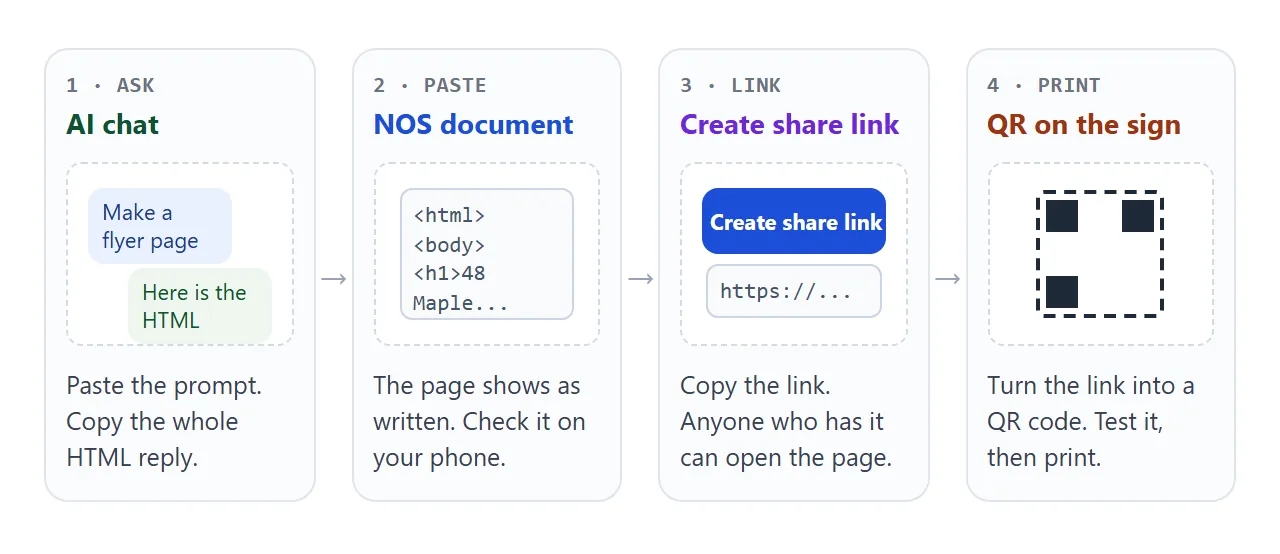
Anyone with the link can open the page in a browser, a phone included, without an account. They cannot edit it. When you change the code in your own document, the link stays the same and shows the new version.
Photos need one extra step. Pictures stored on other websites are blocked on the page, so they have to travel inside it. A data URL does that, as images not showing in HTML explains. Add them, then open the link on your phone and look.
Put the QR code on the sign and the sheet
A QR code holds the link. Any QR code maker takes it. Chrome has one built in: as of October 2026, on a computer, open the page, choose More, then Cast, save, and share, then Create QR code. You can download the image from there.
A file to QR code covers why a code holds a link and not the page itself.
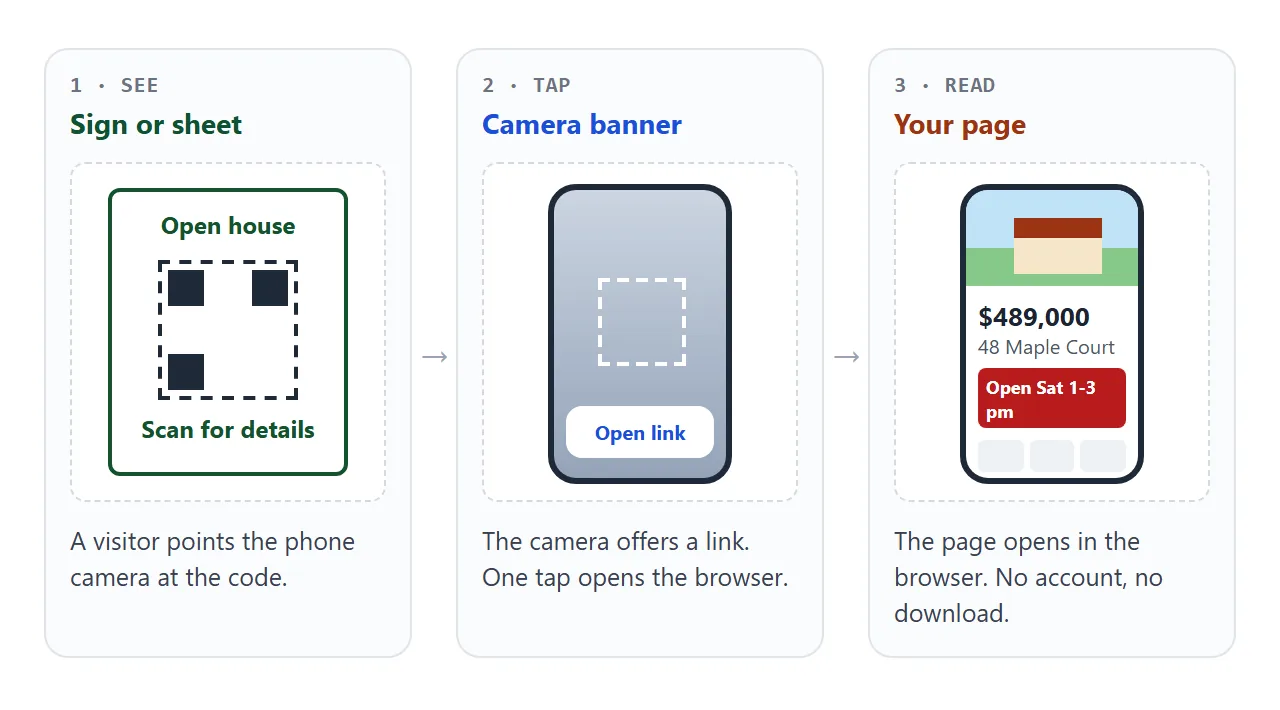
Visitors scan with the camera. On an iPhone, Apple says to open Camera, hold the phone so the code is in the frame, and tap the link that appears. On Android, Google describes a banner to tap.
Here is the same listing as a printable sheet. Type your own address, price and times into the boxes and the sheet follows. The dashed box is where your code goes.
<!doctype html>
<html lang="en">
<head>
<meta charset="utf-8">
<meta name="viewport" content="width=device-width, initial-scale=1">
<title>Open house sheet</title>
<style id="pagesize">@page { size: letter; margin: 0.5in; }</style>
<style>
  * { box-sizing: border-box; }
  body { margin: 0; padding: 12px; font-family: system-ui, sans-serif; color: #1f2937; background: #e5e9ee; }
  .controls { max-width: 560px; margin: 0 auto 12px; background: #fff; border-radius: 10px; padding: 12px; display: grid; gap: 8px; }
  .controls label { display: grid; gap: 2px; font-size: 13px; font-weight: 600; }
  .controls input { font: inherit; padding: 8px; border: 1px solid #cbd5e1; border-radius: 6px; min-height: 40px; }
  .row { display: flex; gap: 8px; align-items: center; flex-wrap: wrap; font-size: 13px; }
  .row button { font: inherit; padding: 8px 12px; border: 1px solid #cbd5e1; background: #fff; border-radius: 8px; min-height: 40px; cursor: pointer; }
  .row button[aria-pressed="true"] { background: #14532d; color: #fff; border-color: #14532d; }
  .sheet { max-width: 560px; margin: 0 auto; background: #fff; padding: 22px; border: 1px solid #cfd6de; aspect-ratio: 8.5 / 11;
    display: flex; flex-direction: column; gap: 12px; -webkit-print-color-adjust: exact; print-color-adjust: exact; }
  .sheet.a4 { aspect-ratio: 210 / 297; }
  .top { display: flex; justify-content: space-between; align-items: baseline; gap: 10px; flex-wrap: wrap; }
  .top h1 { margin: 0; font-size: 26px; letter-spacing: -.4px; }
  .top .p { font-size: 26px; font-weight: 800; color: #14532d; }
  .sheet svg.photo { width: 100%; height: auto; border-radius: 8px; display: block; }
  .when { background: #14532d; color: #fff; border-radius: 8px; padding: 10px 12px; font-weight: 700; font-size: 18px; text-align: center; }
  .cols { display: grid; grid-template-columns: 1fr 150px; gap: 14px; align-items: center; flex: 1; }
  .cols ul { margin: 0; padding-left: 18px; font-size: 15px; }
  .cols li { margin: 4px 0; }
  .qr { text-align: center; font-size: 12px; color: #4b5563; }
  .qr svg { width: 100%; height: auto; display: block; }
  .foot { font-size: 11px; color: #6b7280; margin: 0; }
  @media print {
    body { background: #fff; padding: 0; }
    .controls { display: none; }
    .sheet { border: 0; max-width: none; aspect-ratio: auto; padding: 0; }
  }
</style>
</head>
<body>
<div class="controls">
  <label>Address <input id="in-addr" value="48 Maple Court, Fairview"></label>
  <label>Price <input id="in-price" value="$489,000"></label>
  <label>Open house <input id="in-when" value="Sat 1:00 - 3:00 pm"></label>
  <div class="row">Paper size:
    <button type="button" id="b-letter" aria-pressed="true">Letter</button>
    <button type="button" id="b-a4" aria-pressed="false">A4</button>
  </div>
</div>

<div class="sheet" id="sheet">
  <div class="top"><h1 id="o-addr">48 Maple Court, Fairview</h1><span class="p" id="o-price">$489,000</span></div>
  <svg class="photo" viewBox="0 0 520 190" role="img" aria-label="Drawing of the house">
    <rect width="520" height="190" fill="#bfe3f7"/><rect y="150" width="520" height="40" fill="#86c98a"/>
    <rect x="140" y="64" width="240" height="90" fill="#f5e6c8"/><polygon points="120,68 260,16 400,68" fill="#9a3412"/>
    <rect x="240" y="100" width="40" height="54" fill="#7c4a2d"/>
    <rect x="164" y="88" width="44" height="34" fill="#9bd0ee"/><rect x="312" y="88" width="44" height="34" fill="#9bd0ee"/>
  </svg>
  <div class="when" id="o-when">Sat 1:00 - 3:00 pm</div>
  <div class="cols">
    <ul>
      <li>3 bedrooms, 2 bathrooms</li>
      <li>1,640 sq ft, 2-car garage</li>
      <li>New roof and furnace, 2024</li>
      <li>Fenced back garden</li>
    </ul>
    <div class="qr">
      <svg viewBox="0 0 100 100" role="img" aria-label="Placeholder for your QR code">
        <rect x="1" y="1" width="98" height="98" fill="#fff" stroke="#1f2937" stroke-width="2" stroke-dasharray="5 4"/>
        <g fill="#1f2937"><rect x="10" y="10" width="24" height="24"/><rect x="66" y="10" width="24" height="24"/><rect x="10" y="66" width="24" height="24"/></g>
        <g fill="#fff"><rect x="15" y="15" width="14" height="14"/><rect x="71" y="15" width="14" height="14"/><rect x="15" y="71" width="14" height="14"/></g>
        <text x="50" y="58" text-anchor="middle" font-size="11" font-family="system-ui, sans-serif" fill="#1f2937">YOUR QR</text>
      </svg>
      Scan for photos, floor plan and price changes
    </div>
  </div>
  <p class="foot">Sample sheet with made-up details. Replace the dashed box with your own code.</p>
</div>

<script>
  const $ = (id) => document.getElementById(id);
  // Copy each field onto the sheet as you type
  [['in-addr', 'o-addr'], ['in-price', 'o-price'], ['in-when', 'o-when']].forEach(([from, to]) => {
    $(from).addEventListener('input', () => { $(to).textContent = $(from).value; });
  });
  // Switch the paper shape and the print page size together
  function setSize(name) {
    $('sheet').classList.toggle('a4', name === 'a4');
    $('b-letter').setAttribute('aria-pressed', name === 'letter');
    $('b-a4').setAttribute('aria-pressed', name === 'a4');
    $('pagesize').textContent = '@page { size: ' + name + '; margin: 0.5in; }';
  }
  $('b-letter').addEventListener('click', () => setSize('letter'));
  $('b-a4').addEventListener('click', () => setSize('a4'));
</script>
</body>
</html>
The sheet uses three print features that browsers document. A print media rule hides the boxes and buttons, a page rule sets the paper size, and the print-color-adjust property keeps the colours that browsers may otherwise drop.
Flyer, PDF or link: what to hand out
You may hand out more than one. The difference is what each does when the price changes.
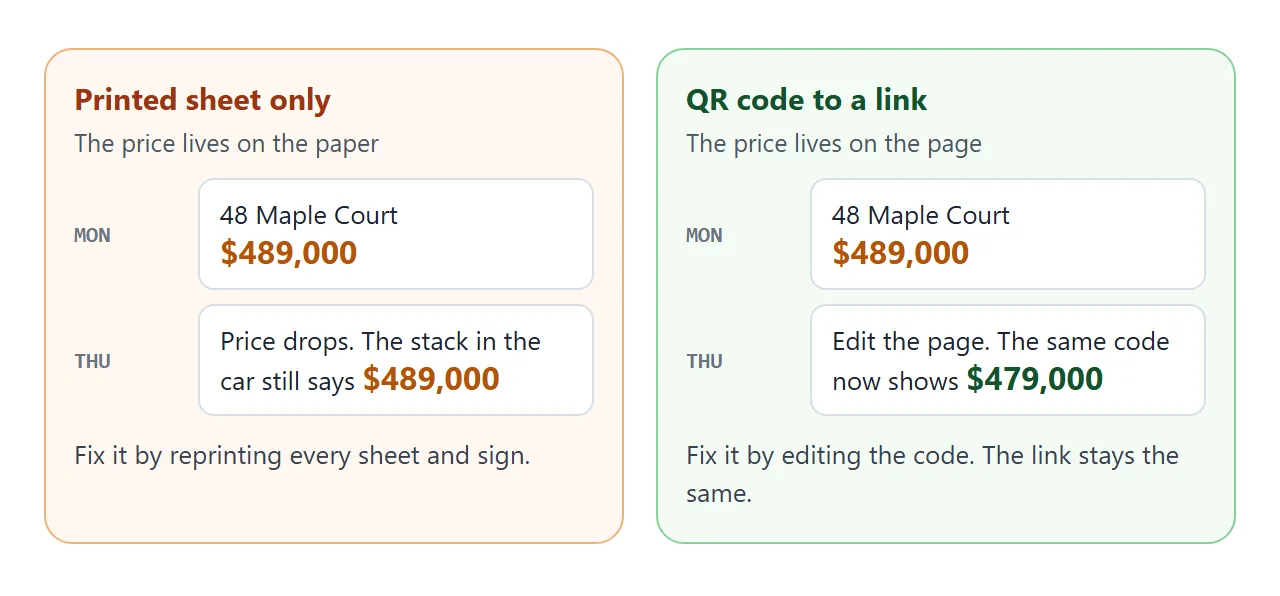
| Way to share | On a phone | After a price change |
|---|---|---|
| Printed sheet only | Not at all | Reprint every sheet |
| PDF sent as an attachment | Must be downloaded, then opened | Send a new file |
| Link with a QR code | Opens in the browser, no account | Edit the page, same link |
Keep the printed sheet short and let the code carry the rest. If you leave the price off the paper, it can never be out of date. Digital brochure compares more formats.
When it does not work
| What you see | Cause | Fix |
|---|---|---|
| The camera shows no link | Glare, shadow, a smudged lens, or the phone is too far | Print the code larger, move it out of direct light, test from the real distance |
| Pixel camera never offers a link | Camera scan suggestions may be off | Open Camera settings, then More settings, and turn it on |
| Photos show as broken icons | The pictures are stored on another website | Embed them in the page as data URLs |
| The page looks tiny, like a desktop site | The viewport line is missing | Ask the AI to add it |
| A contact form seems to do nothing | Sending a form to a server is blocked | Use tel: and mailto: links |
| Printed sheet has white boxes, no colour | Browsers may leave out backgrounds when printing | Add print-color-adjust: exact to the print styles |
| The sheet still shows the old price | The price was printed on paper | Leave the price off the paper, or reprint |
Test it the way a visitor will
Before the open house, print one sheet, put it on a wall, and scan it from where a visitor will stand. Use a phone that has never opened the page, and use mobile data, not your office wifi.
Then read the page as a stranger would. Opening an HTML file on a phone explains why a link works where an attachment often does not.
If it scans, loads quickly and shows the right price, print the rest.