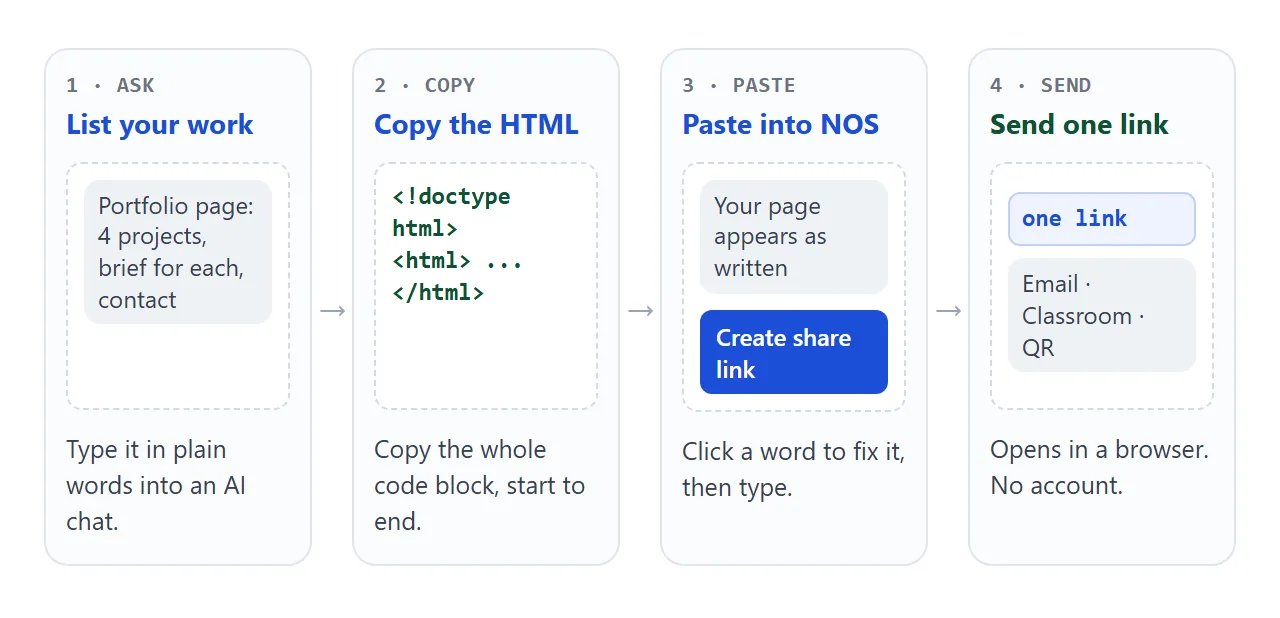
A student portfolio website template can be a page you ask an AI to write. List your projects, ask for one HTML file, paste it into a NOS document, fix the text by clicking, and send one link.
On Quora, someone asks "What are some free websites to build a portfolio?" Site builders are one answer. This is another, and it starts from your work, not a layout.
The page below is the kind of result you can get. Try the filters and the Show the thinking buttons.
<!doctype html>
<html lang="en">
<head>
<meta charset="utf-8">
<meta name="viewport" content="width=device-width, initial-scale=1">
<title>Ines Varga - Portfolio</title>
<style>
* { box-sizing: border-box; }
body { margin: 0; font-family: system-ui, sans-serif; color: #1f2933; background: #f6f8f7; line-height: 1.5; }
.wrap { max-width: 860px; margin: 0 auto; padding: 22px 16px 36px; }
header { padding: 8px 0 18px; border-bottom: 1px solid #dde3e0; }
h1 { margin: 0; font-size: 30px; line-height: 1.15; }
.role { color: #0f766e; font-weight: 600; margin: 4px 0 10px; }
header p { margin: 0; max-width: 560px; }
.filters { display: flex; flex-wrap: wrap; gap: 8px; margin: 20px 0 14px; }
.filters button { font: inherit; font-size: 14px; padding: 7px 14px; border-radius: 999px; border: 1px solid #b9c4bf; background: #fff; color: #1f2933; cursor: pointer; }
.filters button[aria-pressed="true"] { background: #0f766e; border-color: #0f766e; color: #fff; }
.grid { display: grid; grid-template-columns: repeat(auto-fit, minmax(240px, 1fr)); gap: 14px; align-items: start; }
.card { background: #fff; border: 1px solid #dde3e0; border-radius: 12px; overflow: hidden; display: flex; flex-direction: column; }
.card[hidden] { display: none; }
.cover { height: 110px; display: block; width: 100%; }
.body { padding: 12px 14px 14px; display: flex; flex-direction: column; flex: 1; }
.tag { font-size: 12px; font-weight: 700; letter-spacing: .04em; text-transform: uppercase; color: #0f766e; }
.card h2 { margin: 2px 0 4px; font-size: 18px; }
.card p { margin: 0 0 10px; font-size: 14px; }
.more { font: inherit; font-size: 14px; font-weight: 600; color: #0f766e; background: none; border: 0; padding: 0; cursor: pointer; text-align: left; margin-top: auto; }
.why { margin-top: 10px; padding-top: 10px; border-top: 1px dashed #c9d2ce; font-size: 14px; }
.why[hidden] { display: none; }
.why b { display: block; font-size: 12px; text-transform: uppercase; letter-spacing: .04em; color: #52605b; }
.why p { margin: 2px 0 8px; }
.two { display: grid; grid-template-columns: repeat(auto-fit, minmax(240px, 1fr)); gap: 24px; margin-top: 30px; }
h3 { margin: 0 0 8px; font-size: 18px; }
ul { margin: 0; padding-left: 18px; }
a { color: #0f766e; }
</style>
</head>
<body>
<div class="wrap">
<header>
<h1>Ines Varga</h1>
<div class="role">Year 12 · Design & Technology</div>
<p>I like fixing small everyday problems with a sketch, a few lines of code, or a better sentence. Here are four projects, with the thinking behind each one.</p>
</header>
<div class="filters" id="filters">
<button type="button" data-f="all" aria-pressed="true">All</button>
<button type="button" data-f="Design" aria-pressed="false">Design</button>
<button type="button" data-f="Code" aria-pressed="false">Code</button>
<button type="button" data-f="Writing" aria-pressed="false">Writing</button>
</div>
<div class="grid">
<article class="card" data-cat="Design">
<svg class="cover" viewBox="0 0 240 110" preserveAspectRatio="none" aria-hidden="true"><rect width="240" height="110" fill="#cfe8e4"/><rect x="40" y="30" width="12" height="62" fill="#0f766e"/><rect x="28" y="24" width="90" height="16" rx="3" fill="#0f766e"/><rect x="150" y="48" width="56" height="44" rx="4" fill="#fff"/></svg>
<div class="body">
<div class="tag">Design</div>
<h2>Bus stop redesign</h2>
<p>A shelter layout for a stop with a narrow pavement.</p>
<button type="button" class="more" aria-expanded="false">Show the thinking</button>
<div class="why" hidden>
<b>Brief</b><p>Class project: make a stop usable for a pushchair and a wheelchair.</p>
<b>What I tried</b><p>A wall-mounted bench and a corner shelter. The corner blocked the kerb.</p>
<b>Why this one</b><p>The wall bench left a 1.5 m clear path in my scale model.</p>
</div>
</div>
</article>
<article class="card" data-cat="Code">
<svg class="cover" viewBox="0 0 240 110" preserveAspectRatio="none" aria-hidden="true"><rect width="240" height="110" fill="#e6e9f7"/><polyline points="10,85 50,60 90,70 130,35 170,50 230,20" fill="none" stroke="#4f46e5" stroke-width="5" stroke-linejoin="round"/></svg>
<div class="body">
<div class="tag">Code</div>
<h2>Weather logger</h2>
<p>A small page that charts the temperature readings I typed in.</p>
<button type="button" class="more" aria-expanded="false">Show the thinking</button>
<div class="why" hidden>
<b>Brief</b><p>Self-directed: learn charts without a library.</p>
<b>What I tried</b><p>A table first, then bars, then a line.</p>
<b>Why this one</b><p>The line made the cold Tuesday easy to spot.</p>
</div>
</div>
</article>
<article class="card" data-cat="Writing">
<svg class="cover" viewBox="0 0 240 110" preserveAspectRatio="none" aria-hidden="true"><rect width="240" height="110" fill="#fbe9d7"/><rect x="30" y="22" width="120" height="9" rx="4" fill="#c2410c"/><rect x="30" y="42" width="170" height="7" rx="3" fill="#e0b48f"/><rect x="30" y="58" width="150" height="7" rx="3" fill="#e0b48f"/><rect x="30" y="74" width="100" height="7" rx="3" fill="#e0b48f"/></svg>
<div class="body">
<div class="tag">Writing</div>
<h2>Canteen queue feature</h2>
<p>A 600-word piece for the school magazine.</p>
<button type="button" class="more" aria-expanded="false">Show the thinking</button>
<div class="why" hidden>
<b>Brief</b><p>Magazine assignment: one place in school, one clear angle.</p>
<b>What I tried</b><p>A history of the canteen. It read like a leaflet.</p>
<b>Why this one</b><p>Timing the queue gave the piece a spine.</p>
</div>
</div>
</article>
<article class="card" data-cat="Design">
<svg class="cover" viewBox="0 0 240 110" preserveAspectRatio="none" aria-hidden="true"><rect width="240" height="110" fill="#fde2e4"/><circle cx="70" cy="55" r="30" fill="#be123c"/><circle cx="120" cy="55" r="30" fill="#fb7185" fill-opacity=".8"/><circle cx="170" cy="55" r="30" fill="#fff" fill-opacity=".8"/></svg>
<div class="body">
<div class="tag">Design</div>
<h2>Tote bag pattern</h2>
<p>A repeating pattern made from three circles.</p>
<button type="button" class="more" aria-expanded="false">Show the thinking</button>
<div class="why" hidden>
<b>Brief</b><p>Textiles unit: a pattern that works at two sizes.</p>
<b>What I tried</b><p>Five colour sets. Four looked muddy when printed small.</p>
<b>Why this one</b><p>Two reds and white kept its shape at both sizes.</p>
</div>
</div>
</article>
</div>
<div class="two">
<section>
<h3>Skills</h3>
<ul>
<li>Sketching and scale models</li>
<li>HTML, CSS and a little JavaScript</li>
<li>Short-form writing and editing</li>
</ul>
</section>
<section>
<h3>Contact</h3>
<p>Email: <a href="mailto:ines@example.com">ines@example.com</a><br>Available for work experience in July.</p>
</section>
</div>
</div>
<script>
// Filter buttons: show only cards whose data-cat matches
var buttons = document.querySelectorAll('#filters button');
var cards = document.querySelectorAll('.card');
buttons.forEach(function (b) {
b.addEventListener('click', function () {
buttons.forEach(function (x) { x.setAttribute('aria-pressed', x === b ? 'true' : 'false'); });
cards.forEach(function (c) {
c.hidden = b.dataset.f !== 'all' && c.dataset.cat !== b.dataset.f;
});
});
});
// "Show the thinking" opens the panel inside the same card
document.querySelectorAll('.more').forEach(function (m) {
m.addEventListener('click', function () {
var panel = m.nextElementSibling;
var open = panel.hidden;
panel.hidden = !open;
m.setAttribute('aria-expanded', open ? 'true' : 'false');
m.textContent = open ? 'Hide the thinking' : 'Show the thinking';
});
});
</script>
</body>
</html>
Make it with AI
Open ChatGPT, Claude or Gemini and paste a prompt like this. Replace the words in capitals with your own. The reasoning matters more than the layout, and Student portfolio covers what reviewers look for when you have no clients yet.
Make one complete HTML file for my student portfolio.
Name: NAME. Subject: SUBJECT, YEAR.
Show 4 projects as cards. For each: a title, one line
about it, and a "Show the thinking" button that opens
the brief, what I tried and why I chose this version.
Add filter buttons by type, a short skills list and
my contact email.
Rules: it must work on a phone, use one font and two
colours, and keep all CSS and JavaScript inside the
file. No images from other sites; draw covers with
shapes. Put a comment above the project data that
says EDIT HERE.
Then check the result before you use it:
- Facts: read every date, grade and project name. An AI can invent details you never gave it.
- Buttons: press every filter and every Show the thinking button.
- Phone width: shrink the browser window, or open it on a phone, and look for text running off the side.
- Private details: remove anything you would not put on a notice board.
If something is off, reply in the same chat with one change at a time.
Send it as a link
- Copy the whole HTML block from the chat, from the first line to the last.
- Paste it into a NOS document. The page appears as written, with its buttons working.
- Click a wrong word on the page and type the right one. Editing without code shows how.
- Choose Share, then Create share link, and copy the link.
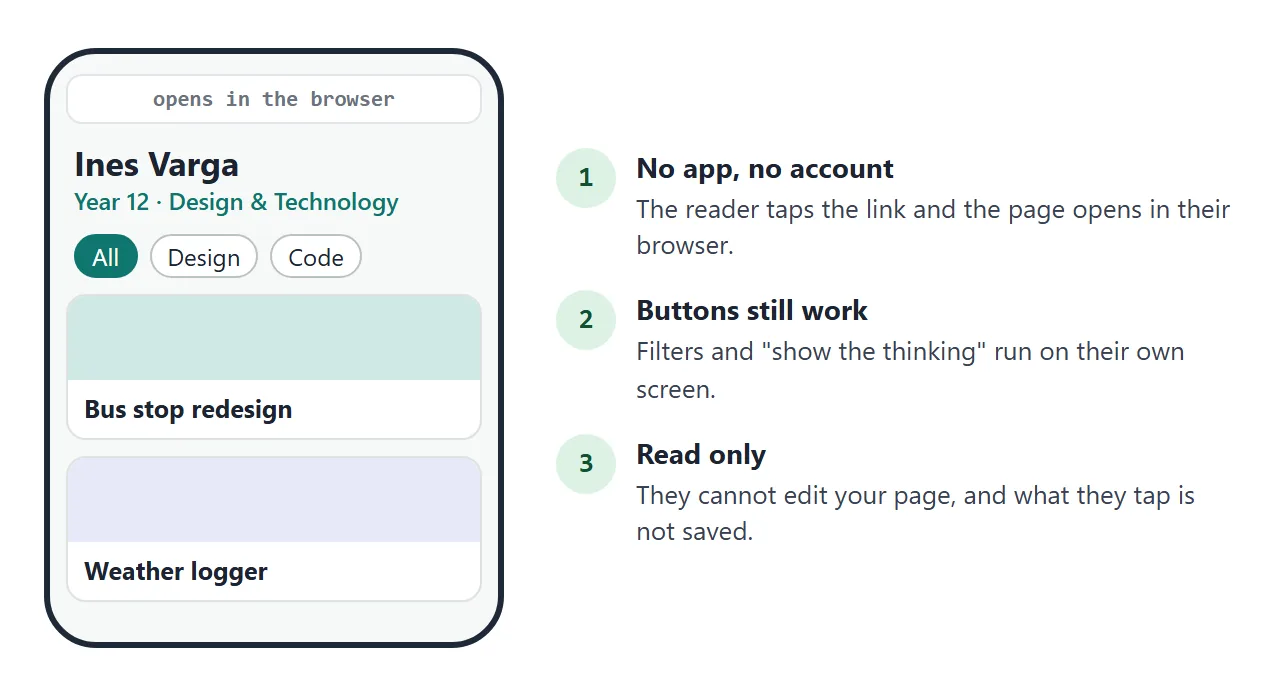
Whoever opens the link sees your page in their browser, on a phone too. They need no account and cannot edit it. If you fix a line later, edit it in the same document and the same link shows the new version.
Where to put the link
The link is plain text, so it goes wherever you already send things. If an application or form has a box for a website, paste it there. Three routes are worth knowing, and the first two depend on your school's setup.
- Google Classroom: Classroom Help says that to attach a link to the assignment you turn in, go to Your work, click Add or create, choose Link, enter the URL and click Add. As of October 2026, that is how Google describes it.
- Google Sites: Insert, then Embed, adds a URL. Google notes that some websites will not let you add their content. This guide did not test NOS pages inside Sites, so a normal text link is the safer choice.
- Paper: put the link in a QR code on a printed portfolio or a poster. Apple says the iPhone Camera app can read a QR code and show a link to tap. QR code link covers the code itself.
The same link also fits on a CV. How to link a portfolio in a resume shows where.
Ways to send it, compared
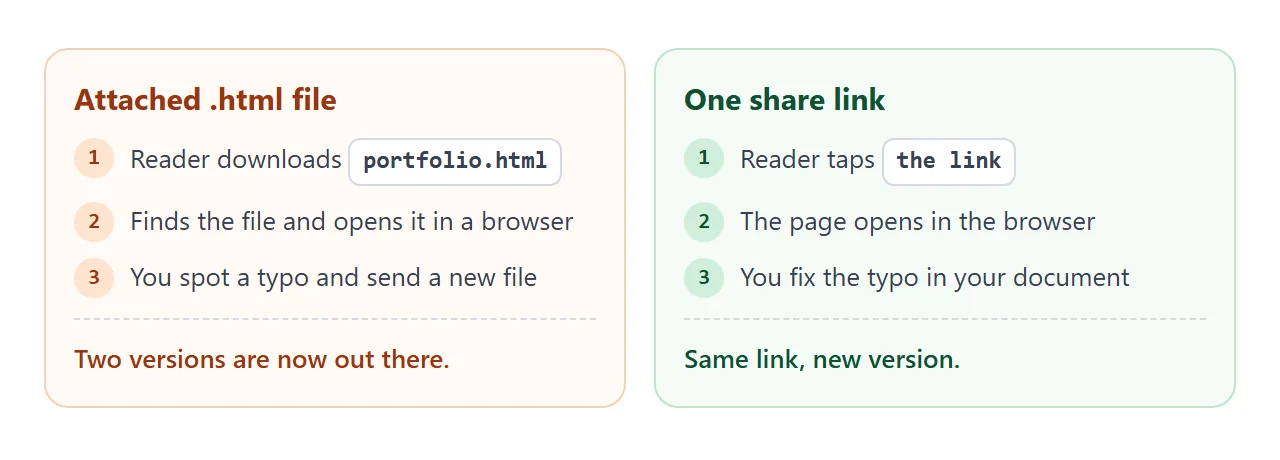
| Way | What the reader needs | If you fix a typo |
|---|---|---|
| HTML file attached to an email | Download it, then open it in a browser | Send a new file |
| NOS share link in an email | Tap the link | Edit once, same link |
| Link in a Classroom assignment | Whoever can see the assignment | Edit once, same link |
| QR code on paper | A phone camera | Edit once, same code |
The last three rows share one benefit: there is a single page, and everyone is looking at it. Why links beat attachments goes further.
A second page: a gallery for creative work
Not every course produces text. If your work is images, ask for a gallery with a large viewer, thumbnails and a note under each piece.
Use the arrows or the thumbnails below. The artwork here is drawn with inline SVG, so there are no image files to lose.
<!doctype html>
<html lang="en">
<head>
<meta charset="utf-8">
<meta name="viewport" content="width=device-width, initial-scale=1">
<title>Theo Lindqvist - Illustration</title>
<style>
* { box-sizing: border-box; }
body { margin: 0; font-family: Georgia, "Times New Roman", serif; background: #14161a; color: #ecebe6; line-height: 1.5; }
.wrap { max-width: 860px; margin: 0 auto; padding: 24px 16px 36px; }
h1 { margin: 0; font-size: 32px; font-weight: 400; letter-spacing: .02em; }
.sub { margin: 4px 0 20px; font: 14px system-ui, sans-serif; color: #a8a79f; }
.viewer { background: #1d2025; border-radius: 12px; padding: 14px; display: grid; grid-template-columns: minmax(0, 1.2fr) minmax(0, 1fr); gap: 18px; align-items: center; }
.big { aspect-ratio: 4 / 3; border-radius: 8px; overflow: hidden; }
.big svg, .thumb svg { display: block; width: 100%; height: 100%; }
.info h2 { margin: 0 0 4px; font-size: 22px; font-weight: 400; }
.meta { font: 13px system-ui, sans-serif; color: #e0a458; margin-bottom: 10px; }
.info p { margin: 0 0 14px; font-size: 16px; }
.nav { display: flex; gap: 8px; }
.nav button { font: 14px system-ui, sans-serif; padding: 8px 14px; border-radius: 8px; border: 1px solid #454b55; background: #262a31; color: #ecebe6; cursor: pointer; }
.thumbs { display: grid; grid-template-columns: repeat(auto-fit, minmax(110px, 1fr)); gap: 10px; margin-top: 14px; }
.thumb { padding: 0; border: 2px solid transparent; border-radius: 8px; overflow: hidden; background: none; cursor: pointer; aspect-ratio: 4 / 3; }
.thumb[aria-current="true"] { border-color: #e0a458; }
footer { margin-top: 22px; font: 14px system-ui, sans-serif; color: #a8a79f; }
footer a { color: #e0a458; }
@media (max-width: 560px) { .viewer { grid-template-columns: 1fr; } }
</style>
</head>
<body>
<div class="wrap">
<h1>Theo Lindqvist</h1>
<div class="sub">Illustration · Art foundation course</div>
<div class="viewer">
<div class="big" id="big"></div>
<div class="info">
<h2 id="title"></h2>
<div class="meta" id="meta"></div>
<p id="note"></p>
<div class="nav">
<button type="button" id="prev">← Previous</button>
<button type="button" id="next">Next →</button>
</div>
</div>
</div>
<div class="thumbs" id="thumbs"></div>
<footer>Commissions and questions: <a href="mailto:theo@example.com">theo@example.com</a></footer>
</div>
<script>
// EDIT HERE: one entry per artwork. Colours are the three shapes.
var works = [
{ title: 'Harbour at six', meta: 'Gouache, 2026', note: 'Brief: a place at one time of day. I kept three colours so the light carries the scene.', bg: '#27425b', a: '#e0a458', b: '#f3e9d2', shape: 'sun' },
{ title: 'Night bus', meta: 'Digital, 2026', note: 'Brief: movement in a still image. The long windows do the work of a blur.', bg: '#2d1f3d', a: '#ff7a90', b: '#ffd9a0', shape: 'bars' },
{ title: 'Greenhouse', meta: 'Ink and wash, 2025', note: 'Self-directed. I tried a full plant study first; the empty bench said more.', bg: '#1f3a2f', a: '#9bd18b', b: '#f3e9d2', shape: 'hills' },
{ title: 'Paper boats', meta: 'Collage, 2025', note: 'Brief: a story in one frame. Torn edges stand in for water.', bg: '#3b2a24', a: '#6fb3d9', b: '#f3e9d2', shape: 'tri' }
];
// Build one artwork as an inline SVG string (no image files needed)
function art(w) {
var s = '<svg viewBox="0 0 160 120" preserveAspectRatio="xMidYMid slice" role="img" aria-label="' + w.title + '"><rect width="160" height="120" fill="' + w.bg + '"/>';
if (w.shape === 'sun') s += '<circle cx="110" cy="45" r="24" fill="' + w.a + '"/><rect y="80" width="160" height="40" fill="' + w.b + '" fill-opacity=".85"/>';
if (w.shape === 'bars') s += '<rect x="14" y="30" width="40" height="30" rx="5" fill="' + w.a + '"/><rect x="62" y="30" width="40" height="30" rx="5" fill="' + w.b + '"/><rect x="110" y="30" width="40" height="30" rx="5" fill="' + w.a + '"/><rect y="84" width="160" height="8" fill="' + w.b + '"/>';
if (w.shape === 'hills') s += '<circle cx="40" cy="95" r="50" fill="' + w.a + '"/><circle cx="115" cy="105" r="55" fill="' + w.b + '" fill-opacity=".8"/>';
if (w.shape === 'tri') s += '<polygon points="30,80 70,80 50,40" fill="' + w.b + '"/><polygon points="90,85 140,85 115,50" fill="' + w.a + '"/><rect y="90" width="160" height="30" fill="' + w.a + '" fill-opacity=".5"/>';
return s + '</svg>';
}
var big = document.getElementById('big');
var thumbs = document.getElementById('thumbs');
var i = 0;
works.forEach(function (w, n) {
var t = document.createElement('button');
t.type = 'button';
t.className = 'thumb';
t.innerHTML = art(w);
t.addEventListener('click', function () { show(n); });
thumbs.appendChild(t);
});
function show(n) {
i = (n + works.length) % works.length;
var w = works[i];
big.innerHTML = art(w);
document.getElementById('title').textContent = w.title;
document.getElementById('meta').textContent = w.meta;
document.getElementById('note').textContent = w.note;
thumbs.querySelectorAll('.thumb').forEach(function (t, k) {
t.setAttribute('aria-current', k === i ? 'true' : 'false');
});
}
document.getElementById('prev').addEventListener('click', function () { show(i - 1); });
document.getElementById('next').addEventListener('click', function () { show(i + 1); });
show(0);
</script>
</body>
</html>
Replace the shapes with your own drawings only if they live inside the page. A link to a photo on another site is blocked.
When it does not work
| What you see | Cause | Fix |
|---|---|---|
| The chat shows code, not a page | You are reading the code block | Copy it into NOS and it renders |
| The page is cut off at the end | The copy missed the last lines | Copy again to the closing html line |
| A made-up grade or date | The AI guessed | Click it and type the real one |
| A picture does not show | Images from other sites are blocked | Ask for shapes and colours instead |
| A contact form does not send | Sending a form to a server is blocked | Show an email address instead |
| Your edit shows for you only | You changed it in the AI chat, not NOS | Make the edit in the NOS document |
| The layout is cramped on a phone | The page was made for a wide screen | Ask the chat to make it work on a phone |