A vibe coded portfolio is a single HTML file, so putting it online does not need a hosting account, a repository or a domain. Paste the code into NOS, choose Create share link, and send the address.
The real work is checking the words, because AI-written pages often contain things you never said.
If you asked an AI for a portfolio and got a long block of code back, the next question is where it goes. That question can sound like a course in hosting. For one file it is not.
Here is the kind of page this guide is about. Open a project's process, tap the email link, and look at it on a narrow screen.
<!doctype html>
<html lang="en">
<head>
<meta charset="utf-8">
<meta name="viewport" content="width=device-width, initial-scale=1">
<title>Pat Sample - Portfolio</title>
<style>
  * { box-sizing: border-box; }
  body { margin: 0; font-family: system-ui, sans-serif; color: #1f2937; background: #f8f7f4; line-height: 1.55; }
  header { background: #1f2a44; color: #fff; padding: 36px 20px 30px; }
  .wrap { max-width: 760px; margin: 0 auto; }
  header h1 { margin: 0 0 6px; font-size: 30px; }
  header p { margin: 0; color: #cbd5e1; }
  nav { display: flex; flex-wrap: wrap; gap: 8px 18px; margin-top: 16px; }
  nav a { color: #fff; font-weight: 600; text-decoration: none; border-bottom: 2px solid #f59e0b; }
  section { padding: 26px 20px 4px; }
  h2 { margin: 0 0 12px; font-size: 21px; }
  .grid { display: grid; grid-template-columns: repeat(auto-fit, minmax(210px, 1fr)); gap: 14px; }
  .proj { background: #fff; border: 1px solid #e5e7eb; border-radius: 12px; overflow: hidden; }
  .thumb { height: 92px; }
  .t1 { background: linear-gradient(135deg, #f59e0b, #ef4444); }
  .t2 { background: linear-gradient(135deg, #14b8a6, #2563eb); }
  .t3 { background: linear-gradient(135deg, #8b5cf6, #ec4899); }
  .body { padding: 12px 14px 14px; }
  .body h3 { margin: 0 0 4px; font-size: 16px; }
  .body p { margin: 0 0 8px; font-size: 14px; color: #4b5563; }
  .more { display: none; font-size: 14px; border-top: 1px dashed #d1d5db; padding-top: 8px; }
  .more.open { display: block; }
  button { font: inherit; font-size: 13px; font-weight: 600; color: #1f2a44; background: #fef3c7; border: 0; border-radius: 8px; padding: 6px 10px; cursor: pointer; }
  .contact { margin: 22px 20px 0; padding: 18px; background: #fff; border: 1px solid #e5e7eb; border-radius: 12px; }
  .contact a { color: #1d4ed8; font-weight: 600; }
  footer { padding: 22px 20px 30px; font-size: 13px; color: #6b7280; }
</style>
</head>
<body>
<header>
  <div class="wrap">
    <h1>Pat Sample</h1>
    <p>Third-year design student. I make small tools and posters for student societies.</p>
    <nav>
      <a href="#work">Work</a>
      <a href="#about">About</a>
      <a href="#contact">Contact</a>
    </nav>
  </div>
</header>

<div class="wrap">
  <section id="work">
    <h2>Selected work</h2>
    <div class="grid">
      <article class="proj">
        <div class="thumb t1"></div>
        <div class="body">
          <h3>Society fair poster</h3>
          <p>Brief: one A3 poster for a hiking society, two colours only.</p>
          <button type="button" aria-expanded="false">Show my process</button>
          <div class="more">I tried a photo, a map and a type-only layout. The type-only version read best from across a hall, so I kept it.</div>
        </div>
      </article>
      <article class="proj">
        <div class="thumb t2"></div>
        <div class="body">
          <h3>Rota planner</h3>
          <p>Brief: a one-page tool so volunteers can swap shifts.</p>
          <button type="button" aria-expanded="false">Show my process</button>
          <div class="more">The first version had three screens. Testing with friends showed nobody used two of them, so I cut it to one.</div>
        </div>
      </article>
      <article class="proj">
        <div class="thumb t3"></div>
        <div class="body">
          <h3>Course zine</h3>
          <p>Brief: a 12-page zine about the year, self-directed.</p>
          <button type="button" aria-expanded="false">Show my process</button>
          <div class="more">I set myself a limit of one typeface. It made the layouts harder and the result calmer.</div>
        </div>
      </article>
    </div>
  </section>

  <section id="about">
    <h2>About</h2>
    <p>I am looking for a summer placement in a small design or web team. I like briefs with a tight constraint and a real audience.</p>
  </section>

  <div class="contact" id="contact">
    <h2>Contact</h2>
    <p>Email me at <a href="mailto:pat.sample@example.com">pat.sample@example.com</a></p>
  </div>
  <footer>Pat Sample, 2026. Example page with made-up content.</footer>
</div>

<script>
  // Each button shows or hides the text under it
  document.querySelectorAll('.proj button').forEach((btn) => {
    btn.addEventListener('click', () => {
      const more = btn.nextElementSibling;
      const open = more.classList.toggle('open');
      btn.setAttribute('aria-expanded', open);
      btn.textContent = open ? 'Hide my process' : 'Show my process';
    });
  });
</script>
</body>
</html>
Make it with AI
Paste this into ChatGPT, Claude or Gemini and replace the brackets with your own details. The rules at the bottom keep the result a single file that works as a link.
Make a one-page portfolio for me as ONE self-contained HTML file.

About me: [your name], [course and year], looking for [what you want].

Projects (use only these, do not invent any):
1. [title] - brief: [what you were asked to make]
2. [title] - brief: [what you were asked to make]
3. [title] - brief: [what you were asked to make]

Rules:
- All CSS and JavaScript inside the file. No external scripts, fonts or images.
- Draw images with CSS gradients or inline SVG.
- Show my email as visible text and as a mailto link. No contact form.
- Include a viewport meta tag so it works on a phone.
- For each project show the brief, what I tried, and why I chose the final version.
- Do not add awards, quotes, dates or facts I did not give you.
When the code comes back, check three things before anything else:
- It is one file. If the answer is split into several files, ask again for one.
- Nothing loads from other sites. Images from other websites are blocked on a NOS page, so they would not appear. Base64 images covers putting a picture inside the file itself.
- It still has your projects. Some answers quietly replace your list with better-sounding ones.
Read it like a stranger would
Pages written by an AI are fluent, and that is the risk. A made-up award reads as smoothly as a real project. Nobody else can tell which sentences you wrote, so you have to.
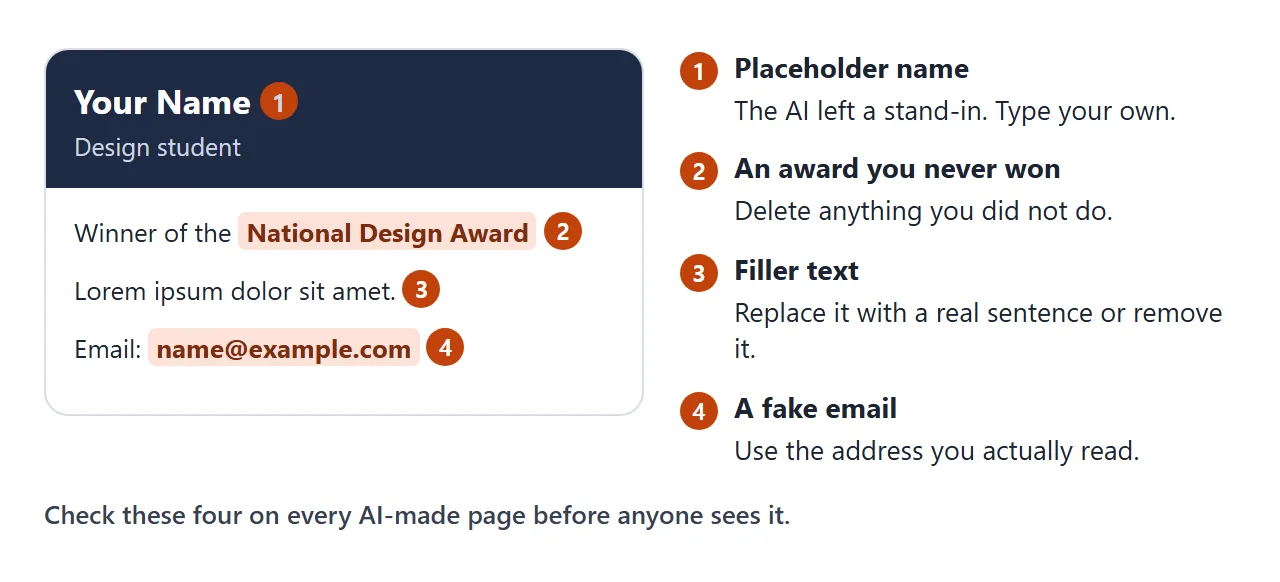
Read the page on your phone, slowly, from the top. The checklist below is itself a small page: one you keep for yourself and tick as you go.
<!doctype html>
<html lang="en">
<head>
<meta charset="utf-8">
<meta name="viewport" content="width=device-width, initial-scale=1">
<title>Before you send it</title>
<style>
  * { box-sizing: border-box; }
  body { margin: 0; padding: 18px; font-family: system-ui, sans-serif; color: #1f2937; background: #f4f5f7; line-height: 1.5; }
  .card { max-width: 560px; margin: 0 auto; background: #fff; border: 1px solid #e5e7eb; border-radius: 14px; padding: 18px 18px 14px; }
  h1 { margin: 0 0 4px; font-size: 20px; }
  .sub { margin: 0 0 12px; font-size: 14px; color: #6b7280; }
  .bar { height: 8px; border-radius: 99px; background: #e5e7eb; overflow: hidden; }
  .fill { height: 100%; width: 0; background: #16a34a; transition: width .2s; }
  #status { margin: 8px 0 12px; font-size: 14px; font-weight: 600; }
  label { display: flex; gap: 10px; align-items: flex-start; padding: 9px 4px; border-top: 1px solid #f0f1f3; font-size: 15px; cursor: pointer; }
  label small { display: block; color: #6b7280; font-size: 13px; }
  input { width: 20px; height: 20px; margin: 2px 0 0; flex: none; accent-color: #16a34a; }
  input:checked + span { color: #6b7280; text-decoration: line-through; }
  input:checked + span small { text-decoration: none; }
</style>
</head>
<body>
<div class="card">
  <h1>Before I send the link</h1>
  <p class="sub">Open the portfolio on your phone first, then tick each line.</p>
  <div class="bar"><div class="fill" id="fill"></div></div>
  <div id="status">0 of 6 done</div>

  <label><input type="checkbox"><span>Name, course and year are correct<small>The AI may have guessed them.</small></span></label>
  <label><input type="checkbox"><span>Every project is one I really did<small>Delete any project or award the AI made up.</small></span></label>
  <label><input type="checkbox"><span>No placeholder text is left<small>Look for Lorem ipsum, Your Name and example.com.</small></span></label>
  <label><input type="checkbox"><span>My email address is real and visible<small>Write it out as text, not only behind a button.</small></span></label>
  <label><input type="checkbox"><span>Every button and link does something<small>Tap each one on the phone.</small></span></label>
  <label><input type="checkbox"><span>I read it once as a stranger would<small>Does it say what I want and what I made?</small></span></label>
</div>

<script>
  const boxes = document.querySelectorAll('input[type=checkbox]');
  const fill = document.getElementById('fill');
  const status = document.getElementById('status');

  function update() {
    const done = [...boxes].filter((b) => b.checked).length;
    fill.style.width = (done / boxes.length * 100) + '%';
    status.textContent = done === boxes.length
      ? 'All done. Send the link.'
      : done + ' of ' + boxes.length + ' done';
  }
  boxes.forEach((b) => b.addEventListener('change', update));
  update();
</script>
</body>
</html>
If something is wrong in the code in a way you cannot fix, fix AI-generated HTML covers the common cases. For wording, you do not need to go back to the chat at all.
Send it as a link
This is the part people expect to be hard, and it is four steps.
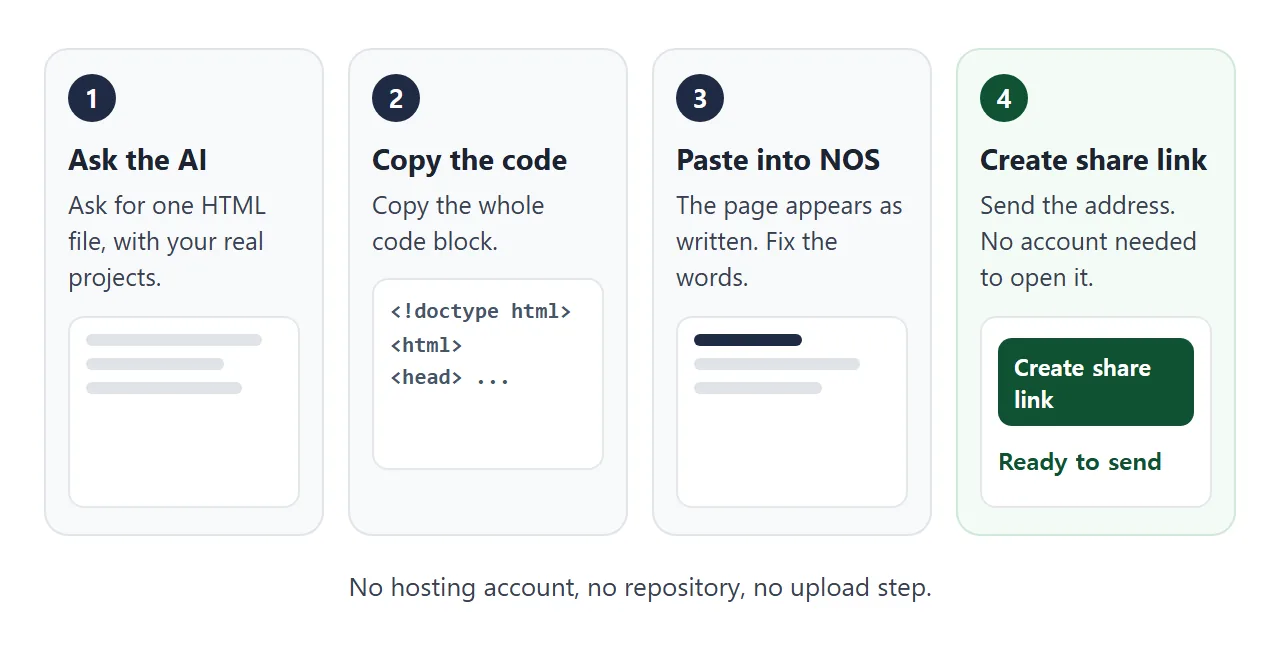
- Copy the whole code block from the chat.
- Paste it into a NOS document. The page renders as written and its scripts run. HTML to link walks through this step.
- Fix any wording you found in the check.
- Choose Create share link and copy the address.
Whoever opens the link sees your page in their browser. That works on a phone as well, and they do not need an account. They can read it but not change it.
Put the address in your resume, an email or a message. How to link a portfolio in a resume covers where it fits on the page.
Why not an attachment or a hosting service?
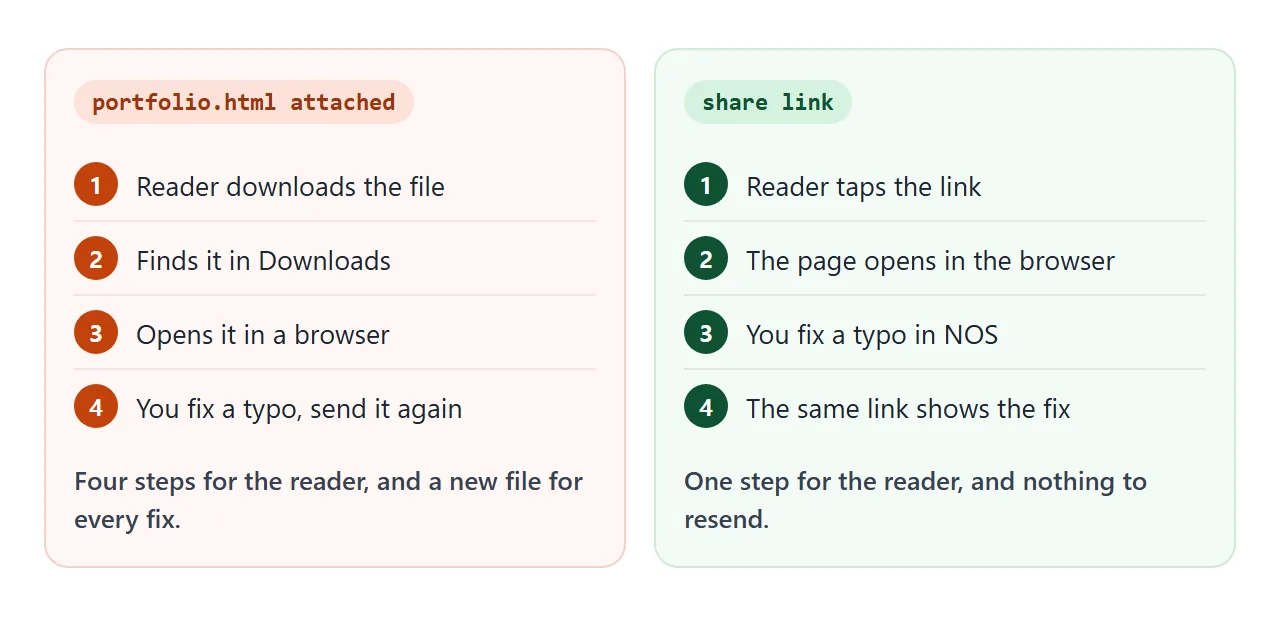
An attached .html file makes the reader download it, find it and open it. A hosting service gives you an address, but it comes with setup of its own.
| Attach the file | NOS share link | GitHub Pages | |
|---|---|---|---|
| What you set up | Nothing | Paste the code | A GitHub repository and a publishing source |
| What the reader does | Download, find, open | Open the link | Open the link |
| After a typo | Send a new file | Edit, same link | Update the repository |
| Good when | The reader can open files | You want to send it today | You want to learn Git too |
GitHub Pages needs a repository on GitHub, a publishing source, and an entry file such as index.html at the top level. On GitHub Free the repository must be public, as of October 2026. Rules can change, so check the current page.
For more on the options, see web hosting for students.
Change the words after you sent it
Spotting a typo after the link is out is the normal case, not a failure. In NOS you can click a word on the rendered page and type the correction, or edit the code. Either way the address stays the same.
So the person who got the link yesterday sees the fix today. You never send version two.
If you ask the chat to fix one word, it may rewrite the whole page and change things you liked. Edit HTML without coding explains why clicking the word is safer. Ask the AI again only for structure, such as a new section.
Ticks you make yourself in View mode are saved, while a visitor's ticks are not. So a checklist page like the one above works as a page for you, kept apart from the portfolio you share.
When it does not work
| What you see | Cause | Fix |
|---|---|---|
| Pictures are missing | The images load from other websites, which are blocked | Ask for CSS gradients or inline SVG |
| The contact form does nothing | A form that sends to a server is blocked | Show your email and use a mailto link |
| Text is tiny on a phone | The viewport meta tag is missing | Ask the AI to add it |
| The AI added a project you did not do | The AI filled a gap in your brief | Delete it and re-run with a stricter prompt |
| A friend sees the old text | They are on an old copy or an old attachment | Send the link, not a file |
The viewport tag is a standard HTML feature, and width=device-width sets the page width to the device width. MDN documents it.
Send the link, then keep improving it
Get the code, check the words, paste, create the link. Nothing here needed hosting knowledge, and nothing is locked once it is sent. If you also want a plain one-page resume, share your resume as a link works the same way.