Vite (pronounced "veet") is a build tool for web projects, not a library you add to a page. When Tailwind styles do nothing in it, one of three things is usually wrong.
The CSS is never loaded, the setup belongs to the other Tailwind version, or a class name is built from pieces. Below are the fixes. If you only need one page that works, skip the build entirely:
<!doctype html>
<html lang="en">
<head>
<meta charset="utf-8">
<meta name="viewport" content="width=device-width, initial-scale=1">
<title>One file, Tailwind and a module script</title>
<!-- Tailwind in the browser: no npm, no config, no build -->
<script src="https://cdn.jsdelivr.net/npm/@tailwindcss/browser@4.3.3"></script>
</head>
<body class="min-h-screen bg-slate-100 font-sans text-slate-800 grid place-items-center p-4">
  <main class="w-full max-w-xs rounded-2xl bg-white p-6 shadow-lg text-center">
    <h1 class="text-xl font-bold">Hello from one file</h1>
    <p class="mt-1 text-sm text-slate-500">Tailwind classes and a module script, no build.</p>
    <p id="count" class="mt-4 text-5xl font-extrabold text-indigo-600">0</p>
    <button id="add" class="mt-4 rounded-lg bg-indigo-600 px-5 py-2 font-semibold text-white hover:bg-indigo-500 active:scale-95">
      Add one
    </button>
  </main>

  <script type="module">
    // An inline module script runs like any other script; modules are deferred automatically
    const count = document.getElementById('count');
    let n = 0;
    document.getElementById('add').addEventListener('click', () => {
      n += 1;
      count.textContent = n;
    });
  </script>
</body>
</html>
That page is one file you can open, edit and send. Everything below explains why the Vite route is different and what to check when it breaks.
What Vite does, and why it is not one file
Vite's own guide describes a dev server built on native ES modules, plus a build command that bundles your code into static assets for production. Its index.html is source code, and the scripts and stylesheets it references are processed as part of the app.
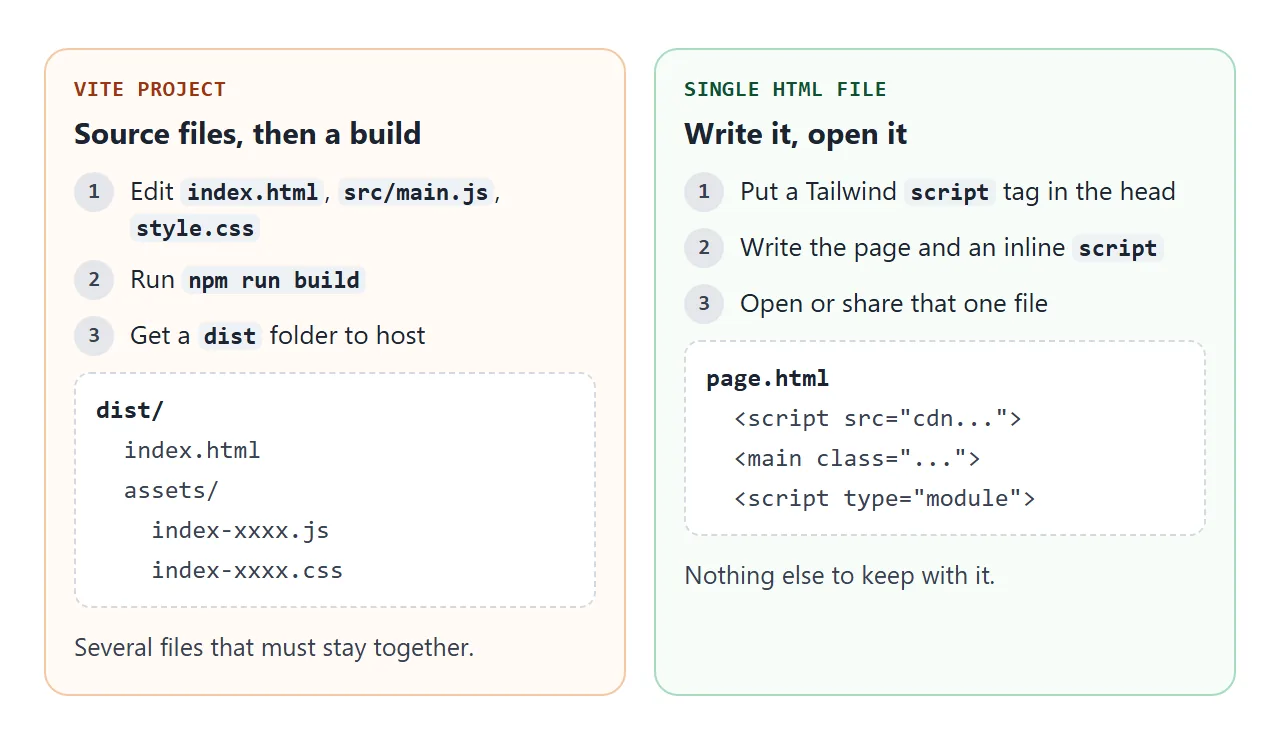
So a Vite project ends in a folder, not a page. The folder is fine for a host. It is awkward when you wanted a file to open or send.
Why Tailwind does nothing in Vite
Three causes cover almost every "my classes are ignored" report.
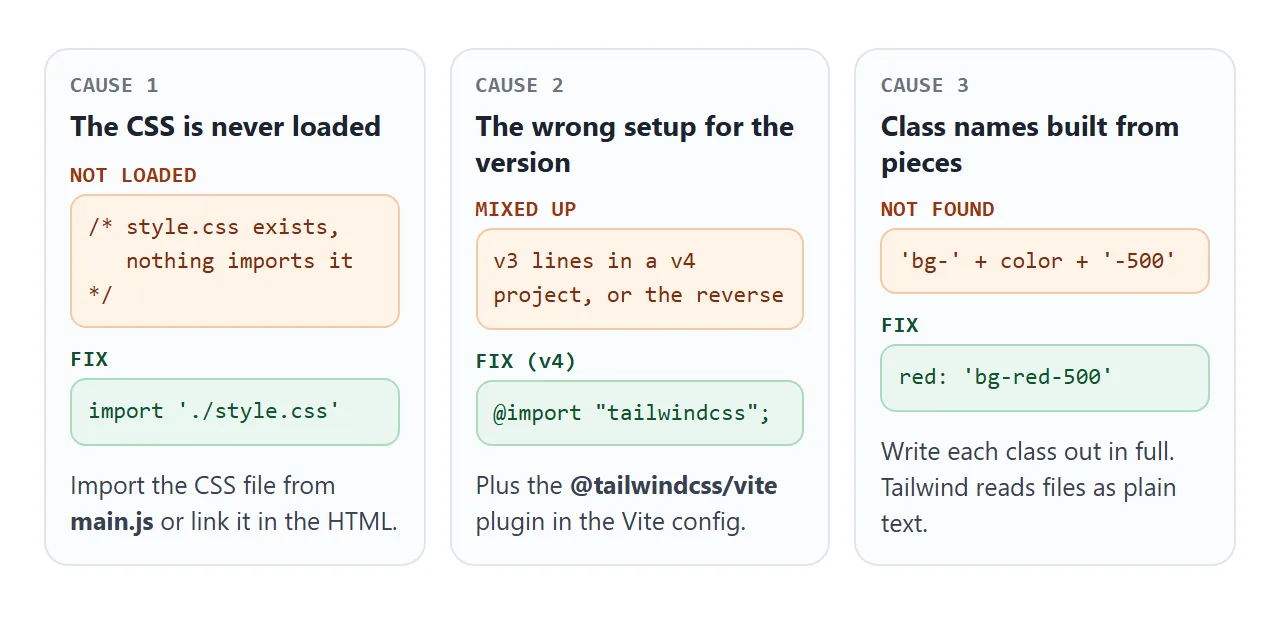
- The CSS is never loaded. A stylesheet that contains the Tailwind import does nothing until something imports it from a script or links it from
index.html. Vite's docs say importing a.cssfile injects it with a<style>tag. - The setup belongs to the other version. Version 3 used
@tailwinddirectives and acontentlist. Version 4 uses a plain CSS import and a Vite plugin. - A class name is built from pieces. Tailwind reads your files as plain text, so
'bg-' + colornever contains the word it needs.
The Vite fix for Tailwind 4
For Tailwind 4, install two packages, then add the plugin to the Vite config:
// vite.config.js
import { defineConfig } from 'vite'
import tailwindcss from '@tailwindcss/vite'

export default defineConfig({
  plugins: [tailwindcss()],
})
Then put one line in your CSS file, and make sure the file is loaded:
@import "tailwindcss";
The install command is npm install tailwindcss @tailwindcss/vite. If your project still has @tailwind base lines, those belong to version 3. A tailwind.config.js file is no longer detected automatically in version 4. Load it with @config if you still need it.
On version 3, the setup is different: PostCSS, and a content array in tailwind.config.js that lists index.html and your source files. If a class works in one file but not another, check that list first.
Check Tailwind at runtime in a plain file
In a plain HTML file there is no build to blame, so you can ask the browser directly. This page measures whether a Tailwind class produced real CSS, and shows the safe way to switch classes.
<!doctype html>
<html lang="en">
<head>
<meta charset="utf-8">
<meta name="viewport" content="width=device-width, initial-scale=1">
<title>Is Tailwind running? Complete class names</title>
<script src="https://cdn.jsdelivr.net/npm/@tailwindcss/browser@4.3.3"></script>
</head>
<body class="min-h-screen bg-slate-100 font-sans text-slate-800 p-4">
  <main class="mx-auto max-w-sm space-y-4">

    <section class="rounded-xl bg-white p-4 shadow">
      <h2 class="font-bold">1. Is Tailwind running?</h2>
      <!-- probe: p-4 means 1rem of padding when Tailwind has generated it -->
      <div id="probe" class="p-4 absolute invisible">probe</div>
      <p id="status" class="mt-2 rounded-md bg-slate-200 px-3 py-2 text-sm">Checking...</p>
    </section>

    <section class="rounded-xl bg-white p-4 shadow">
      <h2 class="font-bold">2. Complete class names</h2>
      <p class="mt-1 text-sm text-slate-500">Each button class is written out in full, so a build tool can find it.</p>
      <div id="badge" class="mt-3 rounded-md px-3 py-2 text-sm font-semibold">Pick a state</div>
      <div class="mt-3 flex gap-2">
        <button data-state="ok" class="rounded-lg bg-green-600 px-3 py-1.5 text-sm font-semibold text-white">OK</button>
        <button data-state="warn" class="rounded-lg bg-amber-500 px-3 py-1.5 text-sm font-semibold text-white">Warn</button>
        <button data-state="fail" class="rounded-lg bg-red-600 px-3 py-1.5 text-sm font-semibold text-white">Fail</button>
      </div>
      <p id="applied" class="mt-3 break-words font-mono text-xs text-slate-500"></p>
    </section>

  </main>

  <script type="module">
    // 1. Ask the browser what the probe's padding really is
    const probe = document.getElementById('probe');
    const status = document.getElementById('status');
    function check() {
      const pad = getComputedStyle(probe).paddingTop;
      status.textContent = pad === '16px'
        ? 'Yes: p-4 gave ' + pad + ' of padding.'
        : 'No: p-4 gave ' + pad + '. The script did not load or run.';
    }
    window.addEventListener('load', () => setTimeout(check, 300));

    // 2. Whole class strings in a lookup, never 'bg-' + color + '-100'
    const states = {
      ok:   'bg-green-100 text-green-800',
      warn: 'bg-amber-100 text-amber-800',
      fail: 'bg-red-100 text-red-800',
    };
    const badge = document.getElementById('badge');
    const applied = document.getElementById('applied');
    document.querySelectorAll('[data-state]').forEach((btn) => {
      btn.addEventListener('click', () => {
        const cls = states[btn.dataset.state];
        badge.className = 'mt-3 rounded-md px-3 py-2 text-sm font-semibold ' + cls;
        badge.textContent = 'State: ' + btn.dataset.state;
        applied.textContent = cls;
      });
    });
  </script>
</body>
</html>
The lookup object is the pattern Tailwind's own docs recommend: complete class names in your code, never fragments joined together. It works the same inside a Vite project and in a single file.
Opening dist/index.html from disk
A common surprise comes after the build. You double-click dist/index.html and the page does not run.
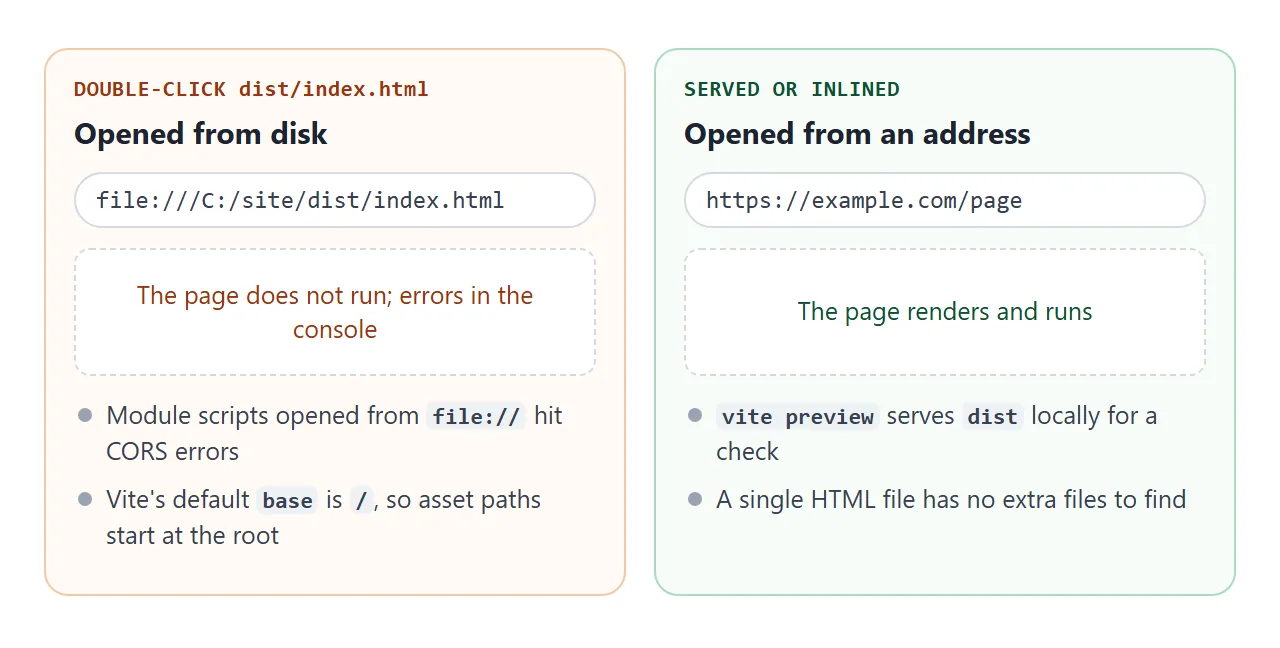
Two things are involved. MDN says module-based pages loaded from file:// hit CORS errors and need a server. And Vite's default base is /, so asset paths start at the site root. Setting base to ./ makes the paths relative, which suits embedded deployment.
To check a build locally, use vite preview, which serves the dist folder. Vite's docs say it is not meant as a production server.
Hosting a built front end covers the base path and routing in more depth, and relative and absolute paths explains why the leading slash matters.
If you want a single output file from Vite itself, the third-party plugin vite-plugin-singlefile inlines JavaScript and CSS into dist/index.html. It is MIT licensed, and its README lists its limits.
A finished one-file page
Here is a small tool built the single-file way: Tailwind from one script tag, an inline module script, and a form handled inside the page. Nothing is sent anywhere.
<!doctype html>
<html lang="en">
<head>
<meta charset="utf-8">
<meta name="viewport" content="width=device-width, initial-scale=1">
<title>Split the bill</title>
<script src="https://cdn.jsdelivr.net/npm/@tailwindcss/browser@4.3.3"></script>
</head>
<body class="min-h-screen bg-slate-100 font-sans text-slate-800 p-4">
  <main class="mx-auto max-w-sm rounded-2xl bg-white p-5 shadow-lg">
    <h1 class="text-xl font-bold">Split the bill</h1>
    <p class="text-sm text-slate-500">One HTML file. Change a number and the result updates.</p>

    <form id="form" class="mt-4 space-y-3">
      <label class="block text-sm font-medium">Bill
        <input id="bill" type="number" min="0" step="0.01" value="80.00" inputmode="decimal"
          class="mt-1 w-full rounded-lg border border-slate-300 px-3 py-2 text-base">
      </label>
      <label class="block text-sm font-medium">Tip: <span id="tipLabel">15</span>%
        <input id="tip" type="range" min="0" max="30" value="15" class="mt-1 w-full">
      </label>
      <label class="block text-sm font-medium">People
        <input id="people" type="number" min="1" max="20" value="3" inputmode="numeric"
          class="mt-1 w-full rounded-lg border border-slate-300 px-3 py-2 text-base">
      </label>
    </form>

    <div class="mt-4 grid grid-cols-2 gap-3 text-center">
      <div class="rounded-xl bg-indigo-50 p-3">
        <div class="text-xs uppercase tracking-wide text-indigo-700">Each pays</div>
        <div id="each" class="text-2xl font-extrabold text-indigo-700">0.00</div>
      </div>
      <div class="rounded-xl bg-slate-100 p-3">
        <div class="text-xs uppercase tracking-wide text-slate-600">Total</div>
        <div id="total" class="text-2xl font-extrabold">0.00</div>
      </div>
    </div>
  </main>

  <script type="module">
    const $ = (id) => document.getElementById(id);

    function update() {
      const bill = parseFloat($('bill').value) || 0;
      const tip = Number($('tip').value);
      const people = Math.max(1, parseInt($('people').value, 10) || 1);
      const total = bill * (1 + tip / 100);
      $('tipLabel').textContent = tip;
      $('total').textContent = total.toFixed(2);
      $('each').textContent = (total / people).toFixed(2);
    }

    // The form is handled in the page; nothing is sent anywhere
    $('form').addEventListener('input', update);
    $('form').addEventListener('submit', (e) => e.preventDefault());
    update();
  </script>
</body>
</html>
- Tailwind: one script tag in the head, pinned to a version so the page does not change under you.
- Logic: one
type="module"script. Modules are deferred automatically, so it runs after the page is parsed. - Form: the
submitevent callspreventDefault(), and theinputevent updates the numbers.
For adding Tailwind to a page you already have, see how to add Tailwind to an HTML file. The Tailwind HTML template is a full page to paste.
When it does not work
| Symptom | Cause | Fix |
|---|---|---|
| No Tailwind styling in a Vite page | The CSS file is never loaded | Import it from main.js, or link it in index.html |
| Classes ignored on version 3 | The content list misses your files |
List index.html and your src files |
| Setup lines from a guide fail | Version 3 lines in a version 4 project | Use @import "tailwindcss"; and the Vite plugin |
| tailwind.config.js has no effect | Not detected automatically in version 4 | Load it with @config |
| A colour class works only sometimes | The class name is built from pieces | Write each class out in full |
| dist/index.html does not run from disk | Module scripts need a server | Use vite preview, or one HTML file |
| Single file is unstyled | The CDN script did not load | Check the script address and the connection |
Share it as a link
A built dist folder is hard to send, and a single HTML file attached to a message may open as plain code, or not at all, on a phone. Opening an HTML file on a phone covers why.
To send the working version, paste the page into a NOS document and choose Create share link. HTML to link walks through it.
The page renders as written and its scripts run, so the people you send it to can click the buttons themselves. Scripts from cdn.jsdelivr.net load. If you change the code later, the same link shows the new version.