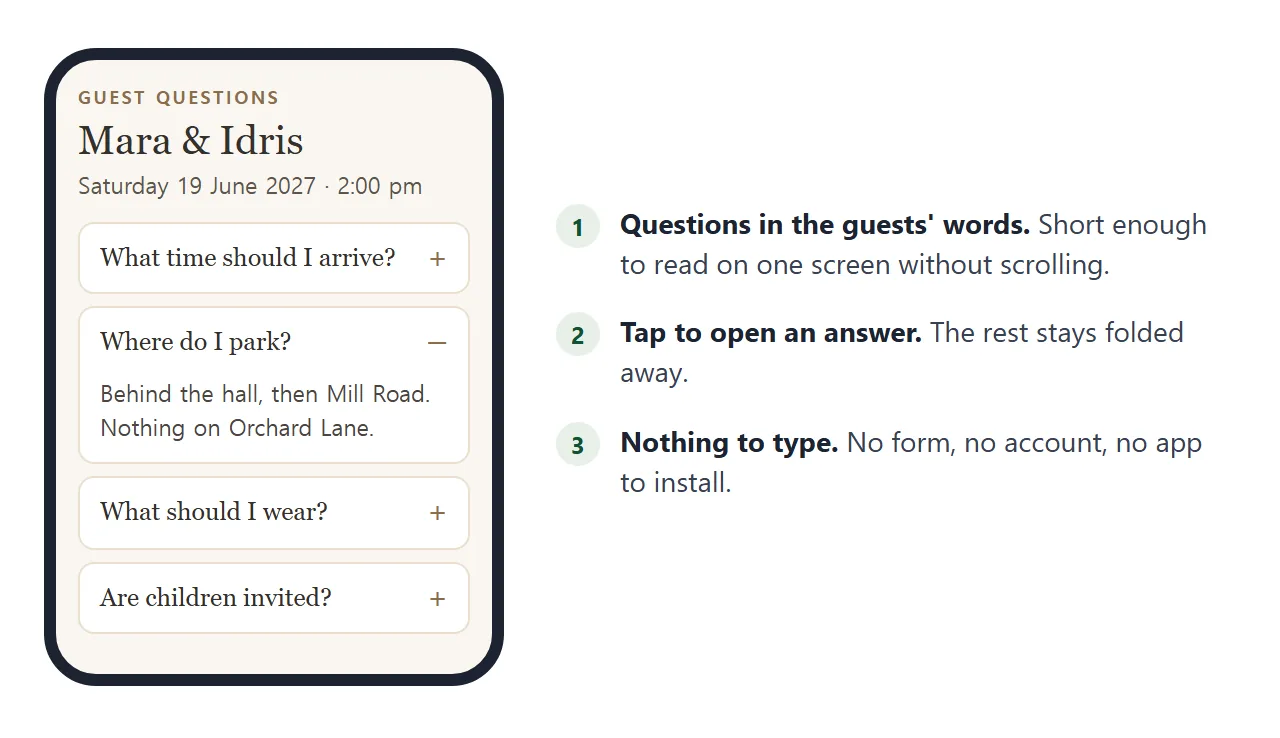
A wedding FAQ page is one page of short answers to the questions guests keep asking: where to park, what to wear, whether children are invited. You send it as a link, and guests tap a question to read the answer.
It sits beside the invitation, not instead of it. The card says when and where. The FAQ answers everything the card has no room for, and you can correct an answer after the invitations are out.
<!doctype html>
<html lang="en">
<head>
<meta charset="utf-8">
<meta name="viewport" content="width=device-width, initial-scale=1">
<title>Mara and Idris - Guest FAQ</title>
<style>
* { box-sizing: border-box; }
body {
margin: 0; padding: 22px 16px 28px;
font-family: Georgia, "Times New Roman", serif;
background: #faf6f0; color: #33302c;
}
.wrap { max-width: 560px; margin: 0 auto; }
.eyebrow { font: 600 12px/1 system-ui, sans-serif; letter-spacing: .14em; text-transform: uppercase; color: #8a6d4b; }
h1 { font-size: 30px; line-height: 1.15; margin: 8px 0 6px; font-weight: 400; }
.when { font: 15px/1.45 system-ui, sans-serif; color: #5b554d; margin: 0 0 16px; }
.bar { display: flex; justify-content: flex-end; margin-bottom: 8px; }
.bar button {
font: 600 13px system-ui, sans-serif; color: #8a6d4b; background: none;
border: 1px solid #d9cbb6; border-radius: 999px; padding: 7px 14px; cursor: pointer;
}
details { background: #fff; border: 1px solid #eadfcf; border-radius: 10px; margin-bottom: 8px; }
summary {
list-style: none; cursor: pointer; padding: 14px 16px; font-size: 17px;
display: flex; justify-content: space-between; align-items: center; gap: 12px;
}
summary::-webkit-details-marker { display: none; }
summary::after { content: "+"; font: 400 22px/1 system-ui, sans-serif; color: #8a6d4b; }
details[open] summary::after { content: "\2212"; }
details p { margin: 0; padding: 0 16px 15px; font: 15px/1.55 system-ui, sans-serif; color: #4a453f; }
.help { margin-top: 16px; padding: 14px 16px; border-radius: 10px; background: #f0e7d8; font: 15px/1.5 system-ui, sans-serif; }
</style>
</head>
<body>
<div class="wrap">
<div class="eyebrow">Guest questions</div>
<h1>Mara & Idris</h1>
<p class="when">Saturday 19 June 2027 · Ceremony 2:00 pm<br>Linden Hall, 14 Orchard Lane</p>
<div class="bar"><button type="button" id="toggle">Open all</button></div>
<details>
<summary>What time should I arrive?</summary>
<p>Doors open at 1:30 pm and the ceremony starts at 2:00 pm sharp. Please be seated by 1:50 pm.</p>
</details>
<details>
<summary>Where do I park?</summary>
<p>The car park behind the hall holds about 40 cars and opens at 1:00 pm. Overflow parking is on Mill Road, a five-minute walk. There is no parking on Orchard Lane itself.</p>
</details>
<details>
<summary>What should I wear?</summary>
<p>Smart and comfortable. The ceremony is indoors, and the garden after it is grass, so block heels are kinder than stilettos. Any colour is fine except white.</p>
</details>
<details>
<summary>Are children invited?</summary>
<p>Yes. Children are welcome at the ceremony and the meal. There is a quiet room with toys and a sitter from 5:00 pm until 9:00 pm.</p>
</details>
<details>
<summary>Is there a shuttle?</summary>
<p>A minibus runs from the Harbour Inn to the hall at 1:15 pm and 1:30 pm, and back at 10:30 pm and 11:30 pm.</p>
</details>
<details>
<summary>Where can I stay?</summary>
<p>The Harbour Inn has a room block under the name Mara and Idris until 1 May. The Station Guest House is a ten-minute drive away.</p>
</details>
<details>
<summary>Can I take photos during the ceremony?</summary>
<p>Please keep phones away during the ceremony itself. A photographer is there, and you are welcome to take as many pictures as you like from the garden onwards.</p>
</details>
<details>
<summary>What about gifts?</summary>
<p>Your company is the gift. If you would still like to give something, there is a card box by the door.</p>
</details>
<div class="help"><b>Still not sure?</b> Text Mara on +1 555 0142. Replies come within a day.</div>
</div>
<script>
const all = document.querySelectorAll('details');
const btn = document.getElementById('toggle');
let opened = false;
// one button opens or closes every answer
btn.addEventListener('click', () => {
opened = !opened;
all.forEach((d) => { d.open = opened; });
btn.textContent = opened ? 'Close all' : 'Open all';
});
</script>
</body>
</html>
Each question is a native HTML disclosure element, so a tap opens it with no script at all. The only script here is the Open all button.
Make it with AI
You do not have to write the HTML. Give an AI chat your questions and your answers, and ask for one file. Paste this into ChatGPT, Claude or Gemini, and replace everything in square brackets.
Write one self-contained HTML file: a FAQ page for wedding guests.
Use a details element with a summary for each question, all closed at the start.
Mobile first, readable at 390 px wide, warm colours, large text.
No external images, no scripts from other sites, no forms.
At the top: names, date, ceremony time, venue name and address.
At the bottom: a box saying "Still not sure? Text [name] on [number]."
Use my wording for the answers and do not invent any details.
1. What time should I arrive? [your answer]
2. Where do I park? [your answer]
3. What should I wear? [your answer]
4. Are children invited? [your answer]
Return only the HTML.
Then read the result before you send it. A chat will happily fill a gap with a plausible detail.
- Every fact is yours. Check each time, address, date and phone number against what you meant.
- Nothing is made up. Delete any answer you did not give it, such as a dress code you never chose.
- Every question opens. Tap each one in the preview.
- No question box. If it added an input or a Submit button, remove it, for the reason in the section on forms below.
Send it as a link
Copy the HTML, paste it into a NOS document and choose Create share link. HTML to link walks through it. The page renders as written. Guests open the link in a browser, on a phone too, with no account.
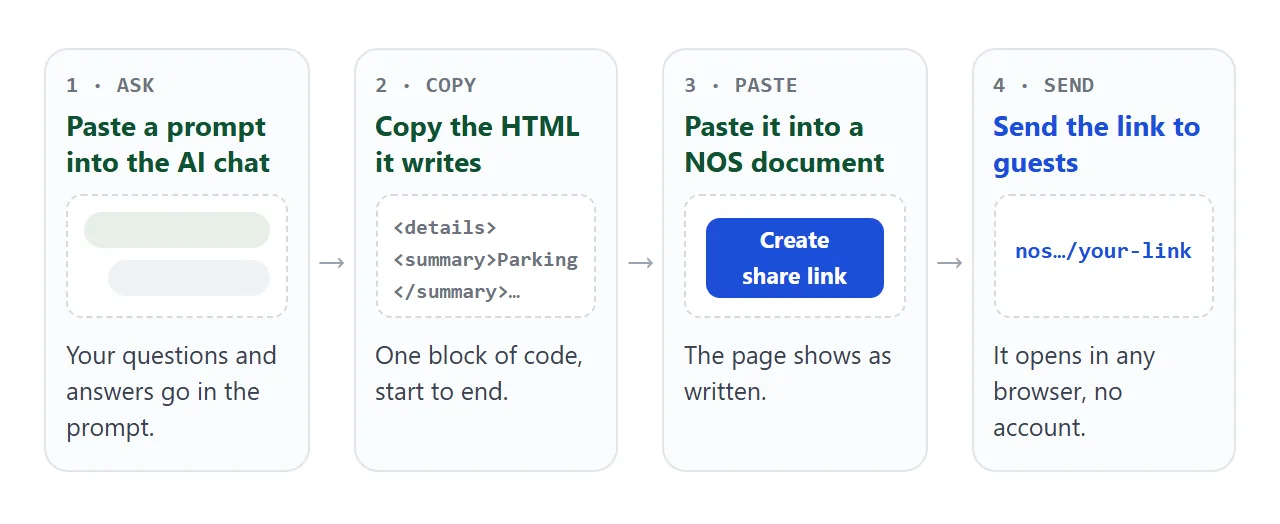
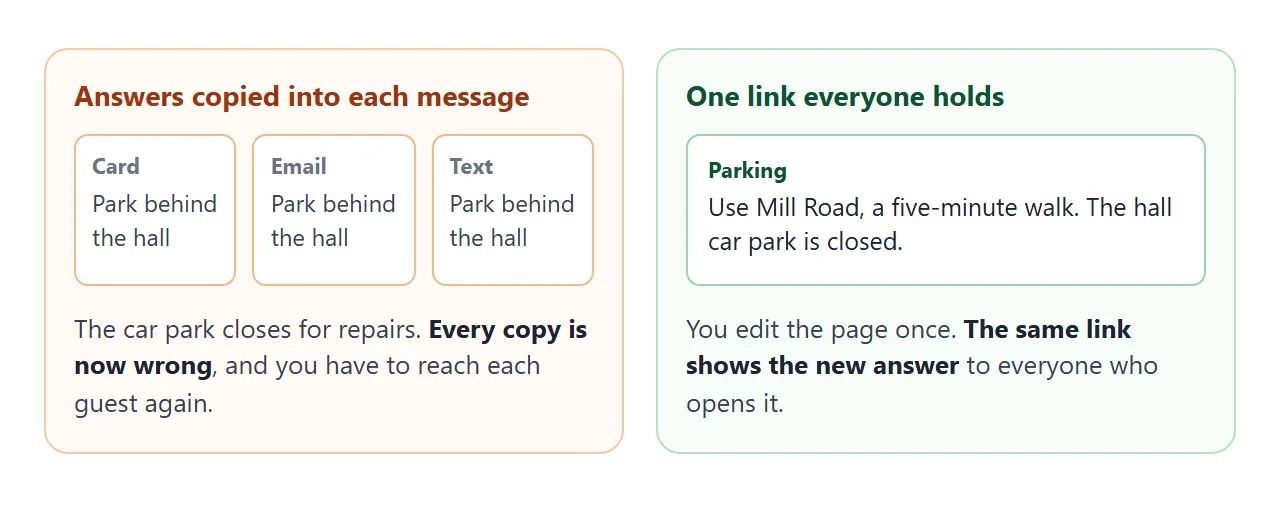
Guests can read the page but cannot edit it. If you change the code later, the same link shows the new version, so you never send a second link.
Put the link wherever guests already look: the invitation, the group chat, an email. For a printed card, a QR code of the link is a separate step; QR code link covers it.
What goes in each answer
Keep an answer to two or three sentences. If it needs more, it is a different page. Share wedding details with guests lists the six questions that come up most often. For each answer:
- Parking: where, how many cars, what opens when, and where to go when it is full.
- Dress code: what is expected, and one practical fact such as grass, stairs or an outdoor part.
- Children: yes or no, said plainly, with what is provided if yes.
- Getting there: shuttle times, taxi or lift arrangements, the last way home.
A page that follows how an FAQ page is built in general is easier to keep tidy. Write each question the way a guest would say it.
There is no form for questions
A question box feels friendly, but there is nowhere for it to send. Forms handled inside the page work, yet a form that sends to a server is blocked on the shared page.
A box saying "Ask us anything" would take what a guest typed and deliver it nowhere.
So give guests a way to reach you outside the page: a phone number or an email address, written as plain text at the bottom. A phone link can be tapped to call on a phone, as HTML link to a phone number explains.
Then let the questions teach you. When the same one reaches you twice, add it to the page.
A short version for the morning
On the day, guests want two things: the time and place, and a quick answer. A second page keeps those at the top and adds topic buttons, so a long list can be narrowed to Dress or Children with one tap.
<!doctype html>
<html lang="en">
<head>
<meta charset="utf-8">
<meta name="viewport" content="width=device-width, initial-scale=1">
<title>Wedding day - quick answers</title>
<style>
  * { box-sizing: border-box; }
  body { margin: 0; font-family: system-ui, sans-serif; background: #f3f6f4; color: #23302a; }
  header { background: #2f5d4a; color: #fff; padding: 18px 16px 16px; }
  header .t { font-size: 13px; letter-spacing: .1em; text-transform: uppercase; opacity: .8; }
  header .big { font-size: 24px; font-weight: 700; margin: 4px 0 2px; }
  header .addr { font-size: 15px; opacity: .92; }
  .chips { display: flex; gap: 8px; padding: 12px 16px 4px; overflow-x: auto; }
  .chips button {
    flex: none; font: 600 14px system-ui, sans-serif; padding: 9px 15px; border-radius: 999px;
    border: 1px solid #b9cbc1; background: #fff; color: #2f5d4a; cursor: pointer;
  }
  .chips button[aria-pressed="true"] { background: #2f5d4a; color: #fff; border-color: #2f5d4a; }
  .list { padding: 8px 16px 20px; }
  .q { background: #fff; border-radius: 10px; padding: 13px 15px; margin-top: 10px; border: 1px solid #dfe8e2; }
  .q h2 { font-size: 16px; margin: 0 0 4px; }
  .q p { margin: 0; font-size: 15px; line-height: 1.5; color: #43524a; }
  .q .tag { display: inline-block; font-size: 11px; font-weight: 700; letter-spacing: .08em; text-transform: uppercase; color: #6c8a7a; margin-bottom: 4px; }
  .help { margin: 4px 16px 24px; padding: 13px 15px; border-radius: 10px; background: #e3ede7; font-size: 15px; line-height: 1.5; }
</style>
</head>
<body>
<header>
  <div class="t">Today</div>
  <div class="big">Ceremony 2:00 pm</div>
  <div class="addr">Linden Hall, 14 Orchard Lane</div>
</header>

<div class="chips" id="chips">
  <button type="button" data-tag="all" aria-pressed="true">All</button>
  <button type="button" data-tag="Getting there" aria-pressed="false">Getting there</button>
  <button type="button" data-tag="Dress" aria-pressed="false">Dress</button>
  <button type="button" data-tag="Children" aria-pressed="false">Children</button>
  <button type="button" data-tag="Evening" aria-pressed="false">Evening</button>
</div>

<div class="list" id="list">
  <div class="q" data-tag="Getting there"><span class="tag">Getting there</span><h2>Where do I park?</h2><p>Behind the hall until it is full, then Mill Road, a five-minute walk. Nothing on Orchard Lane.</p></div>
  <div class="q" data-tag="Getting there"><span class="tag">Getting there</span><h2>When is the last shuttle back?</h2><p>11:30 pm from the hall to the Harbour Inn.</p></div>
  <div class="q" data-tag="Dress"><span class="tag">Dress</span><h2>What should I wear?</h2><p>Smart and comfortable. The garden is grass, so block heels are easier.</p></div>
  <div class="q" data-tag="Dress"><span class="tag">Dress</span><h2>Will it be cold?</h2><p>The hall is warm. Bring a layer for the garden after 6:00 pm.</p></div>
  <div class="q" data-tag="Children"><span class="tag">Children</span><h2>Can the kids come?</h2><p>Yes. A quiet room with toys and a sitter is open from 5:00 pm to 9:00 pm.</p></div>
  <div class="q" data-tag="Evening"><span class="tag">Evening</span><h2>When is dinner?</h2><p>Dinner is served at 6:30 pm. Dancing starts at 8:30 pm.</p></div>
</div>

<div class="help"><b>Lost or running late?</b> Text Idris on +1 555 0187.</div>

<script>
  const chips = document.querySelectorAll('#chips button');
  const cards = document.querySelectorAll('#list .q');

  // a chip shows only the answers with the same tag
  chips.forEach((chip) => {
    chip.addEventListener('click', () => {
      const tag = chip.dataset.tag;
      chips.forEach((c) => c.setAttribute('aria-pressed', c === chip ? 'true' : 'false'));
      cards.forEach((card) => {
        card.hidden = tag !== 'all' && card.dataset.tag !== tag;
      });
    });
  });
</script>
</body>
</html>
The buttons only show and hide text already on the page. Nothing is sent anywhere.
Ways to get the answers to guests
| Way | The guest has to | When an answer changes |
|---|---|---|
| Printed on the invitation | Keep the card | Reprint, or tell everyone |
| FAQ as a file attachment | Download and open a file | Send the new file again |
| FAQ as a link | Tap the link | Edit once, same link shows it |
| Answers typed into a group chat | Scroll back to find them | Post again; old messages stay |
Opening an HTML file on a phone has its own hurdles, covered in Open an HTML file on a phone. A link avoids them.
When it does not work
| What you see | Cause | Fix |
|---|---|---|
| A question will not open | The summary is not the first thing inside the details | Move the summary to the top of that block |
| Every answer is already open | The details tag carries an open attribute | Remove open entirely; open="false" still opens it |
| Stray sentences above the page | You copied the chat's own words too | Copy only the HTML, from the doctype line to the closing html tag |
| A picture is missing | Outside images are blocked on the shared page | Use inline SVG, a CSS shape or just text |
| The question box does nothing | A form that sends to a server is blocked | Delete the box and print a phone number |
| A guest sees an old answer | They hold an old attachment | Send the link instead; editing keeps the same link |
| The number does not dial | The device cannot place calls | Show the number as plain text as well |