A Gemini Canvas tutorial comes down to four moves: open Canvas, describe the page, check the preview, then give the page an address. The first three happen inside Gemini. The last is where teachers get stuck, because the page goes nowhere until you copy its HTML out.
That is the step Alice Keeler's Canvas post lands on: "Choose the embed option and paste the HTML code from the Gemini Canvas." Here is a page worth copying out. Try the answers.
<!doctype html>
<html lang="en">
<head>
<meta charset="utf-8">
<meta name="viewport" content="width=device-width, initial-scale=1">
<title>The water cycle</title>
<style>
* { box-sizing: border-box; }
body { margin: 0; font-family: system-ui, sans-serif; background: #eef6fb; color: #1b2a38; line-height: 1.5; }
main { max-width: 680px; margin: 0 auto; padding: 18px 16px 28px; }
header { background: #1f6fa8; color: #fff; border-radius: 14px; padding: 18px 20px; }
header small { opacity: .85; letter-spacing: .04em; text-transform: uppercase; font-size: 12px; }
h1 { margin: 4px 0 6px; font-size: 26px; }
header p { margin: 0; font-size: 16px; }
.steps { display: grid; grid-template-columns: repeat(auto-fit, minmax(170px, 1fr)); gap: 12px; margin: 16px 0; }
.step { background: #fff; border-radius: 12px; padding: 12px 14px 14px; box-shadow: 0 2px 8px rgba(20, 60, 90, .08); }
.step svg { width: 100%; height: 60px; display: block; margin-bottom: 4px; }
.step h2 { font-size: 16px; margin: 0 0 4px; }
.step p { margin: 0; font-size: 14.5px; }
.box { background: #fff; border-radius: 12px; padding: 14px 16px; margin-bottom: 12px; box-shadow: 0 2px 8px rgba(20, 60, 90, .08); }
.box h3 { margin: 0 0 8px; font-size: 17px; }
.opt { display: block; width: 100%; text-align: left; margin: 6px 0; padding: 10px 12px; font: inherit; font-size: 15px;
border: 2px solid #c9d8e4; border-radius: 10px; background: #fff; cursor: pointer; }
.opt:hover { border-color: #1f6fa8; }
.opt.right { border-color: #2f9e5b; background: #e8f6ee; }
.opt.wrong { border-color: #d9822b; background: #fdf0e3; }
#fb { min-height: 22px; margin: 8px 0 0; font-weight: 600; font-size: 15px; }
ol { margin: 0; padding-left: 20px; font-size: 15px; }
</style>
</head>
<body>
<main>
<header>
<small>Science · Grade 6</small>
<h1>The water cycle</h1>
<p>Goal: explain how water moves from the ground to the sky and back.</p>
</header>
<section class="steps">
<div class="step">
<svg viewBox="0 0 160 76" role="img" aria-label="Sun warming a puddle, vapor rising">
<circle cx="132" cy="16" r="10" fill="#f5b83d"/>
<path d="M10 62 Q40 52 70 62 T130 62 V76 H10Z" fill="#6fb6e6"/>
<path d="M40 48 q-5-8 0-14 t0-14 M64 48 q-5-8 0-14 t0-14" stroke="#1f6fa8" stroke-width="3" fill="none" stroke-linecap="round"/>
</svg>
<h2>1. Evaporation</h2>
<p>The sun warms water. It turns into invisible vapor and rises.</p>
</div>
<div class="step">
<svg viewBox="0 0 160 76" role="img" aria-label="A cloud forming">
<ellipse cx="60" cy="40" rx="34" ry="16" fill="#b9c6d2"/>
<ellipse cx="92" cy="34" rx="30" ry="18" fill="#c9d4de"/>
<ellipse cx="78" cy="46" rx="40" ry="14" fill="#d8e0e8"/>
</svg>
<h2>2. Condensation</h2>
<p>High up, the air is cold. Vapor turns back into tiny drops and makes clouds.</p>
</div>
<div class="step">
<svg viewBox="0 0 160 76" role="img" aria-label="Rain falling from a cloud">
<ellipse cx="80" cy="18" rx="44" ry="14" fill="#9fb0bf"/>
<path d="M52 38 l-4 12 M72 38 l-4 12 M92 38 l-4 12 M112 38 l-4 12 M62 54 l-4 12 M82 54 l-4 12 M102 54 l-4 12" stroke="#1f6fa8" stroke-width="3" stroke-linecap="round"/>
</svg>
<h2>3. Precipitation</h2>
<p>The drops get heavy and fall as rain, snow or hail.</p>
</div>
</section>
<section class="box" id="quiz">
<h3>Check yourself</h3>
<p style="margin:0 0 6px;font-size:15px">Which step makes clouds?</p>
<button class="opt" data-ok="0">Evaporation</button>
<button class="opt" data-ok="1">Condensation</button>
<button class="opt" data-ok="0">Precipitation</button>
<p id="fb" aria-live="polite"></p>
</section>
<section class="box">
<h3>Exit ticket</h3>
<ol>
<li>Where does the water in a cloud come from?</li>
<li>Name one place water goes after it falls.</li>
</ol>
</section>
</main>
<script>
const fb = document.getElementById('fb');
document.querySelectorAll('.opt').forEach((btn) => {
btn.addEventListener('click', () => {
document.querySelectorAll('.opt').forEach((b) => b.classList.remove('right', 'wrong'));
const ok = btn.dataset.ok === '1';
btn.classList.add(ok ? 'right' : 'wrong');
fb.textContent = ok ? 'Right. Vapor cools and condenses into clouds.' : 'Not quite. Think about where vapor turns back into drops.';
});
});
</script>
</body>
</html>
Everything on that page is one file: text, styles, drawings and the script that marks the answer. No image files, nothing loaded from elsewhere. That is deliberate, and the prompt below asks for it.
Open Canvas and ask for the page
On gemini.google.com, Google's help page says to click Add Files below the text box, then Canvas, type your prompt and submit. Menus change, so treat that as the path as of October 2026.
When you want a page, Canvas offers a Web page choice under Create.
Be specific. Keeler's own post notes that her first game was not quite what she pictured because the prompt was thin. Paste this into Gemini and swap in your topic and grade:
Build a single-page HTML lesson for Grade 6 science: "The water cycle".
Make it one self-contained file with HTML, CSS and JavaScript together.
No outside images and no outside libraries. Draw any pictures as inline SVG.
Include: a title and a one-sentence goal; three short steps, each with a simple drawing;
a "Check yourself" multiple-choice question that shows right or wrong when tapped;
and a two-question exit ticket as plain text.
Short sentences, large readable type, and it must work on a phone.
Use made-up examples only, no student names.
Why those lines? "One file" and "inline SVG" keep the page from depending on files you would have to send along. "Work on a phone" matters because students may open your link on one.
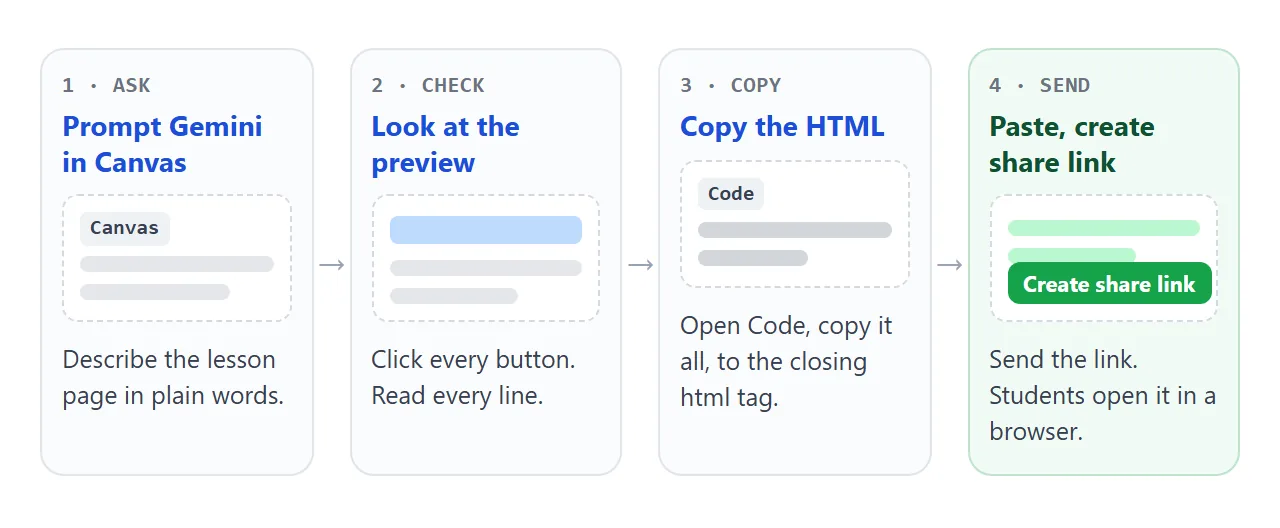
Check the render before anyone else sees it
The preview is your first test. Do the things a student will do.
- Tap every answer, right and wrong. Both should give feedback.
- Read every sentence for facts. You know the subject, so check each claim and each quiz answer.
- Scroll to the bottom. A page that stops short will look fine at the top.
- Shrink the window to phone width and see whether the text still fits.
If a button does nothing, Google's help page says Show console, at the top right of the Canvas panel, lists errors and logs from the preview. Paste the error into the chat and ask Gemini to fix it.
The Gemini preview article lists what a preview cannot prove.
Tweak the wording without breaking the page
You can ask in the chat, or edit the code yourself. Google's help page says Code, at the top right of the Canvas panel, opens the code for editing. Asking is safer when you do not read HTML. Use a narrow instruction:
Rewrite only step 2 for a Grade 4 reading level.
Keep everything else exactly as it is, including the layout and the quiz.
Narrow requests matter because a broad "improve this" can rewrite the whole page, and the quiz you just tested may change. After every tweak, repeat the checks above.
To edit by hand, change only the words between tags. Leave the angle brackets and anything inside them alone. The same prompt style works for other pages, such as a three-question exit quiz.
<!doctype html>
<html lang="en">
<head>
<meta charset="utf-8">
<meta name="viewport" content="width=device-width, initial-scale=1">
<title>Exit quiz: fractions</title>
<style>
  * { box-sizing: border-box; }
  body { margin: 0; font-family: system-ui, sans-serif; background: #f6f4ee; color: #26241f; line-height: 1.5; }
  main { max-width: 600px; margin: 0 auto; padding: 18px 16px 28px; }
  h1 { font-size: 24px; margin: 0 0 4px; }
  .sub { margin: 0 0 14px; color: #5b564b; font-size: 15px; }
  .q { background: #fff; border-radius: 12px; padding: 10px 16px 8px; margin-bottom: 10px; box-shadow: 0 2px 8px rgba(60, 50, 20, .08); }
  .q h2 { font-size: 16px; margin: 0 0 6px; }
  label { display: block; padding: 6px 10px; margin: 3px 0; border: 2px solid #ddd6c4; border-radius: 10px; cursor: pointer; font-size: 15px; }
  label:hover { border-color: #8a6d1d; }
  input { margin-right: 8px; }
  .q.ok label.pick { border-color: #2f9e5b; background: #e8f6ee; }
  .q.no label.pick { border-color: #d9822b; background: #fdf0e3; }
  .note { margin: 2px 0 0; font-size: 14px; font-weight: 600; }
  button#go { font: inherit; font-weight: 700; padding: 11px 20px; border: 0; border-radius: 10px; background: #8a6d1d; color: #fff; cursor: pointer; }
  button#again { font: inherit; padding: 11px 16px; border: 2px solid #8a6d1d; border-radius: 10px; background: #fff; color: #8a6d1d; cursor: pointer; margin-left: 8px; }
  #score { margin: 14px 0 0; font-size: 18px; font-weight: 700; }
</style>
</head>
<body>
<main>
  <h1>Exit quiz: fractions</h1>
  <p class="sub">Pick one answer for each question, then press Check.</p>
  <form id="quiz" novalidate>
    <div class="q" data-a="b">
      <h2>1. Which fraction is the same as one half?</h2>
      <label><input type="radio" name="q1" value="a">1/3</label>
      <label><input type="radio" name="q1" value="b">2/4</label>
      <label><input type="radio" name="q1" value="c">3/5</label>
      <p class="note"></p>
    </div>
    <div class="q" data-a="c">
      <h2>2. Which is the largest?</h2>
      <label><input type="radio" name="q2" value="a">1/8</label>
      <label><input type="radio" name="q2" value="b">1/4</label>
      <label><input type="radio" name="q2" value="c">1/2</label>
      <p class="note"></p>
    </div>
    <div class="q" data-a="a">
      <h2>3. A pizza has 8 slices. Mia eats 2. What fraction is left?</h2>
      <label><input type="radio" name="q3" value="a">6/8</label>
      <label><input type="radio" name="q3" value="b">2/8</label>
      <label><input type="radio" name="q3" value="c">8/6</label>
      <p class="note"></p>
    </div>
    <button type="submit" id="go">Check</button><button type="button" id="again">Clear</button>
    <p id="score" aria-live="polite"></p>
  </form>
</main>

<script>
  const form = document.getElementById('quiz');
  const score = document.getElementById('score');

  form.addEventListener('submit', (e) => {
    e.preventDefault();  // stays on the page, nothing is sent anywhere
    let right = 0;
    form.querySelectorAll('.q').forEach((q) => {
      const pick = q.querySelector('input:checked');
      q.classList.remove('ok', 'no');
      q.querySelectorAll('label').forEach((l) => l.classList.remove('pick'));
      const note = q.querySelector('.note');
      if (!pick) { note.textContent = 'Choose an answer.'; return; }
      pick.parentElement.classList.add('pick');
      const ok = pick.value === q.dataset.a;
      q.classList.add(ok ? 'ok' : 'no');
      note.textContent = ok ? 'Correct.' : 'Not yet. Try again.';
      if (ok) right++;
    });
    score.textContent = 'Score: ' + right + ' of 3';
  });

  document.getElementById('again').addEventListener('click', () => {
    form.reset();
    score.textContent = '';
    form.querySelectorAll('.q').forEach((q) => { q.classList.remove('ok', 'no'); q.querySelector('.note').textContent = ''; q.querySelectorAll('label').forEach((l) => l.classList.remove('pick')); });
  });
</script>
</body>
</html>
The score is worked out on the student's screen. If you want to build one by hand, the HTML quiz guide explains the parts.
Send it as a link
Gemini has its own share option, and it has limits worth knowing. Google's help page says to choose Share & export, then Share, then Copy link.
It also says shared links only open in gemini.google.com, and that you cannot open shared Canvas content in the Gemini mobile app.
If you want a link that opens in any browser, copy the HTML instead. Open Code, copy the whole page, and check that it ends with the closing html tag. The save Gemini chat as HTML guide covers the copy step.
Then paste it into a NOS document and choose Create share link. HTML to link walks through it. The page renders as written and its script runs, so the quiz works.
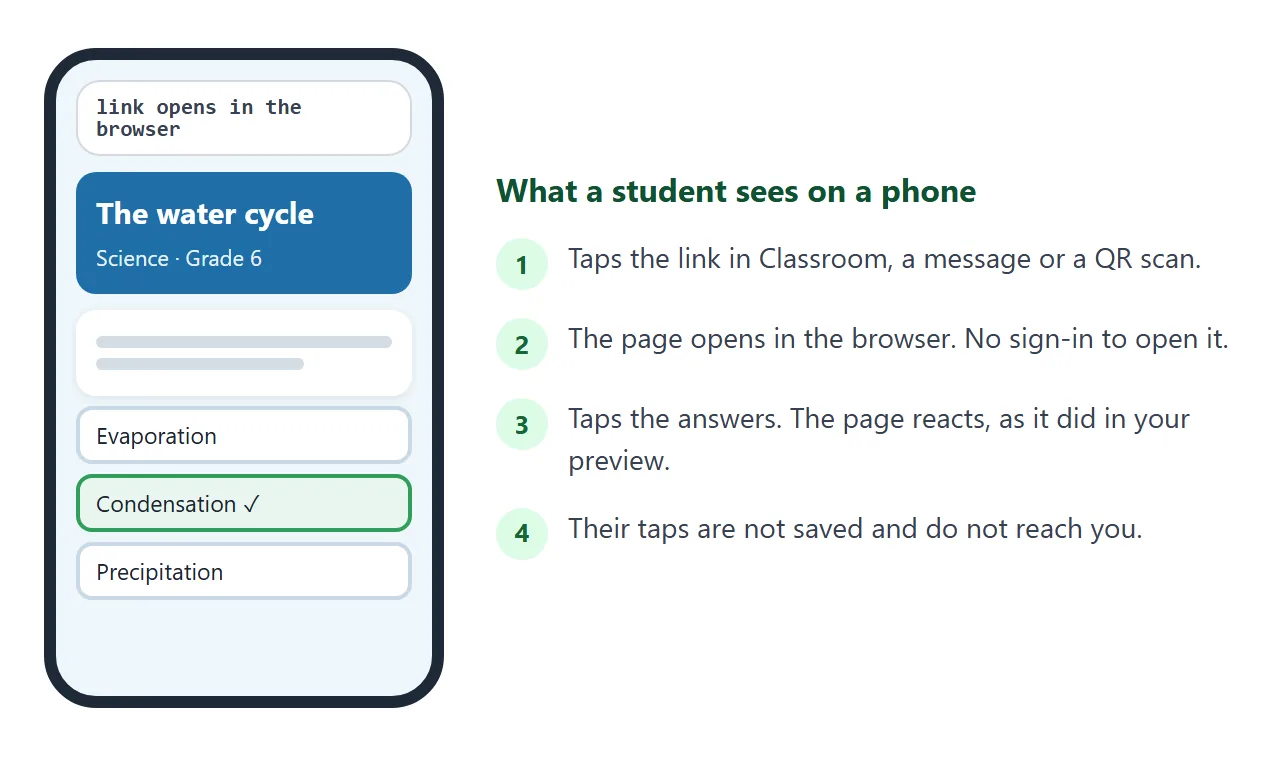
Anyone with the link can open it in a browser, phone included, with no account. They cannot edit it.
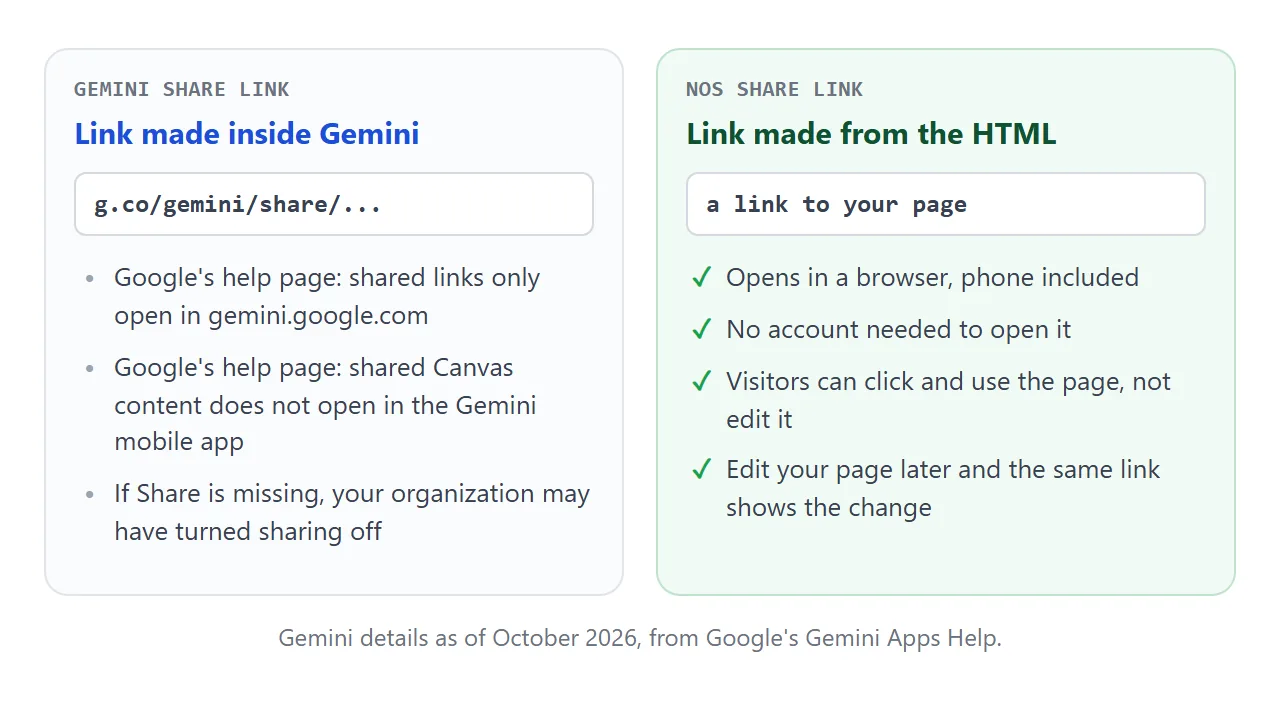
If you fix a typo later, edit the code in the document. The same link shows the new version. Choices a visitor makes on the page, such as a tapped answer, are not saved.
Put the link where students already are
Google Classroom. Google's Classroom help for adding materials (the Android version) says to tap Link, enter the URL and tap Create. Paste your share link there, and the material opens the page.
Google Sites. Keeler's route is the Embed option, with the Canvas HTML pasted in. Google's Sites help says to click Embed code, add your code, then click Next. JavaScript must sit inside script tags and CSS inside style tags.
Google also warns that some websites will not let you add their content. If a box stays empty, put a plain link on the page.
On paper. Turn the link into a code with the QR code guide and print it on the worksheet. Because editing keeps the link, the printed code stays valid.
Ways to share a Canvas page, compared
| Way | Opens where | Phone | Good for |
|---|---|---|---|
| Gemini share link | gemini.google.com | Not in the Gemini app, per Google | Showing a colleague inside Gemini |
| HTML file attached | Whatever app opens it | Depends on the phone | Keeping a copy for yourself |
| Link from the HTML | Any browser | Yes | Classroom, messages, QR codes |
| Embed code in Google Sites | Inside your Site | Depends on your Site | A unit page with several pieces |
On the file row, see opening an HTML file on a phone for why an attachment may not show up as a page. A link sidesteps that.
When it does not work
| What you see | Cause | Fix |
|---|---|---|
| No Share option in Gemini | Your organization may have turned sharing off | Ask your administrator, or share the page HTML as a link |
| Students cannot open the Gemini link on phones | Shared Canvas content does not open in the Gemini mobile app | Share a link made from the HTML |
| The pasted page is blank | The copy stopped short, or the page needs a file you did not send | Copy again to the closing html tag, ask for one file |
| Pictures missing | The page points to outside images, which are blocked | Ask for inline SVG drawings |
| A button does nothing | A script error in the page | Open Show console in Canvas and paste the error to Gemini |
| An answer shows wrong after a tweak | The edit changed the quiz | Ask for narrow edits, then retest |
| Embed box in Sites is empty | The site would not allow embedding | Use a plain link instead |