To host HTML on Cloudflare, create a Cloudflare Pages project, upload the folder containing your index.html, and the page is served at a pages.dev address over HTTPS.

The upload is the short part. What decides whether this was the right route is how the page behaves over the following weeks, when the content changes and the link has already been sent.
Three ways to host HTML on Cloudflare
| Route | You supply | Assumes |
|---|---|---|
| Pages direct upload | A folder from your machine | The page is finished |
| Pages with Git | A repository branch | The source lives in version control |
| Workers | Code that returns a response | You want logic, not a file |
Direct upload is the one to use for a report, a one-page site, or an export from a tool. The Git connection earns its setup when several people change the source and you want the history.
Workers are a different shape of product. They run code and return a response, which is more than serving a file, and more than most HTML pages need.
Preparing the folder
Deploys that fail usually fail for structural reasons, and the error message on a live host is less informative than the one you get locally.
One entry file. The root of the uploaded folder needs index.html, lowercase. A file named q3-report.html still works, but only if the reader types the filename after the address.
The right folder level. Uploading the parent puts your page in a subfolder, so the root returns a 404 while the page itself sits one path segment down.
Exact filenames. The server matches case. Logo.PNG referenced as logo.png is a missing image on the deployed page and a working one on your desktop.
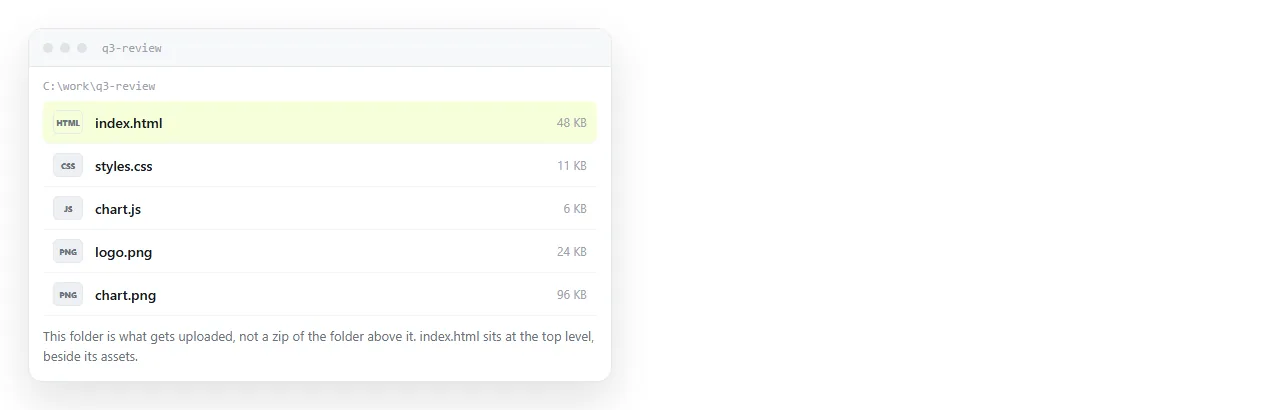
Confirm the page travels before you deploy
A page that depends on files sitting beside it in your project will break the moment the folder structure changes.
- Open the file in the HTML file opener, which has no knowledge of your project folder.
- Confirm fonts, images and any charts appear.
- If something is missing, the page is reaching outward. Self-contained HTML explains how to fold the pieces in.
- If only images are missing, the cause is almost always a path that does not survive the move.
Doing this first turns a vague "it looks broken on my phone" into a fixed file before anyone sees it.
What the pages.dev address is worth
The deployed page is served as text/html over HTTPS. That combination is the entire reason to host anything.
The reader clicks once and sees the page. There is no download, no viewer showing the source code, no separate behaviour on a phone, and no browser warning about an insecure connection.
Cloudflare also puts the page behind its network, so the file is served from somewhere near the reader rather than from your laptop. For a page with images or a large script, that is noticeable.
The subdomain comes from the project name. Choose it before you circulate the link, because renaming the project changes the address and every link already sent stops matching.
The part that is not free
Static hosting stores files. Correcting the page means producing a new file and uploading it again, even if the change is one word.

| Task | Cloudflare Pages | Document that renders HTML |
|---|---|---|
| Publish the first version | Upload a folder | Paste the HTML |
| Fix a wrong number | Edit locally, upload again | Click it and type |
| Keep the address stable | Yes, if the project name holds | Yes |
| Let a colleague correct it | They need account access | Share the document |
| Control who can open it | Public unless you add a rule | Unlisted link by default |
The last row matters more than it looks. A page on a public host is readable by anyone who reaches the address, and search engines can find it if anything links to it.
The paste route
For a single page that will keep changing, there is a shorter path that skips folders entirely.
Paste the HTML into a NOS document. It renders as written, including dark theme, charts and scripts, as a page of its own. Then Share, Share link, Create link.
The link is unlisted by default. It opens for whoever holds it and is not listed anywhere. Ticking Public on the web is what puts it in front of search engines, and that is a deliberate choice rather than a default.
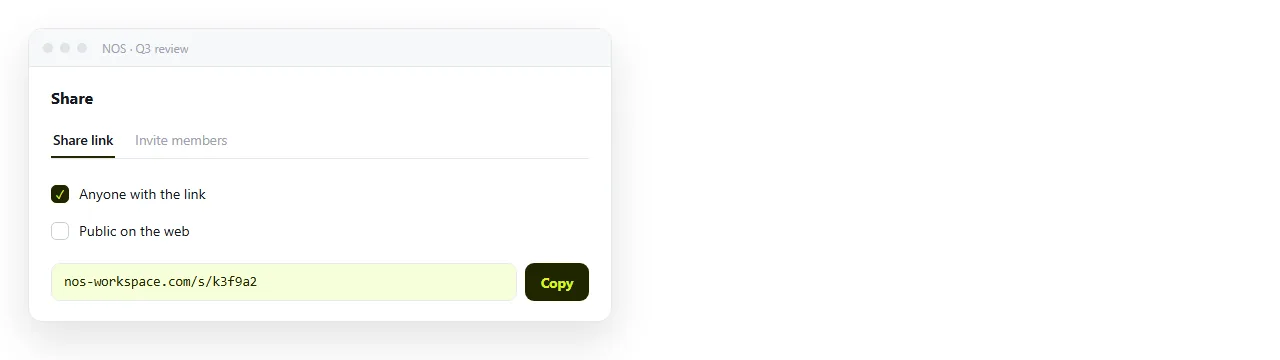
Editing the document does not change the address, so a link sent in January still resolves to the corrected version in April. Turning HTML into a link covers that path directly, and static host versus document compares the two models properly.
Which one fits your page
- Cloudflare Pages when the output is a site with several pages, a build step, or a custom domain.
- Cloudflare Pages when the audience is the public and you want the page cached close to readers.
- A document when it is one page, the readers are named people, and the content has a correction cycle.
- A document when the HTML came out of an AI chat and you want to keep editing the words without regenerating the file.
The free NOS plan covers three documents, which is enough to see whether the editable route matches how your pages actually change.
Hosting is two decisions wearing one name. The first version costs little on either route. The tenth version is where they diverge.